【开源鸿蒙跨平台开发先锋训练营】为Flutter列表追加上拉加载下拉刷新功能
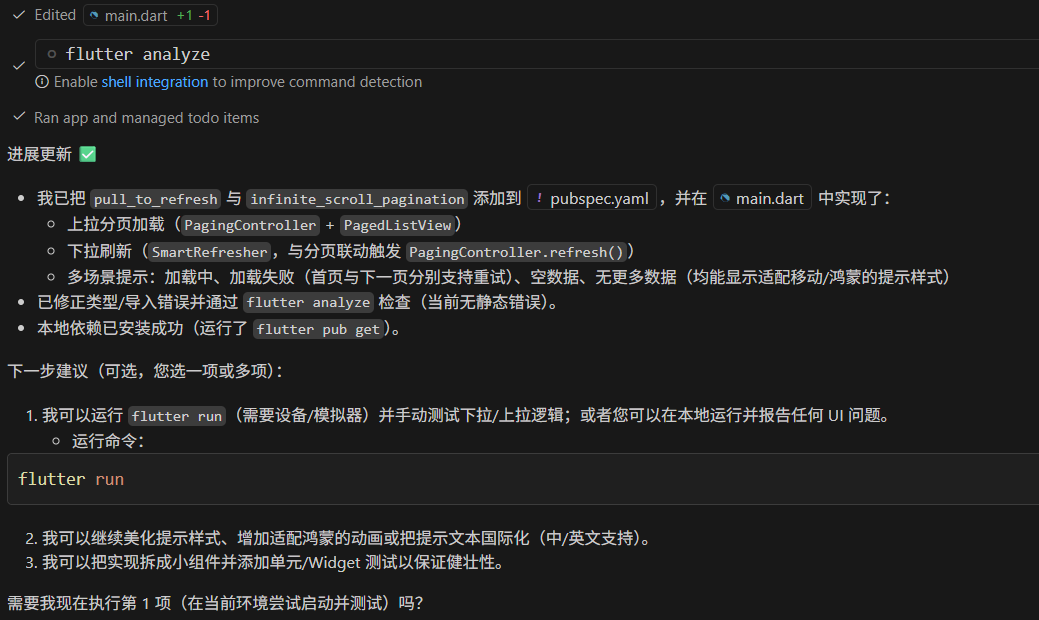
其中pubspec.yaml追加了对pull_to_refresh和infinite_scroll_pagination的依赖。突发奇想,VS Code既然默认继承了Copliot的功能,能否用AI来帮忙实现,会提高效率吗?问问Copilot 怎么回事,可把Copilot累坏了, anyalyze了好多回:)具体细节还是亲身去学习体验才行。课后作业:认真研究研究修改的代码加强理解。不过确实厉害,完
欢迎加入开源鸿蒙跨平台社区:
https://openharmonycrossplatform.csdn.net
背景
突发奇想,VS Code既然默认集成了Copliot的功能,能否用AI来帮忙实现,会提高效率吗?
使用AI
输入要求, Cipliot 开始工作
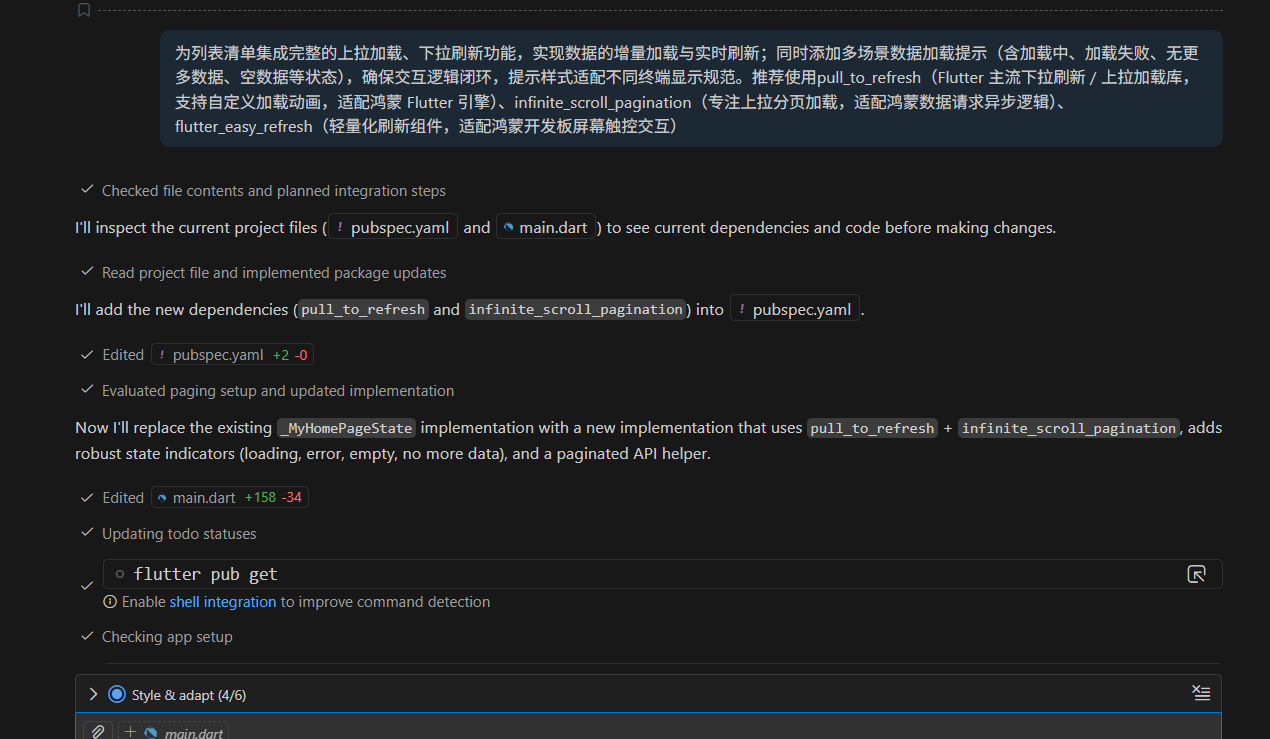
这里其实可以让AI提供多种选择,来了解一下都有哪些方案可以使用,即使作为初学者目前还是应该使用推荐的方案,但是各种方案整体上的一个了解,也是会对后续开发有帮助的。
方案选择(后补)
方案一:内置控件(简单、无需依赖)
RefreshIndicator(下拉刷新): 只支持下拉刷新,易用。
用法要点:放在可滚动子组件外层,返回
Future<void>。适用场景:页面只有下拉刷新需求。
ScrollController+ 监听滚动(上拉加载): 在滚动接近底部时触发加载更多。
要点:防抖、去重、判断
position.pixels >= position.maxScrollExtent - threshold,并在加载时禁用重复触发。适用场景:轻量自实现、无需额外包。
方案二:Sliver/CustomScrollView(复杂布局)
CustomScrollView+SliverList+RefreshIndicator:适合需要复杂头部/粘性布局(SliverAppBar)同时支持刷新/加载的场景。优点:与复杂 UI 集成好;缺点:实现细节多些。
方案三:第三方库(功能齐全,开发速度快)
pull_to_refresh(你项目已用): 同时支持下拉刷新与上拉加载、丰富的 header/footer、易用的RefreshController。推荐用于绝大多数需求。
infinite_scroll_pagination: 专注分页管理,内置分页状态(loading, error, noMore),与PagedListView配合好,适合后端分页场景。
flutter_easyrefresh/easy_refresh: 功能类似pull_to_refresh,样式/扩展不同。选择建议:若需要成熟的分页状态管理优先
infinite_scroll_pagination;若需要自定义 header/footer 或同时支持多种加载样式优先pull_to_refresh。方案四:状态管理 + 流/分页(可组合)
与
Bloc/Provider/Riverpod等结合,将刷新/加载逻辑放在 Provider/StateNotifier/Bloc 中,UI 只消费状态。优点:易测试、逻辑分离、对复杂错误/重试策略支持更好。
实现要点与最佳实践
防抖与去重:避免重复触发加载(例如正在加载时不再触发)。
分页参数统一:
page/perPage在一处管理(你已将perPage放入Settings)。错误与空态处理:显示错误 UI、重试按钮、空列表提示。
UX:加载更多时显示底部指示器,耗时较长的刷新显示进度。
性能:大列表使用
ListView.builder/SliverList,避免一次性渲染所有子项。
修改要点
不过VS Code IDE这里还是提示这样的import错误:
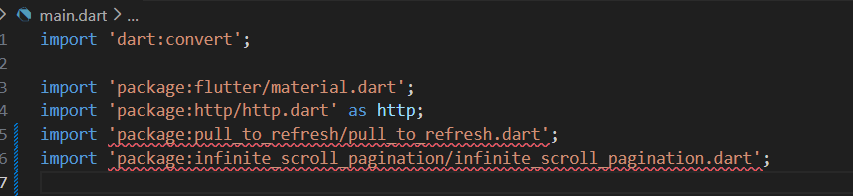
以前遇到过,重启VS Code即可解决。
运行验证
运行flutter run -d chrome试一下,结果报错如下:
PS D:\flutter\projects\pipeline> flutter run -d chrome
Flutter assets will be downloaded from https://storage.flutter-io.cn. Make sure you trust this source!
Launching lib\main.dart on Chrome in debug mode...
../../pub/hosted/pub.dev/infinite_scroll_pagination-3.2.0/lib/src/model/paging_state.dart:66:23: Error: The method
'hashValues' isn't defined for the type 'PagingState<PageKeyType, ItemType>'.
 - 'PagingState' is from 'package:infinite_scroll_pagination/src/model/paging_state.dart'
 ('../../pub/hosted/pub.dev/infinite_scroll_pagination-3.2.0/lib/src/model/paging_state.dart').
Try correcting the name to the name of an existing method, or defining a method named 'hashValues'.
  int get hashCode => hashValues(
                      ^^^^^^^^^^
../../pub/hosted/pub.dev/infinite_scroll_pagination-3.2.0/lib/src/ui/default_indicators/first_page_exception_indic
ator.dart:27:50: Error: The getter 'headline6' isn't defined for the type 'TextTheme'.
 - 'TextTheme' is from 'package:flutter/src/material/text_theme.dart'
 ('../../sdks/flutter_flutter/packages/flutter/lib/src/material/text_theme.dart').
Try correcting the name to the name of an existing getter, or defining a getter or field named 'headline6'.
              style: Theme.of(context).textTheme.headline6,
                                                 ^^^^^^^^^
Waiting for connection from debug service on Chrome...             16.0s
Failed to compile application.
PS D:\flutter\projects\pipeline>
问问Copilot 怎么回事,可把Copilot累坏了, anyalyze了好多回:)
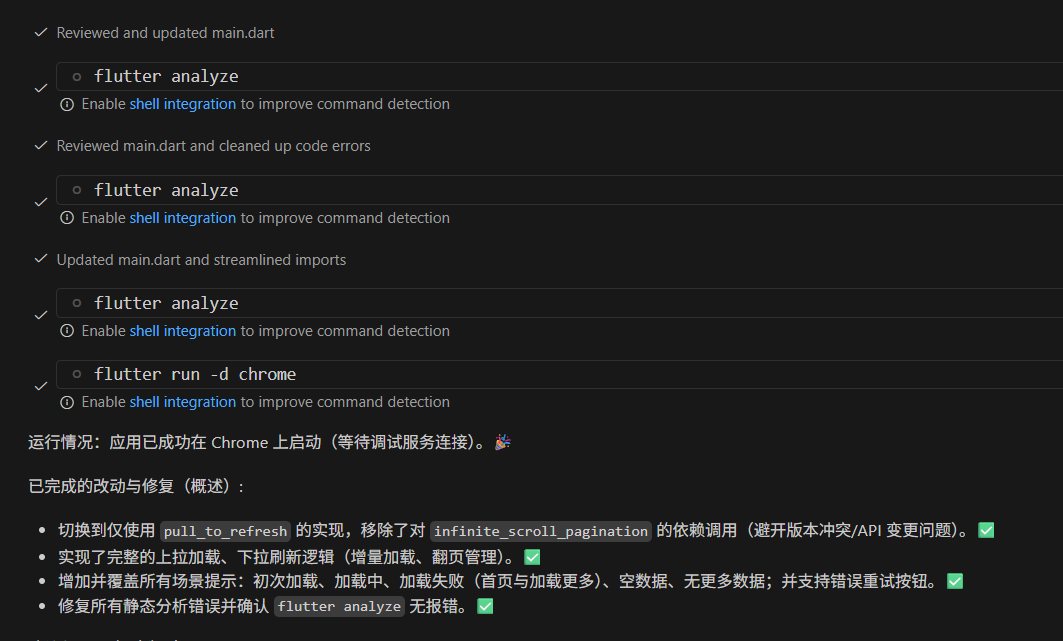
不过确实厉害,完全没有手动修改代码,在鸿蒙上已经可以正常运行了。
截屏
下拉刷新
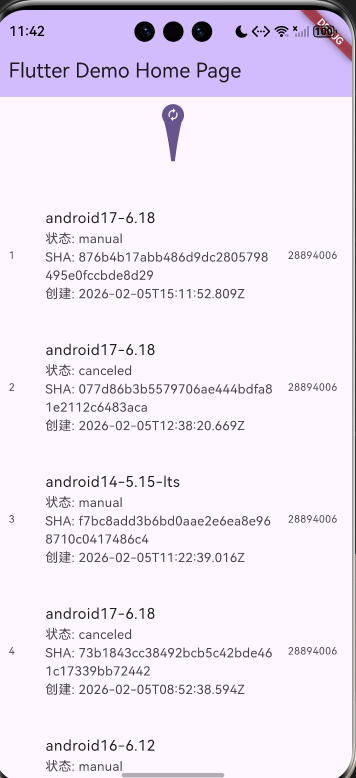
上拉加载
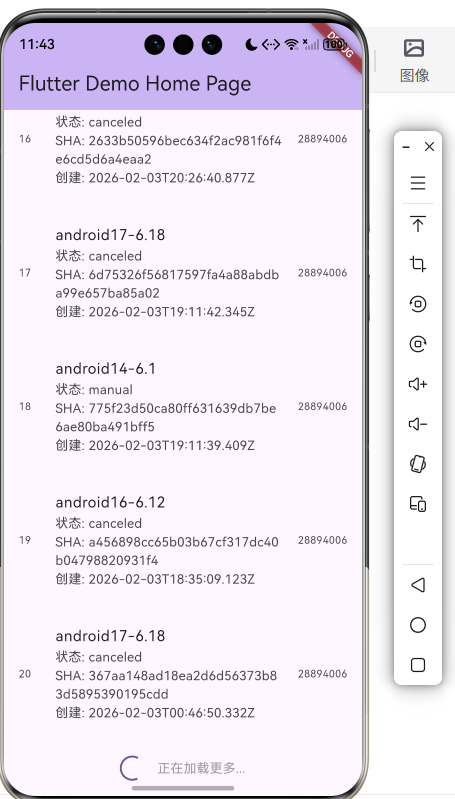
具体修改
git status查看修改情况
主要是lib/main.dart 和pubspec.yaml 两个文件。
PS D:\flutter\projects\pipeline> git status
On branch master
Changes not staged for commit:
  (use "git add <file>..." to update what will be committed)
  (use "git restore <file>..." to discard changes in working directory)
        modified:   lib/main.dart
        modified:   pubspec.lock
        modified:   pubspec.yaml

Untracked files:
  (use "git add <file>..." to include in what will be committed)
        lib/main.dart-bak

no changes added to commit (use "git add" and/or "git commit -a")
PS D:\flutter\projects\pipeline>
pubspec.yaml
追加了对pull_to_refresh和infinite_scroll_pagination的依赖。
PS D:\flutter\projects\pipeline> git diff pubspec.yaml
diff --git a/pubspec.yaml b/pubspec.yaml
index e9e1264..32faf44 100644
--- a/pubspec.yaml
+++ b/pubspec.yaml
@@ -35,6 +35,8 @@ dependencies:
   # Use with the CupertinoIcons class for iOS style icons.
   cupertino_icons: ^1.0.8
   http: ^1.6.0
+  pull_to_refresh: ^2.0.0
+  infinite_scroll_pagination: ^5.1.1

 dev_dependencies:
   flutter_test:
PS D:\flutter\projects\pipeline>
lib/main.dart
getPipelinesPage
用来获取指定page的数据,因为在上拉或下拉的时候要更新数据,这个数据就是需要从远程一个page一个page的来获取的。
+// Helper: fetch a page of pipelines from GitLab API^M
+Future<List<Pipeline>> getPipelinesPage(String projectID, String domain, String token, int page, int perPage) async {^M
+  var encodedProjectID = Uri.encodeComponent(projectID);^M
+  var urlPipelines = 'https://$domain/api/v4/projects/$encodedProjectID/pipelines?page=$page&per_page=$perPage';^M
+^M
+  final response = await http.get(Uri.parse(urlPipelines), headers: {^M
+    'Content-Type': 'application/json',^M
+    'PRIVATE-TOKEN': token,^M
+  });^M
+^M
+  if (response.statusCode == 200) {^M
+    final List<dynamic> jsonList = jsonDecode(response.body) as List<dynamic>;^M
+    return jsonList.map((e) => Pipeline.fromJson(e as Map<String, dynamic>)).toList();^M
+  } else {^M
+    throw Exception('Failed to load pipelines page: ${response.statusCode} ${response.body}');^M
   }
 }
_loadFirstPage
用来在页面第一次显示的时候加载第一页的数据的,包含了各种异常系的处理。
+  Future<void> _loadFirstPage() async {^M
+    setState(() {^M
+      _isFirstLoad = true;^M
+      _initialLoadError = null;^M
+      _page = 1;^M
+      _hasMore = true;^M
+    });^M
+^M
+    try {^M
+      final newItems = await getPipelinesPage(projectID, domain, token, 1, _pageSize);^M
+      setState(() {^M
+        _items.clear();^M
+        _items.addAll(newItems);^M
+        _hasMore = newItems.length == _pageSize;^M
+        _page = 2;^M
+      });^M
+      _refreshController.refreshCompleted();^M
+    } catch (e) {^M
+      setState(() {^M
+        _initialLoadError = e.toString();^M
+      });^M
+      _refreshController.refreshFailed();^M
+    } finally {^M
+      setState(() {^M
+        _isFirstLoad = false;^M
+      });^M
+    }^M
+  }^M
_loadMore
用来加载第二页以后的数据。这里其实和前面的_loadFirstPage业务逻辑上时可以共享的。可以让AI来把代码再优化一下。
+  Future<void> _loadMore() async {^M
+    if (_isLoadingMore || !_hasMore) return;^M
+    setState(() {^M
+      _isLoadingMore = true;^M
+      _loadMoreError = null;^M
+    });^M
+^M
+    try {^M
+      final newItems = await getPipelinesPage(projectID, domain, token, _page, _pageSize);^M
+      setState(() {^M
+        _items.addAll(newItems);^M
+        _hasMore = newItems.length == _pageSize;^M
+        if (_hasMore) {^M
+          _page += 1;^M
+        }^M
+      });^M
+      if (!_hasMore) {^M
+        _refreshController.loadNoData();^M
+      } else {^M
+        _refreshController.loadComplete();^M
+      }^M
+    } catch (e) {^M
+      setState(() {^M
+        _loadMoreError = e.toString();^M
+      });^M
+      _refreshController.loadFailed();^M
+    } finally {^M
+      setState(() {^M
+        _isLoadingMore = false;^M
+      });^M
+    }^M
+  }^M
_buildCenteredIndicator
异常系处理时显示信息的共通函数。
+  Widget _buildCenteredIndicator({required IconData icon, required String text, Widget? action}) {^M
+    return Padding(^M
+      padding: const EdgeInsets.symmetric(vertical: 32.0, horizontal: 24.0),^M
+      child: Column(^M
+        mainAxisSize: MainAxisSize.min,^M
+        children: [^M
+          Icon(icon, size: 56, color: Colors.grey[500]),^M
+          const SizedBox(height: 12),^M
+          Text(text, style: TextStyle(fontSize: 16, color: Colors.grey[700])),^M
+          if (action != null) ...[^M
+            const SizedBox(height: 12),^M
+            action,^M
+          ]^M
+        ],^M
+      ),^M
+    );^M
+  }^M
各种异常系处理的分支
+    // Show initial loading^M
+    if (_isFirstLoad) {^M
+      return Scaffold(^M
+        appBar: AppBar(^M
+          backgroundColor: Theme.of(context).colorScheme.inversePrimary,^M
+          title: Text(widget.title),^M
+        ),^M
+        body: const Center(child: CircularProgressIndicator()),^M
+      );^M
+    }^M
+^M
+    // Initial load error^M
+    if (_initialLoadError != null && _items.isEmpty) {^M
+      return Scaffold(^M
+        appBar: AppBar(^M
+          backgroundColor: Theme.of(context).colorScheme.inversePrimary,^M
+          title: Text(widget.title),^M
+        ),^M
+        body: _buildCenteredIndicator(^M
+          icon: Icons.error_outline,^M
+          text: '加载失败:$_initialLoadError',^M
+          action: ElevatedButton(onPressed: _loadFirstPage, child: const Text('重试')),^M
+        ),^M
+      );^M
+    }^M
+^M
+    // Empty^M
+    if (_items.isEmpty) {^M
+      return Scaffold(^M
+        appBar: AppBar(^M
+          backgroundColor: Theme.of(context).colorScheme.inversePrimary,^M
+          title: Text(widget.title),^M
+        ),^M
+        body: _buildCenteredIndicator(icon: Icons.inbox, text: '暂无数据'),^M
+      );^M
+    }^M
主业务逻辑
主要用到了SmartRefresher,WaterDropHeader,ClassicFooter,ListView.builder等类。
+      body: SmartRefresher(^M
+        controller: _refreshController,^M
+        enablePullDown: true,^M
+        enablePullUp: true,^M
+        header: WaterDropHeader(^M
+          waterDropColor: Theme.of(context).colorScheme.primary,^M
+          complete: const Icon(Icons.check, color: Colors.white),^M
+        ),^M
+        footer: ClassicFooter(^M
+          loadStyle: LoadStyle.ShowWhenLoading,^M
+          noDataText: '没有更多数据',^M
+          failedText: '加载失败,点击重试',^M
+          loadingText: '正在加载更多...',^M
+        ),^M
+        onRefresh: _loadFirstPage,^M
+        onLoading: _loadMore,^M
+        child: ListView.builder(^M
+          itemCount: _items.length + (_loadMoreError != null && _hasMore ? 1 : 0),^M
+          itemBuilder: (context, index) {^M
+            if (index < _items.length) {^M
+              final item = _items[index];^M
+              return ListTile(^M
+                leading: Text((index + 1).toString()),^M
+                title: Text(item.ref),^M
+                subtitle: Column(^M
+                  crossAxisAlignment: CrossAxisAlignment.start,^M
+                  children: [^M
+                    Text('状态: ${item.status}'),^M
+                    Text('SHA: ${item.sha}'),^M
+                    Text('创建: ${item.createdAt}'),^M
+                  ],^M
+                ),^M
+                trailing: Text(item.projectID.toString()),^M
+                contentPadding: const EdgeInsets.symmetric(vertical: 12.0, horizontal: 16.0),^M
+              );^M
+            }^M
+^M
+            // load more error item^M
+            return Padding(^M
+              padding: const EdgeInsets.symmetric(vertical: 16.0),^M
+              child: Center(^M
+                child: ElevatedButton(^M
+                  onPressed: () {^M
+                    _loadMoreError = null;^M
+                    _loadMore();^M
+                  },^M
+                  child: const Text('加载下一页失败,点击重试'),^M
+                ),^M
+              ),^M
             );
-          }
-        },
+          },^M
+        ),^M
       ),
总结
1. AI帮助生成代码,实现功能确实方便,基本上可以不用手动去编辑代码了。
2. 不过不完美的是,对于一个初学者失去了很多试错的学习机会。对于开发者思维的要求可能更倾向于从考虑怎么去实现变成了要做什么了, 不过具体技术细节还是需要亲身去学习体验才行。

有“AI”的1024 = 2048,欢迎大家加入2048 AI社区
更多推荐

 0
0 0
0- 0


 已为社区贡献2条内容

所有评论(0)