06—langchain Tool
文章摘要: Tool是扩展大语言模型(LLM)能力的重要组件,使LLM能够与外部系统交互,执行超出纯文本生成范围的任务。本文介绍了Tool的核心概念和实现方式: Tool特点:增强LLM功能、支持智能决策、模块化设计,可执行搜索、计算、数据库查询等操作。 Tool要素:包含名称、描述、参数模式、调用函数和返回控制等关键属性。 两种实现方式: 使用@tool装饰器:最简实现,自动从函数文档生成描述
Tool
什么是 Tool
Tools 用于扩展大语言模型(LLM)的能力,使其能够与外部系统、API 或自定义函数交互,从而完成仅靠文本生成无法实现的任务(如搜索、计算、数据库查询等)。
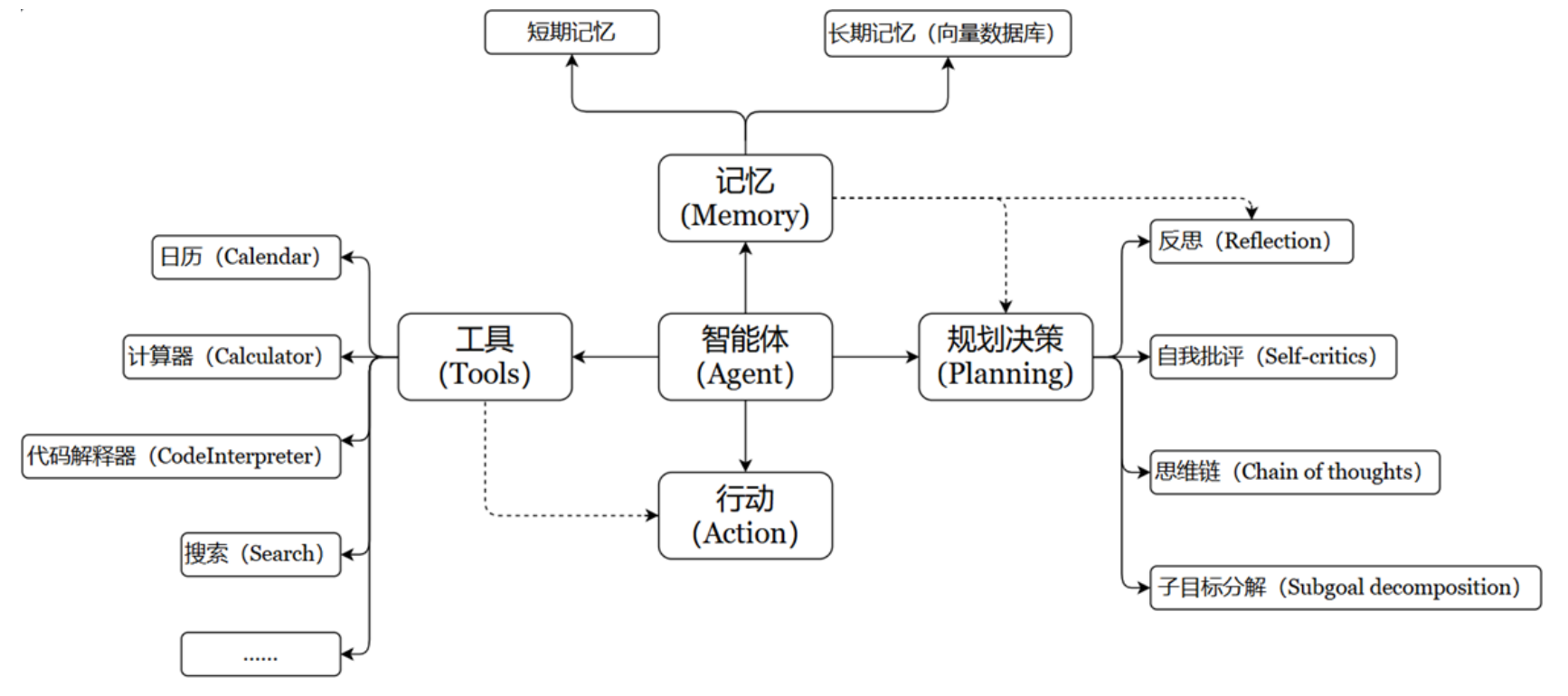
特点:
- 增强 LLM 的功能:让 LLM 突破纯文本生成的限制,执行实际操作(如调用搜索引擎、查询数据库、运行代码等)
- 支持智能决策:在 Agent 工作流中,LLM 根据用户输入动态选择最合适的 Tool 完成任务。
- 模块化设计:每个 Tool 专注一个功能,便于复用和组合(例如:搜索工具 + 计算工具 + 天气查询工具)
Tool 的要素
Tools 本质上是封装了特定功能的可调用模块,是 Agent、Chain 或 LLM 可以用来与世界互动的接口。
Tool 通常包含如下几个要素:
name:工具的名称description:工具的功能描述- 该工具输入的 JSON 模式
- 要调用的函数
return_direct:是否应将工具结果直接返回给用户(仅对 Agent 相关)
实操步骤:
- 将 name、description 和 JSON 模式作为上下文提供给 LLM
- LLM 会根据提示词推断出需要调用哪些工具,并提供具体的调用参数信息
- 用户需要根据返回的工具调用信息,自行触发相关工具的回调
自定义工具
这是关于 LangChain 中自定义 Tool 工具的两种实现方式说明,核心是简化工具的封装流程:
方式 1:使用@tool装饰器
这是自定义工具的最简方式,规则为:
- 工具名称默认使用函数名,可通过
name_or_callable参数自定义 - 工具描述默认使用函数的文档字符串(因此函数必须写文档注释)
方式 2:使用StructuredTool.from_function类方法
功能与@tool装饰器类似,但支持更灵活的配置(如同步/异步实现等),适合需要精细化定义的场景。
Tool 常用属性:
| 属性 | 类型 | 描述 |
|---|---|---|
name |
str | 必选的,在提供给 LLM 或 Agent 的工具集中必须是唯一的。 |
description |
str | 可选但建议,描述工具的功能。LLM 或 Agent 将使用此描述作为上下文,使用它确定工具的使用 |
args_schema |
Pydantic BaseModel | 可选但建议,可用于提供更多信息(例如,few-shot 示例)或验证预期参数。 |
return_direct |
boolean | 仅对 Agent 相关。当为 True 时,在调用给定工具后,Agent 将停止并将结果直接返回给用户。 |
具体实现:
方式 1:@tool()
from langchain_core.tools import tool
from pydantic import BaseModel, Field

# 声明方式1
@tool()
def add_number(a: int, b: int) -> int:
    """计算两个整数的和"""
    return a + b

print(f"name={add_number.name}") # 默认是函数的名称:add_number
print(f"args={add_number.args}") # {'a': {'title': 'A', 'type': 'integer'}, 'b': {'title': 'B', 'type': 'integer'}}
print(f"description={add_number.description}") # 默认是函数的说明信息:计算两个整数的和
print(f"return_direct={add_number.return_direct}") # 默认为False

# 声明方式2
class ArgsSchema(BaseModel):
    a: int = Field(description="第1个整型参数")
    b: int = Field(description="第2个整型参数")
@tool(
    name_or_callable="add_two_number",
    description="add two numbers",
    args_schema=ArgsSchema,
    return_direct=True
)
def add_number(a: int, b: int) -> int:
    """计算两个整数的和"""
    return a + b

print(f"name={add_number.name}") # add_two_number
print(f"args={add_number.args}") # {'a': {'description': '第1个整型参数', 'title': 'A', 'type': 'integer'}, 'b': {'description': '第2个整型参数', 'title': 'B', 'type': 'integer'}}
print(f"description={add_number.description}") # add two numbers
print(f"return_direct={add_number.return_direct}") # True

# 调用工具
res = add_number.invoke({"a": 1, "b": 2})
print(res) # 3
方式 2:StructuredTool.from_function类方法
StructuredTool.from_function 类方法提供了比 @tool 装饰器更多的可配置性,而无需太多额外的代码。
from langchain_core.tools import StructuredTool
from pydantic import BaseModel, Field


def search_google(query: str) -> str:
    return "最后查询的结果:" + query

# 声明方式2
class ArgsSchema(BaseModel):
    query: str = Field(description="要检索的关键词")

# 工具定义
tool = StructuredTool.from_function(
    func=search_google,
    name="Search Google",
    description="查询Google搜索引擎,并将结果返回",
    return_direct=True,
    args_schema=ArgsSchema
)

print(f"name={tool.name}") # Search Google
print(f"args={tool.args}") # {'query': {'description': '要检索的关键词', 'title': 'Query', 'type': 'string'}}
print(f"description={tool.description}") # 查询Google搜索引擎,并将结果返回
print(f"return_direct={tool.return_direct}") # True

# 工具调用
res = tool.invoke({"query": "langchain是什么"})
print(res) # 最后查询的结果:langchain是什么
大模型调用工具
通过大模型分析用户需求,判断是否需要调用指定工具。
举例 1:大模型分析调用的工具
这是获取到需要调用的工具,不会去执行操作。
⚠️ 注:这里使用的是 openai 的包,不是 ollama(ollama 调用 tool 有问题)。
from langchain_community.tools import MoveFileTool
from langchain_core.messages import HumanMessage
from langchain_core.utils.function_calling import convert_to_openai_function
from langchain_openai import ChatOpenAI
import os
import dotenv

dotenv.load_dotenv()

# 模型定义
chat_model = ChatOpenAI(
    model="qwen/qwen3-4b:free",
    api_key=os.getenv("OPENAI_API_KEY"),
    base_url=os.getenv("OPENAI_BASE_URL"),
    max_tokens=2000
)
# 获取工具列表
tools_list = [MoveFileTool()]
"""
因为大模型invoke调用时,tools的格式为:
{
    "type": "function",  # 固定值,标识这是函数类型的工具(目前只有 function 一种类型)
    "function": {        # 函数的具体定义,包含 3 个核心必填字段 + 1 个可选字段
        "name": "工具名称",          # 必填:字符串,只能包含字母、数字、下划线,简短唯一(如 move_file)
        "description": "工具描述",   # 必填:字符串,清晰说明工具用途,帮助模型判断是否调用
        "parameters": {             # 必填:JSON Schema 格式,定义函数的入参规则
            "type": "object",       # 固定值,参数整体是一个对象
            "properties": {         # 定义每个参数的规则
                "参数名1": {
                    "type": "string/number/boolean",  # 参数类型
                    "description": "参数说明"         # 参数含义
                },
                "参数名2": {
                    "type": "string",
                    "description": "参数说明"
                }
            },
            "required": ["参数名1", "参数名2"],  # 必填:指定哪些参数是必须传的
            "additionalProperties": False  # 可选:是否允许传未定义的参数(建议设为 False)
        },
        "strict": True  # 可选:是否严格校验参数(建议设为 True)
    }
}
所以需要使用 convert_to_openai_function 将工具列表进行转换
"""
tools = [convert_to_openai_function(tool) for tool in tools_list]
# 获取消息列表
messages = [HumanMessage(content="将文件a移动到当前目录的./file目录下")]
# 调用大模型(需要传入消息列表、工具列表)
response = chat_model.invoke(
    input=messages,
    tools=tools,
)
print(response)
# content='' additional_kwargs={'tool_calls': [{'id': 'chatcmpl-tool-d15840bfd4d24854b09b816d98a14b20', 'function': {'arguments': '{}{"source_path": "filea", "destination_path": "./file"}', 'name': 'move_file'}, 'type': 'function', 'index': 0}], 'refusal': None} response_metadata={'token_usage': {'completion_tokens': 317, 'prompt_tokens': 200, 'total_tokens': 517, 'completion_tokens_details': {'accepted_prediction_tokens': None, 'audio_tokens': None, 'reasoning_tokens': 419, 'rejected_prediction_tokens': None, 'image_tokens': 0}, 'prompt_tokens_details': {'audio_tokens': 0, 'cached_tokens': 0, 'video_tokens': 0}, 'cost': 0, 'is_byok': False, 'cost_details': {'upstream_inference_cost': None, 'upstream_inference_prompt_cost': 0, 'upstream_inference_completions_cost': 0}}, 'model_name': 'qwen/qwen3-4b:free', 'system_fingerprint': None, 'id': 'gen-1768501741-HwK475Ls3jBi9NoEgsD3', 'service_tier': None, 'finish_reason': 'tool_calls', 'logprobs': None} id='run--019bc2eb-03f3-75a1-ae6b-fca9851da5aa-0' invalid_tool_calls=[{'name': 'move_file', 'args': '{}{"source_path": "filea", "destination_path": "./file"}', 'id': 'chatcmpl-tool-d15840bfd4d24854b09b816d98a14b20', 'error': 'Function move_file arguments:\n\n{}{"source_path": "filea", "destination_path": "./file"}\n\nare not valid JSON. Received JSONDecodeError Extra data: line 1 column 3 (char 2)\nFor troubleshooting, visit: https://python.langchain.com/docs/troubleshooting/errors/OUTPUT_PARSING_FAILURE ', 'type': 'invalid_tool_call'}] usage_metadata={'input_tokens': 200, 'output_tokens': 317, 'total_tokens': 517, 'input_token_details': {'audio': 0, 'cache_read': 0}, 'output_token_details': {'reasoning': 419}}
- content:如果大模型有调用的工具,就不会返回信息给用户,content 为空。
- additional_kwargs:如果大模型有调用的工具,则包含 tool_calls 字段,指明具体函数调用的参数和函数名。
举例 2:如何调用大模型分析出来的工具
对于大模型只能分析出要调用的工具,但是此工具不能真正的执行
下面的代码,因为提示词的路径问题,所以会调用不成功,可以自行更改为你的桌面路径和文件a路径
from langchain_community.tools import MoveFileTool
from langchain_core.messages import HumanMessage
from langchain_core.utils.function_calling import convert_to_openai_function
from langchain_openai import ChatOpenAI
import os
import dotenv
import json

dotenv.load_dotenv()

# 模型定义
chat_model = ChatOpenAI(
    model="qwen/qwen3-4b:free",
    api_key=os.getenv("OPENAI_API_KEY"),
    base_url=os.getenv("OPENAI_BASE_URL"),
    max_tokens=2000
)
# 获取工具列表
tools_list = [MoveFileTool()]
# 工具格式转换
tools = [convert_to_openai_function(tool) for tool in tools_list]
# 获取消息列表
messages = [HumanMessage(content="将文件a移动到桌面")]
# 调用大模型(需要传入消息列表、工具列表)
response = chat_model.invoke(
    input=messages,
    tools=tools,
)

print(response)

if "tool_calls" in response.additional_kwargs:
    for tool_call in response.additional_kwargs["tool_calls"]:
        tool_name = tool_call["function"]["name"]
        tool_args = json.loads(tool_call["function"]["arguments"])
        # 调用工具
        if tool_name == "move_file":
            tool = MoveFileTool()
            # tool.invoke(),这里使用invoke和run都行
            result = tool.run(tool_args)
            print(result)
langchain 1.x 版本
from langchain_core.tools import tool
from langchain_openai import ChatOpenAI
from langchain_core.messages import ToolMessage, AIMessage

# 定义一个工具:计算两个数的和
@tool
def add(a: int, b: int) -> int:
    """计算两个整数的和"""
    print("tool ....")
    return a + b

# 模型绑定工具
llm = ChatOpenAI(
    model="gpt-4o-mini",
    base_url="xxx",
    api_key="xxx",
    temperature=0)

llm_tools = llm.bind_tools([add])

# 用户提问
user_input = "请帮我算一下 12 + 30 等于多少,如果需要可以用工具。"
# 第一次调用模型 → 可能触发工具调用
ai_msg = llm_tools.invoke(user_input)

# 如果模型触发了工具调用
if ai_msg.tool_calls:
    for call in ai_msg.tool_calls:
        if call["name"] == "add":  # 执行工具
            result = add.invoke(call["args"])
            tool_msg = ToolMessage(content=str(result), name=call["name"], tool_call_id=call["id"])
            # 再次调用模型 → 让它基于工具结果生成自然语言回答
            final_ai = llm_tools.invoke([("human", user_input), ai_msg, tool_msg])
            print("调用工具最终回答:", final_ai.content)
else:
    # 模型可能直接回答
    print("最终回答:", ai_msg.content)

有“AI”的1024 = 2048,欢迎大家加入2048 AI社区
更多推荐
 10
10 0
0- 0


 已为社区贡献7条内容

所有评论(0)