004=基于yolov8无人机影像光伏板缺陷检测系统(Python+PySide6界面+训练代码)
本文介绍了基于YOLOv8的目标检测系统开发全流程。首先详细说明了环境配置方法,包括GPU驱动、Python依赖库安装等。接着展示了柑橘检测数据集的结构和样本。系统采用YOLOv8网络架构,使用Anchor-Free检测机制,融合FPN和PAN特征提取技术,支持多任务检测。文章提供了完整的训练代码和验证代码实现,并附带演示视频展示系统效果。该项目可作为计算机视觉入门实践案例,适用于目标检测、图像识
文章目录
一、环境配置
1.1 GPU环境配置
- 如果您的电脑配备了
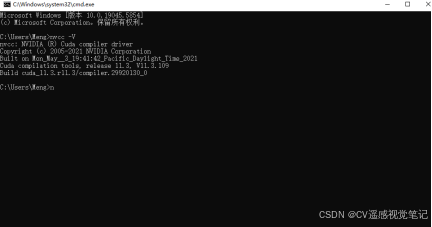
NVIDIA GPU并希望使用GPU进行训练、推理或验证操作,请先确认是否已正确安装CUDA。 - 打开命令提示符,输入以下命令:
nvcc -V
- 如果在命令提示符出现下图所示,则说明已经安装好了CUDA。否则请根据教程2025 CUDA 和 cuDNN 在 Windows 上如何安装配置(保姆级详细版)_windows cudnn安装-CSDN博客
- 请添加图片描述
1.2 Python环境配置
- 安装
torch(以cu113+torch1.12.0为例,若想安装其他版本请到官网)
pip install torch==1.12.0+cu113 torchvision==0.13.0+cu113 torchaudio==0.12.0 --extra-index-url https://download.pytorch.org/whl/cu113
- 安装
ultralytics
pip install ultralytics
- 安装
pyside6
pip install pyside6
- 安装
numpy,在运行时可能出现RuntimeError: Numpy is not available则需要降低numpy版本:
pip install numpy==1.23.5
- 虚拟环境百度网盘下载地址:python虚拟环境百度网盘地址
二、数据集介绍
- 数据集信息如下:
| 数据集 | 图像数量 | 描述 |
|---|---|---|
| 训练集 | 1819张 | 用于模型训练 |
| 验证集 | 227张 | 用于调整模型参数 |
| 测试集 | 227张 | 用于最终效果评估 |
- 部分数据集展示如下:
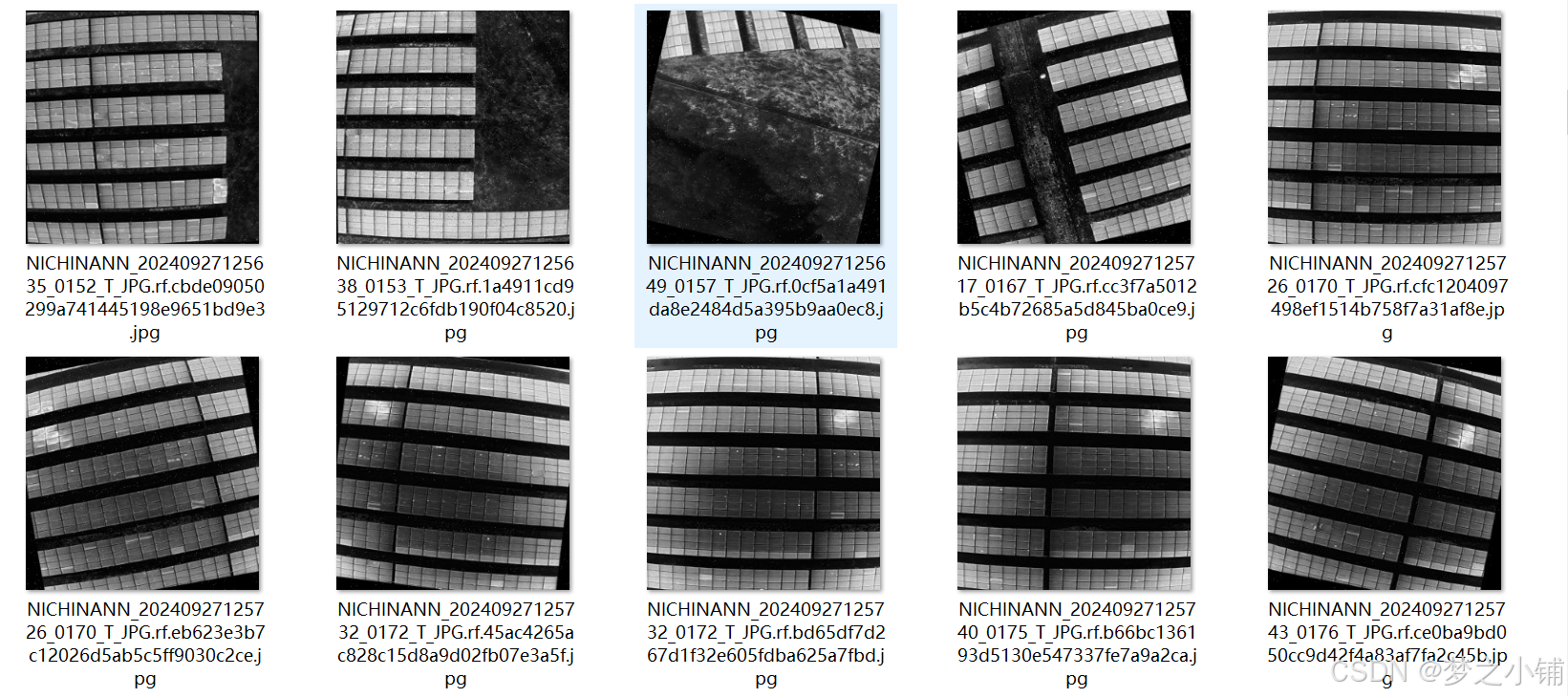
- 数据集列别:[‘Hotspot’, ‘PID’, ‘Shadow’, ‘String’]
三、系统演示视频
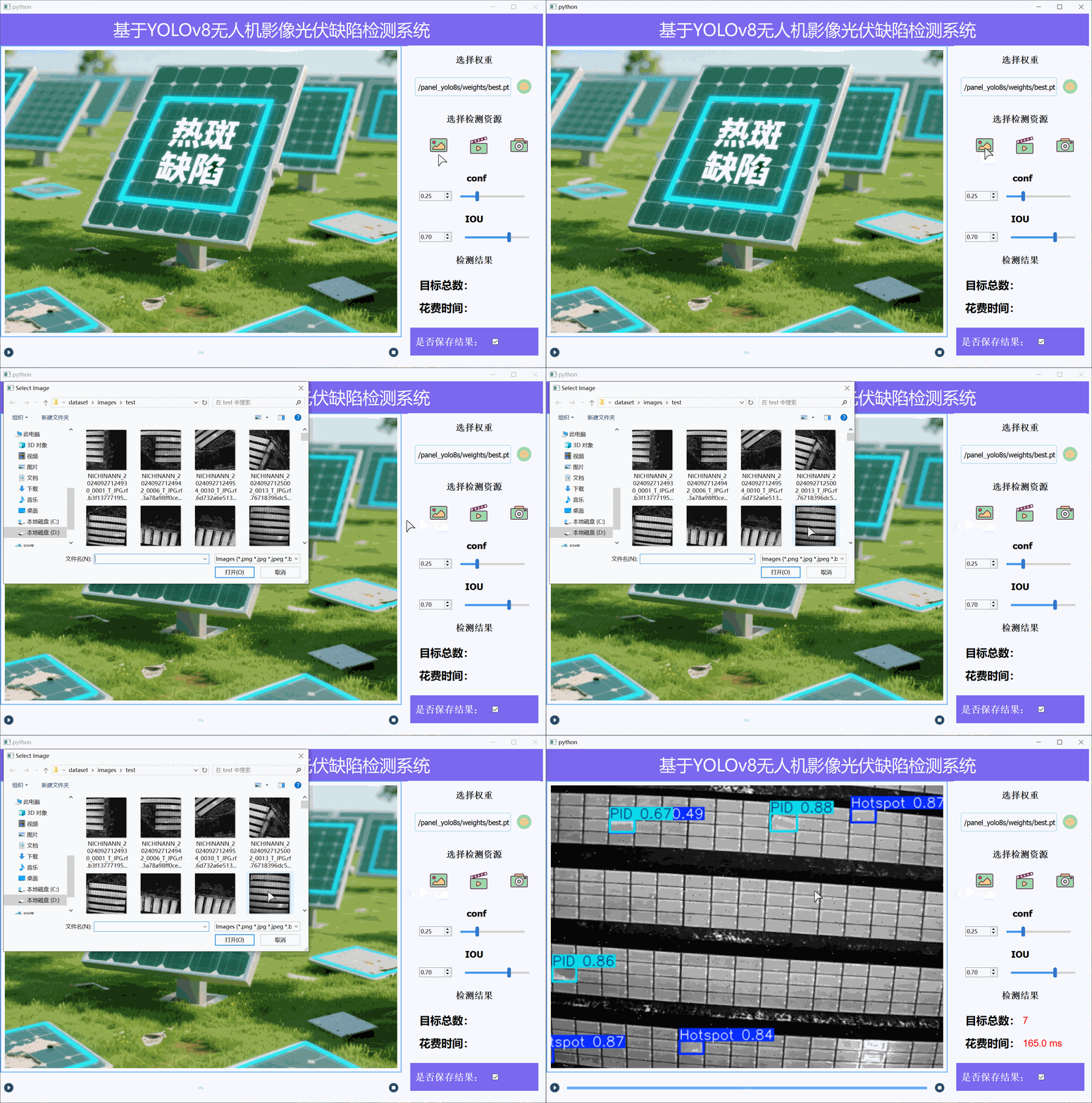
- 演示与介绍视频:基于yolov8柑橘检测系统_哔哩哔哩_bilibili
四、模型原理
YOLOv8(You Only Look Once Version 8)是由 Ultralytics 公司在 2023 年推出的 YOLO 系列最新版本。与前代相比,YOLOv8 在网络结构、检测方式和训练策略上都进行了显著优化,具备更高的检测精度和更好的推理效率。
4.1 网络结构概述
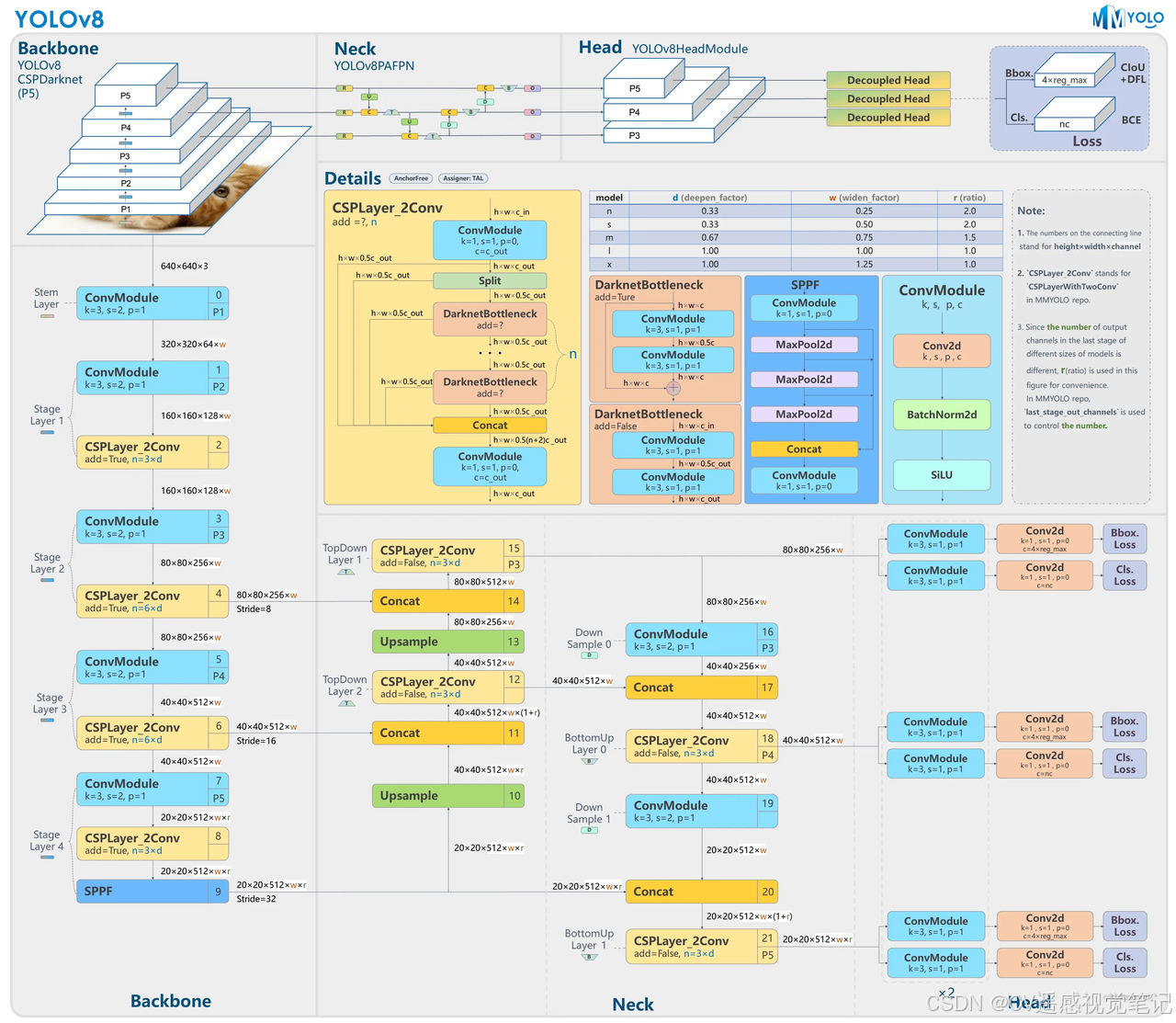
YOLOv8 仍采用典型的三段式架构:Backbone(骨干网络)+ Neck(特征金字塔)+ Head(预测头),但在细节上做了多项改进:
-
Backbone:以轻量级 CSPDarknet 为基础,具备强大的特征提取能力。
-
Neck:融合了 FPN(特征金字塔网络)和 PAN(路径聚合网络),实现多尺度特征融合,有助于检测不同大小的目标。
-
Head:YOLOv8 采用 Anchor-Free(无锚框)机制,直接预测目标框的中心点和边界回归值,简化了检测过程,提升了小目标识别率。
4.2 Anchor-Free 检测机制
相较于 YOLOv5/YOLOv6 所使用的 Anchor-Based 机制,YOLOv8 使用 Anchor-Free 检测头,直接回归框的位置和类别。其优点包括:
-
更少的先验假设:不再依赖预设锚框尺寸;
-
更快的推理速度:减少计算量;
-
更强的泛化能力:对不同分辨率或类别适应性更强。
4.3 训练与损失函数优化
YOLOv8 在损失函数设计上融合多种策略:
-
Box Loss:采用 CIoU(Complete IoU)损失,兼顾定位精度与框形状;
-
Objectness Loss:使用 BCE Loss 衡量目标存在概率;
-
Class Loss:同样使用 BCE Loss 进行多类别分类;
-
辅助策略:如 EMA(指数移动平均)、标签平滑、数据增强(Mosaic、MixUp)等均在训练中默认启用。
4.4 推理与部署优势
YOLOv8 模型结构灵活,支持从轻量级(yolov8n)到高精度(yolov8x)的多种配置,具有如下部署优势:
-
支持 ONNX / TensorRT / OpenVINO 导出,适用于边缘端和服务器端;
-
推理速度快,精度高,适用于实时检测任务;
-
同时支持 检测、分割、姿态估计 多任务融合。
五、代码实现
5.1 训练代码(yolo_train.py)
# -*- coding: UTF-8 -*-
import warnings

warnings.filterwarnings('ignore')
from ultralytics import YOLO

if __name__ == '__main__':

    # 加载预训练模型
    model = YOLO('yolov8n.pt')  # 可以是 yolov8n/s/m/l/x.pt
    # 训练模型
    model.train(data=r"填写你数据集data.yaml文件的地址",
                # 如果大家任务是其它的'ultralytics/cfg/default.yaml'找到这里修改task可以改成detect, segment, classify, pose
                imgsz=640,              # 图像大小
                epochs=100,             # 训练轮数
                single_cls=False,       # 是否是单类别检测
                batch=4,                # 批大小
                close_mosaic=0,         # 倒数多少轮关闭mosaic
                workers=0,              # 线程数
                device='0',             # 选择GPU还是CPU
                optimizer='SGD',        # using SGD 优化器 默认为auto建议大家使用固定的.
                # resume=,              # 续训的话这里填写True, yaml文件的地方改为lats.pt的地址,需要注意的是如果你设置训练200轮次模型训练了200轮次是没有办法进行续训的.
                amp=True,               # 如果出现训练损失为Nan可以关闭amp
                project='runs/train',   # 保存的项目
                name='exp',             # 保存的名称
                )
5.2 验证代码(yolo_val)
# -*- coding: UTF-8 -*-
import warnings

warnings.filterwarnings('ignore')
from ultralytics import YOLO

# 加载训练好的模型
model = YOLO('runs/train/exp/weights/best.pt')  # 替换为你的最佳模型路径
if __name__ == '__main__':

    # 验证模型
    metrics = model.val(
        data='coco128.yaml',  # 数据集配置文件路径
        batch=16,  # 批量大小
        imgsz=640,  # 输入图像大小
        # conf=0.25,  # 对象置信度阈值
        # iou=0.6,  # NMS IoU阈值
        task='val',  # 可以是 'val', 'test' 或 'speed'        device='0',  # 使用GPU (可以是 '0', '0,1,2,3' 或 'cpu')        half=False,  # 使用FP16半精度推理
        dnn=False,  # 使用OpenCV DNN进行ONNX推理
        plots=True,  # 保存验证结果图
        save_json=False,  # 保存结果为JSON文件
        save_hybrid=False,  # 保存混合版本标签
        save_conf=False,  # 保存结果带置信度
        save_txt=False,  # 保存结果为.txt文件
        save_dir='runs/val',  # 保存目录
        name='exp',  # 实验名称
        exist_ok=False,  # 是否覆盖现有项目
        augment=False,  # 增强推理
        verbose=True,  # 打印详细输出
    )
5.3 推理代码(yolo_detect)
# -*- coding: UTF-8 -*-
import warnings

warnings.filterwarnings('ignore')
from ultralytics import YOLO

if __name__ == '__main__':
    # 加载训练好的模型
    model = YOLO('runs/train/exp/weights/best.pt')  # 替换为你的最佳模型路径

    # 图像推理
    results = model.predict(
        source='path/to/image.jpg',  # 可以是文件/文件夹/URL/glob/PIL/numpy/mp4/
        conf=0.25,  # 对象置信度阈值
        iou=0.7,  # NMS IoU阈值
        imgsz=640,  # 推理图像大小
        device='0',  # 使用GPU (可以是 '0', '0,1,2,3' 或 'cpu')        show=False,  # 显示结果
        save=True,  # 保存结果
        save_txt=False,  # 保存结果为.txt文件
        save_conf=False,  # 保存结果带置信度
        save_crop=False,  # 保存裁剪的预测框
        show_labels=True,  # 显示标签
        show_conf=True,  # 显示置信度
        max_det=300,  # 每张图像最大检测数
        augment=False,  # 增强推理
        visualize=False,  # 可视化模型特征
        agnostic_nms=False,  # 类别无关NMS
        retina_masks=False,  # 使用高分辨率分割掩码
        classes=None,  # 按类别过滤结果
        boxes=True,  # 在分割预测中显示框
        line_thickness=3,  # 边界框厚度 (像素)
        half=False,  # 使用FP16半精度推理
        dnn=False,  # 使用OpenCV DNN进行ONNX推理
        vid_stride=1,  # 视频帧率步长
        stream_buffer=False,  # 缓冲所有流帧 (True) 或返回最新帧 (False)        project='runs/detect',  # 保存项目名称
        name='exp',  # 实验名称
        exist_ok=False,  # 是否覆盖现有项目
    )
5.4 主界面代码(main_ui.py)
# -*- coding: UTF-8 -*-
import warnings
warnings.filterwarnings("ignore")
import sys
import os
import time

import cv2
import numpy as np
from ultralytics import YOLO
from PySide6.QtWidgets import QFileDialog, QHBoxLayout, QDialog
from PySide6.QtWidgets import QApplication, QMainWindow, QMessageBox, QPushButton
from PySide6.QtCore import Qt, QThread, Signal, QTimer
from PySide6.QtGui import QPixmap, QImage
from PySide6 import QtGui, QtCore

from yolov8Qt import Ui_MainWindow


def convert2QImage(img):
    height, width, channel = img.shape
    return QImage(img, width, height, width * channel, QImage.Format_RGB888)


#图形界面按钮的方法绑定
class MainWindow(QMainWindow, Ui_MainWindow):
    def __init__(self, parent=None):
        super(MainWindow, self).__init__(parent)
        self.setupUi(self)  # 加载pyside6的UI
        self.timer = QTimer()   # 加载定时器
        self.timer.setInterval(100)  # 设置定时器触发时间
        self.video = None
        self.is_running = False
        self.weights_path = 'runs/orange/weights/best.pt'
        try:
            self.model = YOLO(self.weights_path)
            self.model(np.zeros((800, 800, 3)).astype(np.uint8))  #预先加载推理模型
        except:
            pass
        # 初始化conf和iou
        self.conf = self.doubleSpinBox_conf.value() if hasattr(self, 'doubleSpinBox_conf') else 0.5
        self.iou = self.doubleSpinBox_iou.value() if hasattr(self, 'doubleSpinBox_iou') else 0.7
        self.bind_slots()   # 事件绑定

    def bind_slots(self):
        self.Button_checkImg.clicked.connect(self.select_images)  # 检测图片
        self.Button_openCamera.clicked.connect(self.open_camera)  # 检测摄像头
        self.Button_checkVideo.clicked.connect(self.select_video)  # 检测视频
        # self.Button_select_folder.clicked.connect(self.select_folder)  # 检测文件夹
        self.Button_select_w_p.clicked.connect(self.select_weights)  # 选择权重
        self.pushButton_bofang.clicked.connect(self.run_stop)  # 播放暂停
        self.timer.timeout.connect(self.video_pred)
        # conf/iou参数绑定
        if hasattr(self, 'doubleSpinBox_conf'):
            self.doubleSpinBox_conf.valueChanged.connect(self.update_conf)
        if hasattr(self, 'doubleSpinBox_iou'):
            self.doubleSpinBox_iou.valueChanged.connect(self.update_iou)
        # horizontalSlider绑定
        if hasattr(self, 'horizontalSlider_conf'):
            self.horizontalSlider_conf.valueChanged.connect(self.update_hor_conf)
        if hasattr(self, 'horizontalSlider_iou'):
            self.horizontalSlider_iou.valueChanged.connect(self.update_hor_iou)

    def update_conf(self, value):
        self.conf = value
        if hasattr(self, 'horizontalSlider_conf'):
            self.horizontalSlider_conf.setValue(int(value * 100))

    def update_iou(self, value):
        self.iou = value
        if hasattr(self, 'horizontalSlider_iou'):
            self.horizontalSlider_iou.setValue(int(value * 100))

    def update_hor_conf(self, value):
        conf = value * 0.01
        self.conf = conf
        if hasattr(self, 'doubleSpinBox_conf'):
            self.doubleSpinBox_conf.setValue(conf)

    def update_hor_iou(self, value):
        iou = value * 0.01
        self.iou = iou
        if hasattr(self, 'doubleSpinBox_iou'):
            self.doubleSpinBox_iou.setValue(iou)

    def video_pred(self):
        ret, frame = self.video.read()
        if not ret:
            self.run_stop()
        else:
            # 进度条处理
            if hasattr(self, 'progressBar') and self.video:
                try:
                    current_frame = int(self.video.get(cv2.CAP_PROP_POS_FRAMES))
                    total_frames = int(self.video.get(cv2.CAP_PROP_FRAME_COUNT))
                    if total_frames > 0:
                        percent = int(current_frame / total_frames * 100)
                        self.progressBar.setValue(percent)
                except Exception:
                    pass
            start_time = time.time()
            results = self.model(frame, conf=self.conf, iou=self.iou)
            end_time = time.time()
            img_bgr = results[0].plot()
            num = len(results[0].boxes)
            if hasattr(self, 'label_nums'):
                self.label_nums.setText(str(num))
            if hasattr(self, 'label_times'):
                self.label_times.setText(f"{(end_time - start_time)*1000:.1f} ms")
            # 自动保存视频帧
            if hasattr(self, 'checkBox_isSave') and self.checkBox_isSave.isChecked():
                save_dir = r'./save_result'
                os.makedirs(save_dir, exist_ok=True)
                if not hasattr(self, 'video_writer') or self.video_writer is None:
                    fourcc = cv2.VideoWriter_fourcc(*'mp4v')
                    h, w = img_bgr.shape[:2]
                    # 判断是摄像头还是视频文件
                    if hasattr(self, 'video_path') and self.video_path:
                        base_name = os.path.splitext(os.path.basename(self.video_path))[0]
                        save_path = os.path.join(save_dir, f'{base_name}.mp4')
                        fps = int(self.video.get(cv2.CAP_PROP_FPS)) or 25
                    else:
                        import datetime
                        now = datetime.datetime.now().strftime('%Y%m%d_%H%M%S')
                        save_path = os.path.join(save_dir, f'camera_{now}.mp4')
                        fps = int(1000 // self.timer.interval())
                    self.video_writer = cv2.VideoWriter(save_path, fourcc, fps, (w, h))
                self.video_writer.write(img_bgr)
            height, width = img_bgr.shape[:2]
            width_ratio = 1280 / height
            height_ratio = 720 / width
            scale_ratio = min(width_ratio, height_ratio)
            new_width = int(width * scale_ratio)
            new_height = int(height * scale_ratio)
            img_bgr = cv2.resize(img_bgr, (new_width, new_height))
            img_rgb = cv2.cvtColor(img_bgr, cv2.COLOR_BGR2RGB)
            self.label_result.setPixmap(QPixmap.fromImage(convert2QImage(img_rgb)))

    def select_images(self):
        options = QFileDialog.Options()
        options |= QFileDialog.ReadOnly
        image_path, _ = QFileDialog.getOpenFileName(self, "Select Image", "",
                                                    "Images (*.png *.jpg *.jpeg *.bmp *.gif);;All Files (*)",
                                                    options=options)
        if image_path:
            if hasattr(self, 'progressBar'):
                self.progressBar.setValue(100)
            start_time = time.time()
            results = self.model(image_path, conf=self.conf, iou=self.iou)
            end_time = time.time()
            img_bgr = results[0].plot()
            num = len(results[0].boxes)
            if hasattr(self, 'label_nums'):
                self.label_nums.setText(str(num))
            if hasattr(self, 'label_times'):
                self.label_times.setText(f"{(end_time - start_time)*1000:.1f} ms")
            # 自动保存图片
            if hasattr(self, 'checkBox_isSave') and self.checkBox_isSave.isChecked():
                save_dir = r'./save_result'
                os.makedirs(save_dir, exist_ok=True)
                cv2.imwrite(os.path.join(save_dir, os.path.basename(image_path)), img_bgr)
            height, width = img_bgr.shape[:2]
            width_ratio = 1440 / height
            height_ratio = 960 / width
            scale_ratio = min(width_ratio, height_ratio)
            new_width = int(width * scale_ratio)
            new_height = int(height * scale_ratio)
            img_bgr = cv2.resize(img_bgr, (new_width, new_height))
            img_rgb = cv2.cvtColor(img_bgr, cv2.COLOR_BGR2RGB)
            self.label_result.setPixmap(QPixmap.fromImage(convert2QImage(img_rgb)))

    def select_weights(self):
        options = QFileDialog.Options()
        weights_path, _ = QFileDialog.getOpenFileName(self, '选择pt权重', '', 'pt (*.pt)', options=options)
        if weights_path:
            # self.end_thread()
            self.line_weights.setText(weights_path)
            self.weights_path = weights_path
            self.model = YOLO(self.weights_path)
            self.model(np.zeros((800, 800, 3)).astype(np.uint8))  #预先加载推理模型

    def open_camera(self):
        self.video = cv2.VideoCapture(0)
        self.video_path = None  # 摄像头时清空video_path
        bool_open = self.video.isOpened()
        if not bool_open:
            QMessageBox.warning(self, u"Warning", u"打开摄像头失败", buttons=QMessageBox.Ok,
                                          defaultButton=QMessageBox.Ok)

    def select_video(self):
        options = QFileDialog.Options()
        video_path, _ = QFileDialog.getOpenFileName(self, '选择视频', '',
                                                    'Videos (*.mp4 *.avi *.mkv);;All Files (*)', options=options)
        if video_path:
            self.video = cv2.VideoCapture(video_path)
            self.video_path = video_path  # 记录当前视频路径
        else:
            self.video_path = None

    def run_stop(self):
        if not self.video:
            QMessageBox.warning(self, u"Warning", u"请选择视频或者摄像头", buttons=QMessageBox.Ok,
                                          defaultButton=QMessageBox.Ok)
            return
        else:
            self.is_running = not self.is_running  # 切换状态
            icon = QtGui.QIcon()
            if self.is_running:
                self.timer.start()
                icon.addPixmap(QtGui.QPixmap("icon/暂停.png"),
                               QtGui.QIcon.Normal, QtGui.QIcon.Off)
            else:
                self.timer.stop()
                icon.addPixmap(QtGui.QPixmap("icon/播放.png"),
                               QtGui.QIcon.Normal, QtGui.QIcon.Off)
                # 关闭视频保存
                if hasattr(self, 'video_writer') and self.video_writer is not None:
                    self.video_writer.release()
                    self.video_writer = None
            self.pushButton_bofang.setIcon(icon)
            self.pushButton_bofang.setIconSize(QtCore.QSize(32, 32))


if __name__ == "__main__":
    app = QApplication(sys.argv)
    myWin = MainWindow()
    myWin.show()
    sys.exit(app.exec())
六、性能评估
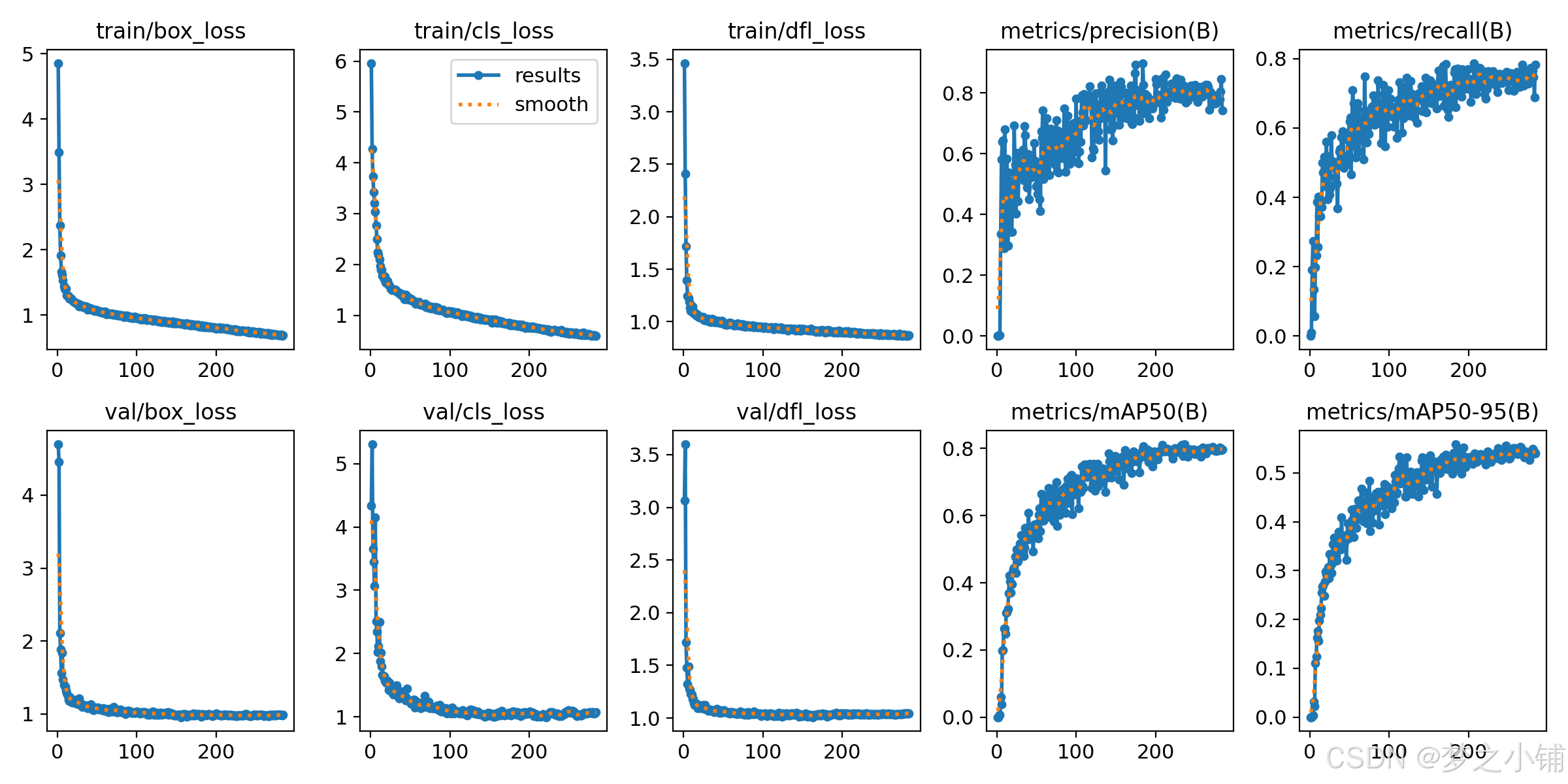
6.1 训练结果

有“AI”的1024 = 2048,欢迎大家加入2048 AI社区
更多推荐
 9
9 0
0- 0


 已为社区贡献7条内容

所有评论(0)