若依分离版二次开发学习6(本地部署DeepSeek至前端展示)
本文详细介绍了如何将DeepSeek模型本地部署并与前端集成。主要内容包括:1) 通过Ollama工具部署DeepSeek模型,提供1.5B到671B不同参数规模的版本选择;2) 构建基于Java的后端服务,实现单轮/多轮对话、流式传输等功能;3) 开发Vue.js前端界面,支持实时打字效果、历史记录管理等交互功能;4) 完整的数据流转流程设计,包括普通对话和流式对话两种模式;5) 系统安全控制方
目录
前置:若依分离版本地部署全教程(从零开始做)_若依部署-CSDN博客
1. 若依分离版二次开发学习1(创建新菜单与移动菜单)-CSDN博客
2. 若依分离版二次开发学习2(通过组件实现数据可视化)-CSDN博客
3. 若依分离版二次开发学习3(自定义化若依界面)-CSDN博客
4. 若依分离版二次开发学习4(主从表:设备与传感器关联)-CSDN博客
5. 若依分离版二次开发学习5(首页优化与传感器设备关联)-CSDN博客
6.7.3 application-deepseek.yml
前置:若依分离版本地部署全教程(从零开始做)_若依部署-CSDN博客
1. 若依分离版二次开发学习1(创建新菜单与移动菜单)-CSDN博客
2. 若依分离版二次开发学习2(通过组件实现数据可视化)-CSDN博客
3. 若依分离版二次开发学习3(自定义化若依界面)-CSDN博客
4. 若依分离版二次开发学习4(主从表:设备与传感器关联)-CSDN博客
5. 若依分离版二次开发学习5(首页优化与传感器设备关联)-CSDN博客
6. 本地部署deepseek至前端展示
6.1 部署Ollama
进入官网:https://ollama.com/
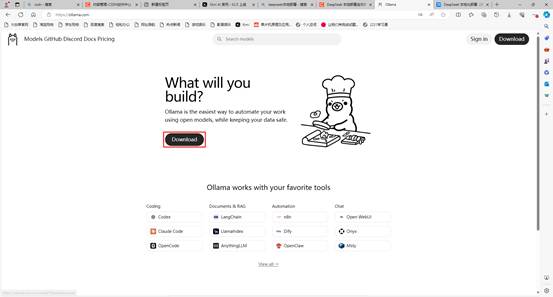
根据你操作系统来选择版本
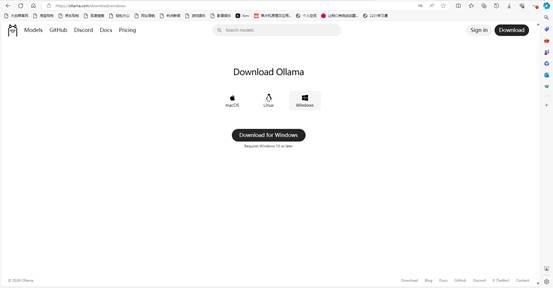
我这里使用的是windows操作
按照好后自动打开
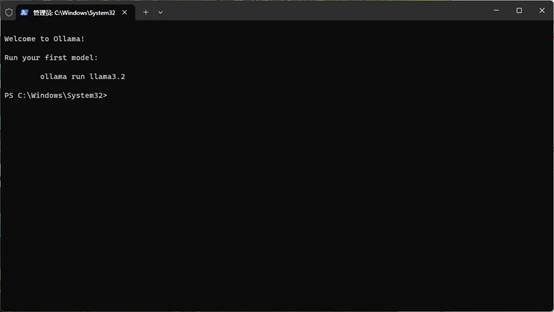
未自动打开的话,打开终端 (Windows 用户打开 PowerShell 或 CMD,Mac/Linux 用户打开 Terminal)。输入 ollama --version,如果显示版本号,说明安装成功。
6.2 通过命令拉取并运行模型
这里我们使用的是Deepseek
可以根据你的硬件配置,选择以下命令之一在终端执行,即可自动下载并运行 DeepSeek 模型。
|
版本 |
命令 |
显存需求 |
适用场景 |
|
1.5B(极简版) |
|
4GB+ |
极低配置,快速测试 |
|
7B(入门首选) |
|
8GB+ |
推荐大多数人使用 |
|
8B(优化版) |
|
8GB+ |
LLaMA 架构优化,效果接近 14B |
|
14B(性能进阶) |
|
12GB+ |
追求更好效果的进阶用户 |
|
32B(高端配置) |
|
24GB+ |
专业场景,效果优秀 |
|
70B(顶级配置) |
|
48GB+ |
旗舰版本,效果最佳 |
|
671B(满血版) |
|
需多卡/集群 |
完整参数,效果最强 |
我这里执行了8b的
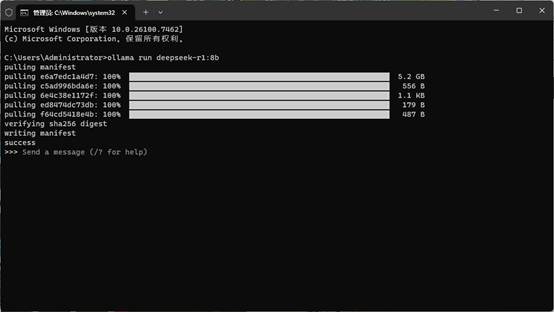
当显示了“>>>”,代表了模型已经配置好了,可以在命令框中进行对话,也可以去安装一个chatBox进行界面化操作,这里我就不细致讲解,继续完成我们的目标
6.3 核心功能模块
6.3.1 后端层(Java)
AiChatController - AI对话控制器
|
接口 |
方法 |
说明 |
|
|
|
单轮对话(非流式) |
|
|
|
流式对话(SSE) |
|
|
|
多轮对话(带历史记录) |
|
|
|
服务健康检查 |
|
|
|
获取可用模型列表 |
认证机制:支持多种 Token 传递方式(Cookie → URL参数 → Header)
DeepSeekServiceImpl - AI服务实现
非流式对话:使用 /api/generate 接口,等待完整响应后返回
流式对话:使用 WebFlux 处理 SSE 流,实时推送数据到前端
多轮对话:使用 /api/chat 接口,支持对话历史上下文
配置(application-deepseek.yml):
# DeepSeek / Ollama AI 配置
deepseek:
  baseUrl: http://localhost:11434
  model: deepseek-r1:8b
  api-key: ""  # 本地Ollama不需要API Key
  timeout: 120000  # 超时时间120秒
6.3.2 前端层(Vue.js)
ai.js - API接口封装
// 核心方法
chat(data)              // 普通对话
chatWithHistory(data)   // 多轮对话
createStreamChat(message, callbacks)  // ⭐ 流式对话(关键)
checkHealth() // 健康检查流式对话实现:使用 fetch API + ReadableStream 处理 SSE 流,支持:
onOpen - 连接建立
onMessage - 实时接收数据块
onDone - 完成标记
onError - 错误处理
index.vue - 对话界面组件
核心功能:
双模式切换:流式输出(实时打字效果)vs 普通模式(等待完整响应)
智能输入:Enter 发送,Shift+Enter 换行
状态监控:显示连接状态(已连接/未连接)
快捷提示:预设农业相关问题模板
消息管理:复制、清空历史记录
打字机效果:AI回复时显示闪烁光标 ▋
6.4 数据流转流程
普通对话(非流式)
用户输入 → Vue组件 → ai.js/chat() → Controller.chat()
↓
Service.chat()
↓
Ollama /api/generate
↓
等待完整响应
↓
返回 ChatResponseDTO
↓
前端显示完整消息
流式对话(SSE)
用户输入 → createStreamChat() → Controller.chatStream()
↓
创建 SseEmitter
↓
Service.chatStream()
↓
┌─────────────────────────→ Ollama /api/generate (stream=true)
│ ↓
│ 实时返回数据流(JSON Lines)
│ ↓
└───────────────────────── Service 提取内容
↓
┌───────────────────────── SseEmitter 推送数据
│ ↓
└────────────────────────→ 前端 fetch 接收 chunks
↓
逐字显示 + 闪烁光标
↓
收到 [DONE] 标记完成
SSE数据格式:
data: 今
data: 天
data: 的
data: 土
data: 壤
data: 湿
data: 度
data: [DONE]
6.5 DTO数据结构
|
DTO |
用途 |
关键字段 |
|
|
单轮请求 |
|
|
|
多轮请求 |
|
|
|
单条消息 |
|
|
|
响应数据 |
|
|
|
Ollama Chat API 映射 |
符合 Ollama 接口规范 |
|
|
Ollama Generate API 映射 |
用于单轮生成 |
6.6 安全与权限
接口权限控制:使用 @PreAuthorize("@ss.hasPermi('agriculture:ai:xxx')")
agriculture:ai:chat - 对话权限
agriculture:ai:history - 历史对话权限
agriculture:ai:list - 查看模型列表权限
Token 获取优先级:Cookie (Admin-Token) → URL参数 → Header (Authorization)
6.7 代码实现
6.7.1 controller
地址:D:\ruoyi\RuoYi-Vue-master\ruoyi-admin\src\main\java\com\ruoyi\web\controller\agriculture下创建一个文件命名为:AiChatController.java
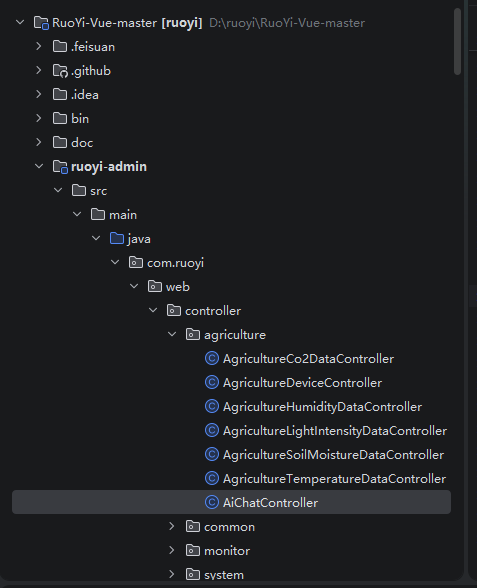
完整代码:
package com.ruoyi.web.controller.agriculture;

import com.ruoyi.agriculture.domain.dto.ChatHistoryRequestDTO;
import com.ruoyi.agriculture.domain.dto.ChatRequestDTO;
import com.ruoyi.agriculture.domain.dto.ChatResponseDTO;
import com.ruoyi.agriculture.service.IDeepSeekService;
import com.ruoyi.common.annotation.Log;
import com.ruoyi.common.core.controller.BaseController;
import com.ruoyi.common.core.domain.AjaxResult;
import com.ruoyi.common.core.domain.model.LoginUser;
import com.ruoyi.common.enums.BusinessType;
import com.ruoyi.common.utils.SecurityUtils;
import org.slf4j.Logger;
import org.slf4j.LoggerFactory;
import org.springframework.beans.factory.annotation.Autowired;
import org.springframework.http.MediaType;
import org.springframework.security.access.prepost.PreAuthorize;
import org.springframework.validation.annotation.Validated;
import org.springframework.web.bind.annotation.*;
import org.springframework.web.servlet.mvc.method.annotation.SseEmitter;
import reactor.core.Disposable;

import javax.servlet.http.Cookie;
import javax.servlet.http.HttpServletRequest;
import java.io.IOException;
import java.util.concurrent.atomic.AtomicBoolean;

/**
 * AI对话控制器 - 农业智能助手
 */
@RestController
@RequestMapping("/agriculture/ai")
public class AiChatController extends BaseController {

    private static final Logger logger = LoggerFactory.getLogger(AiChatController.class);

    @Autowired
    private IDeepSeekService deepSeekService;

    /**
     * 从请求中获取 token(支持 Cookie 和 URL 参数)
     */
    private String getTokenFromRequest(HttpServletRequest request) {
        // 1. 先从 Cookie 获取(若依 Vue 默认方式)
        Cookie[] cookies = request.getCookies();
        if (cookies != null) {
            for (Cookie cookie : cookies) {
                if ("Admin-Token".equals(cookie.getName())
                        || "ruoyi-token".equals(cookie.getName())
                        || "token".equals(cookie.getName())) {
                    return cookie.getValue();
                }
            }
        }

        // 2. 从 URL 参数获取(SSE 备用方式)
        String tokenParam = request.getParameter("token");
        if (tokenParam != null && !tokenParam.isEmpty()) {
            return tokenParam;
        }

        // 3. 从 Header 获取
        String authHeader = request.getHeader("Authorization");
        if (authHeader != null && authHeader.startsWith("Bearer ")) {
            return authHeader.substring(7);
        }

        return null;
    }

    /**
     * 单轮对话(非流式)
     */
    @PreAuthorize("@ss.hasPermi('agriculture:ai:chat')")
    @Log(title = "农业AI对话", businessType = BusinessType.OTHER)
    @PostMapping("/chat")
    public AjaxResult chat(@RequestBody @Validated ChatRequestDTO request) {
        try {
            ChatResponseDTO response = deepSeekService.chat(request).block();
            return AjaxResult.success("对话成功", response);
        } catch (Exception e) {
            logger.error("对话失败: {}", e.getMessage());
            return AjaxResult.error("对话失败: " + e.getMessage());
        }
    }

    /**
     * 流式对话(SSE)- 支持多种 token 传递方式
     */
    @GetMapping(value = "/chat/stream", produces = MediaType.TEXT_EVENT_STREAM_VALUE)
    public SseEmitter chatStream(
            @RequestParam String message,
            HttpServletRequest request) {

        // 获取 token(支持 Cookie、URL 参数、Header)
        String token = getTokenFromRequest(request);

        // 验证登录状态
        LoginUser loginUser = null;
        try {
            // 尝试从 SecurityContext 获取
            loginUser = SecurityUtils.getLoginUser();
            logger.info("用户[{}]发起AI流式请求,消息长度: {}", loginUser.getUsername(), message.length());
        } catch (Exception e) {
            // 如果 SecurityContext 没有,但有 token,记录日志继续(实际生产环境应该验证 token)
            if (token == null || token.isEmpty()) {
                logger.warn("未找到登录信息,且未提供 token");
                SseEmitter emitter = new SseEmitter(0L);
                try {
                    emitter.send(SseEmitter.event().data("[ERROR] 用户未登录或登录已过期"));
                    emitter.complete();
                } catch (IOException ex) {
                    logger.error("发送错误消息失败", ex);
                }
                return emitter;
            }
            logger.info("使用 token 发起流式请求(非SecurityContext),token前10位: {}",
                    token.length() > 10 ? token.substring(0, 10) + "..." : token);
        }

        // 创建SseEmitter,设置较长的超时时间(10分钟)
        SseEmitter emitter = new SseEmitter(600000L);
        AtomicBoolean isCompleted = new AtomicBoolean(false);

        try {
            ChatRequestDTO chatRequest = new ChatRequestDTO();
            chatRequest.setMessage(message);
            chatRequest.setStream(true);

            StringBuilder fullContent = new StringBuilder();

            // 订阅流式数据
            Disposable disposable = deepSeekService.chatStream(chatRequest)
                    .subscribe(
                            content -> {
                                if (isCompleted.get()) return;

                                try {
                                    if (content != null && !content.isEmpty()) {
                                        // 检查是否是错误消息
                                        if (content.startsWith("[ERROR]")) {
                                            logger.error("收到错误内容: {}", content);
                                            if (!isCompleted.get()) {
                                                emitter.send(SseEmitter.event().data(content));
                                                isCompleted.set(true);
                                                emitter.complete();
                                            }
                                            return;
                                        }

                                        // 发送数据到客户端
                                        emitter.send(SseEmitter.event().data(content));
                                        fullContent.append(content);

                                        logger.debug("发送流式数据块,长度: {}, 当前总长度: {}",
                                                content.length(), fullContent.length());
                                    }
                                } catch (IOException e) {
                                    logger.error("发送SSE数据失败: {}", e.getMessage());
                                    if (!isCompleted.get()) {
                                        isCompleted.set(true);
                                        emitter.completeWithError(e);
                                    }
                                }
                            },
                            error -> {
                                logger.error("流式处理异常: {}", error.getMessage(), error);
                                try {
                                    if (!isCompleted.get()) {
                                        emitter.send(SseEmitter.event().data("[ERROR] " + error.getMessage()));
                                        isCompleted.set(true);
                                        emitter.complete();
                                    }
                                } catch (IOException e) {
                                    logger.error("发送错误信息失败", e);
                                }
                            },
                            () -> {
                                logger.info("流式响应完成,总字符数: {}", fullContent.length());
                                try {
                                    if (!isCompleted.get()) {
                                        emitter.send(SseEmitter.event().data("[DONE]"));
                                        isCompleted.set(true);
                                        emitter.complete();
                                    }
                                } catch (IOException e) {
                                    logger.error("发送完成标记失败", e);
                                    if (!isCompleted.get()) {
                                        emitter.complete();
                                    }
                                }
                            }
                    );

            // 处理客户端断开连接
            emitter.onCompletion(() -> {
                logger.debug("SSE连接完成");
                if (!isCompleted.get()) {
                    isCompleted.set(true);
                    disposable.dispose();
                }
            });

            emitter.onTimeout(() -> {
                logger.warn("SSE连接超时");
                if (!isCompleted.get()) {
                    isCompleted.set(true);
                    disposable.dispose();
                }
            });

            emitter.onError(e -> {
                logger.error("SSE连接错误: {}", e.getMessage());
                if (!isCompleted.get()) {
                    isCompleted.set(true);
                    disposable.dispose();
                }
            });

        } catch (Exception e) {
            logger.error("流式请求处理异常: {}", e.getMessage(), e);
            try {
                if (!isCompleted.get()) {
                    emitter.send(SseEmitter.event().data("[ERROR] " + e.getMessage()));
                    isCompleted.set(true);
                    emitter.complete();
                }
            } catch (IOException ex) {
                logger.error("发送异常信息失败", ex);
            }
        }

        return emitter;
    }

    /**
     * 多轮对话(带历史记录)
     */
    @PreAuthorize("@ss.hasPermi('agriculture:ai:history')")
    @Log(title = "农业AI多轮对话", businessType = BusinessType.OTHER)
    @PostMapping("/chat/history")
    public AjaxResult chatWithHistory(@RequestBody @Validated ChatHistoryRequestDTO request) {
        try {
            ChatResponseDTO response = deepSeekService.chatWithHistory(request).block();
            return AjaxResult.success("对话成功", response);
        } catch (Exception e) {
            logger.error("多轮对话失败: {}", e.getMessage());
            return AjaxResult.error("对话失败: " + e.getMessage());
        }
    }

    /**
     * 健康检查 - 公开访问
     */
    @GetMapping("/health")
    public AjaxResult health() {
        try {
            Boolean healthy = deepSeekService.checkHealth().block();
            return healthy ? AjaxResult.success("AI服务正常") : AjaxResult.error("AI服务异常");
        } catch (Exception e) {
            logger.error("健康检查失败: {}", e.getMessage());
            return AjaxResult.error("AI服务异常");
        }
    }

    /**
     * 获取模型列表
     */
    @PreAuthorize("@ss.hasPermi('agriculture:ai:list')")
    @GetMapping("/models")
    public AjaxResult listModels() {
        try {
            java.util.List<String> models = deepSeekService.listModels().block();
            return AjaxResult.success("获取成功", models);
        } catch (Exception e) {
            logger.error("获取模型列表失败: {}", e.getMessage());
            return AjaxResult.error("获取失败: " + e.getMessage());
        }
    }
}
6.7.2 application.yml
在D:\ruoyi\RuoYi-Vue-master\ruoyi-admin\src\main\resources\application.yml中的文件的55行中添加一个deepseek,具体见下图
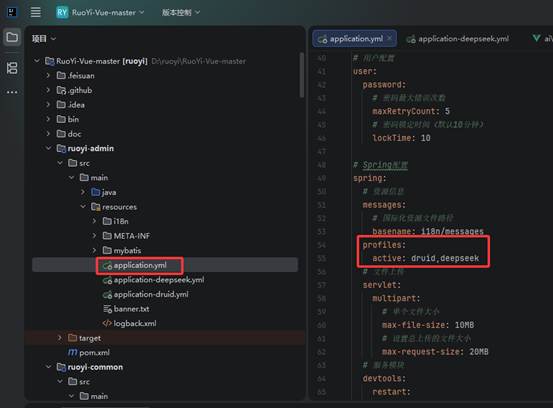
懒人操作(完整代码):
# 项目相关配置
ruoyi:
  # 名称
  name: RuoYi
  # 版本
  version: 3.9.1
  # 版权年份
  copyrightYear: 2026
  # 文件路径 示例( Windows配置D:/ruoyi/uploadPath,Linux配置 /home/ruoyi/uploadPath)
  profile: D:/ruoyi/uploadPath
  # 获取ip地址开关
  addressEnabled: false
  # 验证码类型 math 数字计算 char 字符验证
  captchaType: math

# 开发环境配置
server:
  # 服务器的HTTP端口,默认为8080
  port: 8080
  servlet:
    # 应用的访问路径
    context-path: /
  tomcat:
    # tomcat的URI编码
    uri-encoding: UTF-8
    # 连接数满后的排队数,默认为100
    accept-count: 1000
    threads:
      # tomcat最大线程数,默认为200
      max: 800
      # Tomcat启动初始化的线程数,默认值10
      min-spare: 100

# 日志配置
logging:
  level:
    com.ruoyi: debug
    org.springframework: warn

# 用户配置
user:
  password:
    # 密码最大错误次数
    maxRetryCount: 5
    # 密码锁定时间(默认10分钟)
    lockTime: 10

# Spring配置
spring:
  # 资源信息
  messages:
    # 国际化资源文件路径
    basename: i18n/messages
  profiles:
    active: druid,deepseek
  # 文件上传
  servlet:
    multipart:
      # 单个文件大小
      max-file-size: 10MB
      # 设置总上传的文件大小
      max-request-size: 20MB
  # 服务模块
  devtools:
    restart:
      # 热部署开关
      enabled: true
  # redis 配置
  redis:
    # 地址
    host: localhost
    # 端口,默认为6379
    port: 6379
    # 数据库索引
    database: 0
    # 密码
    password:
    # 连接超时时间
    timeout: 10s
    lettuce:
      pool:
        # 连接池中的最小空闲连接
        min-idle: 0
        # 连接池中的最大空闲连接
        max-idle: 8
        # 连接池的最大数据库连接数
        max-active: 8
        # #连接池最大阻塞等待时间(使用负值表示没有限制)
        max-wait: -1ms

# token配置
token:
  # 令牌自定义标识
  header: Authorization
  # 令牌密钥
  secret: abcdefghijklmnopqrstuvwxyz
  # 令牌有效期(默认30分钟)
  expireTime: 30

# MyBatis配置
mybatis:
  # 搜索指定包别名
  typeAliasesPackage: com.ruoyi.**.domain
  # 配置mapper的扫描,找到所有的mapper.xml映射文件
  mapperLocations: classpath*:mapper/**/*Mapper.xml
  # 加载全局的配置文件
  configLocation: classpath:mybatis/mybatis-config.xml

# PageHelper分页插件
pagehelper:
  helperDialect: mysql
  supportMethodsArguments: true
  params: count=countSql

# Swagger配置
swagger:
  # 是否开启swagger
  enabled: true
  # 请求前缀
  pathMapping: /dev-api

# 防盗链配置
referer:
  # 防盗链开关
  enabled: false
  # 允许的域名列表
  allowed-domains: localhost,127.0.0.1,ruoyi.vip,www.ruoyi.vip

# 防止XSS攻击
xss:
  # 过滤开关
  enabled: true
  # 排除链接(多个用逗号分隔)
  excludes: /system/notice
  # 匹配链接
  urlPatterns: /system/*,/monitor/*,/tool/*
6.7.3 application-deepseek.yml
在D:\ruoyi\RuoYi-Vue-master\ruoyi-admin\src\main\resources中创建一个application-deepseek.yml文件
见下图位置:
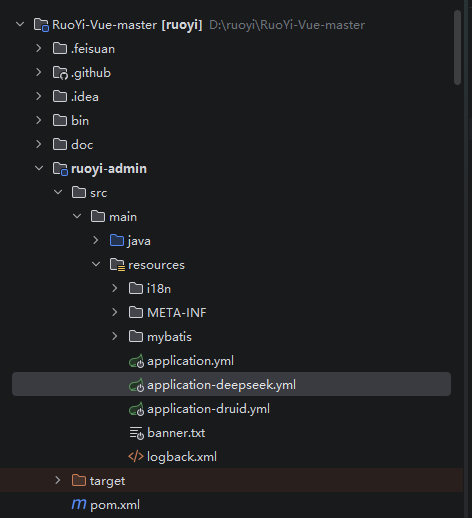
完整代码:
# DeepSeek / Ollama AI 配置
deepseek:
  baseUrl: http://localhost:11434
  model: deepseek-r1:8b
  api-key: ""  # 本地Ollama不需要API Key
  timeout: 120000  # 超时时间120秒
6.7.4 domain
在D:\ruoyi\RuoYi-Vue-master\ruoyi-system\src\main\java\com\ruoyi\agriculture\domain下创建两个文件夹:dto、ollama
在dto中创建四个文件:ChatHistoryRequestDTO.java、ChatMessageDTO.java、ChatRequestDTO.java、ChatResponseDTO.java
在ollama中创建四个文件:OllamaChatRequest.java、OllamaChatResponse.java、OllamaGenerateRequest.java、OllamaGenerateResponse.java
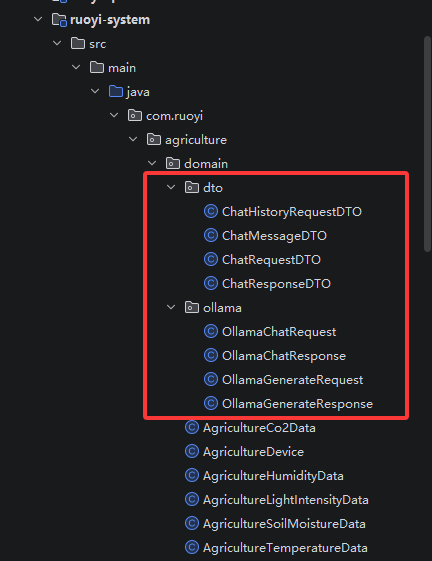
下面是完整代码:
ChatHistoryRequestDTO.java:
package com.ruoyi.agriculture.domain.dto;

import javax.validation.Valid;
import javax.validation.constraints.NotEmpty;
import java.io.Serializable;
import java.util.List;

/**
 * 历史对话请求DTO
 */
public class ChatHistoryRequestDTO implements Serializable {
    private static final long serialVersionUID = 1L;

    @NotEmpty(message = "历史消息不能为空")
    @Valid
    private List<ChatMessageDTO> messages;

    private Boolean stream = false;

    // Getter & Setter
    public List<ChatMessageDTO> getMessages() { return messages; }
    public void setMessages(List<ChatMessageDTO> messages) { this.messages = messages; }
    public Boolean getStream() { return stream; }
    public void setStream(Boolean stream) { this.stream = stream; }
}
ChatMessageDTO.java:
package com.ruoyi.agriculture.domain.dto;

import javax.validation.constraints.NotBlank;
import java.io.Serializable;
import java.time.LocalDateTime;

/**
 * 聊天消息DTO
 */
public class ChatMessageDTO implements Serializable {
    private static final long serialVersionUID = 1L;

    @NotBlank(message = "角色不能为空")
    private String role;  // system/user/assistant

    @NotBlank(message = "消息内容不能为空")
    private String content;

    private LocalDateTime timestamp;

    public ChatMessageDTO() {
        this.timestamp = LocalDateTime.now();
    }

    public ChatMessageDTO(String role, String content) {
        this();
        this.role = role;
        this.content = content;
    }

    // Getter & Setter
    public String getRole() { return role; }
    public void setRole(String role) { this.role = role; }
    public String getContent() { return content; }
    public void setContent(String content) { this.content = content; }
    public LocalDateTime getTimestamp() { return timestamp; }
    public void setTimestamp(LocalDateTime timestamp) { this.timestamp = timestamp; }
}
ChatRequestDTO.java:
package com.ruoyi.agriculture.domain.dto;

import javax.validation.constraints.NotBlank;
import java.io.Serializable;

public class ChatRequestDTO implements Serializable {
    private static final long serialVersionUID = 1L;

    @NotBlank(message = "消息内容不能为空")
    private String message;

    private Boolean stream = false;

    // 构造函数
    public ChatRequestDTO() {}

    public ChatRequestDTO(String message) {
        this.message = message;
    }

    // getter & setter
    public String getMessage() {
        return message;
    }

    public void setMessage(String message) {
        this.message = message;
    }

    public Boolean getStream() {
        return stream;
    }

    public void setStream(Boolean stream) {
        this.stream = stream;
    }
}
ChatResponseDTO.java:
package com.ruoyi.agriculture.domain.dto;

import java.io.Serializable;
import java.time.LocalDateTime;

/**
 * AI对话响应DTO
 */
public class ChatResponseDTO implements Serializable {
    private static final long serialVersionUID = 1L;

    private String content;
    private String model;
    private LocalDateTime responseTime;
    private Integer tokenCount;
    private Boolean done;

    public ChatResponseDTO() {
        this.responseTime = LocalDateTime.now();
    }

    // Getter & Setter
    public String getContent() { return content; }
    public void setContent(String content) { this.content = content; }
    public String getModel() { return model; }
    public void setModel(String model) { this.model = model; }
    public LocalDateTime getResponseTime() { return responseTime; }
    public void setResponseTime(LocalDateTime responseTime) { this.responseTime = responseTime; }
    public Integer getTokenCount() { return tokenCount; }
    public void setTokenCount(Integer tokenCount) { this.tokenCount = tokenCount; }
    public Boolean getDone() { return done; }
    public void setDone(Boolean done) { this.done = done; }
}
OllamaChatRequest.java:
package com.ruoyi.agriculture.domain.ollama;

import com.fasterxml.jackson.annotation.JsonInclude;
import java.util.List;

/**
 * Ollama Chat API请求
 */
@JsonInclude(JsonInclude.Include.NON_NULL)
public class OllamaChatRequest {
    private String model;
    private List<Message> messages;
    private boolean stream = false;
    private Options options;

    public static class Message {
        private String role;
        private String content;

        public Message() {}
        public Message(String role, String content) {
            this.role = role;
            this.content = content;
        }

        public String getRole() { return role; }
        public void setRole(String role) { this.role = role; }
        public String getContent() { return content; }
        public void setContent(String content) { this.content = content; }
    }

    public static class Options {
        private Float temperature;
        private Integer num_predict;

        public Float getTemperature() { return temperature; }
        public void setTemperature(Float temperature) { this.temperature = temperature; }
        public Integer getNumPredict() { return num_predict; }
        public void setNumPredict(Integer num_predict) { this.num_predict = num_predict; }
    }

    // Getter & Setter
    public String getModel() { return model; }
    public void setModel(String model) { this.model = model; }
    public List<Message> getMessages() { return messages; }
    public void setMessages(List<Message> messages) { this.messages = messages; }
    public boolean isStream() { return stream; }
    public void setStream(boolean stream) { this.stream = stream; }
    public Options getOptions() { return options; }
    public void setOptions(Options options) { this.options = options; }
}
OllamaChatResponse.java:
package com.ruoyi.agriculture.domain.ollama;

import com.fasterxml.jackson.annotation.JsonIgnoreProperties;
import com.fasterxml.jackson.annotation.JsonProperty;

/**
 * Ollama Chat API响应
 */
@JsonIgnoreProperties(ignoreUnknown = true)
public class OllamaChatResponse {
    private String model;
    private Message message;
    private boolean done;

    @JsonProperty("created_at")
    private String createdAt;

    public static class Message {
        private String role;
        private String content;

        public String getRole() { return role; }
        public void setRole(String role) { this.role = role; }
        public String getContent() { return content; }
        public void setContent(String content) { this.content = content; }
    }

    // Getter & Setter
    public String getModel() { return model; }
    public void setModel(String model) { this.model = model; }
    public Message getMessage() { return message; }
    public void setMessage(Message message) { this.message = message; }
    public boolean isDone() { return done; }
    public void setDone(boolean done) { this.done = done; }
    public String getCreatedAt() { return createdAt; }
    public void setCreatedAt(String createdAt) { this.createdAt = createdAt; }
}
OllamaGenerateRequest.java:
package com.ruoyi.agriculture.domain.ollama;

import com.fasterxml.jackson.annotation.JsonInclude;

/**
 * Ollama Generate API请求
 */
@JsonInclude(JsonInclude.Include.NON_NULL)
public class OllamaGenerateRequest {
    private String model;
    private String prompt;
    private boolean stream = false;
    private Options options;

    public static class Options {
        private Float temperature;
        private Integer num_predict;

        public Float getTemperature() { return temperature; }
        public void setTemperature(Float temperature) { this.temperature = temperature; }
        public Integer getNumPredict() { return num_predict; }
        public void setNumPredict(Integer numPredict) { this.num_predict = numPredict; }
    }

    // Getter & Setter
    public String getModel() { return model; }
    public void setModel(String model) { this.model = model; }
    public String getPrompt() { return prompt; }
    public void setPrompt(String prompt) { this.prompt = prompt; }
    public boolean isStream() { return stream; }
    public void setStream(boolean stream) { this.stream = stream; }
    public Options getOptions() { return options; }
    public void setOptions(Options options) { this.options = options; }
}
OllamaGenerateResponse.java:
package com.ruoyi.agriculture.domain.ollama;

import com.fasterxml.jackson.annotation.JsonIgnoreProperties;
import com.fasterxml.jackson.annotation.JsonProperty;

/**
 * Ollama Generate API响应
 */
@JsonIgnoreProperties(ignoreUnknown = true)
public class OllamaGenerateResponse {
    private String model;
    private String response;
    private boolean done;

    @JsonProperty("created_at")
    private String createdAt;

    // Getter & Setter
    public String getModel() { return model; }
    public void setModel(String model) { this.model = model; }
    public String getResponse() { return response; }
    public void setResponse(String response) { this.response = response; }
    public boolean isDone() { return done; }
    public void setDone(boolean done) { this.done = done; }
    public String getCreatedAt() { return createdAt; }
    public void setCreatedAt(String createdAt) { this.createdAt = createdAt; }
}
6.7.5 service
地址:D:\ruoyi\RuoYi-Vue-master\ruoyi-system\src\main\java\com\ruoyi\agriculture\service
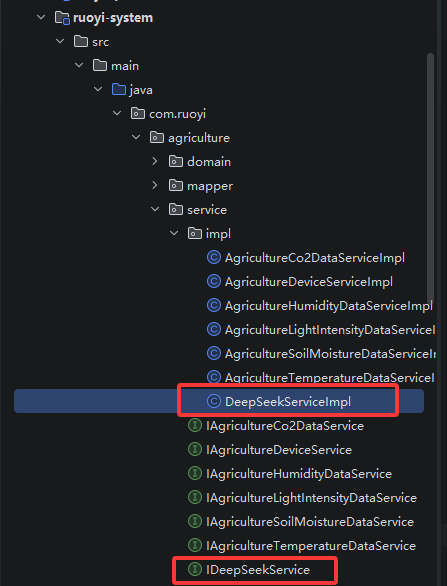
Impl文件夹中创建一个DeepSeekServiceImpl.java文件
完整代码:
package com.ruoyi.agriculture.domain.ollama;

import com.fasterxml.jackson.annotation.JsonIgnoreProperties;
import com.fasterxml.jackson.annotation.JsonProperty;

/**
 * Ollama Generate API响应
 */
@JsonIgnoreProperties(ignoreUnknown = true)
public class OllamaGenerateResponse {
    private String model;
    private String response;
    private boolean done;

    @JsonProperty("created_at")
    private String createdAt;

    // Getter & Setter
    public String getModel() { return model; }
    public void setModel(String model) { this.model = model; }
    public String getResponse() { return response; }
    public void setResponse(String response) { this.response = response; }
    public boolean isDone() { return done; }
    public void setDone(boolean done) { this.done = done; }
    public String getCreatedAt() { return createdAt; }
    public void setCreatedAt(String createdAt) { this.createdAt = createdAt; }
}
创建一个IDeepSeekService.java文件
完整代码:
package com.ruoyi.agriculture.service;

import com.ruoyi.agriculture.domain.dto.ChatRequestDTO;
import com.ruoyi.agriculture.domain.dto.ChatHistoryRequestDTO;
import com.ruoyi.agriculture.domain.dto.ChatResponseDTO;
import reactor.core.publisher.Flux;
import reactor.core.publisher.Mono;

/**
 * DeepSeek AI服务接口
 */
public interface IDeepSeekService {

    /**
     * 单轮对话(非流式)
     */
    Mono<ChatResponseDTO> chat(ChatRequestDTO request);

    /**
     * 单轮对话(流式)
     */
    Flux<String> chatStream(ChatRequestDTO request);

    /**
     * 多轮对话(非流式)
     */
    Mono<ChatResponseDTO> chatWithHistory(ChatHistoryRequestDTO request);

    /**
     * 检查服务状态
     */
    Mono<Boolean> checkHealth();

    /**
     * 获取可用模型列表
     */
    Mono<java.util.List<String>> listModels();
}
6.7.6 ruoyi-ui
api:D:\ruoyi\RuoYi-Vue-master\ruoyi-ui\src\api\agriculture中创建一个ai.js文件
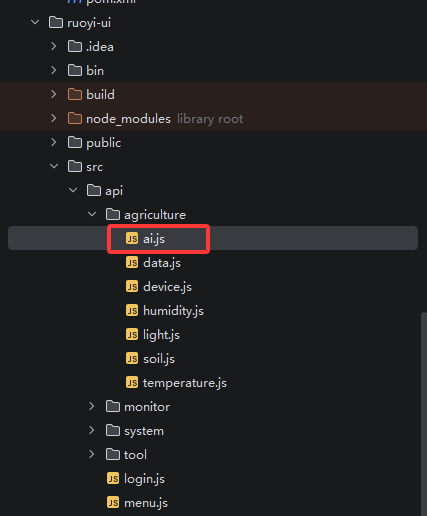
完整代码:
import request from '@/utils/request'

// 非流式对话
export function chat(data) {
  return request({
    url: '/agriculture/ai/chat',
    method: 'post',
    data: data
  })
}

// 多轮对话
export function chatWithHistory(data) {
  return request({
    url: '/agriculture/ai/chat/history',
    method: 'post',
    data: data
  })
}

// 健康检查
export function checkHealth() {
  return request({
    url: '/agriculture/ai/health',
    method: 'get'
  })
}

// 获取模型列表
export function listModels() {
  return request({
    url: '/agriculture/ai/models',
    method: 'get'
  })
}

// 从 Cookie 获取 token(若依 Vue 默认使用 Cookie)
function getTokenFromCookie() {
  const name = 'Admin-Token' // 若依 Vue 默认的 cookie name
  const cookies = document.cookie.split(';')

  for (let cookie of cookies) {
    const [cookieName, cookieValue] = cookie.trim().split('=')
    if (cookieName === name) {
      return decodeURIComponent(cookieValue)
    }
  }

  // 尝试其他可能的 cookie name
  const otherNames = ['ruoyi-token', 'token', 'Authorization', 'vue_admin_template_token']
  for (let name of otherNames) {
    for (let cookie of cookies) {
      const [cookieName, cookieValue] = cookie.trim().split('=')
      if (cookieName === name) {
        console.log('找到 cookie,name:', name)
        return decodeURIComponent(cookieValue)
      }
    }
  }

  return null
}

// 获取 token(优先从 Cookie,其次 localStorage)
function getToken() {
  // 先尝试 Cookie(若依 Vue 默认)
  let token = getTokenFromCookie()
  if (token) return token

  // 再尝试 localStorage
  const localKeys = ['Admin-Token', 'ruoyi-token', 'vue_admin_template_token', 'admin-token', 'token', 'Authorization']
  for (const key of localKeys) {
    token = localStorage.getItem(key)
    if (token) {
      console.log('找到 localStorage token,key:', key)
      return token
    }
  }

  console.log('所有 Cookie:', document.cookie)
  console.log('所有 localStorage keys:', Object.keys(localStorage))

  return null
}

// 流式对话 - 使用 fetch API
export function createStreamChat(message, callbacks) {
  const token = getToken()
  const baseURL = process.env.VUE_APP_BASE_API || ''

  if (!token) {
    console.error('未找到登录 token,请检查 Cookie 和 localStorage')
    if (callbacks && callbacks.onError) {
      callbacks.onError('未登录或登录已过期,请重新登录')
    }
    return { close: () => {} }
  }

  // 构建URL,token 添加到 query 参数(SSE 需要)
  const url = `${baseURL}/agriculture/ai/chat/stream?message=${encodeURIComponent(message)}&token=${encodeURIComponent(token)}`

  console.log('发起流式请求:', url)
  console.log('Token 前10位:', token.substring(0, 10) + '...')

  let isClosed = false
  let abortController = new AbortController()

  fetch(url, {
    method: 'GET',
    headers: {
      'Authorization': 'Bearer ' + token,
      'Accept': 'text/event-stream',
      'Cache-Control': 'no-cache',
      'X-Requested-With': 'XMLHttpRequest'
    },
    signal: abortController.signal,
    credentials: 'include' // 确保携带 Cookie
  })
    .then(async (response) => {
      console.log('响应状态:', response.status)
      console.log('响应类型:', response.headers.get('content-type'))

      if (!response.ok) {
        const errorText = await response.text()
        throw new Error(`HTTP ${response.status}: ${errorText || '请求失败'}`)
      }

      const contentType = response.headers.get('content-type') || ''
      if (!contentType.includes('text/event-stream') && !contentType.includes('octet-stream')) {
        const text = await response.text()
        throw new Error(`错误的响应类型: ${contentType}, 内容: ${text.substring(0, 200)}`)
      }

      console.log('流式连接已建立')
      if (callbacks && callbacks.onOpen) {
        callbacks.onOpen()
      }

      const reader = response.body.getReader()
      const decoder = new TextDecoder('utf-8')
      let buffer = ''

      while (!isClosed) {
        const { done, value } = await reader.read()

        if (done) {
          console.log('流式数据读取完成')
          if (!isClosed && callbacks && callbacks.onDone) {
            callbacks.onDone()
          }
          break
        }

        const chunk = decoder.decode(value, { stream: true })
        buffer += chunk

        const events = buffer.split('\n\n')
        buffer = events.pop() || ''

        for (const event of events) {
          const lines = event.split('\n')
          for (const line of lines) {
            const trimmedLine = line.trim()
            if (!trimmedLine || !trimmedLine.startsWith('data:')) continue

            const data = trimmedLine.substring(5).trim()
            if (!data) continue

            console.log('收到数据:', data.substring(0, Math.min(100, data.length)) + (data.length > 100 ? '...' : ''))

            if (data === '[DONE]') {
              isClosed = true
              if (callbacks && callbacks.onDone) {
                callbacks.onDone()
              }
              return
            }

            if (data.startsWith('[ERROR]')) {
              isClosed = true
              const errorMsg = data.substring(7)
              console.error('收到错误:', errorMsg)
              if (callbacks && callbacks.onError) {
                callbacks.onError(errorMsg)
              }
              return
            }

            if (callbacks && callbacks.onMessage && !isClosed) {
              callbacks.onMessage(data)
            }
          }
        }
      }
    })
    .catch((error) => {
      if (error.name === 'AbortError') {
        console.log('流式请求被取消')
        return
      }

      console.error('流式请求失败:', error)
      if (!isClosed && callbacks && callbacks.onError) {
        callbacks.onError('连接失败: ' + error.message)
      }
    })

  return {
    close: () => {
      if (!isClosed) {
        console.log('关闭流式连接')
        isClosed = true
        abortController.abort()
      }
    }
  }
}
在D:\ruoyi\RuoYi-Vue-master\ruoyi-ui\src\views\agriculture中创建一个ai的文件夹,里面再创建一个index.vue的文件
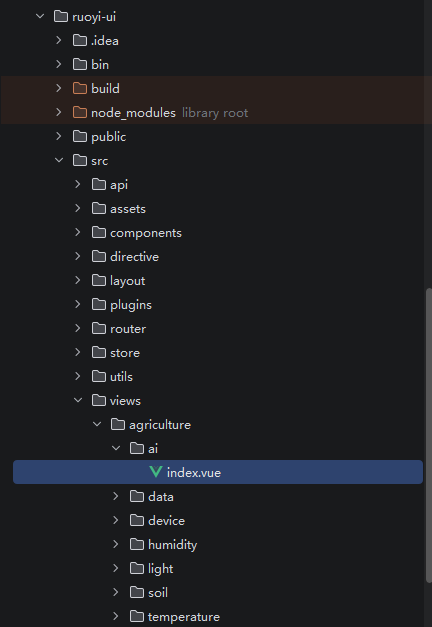
完整代码:
<template>
  <div class="app-container">
    <!-- 头部 -->
    <div class="chat-header">
      <div class="title">
        <i class="el-icon-s-custom"></i>
        <span>农业AI助手</span>
        <el-tag :type="statusType" size="mini" class="status-tag">
          {{ statusText }}
        </el-tag>
      </div>
      <div class="actions">
        <el-button type="text" @click="clearHistory">
          <i class="el-icon-delete"></i> 清空对话
        </el-button>
      </div>
    </div>

    <!-- 对话区域 -->
    <div class="chat-container" ref="chatContainer">
      <div v-if="messages.length === 0" class="empty-state">
        <i class="el-icon-chat-line-round"></i>
        <p>开始与农业AI助手对话</p>
        <div class="quick-actions">
          <el-button
            v-for="(prompt, index) in quickPrompts"
            :key="index"
            size="small"
            @click="useQuickPrompt(prompt)"
          >
            {{ prompt }}
          </el-button>
        </div>
      </div>

      <div
        v-for="(msg, index) in messages"
        :key="index"
        :class="['message', msg.role === 'user' ? 'user-message' : 'ai-message']"
      >
        <div class="avatar">
          <i :class="msg.role === 'user' ? 'el-icon-user' : 'el-icon-s-custom'"></i>
        </div>
        <div class="content">
          <div class="bubble">
            <!-- AI消息使用pre标签保持格式,正在输入时显示闪烁光标 -->
            <pre v-if="msg.role === 'assistant'">{{ msg.content }}<span v-if="msg.isTyping" class="cursor">▋</span></pre>
            <span v-else>{{ msg.content }}</span>
          </div>
          <div class="meta">
            <span class="time">{{ msg.time }}</span>
            <el-button
              v-if="msg.role === 'assistant' && !msg.isTyping"
              type="text"
              size="mini"
              @click="copyContent(msg.content)"
            >
              <i class="el-icon-document-copy"></i>
            </el-button>
          </div>
        </div>
      </div>
    </div>

    <!-- 输入区域 -->
    <div class="input-area">
      <el-input
        v-model="inputMessage"
        type="textarea"
        :rows="3"
        placeholder="输入消息,按 Enter 发送,Shift + Enter 换行..."
        @keyup.enter.native="handleEnter"
        :disabled="isTyping || !isConnected"
      />
      <div class="input-actions">
        <div class="left-actions">
          <el-switch
            v-model="useStream"
            active-text="流式输出"
            inactive-text="普通模式"
            :disabled="isTyping"
          />
          <el-tag v-if="isTyping" size="mini" type="info" class="typing-tag">
            <i class="el-icon-loading"></i> {{ streamStatus }}
          </el-tag>
        </div>
        <el-button
          type="primary"
          :loading="isTyping"
          :disabled="!inputMessage.trim() || !isConnected"
          @click="sendMessage"
        >
          <i class="el-icon-s-promotion"></i> 发送
        </el-button>
      </div>
    </div>
  </div>
</template>

<script>
import { chat, chatWithHistory, checkHealth, createStreamChat } from '@/api/agriculture/ai'

export default {
  name: 'AgricultureAI',
  data() {
    return {
      messages: [],
      inputMessage: '',
      isTyping: false,
      isConnected: false,
      useStream: true,
      streamController: null,
      streamStatus: '思考中...',
      quickPrompts: [
        '分析当前CO2浓度数据',
        '如何优化温室通风?',
        '解释土壤湿度与作物关系',
        '生成作物生长报告模板'
      ]
    }
  },
  computed: {
    statusType() {
      return this.isConnected ? 'success' : 'danger'
    },
    statusText() {
      return this.isConnected ? '已连接' : '未连接'
    }
  },
  mounted() {
    this.checkStatus()
    this.statusTimer = setInterval(this.checkStatus, 30000)
  },
  beforeDestroy() {
    if (this.statusTimer) clearInterval(this.statusTimer)
    this.closeStream()
  },
  methods: {
    async checkStatus() {
      try {
        const res = await checkHealth()
        this.isConnected = res.code === 200
      } catch {
        this.isConnected = false
      }
    },

    useQuickPrompt(prompt) {
      this.inputMessage = prompt
    },

    handleEnter(e) {
      if (!e.shiftKey) {
        e.preventDefault()
        this.sendMessage()
      }
    },

    async sendMessage() {
      const message = this.inputMessage.trim()
      if (!message || this.isTyping) return

      // 添加用户消息
      this.addMessage('user', message)
      this.inputMessage = ''
      this.isTyping = true
      this.streamStatus = '思考中...'

      if (this.useStream) {
        this.sendStreamMessage(message)
      } else {
        this.sendNormalMessage(message)
      }
    },

    async sendNormalMessage(message) {
      try {
        const res = await chat({ message, stream: false })
        if (res.code === 200) {
          this.addMessage('assistant', res.data.content)
        } else {
          this.$message.error(res.msg || '对话失败')
        }
      } catch (error) {
        this.$message.error('请求失败:' + error.message)
      } finally {
        this.isTyping = false
        this.scrollToBottom()
      }
    },

    sendStreamMessage(message) {
      // 先添加一个空的AI消息,标记为正在输入
      const assistantMsg = {
        role: 'assistant',
        content: '',
        time: new Date().toLocaleTimeString(),
        isTyping: true  // 标记为正在输入
      }
      this.messages.push(assistantMsg)
      const assistantIndex = this.messages.length - 1

      this.streamStatus = '接收中...'

      this.streamController = createStreamChat(message, {
        onOpen: () => {
          console.log('流式连接已打开')
        },
        onMessage: (content) => {
          // 更新现有消息内容,而不是创建新消息
          this.messages[assistantIndex].content += content
          this.scrollToBottom()
        },
        onDone: () => {
          console.log('流式响应完成')
          this.messages[assistantIndex].isTyping = false  // 标记为完成
          this.isTyping = false
          this.streamStatus = '完成'
          this.streamController = null
          this.scrollToBottom()
        },
        onError: (errorMsg) => {
          this.$message.error('流式输出错误: ' + errorMsg)
          // 更新为错误信息
          this.messages[assistantIndex].content = '[获取失败: ' + errorMsg + ']'
          this.messages[assistantIndex].isTyping = false
          this.isTyping = false
          this.streamStatus = '错误'
          this.streamController = null
        }
      })
    },

    addMessage(role, content) {
      this.messages.push({
        role,
        content,
        time: new Date().toLocaleTimeString(),
        isTyping: false
      })
      this.scrollToBottom()
    },

    clearHistory() {
      this.$confirm('确定要清空所有对话记录吗?', '提示', {
        type: 'warning'
      }).then(() => {
        this.messages = []
        this.closeStream()
        this.$message.success('已清空')
      })
    },

    copyContent(content) {
      navigator.clipboard.writeText(content).then(() => {
        this.$message.success('已复制到剪贴板')
      })
    },

    scrollToBottom() {
      this.$nextTick(() => {
        const container = this.$refs.chatContainer
        if (container) {
          container.scrollTop = container.scrollHeight
        }
      })
    },

    closeStream() {
      if (this.streamController) {
        this.streamController.close()
        this.streamController = null
      }
      this.isTyping = false
    }
  }
}
</script>

<style lang="scss" scoped>
.chat-header {
  display: flex;
  justify-content: space-between;
  align-items: center;
  padding: 15px 20px;
  background: #fff;
  border-bottom: 1px solid #e4e7ed;
  margin-bottom: 20px;

  .title {
    display: flex;
    align-items: center;
    font-size: 18px;
    font-weight: 600;

    i {
      font-size: 24px;
      margin-right: 10px;
      color: #67c23a;
    }

    .status-tag {
      margin-left: 10px;
    }
  }
}

.chat-container {
  height: calc(100vh - 350px);
  overflow-y: auto;
  padding: 20px;
  background: #f5f7fa;
  border-radius: 8px;
  margin-bottom: 20px;

  .empty-state {
    text-align: center;
    padding: 100px 20px;
    color: #909399;

    i {
      font-size: 64px;
      margin-bottom: 20px;
    }

    .quick-actions {
      margin-top: 20px;

      .el-button {
        margin: 5px;
      }
    }
  }
}

.message {
  display: flex;
  margin-bottom: 20px;

  .avatar {
    width: 40px;
    height: 40px;
    border-radius: 50%;
    display: flex;
    align-items: center;
    justify-content: center;
    flex-shrink: 0;

    i {
      font-size: 20px;
    }
  }

  .content {
    max-width: 70%;
    margin: 0 12px;

    .bubble {
      padding: 12px 16px;
      border-radius: 12px;
      font-size: 14px;
      line-height: 1.6;
      word-wrap: break-word;

      pre {
        margin: 0;
        white-space: pre-wrap;
        word-wrap: break-word;
        font-family: 'Courier New', monospace;
        background: rgba(0,0,0,0.05);
        padding: 10px;
        border-radius: 4px;
        max-width: 100%;

        .cursor {
          animation: blink 1s infinite;
          color: #67c23a;
        }
      }
    }

    .meta {
      margin-top: 6px;
      font-size: 12px;
      color: #909399;
    }
  }

  &.user-message {
    flex-direction: row-reverse;

    .avatar {
      background: #67c23a;
      color: #fff;
    }

    .bubble {
      background: #67c23a;
      color: #fff;
    }

    .meta {
      text-align: right;
    }
  }

  &.ai-message {
    .avatar {
      background: #fff;
      color: #67c23a;
      border: 2px solid #67c23a;
    }

    .bubble {
      background: #fff;
      border: 1px solid #e4e7ed;
    }
  }
}

@keyframes blink {
  0%, 50% { opacity: 1; }
  51%, 100% { opacity: 0; }
}

.input-area {
  background: #fff;
  padding: 20px;
  border-radius: 8px;
  border: 1px solid #e4e7ed;

  .input-actions {
    display: flex;
    justify-content: space-between;
    align-items: center;
    margin-top: 10px;

    .left-actions {
      display: flex;
      align-items: center;
      gap: 15px;

      .typing-tag {
        margin-left: 10px;
      }
    }
  }
}
</style>
6.7.7 创建数据库
-- DeepSeek AI模块菜单权限初始化

-- 1. 插入主菜单
INSERT INTO sys_menu (
    menu_name, parent_id, order_num, path, component,
    is_frame, is_cache, menu_type, visible, status,
    perms, icon, create_by, create_time, remark
) VALUES (
    'AI助手', 0, 999, 'ai', NULL,
    '1', '0', 'M', '0', '0',
    NULL, 'el-icon-s-custom', 'admin', NOW(), 'DeepSeek AI对话模块'
);

-- 获取主菜单ID
SET @ai_menu_id = LAST_INSERT_ID();

-- 2. 插入子菜单-智能对话
INSERT INTO sys_menu (
    menu_name, parent_id, order_num, path, component,
    is_frame, is_cache, menu_type, visible, status,
    perms, icon, create_by, create_time
) VALUES (
    '智能对话', @ai_menu_id, 1, 'chat', 'ai/chat/index',
    '1', '0', 'C', '0', '0',
    'ai:deepseek:view', 'el-icon-chat-line-round', 'admin', NOW()
);

SET @chat_menu_id = LAST_INSERT_ID();

-- 3. 插入子菜单-对话历史
INSERT INTO sys_menu (
    menu_name, parent_id, order_num, path, component,
    is_frame, is_cache, menu_type, visible, status,
    perms, icon, create_by, create_time
) VALUES (
    '对话历史', @ai_menu_id, 2, 'history', 'ai/history/index',
    '1', '0', 'C', '0', '0',
    'ai:history:view', 'el-icon-time', 'admin', NOW()
);

-- 4. 插入子菜单-模型设置
INSERT INTO sys_menu (
    menu_name, parent_id, order_num, path, component,
    is_frame, is_cache, menu_type, visible, status,
    perms, icon, create_by, create_time
) VALUES (
    '模型设置', @ai_menu_id, 3, 'setting', 'ai/setting/index',
    '1', '0', 'C', '0', '0',
    'ai:deepseek:list', 'el-icon-setting', 'admin', NOW()
);

-- 5. 插入对话页面按钮权限
INSERT INTO sys_menu (menu_name, parent_id, order_num, menu_type, visible, status, perms, create_by, create_time) VALUES
('普通对话', @chat_menu_id, 1, 'F', '0', '0', 'ai:deepseek:chat', 'admin', NOW()),
('流式对话', @chat_menu_id, 2, 'F', '0', '0', 'ai:deepseek:stream', 'admin', NOW()),
('多轮对话', @chat_menu_id, 3, 'F', '0', '0', 'ai:deepseek:history', 'admin', NOW()),
('健康检查', @chat_menu_id, 4, 'F', '0', '0', 'ai:deepseek:health', 'admin', NOW());
6.8 效果展示
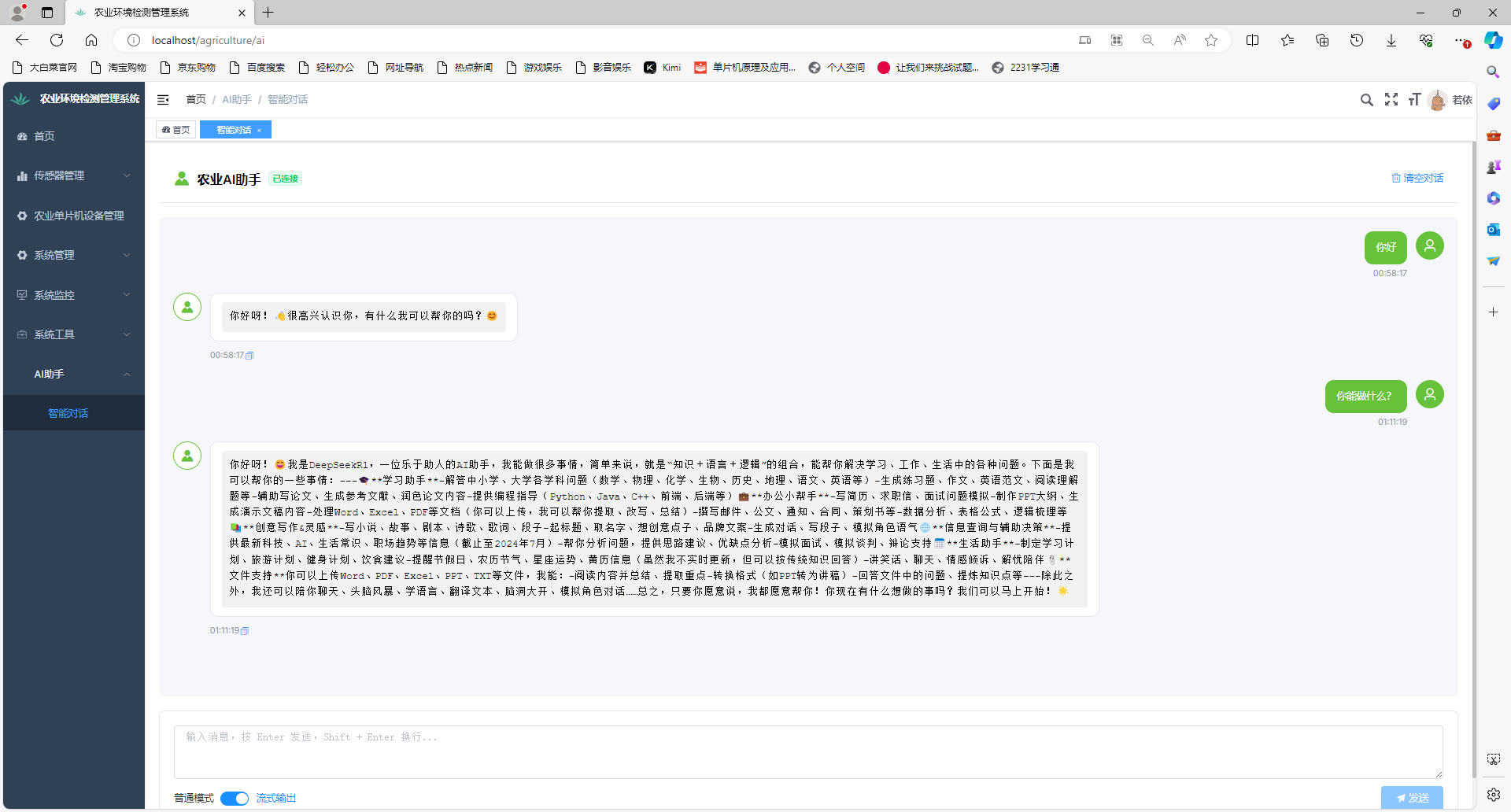

有“AI”的1024 = 2048,欢迎大家加入2048 AI社区
更多推荐


 8
8 0
0- 0


 已为社区贡献3条内容

所有评论(0)