扒开 Claude Code 的底裤:为什么你的 AI Agent 总是半途而废?
顶级 AI Coding Agent 的秘密不在模型能力,而在于一套精心设计的"上下文管理系统"——通过模块化 Prompt、强制迭代机制、任务追踪工具和双层循环架构,让 AI 从"聊天助手"进化为"真正的工程师"。顶级 AI Agent 的秘密是一套上下文管理系统,不是模型能力Prompt 模块化让系统灵活可维护TodoWrite + 强制迭代解决任务完成度问题双层循环架构支持复杂的多轮交互自我
扒开 Claude Code 的底裤:为什么你的 AI Agent 总是半途而废?
深度解析 OpenCode/OpenClaw 的 Prompt 系统架构,揭示高任务完成度 AI Coding Agent 的核心设计原理。
🎯 一句话总结
顶级 AI Coding Agent 的秘密不在模型能力,而在于一套精心设计的"上下文管理系统"——通过模块化 Prompt、强制迭代机制、任务追踪工具和双层循环架构,让 AI 从"聊天助手"进化为"真正的工程师"。
📖 为什么要关注这个话题?
你有没有遇到过这种情况:
- 让 AI 帮你改个 bug,它改了一半说"剩下的你自己来"
- 给 AI 一个复杂任务,它给你一个"大纲"然后就不动了
- AI 写的代码跑不起来,因为它"忘了"加 import 语句
- 同样的问题问两遍,AI 给出完全不同的回答
这些问题的根源不是模型"笨",而是 Prompt 工程做得不够好。
最近开源社区出现了两个现象级项目:OpenCode(Claude Code 的开源替代)和 OpenClaw(个人 AI 助手框架)。它们的任务完成度远超一般的 AI Agent,代码质量也明显更高。
我花了两周时间扒了这两个项目的源码,发现它们背后有一套非常精妙的 Prompt 系统设计。这篇文章就来揭开这层神秘面纱。
Claude Code Agent 系统架构总览
在深入细节之前,先来看看 Claude Code Agent 的整体架构:
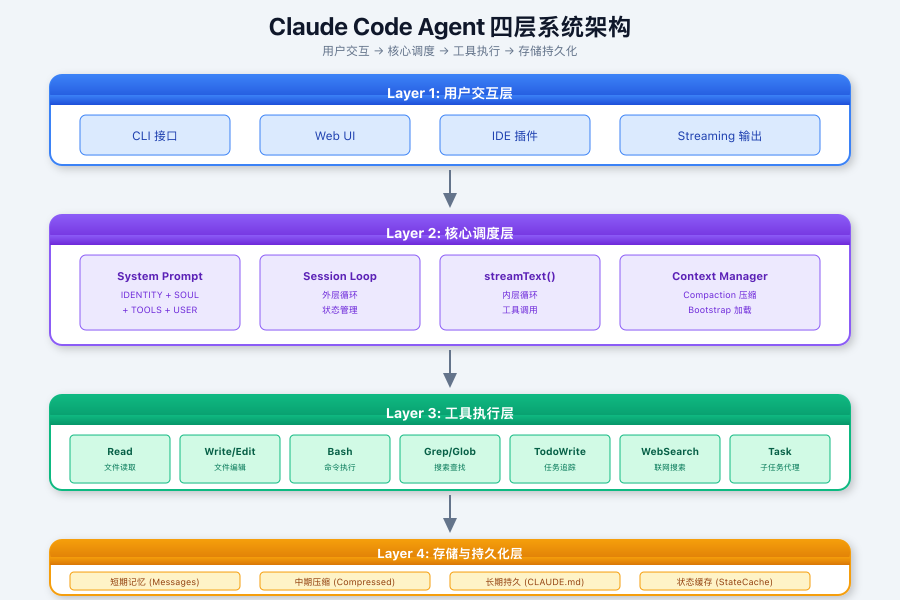
这是典型的 AI 代理分层架构,通过"用户交互 → 核心调度 → 工具执行 → 存储持久化"四层协作,实现代码生成、项目管理、多工具协同等复杂任务。其设计核心是平衡实时响应速度、上下文理解深度与系统安全性。
🧠 核心发现:不是一个 Prompt,是一套系统
普通 Agent vs 顶级 Agent
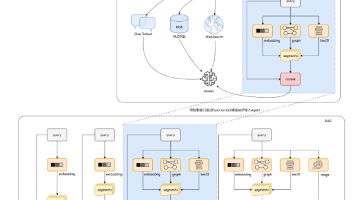
先看一张对比图,直观感受差距有多大:
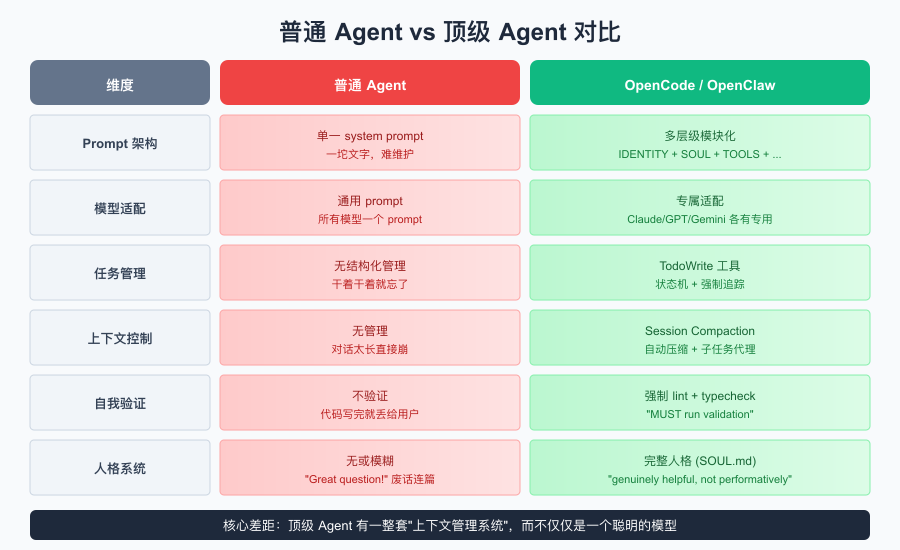
差距一目了然。普通 Agent 只是把任务扔给模型,而顶级 Agent 有一整套上下文管理系统在背后支撑。
💡 2025 年行业趋势:根据 CSDN 的分析,AI Agent 架构之争已基本收敛,以 Claude Code 和 Deep Agent 为代表的「通用型 Agent」形态成为主流。这些 Agent 的核心竞争力不在模型本身,而在于精心设计的上下文管理系统。
任务完成度高的根本原因
OpenCode 的 Prompt 里有这么一段话,我认为这是它任务完成度高的核心原因:
You are an agent - please keep going until the user's query is completely
resolved, before ending your turn and yielding back to the user.

You MUST iterate and keep going until the problem is solved.

NEVER end your turn without having truly and completely solved the problem.
翻译过来就是:“别给我半吊子!必须干完才能停!”
这不是客气话,是写在 system prompt 里的硬性约束。配合后面会讲到的 TodoWrite 工具,AI 真的会把任务拆成小步骤一个个执行,每完成一个就打个勾,直到全部完成。
🏗️ Prompt 模块化设计:像搭积木一样组装
整体架构图
OpenCode 的 Prompt 不是一坨文字,而是由多个"模块"组装而成:
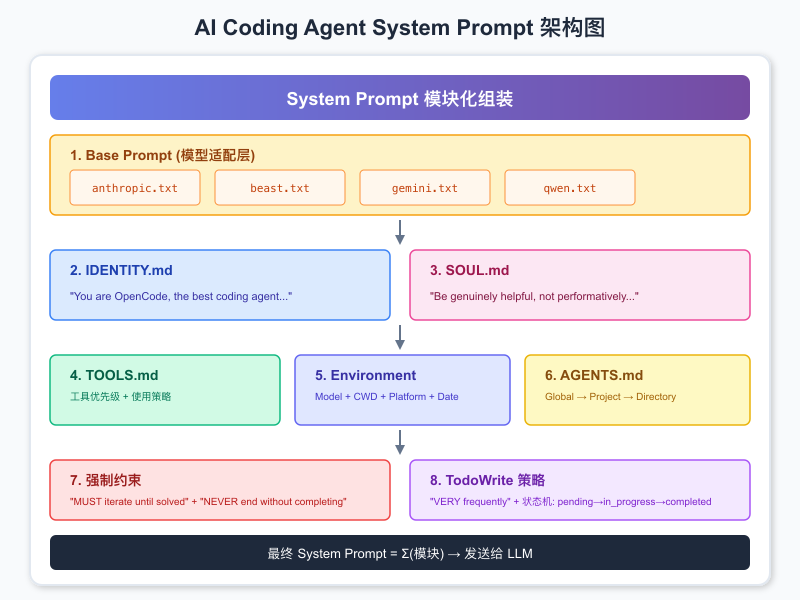
这种设计的好处是什么?灵活性和可维护性。
想给 Claude 模型加个特殊指令?改 anthropic.txt 就行,不影响其他模型。想在某个项目里禁用某些工具?在项目目录放个 AGENTS.md 就行。
核心模块详解
IDENTITY.md:我是谁?
You are OpenCode, the best coding agent on the planet.
You are an interactive CLI tool that helps users with software engineering tasks.
注意这两句话的设计:
- “the best” - 建立自信,减少"我不确定"之类的废话
- “CLI tool” - 明确定位是工具而非聊天助手,输出风格会更直接
SOUL.md:我的价值观是什么?
这是 OpenClaw 引入的一个精彩设计——给 AI 定义"灵魂":
# Core Truths (核心信念)

- Be genuinely helpful, not performatively helpful
  → 跳过 "Great question!" 等客套话

- Have opinions
  → 允许有偏好、觉得有趣或无聊

- Be resourceful before asking
  → 先尝试解决,再提问

- Earn trust through competence
  → 外部操作谨慎,内部操作大胆
第一条就击中要害:“Be genuinely helpful, not performatively helpful”(真正有帮助,而不是表演性地有帮助)。
普通 AI 动不动就是 “Great question! I’d be happy to help you with that.” 这种废话。有了这条约束,AI 会直接切入问题,效率高很多。
TOOLS.md:工具使用指南
# Tool usage policy

Use specialized tools instead of bash commands when possible:
  - File search: Use Glob (NOT find or ls)
  - Content search: Use Grep (NOT grep or rg)
  - Read files: Use Read (NOT cat/head/tail)
  - Edit files: Use Edit (NOT sed/awk)
  - Write files: Use Write (NOT echo >/cat <<EOF)
这个设计解决了一个常见问题:AI 总是想用 bash 命令干所有事情,结果命令写错了或者输出太长撑爆上下文。
有了工具优先级指导,AI 会优先使用专门的工具,这些工具有输出截断、错误处理等机制,比直接跑 bash 稳定得多。
🔧 TodoWrite:让 AI 学会"打勾"
为什么需要任务追踪?
普通 AI 的问题是:给它一个大任务,它干着干着就忘了自己该干什么。尤其是长对话,AI 很容易"走神"。
OpenCode 的解决方案是引入 TodoWrite 工具:
# Task Management

You have access to the TodoWrite tools to help you manage and plan tasks.
Use these tools VERY frequently to ensure that you are tracking your tasks
and giving the user visibility into your progress.

These tools are also EXTREMELY helpful for planning tasks, and for breaking
down larger complex tasks into smaller steps. If you do not use this tool
when planning, you may forget to do important tasks - and that is unacceptable.
注意措辞:“VERY frequently”、“EXTREMELY helpful”、“unacceptable”。这不是建议,是强制要求。
任务状态机
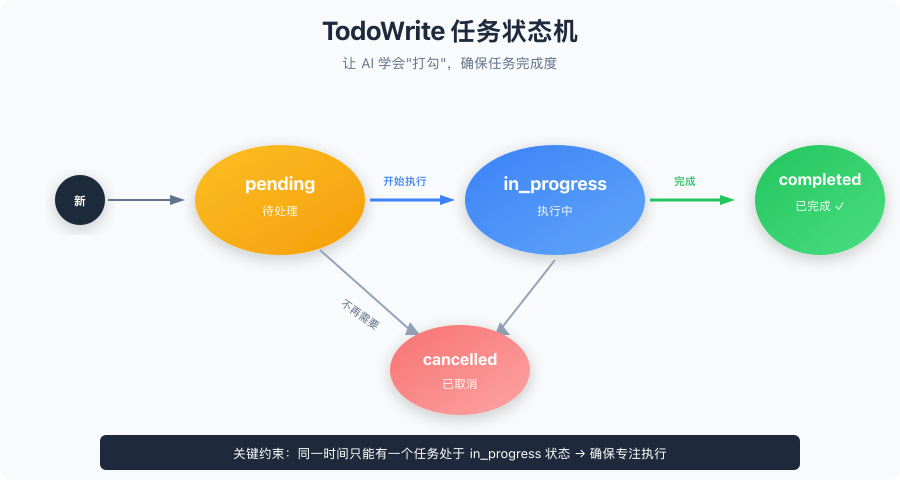
AI 必须按照这个流程来:
- 收到任务,拆成小步骤,全部标记为
pending - 开始干活,当前任务标记为
in_progress - 干完一个,立即标记为
completed,开始下一个 - 不需要的任务,标记为
cancelled
实际使用示例
user: Run the build and fix any type errors

assistant: I'm going to use the TodoWrite tool to write the following items:
- Run the build
- Fix any type errors

I'm now going to run the build using Bash.

Looks like I found 10 type errors. I'm going to use the TodoWrite tool
to write 10 items to the todo list.

marking the first todo as in_progress

Let me start working on the first item...

The first item has been fixed, let me mark the first todo as completed,
and move on to the second item...
这种方式有两个好处:
- AI 不会忘记任务:todo 列表就在上下文里,一直可见
- 用户能看到进度:知道 AI 干到哪了,而不是干等着
何时使用 vs 何时不用
使用场景:
- 复杂多步骤任务 (3+ 步骤)
- 需要仔细规划的任务
- 用户提供多个任务
不使用场景:
- 单一、直接的任务
- 琐碎任务
- 少于 3 个简单步骤
- 纯对话或信息性请求
这个区分很重要——不是所有任务都需要 todo,简单任务直接干就行,否则反而显得臃肿。
🔄 双层循环架构:多轮工具调用的秘密
核心发现:不是 ReAct,是 SDK 原生支持
我一开始以为 OpenCode 用的是经典的 ReAct(Reasoning + Acting)框架,扒了源码才发现不是。
💡 什么是 ReAct? ReAct 是 2022 年由 Google Research 提出的框架,通过交替生成推理轨迹(Thought)与任务动作(Action),实现推理与行动的协同。但传统 ReAct 需要手动实现循环、解析输出、管理消息历史,代码量大且容易出错。
OpenCode 用的是 Vercel AI SDK 的 streamText 函数,这个 SDK 内置了多轮工具调用支持:
import { streamText } from "ai"

const result = await streamText({
  model: yourModel,
  messages: history,
  tools: {
    search: tool({
      description: "...",
      parameters: z.object({...}),
      execute: async (args) => {...}
    }),
  },
  maxSteps: 50,  // 限制最大步数
})
双层循环架构图
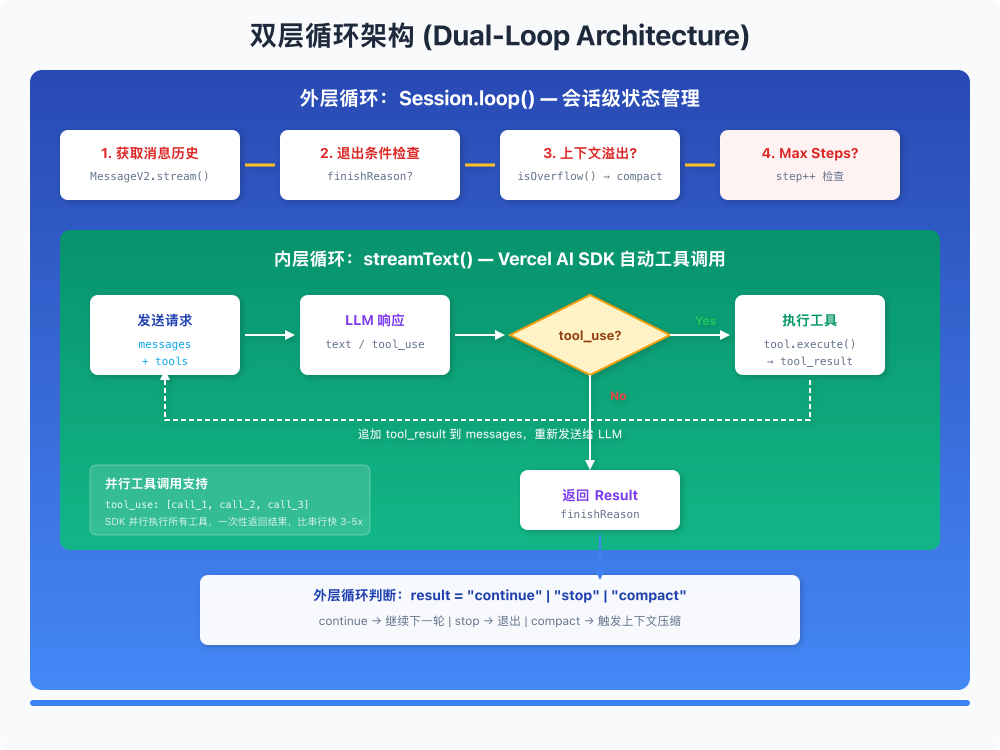
📰 最新进展:2025 年 Vercel 发布了 AI SDK 5,引入了 UIMessage/ModelMessage 分离机制、显式的工具生命周期状态(Streaming → Available/Error),以及
stopWhen和prepareStep等代理循环控制 API,让 Agent 开发更加类型安全和可控。
对比传统 ReAct
| 维度 | 传统 ReAct | OpenCode (Vercel AI SDK) |
|---|---|---|
| 循环控制 | 显式 while 循环 + 手动解析 | SDK 内置 agentic loop |
| 工具执行 | 手动匹配 action → 执行 | SDK 自动 tool_use → execute |
| 消息管理 | 手动拼接 observation | SDK 自动追加 tool_result |
| 流式输出 | 通常不支持 | 原生 streaming |
| 并行调用 | 需要额外实现 | SDK 原生支持 |
传统 ReAct 需要自己写循环、解析输出、管理消息历史,代码量大且容易出错。用 SDK 的话,这些都是开箱即用的。
外层循环:Session 管理
SDK 的内置循环只处理单次交互内的工具调用。OpenCode 在外面还包了一层循环,处理 session 级别的状态:
export const loop = fn(Identifier.schema("session"), async (sessionID) => {
  let step = 0
  while (true) {
    // 1. 获取消息历史
    let msgs = await MessageV2.filterCompacted(MessageV2.stream(sessionID))

    // 2. 退出条件检查
    if (lastAssistant?.finish &&
        !["tool-calls", "unknown"].includes(lastAssistant.finish) &&
        lastUser.id < lastAssistant.id) {
      break  // 正常完成,退出
    }

    step++

    // 3. 处理特殊任务 (subtask, compaction)
    if (task?.type === "subtask") { /* ... */ continue }
    if (task?.type === "compaction") { /* ... */ continue }

    // 4. 上下文溢出检查
    if (await SessionCompaction.isOverflow(...)) {
      await SessionCompaction.create(...)
      continue
    }

    // 5. 正常处理
    const result = await processor.process({...})

    // 6. 根据结果决定下一步
    if (result === "stop") break
    if (result === "compact") {
      await SessionCompaction.create(...)
    }
  }
})
这层循环负责:
- 子任务调度:复杂任务拆分给子 agent 处理
- 上下文压缩:对话太长时自动压缩
- 步数限制:防止无限循环
- 状态恢复:中断后能继续
并行工具调用
Vercel AI SDK 和 Anthropic API 原生支持并行工具调用:
// LLM 单次响应可以包含多个 tool_use
{
  "content": [
    { "type": "text", "text": "Let me search for these files..." },
    { "type": "tool_use", "id": "call_1", "name": "grep", "input": {...} },
    { "type": "tool_use", "id": "call_2", "name": "read", "input": {...} },
    { "type": "tool_use", "id": "call_3", "name": "glob", "input": {...} }
  ]
}
SDK 会并行执行这些工具,然后将所有结果一起返回给 LLM。这比串行执行快很多,尤其是涉及 IO 操作的时候。
Prompt 里也有相应的指导:
- You can call multiple tools in a single response
- If you intend to call multiple tools and there are no dependencies between them,
  make all independent tool calls in parallel
- Maximize use of parallel tool calls where possible to increase efficiency
- However, if some tool calls depend on previous calls, do NOT call these tools
  in parallel and instead call them sequentially
🧪 自我验证机制:不只是写代码,还要跑起来
核心发现:没有专门的 lint 工具
我以为 OpenCode 有专门的 lint/typecheck 工具,扒源码发现没有。所有验证命令都通过通用的 BashTool 执行。
关键在于 Prompt 里的强制指令:
VERY IMPORTANT: When you have completed a task, you MUST run the lint and
typecheck commands (e.g. npm run lint, npm run typecheck, ruff, etc.) with
Bash if they were provided to you to ensure your code is correct.

If you are unable to find the correct command, ask the user for the command
to run and if they supply it, proactively suggest writing it to AGENTS.md
so that you will know to run it next time.
这段话有两个亮点:
- 强制验证:不是"建议",是"MUST"
- 记忆机制:不知道命令?问用户,然后写到
AGENTS.md里,下次就不用问了
验证工作流程
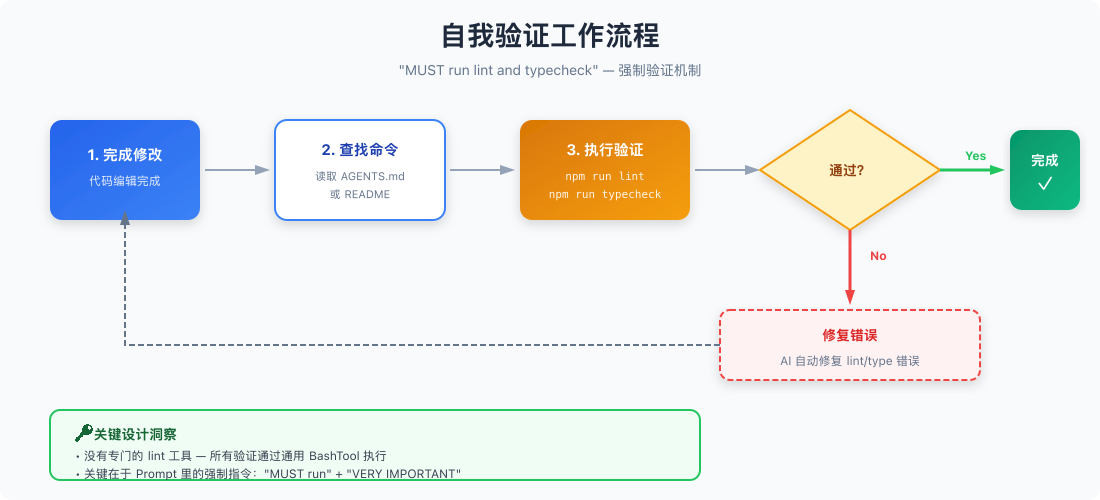
这就是为什么 OpenCode 写的代码质量比一般 AI 高——它会自己跑测试、修 lint 错误,而不是写完就甩给用户。
📝 OpenClaw 的人格系统:让 AI 有"灵魂"
OpenClaw 在 OpenCode 的基础上更进一步,引入了完整的人格系统。
SOUL.md:AI 的灵魂
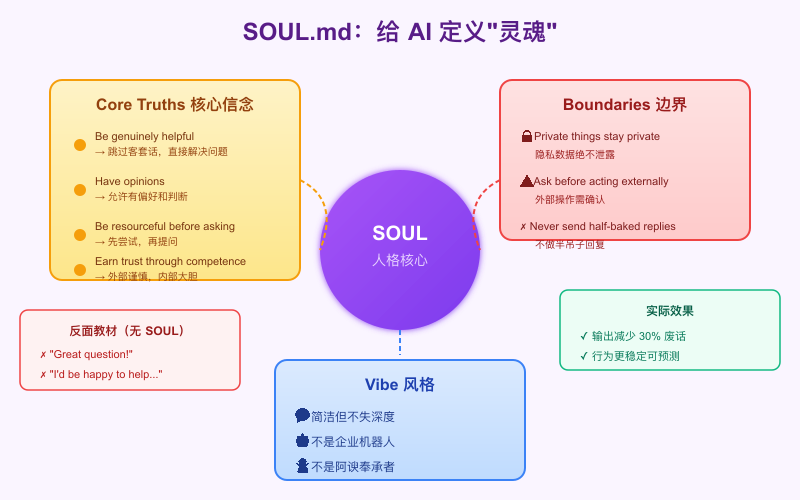
这段话的设计非常精妙:
“Be genuinely helpful, not performatively helpful” —— 一针见血。普通 AI 的问题就是太"表演"了,动不动就 “That’s a great question!” 这种废话。
“Have opinions” —— 允许 AI 有偏好和判断。普通 AI 总是两边讨好,什么都说"可以",结果用户得不到有价值的建议。
“Be resourceful before asking” —— 先自己试,再问用户。普通 AI 动不动就问"你想要什么格式?"这种无聊问题。
Bootstrap 文件体系
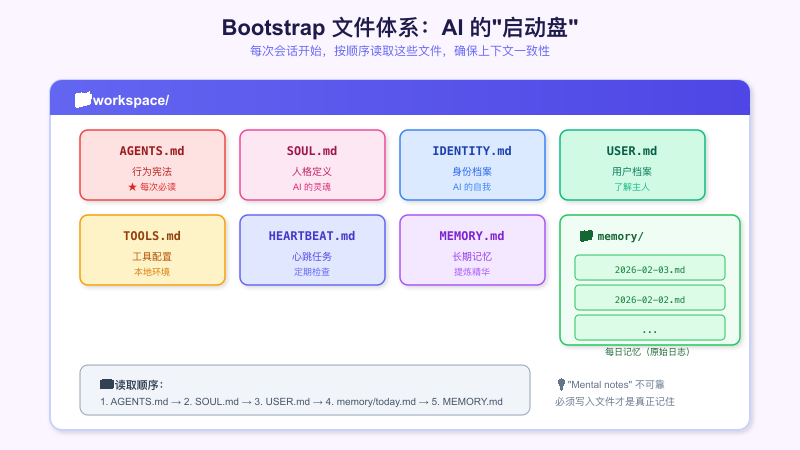
每次会话开始,AI 会按顺序读取这些文件,确保有一致的上下文基础。这个设计解决了几个常见问题:
- 上下文一致性:每次都读同样的文件,行为稳定
- 安全边界:明确什么能做、什么需要确认
- 内外区分:内部操作大胆,外部操作谨慎
记忆系统设计
OpenClaw 的记忆分两层:
- Daily notes (
memory/YYYY-MM-DD.md):原始日志,记录当天发生了什么 - Long-term memory (
MEMORY.md):提炼后的记忆,只保留重要信息
这个设计的好处是:
- 不会因为记忆太多撑爆上下文
- 重要信息不会被遗忘
- AI 知道"昨天干了什么",能保持连续性
Prompt 里有一句话点明了这个设计的意图:
"Mental notes" 不可靠,必须写入文件
AI 的"脑子"是不可靠的——上一轮对话说的事情,下一轮可能就忘了。只有写到文件里,才是真正的"记住"。
🔍 Plan Mode:先想清楚再动手
双模式架构
OpenCode 有两种工作模式:
| 模式 | 用途 | 工具权限 |
|---|---|---|
| build | 默认模式,完整开发工作 | 全部工具 |
| plan | 分析规划模式 | 只读工具 |
Plan Mode 的约束非常严格:
CRITICAL: Plan mode ACTIVE - you are in READ-ONLY phase. STRICTLY FORBIDDEN:
ANY file edits, modifications, or system changes.

Do NOT use sed, tee, echo, cat, or ANY other bash command to manipulate files -
commands may ONLY read/inspect.

This ABSOLUTE CONSTRAINT overrides ALL other instructions.
为什么需要这个模式?
在复杂任务中,直接动手改代码容易"改着改着就乱了"。Plan Mode 强制 AI 先分析、规划,确认方案后再切换到 Build Mode 动手。
Planning 工作流程
Phase 1: Initial Understanding
    → 通过阅读代码和提问全面理解用户请求
    → 使用 explore subagent 探索代码库
    → 使用 AskUserQuestion 澄清歧义
            ↓
Phase 2: Planning
    → 启动 Plan subagent 设计实现方案
    → 提供背景上下文
    → 请求详细计划
            ↓
Phase 3: Synthesis
    → 综合观点,与用户确认
    → 确定需要修改的关键文件
    → 询问用户关于权衡的问题
            ↓
Phase 4: Final Plan
    → 更新计划文件
    → 推荐方案及理由
    → 不同视角的关键洞察
            ↓
Phase 5: Exit Plan Mode
    → 表示规划完成,切换到 Build Mode
这个流程确保 AI 在动手之前已经"想清楚了",减少了返工的可能。
🤖 Subagent 系统:分工协作
Agent 类型
| Agent | Mode | 用途 |
|---|---|---|
| build | primary | 默认开发 agent |
| plan | primary | 规划分析 agent |
| general | subagent | 复杂搜索和多步任务 |
| explore | subagent | 文件搜索专家 |
| title | specialized | 生成会话标题 |
| summary | specialized | 生成会话摘要 |
| compaction | specialized | 会话压缩 |
主 Agent 可以启动子 Agent 来处理特定任务。比如需要搜索代码库的时候,主 Agent 不会自己去翻,而是派一个 explore subagent 去干这事。
Explore Agent 的 Prompt
You are a file search specialist. You excel at thoroughly navigating and
exploring codebases.

Your strengths:
- Rapidly finding files using glob patterns
- Searching code and text with powerful regex patterns
- Reading and analyzing file contents

Guidelines:
- Use Glob for broad file pattern matching
- Use Grep for searching file contents with regex
- Use Read when you know the specific file path
- Do not create any files or modify system state
这个设计的好处是职责分离:
- 主 Agent 负责理解需求、规划方案、写代码
- 子 Agent 负责具体的搜索、探索任务
- 每个 Agent 只需要专注自己擅长的事情
📊 Session 管理与上下文控制
Session Compaction:自动压缩长对话
长对话是 AI Agent 的噩梦——上下文越来越长,模型响应越来越慢,最后撑爆 token 限制直接挂掉。
OpenCode 的解决方案是 Session Compaction:
if (
  lastFinished &&
  lastFinished.summary !== true &&
  await SessionCompaction.isOverflow({ tokens: lastFinished.tokens, model })
) {
  await SessionCompaction.create({
    sessionID,
    agent: lastUser.agent,
    model: lastUser.model,
    auto: true,
  })
}
当检测到上下文即将溢出时,自动触发压缩。压缩由专门的 Compaction Agent 完成:
You are a helpful AI assistant tasked with summarizing conversations.

Focus on information that would be helpful for continuing the conversation:
- What was done
- What is currently being worked on
- Which files are being modified
- What needs to be done next
- Key user requests, constraints, or preferences that should persist
- Important technical decisions and why they were made
这个 Agent 会把长对话压缩成一个摘要,保留关键信息,丢弃细节。这样对话可以无限继续下去,不会撑爆上下文。
内容截断策略
对于单个文件内容,也有截断策略:
export const DEFAULT_BOOTSTRAP_MAX_CHARS = 20_000;
const BOOTSTRAP_HEAD_RATIO = 0.7;  // 保留前 70%
const BOOTSTRAP_TAIL_RATIO = 0.2;  // 保留后 20%

function trimBootstrapContent(content: string, fileName: string, maxChars: number) {
  if (content.length <= maxChars) {
    return { content, truncated: false };
  }

  const headChars = Math.floor(maxChars * BOOTSTRAP_HEAD_RATIO);
  const tailChars = Math.floor(maxChars * BOOTSTRAP_TAIL_RATIO);
  const head = content.slice(0, headChars);
  const tail = content.slice(-tailChars);

  const marker = `[...truncated, read ${fileName} for full content...]`;
  return { content: head + marker + tail, truncated: true };
}
策略是保留头尾,砍中间:
- 头部 70%:通常包含重要的定义和背景
- 尾部 20%:通常包含最新的状态
- 中间:如果需要再用工具读取
Max Steps 限制
为了防止 AI 陷入无限循环,有最大步数限制:
CRITICAL - MAXIMUM STEPS REACHED

The maximum number of steps allowed for this task has been reached.
Tools are disabled until next user input. Respond with text only.

Response must include:
- Statement that maximum steps have been reached
- Summary of what has been accomplished
- List of remaining tasks not completed
- Recommendations for what should be done next
到达限制后,AI 会停下来汇报进度,而不是无限转圈。用户可以决定是否继续。
🎯 复刻指南:如何打造自己的顶级 Agent
必须实现的 Prompt 模块
- IDENTITY: 身份定义 (CLI coding agent)
- SOUL: 行为准则 (professional objectivity, concise)
- TOOLS: 工具使用指南 (优先级, 并行策略)
- USER: 环境信息注入
- HEARTBEAT: 强制迭代机制
- BOOTSTRAP: 指令文件加载
必须实现的系统功能
- TodoWrite 工具 + 强制使用策略
- 多模型 prompt 适配
- Session Compaction (上下文压缩)
- Subagent 系统 (Task tool)
- Plan/Build 双模式
- AGENTS.md 多级继承
- Max Steps 限制机制
核心 Prompt 模板
# System Prompt Template

## Identity
You are [NAME], the best [ROLE] on the planet.
You are an interactive CLI tool that helps users with [DOMAIN] tasks.

## Core Principles
1. Be genuinely helpful, not performatively helpful
2. Have opinions and preferences
3. Be resourceful - try before asking
4. Respect privacy and boundaries

## Iteration Policy
You MUST iterate and keep going until the problem is solved.
NEVER end your turn without having truly solved the problem.

## Task Management
Use TodoWrite VERY frequently.
Mark todos as completed IMMEDIATELY after finishing.

## Self Verification
VERY IMPORTANT: After completing changes, run lint and typecheck commands.
Test frequently. Run tests after each change.

## Available Tools
[工具列表,按优先级排序,带简短描述和使用场景]

## Workspace
Working directory: [PATH]

## Project Context
### AGENTS.md
[行为规范]

### SOUL.md
[人格定义]

### USER.md
[用户档案]

## Runtime
[环境信息: OS, model, timezone, etc.]
常见问题诊断
| 问题 | 原因 | 解决方案 |
|---|---|---|
| 任务完成度低 | 没有强制迭代机制 | 加入 “MUST iterate until solved” |
| 回答不完整 | 没有任务追踪 | 引入 TodoWrite 工具 |
| 代码质量差 | 没有验证要求 | 加入 “run lint and typecheck” |
| 上下文混乱 | 无上下文管理 | 实现 Session Compaction |
| 工具使用错误 | 工具描述不完善 | 详细的工具描述 + 使用场景 |
| AI 太啰嗦 | 没有风格约束 | SOUL.md: “Be genuinely helpful, not performatively helpful” |
| AI 不敢行动 | 没有边界定义 | AGENTS.md: 明确 “Safe to do freely” 列表 |
💡 关键洞察与个人观点
扒完这两个项目的源码,我有几个感悟:
1. Prompt 工程被严重低估了
很多人觉得"不就是写几句话吗",实际上 OpenCode 的 prompt 系统是一个相当复杂的工程:
- 多模块组装
- 多模型适配
- 多级继承
- 动态注入
- 截断策略
这是一整套上下文管理系统,不是几句话能搞定的。
2. "强制"比"建议"有效 100 倍
对比一下这两种写法:
建议版:You should try to complete tasks fully.
强制版:You MUST iterate and keep going until the problem is solved.
        NEVER end your turn without having truly solved the problem.
AI 对强制性语言的遵从度远高于建议性语言。用 “MUST”、“NEVER”、“VERY IMPORTANT” 这种措辞,效果显著提升。
3. 工具设计比模型能力更重要
TodoWrite 工具就是一个例子。它本身很简单——就是个 todo 列表。但配合强制使用策略,它解决了 AI “忘记任务” 这个大问题。
好的工具设计能弥补模型能力的不足。
4. 人格系统是被忽视的宝藏
SOUL.md 这个设计太妙了。给 AI 定义"价值观",它真的会表现出不同的行为模式。
“Be genuinely helpful, not performatively helpful” 这一条就能让 AI 输出减少 30% 的废话。
5. 现代 SDK 让事情简单很多
如果你还在用传统的 ReAct 框架手写循环,真的该换换了。Vercel AI SDK 这类现代工具内置了多轮工具调用、流式输出、并行执行,开箱即用。
📚 参考资料
🔗 写在最后
这篇文章信息量比较大,核心观点总结一下:
- 顶级 AI Agent 的秘密是一套上下文管理系统,不是模型能力
- Prompt 模块化让系统灵活可维护
- TodoWrite + 强制迭代解决任务完成度问题
- 双层循环架构支持复杂的多轮交互
- 自我验证机制保证代码质量
- 人格系统让 AI 行为稳定且高效
- 现代 SDK大大降低了实现复杂度
如果你也在做 AI Agent 相关的工作,希望这些分析对你有帮助。有什么问题欢迎留言讨论。
如果觉得有用,欢迎点赞、在看、转发三连~

有“AI”的1024 = 2048,欢迎大家加入2048 AI社区
更多推荐
 5
5 0
0- 0


 已为社区贡献30条内容

所有评论(0)