Linux 18 进程控制
本文主要介绍了Linux进程管理的几个关键概念:1. 进程创建:详细讲解了fork系统调用的实现机制,包括写时拷贝技术及其优势(减少创建时间和内存浪费),以及fork失败的原因。2. 进程终止:分析了进程退出的三种场景(正常/异常结束、结果正确/错误),比较了exit和_exit的区别,指出缓冲区存在于库而非操作系统。3. 进程等待:阐述了父进程通过wait/waitpid回收子进程资源的必要性,
🔥个人主页:Milestone-里程碑
❄️个人专栏: <<力扣hot100>> <<C++>><<Linux>>
🌟心向往之行必能至
目录
一.进程创建
1.1再识fork
关于fork的基础使用,在前面的文章已经讲过,此处不再赘述
进程调⽤ fork ,当控制转移到内核中的 fork 代码后,内核做:分配新的内存块和内核数据结构给⼦进程将⽗进程部分数据结构内容拷⻉⾄⼦进程添加⼦进程到系统进程列表当中fork 返回,开始调度器调度
1.2 写时拷贝
当父子数据未被修改写入时,共用同一份资源,但其中一方数据进行了写入,便会写时拷贝一份
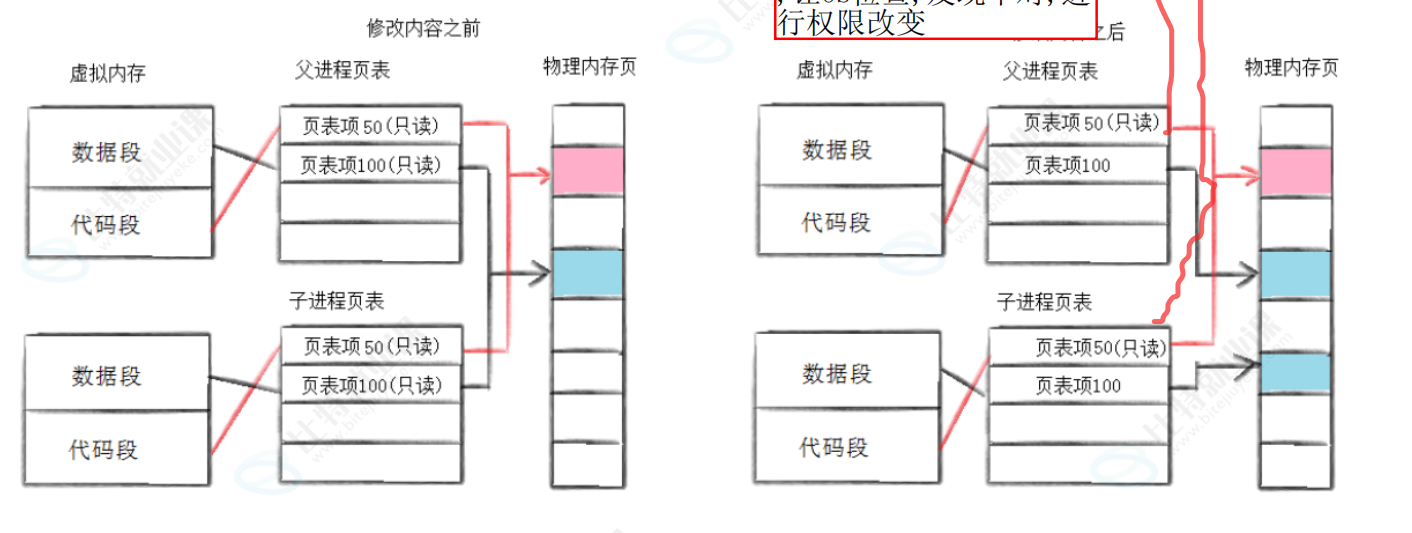
可以看到修改前,数据段都为r,修改后,不只为r,原理是对权限为r的数据段进行写入,OS会检查,发现错误,就会自动修改权限,进行拷贝
同时我们发现没被修改的代码段依旧共用同一份资源
因此,写时拷贝的好处
1.减少创建时间
2.减少内存浪费
1.3 fork调用失败原因
• 系统中有太多的进程• 实际⽤⼾的进程数超过了限制
二.进程终止
2.1 进程退出场景
子进程是由父进程创建的,是要让完成某些事情的,子进程要反馈父进程某些信息
代码正常运行,结果正确test1.c ⮀ ⮂⮂ buffers 1 #include<stdio.h> 2 int main() 3 { W> 4 int a = 1; 5 return 0; 6 }退出码:
[lcb@hcss-ecs-1cde 4]$ echo $?
0
代码运行完毕,结果不正确
  1 #include<stdio.h>
    2 int main()
    3 {
    4   int a = 1;
W>  5   a =a/0;
    6   return 0;
    7
    8 }
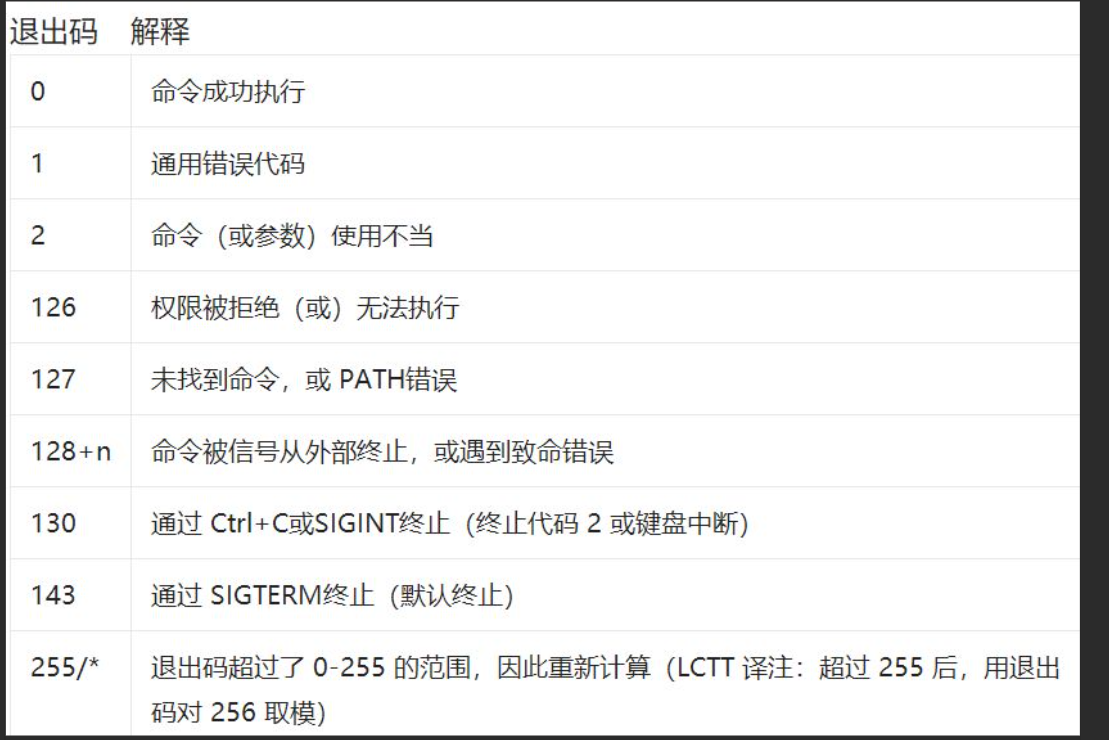
退出码
[lcb@hcss-ecs-1cde 4]$ echo $?
136
注:
再查看退出码,又会为0,因为是查看最近一个进程的退出码
[lcb@hcss-ecs-1cde 4]$ echo $?
0
常见退出方式
2.2exit && _exit
# include <unistd.h>void _exit( int status);参数: status 定义了进程的终⽌状态,⽗进程通过 wait 来获取该值# include <unistd.h>void exit ( int status);
前面我们学过,当有sleep时,会写入缓存区,当\n可以刷新缓存区,接下来让我们看这两个,会发现无\n时,_exit不会刷新缓存区,而exit会
原因在于
1. 执⾏⽤⼾通过 atexit或on_exit定义的清理函数。2. 关闭所有打开的流,所有的缓存数据均被写⼊3. 调⽤_exit(库调用系统调用,封装了_exit)

因此我们可以得到一个结论
我们前面所说的缓存区不在操作系统内部的缓存区,而是库的缓存区
三.进程等待
3.1等待方式
wait
#include<sys/types.h>
#include<sys/wait.h>
pid_t wait(int* status);
返回值:
成功返回被等待进程pid,失败返回-1。
参数:
输出型参数,获取⼦进程退出状态,不关⼼则可以设置成为NULL
waitpid
pid_ t waitpid(pid_t pid, int *status, int options);
返回值:
当正常返回的时候waitpid返回收集到的⼦进程的进程ID;
如果设置了选项WNOHANG,⽽调⽤中waitpid发现没有已退出的⼦进程可收集,则返回0;
如果调⽤中出错,则返回-1,这时errno会被设置成相应的值以指⽰错误所在;
参数:
pid:
Pid=-1,等待任⼀个⼦进程。与wait等效。
Pid>0.等待其进程ID与pid相等的⼦进程。
status: 输出型参数
WIFEXITED(status): 若为正常终⽌⼦进程返回的状态,则为真。(查看进程
是否是正常退出)
WEXITSTATUS(status): 若WIFEXITED⾮零,提取⼦进程退出码。(查看进程
的退出码)
options:默认为0,表⽰阻塞等待

WNOHANG: 若pid指定的⼦进程没有结束,则waitpid()函数返回0,不予以等
待。若正常结束,则返回该⼦进程的ID。
3.2获取status和信号
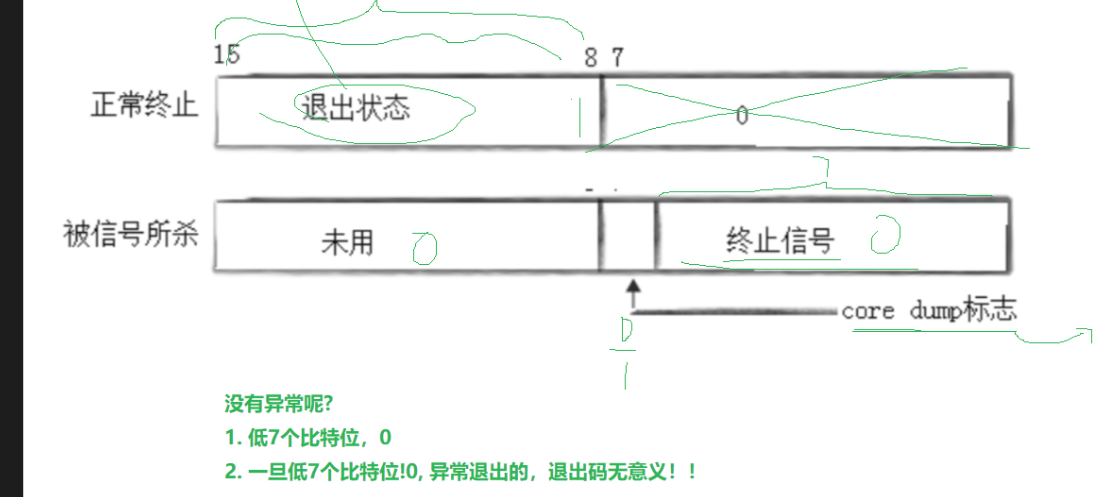
include<stdio.h>
    2 #include<unistd.h>
    3 #include<stdlib.h>
    4 #include<string.h>
    5
    6 int main()
    7 {
    8   pid_t id =fork();
    9   if(id ==0)
   10   {
   11     //子进程
   12     int cnt =5;
   13     while(cnt--)
   14     {
   15       printf("子进程 pid:%d ppid%d\n",getpid(),getppid());
   16       sleep(1);
   17
   18     }
   19     //退出的是子进程的程序,父进程不受影响
   20   exit(0);
   21
   22   }
   23   //procid_t ret = wait(NULL);
   24   int st=0;
E> 25   pid_t ret = waitpid(id,&st,0);
   26
   27   if(ret >0&& (st>>8)&0XFF==0)//id匹配上,且正常退出
   28   {
   29     printf("wait success rid:%d,exit code :%d\n",ret,(st>>8&0XFF));
   30   }
   31   else if(ret>0)//异常退出,信号code不为0
W> 32     printf("wait failed rid:%d\n exit code:%d\n",ret,st&0X7F);
   33   sleep(100);
   34
   35
   36   return 0;
   37 }
四.阻塞非阻塞等待
阻塞等待即父进程会一直等待子进程完成再继续执行,非阻塞等待则是父进程在等待子进程返回结果时,也会执行自己的程序
当然,上面太过生涩,接下来我们讲两个故事理解
非阻塞等待
为了应对OS期末考试,小明前往并打电话找学霸小李进行复习指导,小李回复,他正在干自己的事,让小明等个10多分钟,后挂断了电话.
在这等待的过程中,小明一边干自己的事(看书等),一边隔一会给小李打个电话,得到小李的回复还未干好,立马挂掉电话
在这期中,小明在等待小李的时候,还自己进行了看错,效率提高
#include<stdio.h>
    2 #include<unistd.h>
    3 #include<stdlib.h>
    4 #include<string.h>
    5 typedef void (*func_t)();
    6 #define NUM 5
    7 func_t handlers[NUM+1];
    8 void download()
    9 {
   10   printf("下载任务\n");
   11 }
   12 void up()
   13 {
   14   printf("更新任务\n");
   15 }
   16 void flush()
   17 {
   18   printf("更新任务\n");
   19 }
   20 void regist(func_t h[],func_t f)
   21 {
   22   int i=0;
   23   for(;i<NUM;++i)
   24   {
   25     if(h[i]==NULL)break;
   26   }
   27   if(i==NUM) return;
   28   h[i]=f;
   29   h[i++]=NULL;
   30 }
   31 int main()
   32 {
   33   regist(handlers,download);
   34   regist(handlers,up);
   35   regist(handlers,flush);
   36   pid_t id =fork();
   37   if(id ==0)
   38   {
   39     //子进程
   40     int cnt =5;
   41     while(1)
   42     {
   43       printf("子进程 pid:%d ppid%d\n",getpid(),getppid());
   44       sleep(1);
   45       cnt--;
   46     }
   47     //退出的是子进程的程序,父进程不受影响
   48   exit(10);
   49
   50   }
   51   //procid_t ret = wait(NULL);
   52   while(1)
   53   {
   54
   55
   56   int st=0;
E> 57   pid_t ret = waitpid(id,&st,WNOHANG);
   58
   if(ret >0)//id匹配上,且正常退出
   60   {
   61     printf("wait success rid:%d,exit code :%d\n",ret,(st>>8&0XFF));
   62     break;
   63   }
   64   else if(ret==0)
   65   {
   66     //函数指针回调哦
   67     int i=0;
   68     for(;handlers[i];++i)
   69       handlers[i]();
   70     printf("本轮调用结束\n");
   71     sleep(1);
   72   }
   73   else
   74   {
   75
   76     printf("调用失败\n");
   77     break;
   78   }
   79
   80   }
   81   return 0;
   82 }
  ~
在上面中,父进程在等待子进程调用时,也在干自己的事,如下载,刷新等,效率得到提高
阻塞等待
在上面的通话中,小明觉得每次打过于麻烦,于是下次找小李复习时,让小李没挂电话了,一直通电话,直到小李干完自己的事
上面这例子就如我们代码运行到cin scanf ,必须我们进行输入,才会完成
五.进程程序替换
注,进程程序替换后,会进行覆盖代码于与数据段,后面的程序将不再执行(只要是可执行程序,就可以替换,即使是其他语言的)
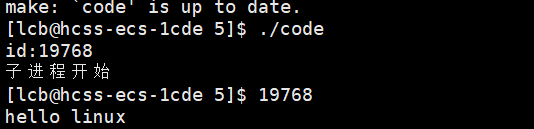
5.1 验证id不变与覆盖式写入
#include<stdio.h>
  2 #include <unistd.h>
  3 #include<sys/types.h>
  4 int main()
  5 {
  6   if(fork()==0)
  7   {
  8     printf("id:%d\n",getpid());
  9     printf("子进程开始\n");
 10     execl("./test","test",NULL);
 11     printf("子进程结束\n");
 12   }
 13   return 0;
 14 }
发现确实如此
5.2 替换函数
#include <unistd.h>
int execl(const char *path, const char *arg, ...);
int execlp(const char *file, const char *arg, ...);
int execle(const char *path, const char *arg, ...,char *const envp[]);
int execv(const char *path, char *const argv[]);
int execvp(const char *file, char *const argv[]);
int execve(const char *path, char *const argv[], char *const envp[]);
解释
函数解释• 这些函数如果调⽤成功则加载新的程序从启动代码开始执⾏,不再返回。• 如果调⽤出错则返回 -1• 所以 exec 函数只有出错的返回值⽽没有成功的返回值,所有不用对返回值进行判断,有就一定出错了
5.3 命名理解
| 函数名 | 参数格式 | 是否带路径 | 是否使用当前环境变量 | 典型使用场景 |
|---|---|---|---|---|
| execl | 列表 | 不是 | 是 | 明确知道程序路径,参数较少的场景 |
| execlp | 列表 | 是 | 是 | 执行系统命令(如ls),依赖环境变量找程序 |
| execele | 列表 | 不是 | 不是,须自己组装环境变量 | 需要自定义环境变量的场景 |
| execv | 数组 | 不是 | 是 | 参数较多(需存数组),知道程序路径的场景 |
| execvp | 数组 | 是 | 是 | 执行系统命令且参数较多的场景 |
| execve | 数组 | 不是 | 不是,须自己组装环境变量 | 参数较多且需要自定义环境变量的场景 |
5.4 替换函数使用
也可以替换自己写的程序,前面已经验证了
5.4.1 execl
int execl(const char *path, const char *arg, ...);
第一个参数写路径,第二个到第n-1个参数上面是参数包,你就是写你正常写的命令符,最后一个
如果不用
NULL结尾,execl会无限制地读取后续内存中的
#include<stdio.h>
  2 #include <unistd.h>
  3 #include<sys/types.h>
  4 int main()
  5 {
  6   if(fork()==0)
  7   {
  8     printf("id:%d\n",getpid());
  9     printf("子进程开始\n");
 10  //   execl("./test","test",NULL);
 11     printf("子进程结束\n");
 12   }
 13   execl("user/bin/ls","ls","-a","-l",NULL);
 14   return 0;
 15 }
~
5.4.2 execlp
#include<stdio.h>
  2 #include <unistd.h>
  3 #include<sys/types.h>
  4 int main()
  5 {
  6   if(fork()==0)
  7   {
  8     printf("id:%d\n",getpid());
  9     printf("子进程开始\n");
 10  //   execl("./test","test",NULL);
 11     printf("子进程结束\n");
 12   }
 13   execlp("ls","-a","-l",NULL);
 14   return 0;
 15 }
~
5.4.3 execv
#include<stdio.h>
  2 #include <unistd.h>
  3 #include<sys/types.h>
  4 int main()
  5 {
  6   if(fork()==0)
  7   {
  8     printf("id:%d\n",getpid());
  9     printf("子进程开始\n");
 10  //   execl("./test","test",NULL);
 11     printf("子进程结束\n");
 12   }
       char *const args[] ={"ls","-a","-l","NULL"};
 13   execv("user/bin/ls",args);
 14   return 0;
 15 }
~
5.4.4 execvp
#include<stdio.h>
  2 #include <unistd.h>
  3 #include<sys/types.h>
  4 int main()
  5 {
  6   if(fork()==0)
  7   {
  8     printf("id:%d\n",getpid());
  9     printf("子进程开始\n");
 10  //   execl("./test","test",NULL);
 11     printf("子进程结束\n");
 12   }
       char *const args[] ={"ls","-a","-l","NULL"};
 13   execv(args);
 14   return 0;
 15 }
~
5.4.5 execele
#include<stdio.h>
  2 #include <unistd.h>
  3 #include<sys/types.h>
  4 int main()
  5 {
  6   if(fork()==0)
  7   {
  8     printf("id:%d\n",getpid());
  9     printf("子进程开始\n");
 10  //   execl("./test","test",NULL);
 11     printf("子进程结束\n");
 12   }
        char *const env[]={(char*const) "MYLE=55555"
        NULL;
    }
 13   execl("user/bin/ls","ls","-a","-l",NULL,env);
 14   return 0;
 15 }
~
我们前面了解到OS会自带环境变量,但此外我们输出,只要我们定义的环境变量env
解决办法有两个,一不传,OS会自己调用自己的
二:使用putenv(新增环境变量)
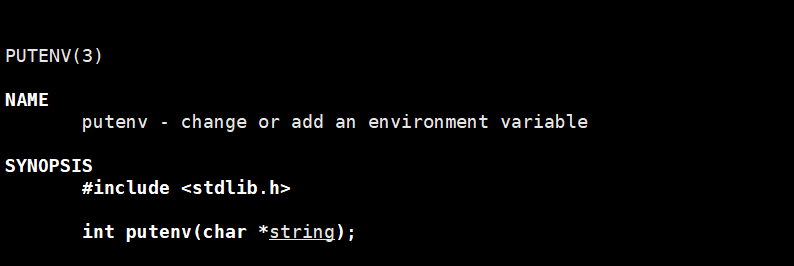
#include<stdio.h>
  2 #include <unistd.h>
  3 #include<sys/types.h>
  4 int main()
  5 {
  6   if(fork()==0)
  7   {
  8     printf("id:%d\n",getpid());
  9     printf("子进程开始\n");
 10  //   execl("./test","test",NULL);
 11     printf("子进程结束\n");
 12   }
        char *const env[]={(char*const) "MYLE=55555"
        NULL;
    }
 13   execl("user/bin/ls","ls","-a","-l",NULL);
     execl("user/bin/ls","ls","-a","-l",putenv(env));
 14   return 0;
 15 }
~
5.5 execve
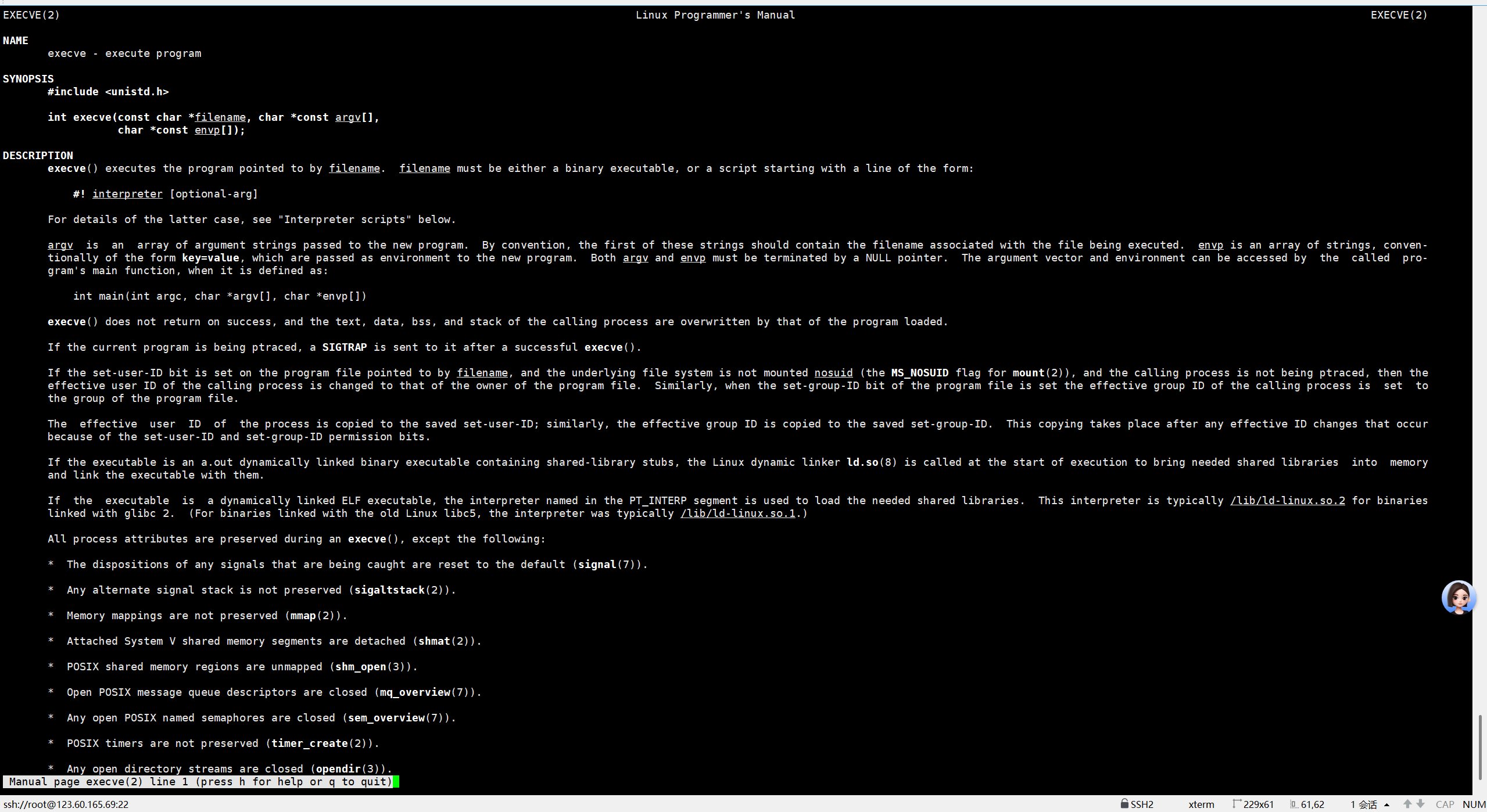
仔细阅读man手册发现,execve是系统调用的,上面的替换函数其实是库函数,最后都会系统调用execve,这也是为什么 有e时,不传环境变量,OS会使用自己默认环境变量的原因

有“AI”的1024 = 2048,欢迎大家加入2048 AI社区
更多推荐


 47
47 0
0- 0


 已为社区贡献5条内容

所有评论(0)