用Claude Code构建AI内容创作工作流:从灵感到发布的自动化实践
经过三个月的实践,我摸索出了一套基于Claude Code的AI辅助创作工作流。这篇文章将分享我的实战经验,包括代码实现、流程设计,以及如何让AI成为你的"创作搭档"而不是"替代者"。

📝 专注C/C++、Linux编程与人工智能领域,分享学习笔记!
🌟 感谢各位小伙伴的长期陪伴与支持,欢迎文末添加好友一起交流!

前言
作为一个技术内容创作者,我一直在思考一个问题:如何让AI工具真正融入创作流程,而不是简单的内容生成器?
经过三个月的实践,我摸索出了一套基于Claude Code的AI辅助创作工作流。这篇文章将分享我的实战经验,包括代码实现、流程设计,以及如何让AI成为你的"创作搭档"而不是"替代者"。
一、为什么选择Claude Code?
市面上的AI工具很多,但我最终选择Claude Code作为核心工具,原因有三:
| 对比维度 | ChatGPT | Claude Code | 本地模型 |
|---|---|---|---|
| 代码理解 | ⭐⭐⭐⭐ | ⭐⭐⭐⭐⭐ | ⭐⭐⭐ |
| 上下文记忆 | ⭐⭐⭐ | ⭐⭐⭐⭐⭐ | ⭐⭐ |
| 本地文件操作 | ❌ | ✅ | ✅ |
| CLI集成 | ⭐⭐ | ⭐⭐⭐⭐⭐ | ⭐⭐⭐ |
Claude Code最大的优势在于它能真正"理解"你的项目,而不是孤立地回答问题。它可以读取代码、分析结构、理解上下文,这才是"创作搭档"该有的样子。
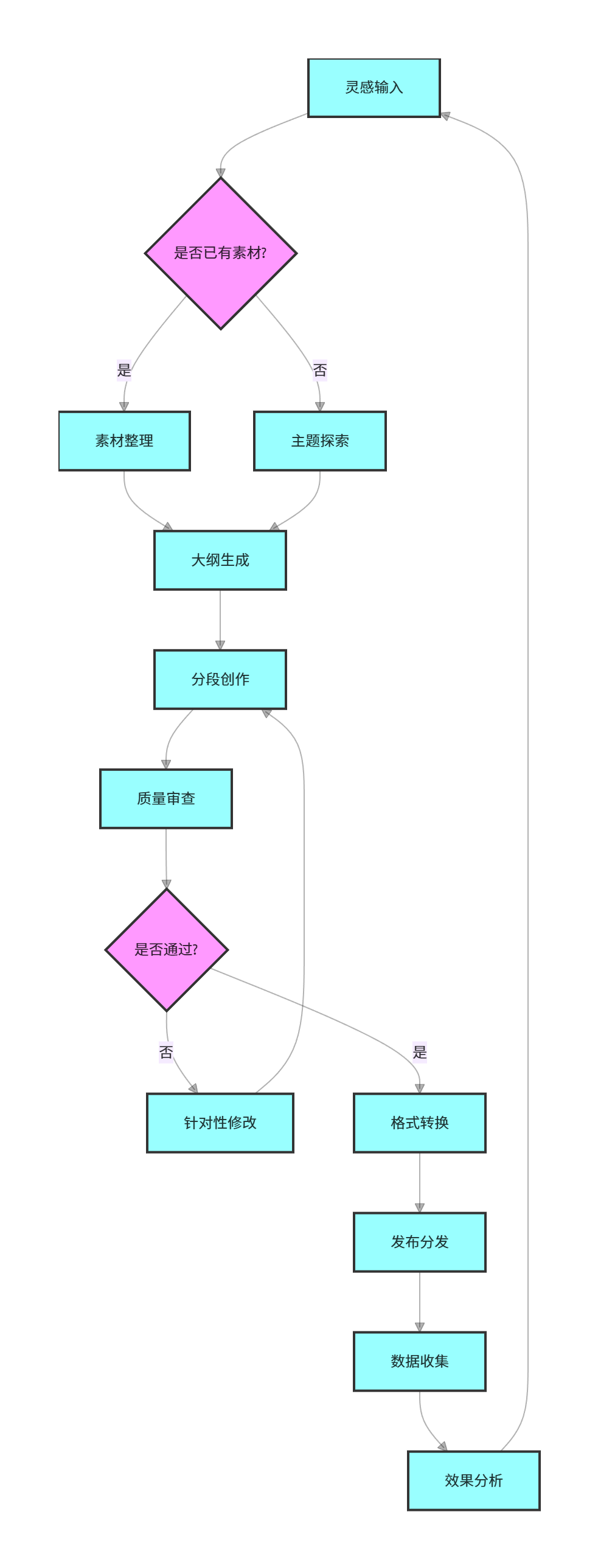
二、核心工作流设计
2.1 整体流程图
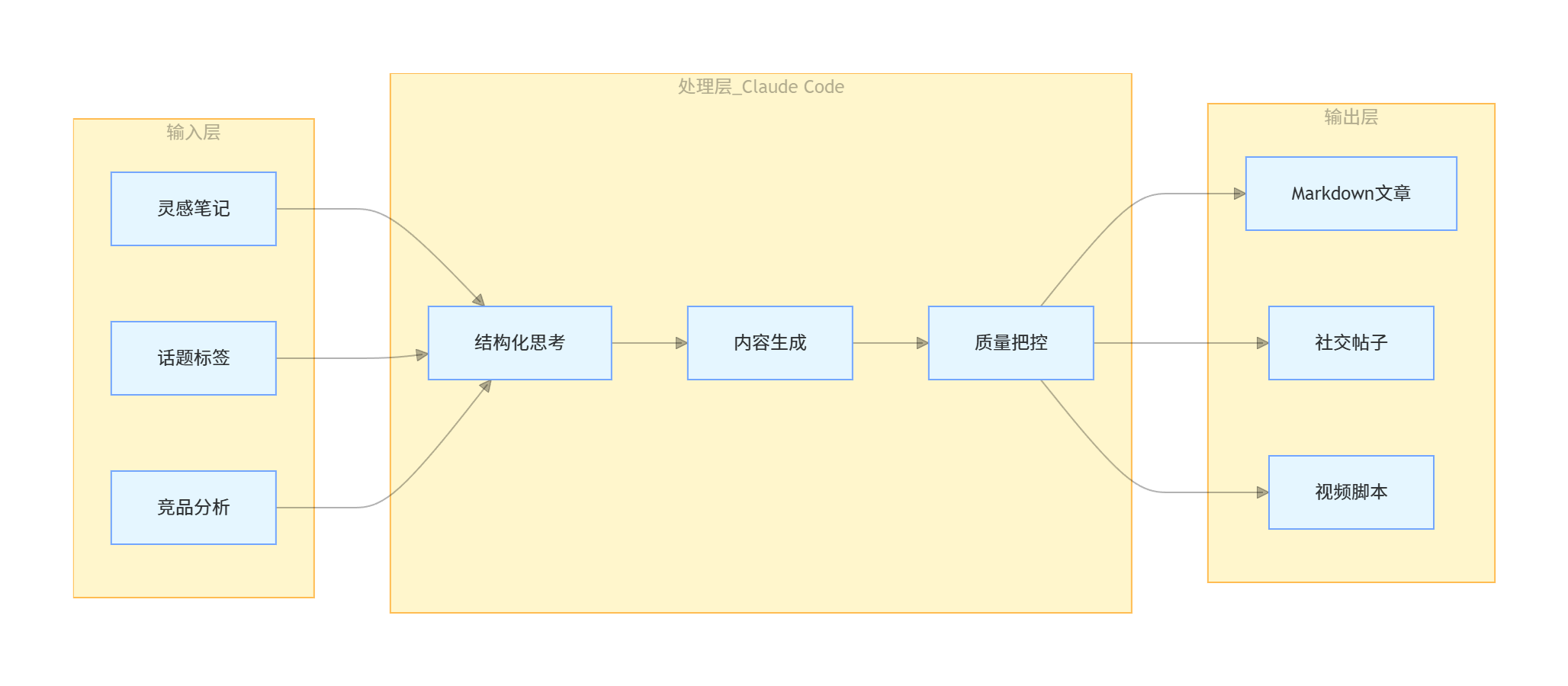
2.2 核心模块架构
三、实战代码实现
3.1 灵感捕捉器
第一个痛点是:灵感来得快去得也快。我写了一个简单的灵感捕捉脚本:
# capture_inspiration.py
import json
from datetime import datetime
from pathlib import Path

class InspirationCapture:
    """灵感捕捉工具 - 记录稍纵即逝的想法"""

    def __init__(self, storage_path="inspirations.json"):
        self.storage_path = Path(storage_path)
        self._init_storage()

    def _init_storage(self):
        """初始化存储文件"""
        if not self.storage_path.exists():
            self.storage_path.write_text(json.dumps([]))

    def capture(self, idea: str, tags: list = None, context: str = ""):
        """
        捕捉灵感

        Args:
            idea: 灵感内容
            tags: 标签列表
            context: 背景/上下文
        """
        record = {
            "id": self._generate_id(),
            "timestamp": datetime.now().isoformat(),
            "idea": idea,
            "tags": tags or [],
            "context": context,
            "status": "pending"  # pending, developing, published
        }

        self._append_record(record)
        return record["id"]

    def _generate_id(self):
        """生成唯一ID"""
        return datetime.now().strftime("%Y%m%d%H%M%S")

    def _append_record(self, record):
        """追加记录到文件"""
        data = json.loads(self.storage_path.read_text())
        data.append(record)
        self.storage_path.write_text(json.dumps(data, indent=2, ensure_ascii=False))

    def get_pending_ideas(self):
        """获取待处理的灵感"""
        data = json.loads(self.storage_path.read_text())
        return [item for item in data if item["status"] == "pending"]


# 使用示例
if __name__ == "__main__":
    capturer = InspirationCapture()

    # 快速记录一个灵感
    capturer.capture(
        idea="写一篇关于Claude Code工作流的文章",
        tags=["AI", "Claude", "工作流"],
        context="最近很多人问我如何高效使用AI工具"
    )
3.2 与Claude Code集成
有了灵感库,接下来是让Claude Code帮我们扩展成大纲:
# 让Claude Code读取灵感并生成大纲
claude-code "请读取inspirations.json中最新的一条pending灵感,基于它生成一篇技术文章的大纲。要求:
1. 文章类型:教程/实战经验
2. 目标读者:有一定基础的开发者
3. 大纲结构:包含引言、核心内容(3-5个小节)、代码示例、总结
4. 输出格式:Markdown"
3.3 内容生成工作流
这是核心部分——让Claude Code分段生成内容,同时保持质量:
# content_workflow.py
import subprocess
import time
from pathlib import Path

class ContentWorkflow:
    """AI驱动的内容创作工作流"""

    def __init__(self, claude_code_path="claude-code"):
        self.claude_path = claude_code_path
        self.work_dir = Path("articles")
        self.work_dir.mkdir(exist_ok=True)

    def generate_outline(self, inspiration_data):
        """
        生成文章大纲

        Args:
            inspiration_data: 灵感数据字典
        """
        prompt = f"""
        基于以下灵感生成文章大纲:

        灵感内容:{inspiration_data['idea']}
        标签:{', '.join(inspiration_data['tags'])}
        背景:{inspiration_data.get('context', '')}

        要求:
        1. 大纲要具体到每个小节的标题
        2. 标注哪些部分需要代码示例
        3. 估算每个小节的字数
        4. 输出为Markdown格式
        """

        return self._call_claude(prompt)

    def generate_section(self, outline, section_title):
        """
        生成指定小节的内容

        Args:
            outline: 完整大纲
            section_title: 要生成的小节标题
        """
        prompt = f"""
        你正在写一篇文章,大纲如下:

        {outline}

        现在请撰写"{section_title}"这一小节的完整内容。
        要求:
        1. 内容要充实,有具体例子
        2. 如果涉及代码,请提供完整可运行的代码
        3. 保持技术专业性,但要易懂
        4. 字数符合大纲估算
        """

        return self._call_claude(prompt)

    def _call_claude(self, prompt):
        """
        调用Claude Code

        这是一个简化示例,实际中你可以使用Claude Code的API或CLI
        """
        # 实际项目中,这里应该调用Claude Code的接口
        # 这里用伪代码示意
        result = subprocess.run(
            [self.claude_path, prompt],
            capture_output=True,
            text=True
        )
        return result.stdout

    def review_content(self, content):
        """
        内容审查 - 让AI帮忙检查质量

        Args:
            content: 待审查的内容
        """
        review_prompt = f"""
        请从以下维度审查这篇文章,给出改进建议:

        {content}

        审查维度:
        1. 逻辑是否清晰
        2. 技术准确性
        3. 可读性
        4. 是否有遗漏的关键点
        5. 标题是否吸引人

        请以结构化的方式输出问题和建议。
        """

        return self._call_claude(review_prompt)

    def assemble_article(self, sections_data):
        """
        组装完整文章

        Args:
            sections_data: 各小节内容字典
        """
        article = []
        article.append("# " + sections_data.get("title", ""))
        article.append("\n")

        for section, content in sections_data.get("sections", {}).items():
            article.append(f"## {section}\n")
            article.append(content)
            article.append("\n\n")

        return "".join(article)
3.4 质量审查自动化
内容生成后,质量把关很重要:
# quality_checker.py
import re
from typing import List, Dict

class ContentQualityChecker:
    """内容质量检查器"""

    def __init__(self):
        self.checks = [
            self._check_word_count,
            self._check_code_blocks,
            self._check_readability,
            self._check_structure
        ]

    def check(self, content: str, requirements: Dict) -> Dict:
        """
        执行所有检查

        Args:
            content: 待检查内容
            requirements: 要求字典(如最小字数等)
        """
        results = {
            "passed": True,
            "issues": [],
            "warnings": []
        }

        for check_func in self.checks:
            result = check_func(content, requirements)
            if not result["passed"]:
                results["passed"] = False
                results["issues"].append(result["message"])
            elif result.get("warning"):
                results["warnings"].append(result["warning"])

        return results

    def _check_word_count(self, content: str, requirements: Dict) -> Dict:
        """检查字数"""
        word_count = len(content)
        min_words = requirements.get("min_words", 1000)

        if word_count < min_words:
            return {
                "passed": False,
                "message": f"字数不足:当前{word_count}字,要求至少{min_words}字"
            }

        return {"passed": True}

    def _check_code_blocks(self, content: str, requirements: Dict) -> Dict:
        """检查代码块"""
        code_blocks = re.findall(r'```[\s\S]*?```', content)
        required_blocks = requirements.get("min_code_blocks", 1)

        if len(code_blocks) < required_blocks:
            return {
                "passed": False,
                "message": f"代码块不足:当前{len(code_blocks)}个,要求至少{required_blocks}个"
            }

        return {"passed": True}

    def _check_readability(self, content: str, requirements: Dict) -> Dict:
        """检查可读性"""
        # 检查段落长度
        paragraphs = content.split('\n\n')
        long_paragraphs = [p for p in paragraphs if len(p) > 500]

        if long_paragraphs:
            return {
                "passed": True,
                "warning": f"发现{len(long_paragraphs)}个超长段落,建议拆分以提高可读性"
            }

        return {"passed": True}

    def _check_structure(self, content: str, requirements: Dict) -> Dict:
        """检查结构完整性"""
        required_sections = requirements.get("required_sections", [])

        missing = []
        for section in required_sections:
            if section not in content:
                missing.append(section)

        if missing:
            return {
                "passed": False,
                "message": f"缺少必要章节:{', '.join(missing)}"
            }

        return {"passed": True}
四、完整工作流示例
把上面的模块整合起来:
# main_workflow.py
from capture_inspiration import InspirationCapture
from content_workflow import ContentWorkflow
from quality_checker import ContentQualityChecker

def main():
    # 初始化各模块
    capturer = InspirationCapture()
    workflow = ContentWorkflow()
    checker = ContentQualityChecker()

    # 获取待处理的灵感
    pending_ideas = capturer.get_pending_ideas()

    if not pending_ideas:
        print("没有待处理的灵感")
        return

    # 选择最新的一条
    idea = pending_ideas[0]
    print(f"正在处理灵感: {idea['idea']}")

    # 步骤1: 生成大纲
    print("生成大纲...")
    outline = workflow.generate_outline(idea)
    print(outline)

    # 步骤2: 分段生成内容
    print("生成内容...")
    sections = {}
    # 这里简化处理,实际应该解析outline中的各个小节
    section_titles = ["引言", "核心实现", "代码示例", "总结"]

    for title in section_titles:
        print(f"  正在生成: {title}")
        content = workflow.generate_section(outline, title)
        sections[title] = content
        time.sleep(1)  # 避免请求过快

    # 步骤3: 质量检查
    print("质量检查...")
    full_content = workflow.assemble_article({
        "title": idea['idea'],
        "sections": sections
    })

    quality_result = checker.check(full_content, {
        "min_words": 1500,
        "min_code_blocks": 3,
        "required_sections": ["引言", "核心实现", "总结"]
    })

    if quality_result["passed"]:
        print("质量检查通过!")
    else:
        print("质量检查未通过:")
        for issue in quality_result["issues"]:
            print(f"  - {issue}")

    # 步骤4: AI审查
    print("AI审查中...")
    review = workflow.review_content(full_content)
    print(review)

    # 步骤5: 保存文章
    output_path = f"articles/{idea['id']}.md"
    with open(output_path, 'w', encoding='utf-8') as f:
        f.write(full_content)

    print(f"文章已保存至: {output_path}")

if __name__ == "__main__":
    main()
五、让AI工作起来还不够,需要让它"为你工作"
工具再好,用的人不对,效果也会大打折扣。我发现很多开发者用AI有一个误区:把AI当工具用,而不是当搭档用。
什么区别?
- 工具模式:你需要什么,问什么,AI答什么,完事
- 搭档模式:你告诉AI目标和背景,让它参与决策,共同完成项目
我举个例子:
❌ 工具模式:
"帮我写一个Python函数读取JSON文件"
✅ 搭档模式:
"我正在构建一个内容创作系统,需要读取灵感数据。
考虑到性能和可扩展性,你觉得用什么存储方式比较好?
如果用JSON,怎么处理并发写入的问题?"
看出区别了吗?第二种方式,AI不仅给你代码,还会帮你思考架构,指出你没想到的问题。
六、创作不是终点,分享才是
写完文章只是完成了一半,另一半是:让更多人看到你的内容。
这也是我为什么喜欢在脉脉这样的技术社区分享的原因。这里有真实的开发者,有高质量的讨论,你的内容能真正触达到需要的人。
最近我发现脉脉在搞一个挺有意思的活动——【AI创作者xAMA活动】,刚好适合像我这样喜欢分享技术内容的人:
- 发帖、发评论、关注,就能赚积分
- 积分可以兑换现金红包、商单激励、视频会员
- 最重要的是:活动长期有效,不是那种赶时间的热闹

说实话,这种活动挺打动我的。不是因为它能赚多少钱,而是它在鼓励持续创作,而不是一次性"薅羊毛"。好的创作者生态,应该让持续输出的人得到回报。
七、总结
AI时代的创作,核心不是"让AI替你写",而是"让AI放大你的能力":
| 能力类型 | AI擅长 | 人类必须做 |
|---|---|---|
| 信息收集 | ✅ 快速整合 | ❌ 确定方向 |
| 结构梳理 | ✅ 逻辑框架 | ❌ 价值判断 |
| 内容生成 | ✅ 快速产出 | ❌ 注入个性 |
| 质量把控 | ✅ 基础检查 | ❌ 最终把关 |
| 读者连接 | ❌ | ✅ 情感共鸣 |
最好的工作流,是让AI做它擅长的事,让你做只有你能做的事。
希望这篇文章能给你一些启发。如果你也在构建自己的AI创作工作流,欢迎在评论区分享你的经验——好的想法,值得被更多人看到。
参考资源
- 文章首发于脉脉,欢迎关注我的专栏获取更多AI工具实战内容
- 相关活动:如果你也在用AI辅助创作,不妨参与一下AI创作者xAMA活动,边分享边赚点小奖励~
✍️ 坚持用 清晰易懂的图解 + 可落地的代码,让每个知识点都 简单直观!
💡 座右铭:“道路是曲折的,前途是光明的!”


有“AI”的1024 = 2048,欢迎大家加入2048 AI社区
更多推荐
 63
63 0
0- 0


 已为社区贡献15条内容

所有评论(0)