Flutter for OpenHarmony从基础到惊艳:深度解析新版 AI 聊天应用的三大跃迁
Flutter for OpenHarmony从基础到惊艳:深度解析新版 AI 聊天应用的三大跃迁
Flutter for OpenHarmony从基础到惊艳:深度解析新版 AI 聊天应用的三大跃迁
在上一篇《打造你的第一个 Flutter
聊天机器人》中,我们实现了一个功能完整但界面朴素的聊天原型。而今天展示的全新升级版,则是一次从“能用”到“令人惊艳”的质变——它不仅保留了核心交互逻辑,更在视觉设计、用户体验与情感化细节上实现了三大维度的全面跃迁。本文将带你逐层拆解这场华丽进化。
完整效果展示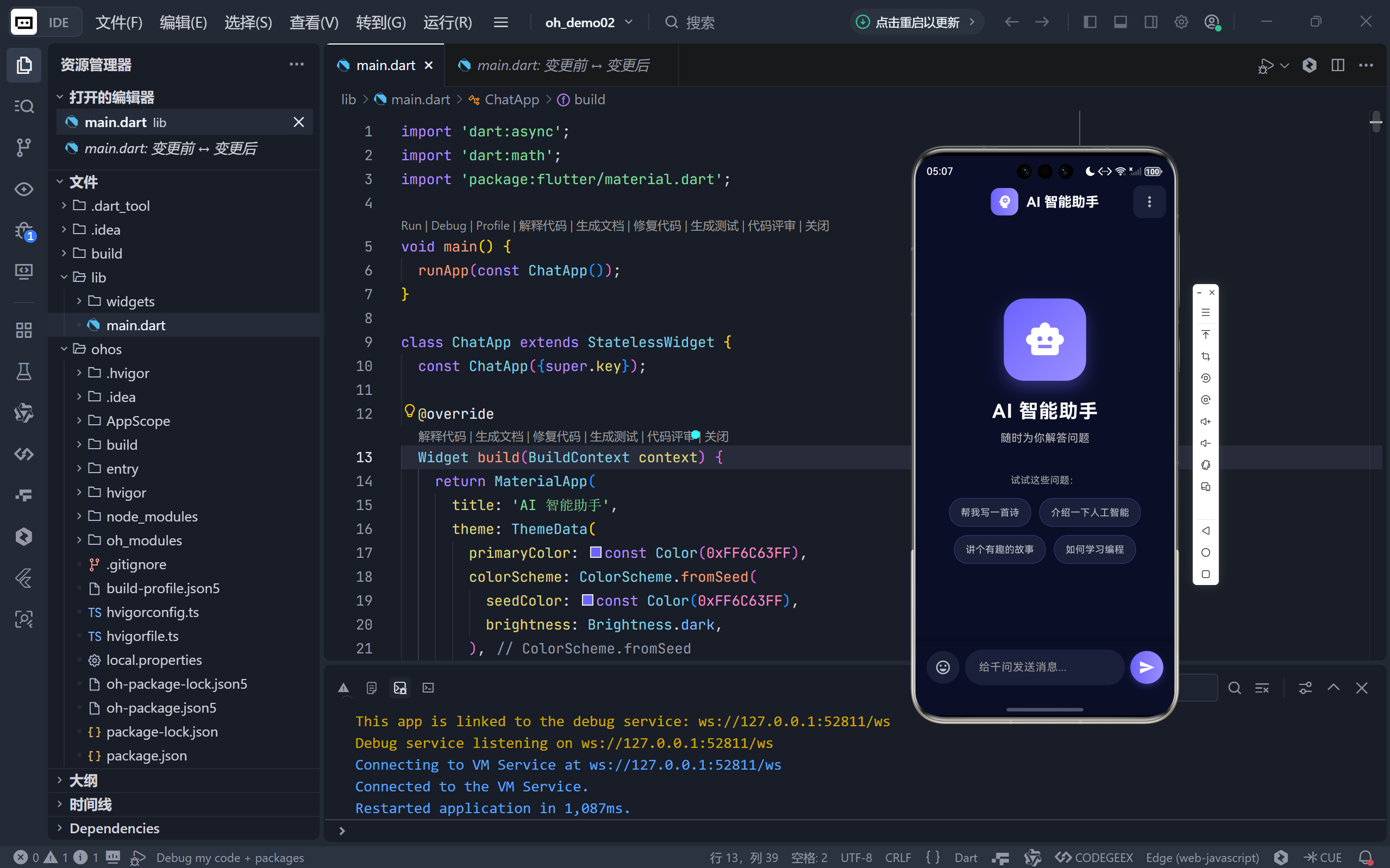
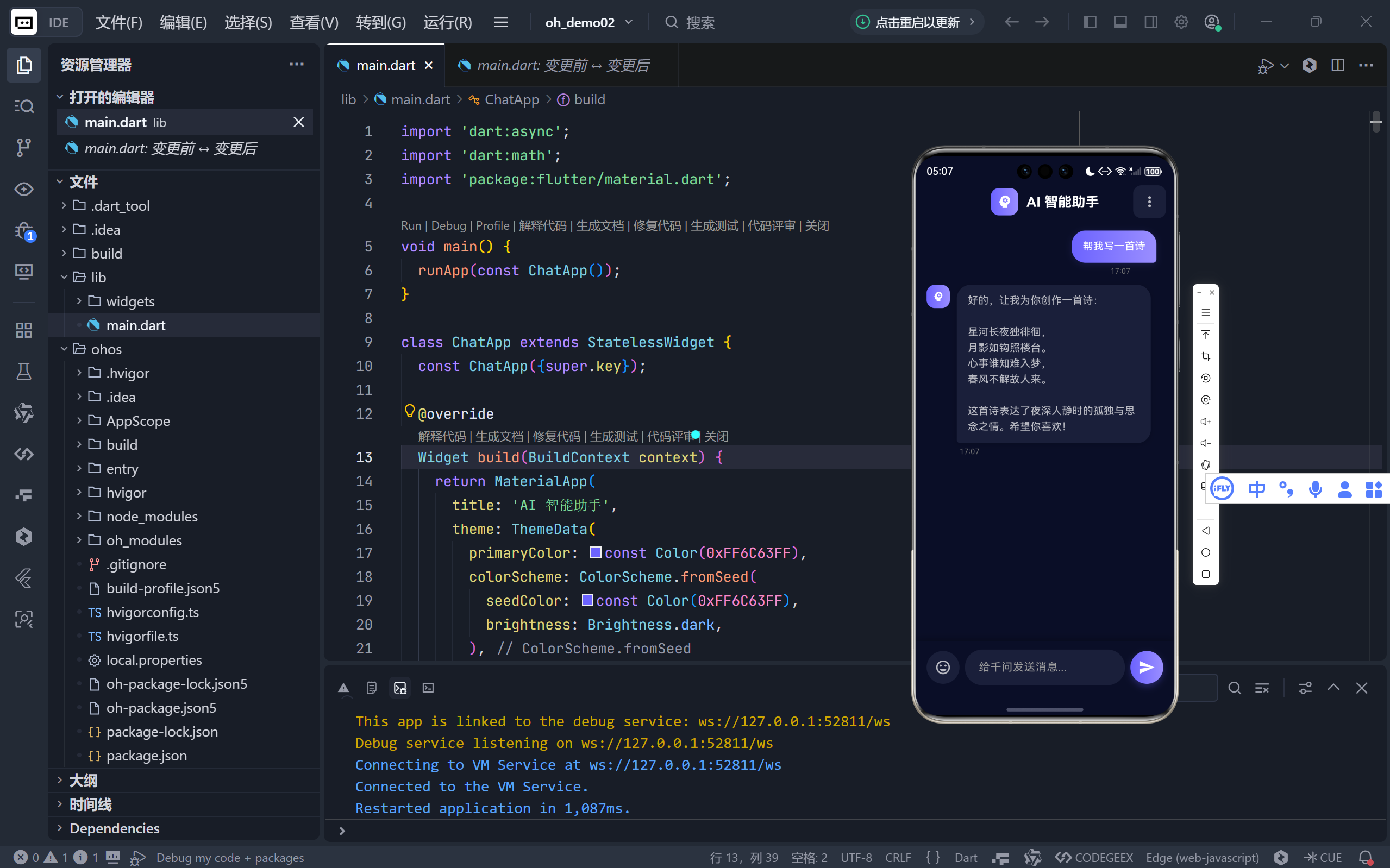
一、主页革命:从空白列表到沉浸式欢迎中心
1. 告别冷启动:精心设计的欢迎屏
旧版应用打开即为空白聊天区,用户需自行输入首条消息。新版则引入了完整的欢迎界面(_buildWelcomeScreen):
- 中央 AI 头像:120×120 的渐变圆形容器 +
Icons.smart_toy图标,配合深色背景下的柔和阴影,营造出“智能体正在待命”的仪式感; - 引导性副标题:“随时为你解答问题” —— 简洁传递产品价值;
- 快捷提示词卡片:4 个高频场景(写诗、AI 介绍、故事、编程学习)以可点击标签形式呈现,大幅降低用户首次交互门槛。
💡 设计心理学:用户面对空白输入框常感迷茫,而预设问题如同“对话脚手架”,引导用户快速进入状态。
2. 动态切换机制
通过条件判断实现智能视图切换:
Expanded(
  child: _messages.isEmpty
      ? _buildWelcomeScreen()
      : ListView(...),
)
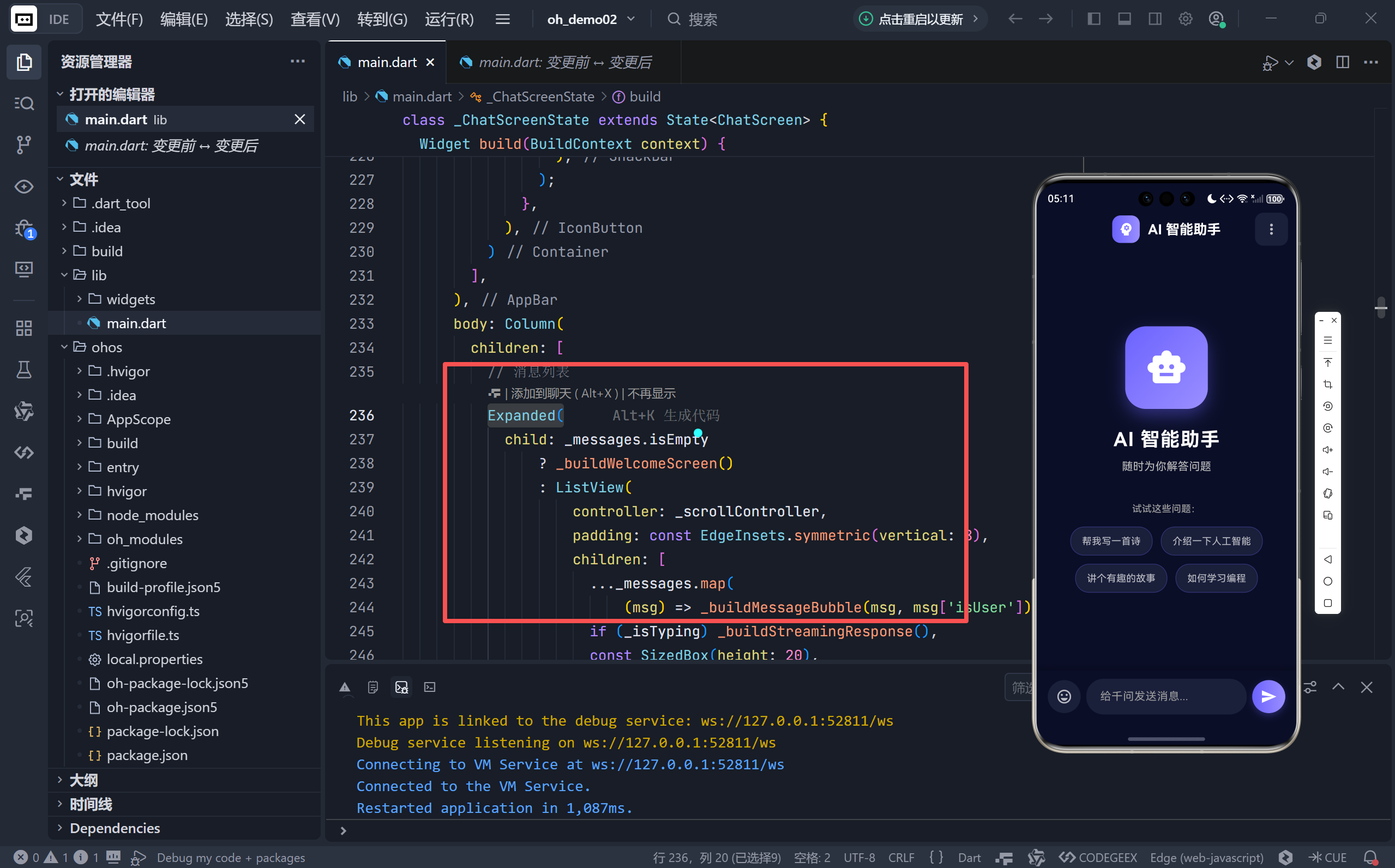
- 首次打开 → 显示欢迎屏;
- 发送任意消息后 → 自动切换为聊天列表;
- 无冗余状态管理,代码简洁高效。
二、聊天体验升级:流式输出与时间戳的沉浸感
1. 模拟真实打字:流式响应(Streaming Response)
这是本次最核心的技术亮点!旧版一次性显示完整回复,新版则通过 _startStreamingResponse 实现逐字符输出:
Timer.periodic(Duration(milliseconds: 30), (timer) {
  setState(() { _currentStreamingText = fullText.substring(0, currentIndex + 1); });
  currentIndex++;
});
- 每 30ms 输出一个字符,模拟人类打字速度;
- 用户可实时看到 AI “思考并书写” 的过程,显著提升对话真实感与期待感。
2. 动态闪烁光标:细节中的生命力
在流式输出时,气泡末尾会显示一个自动闪烁的紫色光标:
TweenAnimationBuilder<double>(
  tween: Tween(begin: 0.0, end: 1.0),
  duration: Duration(milliseconds: 500),
  builder: (context, value, child) => Opacity(opacity: value, ...),
)
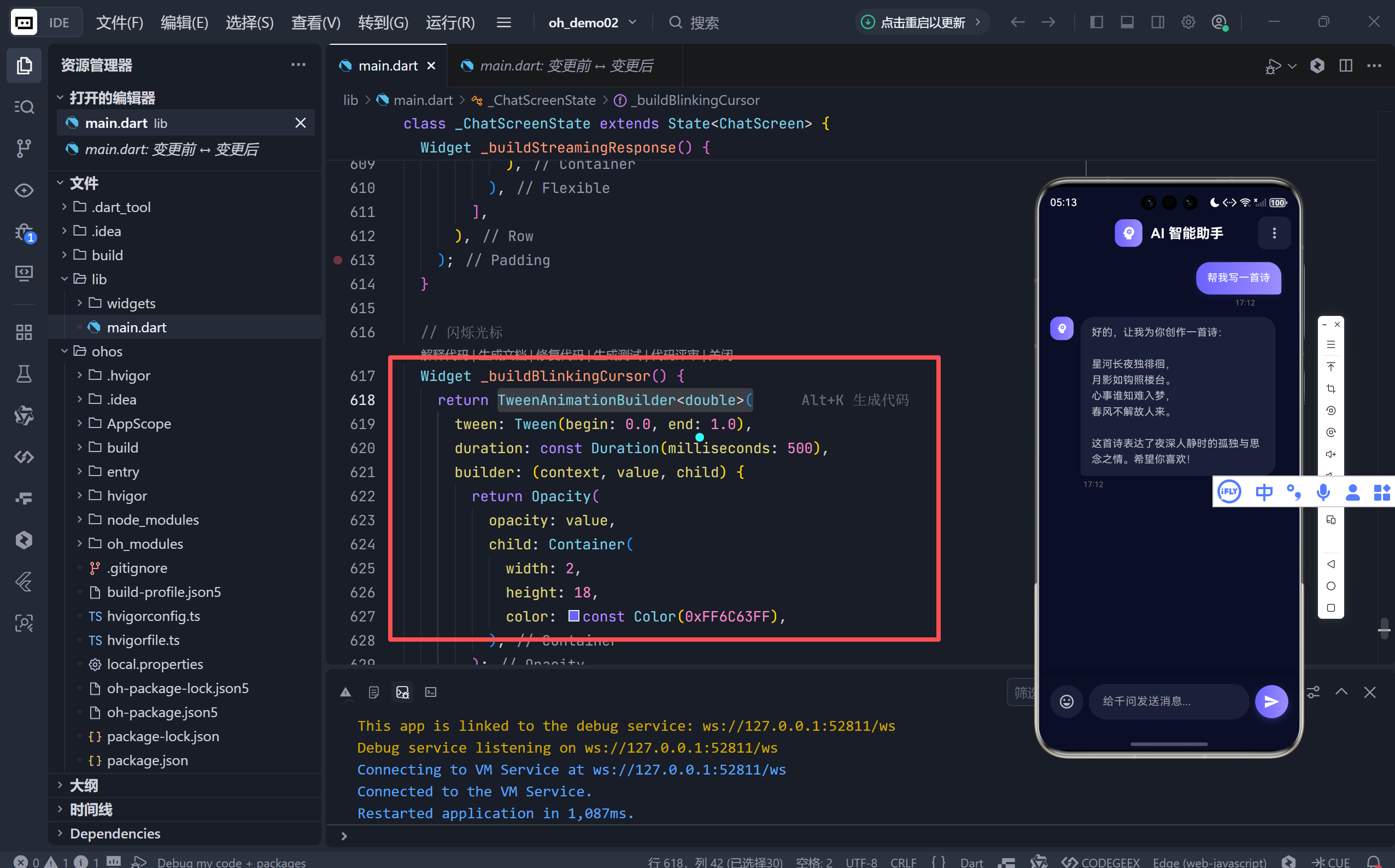
- 光标颜色
#6C63FF与主题色一致;- 500ms 周期淡入淡出,模仿终端输入效果;
- 微小动画赋予 AI “生命感”,暗示“我还在输入”。
3. 精准时间戳:专业级对话记录
每条消息下方新增发送时间:
final timeStr = '${timestamp.hour}:${timestamp.minute}';
Text(timeStr, style: TextStyle(color: Colors.grey[600], fontSize: 11));
- 时间显示在气泡外侧,避免干扰正文;
- 用户消息靠右对齐时间,AI 消息靠左,布局逻辑严谨;
- 为未来实现“消息按天分组”奠定基础。
三、视觉语言重塑:深空紫调的专业美学
1. 全新色彩系统
| 元素 | 旧版 | 新版 |
|---|---|---|
| 主题色 | Colors.blue |
#6C63FF(科技紫) |
| 背景色 | #121212 |
#0A0E27(深空蓝黑) |
| 卡片色 | 无 | #1A1F3A(带蓝调灰) |
#6C63FF是 Figma 社区流行的“赛博紫”,兼具科技感与亲和力;#0A0E27比纯黑更柔和,减少 OLED 屏幕的视觉疲劳;- 整体配色灵感源自 VS Code 深色主题,契合开发者审美。
2. 消息气泡全面进化
- 用户气泡:采用
LinearGradient([#6C63FF, #9B8FFF])渐变填充,取代单一蓝色;- AI 气泡:使用
#1A1F3A卡片色 + 微阴影,质感如磨砂玻璃;- 圆角优化:从
18提升至20,更符合 Material 3 圆润趋势;- 头像统一:双方均使用
Icons.psychology(大脑图标),强化“智能助手”定位。
3. 输入区域精致打磨
- 聚焦边框:获得焦点时显示
2px紫色边框,反馈清晰;- 发送按钮:改为渐变背景 + 阴影,点击区域扩大为
InkWell;- 表情按钮占位:左侧预留
emoji_emotions_outlined按钮,为未来扩展留接口;- 安全区域适配:包裹
SafeArea,确保 iPhone 刘海屏下正常显示。
四、内容深度增强:千问风格的专业回复
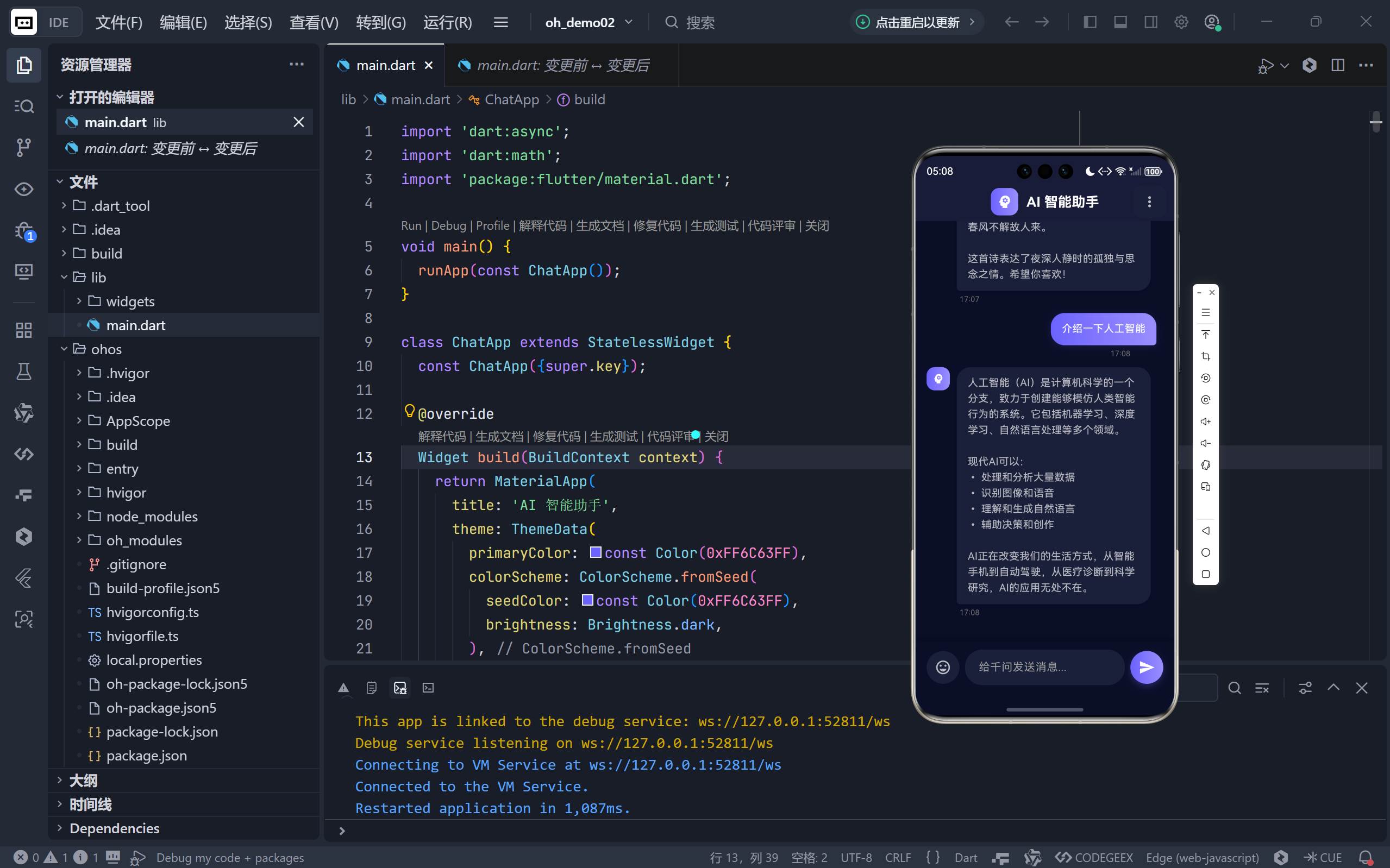
新版 _getAIResponse 返回的内容长度与结构复杂度大幅提升:
- 多段落结构:使用
\n\n分隔逻辑段落(如诗歌、故事、学习建议);- 列表化表达:关键信息以
•或1. 2. 3.列出,提升可读性;- 场景化结尾:每条回复均以鼓励性语句收尾(“希望你喜欢!”、“加油!”);
- 上下文感知:对“如何…”类问题提供方法论框架,而非泛泛而谈。
示例:当用户问“如何学习编程”,AI 不仅列出步骤,还推荐具体平台(LeetCode、GitHub),实用性远超普通聊天机器人。
五、工程细节:健壮性与性能优化
内存安全 所有异步操作前检查
if (!mounted) return;,避免setState在组件销毁后调用。滚动平滑
_scrollToBottom使用Future.delayed+animateTo,确保新消息出现后才滚动,杜绝跳闪。资源释放
dispose()中清理Timer、ScrollController、TextEditingController,防止内存泄漏。文本处理 输入时自动
trim()并过滤空消息,提升健壮性。
结语:小应用,大思考
这个看似简单的聊天应用,实则凝聚了现代 UI/UX 设计的诸多精髓:
- 情感化设计:闪烁光标、流式输出、欢迎引导 —— 让机器有了温度;
- 专业级视觉:深空紫配色、精准间距、光影层次 —— 传递品质感;
- 用户为中心:降低首次使用门槛、提供结构化信息、优化交互反馈 —— 尊重用户时间。
🌐 加入社区
欢迎加入 开源鸿蒙跨平台开发者社区,获取最新资源与技术支持:
👉 开源鸿蒙跨平台开发者社区
完整代码展示
import 'dart:async';
import 'dart:math';
import 'package:flutter/material.dart';
void main() {
runApp(const ChatApp());
}
class ChatApp extends StatelessWidget {
const ChatApp({super.key});
@override
Widget build(BuildContext context) {
return MaterialApp(
title: 'AI 智能助手',
theme: ThemeData(
primaryColor: const Color(0xFF6C63FF),
colorScheme: ColorScheme.fromSeed(
seedColor: const Color(0xFF6C63FF),
brightness: Brightness.dark,
),
useMaterial3: true,
scaffoldBackgroundColor: const Color(0xFF0A0E27),
cardColor: const Color(0xFF1A1F3A),
),
home: const ChatScreen(),
debugShowCheckedModeBanner: false,
);
}
}
class ChatScreen extends StatefulWidget {
const ChatScreen({super.key});
@override
State<ChatScreen> createState() => _ChatScreenState();
}
class _ChatScreenState extends State<ChatScreen> {
// 消息列表 - 支持流式输出
final List<Map<String, dynamic>> _messages = [];
final TextEditingController _controller = TextEditingController();
bool _isTyping = false; // AI 是否正在思考
Timer? _responseTimer; // 用于定时器管理
final ScrollController _scrollController = ScrollController();
String _currentStreamingText = ''; // 当前流式输出的文本
// 欢迎提示词
final List<String> _welcomePrompts = [
'帮我写一首诗',
'介绍一下人工智能',
'讲个有趣的故事',
'如何学习编程',
];
// 发送消息
void _sendMessage() {
if (_controller.text.trim().isEmpty || _isTyping) return;
final String text = _controller.text.trim();
_controller.clear();
// 添加用户消息
setState(() {
_messages.add({
'text': text,
'isUser': true,
'timestamp': DateTime.now(),
});
_isTyping = true;
_currentStreamingText = '';
});
// 滚动到底部
_scrollToBottom();
// 模拟 AI 思考后开始流式输出
_responseTimer = Timer(const Duration(milliseconds: 800), () {
if (!mounted) return;
final String fullResponse = _getAIResponse(text);
_startStreamingResponse(fullResponse);
});
}
// 流式输出响应(模拟千问的打字效果)
void _startStreamingResponse(String fullText) {
int currentIndex = 0;
Timer.periodic(const Duration(milliseconds: 30), (timer) {
if (!mounted) {
timer.cancel();
return;
}
if (currentIndex >= fullText.length) {
timer.cancel();
setState(() {
_isTyping = false;
_messages.add({
'text': fullText,
'isUser': false,
'timestamp': DateTime.now(),
});
_currentStreamingText = '';
});
return;
}
setState(() {
_currentStreamingText = fullText.substring(0, currentIndex + 1);
});
// 实时滚动到底部
_scrollToBottom();
currentIndex++;
});
}
// 滚动到底部
void _scrollToBottom() {
Future.delayed(const Duration(milliseconds: 100), () {
if (_scrollController.hasClients) {
_scrollController.animateTo(
_scrollController.position.maxScrollExtent,
duration: const Duration(milliseconds: 300),
curve: Curves.easeOut,
);
}
});
}
// 发送欢迎提示词
void _sendWelcomePrompt(String prompt) {
_controller.text = prompt;
_sendMessage();
}
// AI 回复逻辑 (模拟千问风格)
String _getAIResponse(String input) {
input = input.toLowerCase();
if (input.contains('你叫什么') || input.contains('名字')) {
return '我是千问,由阿里云开发的大语言模型。我致力于为用户提供智能、高效的对话体验,能够回答问题、创作内容、分析信息等。很高兴认识你!';
} else if (input.contains('你好') || input.contains('hello')) {
return '你好!很高兴见到你。我是千问,一个由阿里云开发的人工智能助手。我可以帮助你解答问题、提供建议、辅助创作等。今天有什么我可以帮你的吗?';
} else if (input.contains('再见') || input.contains('拜拜')) {
return '再见!很高兴今天能够帮助你。如果以后有任何问题或需要协助,随时都可以来找我。祝你一切顺利,生活愉快!';
} else if (input.contains('天气')) {
return '抱歉,我无法获取实时的天气信息。不过,我可以告诉你一些关于天气的知识,或者你可以查看手机上的天气预报应用来获取准确的天气情况。需要我为你做些其他事情吗?';
} else if (input.contains('笑话')) {
return '好吧,来个程序员笑话:有一天,0 对 8 说:"你的腰带可真紧啊!" 8 对 0 说:"你看看你自己,胖得都变形了!" 😄';
} else if (input.contains('诗')) {
return '好的,让我为你创作一首诗:\n\n星河长夜独徘徊,\n月影如钩照楼台。\n心事谁知难入梦,\n春风不解故人来。\n\n这首诗表达了夜深人静时的孤独与思念之情。希望你喜欢!';
} else if (input.contains('人工智能') || input.contains('ai')) {
return '人工智能(AI)是计算机科学的一个分支,致力于创建能够模仿人类智能行为的系统。它包括机器学习、深度学习、自然语言处理等多个领域。\n\n现代AI可以:\n• 处理和分析大量数据\n• 识别图像和语音\n• 理解和生成自然语言\n• 辅助决策和创作\n\nAI正在改变我们的生活方式,从智能手机到自动驾驶,从医疗诊断到科学研究,AI的应用无处不在。';
} else if (input.contains('故事')) {
return '好的,让我给你讲个有趣的故事:\n\n从前有个程序员,他每天都在写代码。有一天,他的代码出了bug,他找了三天三夜都没找到。\n\n最后,他绝望地向同事求助。同事看了五分钟后,指着屏幕说:"你这里少了一个分号。"\n\n程序员恍然大悟,从那以后,他学会了——多喝咖啡,少写bug!\n\n这个小故事告诉我们:有时候,答案就在眼前,只是我们当局者迷。';
} else if (input.contains('编程') || input.contains('代码')) {
return '学习编程是一个很好的选择!以下是一些建议:\n\n1. 选择一门语言\n • Python:适合初学者,语法简洁\n • JavaScript:Web开发必备\n • Java/Go:后端开发\n\n2. 学习路径\n • 基础语法\n • 数据结构与算法\n • 项目实战\n • 持续练习\n\n3. 推荐资源\n • 在线课程:Coursera、MOOC\n • 练习平台:LeetCode、牛客网\n • 开源项目:GitHub\n\n记住,编程需要耐心和持续的实践。遇到问题不要放弃,坚持下去就一定会有收获!加油!';
} else if (input.contains('如何') ||
input.contains('怎么') ||
input.contains('怎么做')) {
return '这是一个很好的问题。让我为你分析一下:\n\n首先,我们需要明确问题的具体目标和约束条件。然后,可以采取以下步骤:\n\n1. 明确需求:深入了解你想要达成的具体目标\n2. 分析现状:评估当前的资源和条件\n3. 制定计划:分解任务,制定可执行的步骤\n4. 执行行动:按计划逐步实施\n5. 评估反馈:根据结果调整和优化\n\n如果你能提供更多细节,我可以给出更具体的建议。';
} else {
// 随机通用回复 - 更丰富多样
final List<String> generics = [
'这是个很好的问题!从多个角度来看,我认为关键在于理解问题的本质。你提到的话题很有深度,让我来详细解释一下...\n\n首先,我们需要考虑的是,这个问题涉及多个层面。从技术角度来看,它关系到具体实现;从实践角度来看,它又牵涉到实际应用。\n\n我的建议是,你可以尝试从以下几个方面入手:分析现状、明确目标、制定计划、持续优化。如果有任何疑问,随时问我!',
'我理解你的意思。这个问题确实值得深入探讨。让我分享一些想法:\n\n• 要点一:这个问题的核心在于如何找到最合适的解决方案\n• 要点二:考虑到实际情况,可能需要多方面权衡\n• 要点三:建议你可以尝试不同的方法,找到最适合你的那一个\n\n希望这些建议对你有帮助!如果需要更详细的解释,请告诉我。',
'感谢你的提问!这是一个很有价值的话题。\n\n我认为,关键在于掌握正确的方法论。首先,我们需要系统性地分析问题;其次,要善于利用可用的资源和工具;最后,保持开放的学习态度,不断迭代改进。\n\n如果你能提供更多背景信息,我可以给出更具针对性的建议。',
'你提的这个问题很好,让我来帮你理清思路。\n\n从根本上说,这个问题的解决需要遵循一定的原则:目标明确、方法科学、执行有效。\n\n我建议你可以:1. 先梳理清楚核心需求 2. 然后制定详细的方案 3. 接着分步骤实施 4. 最后根据反馈调整优化。\n\n在这个过程中,如果遇到任何困难,随时可以来问我,我很乐意提供帮助!',
];
return generics[Random().nextInt(generics.length)];
}
}
@override
Widget build(BuildContext context) {
return Scaffold(
backgroundColor: const Color(0xFF0A0E27),
appBar: AppBar(
elevation: 0,
backgroundColor: Colors.transparent,
title: Row(
mainAxisSize: MainAxisSize.min,
children: [
Container(
padding: const EdgeInsets.all(8),
decoration: BoxDecoration(
gradient: const LinearGradient(
colors: [Color(0xFF6C63FF), Color(0xFF9B8FFF)],
),
borderRadius: BorderRadius.circular(12),
),
child: const Icon(
Icons.psychology,
color: Colors.white,
size: 24,
),
),
const SizedBox(width: 12),
const Text(
'AI 智能助手',
style: TextStyle(
fontSize: 20,
fontWeight: FontWeight.bold,
color: Colors.white,
),
),
],
),
centerTitle: true,
actions: [
Container(
margin: const EdgeInsets.only(right: 12),
decoration: BoxDecoration(
color: const Color(0xFF1A1F3A),
borderRadius: BorderRadius.circular(12),
),
child: IconButton(
icon: const Icon(Icons.more_vert, color: Colors.white70),
onPressed: () {
ScaffoldMessenger.of(context).showSnackBar(
const SnackBar(
content: Text('更多功能开发中...'),
backgroundColor: Color(0xFF6C63FF),
),
);
},
),
)
],
),
body: Column(
children: [
// 消息列表
Expanded(
child: _messages.isEmpty
? _buildWelcomeScreen()
: ListView(
controller: _scrollController,
padding: const EdgeInsets.symmetric(vertical: 8),
children: [
..._messages.map(
(msg) => _buildMessageBubble(msg, msg['isUser'])),
if (_isTyping) _buildStreamingResponse(),
const SizedBox(height: 20),
],
),
),
// 输入区域
Container(
padding: const EdgeInsets.fromLTRB(16, 12, 16, 16),
decoration: BoxDecoration(
color: const Color(0xFF0A0E27),
boxShadow: [
BoxShadow(
color: Colors.black.withValues(alpha: 0.3),
blurRadius: 10,
offset: const Offset(0, -2),
),
],
),
child: SafeArea(
child: Row(
children: [
Container(
decoration: BoxDecoration(
color: const Color(0xFF1A1F3A),
borderRadius: BorderRadius.circular(25),
),
child: IconButton(
icon: const Icon(Icons.emoji_emotions_outlined,
color: Colors.white70),
onPressed: () {},
),
),
const SizedBox(width: 8),
Expanded(
child: TextField(
controller: _controller,
maxLines: null,
style: const TextStyle(color: Colors.white),
decoration: InputDecoration(
hintText: '给千问发送消息...',
hintStyle: TextStyle(color: Colors.grey[500]),
filled: true,
fillColor: const Color(0xFF1A1F3A),
border: OutlineInputBorder(
borderRadius: BorderRadius.circular(25),
borderSide: BorderSide.none,
),
enabledBorder: OutlineInputBorder(
borderRadius: BorderRadius.circular(25),
borderSide: BorderSide.none,
),
focusedBorder: OutlineInputBorder(
borderRadius: BorderRadius.circular(25),
borderSide: const BorderSide(
color: Color(0xFF6C63FF),
width: 2,
),
),
contentPadding: const EdgeInsets.symmetric(
horizontal: 20, vertical: 14),
),
onSubmitted: (value) => _sendMessage(),
textInputAction: TextInputAction.send,
),
),
const SizedBox(width: 8),
Container(
decoration: BoxDecoration(
gradient: const LinearGradient(
colors: [Color(0xFF6C63FF), Color(0xFF9B8FFF)],
),
borderRadius: BorderRadius.circular(25),
boxShadow: [
BoxShadow(
color: const Color(0xFF6C63FF).withValues(alpha: 0.3),
blurRadius: 8,
offset: const Offset(0, 4),
),
],
),
child: InkWell(
borderRadius: BorderRadius.circular(25),
onTap: _sendMessage,
child: const Padding(
padding: EdgeInsets.all(12),
child: Icon(Icons.send, color: Colors.white),
),
),
),
],
),
),
),
],
),
);
}
@override
void dispose() {
_controller.dispose();
_responseTimer?.cancel();
_scrollController.dispose();
super.dispose();
}
// 构建欢迎界面
Widget _buildWelcomeScreen() {
return Center(
child: SingleChildScrollView(
padding: const EdgeInsets.all(24),
child: Column(
mainAxisAlignment: MainAxisAlignment.center,
children: [
// AI 头像动画
Container(
width: 120,
height: 120,
decoration: BoxDecoration(
gradient: const LinearGradient(
begin: Alignment.topLeft,
end: Alignment.bottomRight,
colors: [Color(0xFF6C63FF), Color(0xFF9B8FFF)],
),
borderRadius: BorderRadius.circular(30),
boxShadow: [
BoxShadow(
color: const Color(0xFF6C63FF).withValues(alpha: 0.4),
blurRadius: 20,
offset: const Offset(0, 10),
),
],
),
child: const Icon(
Icons.smart_toy,
size: 60,
color: Colors.white,
),
),
const SizedBox(height: 24),
const Text(
'AI 智能助手',
style: TextStyle(
fontSize: 28,
fontWeight: FontWeight.bold,
color: Colors.white,
letterSpacing: 1,
),
),
const SizedBox(height: 8),
Text(
'随时为你解答问题',
style: TextStyle(
fontSize: 16,
color: Colors.grey[400],
),
),
const SizedBox(height: 40),
// 快捷提示词
const Text(
'试试这些问题:',
style: TextStyle(
fontSize: 14,
color: Colors.grey,
fontWeight: FontWeight.w500,
),
),
const SizedBox(height: 16),
Wrap(
spacing: 12,
runSpacing: 12,
alignment: WrapAlignment.center,
children: _welcomePrompts.map((prompt) {
return InkWell(
onTap: () => _sendWelcomePrompt(prompt),
borderRadius: BorderRadius.circular(20),
child: Container(
padding: const EdgeInsets.symmetric(
horizontal: 16, vertical: 10),
decoration: BoxDecoration(
color: const Color(0xFF1A1F3A),
borderRadius: BorderRadius.circular(20),
border: Border.all(
color: const Color(0xFF6C63FF).withValues(alpha: 0.3),
width: 1,
),
),
child: Text(
prompt,
style: const TextStyle(
color: Colors.white70,
fontSize: 14,
),
),
),
);
}).toList(),
),
],
),
),
);
}
// 构建消息气泡
Widget _buildMessageBubble(Map<String, dynamic> msg, bool isUser) {
final DateTime? timestamp = msg['timestamp'];
final timeStr = timestamp != null
? '${timestamp.hour.toString().padLeft(2, '0')}:${timestamp.minute.toString().padLeft(2, '0')}'
: '';
return Padding(
padding: const EdgeInsets.symmetric(horizontal: 16, vertical: 6),
child: Column(
crossAxisAlignment:
isUser ? CrossAxisAlignment.end : CrossAxisAlignment.start,
children: [
Row(
mainAxisAlignment:
isUser ? MainAxisAlignment.end : MainAxisAlignment.start,
crossAxisAlignment: CrossAxisAlignment.start,
children: [
if (!isUser) ...[
Container(
padding: const EdgeInsets.all(8),
decoration: BoxDecoration(
gradient: const LinearGradient(
colors: [Color(0xFF6C63FF), Color(0xFF9B8FFF)],
),
borderRadius: BorderRadius.circular(12),
),
child: const Icon(
Icons.psychology,
color: Colors.white,
size: 18,
),
),
const SizedBox(width: 10),
],
Flexible(
child: Container(
padding:
const EdgeInsets.symmetric(horizontal: 16, vertical: 12),
decoration: BoxDecoration(
gradient: isUser
? const LinearGradient(
colors: [Color(0xFF6C63FF), Color(0xFF9B8FFF)],
)
: null,
color: isUser ? null : const Color(0xFF1A1F3A),
borderRadius: BorderRadius.only(
topLeft: const Radius.circular(20),
topRight: const Radius.circular(20),
bottomLeft: Radius.circular(isUser ? 20 : 5),
bottomRight: Radius.circular(isUser ? 5 : 20),
),
boxShadow: [
BoxShadow(
color: (isUser ? const Color(0xFF6C63FF) : Colors.black)
.withValues(alpha: 0.15),
blurRadius: 8,
offset: const Offset(0, 2),
),
],
),
constraints: BoxConstraints(
maxWidth: MediaQuery.of(context).size.width * 0.75,
),
child: Text(
msg['text'],
style: TextStyle(
color: isUser ? Colors.white : Colors.white70,
fontSize: 15,
height: 1.5,
),
),
),
),
if (isUser) const SizedBox(width: 10),
],
),
if (timeStr.isNotEmpty) ...[
const SizedBox(height: 4),
Padding(
padding: EdgeInsets.only(
left: isUser ? 0 : 48,
right: isUser ? 48 : 0,
),
child: Text(
timeStr,
style: TextStyle(
color: Colors.grey[600],
fontSize: 11,
),
),
),
],
],
),
);
}
// 构建流式输出响应
Widget _buildStreamingResponse() {
return Padding(
padding: const EdgeInsets.symmetric(horizontal: 16, vertical: 6),
child: Row(
crossAxisAlignment: CrossAxisAlignment.start,
children: [
Container(
padding: const EdgeInsets.all(8),
decoration: BoxDecoration(
gradient: const LinearGradient(
colors: [Color(0xFF6C63FF), Color(0xFF9B8FFF)],
),
borderRadius: BorderRadius.circular(12),
),
child: const Icon(
Icons.psychology,
color: Colors.white,
size: 18,
),
),
const SizedBox(width: 10),
Flexible(
child: Container(
padding: const EdgeInsets.symmetric(horizontal: 16, vertical: 12),
decoration: BoxDecoration(
color: const Color(0xFF1A1F3A),
borderRadius: BorderRadius.only(
topLeft: const Radius.circular(20),
topRight: const Radius.circular(20),
bottomLeft: const Radius.circular(5),
bottomRight: const Radius.circular(20),
),
boxShadow: [
BoxShadow(
color: Colors.black.withValues(alpha: 0.15),
blurRadius: 8,
offset: const Offset(0, 2),
),
],
),
constraints: BoxConstraints(
maxWidth: MediaQuery.of(context).size.width * 0.75,
),
child: Row(
crossAxisAlignment: CrossAxisAlignment.start,
children: [
Expanded(
child: Text(
_currentStreamingText,
style: const TextStyle(
color: Colors.white70,
fontSize: 15,
height: 1.5,
),
),
),
const SizedBox(width: 8),
_buildBlinkingCursor(),
],
),
),
),
],
),
);
}
// 闪烁光标
Widget _buildBlinkingCursor() {
return TweenAnimationBuilder<double>(
tween: Tween(begin: 0.0, end: 1.0),
duration: const Duration(milliseconds: 500),
builder: (context, value, child) {
return Opacity(
opacity: value,
child: Container(
width: 2,
height: 18,
color: const Color(0xFF6C63FF),
),
);
},
onEnd: () {
setState(() {});
},
);
}
}

有“AI”的1024 = 2048,欢迎大家加入2048 AI社区
更多推荐

 5
5 0
0- 0


 已为社区贡献9条内容

所有评论(0)