spring ai alibaba
一、什么是 Spring AI Alibaba
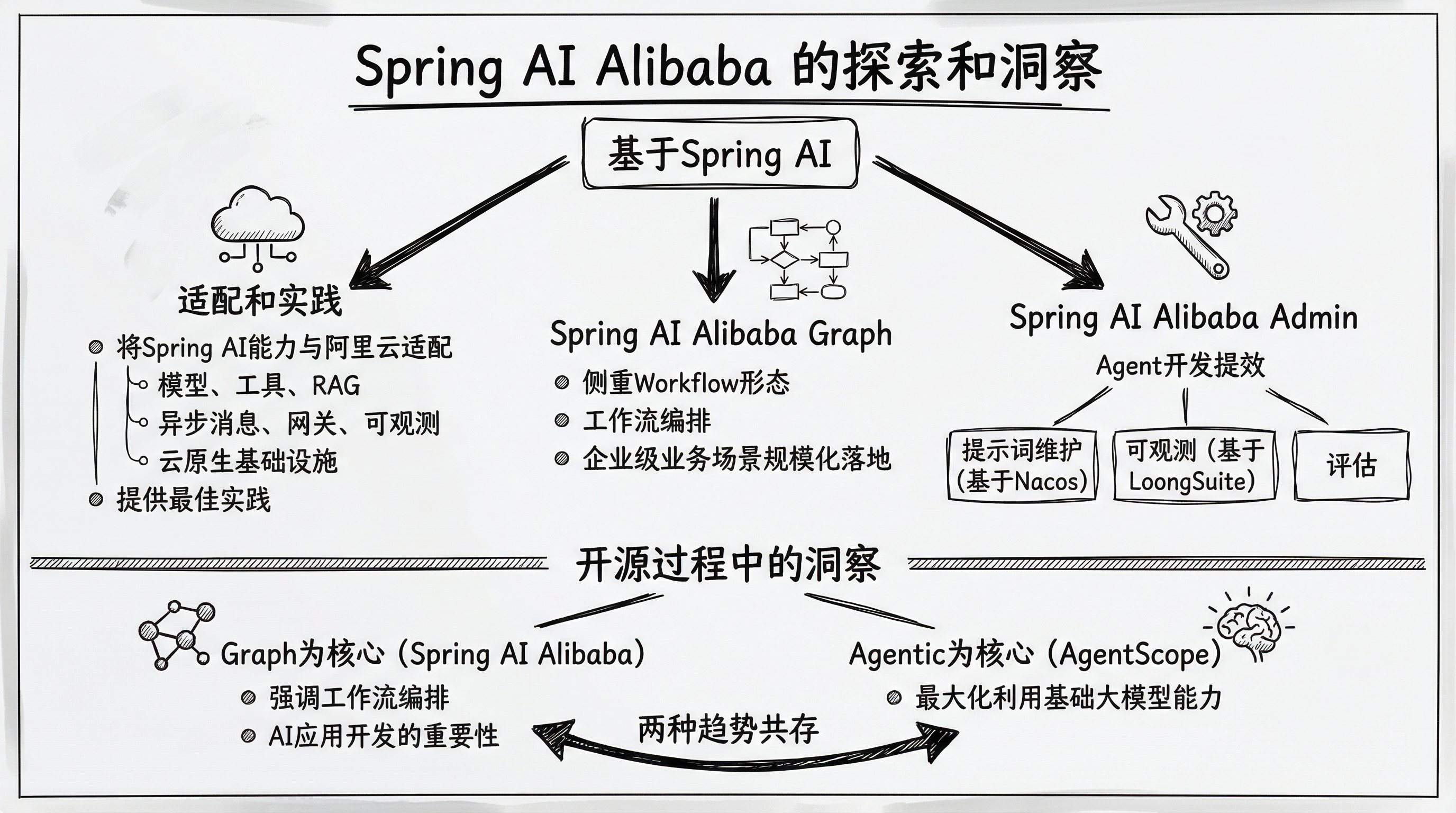
Spring AI Alibaba 是一款以 Spring AI 为基础,深度集成百炼平台,支持 ChatBot、工作流、多智能体应用开发模式的 AI 框架。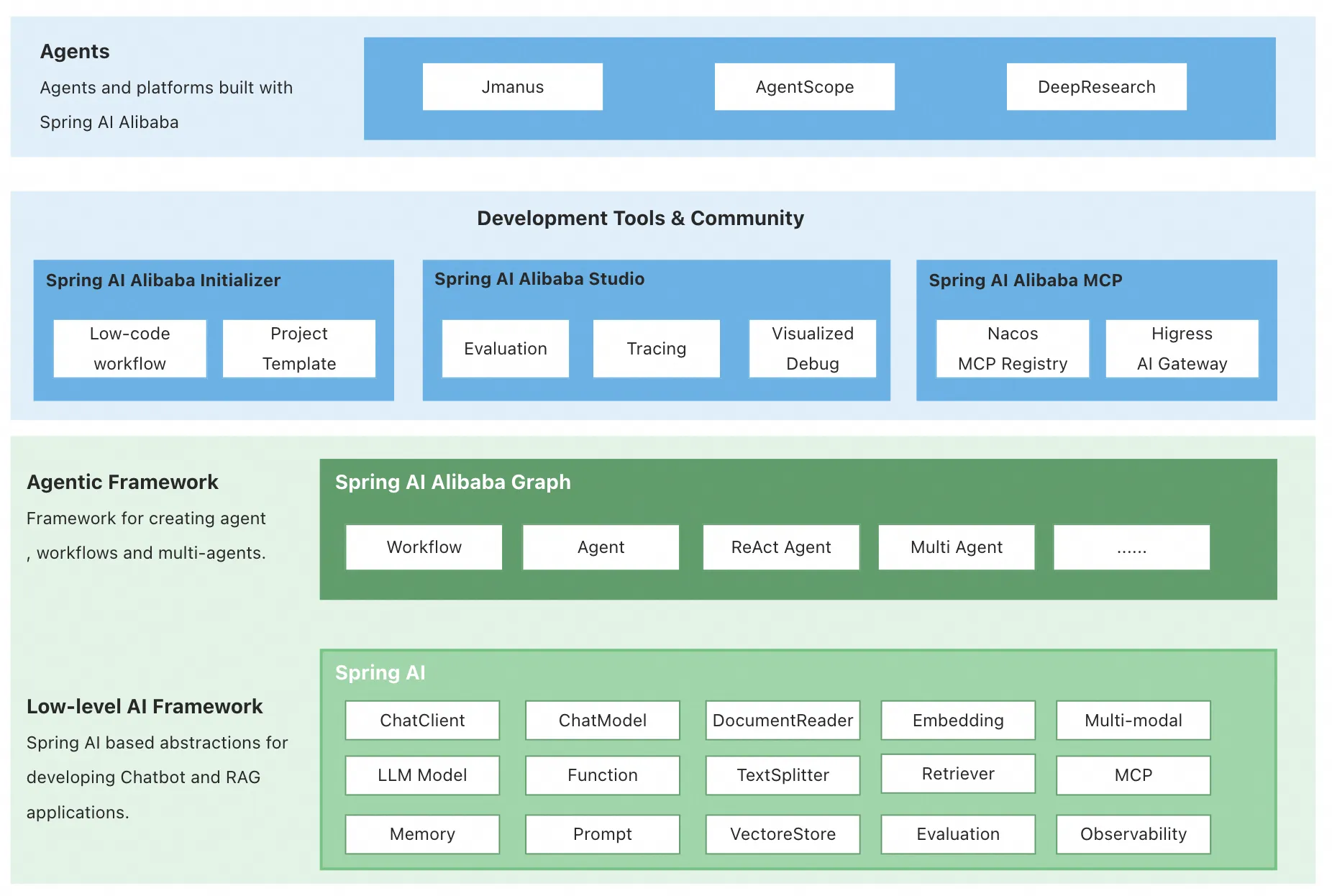
在 1.0 版本中,Spring AI Alibaba 提供以下核心能力,让开发者可以快速构建自己的 Agent、Workflow 或 Multi-Agent 应用。
Graph 多智能体框架。 基于 Spring AI Alibaba Graph,开发者可快速构建工作流、多智能体应用,无需关心流程编排、上下文记忆管理等底层实现。通过 Graph 与低代码、自规划智能体结合,为开发者提供从低代码、高代码到零代码构建智能体的更灵活选择。
通过 AI 生态集成,解决企业智能体落地过程中关心的痛点问题。 Spring AI Alibaba 支持与百炼平台深度集成,提供模型接入、RAG 知识库解决方案;支持 ARMS、Langfuse 等可观测产品无缝接入;支持企业级的 MCP 集成,包括 Nacos MCP Registry 分布式注册与发现、自动 Router 路由等。
探索具备自主规划能力的通用智能体产品与平台。 社区发布了基于 Spring AI Alibaba 框架实现的 JManus 智能体,除了对标 Manus 的通用智能体能力外,我们的目标是基于 JManus 探索自主规划在智能体开发方向的应用,为开发者提供从低代码、高代码到零代码构建智能体的更灵活选择。
官网:https://java2ai.com/
github:https://github.com/alibaba/spring-ai-alibaba
二、Quickly Run a ChatBot
参考:https://java2ai.com/docs/frameworks/studio/quick-start
There’s a ChatBot example provided by the community at examples/chatbot.
1,Download the code.
git clone --depth=1 https://github.com/alibaba/spring-ai-alibaba.git
cd spring-ai-alibaba/examples/chatbot
2,Start the ChatBot.
Before starting, set API-KEY first (visit Aliyun Bailian to get API-KEY):
# this example uses 'spring-ai-alibaba-starter-dashscope', visit https://java2ai.com to learn how to use OpenAI/DeepSeek.
export AI_DASHSCOPE_API_KEY=your-api-key
这里我们修改application.properties使用本地Ollama模型:
# Spring AI Configuration - DashScope (Disabled)
spring.autoconfigure.exclude=\
  com.alibaba.cloud.ai.autoconfigure.dashscope.DashScopeChatAutoConfiguration,\
  com.alibaba.cloud.ai.autoconfigure.dashscope.DashScopeAgentAutoConfiguration,\
  com.alibaba.cloud.ai.autoconfigure.dashscope.DashScopeAudioSpeechAutoConfiguration,\
  com.alibaba.cloud.ai.autoconfigure.dashscope.DashScopeAudioTranscriptionAutoConfiguration

# Spring AI Configuration - Ollama (Enabled)
spring.ai.ollama.base-url=http://localhost:11434
spring.ai.ollama.chat.enabled=true
spring.ai.ollama.chat.model=qwen2.5:0.5b
spring.ai.ollama.chat.temperature=0.7
spring.ai.model.chat=ollama
mvn spring-boot:run
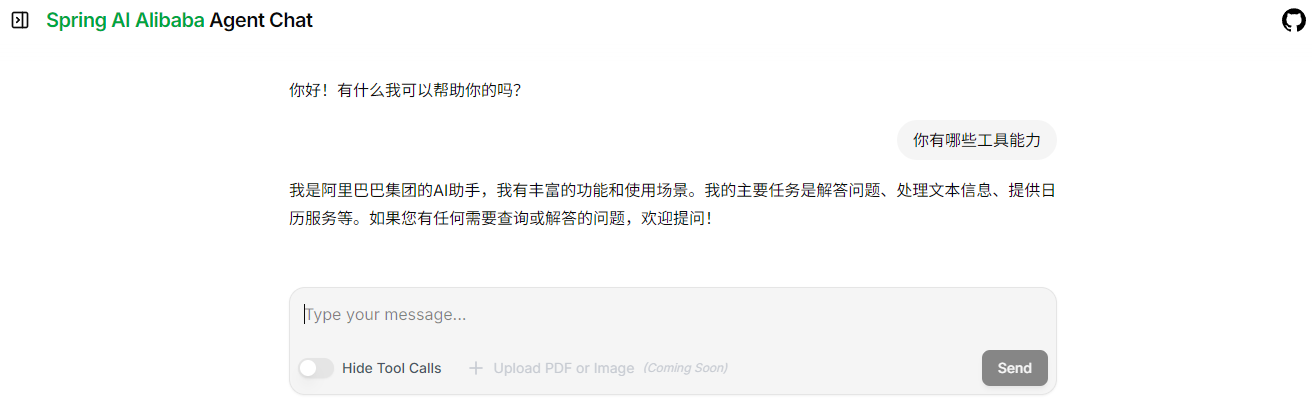
3,Chat with ChatBot.
Open the browser and visit http://localhost:8080/chatui/index.html to chat with the ChatBot.
三、DeepResearch
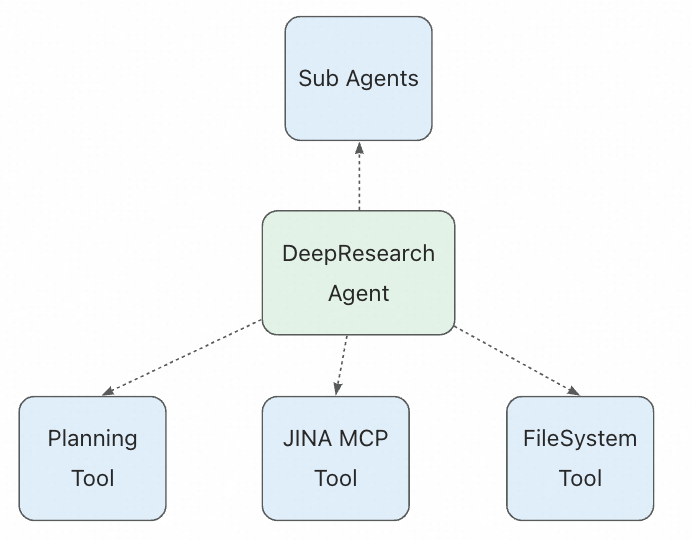
DeepResearch 是一款基于阿里巴巴 Spring AI 构建的智能体,能够进行深入的研究并撰写高质量的报告。使用 LLM 循环调用工具是最简单的智能体形式,但这可能会导致智能体功能“浅薄”。DeepResearch 实现了任务规划、子智能体、文件系统访问以及详细的提示,从而能够解决复杂的多步骤研究任务。
DeepResearch实现了一种超越简单工具调用循环的智能体架构。它结合了规划、上下文管理和子智能体协作,以应对需要多步骤和深入调查的复杂研究任务。
参考: https://java2ai.com/agents/deepresearch/quick-start
git clone https://github.com/alibaba/spring-ai-alibaba.git
cd spring-ai-alibaba/examples/deepresearch
使用ollama做如下修改,将 AI 模型(ChatModel)的创建方式从 内部硬编码 改为 外部依赖注入,并更新了配置文件:
diff --git a/examples/deepresearch/src/main/java/com/alibaba/cloud/ai/examples/deepresearch/AgentStaticLoader.java b/examples/deepresearch/src/main/java/com/alibaba/cloud/ai/examples/deepresearch/AgentStaticLoader.java
index f99d75c08..471c65c5f 100644
--- a/examples/deepresearch/src/main/java/com/alibaba/cloud/ai/examples/deepresearch/AgentStaticLoader.java
+++ b/examples/deepresearch/src/main/java/com/alibaba/cloud/ai/examples/deepresearch/AgentStaticLoader.java
@@ -21,6 +21,7 @@ import com.alibaba.cloud.ai.graph.GraphRepresentation;
 import com.alibaba.cloud.ai.graph.agent.Agent;
 import com.alibaba.cloud.ai.graph.agent.ReactAgent;

+import org.springframework.ai.chat.model.ChatModel;
 import org.springframework.ai.tool.ToolCallback;
 import org.springframework.ai.tool.ToolCallbackProvider;

@@ -52,13 +53,13 @@ class AgentStaticLoader implements AgentLoader {

 //     public AgentStaticLoader(){}

-       public AgentStaticLoader(ToolCallbackProvider toolCallbackProvider) {
+       public AgentStaticLoader(ChatModel chatModel, ToolCallbackProvider toolCallbackProvider) {

                List<ToolCallback> toolCallbacks = Arrays.asList(toolCallbackProvider.getToolCallbacks());

                System.out.println("Loaded MCP tool callbacks: " + toolCallbacks.size());

-               ReactAgent researchAgent = new DeepResearchAgent().getResearchAgent(toolCallbacks);
+               ReactAgent researchAgent = new DeepResearchAgent(chatModel).getResearchAgent(toolCallbacks);
                GraphRepresentation representation = researchAgent.getAndCompileGraph().stateGraph.getGraph(GraphRepresentation.Type.PLANTUML);

                System.out.println(representation.content());
diff --git a/examples/deepresearch/src/main/java/com/alibaba/cloud/ai/examples/deepresearch/DeepResearchAgent.java b/examples/deepresearch/src/main/java/com/alibaba/cloud/ai/examples/deepresearch/DeepResearchAgent.java
index 77ff317ef..a1a592c34 100644
--- a/examples/deepresearch/src/main/java/com/alibaba/cloud/ai/examples/deepresearch/DeepResearchAgent.java
+++ b/examples/deepresearch/src/main/java/com/alibaba/cloud/ai/examples/deepresearch/DeepResearchAgent.java
@@ -15,8 +15,6 @@
  */
 package com.alibaba.cloud.ai.examples.deepresearch;

-import com.alibaba.cloud.ai.dashscope.api.DashScopeApi;
-import com.alibaba.cloud.ai.dashscope.chat.DashScopeChatModel;
 import com.alibaba.cloud.ai.graph.agent.ReactAgent;
 import com.alibaba.cloud.ai.graph.agent.extension.interceptor.FilesystemInterceptor;
 import com.alibaba.cloud.ai.graph.agent.extension.interceptor.LargeResultEvictionInterceptor;
@@ -66,11 +64,9 @@ public class DeepResearchAgent {

 //     private ShellTool shellTool = ShellTool.builder().build();

-       public DeepResearchAgent() {
-               // Create DashScopeApi instance using the API key from environment variable
-               DashScopeApi dashScopeApi = DashScopeApi.builder().apiKey(System.getenv("AI_DASHSCOPE_API_KEY")).build();
-               // Create DashScope ChatModel instance
-               this.chatModel = DashScopeChatModel.builder().dashScopeApi(dashScopeApi).build();
+       public DeepResearchAgent(ChatModel chatModel) {
+               // Use injected ChatModel (can be DashScope, Ollama, or any other configured model)
+               this.chatModel = chatModel;

                this.systemPrompt = researchInstructions + "\n\n" + BASE_AGENT_PROMPT;

diff --git a/examples/deepresearch/src/main/resources/application.yml b/examples/deepresearch/src/main/resources/application.yml
index 97212ef3b..ebc32088b 100755
--- a/examples/deepresearch/src/main/resources/application.yml
+++ b/examples/deepresearch/src/main/resources/application.yml
@@ -15,6 +15,24 @@ spring:
               # 官方地址:https://mcp.jina.ai 本地部署:http://127.0.0.1:8787
               url: "https://mcp.jina.ai"
               endpoint: "/sse"
+              headers:
+                x-api-key: ${JINA_API_KEY:}
         request-timeout: 60000
+    # Spring AI Configuration - Ollama (Enabled)
+    ollama:
+      base-url: http://localhost:11434
+      chat:
+        enabled: true
+        model: qwen2.5:0.5b
+        temperature: 0.7
+    model:
+      chat: ollama
+  autoconfigure:
+    exclude:
+      - com.alibaba.cloud.ai.autoconfigure.dashscope.DashScopeChatAutoConfiguration
+      - com.alibaba.cloud.ai.autoconfigure.dashscope.DashScopeAgentAutoConfiguration
+      - com.alibaba.cloud.ai.autoconfigure.dashscope.DashScopeAudioSpeechAutoConfiguration
+      - com.alibaba.cloud.ai.autoconfigure.dashscope.DashScopeAudioTranscriptionAutoConfiguration
+

有“AI”的1024 = 2048,欢迎大家加入2048 AI社区
更多推荐


 5
5 0
0- 0


 已为社区贡献7条内容

所有评论(0)