打造跨端应急物资管理系统:Flutter × OpenHarmony 顶部导航栏与数据结构实战解析
本文介绍了基于Flutter和OpenHarmony开发跨端应急物资管理系统的关键技术。系统通过Flutter实现统一UI界面,结合OpenHarmony的分布式能力访问硬件资源,解决了传统系统跨平台部署困难的问题。文章重点解析了系统首页的实现,包括使用StatefulWidget管理动态页面、Scaffold构建基础布局、SafeArea保证显示安全区域等核心代码。特别详细讲解了顶部导航栏的实现
文章目录
打造跨端应急物资管理系统:Flutter × OpenHarmony 顶部导航栏与数据结构实战解析
前言
随着自然灾害、公共事件频发,应急物资管理系统在救灾、城市管理和企业运营中扮演着越来越重要的角色。传统系统往往存在跨平台部署困难、界面体验不统一的问题,而 Flutter × OpenHarmony 的组合为开发高效、跨端、原生体验的应急物资管理系统提供了新的解决方案。
本文将结合一个完整的案例,详细解析系统的 顶部导航栏设计、关键数据结构管理,并通过代码逐行讲解实现原理,帮助开发者快速掌握跨端应用的构建技巧。
背景
应急物资管理系统主要功能包括:
- 实时监控:物资库存、调拨情况、紧急事件响应。
- 智能管理:根据库存和需求自动预警、推荐补充方案。
- 跨平台访问:手机端、平板端、PC端都能使用同一套应用。
传统开发方式需针对 Android/iOS/HarmonyOS 分别开发,而 Flutter × OpenHarmony 提供了一套跨端 UI 框架与原生兼容机制,实现一次开发、全平台运行。
Flutter × OpenHarmony 跨端开发介绍
Flutter 是 Google 推出的跨平台 UI 框架,通过 Dart 语言实现高性能渲染,支持 iOS、Android、Web、桌面等多端运行。
OpenHarmony 是华为主导的开源操作系统,强调 分布式能力与原生设备适配。
结合 Flutter × OpenHarmony,可以:
- 利用 Flutter 的组件化布局快速搭建 UI。
- 通过 OpenHarmony 的分布式特性访问硬件与系统资源。
- 实现统一的数据结构管理和响应式界面。

开发核心代码解析
下面以系统首页的 顶部导航栏 与 数据结构管理 为例,逐行解析 Flutter 代码实现。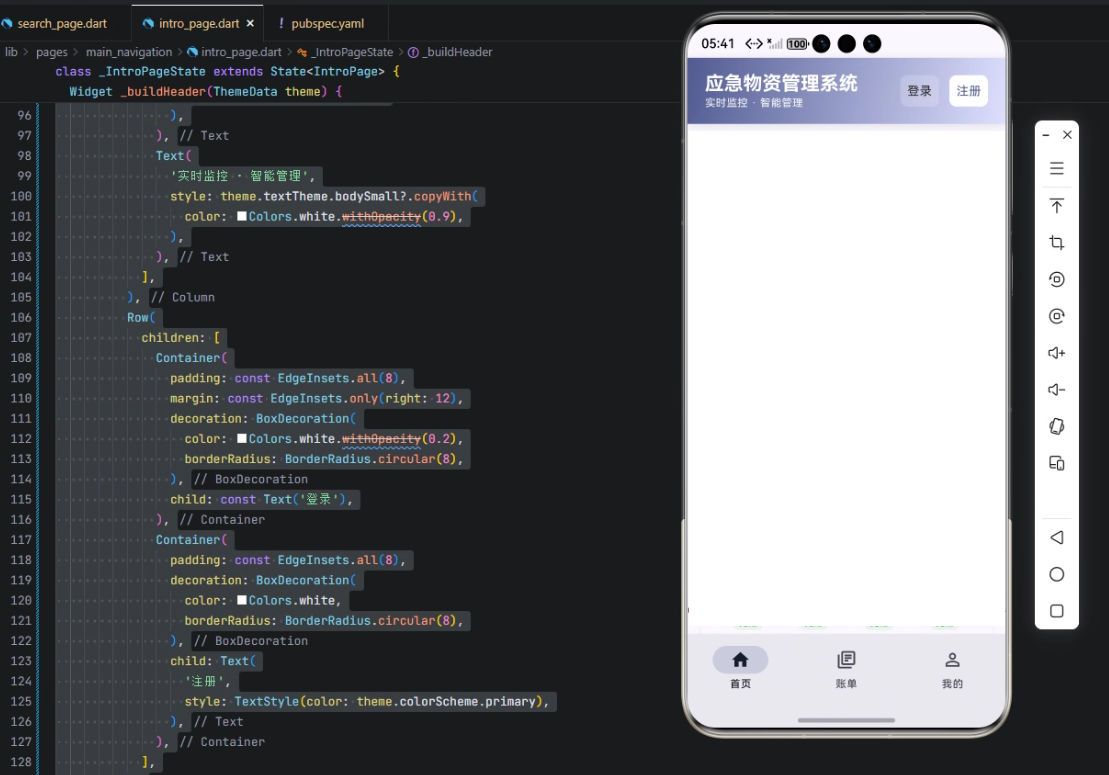
1️⃣ 页面整体结构
class IntroPage extends StatefulWidget {
const IntroPage({super.key});
State<IntroPage> createState() => _IntroPageState();
}
- StatefulWidget:用于管理需要动态更新状态的页面。
IntroPage:首页入口,包含顶部导航栏和主内容区域。createState:创建_IntroPageState,用于页面状态管理。
class _IntroPageState extends State<IntroPage> {
Widget build(BuildContext context) {
final theme = Theme.of(context);
return Scaffold(
body: SafeArea(
child: Column(
children: [
_buildHeader(theme), // 顶部导航栏
Expanded(
child: SingleChildScrollView(
padding: const EdgeInsets.all(16),
child: Column(
crossAxisAlignment: CrossAxisAlignment.start,
children: [
_buildWelcomeSection(theme),
const SizedBox(height: 24),
_buildKeyMetrics(theme),
const SizedBox(height: 24),
_buildEmergencySupplies(theme),
const SizedBox(height: 24),
_buildSuppliesCategories(theme),
const SizedBox(height: 24),
_buildInventoryAlerts(theme),
const SizedBox(height: 24),
_buildActivityTimeline(theme),
const SizedBox(height: 24),
_buildQuickActions(theme),
const SizedBox(height: 32),
],
),
),
),
],
),
),
);
}
解析:
Scaffold:Flutter 页面基础布局,支持 AppBar、Drawer、FloatingActionButton 等。SafeArea:保证页面内容不会被刘海或状态栏遮挡。_buildHeader(theme):自定义顶部导航栏组件。SingleChildScrollView+Column:实现内容纵向滚动,兼容多屏幕尺寸。
2️⃣ 顶部导航栏实现
Widget _buildHeader(ThemeData theme) {
  return Container(
    padding: const EdgeInsets.symmetric(horizontal: 20, vertical: 16),
    decoration: BoxDecoration(
      gradient: LinearGradient(
        begin: Alignment.topLeft,
        end: Alignment.bottomRight,
        colors: [theme.colorScheme.primary, theme.colorScheme.primaryContainer],
      ),
      boxShadow: [
        BoxShadow(
          color: Colors.black.withOpacity(0.1),
          spreadRadius: 0,
          blurRadius: 10,
          offset: const Offset(0, 2),
        ),
      ],
    ),
    child: Row(
      mainAxisAlignment: MainAxisAlignment.spaceBetween,
      children: [
        Column(
          crossAxisAlignment: CrossAxisAlignment.start,
          children: [
            Text(
              '应急物资管理系统',
              style: theme.textTheme.titleLarge?.copyWith(
                color: Colors.white,
                fontWeight: FontWeight.bold,
              ),
            ),
            Text(
              '实时监控 · 智能管理',
              style: theme.textTheme.bodySmall?.copyWith(
                color: Colors.white.withOpacity(0.9),
              ),
            ),
          ],
        ),
        Row(
          children: [
            Container(
              padding: const EdgeInsets.all(8),
              margin: const EdgeInsets.only(right: 12),
              decoration: BoxDecoration(
                color: Colors.white.withOpacity(0.2),
                borderRadius: BorderRadius.circular(8),
              ),
              child: const Text('登录'),
            ),
            Container(
              padding: const EdgeInsets.all(8),
              decoration: BoxDecoration(
                color: Colors.white,
                borderRadius: BorderRadius.circular(8),
              ),
              child: Text(
                '注册',
                style: TextStyle(color: theme.colorScheme.primary),
              ),
            ),
          ],
        ),
      ],
    ),
  );
}
解析:
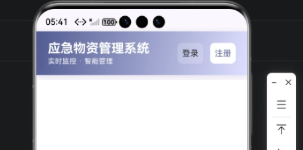
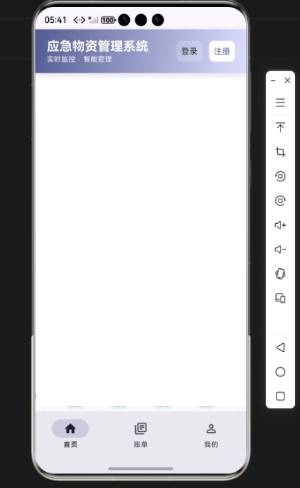
Container:顶部导航栏的容器,设置内边距和装饰。LinearGradient:渐变背景,从主色到容器色,增强视觉层次感。boxShadow:阴影效果,增加悬浮感。Row+Column:左侧显示系统标题和副标题,右侧显示登录/注册按钮。Text样式使用theme.textTheme保持主题一致性。Container+borderRadius:圆角按钮设计,提升交互体验。
3️⃣ 数据结构管理示例
在系统中,我们需要管理 物资分类、库存状态、预警信息 等数据。可以定义如下模型类:
class SupplyItem {
  final String id;
  final String name;
  final int quantity;
  final String category;
  final DateTime expiryDate;

  SupplyItem({
    required this.id,
    required this.name,
    required this.quantity,
    required this.category,
    required this.expiryDate,
  });

  bool get isLowStock => quantity < 10;
  bool get isExpired => DateTime.now().isAfter(expiryDate);
}

class SupplyCategory {
  final String id;
  final String name;
  final List<SupplyItem> items;

  SupplyCategory({
    required this.id,
    required this.name,
    required this.items,
  });

  int get totalQuantity => items.fold(0, (sum, item) => sum + item.quantity);
}
解析:
SupplyItem:物资单元,包含 ID、名称、数量、类别、过期时间。isLowStock/isExpired:快捷属性,用于库存预警和过期监控。SupplyCategory:物资分类管理,每个分类包含若干物资。totalQuantity:计算分类总库存。
4️⃣ 心得
通过 Flutter × OpenHarmony 开发跨端应用,有以下收获:
- 组件化布局:UI 可高度复用,顶部导航栏、指标卡片、物资列表都可以独立封装。
- 主题管理:
ThemeData保证不同设备上界面风格一致。 - 响应式数据结构:通过
StatefulWidget+ 数据模型,实现实时更新库存状态和预警提示。 - 跨端兼容性:一次编写,手机端、平板端、PC端都能运行,无需重复开发。
总结
本文通过一个完整的案例,展示了 Flutter × OpenHarmony 应急物资管理系统的顶部导航栏设计与数据结构管理。核心亮点包括:
- 顶部导航栏:渐变背景、阴影、圆角按钮设计。
- 数据结构:物资与分类模型化,支持库存预警与过期监控。
- 跨端开发:利用 Flutter 的组件化与 OpenHarmony 的分布式特性,实现高效、统一的跨平台体验。
通过这种方式,开发者可以快速搭建高质量的应急物资管理系统,为公共安全和企业运营提供可靠的数据与界面支持。
欢迎加入开源鸿蒙跨平台社区:https://openharmonycrossplatform.csdn.net

有“AI”的1024 = 2048,欢迎大家加入2048 AI社区
更多推荐
 13
13 0
0- 0


 已为社区贡献1条内容

所有评论(0)