Docker+NVIDIA Container Toolkit+Ray+双3090容器transformer数据并行模式分布式联合运行Qwen3-4B-Instruct-2507模型
Docker+NVIDIA Container Toolkit+Ray+双3090容器transformer数据并行模式分布式联合运行Qwen3-4B-Instruct-2507模型
·
文章目录
- 基于 Docker + Ray Cluster + Transformers 的 Qwen2.5-4B 分布式数据并行推理。
零 实战环境和架构差异
0.0 核心架构
- 宿主机(Ubuntu24.04+双3090)部署2个Docker容器,单容器独占1张3090,通过
--gpus device=N精准绑定显卡;容器内搭建Ray分布式集群(1主1从),基于vLLM实现4B大模型的分布式推理/部署,全程保留宿主机3090的可视化使用,无需GPU直通,兼顾开发操作与算力利用。 - 适配性:单张3090(24G显存)满足4B模型(FP16约16G/INT4约4G)的显存要求,双容器数据并行模式可提升推理吞吐量/并发量。
前置条件
- 宿主机已装Ubuntu24.04图形版,双3090显卡正常识别,开启基础虚拟化(BIOS的VMX)。
- 宿主机已装NVIDIA官方驱动(≥535,建议545/550),验证:
nvidia-smi能正常显示双3090。 - 宿主机网络正常,能拉取Docker镜像,建议换国内镜像源。
0.1 实验软硬件环境说明
- 📋 实验环境配置表
| 分类 | 项目 | 配置详情 | 备注 |
|---|---|---|---|
| 硬件环境 | CPU | e5 2696V3(逻辑核心数>=16) | 启动时分配8 cores 给 Ray |
| 物理内存 (RAM) | 32 GB | 关键瓶颈,需要精细规划共享内存 | |
| GPU | NVIDIA GeForce RTX 3090 x 2 | 单卡 24GB VRAM | |
| 网络 | 无线网卡 (USB) | wlxe0ad47220334 |
|
| 操作系统 | OS 发行版 | Ubuntu 24.04 LTS | 内核版本 6.14.0-37-generic |
| 宿主机 IP | 10.193.195.59(机器正常活动网卡) | 无线网络 IP,作为集群通信地址 | |
| 基础软件 | Docker 管理 | 1Panel | 开源 Linux 服务器运维管理面板 |
| NVIDIA 驱动 | 570.211.01 | 支持 CUDA 12.8 | |
| Docker 网络 | Host 模式 (--network host) |
容器与宿主机共享网络栈,性能最优 | |
| 核心环境 | 基础镜像 | ray-vllm:3090-cuda12.8 |
包含 Ray, vLLM, CUDA 12.8 |
| Python | 3.12.3 | Ray 脚本路径显示 | |
| 集群配置 | Ray 版本 | 2.53.0 | 支持 ray metrics launch-prometheus |
| 集群架构 | Head Node + Worker Node (双容器) | ray-node-0 (Head), ray-node-1 (Worker) |
|
| 通信端口 | 6379 (GCS), 8265 (Dashboard), 8080 (Metrics) | 确保 6379 未被 Redis 占用 | |
| 资源分配 | GPU 策略 | 独占模式 | --gpus all + NVIDIA_VISIBLE_DEVICES=0/1 |
| 共享内存 | 12 GB / 容器 | 物理内存 32GB 下的折中方案 | |
| 内存优化 | Memfd 启用 | 环境变量 VLLM_USE_MEMFD=1 绕过 /dev/shm 限制 |
|
| 监控栈(未成功实践) | Prometheus | v3.9.1 | 由 ray metrics 自动安装,运行于宿主机 |
| Grafana | Latest (Docker) | 运行于宿主机,数据源连接 Prometheus | |
| Dashboard | Ray Dashboard | http://10.193.195.59:8265 |
0.2 架构差异说明
| 维度 | 伴生文档 (Ray+vLLM) | 本文档 (Ray+Transformers) |
|---|---|---|
| 并行模式 | 张量并行 (Tensor Parallelism) | 数据并行 (Data Parallelism) |
| 模型分布 | 单模型权重切分至2张GPU | 2个完整模型副本,每卡独立 |
| 请求处理 | 单请求跨2张GPU协同计算 | 不同请求分发至不同GPU独立计算 |
| 适用场景 | 大模型(>13B)单请求推理 | 中高并发独立请求推理 |
| 内存占用 | 模型分片,单卡存部分参数 | 每卡存完整模型(4B约8G/卡) |
| Ray角色 | 分布式计算基础设施 | 服务编排器 + Actor调度器 |
二 Docker和NVIDIA Container Toolkit准备
2.1 Docker环境准备
- 运行安装1panel脚本,以root用户身份运行一键安装脚本,自动完成1Panel的下载和安装。安装过程会顺带安装docker相关组建,方便省事,同时还可以可视化管理服务器。更详细设置参看1Panel文档。
bash -c "$(curl -sSL https://resource.fit2cloud.com/1panel/package/v2/quick_start.sh)"
- 可以在1panel容器管理面板添加镜像代理。
https://docker.1ms.run
https://swr.cn-north-4.myhuaweicloud.com
docker pull swr.cn-north-4.myhuaweicloud.com/ddn-k8s/docker.io/nvidia/cuda:12.8.1-cudnn-devel-ubuntu24.04
docker tag  swr.cn-north-4.myhuaweicloud.com/ddn-k8s/docker.io/nvidia/cuda:12.8.1-cudnn-devel-ubuntu24.04  docker.io/nvidia/cuda:12.8.1-cudnn-devel-ubuntu24.04
2.2 NVIDIA Container Toolkit环境准备
- NVIDIA Container Toolkit的配置主要参考以下两片文章。
# 1 安装依赖
sudo apt-get update
sudo apt-get install -y curl

# 2 添加密钥和仓库
curl -fsSL https://nvidia.github.io/libnvidia-container/gpgkey | sudo gpg --dearmor -o /usr/share/keyrings/nvidia-container-toolkit-keyring.gpg
curl -s -L https://nvidia.github.io/libnvidia-container/stable/deb/nvidia-container-toolkit.list | \
  sed 's#deb https://#deb [signed-by=/usr/share/keyrings/nvidia-container-toolkit-keyring.gpg] https://#g' | \
  sudo tee /etc/apt/sources.list.d/nvidia-container-toolkit.list
# 3执行安装
sudo apt-get update
sudo apt-get install -y nvidia-container-toolkit

# 4更新Docker配置
sudo nvidia-ctk runtime configure --runtime=docker
# 5 重启Docker服务
sudo systemctl restart docker
三 定制化Docker镜像
- 基于
nvidia/cuda:12.8.1-cudnn-devel-ubuntu24.04基础镜像(适配 3090,兼容 Ubuntu24.04),构建包含Python3.10+Ray+vLLM + 依赖库的定制镜像,确保双容器环境一致,避免版本冲突。
3.1 构建镜像存放位置,保持和1panel存放位置一致。
cd /opt/1panel/apps/
mkdir RayCuda
3.2 创建 Dockerfile文件
cd RayCuda
vim Dockerfile
# 基础镜像:CUDA 12.8.1 + CUDNN+ Ubuntu 24.04(适配3090,兼容vLLM/Ray)
FROM nvidia/cuda:12.8.1-cudnn-devel-ubuntu24.04

# 第一步:修复NVIDIA GPG密钥警告,刷新apt缓存
# 备注:迁移NVIDIA GPG密钥到新的keyring,消除弃用警告,同时刷新官方源缓存
RUN mkdir -p /etc/apt/trusted.gpg.d && \
    cp /etc/apt/trusted.gpg /etc/apt/trusted.gpg.d/nvidia-cuda.gpg && \
    apt update && \
    apt clean && \
    rm -rf /var/lib/apt/lists/*

# 第二步:安装基础依赖
RUN apt update && apt install -y --no-install-recommends \
    python3-dev python3-pip \
    git wget vim net-tools iputils-ping \
    && rm -rf /var/lib/apt/lists/*

# 第三步:直接配置国内PyPI源
RUN pip config set global.index-url https://pypi.tuna.tsinghua.edu.cn/simple

# 第四步:安装Ray(分布式核心,2.53.0稳定版,兼容Python3.11/CUDA 12.8)
RUN pip install ray[default,serve]==2.53.0 -i https://pypi.tuna.tsinghua.edu.cn/simple --break-system-packages

# 第五步:安装vLLM(大模型推理,适配CUDA 12.8,添加--break-system-packages解决ubuntu24.4报错)
RUN pip install vllm[all] -i https://pypi.tuna.tsinghua.edu.cn/simple --break-system-packages

# 第六步:安装PyTorch(适配CUDA 12.8,使用官方whl包)
RUN pip install torch torchvision torchaudio --index-url https://download.pytorch.org/whl/cu128 --break-system-packages && \
    pip install transformers accelerate sentencepiece -i https://pypi.tuna.tsinghua.edu.cn/simple --break-system-packages

# 第七步:设置CUDA 12.8环境变量,确保依赖能找到CUDA路径
ENV CUDA_HOME=/usr/local/cuda-12.8
ENV PATH=$CUDA_HOME/bin:$PATH
ENV LD_LIBRARY_PATH=$CUDA_HOME/lib64:$LD_LIBRARY_PATH

# 工作目录
WORKDIR /root/ray-vllm
3.3 构建 Docker 镜像
- 进入Dockerfile所在目录,执行构建命令,镜像命名为ray-vllm:3090-cuda12.8。构建时间约10分钟,全程无报错即成功。
cd /opt/1panel/apps/RayCuda
docker build -t ray-vllm:3090-cuda12.8 .
3.4 启动双 Docker 容器(单容器单3090,桥接网络)
- 使用独立挂载点
/opt/1panel/apps/RayCuda/ray-transformers-data/,通过符号链接共享模型文件,零硬盘空间浪费。
# 创建共享模型库(只存一份,供所有模式共用)
mkdir -p /opt/1panel/apps/RayCuda/shared-models

# 创建Transformers模式专属数据目录
mkdir -p /opt/1panel/apps/RayCuda/ray-transformers-data/{head,worker}
- 启动两个容器,分别绑定GPU 0和GPU 1:
# 主节点容器(挂载 transformers 专属目录 + 共享模型)
docker run -itd \
  --name ray-node-0 \
  --gpus device=0 \
  --network host \
  --privileged \
  --shm-size=12g \
  -e NVIDIA_VISIBLE_DEVICES=0 \
  -v /opt/1panel/apps/RayCuda/ray-transformers-data/head:/root/ray-transformers/data \
  -v /opt/1panel/apps/RayCuda/shared-models:/root/models:ro \
  ray-vllm:3090-cuda12.8 /bin/bash

# 从节点容器
docker run -itd \
  --name ray-node-1 \
  --gpus device=1 \
  --network host \
  --privileged \
  --shm-size=12g \
  -e NVIDIA_VISIBLE_DEVICES=1 \
  -v /opt/1panel/apps/RayCuda/ray-transformers-data/worker:/root/ray-transformers/data \
  -v /opt/1panel/apps/RayCuda/shared-models:/root/models:ro \
  ray-vllm:3090-cuda12.8 /bin/bash
/root/models:ro以只读方式挂载共享模型,防止误修改- 各自数据目录
/root/data/ray-transformers/data独立存储日志、缓存等 - 模型路径在代码中统一使用
/root/models/Qwen2.5-4B-Instruct
3.5 验证容器状态
- 说明:由于NVIDIA Container Toolkit的特殊机制,在但容器内使用nvidia-smi命令可以查看到两个GPU,这是正常现象,但通过
env | grep NVIDIA可以验证可以使用的GPU,重点以此来验证容器内GPU隔离的成功。 - 主节点容器状态验证
docker exec -it ray-node-0 bash
# 在容器内重新设置可用GPU变量才生效
export CUDA_VISIBLE_DEVICES=0
python3 -c "import torch; print('Node0:', torch.cuda.device_count())"
env | grep NVIDIA
exit
(base) root@yang-server:/opt/1panel/apps/RayCuda# docker exec -it ray-node-0 bash
root@yang-server:~/ray-vllm# python3 -c "import torch; print('Node0:', torch.cuda.device_count())"
Node0: 2
root@yang-server:~/ray-vllm# export CUDA_VISIBLE_DEVICES=0
root@yang-server:~/ray-vllm# python3 -c "import torch; print('Node0:', torch.cuda.device_count())"
Node0: 1
root@yang-server:~/ray-vllm# env | grep NVIDIA
NVIDIA_VISIBLE_DEVICES=0
- 从节点容器状态验证。
docker exec -it ray-node-1 bash
# 在容器内重新设置可用GPU变量才生效
export CUDA_VISIBLE_DEVICES=1
python3 -c "import torch; print('Node1:', torch.cuda.device_count())"
env | grep NVIDIA
exit
(base) root@yang-server:~# docker exec -it ray-node-1 bash
root@yang-server:~/ray-vllm# export CUDA_VISIBLE_DEVICES=1
root@yang-server:~/ray-vllm# python3 -c "import torch; print('Node1:', torch.cuda.device_count())"
Node1: 1
root@yang-server:~/ray-vllm# env | grep NVIDIA
NVIDIA_VISIBLE_DEVICES=1
四 搭建 Ray 分布式集群
- 分布式集群为双容器(1 主 1 从),每个容器内只有一张GPU可以使用。
4.1 确定宿主机IP(集群通信地址)
- 在宿主机终端执行ip地址查看命令。
ip addr
(base) root@yang-server:~# ip addr
1: lo: <LOOPBACK,UP,LOWER_UP> mtu 65536 qdisc noqueue state UNKNOWN group default qlen 1000
    link/loopback 00:00:00:00:00:00 brd 00:00:00:00:00:00
    inet 127.0.0.1/8 scope host lo
       valid_lft forever preferred_lft forever
    inet6 ::1/128 scope host noprefixroute
       valid_lft forever preferred_lft forever
2: enp5s0: <NO-CARRIER,BROADCAST,MULTICAST,UP> mtu 1500 qdisc fq_codel state DOWN group default qlen 1000
    link/ether 00:e0:21:9d:65:a0 brd ff:ff:ff:ff:ff:ff
3: wlxe0ad47220334: <BROADCAST,MULTICAST,UP,LOWER_UP> mtu 1500 qdisc noqueue state UP group default qlen 1000
    link/ether e0:ad:47:22:03:34 brd ff:ff:ff:ff:ff:ff
    inet 10.193.195.59/17 brd 10.193.255.255 scope global dynamic noprefixroute wlxe0ad47220334
       valid_lft 75329sec preferred_lft 75329sec
    inet6 fe80::5076:b18f:9e57:fbdc/64 scope link noprefixroute
       valid_lft forever preferred_lft forever
10.193.195.59(网卡wlxe0ad47220334)- 状态:
state UP(正在运行) - 类型:无线网卡 (以
wl开头) - 理由:处于 UP 状态且拥有正常互联网 IP 地址**的网卡。Ray 集群的节点之间需要通过这个 IP 进行通信。
- 状态:
192.168.x.x(有线网卡enp5s0)- 状态:
state DOWN(已断开) - 理由:有线网卡目前没有连接网线或者没有获取到 IP,所以无法使用。
- 状态:
4.2 主从节点ray启动
- 注意关闭宿主机上6379端口Redis的服务。
# 主节点容器 (ray-node-0)
docker exec -it ray-node-0 bash
ray start --head \
  --node-ip-address=10.193.195.59 \
  --port=6379 \
  --dashboard-host=0.0.0.0 \
  --num-cpus=8 \
  --num-gpus=1

# 从节点容器 (ray-node-1) - 执行主节点输出的连接命令
docker exec -it ray-node-1 bash
ray start --address='10.193.195.59:6379' --node-ip-address='10.193.195.59' --num-cpus=8 --num-gpus=1
4.5 查看Ray仪表盘
- 可视化验证:宿主机浏览器打开
http://localhost:8265,进入 Ray 仪表盘,在Cluster能看到 2 个节点,GPUs 显示 2,即集群搭建成功。(每个节点虽然显示两个GPU,但实际只使用一个GPU)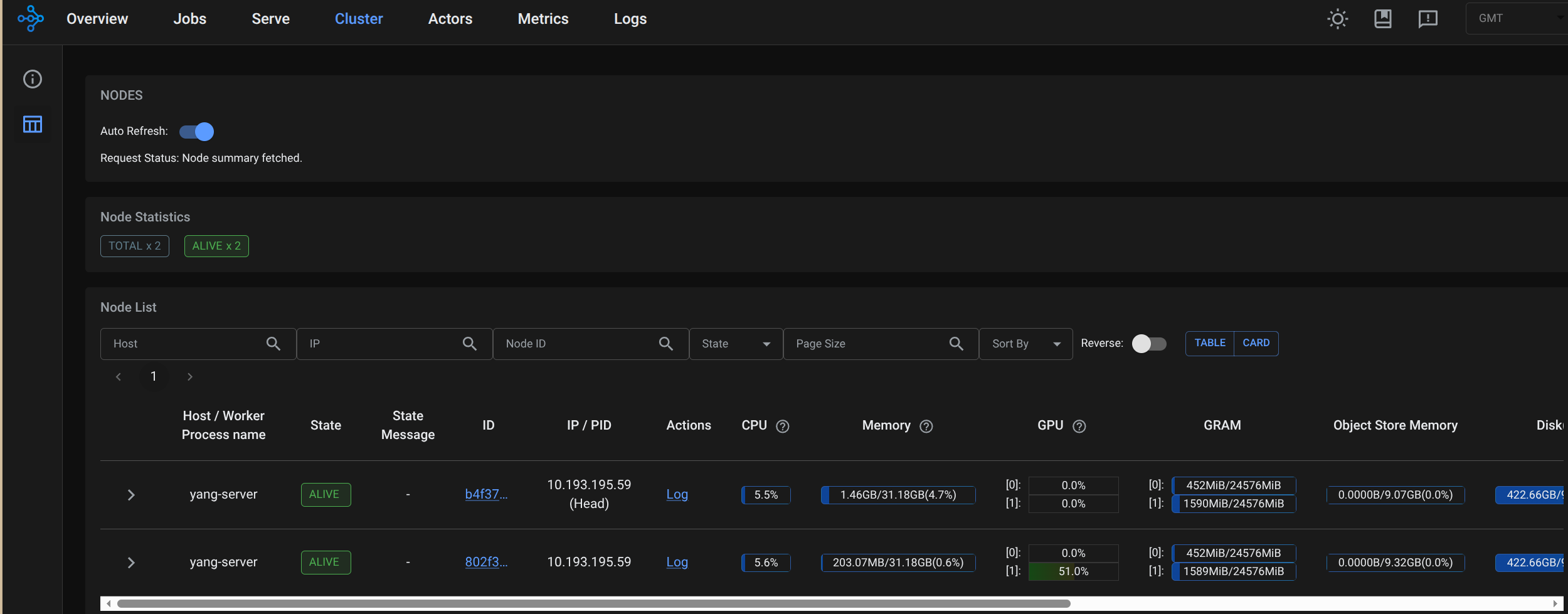
4.6 节点内验证Ray集群状态
- 在主节点挂在目录
/opt/1panel/apps/RayCuda/ray-vllm-data-0/,创建测试脚本。
cd /opt/1panel/apps/RayCuda/ray-vllm-data-0/
vim check_resources.py
- 填入脚本内容。
import ray

# 连接到 Ray 集群
ray.init(address='auto', _node_ip_address='10.193.195.59')

# 获取集群资源
cluster_resources = ray.cluster_resources()
available_resources = ray.available_resources()

print("--- 集群总资源 ---")
for resource, value in cluster_resources.items():
    print(f"{resource}: {value}")

print("\n--- 可用资源 ---")
for resource, value in available_resources.items():
    print(f"{resource}: {value}")

# 获取所有节点
nodes = ray.nodes()
print(f"\n--- 节点数量: {len(nodes)} ---")
for node in nodes:
    print(f"节点 ID: {node['NodeID']}")
    print(f"节点 IP: {node['NodeManagerAddress']}")
    print(f"节点资源: {node['Resources']}")
    print("---")

# 断开连接
ray.shutdown()
- 执行脚本,可以清楚地看到每个容器内的GPU数量为1。
root@yang-server:~/ray-vllm/data# python3 check_resources.py
2026-01-29 05:35:34,420 INFO worker.py:1821 -- Connecting to existing Ray cluster at address: 10.193.195.59:6379...
2026-01-29 05:35:34,434 INFO worker.py:1998 -- Connected to Ray cluster. View the dashboard at http://10.193.195.59:8265
/usr/local/lib/python3.12/dist-packages/ray/_private/worker.py:2046: FutureWarning: Tip: In future versions of Ray, Ray will no longer override accelerator visible devices env var if num_gpus=0 or num_gpus=None (default). To enable this behavior and turn off this error message, set RAY_ACCEL_ENV_VAR_OVERRIDE_ON_ZERO=0
  warnings.warn(
--- 集群总资源 ---
object_store_memory: 19738098892.0
GPU: 2.0
CPU: 16.0
accelerator_type:G: 2.0
memory: 46055564084.0
node:10.193.195.59: 2.0
node:__internal_head__: 1.0

--- 可用资源 ---
object_store_memory: 19738098892.0
GPU: 2.0
CPU: 16.0
node:10.193.195.59: 2.0
accelerator_type:G: 2.0
memory: 46055564084.0
node:__internal_head__: 1.0

--- 节点数量: 2 ---
节点 ID: b4f370771c977c241f30a026e0c9ddfb4ee38a38d01eb731f9f72efd
节点 IP: 10.193.195.59
节点资源: {'memory': 22714964788.0, 'object_store_memory': 9734984908.0, 'node:__internal_head__': 1.0, 'accelerator_type:G': 1.0, 'GPU': 1.0, 'CPU': 8.0, 'node:10.193.195.59': 1.0}
---
节点 ID: 802f333067990b56926977df9b233c5fa021783653ba92413e0a36ca
节点 IP: 10.193.195.59
节点资源: {'memory': 23340599296.0, 'object_store_memory': 10003113984.0, 'accelerator_type:G': 1.0, 'GPU': 1.0, 'CPU': 8.0, 'node:10.193.195.59': 1.0}
---
4.7 模型准备
- 在宿主机下载Qwen2.5-4B-Instruct模型(数据并行模式下,每个节点需独立加载完整模型):
# 下载模型到共享目录(仅一次)
cd /opt/1panel/apps/RayCuda/shared-models
modelscope download --model Qwen/Qwen3-4B-Instruct-2507 --local_dir ./Qwen3-4B-Instruct-2507
五 Ray+transformer数据并行运行Qwen3-4B模型
- 使用Ray Serve部署2个独立的Transformer模型副本(每个副本占用1张GPU)。
5.1 创建Ray Serve部署脚本
- 在主节点容器的挂载目录创建部署文件:
docker exec -it ray-node-0 bash
cd /root/ray-transformers/data
vim serve_transformer.py
- serve_transformer.py写入以下内容(数据并行核心配置):
import ray
from ray import serve
from transformers import AutoModelForCausalLM, AutoTokenizer, TextIteratorStreamer
from starlette.requests import Request
from starlette.responses import StreamingResponse, JSONResponse
from starlette.middleware.cors import CORSMiddleware
import torch
import threading
import json
import os
import time
from typing import Optional, List, Dict

# 从环境变量读取配置
MODEL_PATH = os.getenv("MODEL_PATH", "/root/models/Qwen3-4B-Instruct-2507")
DEFAULT_API_KEY = os.getenv("API_KEY", "")
MAX_LENGTH = int(os.getenv("MAX_LENGTH", "4096"))

def verify_auth(request: Request) -> Optional[str]:
    """验证 API Key"""
    if not DEFAULT_API_KEY:
        return None

    auth_header = request.headers.get("authorization", "")
    if not auth_header.startswith("Bearer "):
        return "Missing or invalid Authorization header. Expected: Bearer <api_key>"

    provided_key = auth_header.replace("Bearer ", "").strip()
    if provided_key != DEFAULT_API_KEY:
        return "Invalid API Key"

    return None

def build_qwen_prompt(messages: List[Dict[str, str]]) -> str:
    """手动构建 Qwen 格式的 prompt"""
    prompt_parts = []
    for msg in messages:
        role = msg.get("role", "user")
        content = msg.get("content", "")
        prompt_parts.append(f"<|im_start|>{role}\n{content}<|im_end|>")
    prompt_parts.append("<|im_start|>assistant\n")
    return "\n".join(prompt_parts)

@serve.deployment(
    num_replicas=2,
    ray_actor_options={"num_gpus": 1}
)
class QwenDataParallelDeployment:
    def __init__(self):
        self.node_id = ray.get_runtime_context().get_node_id()[:8]
        self.actor_name = f"Replica-{self.node_id}"
        print(f"[{self.actor_name}] Initializing on GPU...")
        print(f"[{self.actor_name}] Loading model from: {MODEL_PATH}")

        if not os.path.exists(MODEL_PATH):
            raise RuntimeError(f"Model path does not exist: {MODEL_PATH}")

        # 加载 Tokenizer
        self.tokenizer = AutoTokenizer.from_pretrained(
            MODEL_PATH,
            trust_remote_code=True,
            local_files_only=True
        )

        # 关键修复:确保 pad_token 和 eos_token 正确设置
        if self.tokenizer.pad_token is None:
            self.tokenizer.pad_token = self.tokenizer.eos_token
        if self.tokenizer.pad_token_id is None:
            self.tokenizer.pad_token_id = self.tokenizer.eos_token_id

        print(f"[{self.actor_name}] pad_token: {self.tokenizer.pad_token}, pad_token_id: {self.tokenizer.pad_token_id}")

        # 加载模型
        self.model = AutoModelForCausalLM.from_pretrained(
            MODEL_PATH,
            dtype=torch.float16,
            device_map="cuda:0",
            trust_remote_code=True,
            local_files_only=True
        ).eval()

        self.gpu_id = torch.cuda.current_device()
        print(f"[{self.actor_name}] Model loaded on GPU-{self.gpu_id}")

    def _add_cors_headers(self, response):
        """添加 CORS 头到响应"""
        response.headers["Access-Control-Allow-Origin"] = "*"
        response.headers["Access-Control-Allow-Methods"] = "GET, POST, OPTIONS"
        response.headers["Access-Control-Allow-Headers"] = "Content-Type, Authorization"
        return response

    async def __call__(self, request: Request):
        # 处理 CORS 预检请求 (OPTIONS)
        if request.method == "OPTIONS":
            return self._add_cors_headers(JSONResponse({}, status_code=200))

        # 鉴权检查
        auth_error = verify_auth(request)
        if auth_error:
            return self._add_cors_headers(JSONResponse(
                {"error": {"message": auth_error, "type": "authentication_error"}},
                status_code=401
            ))

        try:
            json_request = await request.json()

            messages = json_request.get("messages", [])
            prompt = json_request.get("prompt", "")
            model_requested = json_request.get("model", "default")
            max_tokens = json_request.get("max_tokens", 512)
            temperature = json_request.get("temperature", 0.7)
            stream = json_request.get("stream", False)
            top_p = json_request.get("top_p", 0.9)

            if not messages and prompt:
                messages = [{"role": "user", "content": prompt}]
            elif not messages:
                return self._add_cors_headers(JSONResponse(
                    {"error": {"message": "messages or prompt is required", "type": "invalid_request"}},
                    status_code=400
                ))

            # 构建 prompt
            try:
                text = self.tokenizer.apply_chat_template(
                    messages,
                    tokenize=False,
                    add_generation_prompt=True
                )
            except Exception as e:
                print(f"[{self.actor_name}] apply_chat_template failed: {e}, using manual")
                text = build_qwen_prompt(messages)

            # Tokenize
            inputs = self.tokenizer(
                text,
                return_tensors="pt",
                padding=False,
                truncation=True,
                max_length=MAX_LENGTH,
                add_special_tokens=False
            ).to("cuda")

            input_length = inputs.input_ids.shape[1]
            print(f"[{self.actor_name}] Input length: {input_length}")

            if input_length > MAX_LENGTH:
                return self._add_cors_headers(JSONResponse(
                    {"error": {"message": f"Input too long: {input_length} > {MAX_LENGTH}", "type": "invalid_request"}},
                    status_code=400
                ))

            # 获取 token ids
            pad_token_id = self.model.config.pad_token_id if self.model.config.pad_token_id is not None else self.tokenizer.eos_token_id
            eos_token_id = self.model.config.eos_token_id if self.model.config.eos_token_id is not None else self.tokenizer.eos_token_id

            if stream:
                streamer = TextIteratorStreamer(
                    self.tokenizer,
                    skip_prompt=True,
                    skip_special_tokens=True
                )

                generation_kwargs = {
                    "input_ids": inputs.input_ids,
                    "streamer": streamer,
                    "max_new_tokens": min(max_tokens, MAX_LENGTH - input_length),
                    "do_sample": True,
                    "temperature": temperature,
                    "top_p": top_p,
                }

                if pad_token_id is not None:
                    generation_kwargs["pad_token_id"] = pad_token_id
                if eos_token_id is not None:
                    generation_kwargs["eos_token_id"] = eos_token_id

                thread = threading.Thread(target=self.model.generate, kwargs=generation_kwargs)
                thread.start()

                async def generate_stream():
                    for text in streamer:
                        yield f"data: {json.dumps({'object': 'chat.completion.chunk', 'choices': [{'delta': {'content': text}}]})}\n\n"

                    yield f"data: {json.dumps({'object': 'chat.completion.chunk', 'choices': [{'delta': {}, 'finish_reason': 'stop'}]})}\n\n"
                    yield "data: [DONE]\n\n"

                response = StreamingResponse(
                    generate_stream(),
                    media_type="text/event-stream",
                    headers={
                        "X-Accel-Buffering": "no",
                        "Cache-Control": "no-cache",
                    }
                )
                # 为流式响应添加 CORS 头
                response.headers["Access-Control-Allow-Origin"] = "*"
                response.headers["Access-Control-Allow-Methods"] = "GET, POST, OPTIONS"
                response.headers["Access-Control-Allow-Headers"] = "Content-Type, Authorization"
                return response

            else:
                with torch.no_grad():
                    generation_kwargs = {
                        "input_ids": inputs.input_ids,
                        "max_new_tokens": min(max_tokens, MAX_LENGTH - input_length),
                        "do_sample": True,
                        "temperature": temperature,
                        "top_p": top_p,
                    }

                    if pad_token_id is not None:
                        generation_kwargs["pad_token_id"] = pad_token_id
                    if eos_token_id is not None:
                        generation_kwargs["eos_token_id"] = eos_token_id

                    outputs = self.model.generate(**generation_kwargs)

                generated_ids = outputs[0][input_length:]
                response_text = self.tokenizer.decode(generated_ids, skip_special_tokens=True)

                response = JSONResponse({
                    "id": f"chatcmpl-{int(time.time()*1000)}",
                    "object": "chat.completion",
                    "created": int(time.time()),
                    "model": model_requested,
                    "choices": [{
                        "index": 0,
                        "message": {
                            "role": "assistant",
                            "content": response_text
                        },
                        "finish_reason": "stop"
                    }],
                    "usage": {
                        "prompt_tokens": input_length,
                        "completion_tokens": len(generated_ids),
                        "total_tokens": input_length + len(generated_ids)
                    },
                    "system_info": {
                        "node": self.node_id,
                        "gpu": int(self.gpu_id),
                        "backend": "ray-transformers"
                    }
                })
                return self._add_cors_headers(response)

        except Exception as e:
            import traceback
            print(f"[{self.actor_name}] Error: {str(e)}")
            print(traceback.format_exc())
            return self._add_cors_headers(JSONResponse(
                {"error": {"message": str(e), "type": "internal_error"}},
                status_code=500
            ))

# 部署绑定
app = QwenDataParallelDeployment.bind()

if __name__ == "__main__":
    import ray
    from ray import serve
    import time
    from ray.util.placement_group import placement_group

    if not ray.is_initialized():
        ray.init(address="auto")

    # 通过环境变量和资源标签强制每个容器上报不同资源
    # 确保 Ray 正确调度到不同节点,每个节点有 num_gpus=1
    # 实际上 Ray 应该自动处理,这里我们使用更简单的方案

    serve.start(
        http_options={
            "host": "0.0.0.0",
            "port": 8000
        }
    )

    # 标准方式启动
    serve.run(
        app,
        name="qwen-transformers",
        route_prefix="/"
    )

    print("✅ Server running on http://0.0.0.0:8000")
    print(f"📁 Model: {MODEL_PATH}")
    print(f"🔑 Auth: {'Enabled' if DEFAULT_API_KEY else 'Disabled'}")
    print("⚠️  提示:如果两个副本都在同一 GPU,请检查 Ray 节点资源分布")
    print("📡 Press Ctrl+C to stop...")

    try:
        while True:
            time.sleep(3600)
    except KeyboardInterrupt:
        print("\n🛑 Shutting down...")
        serve.shutdown()
5.2 环境变量配置与启动方式
5.3 环境变量设置和服务启动
-
- 在主节点容器的挂载目录创建环境配置文件:
docker exec -it ray-node-0 bash
cd /root/ray-transformers/data
vim .env
# .env 文件内容
API_KEY=sk-your-secret-key
MODEL_PATH=/root/models/Qwen2.5-4B-Instruct
MAX_LENGTH=4096
- 在主节点容器内启动Serve(数据并行模式下的服务入口):
# 进入主节点
docker exec -it ray-node-0 bash
cd /root/ray-transformers/data
# 启动时加载env文件
set -a && source /root/ray-transformers/data/.env && set +a
# 启动Serve(阻塞式,保持终端运行)
python3 serve_transformer.py
- 成功标志:
root@yang-server:~/ray-transformers/data# python3 serve_transformer.py
2026-01-31 05:36:56,218 INFO worker.py:1821 -- Connecting to existing Ray cluster at address: 10.193.195.59:6379...
2026-01-31 05:36:56,231 INFO worker.py:1998 -- Connected to Ray cluster. View the dashboard at http://10.193.195.59:8265
/usr/local/lib/python3.12/dist-packages/ray/_private/worker.py:2046: FutureWarning: Tip: In future versions of Ray, Ray will no longer override accelerator visible devices env var if num_gpus=0 or num_gpus=None (default). To enable this behavior and turn off this error message, set RAY_ACCEL_ENV_VAR_OVERRIDE_ON_ZERO=0
  warnings.warn(
INFO 2026-01-31 05:36:58,333 serve 1084 -- Started Serve in namespace "serve".
(ProxyActor pid=1143) INFO 2026-01-31 05:36:58,251 proxy 10.193.195.59 -- Proxy starting on node b85eced9522c224a5aa15320fbc6059842df1a1bfaa175747a6b6deb (HTTP port: 8000).
(ProxyActor pid=1143) INFO 2026-01-31 05:36:58,328 proxy 10.193.195.59 -- Got updated endpoints: {}.
INFO 2026-01-31 05:36:58,343 serve 1084 -- Connecting to existing Serve app in namespace "serve". New http options will not be applied.
WARNING 2026-01-31 05:36:58,343 serve 1084 -- The new client HTTP config differs from the existing one in the following fields: ['host']. The new HTTP config is ignored.
(ServeController pid=1141) INFO 2026-01-31 05:36:58,382 controller 1141 -- Deploying new version of Deployment(name='QwenDataParallelDeployment', app='qwen-transformers') (initial target replicas: 2).
(ProxyActor pid=1143) INFO 2026-01-31 05:36:58,387 proxy 10.193.195.59 -- Got updated endpoints: {Deployment(name='QwenDataParallelDeployment', app='qwen-transformers'): EndpointInfo(route='/', app_is_cross_language=False, route_patterns=None)}.
(ProxyActor pid=1143) INFO 2026-01-31 05:36:58,406 proxy 10.193.195.59 -- Started <ray.serve._private.router.SharedRouterLongPollClient object at 0x7d8e94308da0>.
(ServeController pid=1141) INFO 2026-01-31 05:36:58,487 controller 1141 -- Adding 2 replicas to Deployment(name='QwenDataParallelDeployment', app='qwen-transformers').
(ServeReplica:qwen-transformers:QwenDataParallelDeployment pid=1144) [Replica-b85eced9] Initializing on GPU...
(ServeReplica:qwen-transformers:QwenDataParallelDeployment pid=1144) [Replica-b85eced9] Loading model from: /root/models/Qwen3-4B-Instruct-2507
(ServeReplica:qwen-transformers:QwenDataParallelDeployment pid=1144) [Replica-b85eced9] pad_token: <|endoftext|>, pad_token_id: 151643
Loading checkpoint shards:   0%|          | 0/3 [00:00<?, ?it/s]144)
(ProxyActor pid=396) INFO 2026-01-31 05:37:04,759 proxy 10.193.195.59 -- Proxy starting on node 1bd9620b5a5320243b9b62c7c00a3ca7692ded734602b214f8e5c20a (HTTP port: 8000).
(ProxyActor pid=396) INFO 2026-01-31 05:37:04,832 proxy 10.193.195.59 -- Got updated endpoints: {Deployment(name='QwenDataParallelDeployment', app='qwen-transformers'): EndpointInfo(route='/', app_is_cross_language=False, route_patterns=None)}.
(ProxyActor pid=396) INFO 2026-01-31 05:37:04,861 proxy 10.193.195.59 -- Started <ray.serve._private.router.SharedRouterLongPollClient object at 0x7adc0c7b9070>.
Loading checkpoint shards:  33%|███▎      | 1/3 [00:01<00:02,  1.05s/it]
Loading checkpoint shards: 100%|██████████| 3/3 [00:02<00:00,  1.39it/s]
(ServeReplica:qwen-transformers:QwenDataParallelDeployment pid=1144) [Replica-b85eced9] Model loaded on GPU-0
INFO 2026-01-31 05:37:07,486 serve 1084 -- Application 'qwen-transformers' is ready at http://0.0.0.0:8000/.
✅ Server running on http://0.0.0.0:8000
📁 Model: /root/models/Qwen3-4B-Instruct-2507
🔑 Auth: Disabled
⚠️  提示:如果两个副本都在同一 GPU,请检查 Ray 节点资源分布
📡 Press Ctrl+C to stop...
(ServeReplica:qwen-transformers:QwenDataParallelDeployment pid=338) INFO 2026-01-31 05:37:27,275 qwen-transformers_QwenDataParallelDeployment ea3jryrd f777f3fd-0ff4-4b9d-b51d-44493e9e005b -- OPTIONS / 200 2.9ms
(ServeReplica:qwen-transformers:QwenDataParallelDeployment pid=338) The attention mask is not set and cannot be inferred from input because pad token is same as eos token. As a consequence, you may observe unexpected behavior. Please pass your input's `attention_mask` to obtain reliable results.
Loading checkpoint shards:   0%|          | 0/3 [00:00<?, ?it/s]38)
Loading checkpoint shards:  67%|██████▋   | 2/3 [00:02<00:01,  1.03s/it] [repeated 3x across cluster] (Ray deduplicates logs by default. Set RAY_DEDUP_LOGS=0 to disable log deduplication, or see https://docs.ray.io/en/master/ray-observability/user-guides/configure-logging.html#log-deduplication for more options.)
Loading checkpoint shards: 100%|██████████| 3/3 [00:02<00:00,  1.44it/s]
(ServeReplica:qwen-transformers:QwenDataParallelDeployment pid=338) [Replica-1bd9620b] Input length: 9
(ServeReplica:qwen-transformers:QwenDataParallelDeployment pid=338) [Replica-1bd9620b] Initializing on GPU...
(ServeReplica:qwen-transformers:QwenDataParallelDeployment pid=338) [Replica-1bd9620b] Loading model from: /root/models/Qwen3-4B-Instruct-2507
(ServeReplica:qwen-transformers:QwenDataParallelDeployment pid=338) [Replica-1bd9620b] pad_token: <|endoftext|>, pad_token_id: 151643
(ServeReplica:qwen-transformers:QwenDataParallelDeployment pid=338) [Replica-1bd9620b] Model loaded on GPU-0
- 完整目录结构:
/opt/1panel/apps/RayCuda/
├── shared-models/                    # 共享模型(只读)
│   └── Qwen2.5-4B-Instruct/
├── ray-transformers-data/
│   ├── head/                         # 主节点数据
│   │   ├── serve_transformer.py      # 部署脚本
│   │   ├── chat.html                 # 对话页面
│   │   └── .env                      # 环境变量(含API_KEY)
│   └── worker/                       # 从节点数据(空即可)
└── vllm-data/                        # vLLM数据(隔离)
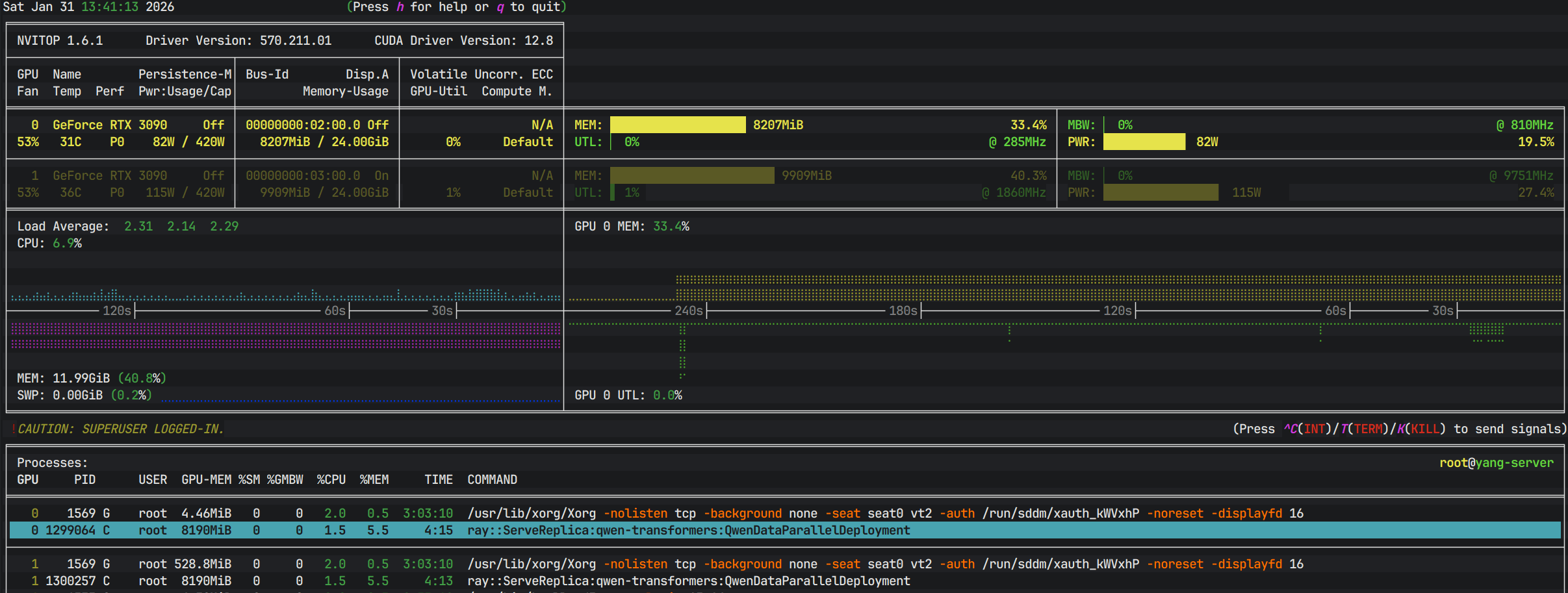
5.4 GPU状态检测
- 在宿主机安装
nvitop监视gpu情况。
pip install nvitop
nvitop -m full
六 交互式分布式推理(快速测试)
6.1 服务接口测试
# 1. 不带鉴权(如果 .env 中 API_KEY 留空):
curl -X POST http://localhost:8000/ \
  -H "Content-Type: application/json" \
  -d '{"messages":[{"role":"user","content":"你好"}]}'

# 2. 流式输出测试:
curl -X POST http://localhost:8000/ \
  -H "Content-Type: application/json" \
  -H "Authorization: Bearer sk-666666" \
  -d '{"messages":[{"role":"user","content":"讲个笑话"}],"stream":true}'

#使用 prompt 字段(简化版):
curl -X POST http://localhost:8000/ \
  -H "Content-Type: application/json" \
  -H "Authorization: Bearer sk-666666" \
  -d '{"prompt":"你好","max_tokens":100}'
6.2 测试数据并行分发
- 创建测试脚本验证请求是否被分发到不同GPU(数据并行核心特征):
# 新终端,进入主节点容器
docker exec -it ray-node-0 bash
cd /root/ray-transformers/data
vim test_data_parallel.py
import requests
import json
import concurrent.futures
import time

BASE_URL = "http://127.0.0.1:8000"
API_KEY = "sk-666666"  # 如果设置了 API Key,请填写

def send_request(prompt_id):
    """发送单个请求并记录返回的节点信息"""
    headers = {"Content-Type": "application/json"}
    if API_KEY:
        headers["Authorization"] = f"Bearer {API_KEY}"

    payload = {
        "messages": [{"role": "user", "content": f"请用一句话回复'收到,请求ID: {prompt_id}'"}],
        "max_tokens": 50,
        "stream": False  # 非流式才能看到 system_info
    }

    try:
        resp = requests.post(f"{BASE_URL}/", headers=headers, json=payload, timeout=30)
        result = resp.json()

        # 正确解析 system_info 字段
        system_info = result.get("system_info", {})
        response_text = result.get("choices", [{}])[0].get("message", {}).get("content", "无内容")

        return {
            "request_id": prompt_id,
            "node": system_info.get("node", "unknown")[:8],  # 取前8位
            "gpu": system_info.get("gpu", "unknown"),
            "response": response_text[:50] + ("..." if len(response_text) > 50 else "")
        }
    except Exception as e:
        return {"request_id": prompt_id, "error": str(e), "node": "error", "gpu": "error"}

# 测试
print("=== 测试数据并行:并发发送30个请求 ===")
with concurrent.futures.ThreadPoolExecutor(max_workers=30) as executor:
    futures = [executor.submit(send_request, i) for i in range(1, 30)]
    results = [f.result() for f in concurrent.futures.as_completed(futures)]

for r in sorted(results, key=lambda x: x["request_id"]):
    print(f"请求{r['request_id']:02d} -> 节点:{r['node']:8s} GPU:{r['gpu']} -> {r.get('response', r.get('error'))}")

# 检查节点分布
nodes = set(r['node'] for r in results if r['node'] not in ['unknown', 'error'])
print(f"\n请求分布到 {len(nodes)} 个不同节点(期望: 2,证明数据并行生效)")
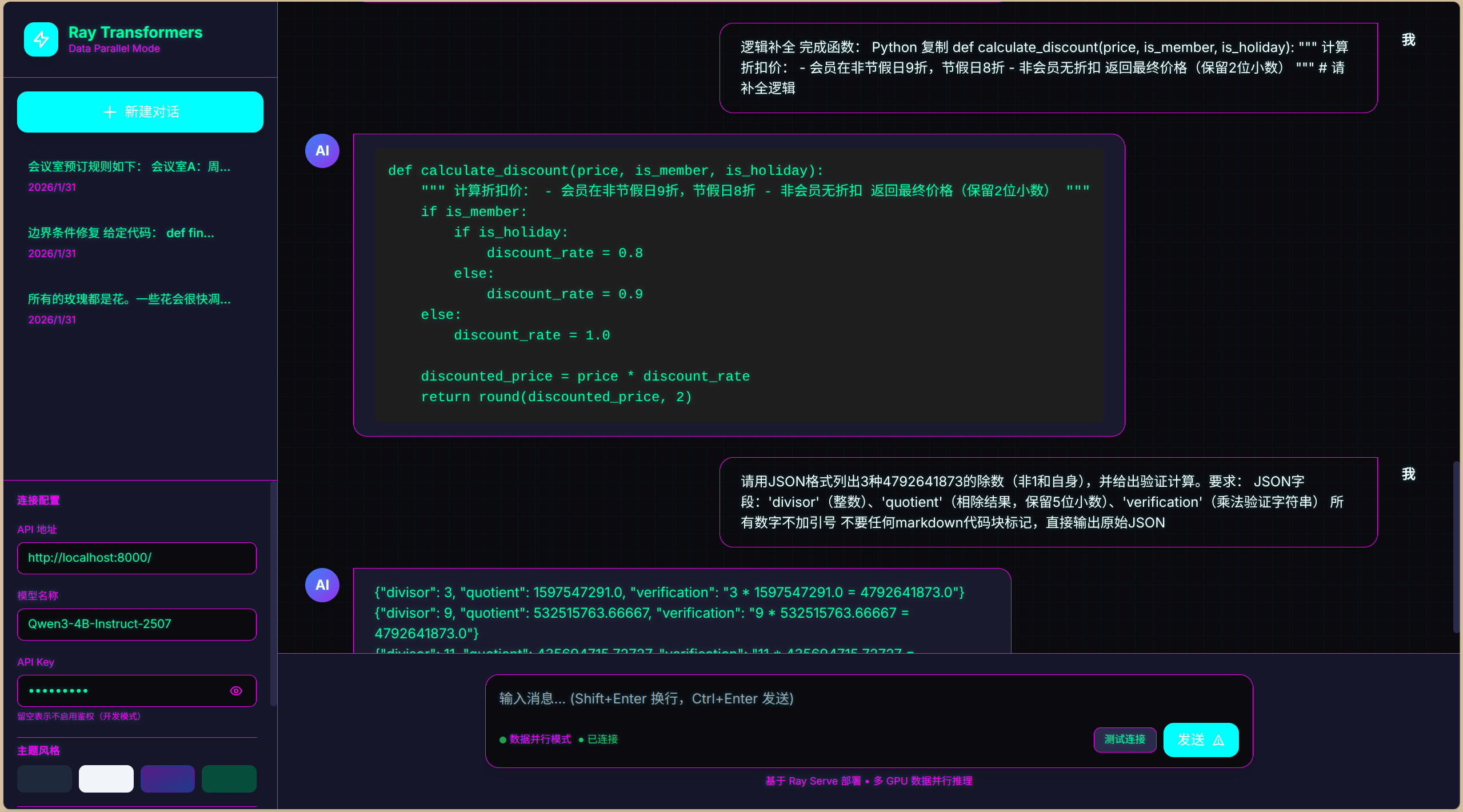
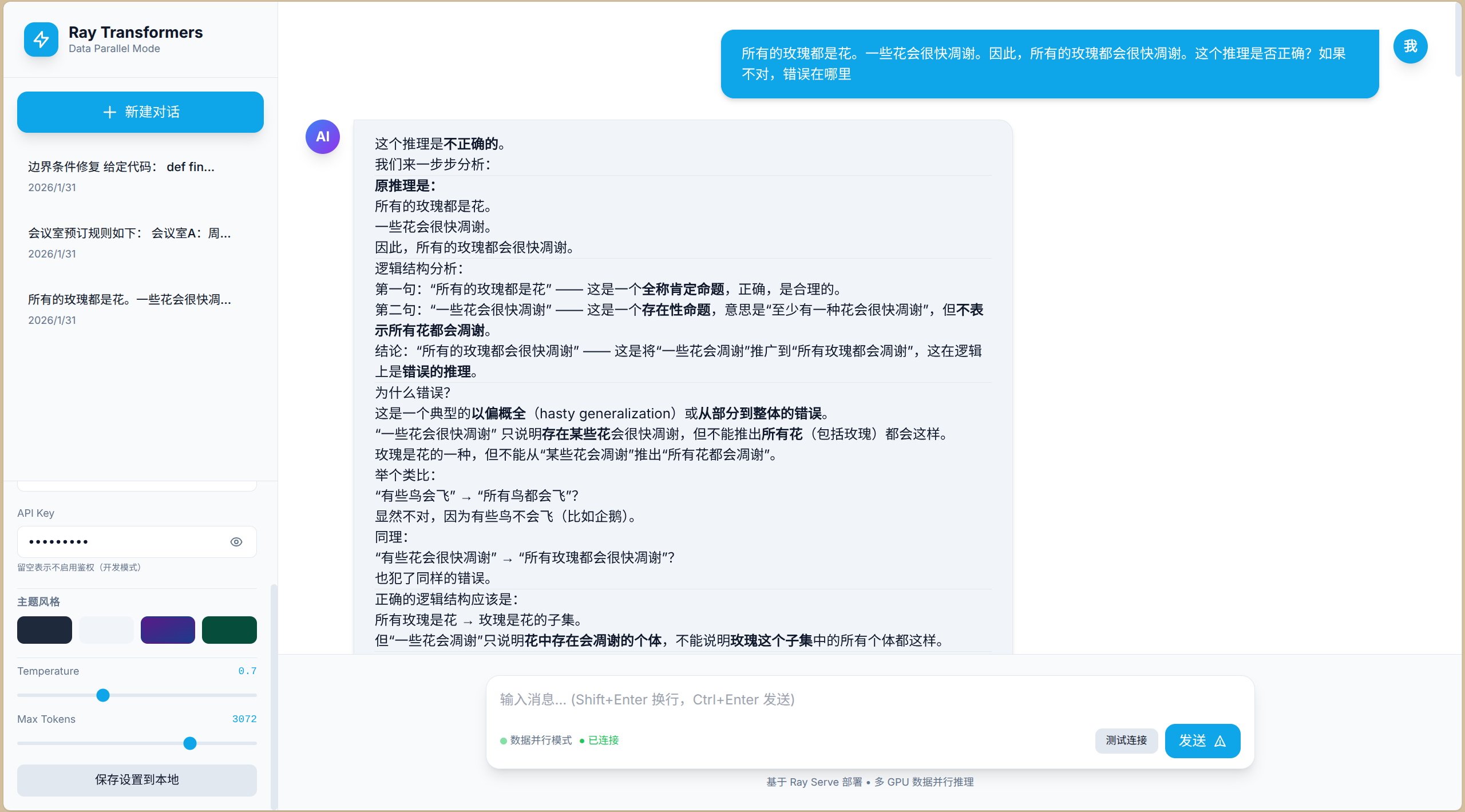
6.3 现代化交互式对话
- 一个独立的
chat.html,支持**深色(Dark)、浅色(Light)、赛博朋克(Cyberpunk)、自然绿(Nature)**四种主题,具备完整的Markdown渲染、代码高亮和流式输出。
# 将页面保存到宿主机,通过挂载共享给容器
vim /opt/1panel/apps/RayCuda/ray-transformers-data/head/chat.html
- chat.html文件内容如下:
<!DOCTYPE html>
<html lang="zh-CN" data-theme="dark">
<head>
<meta charset="UTF-8">
<meta name="viewport" content="width=device-width, initial-scale=1.0">
<title>Ray Transformers AI Chat</title>
<script src="https://cdn.tailwindcss.com"></script>
<script src="https://cdn.jsdelivr.net/npm/marked/marked.min.js"></script>
<link rel="stylesheet" href="https://cdnjs.cloudflare.com/ajax/libs/highlight.js/11.9.0/styles/atom-one-dark.min.css">
<script src="https://cdnjs.cloudflare.com/ajax/libs/highlight.js/11.9.0/highlight.min.js"></script>
<link href="https://fonts.googleapis.com/css2?family=Inter:wght@300;400;500;600;700&family=JetBrains+Mono:wght@400;700&display=swap" rel="stylesheet">
<style>
/* CSS变量主题系统 */
:root {
--font-main: 'Inter', sans-serif;
--font-mono: 'JetBrains Mono', monospace;
--radius: 12px;
--transition: all 0.3s cubic-bezier(0.4, 0, 0.2, 1);
}
/* 深色主题(默认) */
:root[data-theme="dark"] {
--bg-primary: #0f172a;
--bg-secondary: #1e293b;
--bg-tertiary: #334155;
--text-primary: #f8fafc;
--text-secondary: #94a3b8;
--accent: #3b82f6;
--accent-hover: #2563eb;
--border: #334155;
--user-bubble: #3b82f6;
--ai-bubble: #1e293b;
--shadow: 0 20px 25px -5px rgba(0, 0, 0, 0.5);
}
/* 浅色主题 */
:root[data-theme="light"] {
--bg-primary: #ffffff;
--bg-secondary: #f8fafc;
--bg-tertiary: #e2e8f0;
--text-primary: #0f172a;
--text-secondary: #64748b;
--accent: #0ea5e9;
--accent-hover: #0284c7;
--border: #e2e8f0;
--user-bubble: #0ea5e9;
--ai-bubble: #f1f5f9;
--shadow: 0 20px 25px -5px rgba(0, 0, 0, 0.1);
}
/* 赛博朋克主题 */
:root[data-theme="cyberpunk"] {
--bg-primary: #0a0a0f;
--bg-secondary: #16162a;
--bg-tertiary: #2a2a4a;
--text-primary: #00ff9d;
--text-secondary: #ff00ff;
--accent: #00ffff;
--accent-hover: #00cccc;
--border: #ff00ff;
--user-bubble: linear-gradient(135deg, #ff00ff 0%, #00ffff 100%);
--ai-bubble: #1a1a2e;
--shadow: 0 0 20px rgba(0, 255, 255, 0.3);
}
/* 自然绿主题 */
:root[data-theme="nature"] {
--bg-primary: #022c22;
--bg-secondary: #064e3b;
--bg-tertiary: #065f46;
--text-primary: #ecfdf5;
--text-secondary: #6ee7b7;
--accent: #34d399;
--accent-hover: #10b981;
--border: #059669;
--user-bubble: #059669;
--ai-bubble: #064e3b;
--shadow: 0 20px 25px -5px rgba(0, 0, 0, 0.3);
}
* { font-family: var(--font-main); transition: var(--transition); }
body {
background: var(--bg-primary);
color: var(--text-primary);
overflow: hidden;
}
/* 自定义滚动条 */
::-webkit-scrollbar { width: 8px; height: 8px; }
::-webkit-scrollbar-track { background: transparent; }
::-webkit-scrollbar-thumb {
background: var(--bg-tertiary);
border-radius: 4px;
}
::-webkit-scrollbar-thumb:hover { background: var(--accent); }
/* 消息气泡动画 */
@keyframes messageSlide {
from { opacity: 0; transform: translateY(20px) scale(0.95); }
to { opacity: 1; transform: translateY(0) scale(1); }
}
.message-anim { animation: messageSlide 0.3s ease-out forwards; }
/* 打字机光标 */
.typing-cursor::after {
content: '▋';
animation: blink 1s infinite;
color: var(--accent);
margin-left: 2px;
}
@keyframes blink { 0%, 50% { opacity: 1; } 51%, 100% { opacity: 0; } }
/* 代码块样式 */
pre {
background: #1e1e1e !important;
border-radius: 8px;
padding: 16px;
overflow-x: auto;
position: relative;
margin: 12px 0;
}
code { font-family: var(--font-mono); font-size: 0.9em; }
.copy-btn {
position: absolute;
top: 8px;
right: 8px;
background: rgba(255,255,255,0.1);
border: none;
color: #fff;
padding: 4px 8px;
border-radius: 4px;
cursor: pointer;
font-size: 12px;
opacity: 0;
transition: opacity 0.2s;
}
pre:hover .copy-btn { opacity: 1; }
/* 思考动画 */
.thinking {
display: flex;
gap: 4px;
padding: 12px;
align-items: center;
}
.thinking-dot {
width: 8px;
height: 8px;
background: var(--accent);
border-radius: 50%;
animation: bounce 1.4s infinite ease-in-out both;
}
.thinking-dot:nth-child(1) { animation-delay: -0.32s; }
.thinking-dot:nth-child(2) { animation-delay: -0.16s; }
@keyframes bounce {
0%, 80%, 100% { transform: scale(0); }
40% { transform: scale(1); }
}
/* 输入框发光效果 */
.input-glow:focus-within {
box-shadow: 0 0 0 3px rgba(59, 130, 246, 0.3);
border-color: var(--accent);
}
/* 赛博朋克特殊效果 */
[data-theme="cyberpunk"] .cyber-grid {
background-image:
linear-gradient(rgba(0, 255, 255, 0.03) 1px, transparent 1px),
linear-gradient(90deg, rgba(0, 255, 255, 0.03) 1px, transparent 1px);
background-size: 20px 20px;
}
[data-theme="cyberpunk"] * {
text-shadow: 0 0 5px rgba(0, 255, 255, 0.3);
}
/* 密码显示切换按钮 */
.password-toggle {
position: absolute;
right: 12px;
top: 50%;
transform: translateY(-50%);
color: var(--text-secondary);
cursor: pointer;
padding: 4px;
}
.password-toggle:hover { color: var(--accent); }
</style>
</head>
<body class="h-screen w-screen flex cyber-grid">
<!-- 侧边栏 -->
<aside id="sidebar" class="w-80 bg-[var(--bg-secondary)] border-r border-[var(--border)] flex flex-col transform -translate-x-full md:translate-x-0 transition-transform duration-300 absolute md:relative z-20 h-full">
<!-- Logo -->
<div class="p-6 border-b border-[var(--border)] flex items-center justify-between">
<div class="flex items-center gap-3">
<div class="w-10 h-10 rounded-xl bg-[var(--accent)] flex items-center justify-center text-white font-bold text-xl shadow-lg">
<svg class="w-6 h-6" fill="none" stroke="currentColor" viewBox="0 0 24 24"><path stroke-linecap="round" stroke-linejoin="round" stroke-width="2" d="M13 10V3L4 14h7v7l9-11h-7z"></path></svg>
</div>
<div>
<h1 class="font-bold text-lg leading-tight">Ray Transformers</h1>
<p class="text-xs text-[var(--text-secondary)]">Data Parallel Mode</p>
</div>
</div>
<button onclick="toggleSidebar()" class="md:hidden text-[var(--text-secondary)] hover:text-[var(--text-primary)]">
<svg class="w-6 h-6" fill="none" stroke="currentColor" viewBox="0 0 24 24"><path stroke-linecap="round" stroke-linejoin="round" stroke-width="2" d="M6 18L18 6M6 6l12 12"></path></svg>
</button>
</div>
<!-- 新对话按钮 -->
<div class="p-4">
<button onclick="newChat()" class="w-full py-3 px-4 bg-[var(--accent)] hover:bg-[var(--accent-hover)] text-white rounded-xl font-medium flex items-center justify-center gap-2 shadow-lg transform hover:scale-[1.02] transition-all">
<svg class="w-5 h-5" fill="none" stroke="currentColor" viewBox="0 0 24 24"><path stroke-linecap="round" stroke-linejoin="round" stroke-width="2" d="M12 4v16m8-8H4"></path></svg>
新建对话
</button>
</div>
<!-- 历史记录 -->
<div class="flex-1 overflow-y-auto px-4 space-y-2" id="history-list">
<!-- 动态生成 -->
</div>
<!-- 设置面板 -->
<div class="p-4 border-t border-[var(--border)] space-y-4 overflow-y-auto max-h-96">
<!-- 连接设置 -->
<div class="space-y-3">
<label class="text-xs font-semibold text-[var(--text-secondary)] uppercase tracking-wider block">连接配置</label>
<!-- API URL -->
<div class="space-y-1">
<label class="text-xs text-[var(--text-secondary)]">API 地址</label>
<input type="text" id="api-url" value="http://localhost:8000/"
class="w-full px-3 py-2 bg-[var(--bg-primary)] border border-[var(--border)] rounded-lg text-sm focus:outline-none focus:border-[var(--accent)] text-[var(--text-primary)] placeholder-[var(--text-secondary)]">
</div>
<!-- 模型名称 -->
<div class="space-y-1">
<label class="text-xs text-[var(--text-secondary)]">模型名称</label>
<input type="text" id="model-name" value="Qwen3-4B-Instruct-2507"
placeholder="Qwen3-4B-Instruct-2507"
class="w-full px-3 py-2 bg-[var(--bg-primary)] border border-[var(--border)] rounded-lg text-sm focus:outline-none focus:border-[var(--accent)] text-[var(--text-primary)] placeholder-[var(--text-secondary)]">
</div>
<!-- API Key -->
<div class="space-y-1">
<label class="text-xs text-[var(--text-secondary)]">API Key</label>
<div class="relative">
<input type="password" id="api-key" value=""
placeholder="sk-xxxxxxxx"
class="w-full px-3 py-2 pr-10 bg-[var(--bg-primary)] border border-[var(--border)] rounded-lg text-sm focus:outline-none focus:border-[var(--accent)] text-[var(--text-primary)] placeholder-[var(--text-secondary)]">
<button onclick="togglePasswordVisibility()" class="password-toggle" type="button">
<svg id="eye-icon" class="w-4 h-4" fill="none" stroke="currentColor" viewBox="0 0 24 24"><path stroke-linecap="round" stroke-linejoin="round" stroke-width="2" d="M15 12a3 3 0 11-6 0 3 3 0 016 0z"></path><path stroke-linecap="round" stroke-linejoin="round" stroke-width="2" d="M2.458 12C3.732 7.943 7.523 5 12 5c4.478 0 8.268 2.943 9.542 7-1.274 4.057-5.064 7-9.542 7-4.477 0-8.268-2.943-9.542-7z"></path></svg>
</button>
</div>
<p class="text-[10px] text-[var(--text-secondary)] mt-1">留空表示不启用鉴权(开发模式)</p>
</div>
</div>
<!-- 主题切换 -->
<div class="pt-2 border-t border-[var(--border)]">
<label class="text-xs font-semibold text-[var(--text-secondary)] uppercase tracking-wider mb-2 block">主题风格</label>
<div class="grid grid-cols-4 gap-2">
<button onclick="setTheme('dark')" class="h-8 rounded-lg bg-slate-800 border-2 border-transparent hover:border-[var(--accent)] transition-all" title="深色"></button>
<button onclick="setTheme('light')" class="h-8 rounded-lg bg-slate-100 border-2 border-transparent hover:border-[var(--accent)] transition-all" title="浅色"></button>
<button onclick="setTheme('cyberpunk')" class="h-8 rounded-lg bg-gradient-to-br from-purple-900 to-blue-900 border-2 border-transparent hover:border-[var(--accent)] transition-all" title="赛博朋克"></button>
<button onclick="setTheme('nature')" class="h-8 rounded-lg bg-emerald-900 border-2 border-transparent hover:border-[var(--accent)] transition-all" title="自然绿"></button>
</div>
</div>
<!-- 参数调节 -->
<div class="space-y-3 pt-2 border-t border-[var(--border)]">
<div>
<div class="flex justify-between text-xs mb-1">
<span class="text-[var(--text-secondary)]">Temperature</span>
<span id="temp-value" class="text-[var(--accent)] font-mono">0.7</span>
</div>
<input type="range" id="temperature" min="0" max="2" step="0.1" value="0.7"
class="w-full h-1 bg-[var(--bg-tertiary)] rounded-lg appearance-none cursor-pointer accent-[var(--accent)]">
</div>
<div>
<div class="flex justify-between text-xs mb-1">
<span class="text-[var(--text-secondary)]">Max Tokens</span>
<span id="token-value" class="text-[var(--accent)] font-mono">2048</span>
</div>
<input type="range" id="max-tokens" min="256" max="4096" step="256" value="2048"
class="w-full h-1 bg-[var(--bg-tertiary)] rounded-lg appearance-none cursor-pointer accent-[var(--accent)]">
</div>
</div>
<!-- 保存按钮 -->
<button onclick="saveSettings()" class="w-full py-2 bg-[var(--bg-tertiary)] hover:bg-[var(--accent)] text-[var(--text-primary)] rounded-lg text-sm font-medium transition-all border border-[var(--border)]">
保存设置到本地
</button>
</div>
</aside>
<!-- 主内容区 -->
<main class="flex-1 flex flex-col h-full relative">
<!-- 顶部栏(移动端) -->
<header class="md:hidden h-16 bg-[var(--bg-secondary)] border-b border-[var(--border)] flex items-center px-4 justify-between">
<button onclick="toggleSidebar()" class="text-[var(--text-secondary)]">
<svg class="w-6 h-6" fill="none" stroke="currentColor" viewBox="0 0 24 24"><path stroke-linecap="round" stroke-linejoin="round" stroke-width="2" d="M4 6h16M4 12h16M4 18h16"></path></svg>
</button>
<span class="font-semibold">Ray Chat</span>
<div class="w-6"></div>
</header>
<!-- 消息区 -->
<div id="chat-messages" class="flex-1 overflow-y-auto p-4 md:p-8 space-y-6 scroll-smooth">
<!-- 欢迎消息 -->
<div class="message-anim flex gap-4 items-start">
<div class="w-10 h-10 rounded-full bg-gradient-to-br from-blue-500 to-purple-600 flex items-center justify-center text-white font-bold flex-shrink-0 shadow-lg">
AI
</div>
<div class="flex-1 max-w-3xl">
<div class="bg-[var(--ai-bubble)] rounded-2xl rounded-tl-none px-6 py-4 shadow-md border border-[var(--border)]">
<p class="text-[var(--text-primary)] leading-relaxed">
你好!我是基于 <strong>Ray+Transformers</strong> 数据并行架构运行的 AI 助手。<br>
当前后端部署了 <span class="text-[var(--accent)] font-mono">2</span> 个独立模型副本,支持高并发请求处理。<br><br>
我可以帮您:
</p>
<ul class="mt-2 space-y-1 text-[var(--text-secondary)] list-disc list-inside">
<li>流式生成文本</li>
<li>代码编写与解释</li>
<li>Markdown 格式输出</li>
</ul>
</div>
<span class="text-xs text-[var(--text-secondary)] mt-1 ml-1" id="model-display">模型: Qwen3-4B-Instruct-2507</span>
</div>
</div>
</div>
<!-- 输入区 -->
<div class="p-4 md:p-6 bg-[var(--bg-secondary)] border-t border-[var(--border)]">
<div class="max-w-4xl mx-auto relative">
<div class="input-glow bg-[var(--bg-primary)] border border-[var(--border)] rounded-2xl shadow-lg flex flex-col">
<textarea id="user-input" rows="1" placeholder="输入消息... (Shift+Enter 换行,Ctrl+Enter 发送)"
class="w-full bg-transparent border-0 p-4 resize-none focus:outline-none text-[var(--text-primary)] max-h-32"
oninput="this.style.height='auto';this.style.height=this.scrollHeight+'px'"
onkeydown="handleKeyDown(event)"></textarea>
<div class="flex items-center justify-between px-4 pb-3">
<div class="flex items-center gap-2 text-xs text-[var(--text-secondary)]">
<span class="flex items-center gap-1">
<div class="w-2 h-2 rounded-full bg-green-500 animate-pulse"></div>
数据并行模式
</span>
<span id="connection-status" class="text-yellow-500">● 未连接</span>
</div>
<div class="flex items-center gap-2">
<button onclick="testConnection()" class="text-xs px-3 py-1.5 bg-[var(--bg-tertiary)] hover:bg-[var(--accent)] text-[var(--text-primary)] rounded-lg transition-all border border-[var(--border)]">
测试连接
</button>
<button onclick="sendMessage()" id="send-btn" class="bg-[var(--accent)] hover:bg-[var(--accent-hover)] text-white px-4 py-2 rounded-xl font-medium flex items-center gap-2 transition-all disabled:opacity-50 disabled:cursor-not-allowed">
<span>发送</span>
<svg class="w-4 h-4" fill="none" stroke="currentColor" viewBox="0 0 24 24"><path stroke-linecap="round" stroke-linejoin="round" stroke-width="2" d="M12 19l9 2-9-18-9 18 9-2zm0 0v-8"></path></svg>
</button>
</div>
</div>
</div>
<p class="text-center text-xs text-[var(--text-secondary)] mt-2">
基于 Ray Serve 部署 • 多 GPU 数据并行推理
</p>
</div>
</div>
</main>
<script>
// 状态管理
let currentChatId = Date.now();
let isStreaming = false;
let chatHistory = JSON.parse(localStorage.getItem('chatHistory') || '[]');
// 初始化
document.addEventListener('DOMContentLoaded', () => {
loadSettings();
loadHistoryList();
document.getElementById('temperature').addEventListener('input', (e) => {
document.getElementById('temp-value').textContent = e.target.value;
});
document.getElementById('max-tokens').addEventListener('input', (e) => {
document.getElementById('token-value').textContent = e.target.value;
});
// 自动测试连接
setTimeout(testConnection, 1000);
});
// 加载设置
function loadSettings() {
const settings = JSON.parse(localStorage.getItem('chatSettings') || '{}');
if (settings.apiUrl) document.getElementById('api-url').value = settings.apiUrl;
if (settings.modelName) {
document.getElementById('model-name').value = settings.modelName;
document.getElementById('model-display').textContent = '模型: ' + settings.modelName;
}
if (settings.apiKey) document.getElementById('api-key').value = settings.apiKey;
if (settings.theme) setTheme(settings.theme);
if (settings.temperature) {
document.getElementById('temperature').value = settings.temperature;
document.getElementById('temp-value').textContent = settings.temperature;
}
if (settings.maxTokens) {
document.getElementById('max-tokens').value = settings.maxTokens;
document.getElementById('token-value').textContent = settings.maxTokens;
}
}
// 保存设置
function saveSettings() {
const settings = {
apiUrl: document.getElementById('api-url').value,
modelName: document.getElementById('model-name').value,
apiKey: document.getElementById('api-key').value,
theme: document.documentElement.getAttribute('data-theme'),
temperature: document.getElementById('temperature').value,
maxTokens: document.getElementById('max-tokens').value
};
localStorage.setItem('chatSettings', JSON.stringify(settings));
// 更新显示
document.getElementById('model-display').textContent = '模型: ' + settings.modelName;
// 视觉反馈
const btn = event.target;
const originalText = btn.textContent;
btn.textContent = '已保存!';
btn.classList.add('bg-green-600');
setTimeout(() => {
btn.textContent = originalText;
btn.classList.remove('bg-green-600');
}, 1500);
}
// 主题切换
function setTheme(theme) {
document.documentElement.setAttribute('data-theme', theme);
localStorage.setItem('theme', theme);
}
// 密码可见性切换
function togglePasswordVisibility() {
const input = document.getElementById('api-key');
const icon = document.getElementById('eye-icon');
if (input.type === 'password') {
input.type = 'text';
icon.innerHTML = '<path stroke-linecap="round" stroke-linejoin="round" stroke-width="2" d="M13.875 18.825A10.05 10.05 0 0112 19c-4.478 0-8.268-2.943-9.543-7a9.97 9.97 0 011.563-3.029m5.858.908a3 3 0 114.243 4.243M9.878 9.878l4.242 4.242M9.88 9.88l-3.29-3.29m7.532 7.532l3.29 3.29M3 3l3.59 3.59m0 0A9.953 9.953 0 0112 5c4.478 0 8.268 2.943 9.543 7a10.025 10.025 0 01-4.132 5.411m0 0L21 21"></path>';
} else {
input.type = 'password';
icon.innerHTML = '<path stroke-linecap="round" stroke-linejoin="round" stroke-width="2" d="M15 12a3 3 0 11-6 0 3 3 0 016 0z"></path><path stroke-linecap="round" stroke-linejoin="round" stroke-width="2" d="M2.458 12C3.732 7.943 7.523 5 12 5c4.478 0 8.268 2.943 9.542 7-1.274 4.057-5.064 7-9.542 7-4.477 0-8.268-2.943-9.542-7z"></path>';
}
}
// 测试连接
async function testConnection() {
const status = document.getElementById('connection-status');
status.textContent = '● 测试中...';
status.className = 'text-yellow-500';
try {
const apiUrl = document.getElementById('api-url').value.replace(/\/+$/, '');
const apiKey = document.getElementById('api-key').value;
const modelName = document.getElementById('model-name').value;
const headers = { 'Content-Type': 'application/json' };
if (apiKey) headers['Authorization'] = `Bearer ${apiKey}`;
// 发送一个简单请求测试连接
const response = await fetch(`${apiUrl}`, {
method: 'POST',
headers: headers,
body: JSON.stringify({
messages: [{ role: 'user', content: 'test' }],
max_tokens: 1,
stream: false
})
});
if (response.ok || response.status === 401) { // 401也表示服务在线,只是鉴权失败
status.textContent = '● 已连接';
status.className = 'text-green-500';
if (response.status === 401) {
status.textContent = '● 鉴权失败';
status.className = 'text-red-500';
}
} else {
throw new Error('服务异常');
}
} catch (e) {
status.textContent = '● 未连接';
status.className = 'text-red-500';
}
}
// 侧边栏切换
function toggleSidebar() {
const sidebar = document.getElementById('sidebar');
sidebar.classList.toggle('-translate-x-full');
}
// 新建对话
function newChat() {
currentChatId = Date.now();
document.getElementById('chat-messages').innerHTML = `
<div class="message-anim flex gap-4 items-start">
<div class="w-10 h-10 rounded-full bg-gradient-to-br from-blue-500 to-purple-600 flex items-center justify-center text-white font-bold flex-shrink-0 shadow-lg">
AI
</div>
<div class="flex-1 max-w-3xl">
<div class="bg-[var(--ai-bubble)] rounded-2xl rounded-tl-none px-6 py-4 shadow-md border border-[var(--border)]">
<p class="text-[var(--text-primary)]">已开启新对话。有什么可以帮您的?</p>
</div>
</div>
</div>
`;
if (window.innerWidth < 768) toggleSidebar();
}
// 键盘事件
function handleKeyDown(e) {
if (e.key === 'Enter' && !e.shiftKey) {
e.preventDefault();
sendMessage();
}
}
// 渲染Markdown
function renderMarkdown(text) {
marked.setOptions({
highlight: function(code, lang) {
if (lang && hljs.getLanguage(lang)) {
return hljs.highlight(code, { language: lang }).value;
}
return hljs.highlightAuto(code).value;
},
breaks: true
});
return marked.parse(text);
}
// 添加消息到界面
function addMessage(role, content, isStreaming = false) {
const container = document.getElementById('chat-messages');
const messageId = 'msg-' + Date.now();
const html = `
<div id="${messageId}" class="message-anim flex gap-4 ${role === 'user' ? 'flex-row-reverse' : ''} items-start">
<div class="w-10 h-10 rounded-full flex items-center justify-center text-white font-bold flex-shrink-0 shadow-lg ${
role === 'user'
? 'bg-[var(--user-bubble)]'
: 'bg-gradient-to-br from-blue-500 to-purple-600'
}">
${role === 'user' ? '我' : 'AI'}
</div>
<div class="flex-1 max-w-3xl ${role === 'user' ? 'text-right' : ''}">
<div class="inline-block text-left px-6 py-4 shadow-md border border-[var(--border)] ${
role === 'user'
? 'bg-[var(--user-bubble)] text-white rounded-2xl rounded-tr-none'
: 'bg-[var(--ai-bubble)] text-[var(--text-primary)] rounded-2xl rounded-tl-none'
}">
<div class="prose prose-invert max-w-none ${isStreaming ? 'typing-cursor' : ''}" id="content-${messageId}">
${role === 'user' ? content : (isStreaming ? '' : renderMarkdown(content))}
</div>
</div>
</div>
</div>
`;
container.insertAdjacentHTML('beforeend', html);
container.scrollTop = container.scrollHeight;
return messageId;
}
// 发送消息
async function sendMessage() {
const input = document.getElementById('user-input');
const btn = document.getElementById('send-btn');
const content = input.value.trim();
if (!content || isStreaming) return;
// 添加用户消息
addMessage('user', content);
input.value = '';
input.style.height = 'auto';
btn.disabled = true;
isStreaming = true;
// 添加思考动画
const loadingId = 'loading-' + Date.now();
const container = document.getElementById('chat-messages');
container.insertAdjacentHTML('beforeend', `
<div id="${loadingId}" class="message-anim flex gap-4 items-start">
<div class="w-10 h-10 rounded-full bg-gradient-to-br from-blue-500 to-purple-600 flex items-center justify-center text-white font-bold flex-shrink-0">
AI
</div>
<div class="flex-1 max-w-3xl">
<div class="bg-[var(--ai-bubble)] rounded-2xl rounded-tl-none px-6 py-4 border border-[var(--border)] inline-block">
<div class="thinking">
<div class="thinking-dot"></div>
<div class="thinking-dot"></div>
<div class="thinking-dot"></div>
<span class="text-[var(--text-secondary)] text-sm ml-2">思考中...</span>
</div>
</div>
</div>
</div>
`);
container.scrollTop = container.scrollHeight;
const apiUrl = document.getElementById('api-url').value.replace(/\/+$/, '');
const apiKey = document.getElementById('api-key').value;
const modelName = document.getElementById('model-name').value;
const temperature = parseFloat(document.getElementById('temperature').value);
const maxTokens = parseInt(document.getElementById('max-tokens').value);
// 准备请求头
const headers = { 'Content-Type': 'application/json' };
if (apiKey) headers['Authorization'] = `Bearer ${apiKey}`;
try {
// 获取历史消息(最近10轮)
const messages = [];
const historyDivs = container.querySelectorAll('.message-anim');
let count = 0;
for (let i = historyDivs.length - 3; i >= 0 && count < 20; i--) {
const div = historyDivs[i];
const isUser = div.querySelector('.rounded-tr-none');
const text = div.querySelector('[id^="content-"]')?.textContent || '';
if (text) {
messages.unshift({ role: isUser ? 'user' : 'assistant', content: text });
count++;
}
}
messages.push({ role: 'user', content: content });
// 移除思考动画
document.getElementById(loadingId)?.remove();
// 创建AI消息容器
const messageId = addMessage('assistant', '', true);
const contentDiv = document.getElementById(`content-${messageId}`);
let fullText = '';
// 流式请求
const response = await fetch(`${apiUrl}`, {
method: 'POST',
headers: headers,
body: JSON.stringify({
model: modelName, // 传递模型名称
messages: messages,
temperature: temperature,
max_tokens: maxTokens,
stream: true
})
});
if (!response.ok) {
if (response.status === 401) throw new Error('API Key 验证失败');
if (response.status === 403) throw new Error('没有权限访问该模型');
throw new Error(`HTTP ${response.status}: ${response.statusText}`);
}
const reader = response.body.getReader();
const decoder = new TextDecoder();
while (true) {
const { done, value } = await reader.read();
if (done) break;
const chunk = decoder.decode(value);
const lines = chunk.split('\n');
for (const line of lines) {
if (line.trim() === '' || line.trim() === 'data: [DONE]') continue;
if (line.startsWith('data: ')) {
try {
const data = JSON.parse(line.slice(6));
const text = data.choices?.[0]?.delta?.content || '';
if (text) {
fullText += text;
contentDiv.innerHTML = renderMarkdown(fullText);
contentDiv.classList.remove('typing-cursor');
contentDiv.querySelectorAll('pre code').forEach((block) => {
hljs.highlightBlock(block);
});
addCopyButtons(contentDiv);
container.scrollTop = container.scrollHeight;
}
} catch (e) {}
}
}
}
saveToHistory(content, fullText);
} catch (error) {
document.getElementById(loadingId)?.remove();
addMessage('assistant', `❌ 错误: ${error.message}`);
} finally {
isStreaming = false;
btn.disabled = false;
}
}
// 添加复制按钮
function addCopyButtons(container) {
container.querySelectorAll('pre').forEach(pre => {
if (pre.querySelector('.copy-btn')) return;
const btn = document.createElement('button');
btn.className = 'copy-btn';
btn.textContent = '复制';
btn.onclick = () => {
navigator.clipboard.writeText(pre.querySelector('code')?.textContent || '');
btn.textContent = '已复制!';
setTimeout(() => btn.textContent = '复制', 2000);
};
pre.appendChild(btn);
});
}
// 历史记录管理
function saveToHistory(userMsg, aiMsg) {
const history = JSON.parse(localStorage.getItem('chatHistory') || '[]');
const existing = history.find(h => h.id === currentChatId);
if (existing) {
existing.messages.push({ user: userMsg, ai: aiMsg });
existing.updated = Date.now();
} else {
history.push({
id: currentChatId,
title: userMsg.slice(0, 20) + (userMsg.length > 20 ? '...' : ''),
messages: [{ user: userMsg, ai: aiMsg }],
updated: Date.now()
});
}
localStorage.setItem('chatHistory', JSON.stringify(history));
loadHistoryList();
}
function loadHistoryList() {
const list = document.getElementById('history-list');
const history = JSON.parse(localStorage.getItem('chatHistory') || '[]')
.sort((a, b) => b.updated - a.updated);
list.innerHTML = history.map(h => `
<div onclick="loadChat(${h.id})" class="p-3 rounded-xl hover:bg-[var(--bg-tertiary)] cursor-pointer group transition-all border border-transparent hover:border-[var(--border)]">
<div class="flex items-center justify-between">
<span class="text-sm font-medium text-[var(--text-primary)] truncate">${h.title}</span>
<button onclick="deleteChat(event, ${h.id})" class="opacity-0 group-hover:opacity-100 text-red-500 hover:text-red-600 p-1">
<svg class="w-4 h-4" fill="none" stroke="currentColor" viewBox="0 0 24 24"><path stroke-linecap="round" stroke-linejoin="round" stroke-width="2" d="M19 7l-.867 12.142A2 2 0 0116.138 21H7.862a2 2 0 01-1.995-1.858L5 7m5 4v6m4-6v6m1-10V4a1 1 0 00-1-1h-4a1 1 0 00-1 1v3M4 7h16"></path></svg>
</button>
</div>
<div class="text-xs text-[var(--text-secondary)] mt-1">
${new Date(h.updated).toLocaleDateString()}
</div>
</div>
`).join('');
}
function loadChat(id) {
// 加载历史对话逻辑
currentChatId = id;
const history = JSON.parse(localStorage.getItem('chatHistory') || '[]');
const chat = history.find(h => h.id === id);
if (chat) {
const container = document.getElementById('chat-messages');
container.innerHTML = '';
chat.messages.forEach(m => {
addMessage('user', m.user);
addMessage('assistant', m.ai);
});
}
if (window.innerWidth < 768) toggleSidebar();
}
function deleteChat(e, id) {
e.stopPropagation();
const history = JSON.parse(localStorage.getItem('chatHistory') || '[]');
const filtered = history.filter(h => h.id !== id);
localStorage.setItem('chatHistory', JSON.stringify(filtered));
loadHistoryList();
}
</script>
</body>
</html>
- 直接使用宿主机打开网页文件,测试效果如下:
七 与vLLM模式的关键差异
| 对比项 | Ray+vLLM | Ray+Transformers |
|---|---|---|
| 启动命令 | vllm serve |
serve run (Ray Serve) |
| 模型加载 | 自动分片到2张GPU | 每卡独立加载完整模型 |
| 显存占用 | ~5GB/卡(4B模型分片) | ~8GB/卡(4B模型完整复制) |
| 并发特性 | 连续批处理 | 独立Actor并行处理 |
| 容错性 | 单卡故障整体失效 | 单卡故障仅影响该副本 |
| 扩缩容 | 需重启调整TP大小 | 动态调整num_replicas |

有“AI”的1024 = 2048,欢迎大家加入2048 AI社区
更多推荐

 6
6 0
0- 0


 已为社区贡献67条内容

所有评论(0)