DHTMLX Gantt 9.1.1
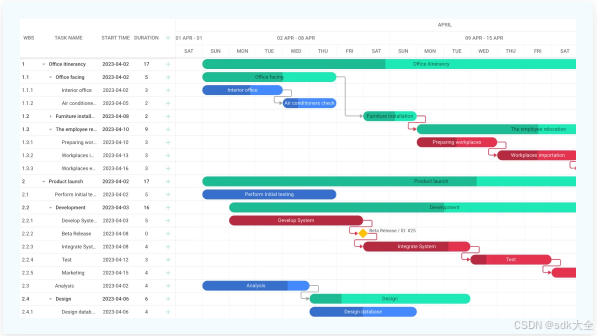
DHTMLX Gantt is a JavaScript component for displaying and editing project timelines in the browser. It combines a configurable grid, a zoomable time scale, and a scheduling engine that understands wor
9.1.1
December 15, 2025. Bugfix release
Fixes
- Fix the error that occurred in React Gantt when the user provided
linksprop without thetasksprop - Fix the issue in React Gantt where reloaded tasks did not have link IDs in their
$sourceand$targetproperties - Fix the issue where Gantt opened the inline editor after pressing the Meta key
- Fix the
%wdate format not working correctly in CSP production environments - Fix the issue that prevented group tasks from being displayed as split tasks when they had
render="split"specified - Fix the issue with the resource grid disappearing on pressing the Tab key after editing a resource cell
Updates
- Allow configuring row and task bar height for virtual tasks
DHTMLX Gantt overview
DHTMLX Gantt is a JavaScript component for displaying and editing project timelines in the browser. It combines a configurable grid, a zoomable time scale, and a scheduling engine that understands working time, dependencies, and constraints.
You can use it to build project and resource planning views for project management tools, construction and manufacturing schedules, field service planning, and any other application that needs a visual project timeline.
DHTMLX Gantt is available in Standard and PRO editions. The PRO edition includes such features as auto scheduling, critical path, resource management, dynamic loading, and more.
Quick start by framework
You can use DHTMLX Gantt as a vanilla JavaScript widget or integrate it into a modern framework. Start with a step-by-step "How to start" guide suitable for your stack:

Minimal setup with script tags or bundlers. Great for simple pages or non-framework apps.

Use the ready-made ReactGantt component with props and events.

Integrate Gantt into Angular projects using a thin wrapper.

Add a Gantt chart to Vue apps with a small wrapper and reactive props.

Use Gantt inside Svelte with a simple component that binds configuration and events.
Embed the core Gantt widget into your own components for full control over life cycle and data flow.

Embed Gantt in Salesforce apps, connect to your org data, and keep project timelines in CRM.
Live demos
To see DHTMLX Gantt in action, explore the online demos:
- Basic Gantt chart with tasks and links.
- Auto scheduling and critical path examples.
- Resource management diagram and histogram.
- Browse all samples to check the full range of Gantt features.
Key capabilities
DHTMLX Gantt combines a scheduling engine, a flexible timeline, and resource tools. The sections below highlight the main areas and guide you to more detailed chapters.
Project scheduling
DHTMLX Gantt includes a scheduling engine that comprehends project structure and working time:
- Task types and dependencies - three core task types (task, summary, milestone) linked by dependencies.
- Working time calendars on project, task, and resource levels.
- Auto scheduling and critical path to recalculate plans and highlight the tasks that drive the project finish date.
The scheduling behavior is configurable, so you can align it with your internal rules or tools like MS Project.
Timeline & grid
The component combines a data grid on the left with a zoomable time scale on the right, both parts being highly tunable:
- Flexible layout with additional grids, right-side columns, and custom panels.
- Configurable columns with inline editing, multi-selection, drag-and-drop, and keyboard navigation.
- A customizable time scale with markers, and highlighted time slots.
Advanced project controls
For more detailed project tracking, Gantt supports such features as:
- Baselines and deadlines to compare planned dates with current ones.
- Unscheduled tasks and split tasks for incomplete, interrupted, or phased work.
- Undo/redo history for safe editing.
Resource & workload management (PRO)
The PRO edition adds a dedicated resource layer which provides:
- Resource assignments attached to tasks.
- Resource histogram and resource load diagrams.
- Grouping tasks by resource to see who is doing what.
This turns the Gantt chart into a basic tool for managing resources without leaving your application.
Export & ecosystem
DHTMLX Gantt integrates with external tools and output formats ensuring great export/import possibilities:
- Export to PDF/PNG and Excel (including a Node.js export module).
- Export/import to MS Project and Primavera (via export service).
Frameworks and backend integration
Frontend integration
DHTMLX Gantt is a framework-agnostic, vanilla JavaScript component that works in all modern browsers. It can be used:
For React you have two options:
- Use the official ReactGantt wrapper, which exposes Gantt as a declarative React component with props for configuration and events. This is usually the best choice for new React projects.
- Follow the low-level React integration guide if you prefer to embed the core Gantt widget yourself and control initialization, destruction, and data flow manually.
For Angular, Vue, and Svelte, the How to start guides show how to build a thin wrapper component that fits your application architecture.
Backend integration
On the backend side, Gantt communicates with a REST-like API:
- Data is typically loaded and saved as JSON (tasks, links, resources, assignments).
- The built-in DataProcessor helps routing the create/update/delete operations to your server.
- There are tutorials for popular backend platforms and frameworks (Node.js, .NET Core, Laravel, etc.) that cover CRUD operations and best practices for syncing Gantt with your database.
Thus, it is easy to plug Gantt into existing systems or new micro services.
What's next
If you are just getting started:
- Follow a How to start guide for your preferred front-end framework or plain JavaScript.
- Adjust grid columns, working time calendars, scales, and editing behavior.
- Connect to your backend - set up the DataProcessor and REST endpoints for tasks, links, and resources.
- Explore Guides and API reference for deeper customization (templates, events, extensions).
If you are already using DHTMLX Gantt and upgrading from an earlier version, check the What's new for the release notes and a summary of the latest features and migration guides.

有“AI”的1024 = 2048,欢迎大家加入2048 AI社区
更多推荐
 14
14 0
0- 0


 已为社区贡献41条内容

所有评论(0)