【7】Kilo 工具模块设计详解
模块化设计:工具按功能分组,便于管理和扩展按需加载:根据工作模式和配置动态启用工具安全可控:严格的参数验证和权限控制可扩展性:支持 MCP 协议集成第三方工具用户友好:清晰的工具描述和使用示例// 工具基类// 工具参数名称// ... 更多参数] as const// 工具显示名称// ... 更多工具// 工具使用接口// 具体工具类型(示例)是一个开放协议,允许 AI 应用与外部工具和数据源
Kilo 工具模块设计
摘要
介绍 Kilo 项目中的工具系统架构、设计理念和实现细节。Kilo 提供了 20+ 个核心工具,涵盖文件读取、编辑、命令执行、浏览器交互、MCP 集成等多个领域,为 AI 辅助编程提供了完整的工具链支持。
关键特性:
- 20+ 个核心工具,覆盖开发全流程
- 模块化设计,工具按功能分组管理
- 动态工具可用性控制
- 支持实验性功能和条件启用
- MCP 协议集成,可扩展第三方工具
一、概述
Kilo 的工具系统遵循以下核心设计理念:
- 模块化设计:工具按功能分组,便于管理和扩展
- 按需加载:根据工作模式和配置动态启用工具
- 安全可控:严格的参数验证和权限控制
- 可扩展性:支持 MCP 协议集成第三方工具
- 用户友好:清晰的工具描述和使用示例
二、工具分类与功能
2.1 工具分类总览
Kilo 提供 28 个核心工具,按功能分为 6 大类(部分不在分组内):
| 工具类别 | 工具数量 | 主要用途 | 始终可用 |
|---|---|---|---|
| 文件读取类(Read) | 5 | 读取、搜索、列举文件和代码 | 否 |
| 文件编辑类(Edit) | 10 | 创建、修改、替换文件内容 | 否 |
| 命令执行类(Command) | 1 | 执行系统命令 | 否 |
| 浏览器交互类(Browser) | 1 | 自动化浏览器操作 | 否 |
| MCP 集成类(MCP) | 2 | 调用外部 MCP 工具和资源 | 否 |
| 模式任务类(Modes) | 2 | 切换模式、管理任务和其他交互功能 | 是 |
2.2 文件读取类工具(Read Tools)
| 工具名称 | 核心功能 | 主要参数 | 典型场景 | 条件可用 |
|---|---|---|---|---|
| read_file | 读取文件内容,支持行范围和多文件 | path, start_line, end_line |
查看源码、读取配置、代码审查 | 否 |
| fetch_instructions | 获取预定义的任务指令 | 无 | 获取项目规范、编码标准 | 否 |
| search_files | 正则表达式搜索文件内容 | path, regex, file_pattern |
查找函数使用、搜索配置项 | 否 |
| list_files | 列出目录中的文件 | path, recursive |
了解项目结构、查找文件 | 否 |
| list_code_definition_names | 列出代码定义(类、函数等) | path |
快速了解模块导出、代码结构 | 否 |
| codebase_search | 语义搜索代码库 | query, path |
查找功能实现、理解代码意图 | 是(需索引) |
read_file 特殊说明:
- 支持 PDF 和 DOCX 文本提取
- 输出带行号,便于引用
- 某些模型使用简化版本(单文件读取)
2.3 文件编辑类工具(Edit Tools)
| 工具名称 | 核心功能 | 主要参数 | 典型场景 | 条件可用 |
|---|---|---|---|---|
| apply_diff | 应用 diff 补丁精确修改 | path, diff |
精确修改代码、批量修改 | 否 |
| edit_file | Morph 快速编辑(Kilo 特有) | target_file, instructions, code_edit |
快速代码编辑 | 是(需 Morph) |
| fast_edit_file | 快速编辑文件(Fast Apply) | target_file, instructions, code_edit |
更快的代码编辑方式 | 否 |
| write_to_file | 创建新文件或完全重写 | path, content |
创建新文件、生成配置 | 否 |
| delete_file | 删除指定文件 | path |
清理不需要的文件 | 否 |
| new_rule | 创建 Kilo 规则文件 | name, content |
定义项目规范、编码标准 | 否 |
| generate_image | AI 生成或编辑图像 | prompt, path, image |
生成 UI 设计、创建图标 | 是(实验性) |
| search_and_replace | 搜索并替换文本或正则 | path, search, replace, use_regex |
批量重命名、更新配置 | 否 |
| search_replace | 单次搜索替换 | file_path, old_string, new_string |
精确文本替换 | 否 |
| apply_patch | 应用补丁文件 | patch |
应用复杂的代码变更 | 否 |
edit_file 条件可用性:
- 需要 Morph 功能可用
- 启用时禁用传统编辑工具:
apply_diff,write_to_file,fast_edit_file,search_and_replace
generate_image 条件可用性:
- 需要启用
imageGeneration实验特性 - 通过 OpenRouter API 调用
2.4 命令执行类工具(Command Tools)
| 工具名称 | 核心功能 | 主要参数 | 典型场景 | 安全特性 |
|---|---|---|---|---|
| execute_command | 执行系统 CLI 命令 | command, cwd |
运行构建、执行测试、Git 操作 | 危险命令检测、用户批准 |
安全注意事项:
- 命令需要经过验证
- 避免执行危险命令
- 建议使用相对路径
- 优先使用复杂 CLI 命令而非创建可执行脚本
2.5 浏览器交互工具(Browser Tools)
| 工具名称 | 核心功能 | 主要参数 | 支持的操作 | 条件可用 |
|---|---|---|---|---|
| browser_action | Puppeteer 浏览器自动化 | action, url, coordinate, text |
launch, navigate, click, type, screenshot, close | 是(需计算机使用支持) |
使用限制:
- 每条消息只能执行一个浏览器操作
- 每次操作后返回截图和控制台日志
典型场景:
- Web 应用测试
- UI 自动化
- 网页截图
- 表单填写
2.6 MCP 集成工具(MCP Tools)
| 工具名称 | 核心功能 | 主要参数 | 典型场景 | 条件可用 |
|---|---|---|---|---|
| use_mcp_tool | 调用 MCP 服务器工具 | server_name, tool_name, arguments |
调用第三方 API、集成外部服务 | 是(需 MCP Hub) |
| access_mcp_resource | 访问 MCP 服务器资源 | server_name, uri |
获取远程数据、访问系统信息 | 是(需 MCP Hub) |
MCP 工具特点:
- 每个 MCP 服务器可提供多个工具
- 工具有定义的输入模式(必需和可选参数)
- 资源代表可用作上下文的数据源
2.7 交互和完成工具(Interactive Tools)
| 工具名称 | 核心功能 | 主要参数 | 典型场景 | 始终可用 |
|---|---|---|---|---|
| ask_followup_question | 询问澄清性问题 | question, follow_up |
需求澄清、参数确认、选项选择 | 是 |
| attempt_completion | 展示任务完成结果 | result |
任务完成总结、展示最终结果 | 是 |
attempt_completion 重要提示:
- 使用前必须确认所有工具调用成功
- 结果应该是完整和最终的,不需要用户进一步输入
2.8 模式和任务管理工具(Mode & Task Tools)
| 工具名称 | 核心功能 | 主要参数 | 典型场景 | 条件可用 |
|---|---|---|---|---|
| switch_mode | 切换工作模式 | mode_slug, reason |
从 code 切换到 architect 模式 | 始终可用 |
| new_task | 创建新子任务 | mode, message, todos |
创建子任务、并行处理、任务分解 | 始终可用 |
| update_todo_list | 更新待办列表 | todos |
任务进度管理、多步骤跟踪 | 条件可用 |
| run_slash_command | 执行斜杠命令 | command, args |
快速执行常用操作、调用工作流 | 实验性 |
update_todo_list 条件可用性:
- 需要
todoListEnabled设置为 true - 支持逐步任务跟踪和动态添加待办事项
run_slash_command 条件可用性:
- 需要启用
runSlashCommand实验特性
2.9 调试和维护工具(Debug Tools)
| 工具名称 | 核心功能 | 主要参数 | 典型场景 | 始终可用 |
|---|---|---|---|---|
| report_bug | 提交错误报告到 GitHub | title, description |
报告软件缺陷、提交功能请求 | 是 |
2.10 上下文管理工具(Context Tools)
| 工具名称 | 核心功能 | 主要参数 | 典型场景 | 始终可用 |
|---|---|---|---|---|
| condense | 压缩对话上下文窗口 | message |
长时间对话管理、Token 优化 | 是 |
condense 特点:
- 创建对话的详细摘要
- 保留关键信息同时减少 token 使用
- 用户可以提供反馈来指导摘要方向
- 详细说明参见《Kilo 上下文管理与压缩机制》白皮书
三、工具架构设计
3.1 工具定义
3.1.1 核心类型定义
// 工具基类
BaseTool<TName extends ToolName> {
	abstract execute(params: ToolParams<TName>, task: Task, callbacks: ToolCallbacks): Promise<void>;
    async handle(task: Task, block: ToolUse<TName>, callbacks: ToolCallbacks): Promise<void>;
}

// 工具参数名称
export const toolParamNames = [
	"command", "path", "content", "line_count", "regex",
	"file_pattern", "recursive", "action", "url", "coordinate",
	// ... 更多参数
] as const

export type ToolParamName = (typeof toolParamNames)[number]

// 工具显示名称
export const TOOL_DISPLAY_NAMES: Record<ToolName, string> = {
	execute_command: "run commands",
	read_file: "read files",
	write_to_file: "write files",
	apply_diff: "apply changes",
	edit_file: "edit file",
	// ... 更多工具
}

// 工具使用接口
export interface ToolUse {
	type: "tool_use"
	name: ToolName
	params: Partial<Record<ToolParamName, string>>
	partial: boolean
}

// 具体工具类型(示例)
export interface ReadFileToolUse extends ToolUse {
	name: "read_file"
	params: Partial<Pick<Record<ToolParamName, string>,
		"args" | "path" | "start_line" | "end_line">>
}
3.1.2 工具结构类图
BaseTool是Kilo工具系统的抽象基类,定义了工具的基本结构,所有工具都继承自BaseTool。它提供了工具名称、执行方法、参数和回调等通用属性。
ToolUse接口是Kilo工具系统的核心契约,定义了LLM生成的工具调用结构。它包含了工具名称、参数和部分执行标志,是连接AI意图和具体工具实现的桥梁。
3.2 工具分组
工具分组架构是Kilo工具系统的组织核心,通过对工具进行合理的分组管理,实现了工具的模块化、可维护性和灵活性,是一种组织和管理工具的方式,它将具有相似功能的工具归类在一起,便于根据不同模式(Mode)的需求来分配合适的工具集合。
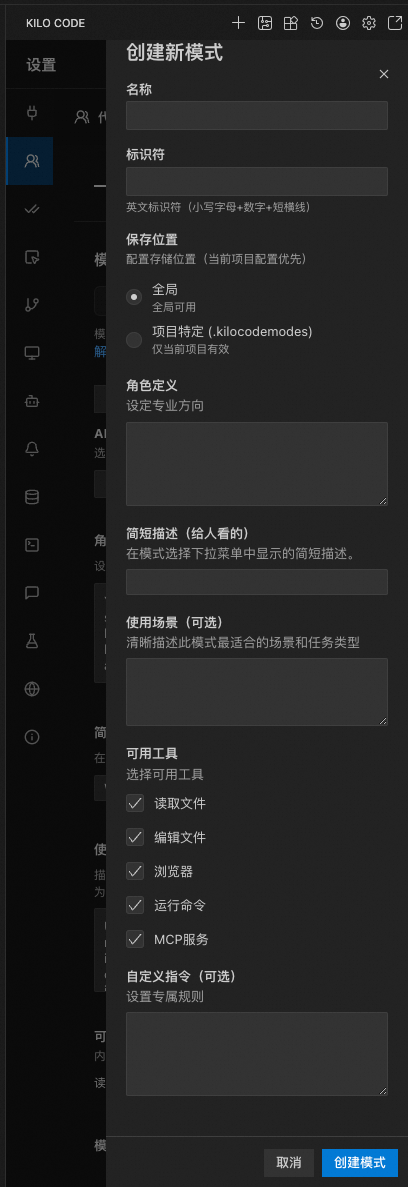
3.2.1 工具组配置含义
工具组配置定义了不同功能领域的工具集合,每个组都有特定的用途和特征:
read组: 文件读取类工具组
- 功能定位: 专门负责文件内容的读取、搜索和浏览操作
- 核心职责: 提供对项目文件系统的只读访问能力
- 典型应用场景: 代码审查、配置查阅、文档阅读、代码搜索等
- 安全性: 相对安全,仅提供读取能力,不涉及文件修改
edit组: 文件编辑类工具组
- 功能定位: 负责文件的创建、修改、删除等编辑操作
- 核心职责: 提供对项目文件系统的写入和修改能力
- 典型应用场景: 代码生成、文件创建、代码重构、配置修改等
- 安全性: 需要严格的安全控制,涉及文件系统修改
browser组: 浏览器交互类工具组
- 功能定位: 提供浏览器自动化操作能力
- 核心职责: 控制浏览器执行导航、点击、输入等操作
- 典型应用场景: 网页测试、UI自动化、数据抓取等
- 安全性: 需要特殊权限,涉及外部系统控制
command组: 命令执行类工具组
- 功能定位: 提供系统命令执行能力
- 核心职责: 在操作系统层面执行CLI命令
- 典型应用场景: 构建部署、环境管理、系统操作等
- 安全性: 最高等级安全控制,需要用户明确授权
mcp组: MCP集成类工具组
- 功能定位: 提供与外部MCP服务器的集成能力
- 核心职责: 调用外部工具和服务,扩展AI代理的能力边界
- 典型应用场景: 第三方API调用、专业工具集成、企业服务对接等
- 安全性: 需要配置管理,依赖外部服务的安全性
3.2.2 工具组设计原则
- 职责分离: 每个工具组专注于特定功能领域,避免功能交叉
- 权限分级: 不同组别具有不同的安全级别和权限要求
- 灵活组合: 工具组可根据工作模式灵活组合使用
- 易于扩展: 新增工具可通过归属合适组别快速集成
3.2.3 始终可用工具说明
始终可用工具是指在任何工作模式下都可以使用的工具,主要包括交互类和管理类工具:
- ask_followup_question: 用于澄清问题和获取用户反馈
- attempt_completion: 用于标记任务完成状态
- switch_mode: 用于切换工作模式
- new_task: 用于创建新的子任务
- report_bug: 用于报告错误和问题
- condense: 用于上下文压缩管理
这些工具不受模式限制,确保用户在任何时候都能进行基本的交互和管理操作。
3.2.4 工具组配置
文件路径: src/shared/tools.ts
export const TOOL_GROUPS: Record<ToolGroup, ToolGroupConfig> = {
	read: {
		tools: ["read_file", "fetch_instructions", "search_files", "list_files", "codebase_search"],
	},
	edit: {
		tools: [
			"apply_diff",
			"edit_file",
			// kilocode_change start: Fast Apply
			"fast_edit_file",
			// kilocode_change end
			"write_to_file",
			"delete_file", // kilocode_change
			"new_rule", // kilocode_change
			"generate_image",
		],
		customTools: ["search_and_replace", "search_replace", "edit_file", "apply_patch"],
	},
	browser: {
		tools: ["browser_action"],
	},
	command: {
		tools: ["execute_command"],
	},
	mcp: {
		tools: ["use_mcp_tool", "access_mcp_resource"],
	},
	modes: {
		tools: ["switch_mode", "new_task"],
		alwaysAvailable: true,
	},
}
3.2.5 始终可用工具
export const ALWAYS_AVAILABLE_TOOLS: ToolName[] = [
	"ask_followup_question",
	"attempt_completion",
	"switch_mode",
	"new_task",
	"report_bug",
	"condense", // kilocode_Change
	"update_todo_list",
	"run_slash_command",
] as const
3.3 工具描述生成
3.3.1 描述函数映射
文件路径: src/core/prompts/tools/index.ts
const toolDescriptionMap: Record<string, (args: ToolArgs) => string | undefined> = {
  execute_command: (args) => getExecuteCommandDescription(args),
  read_file: (args) => {
    const modelId = args.settings?.modelId
    if (modelId && shouldUseSingleFileRead(modelId)) {
      return getSimpleReadFileDescription(args)
    }
    return getReadFileDescription(args)
  },
  write_to_file: (args) => getWriteToFileDescription(args),
  // ... 更多工具
}
3.3.2 工具描述生成
作用
- 指导AI决策: 工具描述向AI模型解释每个工具的功能、用途和适用场景,帮助AI决定何时以及如何使用特定工具
- 规范化调用格式: 提供标准的XML格式示例,确保AI能够正确构造工具调用
- 参数说明: 清晰定义每个工具所需的参数及其含义,减少错误调用
- 使用指南: 包含最佳实践和注意事项,提高工具使用效率
export function getToolDescriptionsForMode(
  mode: Mode,
  cwd: string,
  supportsComputerUse: boolean,
  codeIndexManager?: CodeIndexManager,
  diffStrategy?: DiffStrategy,
  // ... 更多参数
): string {
  const config = getModeConfig(mode, customModes)
  const tools = new Set<string>()

  // 1. 添加模式的工具组
  config.groups.forEach((groupEntry) => {
    const groupName = getGroupName(groupEntry)
    const toolGroup = TOOL_GROUPS[groupName]
    if (toolGroup) {
      toolGroup.tools.forEach((tool) => {
        if (isToolAllowedForMode(tool as ToolName, mode, customModes, toolOptions, toolGroups, experiments)) {
          tools.add(tool)
        }
      })
    }
  })

  // 2. 添加始终可用工具
  ALWAYS_AVAILABLE_TOOLS.forEach((tool) => tools.add(tool))

  // 3. 条件排除工具
  if (!codeIndexManager?.isFeatureEnabled) {
    tools.delete("codebase_search")
  }

  if (isMorphAvailable(clineProviderState)) {
    const traditionalEditingTools = [
      "apply_diff", "write_to_file",
      "insert_content", "search_and_replace"
    ]
    traditionalEditingTools.forEach((tool) => tools.delete(tool))
  } else {
    tools.delete("edit_file")
  }

  // 4. 生成工具描述
  const descriptions = Array.from(tools).map((toolName) => {
    const descriptionFn = toolDescriptionMap[toolName]
    return descriptionFn ? descriptionFn(args) : undefined
  })

  return `# Tools\n\n${descriptions.filter(Boolean).join("\n\n")}`
}
3.4 工具实现架构
3.4.1 工具实现模式
所有工具实现遵循统一的函数签名:
export async function xxxTool(
  cline: Task,
  block: ToolUse,
  askApproval: AskApproval,
  handleError: HandleError,
  pushToolResult: PushToolResult,
  removeClosingTag: RemoveClosingTag,
) {
  // 1. 处理部分工具调用
  if (block.partial) {
    // 处理流式输入
    return
  }

  // 2. 参数验证
  if (!block.params.xxx) {
    cline.consecutiveMistakeCount++
    pushToolResult(await cline.sayAndCreateMissingParamError("xxx", "xxx"))
    return
  }

  // 3. 重置错误计数
  cline.consecutiveMistakeCount = 0

  // 4. 请求用户批准(如需要)
  const approved = await askApproval("xxx", message, progressStatus)
  if (!approved) {
    pushToolResult(formatResponse.toolDenied())
    return
  }

  // 5. 执行工具逻辑
  try {
    const result = await doSomething()
    pushToolResult(formatResponse.toolResult(result))
  } catch (error) {
    await handleError("doing something", error)
  }
}
3.4.2 工具文件组织
src/core/tools/
├── helpers/                    # 辅助函数
├── __tests__/                  # 测试文件
├── kilocode.ts                 # Kilo 特定工具
├── readFileTool.ts             # 读取文件工具
├── writeToFileTool.ts          # 写入文件工具
├── executeCommandTool.ts       # 命令执行工具
├── browserActionTool.ts        # 浏览器操作工具
├── useMcpToolTool.ts           # MCP 工具使用
├── accessMcpResourceTool.ts    # MCP 资源访问
├── condenseTool.ts             # 上下文压缩工具
├── editFileTool.ts             # 文件编辑工具(Morph)
├── applyDiffTool.ts            # Diff 应用工具
├── searchAndReplaceTool.ts     # 搜索替换工具
├── insertContentTool.ts        # 内容插入工具
├── generateImageTool.ts        # 图像生成工具
├── codebaseSearchTool.ts       # 代码库搜索工具
├── searchFilesTool.ts          # 文件搜索工具
├── listFilesTool.ts            # 文件列表工具
├── listCodeDefinitionNamesTool.ts  # 代码定义列表工具
├── askFollowupQuestionTool.ts  # 询问问题工具
├── attemptCompletionTool.ts    # 完成任务工具
├── switchModeTool.ts           # 切换模式工具
├── newTaskTool.ts              # 新建任务工具
├── newRuleTool.ts              # 新建规则工具
├── reportBugTool.ts            # 报告错误工具
├── updateTodoListTool.ts       # 更新待办工具
├── runSlashCommandTool.ts      # 运行命令工具
├── fetchInstructionsTool.ts    # 获取指令工具
└── validateToolUse.ts          # 工具验证
四、工具调用流程
4.1 工具调用时序图
4.2 工具调用流程详解
4.2.1 工具解析机制
Kilo 使用 XML 格式 来解析工具调用,主要通过 AssistantMessageParser 类实现增量流式解析。
核心解析器: AssistantMessageParser
文件路径: src/core/assistant-message/AssistantMessageParser.ts
关键特性:
- 增量解析: 支持流式解析,避免每次都重新处理整个消息
- 状态管理: 维护解析状态,包括当前文本内容、工具使用、参数等
- 大小限制: 设置了 1MB 的累积器大小限制和 100KB 的参数长度限制
解析流程:
// 1. 初始化解析器
this.assistantMessageParser = new AssistantMessageParser()

// 2. 处理每个文本块
case "text": {
    assistantMessage += chunk.text

    // 解析原始助手消息块为内容块
    const prevLength = this.assistantMessageContent.length
    this.assistantMessageContent = this.assistantMessageParser.processChunk(chunk.text)

    if (this.assistantMessageContent.length > prevLength) {
        // 有新内容需要展示
        this.userMessageContentReady = false
    }

    // 向用户展示内容 & 工具调用
    presentAssistantMessage(this)
    break
}

// 3. 流结束后完成解析
this.assistantMessageParser.finalizeContentBlocks()
this.assistantMessageContent = this.assistantMessageParser.getContentBlocks()
XML 格式示例:
<read_file>
<path>src/core/task/Task.ts</path>
<start_line>1</start_line>
<end_line>100</end_line>
</read_file>
4.2.2 工具执行流程
工具执行通过 presentAssistantMessage 函数实现,这是一个递归函数,负责处理所有内容块。
文件路径: src/core/assistant-message/presentAssistantMessage.ts
执行流程:
export async function presentAssistantMessage(cline: Task, recursionDepth: number = 0) {
    // 1. 检查任务是否中止
    if (cline.abort) {
        throw new Error(`Task aborted`)
    }

    // 2. 遍历内容块
    for (const block of cline.assistantMessageContent) {
        switch (block.type) {
            case "text":
                // 处理文本内容
                await cline.say("text", content, undefined, block.partial)
                break

            case "tool_use":
                // 处理工具使用
                // 2.1 验证工具使用
                validateToolUse(block.name, mode, customModes, options, block.params)

                // 2.2 检查重复调用
                const repetitionCheck = cline.toolRepetitionDetector.check(block)

                // 2.3 执行具体工具
                switch (block.name) {
                    case "execute_command":
                        await executeCommandTool(cline, block, askApproval, handleError, pushToolResult, removeClosingTag)
                        break
                    case "read_file":
                        await readFileTool(cline, block, askApproval, handleError, pushToolResult, removeClosingTag)
                        break
                    case "write_to_file":
                        await writeToFileTool(cline, block, askApproval, handleError, pushToolResult, removeClosingTag)
                        break
                    // ... 其他工具
                }
                break
        }
    }
}
4.2.3 工具结果处理
工具结果通过 pushToolResult 函数处理,将结果添加到用户消息内容中。
const pushToolResult = (content: ToolResponse) => {
    cline.userMessageContent.push({
        type: "text",
        text: `${toolDescription()} Result:`
    })

    if (typeof content === "string") {
        cline.userMessageContent.push({
            type: "text",
            text: content || "(tool did not return anything)"
        })
    } else {
        // 处理包含图片的结果
        cline.userMessageContent.push(...content)
    }

    // 标记已使用工具,防止同一消息中使用多个工具
    cline.didAlreadyUseTool = true
}
结果格式化:
// 工具拒绝
formatResponse.toolDenied()
formatResponse.toolDeniedWithFeedback(feedback)

// 工具批准
formatResponse.toolApprovedWithFeedback(feedback)

// 工具错误
formatResponse.toolError(errorString)

// 工具结果
formatResponse.toolResult(content, images)
五、MCP 工具集成
5.1 MCP 协议概述
MCP (Model Context Protocol) 是一个开放协议,允许 AI 应用与外部工具和数据源进行标准化集成。
核心概念:
- MCP 服务器: 提供工具和资源的独立进程
- MCP 工具: 服务器提供的可调用函数
- MCP 资源: 服务器提供的数据源(文件、API 等)
5.2 MCP Hub 架构
文件路径: src/services/mcp/McpHub.ts
核心功能:
- 管理多个 MCP 服务器连接
- 工具和资源的发现与调用
- 服务器生命周期管理
- 错误处理和重连机制
架构图:
┌─────────────────────────────────────────┐
│           Kilo Code                      │
│  ┌───────────────────────────────────┐  │
│  │         MCP Hub                    │  │
│  │  ┌──────────┐  ┌──────────┐      │  │
│  │  │ Server 1 │  │ Server 2 │ ...  │  │
│  │  └──────────┘  └──────────┘      │  │
│  └───────────────────────────────────┘  │
└─────────────────────────────────────────┘
         │              │
         ▼              ▼
   ┌──────────┐   ┌──────────┐
   │  MCP     │   │  MCP     │
   │ Server 1 │   │ Server 2 │
   └──────────┘   └──────────┘
5.3 MCP 服务器配置
配置文件: .kilocode/mcp.json
{
  "mcpServers": {
    "filesystem": {
      "command": "npx",
      "args": ["-y", "@modelcontextprotocol/server-filesystem", "/path/to/allowed/files"],
      "disabled": false
    },
    "github": {
      "command": "npx",
      "args": ["-y", "@modelcontextprotocol/server-github"],
      "env": {
        "GITHUB_PERSONAL_ACCESS_TOKEN": "your_token_here"
      }
    }
  }
}
5.4 工具调用流程
use_mcp_tool 完整流程:
1. 参数验证
   ├─ 检查 server_name
   ├─ 检查 tool_name
   └─ 解析 JSON arguments

2. 工具存在性验证
   ├─ 查找 MCP 服务器
   ├─ 检查工具是否存在
   └─ 检查工具是否启用

3. 用户批准
   └─ 显示工具调用详情

4. 执行工具
   ├─ 发送开始状态
   ├─ 调用 MCP 工具
   ├─ 处理结果内容
   └─ 发送完成状态

5. 结果处理
   ├─ 提取文本内容
   ├─ 处理图片内容
   └─ 返回格式化结果
5.5 资源访问流程
access_mcp_resource 完整流程:
1. 参数验证
   ├─ 检查 server_name
   └─ 检查 uri

2. 用户批准
   └─ 显示资源访问详情

3. 读取资源
   └─ 调用 MCP Hub.readResource()

4. 结果处理
   ├─ 提取文本内容
   ├─ 处理图片内容(base64)
   └─ 返回格式化结果
5.6 MCP 工具示例
5.6.1 文件系统工具
<use_mcp_tool>
<server_name>filesystem</server_name>
<tool_name>read_file</tool_name>
<arguments>{"path": "/path/to/file.txt"}</arguments>
</use_mcp_tool>
5.6.2 GitHub 工具
<use_mcp_tool>
<server_name>github</server_name>
<tool_name>create_issue</tool_name>
<arguments>{
  "owner": "kilocode",
  "repo": "kilocode",
  "title": "Bug Report",
  "body": "Description of the bug"
}</arguments>
</use_mcp_tool>
5.6.3 资源访问
<access_mcp_resource>
<server_name>filesystem</server_name>
<uri>file:///path/to/resource.json</uri>
</access_mcp_resource>

有“AI”的1024 = 2048,欢迎大家加入2048 AI社区
更多推荐


 30
30 0
0- 0


 已为社区贡献5条内容

所有评论(0)