【affine】私有化部署 and 注意事项!
最近事比较多,鼠标垫开网吧系列更新速度较慢……
我是目录
前言
为什么写这篇文章?
今天要更新接口文档,想找个新的工具,找到了开源项目 showdoc。发现 showdoc 本地化部署后,没有名额限制,且支持白板文档!就忍不住和 affine 文档做了一下对比!查资料过程中看了 csdn 的一篇文章,发现挺坑的,于是记录了下来。
- 文章地址:
10分钟搞定AFFiNE私有化部署:告别云端限制,打造专属知识工作台 ,原文是 AI 辅助生成的,截图如下:

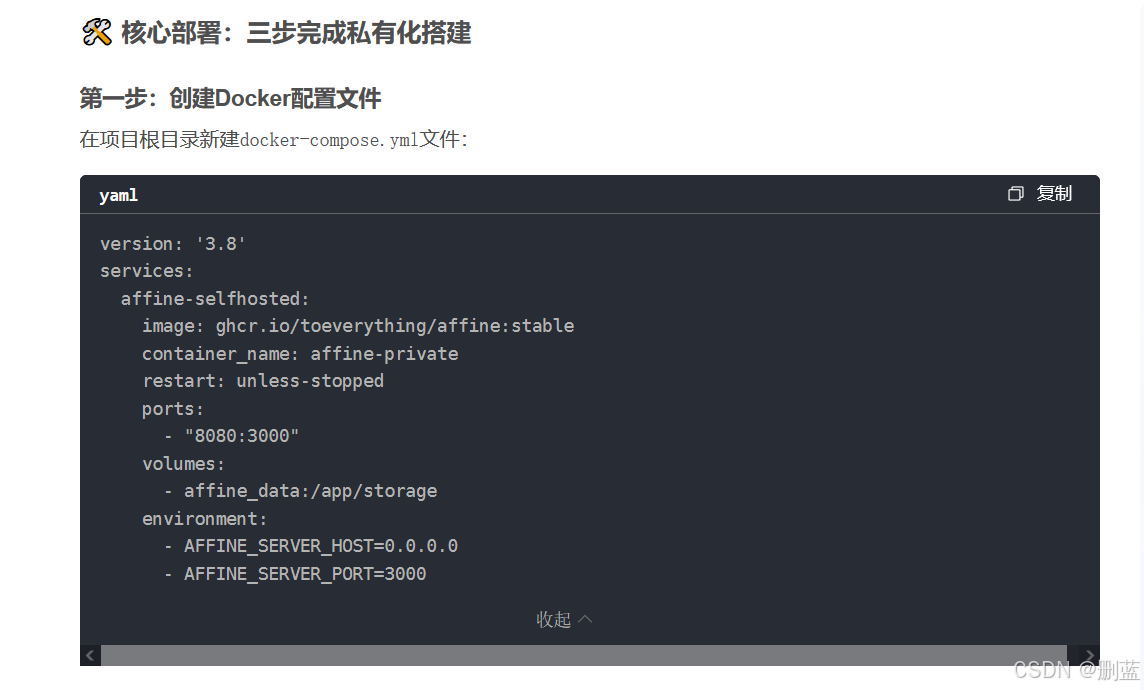
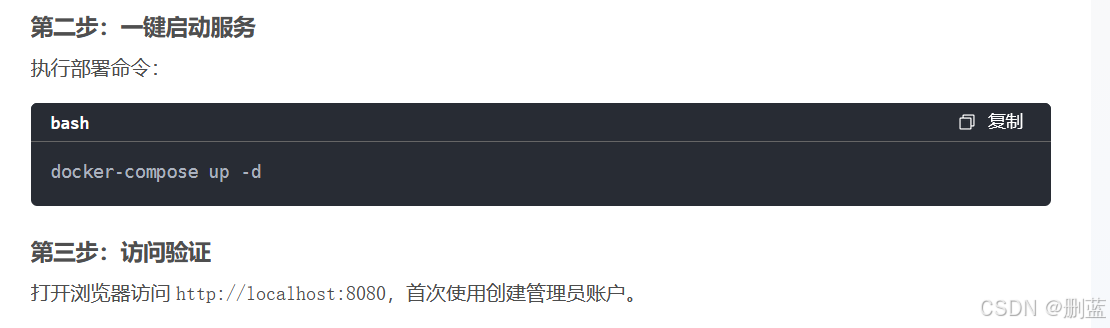

这里私有化部署过程明显有问题,affine 私有化部署过程中需要配置数据库,而 AI 给出的文章中并没有,所以是跑不起来的!
错误验证
使用如下 docker-compose.yml 配置文件,按原文部署过程,进行操作,会出现异常。
配置文件
services:
  affine-selfhosted:
    image: ghcr.io/toeverything/affine:stable
    container_name: affine-private
    restart: unless-stopped
    ports:
      - "8081:3000"
部分异常截图
……

Error: connect ECONNREFUSED 127.0.0.1:6379
    at TCPConnectWrap.afterConnect [as oncomplete] (node:net:1637:16) {
  errno: -111,
  code: 'ECONNREFUSED',
  syscall: 'connect',
  address: '127.0.0.1',
  port: 6379
}

……

PrismaClientInitializationError:
Invalid `prisma.appConfig.findMany()` invocation:

error: Environment variable not found: DATABASE_URL.
  -->  schema.prisma:10
   |
 9 |   provider   = "postgresql"
10 |   url        = env("DATABASE_URL")
   |
Validation Error Count: 1
    at Zn.handleRequestError (/app/node_modules/.prisma/client/runtime/library.js:124:7759)
    at Zn.handleAndLogRequestError (/app/node_modules/.prisma/client/runtime/library.js:124:6784)
    at Zn.request (/app/node_modules/.prisma/client/runtime/library.js:124:6491)
    at async l (/app/node_modules/.prisma/client/runtime/library.js:133:9778)
    at async ServerService.loadDbOverrides (file:///app/dist/main.js:103812:25)
    at async ServerService.setup (file:///app/dist/main.js:103804:27)
    at async ServerService.onApplicationBootstrap (file:///app/dist/main.js:103734:9)
    at async Promise.all (index 0)
    at async callModuleBootstrapHook (/app/node_modules/@nestjs/core/hooks/on-app-bootstrap.hook.js:43:5)
    at async NestApplication.callBootstrapHook (/app/node_modules/@nestjs/core/nest-application-context.js:264:13) {
  clientVersion: '6.8.2',
  errorCode: undefined,
  retryable: undefined
}
错误原因分析
官网找到如下截图,pgsql, redis 都是必须的,原文中并没有提及数据库的配置,所以跑不起来是正常的!

异常反馈
- 因为原文有明显的错误引导,所以想评论一下,结果发现没地方回复
- 原文是 AI 辅助编写的,估计作者压根就没有部署过 affine 项目,只是知道这个项目很火就发文了,所以没注意实用性
- 原文发文时间是 2016-01-21,也就是前几天的事(当前时间:2026年1月26日21:56:10),时效性还在,所以记录一下
affine (all in one)
老规矩:先上官网, affine doc,以下所有文档皆基于官方文档编写!如有不同或异议,请直接异步官网!
是什么?
这里先声明:不是仿射!
AFFiNE Docs 是一个开源、一体化的工作区和操作系统,旨在帮助用户组装个人知识库、维基、演示文稿和数字资产管理。它常被视为 Notion 和 Miro 的替代品,结合了块编辑器的灵活性与实时协作功能。
核心功能
- 支持 Markdown 语法和直观的块编辑器,便于内容创作。
- 基于 CRDT(Conflict-Free Replicated Data Type)技术实现实时协作,允许多用户同时编辑文档。
- 提供光标同步显示技术,让团队协作时能清晰看到彼此的编辑位置,提升效率。
- 支持多种外部数据源集成,如网页书签、嵌入内容(YouTube、Figma、GitHub 等)、文件附件和表格。
技术特点
- 采用现代 Web 架构,包括 Rust 原生模块和 Yjs 协作引擎,确保高性能和低延迟。
- 支持虚拟化渲染和懒加载,优化大型文档的处理速度。
- 提供导入导出功能,方便数据迁移和备份。
使用场景
- 适用于个人知识管理、团队项目协作、远程教学和创意设计等场景。
- 开发者可通过自定义适配器扩展其数据集成能力。
个人看法
-
开源,新一代文本记录工具,支持普通文档模式和无界文档模式,all in one 理念的实现者!设计理念非常新颖,值得学习和使用!
-
个人 或 不大于 10 人的小型团队,可以免费使用私有版本(自己部署)
-
人数较多的团队,需要考虑费用问题,是否值得投入
-
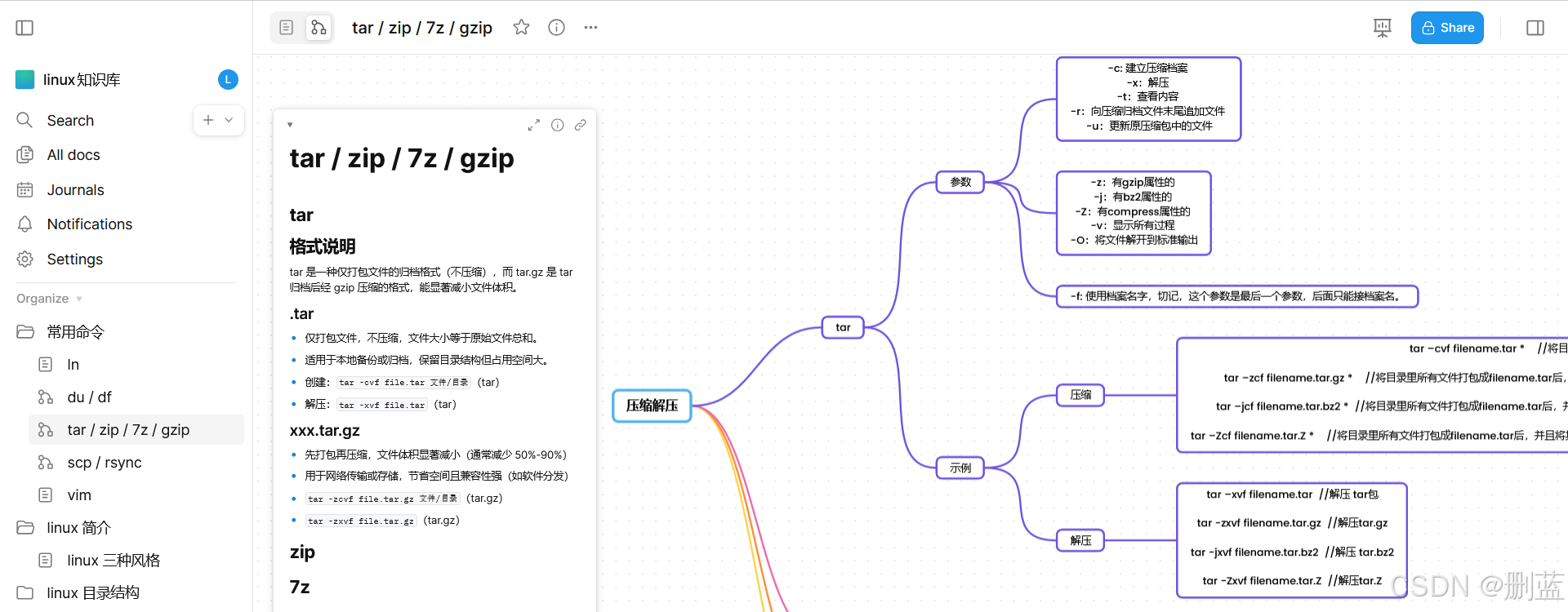
下面是使用截图(无界模式)
私有化部署(docker)
1、创建文件夹(数据存储位置)
mkdir affine
cd affine
2、编写 yaml 文件
- 直接获取
wget -O docker-compose.yml https://github.com/toeverything/affine/releases/latest/download/docker-compose.yml
- 手动编写
name: affine
services:
  affine:
    image: ghcr.io/toeverything/affine:${AFFINE_REVISION:-stable}
    container_name: affine_server
    ports:
      - '${PORT:-3010}:3010'
    depends_on:
      redis:
        condition: service_healthy
      postgres:
        condition: service_healthy
      affine_migration:
        condition: service_completed_successfully
    volumes:
      # custom configurations
      - ${UPLOAD_LOCATION}:/root/.affine/storage
      - ${CONFIG_LOCATION}:/root/.affine/config
    env_file:
      - .env
    environment:
      - REDIS_SERVER_HOST=redis
      - DATABASE_URL=postgresql://${DB_USERNAME}:${DB_PASSWORD}@postgres:5432/${DB_DATABASE:-affine}
      - AFFINE_INDEXER_ENABLED=false
    restart: unless-stopped

  affine_migration:
    image: ghcr.io/toeverything/affine:${AFFINE_REVISION:-stable}
    container_name: affine_migration_job
    volumes:
      # custom configurations
      - ${UPLOAD_LOCATION}:/root/.affine/storage
      - ${CONFIG_LOCATION}:/root/.affine/config
    command: ['sh', '-c', 'node ./scripts/self-host-predeploy.js']
    env_file:
      - .env
    environment:
      - REDIS_SERVER_HOST=redis
      - DATABASE_URL=postgresql://${DB_USERNAME}:${DB_PASSWORD}@postgres:5432/${DB_DATABASE:-affine}
      - AFFINE_INDEXER_ENABLED=false
    depends_on:
      postgres:
        condition: service_healthy
      redis:
        condition: service_healthy

  redis:
    image: redis
    container_name: affine_redis
    healthcheck:
      test: ['CMD', 'redis-cli', '--raw', 'incr', 'ping']
      interval: 10s
      timeout: 5s
      retries: 5
    restart: unless-stopped

  postgres:
    image: pgvector/pgvector:pg16
    container_name: affine_postgres
    volumes:
      - ${DB_DATA_LOCATION}:/var/lib/postgresql/data
    environment:
      POSTGRES_USER: ${DB_USERNAME}
      POSTGRES_PASSWORD: ${DB_PASSWORD}
      POSTGRES_DB: ${DB_DATABASE:-affine}
      POSTGRES_INITDB_ARGS: '--data-checksums'
      # you better set a password for you database
      # or you may add 'POSTGRES_HOST_AUTH_METHOD=trust' to ignore postgres security policy
      POSTGRES_HOST_AUTH_METHOD: trust
    healthcheck:
      test:
        ['CMD', 'pg_isready', '-U', "${DB_USERNAME}", '-d', "${DB_DATABASE:-affine}"]
      interval: 10s
      timeout: 5s
      retries: 5
    restart: unless-stopped
项目分析
- 创建了 pgsql 和 redis 容器,affine_migration 和 affine 容器
- pgsql 和 redis 是基础项目,如有 外部数据库,可以不进行配置
- affine_migration 是基础项目,用来处理数据库初始化 和 数据迁移等工作
- affine 是实践中核心的项目!!!需要配置好数据库才能使用!
3、编写 .env 文件(环境变量)
- 直接获取
wget -O .env https://github.com/toeverything/affine/releases/latest/download/default.env.example
- 手动编写(.env)
# select a revision to deploy, available values: stable, beta, canary
AFFINE_REVISION=stable

# set the port for the server container it will expose the server on
PORT=3010

# set the host for the server for outgoing links
# AFFINE_SERVER_HTTPS=true
# AFFINE_SERVER_HOST=affine.yourdomain.com
# or
# AFFINE_SERVER_EXTERNAL_URL=https://affine.yourdomain.com

# position of the database data to persist
DB_DATA_LOCATION=~/.affine/self-host/postgres/pgdata
# position of the upload data(images, files, etc.) to persist
UPLOAD_LOCATION=~/.affine/self-host/storage
# position of the configuration files to persist
CONFIG_LOCATION=~/.affine/self-host/config

# database credentials
DB_USERNAME=affine
DB_PASSWORD=
DB_DATABASE=affine
4、启动容器
docker compose up -d
5、访问 web 进行验证
eg:
http://localhost:3010
6、域名配置(可选)
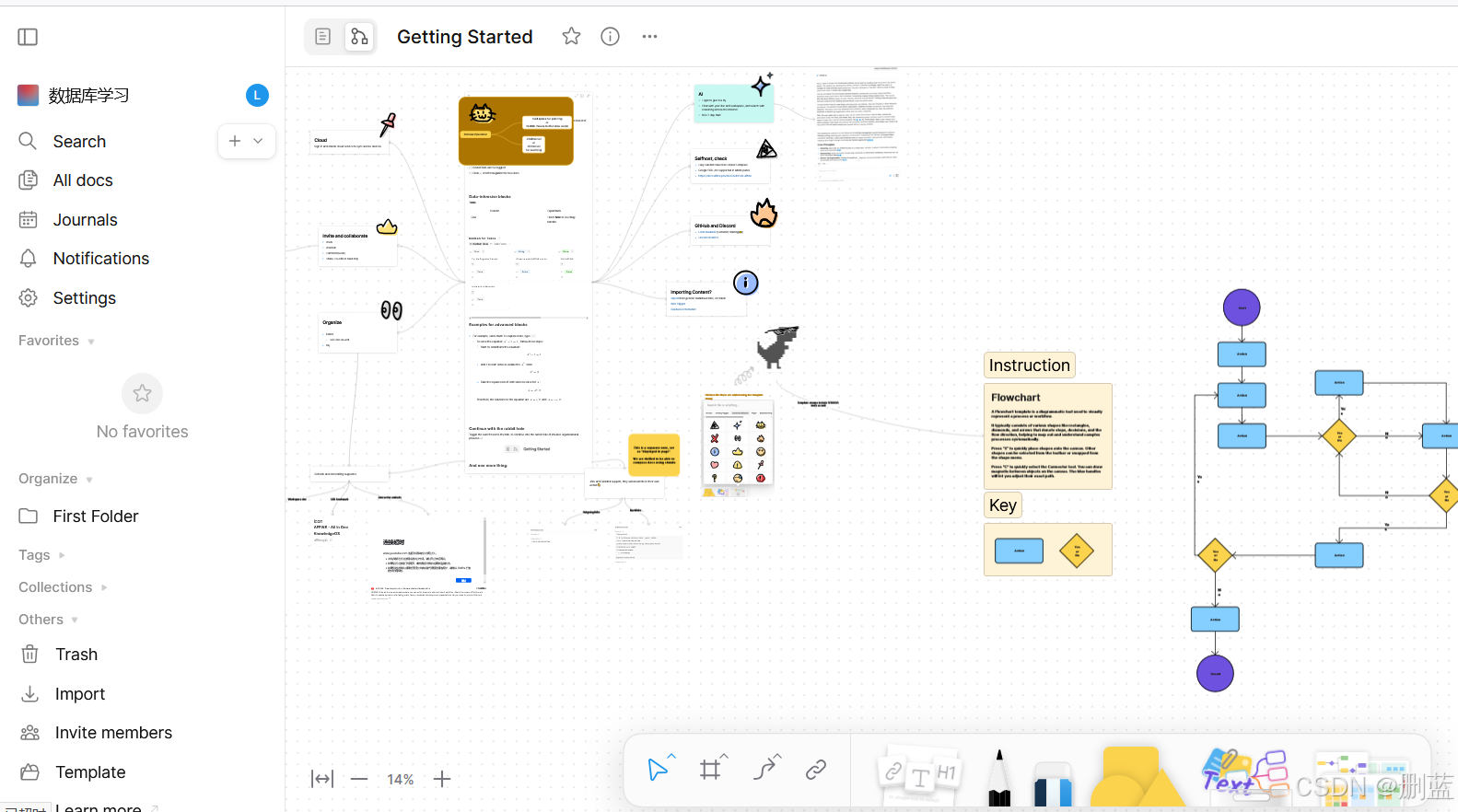
实际运行展示
注意事项
硬件条件(docker 部署)
- 操作系统:支持Windows、macOS、Linux全平台
- Docker版本:Docker Engine 20.10+ 和 Docker Compose 2.0+
- 硬件配置:2核CPU、4GB内存、10GB存储空间
详细要求(需要根据使用状况进行分析)
这里就不翻译了,原汁原味!保证准确性
- 地址:requirements
Requirements
Hardware and software requirements for Self-hosted AFFiNE instances
Hardware
Storage
The necessary storage space largely depends on the size of your workspaces and collaborators, blobs you may upload, and number of total docs.
Basically, The server itself requires nearly 1.5 GB spare space for installation. The performance of your host’s fs significantly affect performance of AFFiNE.
Based on the space usage we monitored at affine.pro
100 MB Postgres space growth as per 1k docs, average 1k words per doc

10 GB Blob storage growth as per 1k blobs
CPU
We recommend the CPU of host to have at least 4 cores, for leverage long CPU holding jobs. AFFiNE’s response speed depends on the specification of your CPU.
Memory (RAM)
Memory are mostly consumed by Sync system and Doc merging. The larger the largest doc is, the more Memory will be taken to merge it.
Memory specifications are various depends on the size of your docs and modification times of each docs. Based on the Memory consumption we monitored at affine.pro
merging a doc with 10k modifications leads to peaking 1 GB memory usage
So we recommend the host to:
have 2 GB RAM for basic usage

have 4 GB RAM, if there will be docs with more than 10k words
Optional Components
The following components are either integrated internally in some installation methods or optional for more professional users.
PostgreSQL
Postgres is the very basic component where AFFiNE’s data stored in, and it’s the only database AFFiNE supports. More details here.
AFFiNE Version Tested Postgres version
0.21.x postgres:16
0.21.x with AI pgvector/pgvector:pg16
INFO
You need to install pgvector extension manually if an self maintained Postgres used, to enable full capabilities of AI.
Redis
Redis is used as Cache facility, center of background tasks, core of sync system.
AFFiNE can’t run without a Redis server provided. More details here.
Redis 6.x or 7.x is required and fully tested.
Prometheus
By default, Prometheus and its related exporters are enabled to monitor AFFiNE instances. These processes consume approximately 200 MB of memory.
For more information, see monitoring with Prometheus.
Last Updated: 2025/6/10 07:44:00

有“AI”的1024 = 2048,欢迎大家加入2048 AI社区
更多推荐


 23
23 0
0- 0


 已为社区贡献1条内容

所有评论(0)