LangGraph--基础学习(Human-in-the-loop 人工参与深入学习1)
中断通过在特定节点暂停图形,向人类呈现信息,并使用他们的输入恢复图形,来实现人在回路工作流。它对于审批、编辑或收集其他上下文等任务很有用。使用提供人类响应的命令对象恢复图形从上面可以发现Interrupt的参数其实就是发送给客户端提醒用户的,中断返回的结果就是Command命令输入的,即人工参与过程。再看看一个例子是一个特殊的键,如果图形被中断,则在运行图形时将返回该键。在 0.4.0 版本中增加
interrupt 中断
中断通过在特定节点暂停图形,向人类呈现信息,并使用他们的输入恢复图形,来实现人在回路工作流。它对于审批、编辑或收集其他上下文等任务很有用。使用提供人类响应的 Command 命令对象恢复图形
例子:
from typing import TypedDict
import uuid
from typing import Optional
from langgraph.checkpoint.memory import InMemorySaver,MemorySaver
from langgraph.constants import START
from langgraph.graph import StateGraph
from langgraph.types import interrupt,Command

class State(TypedDict):
    """The graph state."""
    foo: str
    human_value: Optional[str]
    """Human_value 将使用中断来更新"""


def node(state: State):
    answer = interrupt(
        # 这个值将作为中断信息的一部分发送给客户端。简单来说就是突然中断,我们需要给客户端或者用户提供一个信息,
        # 让他们知道我们中断了,并且中断的原因是什么。他们需要做什么
        "触发了中断,该中断是因为某些原因触发,请用户处理,,,,,,,"
    )
    print(f"> 从中断接收到的数据: {answer}")
    return {"human_value": answer}


builder = StateGraph(State)
builder.add_node("node", node)
builder.add_edge(START, "node")


# 启用checkpointer后,中断功能才能正常工作!
checkpointer = MemorySaver()
graph = builder.compile(checkpointer=checkpointer)

config = {
    "configurable": {
        "thread_id": uuid.uuid4(),
    }
}

for chunk in graph.stream({"foo": "abc"}, config):
    print(chunk)

print("--------------分隔符----------------------")
# command = Command(resume="some input from a human!!!")
for chunk in graph.stream(Command(resume="用户进行了处理,并返回了结果"), config):
    print(chunk)
{'__interrupt__': (Interrupt(value='触发了中断,该中断是因为某些原因触发,请用户处理,,,,,,,', resumable=True, ns=['node:b6808aa2-bd15-ab8a-096b-8c20bee0e27f']),)}
--------------分隔符----------------------
> 从中断接收到的数据: 用户进行了处理,并返回了结果
{'node': {'human_value': '用户进行了处理,并返回了结果'}}从上面可以发现Interrupt的参数其实就是发送给客户端提醒用户的,中断返回的结果就是Command命令输入的,即人工参与过程。再看看一个例子
class State(TypedDict):
    some_text:str

def human_node(state:State):
    value = interrupt({
        "text_to_revise":state["some_text"]
    })
    return {"some_text":value}

graph_builder = StateGraph(State)
graph_builder.add_node("human_node", human_node)
graph_builder.add_edge(START,"human_node")

checkpointer = InMemorySaver()
graph =  graph_builder.compile(checkpointer=checkpointer)

config = {"configurable":{"thread_id":uuid.uuid4()}}
result = graph.invoke({"some_text":"hello world"}, config)
print(result["__interrupt__"])
print(graph.invoke(Command(resume="edited text"), config=config))
[Interrupt(value={'text_to_revise': 'hello world'}, resumable=True, ns=['human_node:8fe3fcc9-9fa6-f262-4cb5-3ee3d0d0d7b7'])]
{'some_text': 'edited text'}__interrupt__ 是一个特殊的键,如果图形被中断,则在运行图形时将返回该键。在 0.4.0 版本中增加了对 invoke 和 ainvoke 中 __interrupt__的支持。如果你使用的是旧版本,那么你只会在使用 stream 或 astream 的结果中看到 __interrupt__。你也可以使用 graph.get_state(thread_id) 来获取中断值。
中断既强大又符合人体工程学。然而,虽然它们在开发人员的体验方面可能类似于 Python 的 input()函数,但重要的是要注意它们不会自动从中断点恢复执行。相反,它们会对使用中断的整个节点进行中断。因此,中断通常最好放在节点的开始或专用节点中。
中断使用要求
- 指定一个checkpointer 以在每一步之后保存图形状态。
- 在适当的地方调用
interrupt() - 使用线程 ID 运行图形 ,直到
中断被命中。 - 使用
invoke/ainvoke/stream/astream恢复执行
中断设计模式
通常有三种不同的操作可以使用中断在工作流执行:
1. 接受或拒绝
在关键步骤(如 API 调用)之前调整图形,以审查和批准操作。如果操作被拒绝,您可以阻止图形执行该步骤,并可能采取替代操作。这种模式通常涉及根据人类的输入对图进行路由。
2. 编辑图状态
暂停图形以查看和编辑图形状态。这对于纠正错误或使用其他信息更新状态非常有用。这种模式通常涉及使用人类输入更新状态。
3. 获取输入
在图中的特定步骤处解释请求人工输入。这对于收集额外的信息或上下文以告知代理的决策过程是有用的。
接受或拒绝
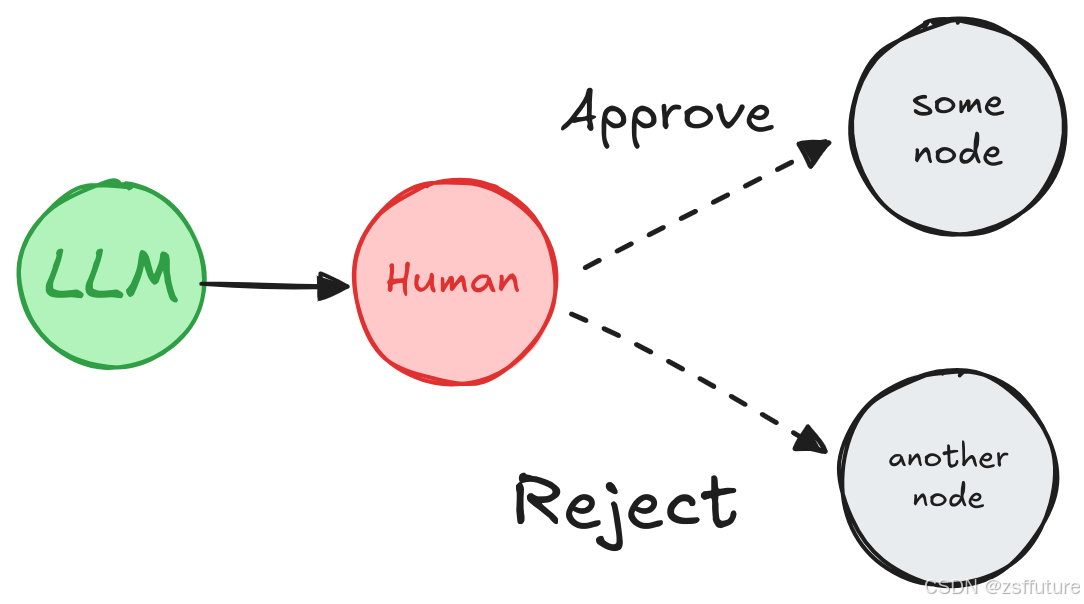
根据人类的批准或拒绝,图形可以继续进行操作或采取替代路径。
在执行关键步骤(如 API 调用)之前对图形进行缩放,以查看和批准操作。如果操作被拒绝,您可以阻止图形执行该步骤,并可能采取替代操作。例子如下:
from typing import Literal,TypedDict
import uuid

from langgraph.checkpoint.memory import InMemorySaver,MemorySaver
from langgraph.constants import START,END
from langgraph.graph import StateGraph
from langgraph.types import interrupt,Command

class State(TypedDict):
    llm_output:str
    decision:str

# 简单的模拟大模型输出
def llm_out(state:State):
    return {"llm_output":"这个一个大模型的输出结果"}

def human_approval(state:State)->Command[Literal["approved_path","rejected_path"]]:
    decision = interrupt({
        "question":"你同意下面的内容输出出去吗?",
        "llm_output":state["llm_output"]
    })
    if decision == "approve":
        return Command(goto="approved_path",update={"decision":"approved"})
    else:
        return Command(goto="rejected_path",update={"decision":"rejected"})

def approved_node(state:State)->State:
    print("√同意输出")
    return state
def rejected_node(state:State)->State:
    print("×拒绝输出")
    return state

# 构建图
graph_builder = StateGraph(State)
graph_builder.add_node("llm_out",llm_out)
graph_builder.add_node("human_approval",human_approval)
graph_builder.add_node("approved_path",approved_node)
graph_builder.add_node("rejected_path",rejected_node)

graph_builder.add_edge(START,"llm_out")
graph_builder.add_edge("llm_out","human_approval")
graph_builder.add_edge("approved_path",END)
graph_builder.add_edge("rejected_path",END)

checkpointer = InMemorySaver()
graph = graph_builder.compile(checkpointer=checkpointer)

print(graph.get_graph().draw_mermaid())
graph_png = graph.get_graph().draw_mermaid_png()
with open("interrupt_human_approval.png", "wb") as f:
    f.write(graph_png)

config = {"configurable":{"thread_id":uuid.uuid4()}}
result = graph.invoke({},config)
print(result["__interrupt__"])

print("------------------------------------------------")
final_result = graph.invoke(Command(resume="approve"),config=config)
print(final_result)
[Interrupt(value={'question': '你同意下面的内容输出出去吗?', 'llm_output': '这个一个大模型的输出结果'}, resumable=True, ns=['human_approval:ae5d34b3-88a6-544f-60b1-3e9febfffca4'])]
------------------------------------------------
√同意输出
{'llm_output': '这个一个大模型的输出结果', 'decision': 'approved'}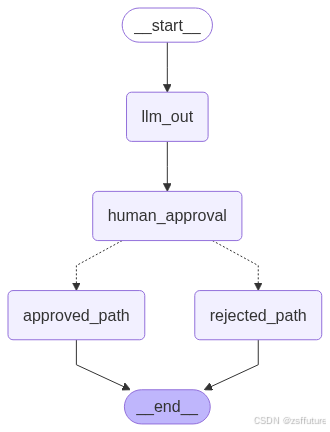
查看编辑状态
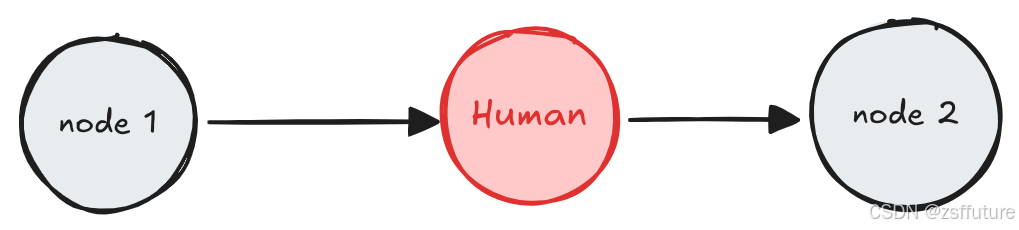
人类可以查看和编辑图形的状态。这对于纠正错误或使用其他信息更新状态非常有用
from typing import TypedDict
import uuid

from langgraph.checkpoint.memory import InMemorySaver,MemorySaver
from langgraph.constants import START,END
from langgraph.graph import StateGraph
from langgraph.types import interrupt,Command

class State(TypedDict):
    summary:str

# 模拟大模型生成总结
def llm_summary(state:State)->State:
    return {"summary":"以色列对战伊朗必将胜利!!!!!!!!!!"}

# 模拟用户编辑总结
def human_edit(state:State)->State:
    result = interrupt({
        "问题":"请查看下方的大模型输出数据是否需要编辑?",
        "大模型生成的总结":state["summary"]
    })
    return {"summary":result["edited_summary"]}

# 模拟编辑后的下游任务使用
def downstream_task(state:State)->State:
    print("下游任务使用编辑后的总结:",state["summary"])
    return state

# 构建图
graph_builder = StateGraph(State)
graph_builder.add_node("llm_summary",llm_summary)
graph_builder.add_node("human_edit",human_edit)
graph_builder.add_node("downstream_task",downstream_task)

graph_builder.add_edge(START,"llm_summary")
graph_builder.add_edge("llm_summary","human_edit")
graph_builder.add_edge("human_edit","downstream_task")
graph_builder.add_edge("downstream_task",END)

checkpointer = InMemorySaver()
graph = graph_builder.compile(checkpointer=checkpointer)


print(graph.get_graph().draw_mermaid())
graph_png = graph.get_graph().draw_mermaid_png()
with open("interrupt_human_edit.png", "wb") as f:
    f.write(graph_png)

config = {"configurable":{"thread_id":uuid.uuid4()}}
result = graph.invoke({},config)
print(result["__interrupt__"])

print("------------------------------------------------")
final_result = graph.invoke(Command(resume={"edited_summary":"以色列对战伊朗必败!!!!!!!!!!"}),config=config)
print(final_result)
[Interrupt(value={'问题': '请查看下方的大模型输出数据是否需要编辑?', '大模型生成的总结': '以色列对战伊朗必将胜利!!!!!!!!!!'}, resumable=True, ns=['human_edit:93b52d1c-581f-a8b5-2f95-93fd0b4c2124'])]
------------------------------------------------
下游任务使用编辑后的总结: 以色列对战伊朗必败!!!!!!!!!!
{'summary': '以色列对战伊朗必败!!!!!!!!!!'}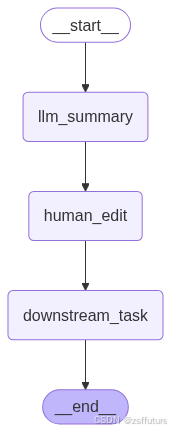
查看工具调用
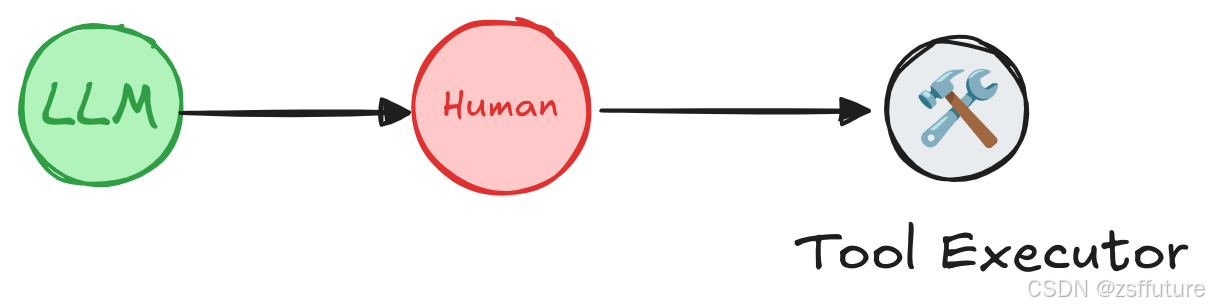
人类可以在继续之前查看和编辑 LLM 的输出。对于 LLM 请求的工具调用可能敏感或需要人为监督的应用程序来说,这一点尤其重要
from typing_extensions import TypedDict, Literal
from langgraph.graph import StateGraph, START, END, MessagesState
from langgraph.checkpoint.memory import MemorySaver
from langgraph.types import Command, interrupt

from langchain_core.tools import tool
from langchain_core.messages import AIMessage
from IPython.display import Image, display
from langchain_deepseek import ChatDeepSeek
from dotenv import load_dotenv
import os
# 加载.env文件中的环境变量
load_dotenv()

llm = ChatDeepSeek(
    model="deepseek-chat",
    api_key=os.getenv("DEEPSEEK_API_KEY"))

@tool
def weather_search(city:str):
    """ 查看天气 """
    print("-----------")
    print("搜索:",city)
    print("-----------")
    return "晴天"

llm_with_tools = llm.bind_tools([weather_search])

class State(MessagesState):
    """ 简单的状态 """

def call_llm(state:State):
    return {"messages":[llm_with_tools.invoke(state["messages"])]}

def human_review_node(state)->Command[Literal["call_llm","run_tool"]]:
    last_message = state["messages"][-1]
    tool_call = last_message.tool_calls[-1]

    human_review = interrupt({
        "问题":"是否需要调用工具?",
        "工具调用":tool_call
    })

    review_action = human_review["action"]
    review_data = human_review["data"]

    if review_action == "continue":
        return Command(goto="run_tool")
    elif review_action == "update":
        updated_message = {
            "role":"ai",
            "content":last_message.content,
            "tool_calls":[
                {
                    "id":tool_call["id"],
                    "name":tool_call["name"],
                    "args":review_data,
                }
            ],
            "id": last_message.id
        }
        return Command(goto="run_tool",update={"messages":[updated_message]})
    elif review_action == "feedback":
        tool_message = {
            "role":"tool",
            "content":review_data,
            "name":tool_call["name"],
            "tool_call_id":tool_call["id"]
        }
        return Command(goto="call_llm",update={"messages":[tool_message]})


def run_tool(state:State):
    new_messages = []
    tools = {"weather_search": weather_search}
    tool_calls = state["messages"][-1].tool_calls
    for tool_call in tool_calls:
        tool = tools[tool_call["name"]]
        result = tool.invoke(tool_call["args"])
        new_messages.append({
            "role":"tool",
            "name":tool_call["name"],
            "content":result,
            "tool_call_id":tool_call["id"]
        })
    return {"messages":new_messages}

def route_after_llm(state:State)->Literal[END,"human_review_node"]:
    if len(state["messages"][-1].tool_calls)==0:
        return END
    else:
        return "human_review_node"

graph_builder = StateGraph(State)
graph_builder.add_node("call_llm",call_llm)
graph_builder.add_node("human_review_node",human_review_node)
graph_builder.add_node("run_tool",run_tool)

graph_builder.add_edge(START,"call_llm")
graph_builder.add_conditional_edges("call_llm",route_after_llm,{END:END,"human_review_node":"human_review_node" })
graph_builder.add_edge("run_tool","call_llm" )


memory = MemorySaver()
config = {"configurable":{"thread_id":uuid.uuid4()}}
# Add
graph = graph_builder.compile(checkpointer=memory)

# View
display(Image(graph.get_graph().draw_mermaid_png()))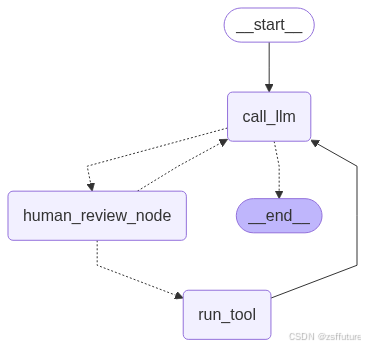
# Input
initial_input = {"messages": [{"role": "user", "content": "安徽合肥是什么天气?"}]}

# Thread
thread = {"configurable": {"thread_id": "3"}}

# Run the graph until the first interruption
for event in graph.stream(initial_input, thread, stream_mode="updates"):
    print(event)
    print("\n")
执行后会触发中断
{'call_llm': {'messages': [AIMessage(content='', additional_kwargs={'tool_calls': [{'id': 'call_0_05e5640f-7a5b-46c4-93e5-cd0ae189fe7a', 'function': {'arguments': '{"city":"安徽合肥"}', 'name': 'weather_search'}, 'type': 'function', 'index': 0}], 'refusal': None}, response_metadata={'token_usage': {'completion_tokens': 19, 'prompt_tokens': 101, 'total_tokens': 120, 'completion_tokens_details': None, 'prompt_tokens_details': {'audio_tokens': None, 'cached_tokens': 64}, 'prompt_cache_hit_tokens': 64, 'prompt_cache_miss_tokens': 37}, 'model_name': 'deepseek-chat', 'system_fingerprint': 'fp_8802369eaa_prod0623_fp8_kvcache', 'id': 'f1a6cd35-23a8-4e08-aecb-1fac0ff8489d', 'service_tier': None, 'finish_reason': 'tool_calls', 'logprobs': None}, id='run--5885ed4b-8bbb-401f-ac06-99284698c1b3-0', tool_calls=[{'name': 'weather_search', 'args': {'city': '安徽合肥'}, 'id': 'call_0_05e5640f-7a5b-46c4-93e5-cd0ae189fe7a', 'type': 'tool_call'}], usage_metadata={'input_tokens': 101, 'output_tokens': 19, 'total_tokens': 120, 'input_token_details': {'cache_read': 64}, 'output_token_details': {}})]}}


{'__interrupt__': (Interrupt(value={'问题': '是否需要调用工具?', '工具调用': {'name': 'weather_search', 'args': {'city': '安徽合肥'}, 'id': 'call_0_05e5640f-7a5b-46c4-93e5-cd0ae189fe7a', 'type': 'tool_call'}}, resumable=True, ns=['human_review_node:2e824f22-d22f-604b-071d-7078e587d50b']),)}
使用更新继续执行:
for event in graph.stream(
    Command(resume={"action": "update", "data": {"city": "安徽亳州"}}),
    thread,
    stream_mode="updates",
):
    print(event)
    print("\n")
{'human_review_node': {'messages': [{'role': 'ai', 'content': '', 'tool_calls': [{'id': 'call_0_05e5640f-7a5b-46c4-93e5-cd0ae189fe7a', 'name': 'weather_search', 'args': {'city': '安徽亳州'}}], 'id': 'run--5885ed4b-8bbb-401f-ac06-99284698c1b3-0'}]}}
-----------
搜索: 安徽亳州
-----------
{'run_tool': {'messages': [{'role': 'tool', 'name': 'weather_search', 'content': '晴天', 'tool_call_id': 'call_0_05e5640f-7a5b-46c4-93e5-cd0ae189fe7a'}]}}
{'call_llm': {'messages': [AIMessage(content='安徽合肥目前是晴天。', additional_kwargs={'refusal': None}, response_metadata={'token_usage': {'completion_tokens': 6, 'prompt_tokens': 141, 'total_tokens': 147, 'completion_tokens_details': None, 'prompt_tokens_details': {'audio_tokens': None, 'cached_tokens': 64}, 'prompt_cache_hit_tokens': 64, 'prompt_cache_miss_tokens': 77}, 'model_name': 'deepseek-chat', 'system_fingerprint': 'fp_8802369eaa_prod0623_fp8_kvcache', 'id': 'a51d6dfe-d2d3-4815-a162-97fa7cd22dd9', 'service_tier': None, 'finish_reason': 'stop', 'logprobs': None}, id='run--e51d7f79-4b1e-4bbc-83f0-fc5ebbb68152-0', usage_metadata={'input_tokens': 141, 'output_tokens': 6, 'total_tokens': 147, 'input_token_details': {'cache_read': 64}, 'output_token_details': {}})]}}测试反馈机制:
# Input
initial_input = {"messages": [{"role": "user", "content": "安徽合肥天气?"}]}

# Thread
thread = {"configurable": {"thread_id": "4"}}

# Run the graph until the first interruption
for event in graph.stream(initial_input, thread, stream_mode="updates"):
    print(event)
    print("\n")

print("Pending Executions!")
print(graph.get_state(thread).next)
{'call_llm': {'messages': [AIMessage(content='', additional_kwargs={'tool_calls': [{'id': 'call_0_aac9d2e8-b9ac-45e5-9ae1-609967d1e179', 'function': {'arguments': '{"city":"安徽合肥"}', 'name': 'weather_search'}, 'type': 'function', 'index': 0}], 'refusal': None}, response_metadata={'token_usage': {'completion_tokens': 19, 'prompt_tokens': 100, 'total_tokens': 119, 'completion_tokens_details': None, 'prompt_tokens_details': {'audio_tokens': None, 'cached_tokens': 64}, 'prompt_cache_hit_tokens': 64, 'prompt_cache_miss_tokens': 36}, 'model_name': 'deepseek-chat', 'system_fingerprint': 'fp_8802369eaa_prod0623_fp8_kvcache', 'id': '49e2ca41-a39d-4b1a-9522-9f3a77fd07a2', 'service_tier': None, 'finish_reason': 'tool_calls', 'logprobs': None}, id='run--b5260e55-3f45-40d1-a62a-91ba16bff42a-0', tool_calls=[{'name': 'weather_search', 'args': {'city': '安徽合肥'}, 'id': 'call_0_aac9d2e8-b9ac-45e5-9ae1-609967d1e179', 'type': 'tool_call'}], usage_metadata={'input_tokens': 100, 'output_tokens': 19, 'total_tokens': 119, 'input_token_details': {'cache_read': 64}, 'output_token_details': {}})]}}
{'__interrupt__': (Interrupt(value={'问题': '是否需要调用工具?', '工具调用': {'name': 'weather_search', 'args': {'city': '安徽合肥'}, 'id': 'call_0_aac9d2e8-b9ac-45e5-9ae1-609967d1e179', 'type': 'tool_call'}}, resumable=True, ns=['human_review_node:5adaa350-8a4e-1025-18d8-3a7c7bb784c9']),)}
Pending Executions!
('human_review_node',)for event in graph.stream(
# provide our natural language feedback!
Command(
resume={
"action": "feedback",
"data": "User requested changes: use <city, country> format for location",
}
),
thread,
stream_mode="updates",
):
print(event)
print("\n")反馈机制,当进入中断后,继续执行修改了相关内容,反馈机制会反馈到大模型,大模型会继续调用工具,然后触发新的中断
{'human_review_node': {'messages': [{'role': 'tool', 'content': 'User requested changes: use <city, country> format for location', 'name': 'weather_search', 'tool_call_id': 'call_0_aac9d2e8-b9ac-45e5-9ae1-609967d1e179'}]}}


{'call_llm': {'messages': [AIMessage(content='', additional_kwargs={'tool_calls': [{'id': 'call_0_7f3c1f1b-142c-43b2-b54a-40fda12f97ef', 'function': {'arguments': '{"city":"Hefei, China"}', 'name': 'weather_search'}, 'type': 'function', 'index': 0}], 'refusal': None}, response_metadata={'token_usage': {'completion_tokens': 22, 'prompt_tokens': 151, 'total_tokens': 173, 'completion_tokens_details': None, 'prompt_tokens_details': {'audio_tokens': None, 'cached_tokens': 64}, 'prompt_cache_hit_tokens': 64, 'prompt_cache_miss_tokens': 87}, 'model_name': 'deepseek-chat', 'system_fingerprint': 'fp_8802369eaa_prod0623_fp8_kvcache', 'id': '53590da8-ece9-4c29-94fc-3bd48680ae1f', 'service_tier': None, 'finish_reason': 'tool_calls', 'logprobs': None}, id='run--5ce2b552-50f2-47b6-8eb5-75e9a718dc59-0', tool_calls=[{'name': 'weather_search', 'args': {'city': 'Hefei, China'}, 'id': 'call_0_7f3c1f1b-142c-43b2-b54a-40fda12f97ef', 'type': 'tool_call'}], usage_metadata={'input_tokens': 151, 'output_tokens': 22, 'total_tokens': 173, 'input_token_details': {'cache_read': 64}, 'output_token_details': {}})]}}


{'__interrupt__': (Interrupt(value={'问题': '是否需要调用工具?', '工具调用': {'name': 'weather_search', 'args': {'city': 'Hefei, China'}, 'id': 'call_0_7f3c1f1b-142c-43b2-b54a-40fda12f97ef', 'type': 'tool_call'}}, resumable=True, ns=['human_review_node:298828d3-6df2-07e7-f9b8-224e03c17f08']),)}
后面还要几个关于中断的使用,下一篇文章介绍

有“AI”的1024 = 2048,欢迎大家加入2048 AI社区
更多推荐
 30
30 0
0- 0


 已为社区贡献20条内容

所有评论(0)