Spring AI Gateway:从入门到实战,打造智能AI服务网关
Spring AI Gateway:从入门到实战,打造智能AI服务网关
前言
随着大语言模型(LLM)的快速发展,越来越多的企业开始将AI能力集成到业务系统中。然而,直接在业务代码中调用AI API会带来诸多问题:API密钥管理困难、请求限流难以控制、成本无法追踪、响应缺乏统一处理等。
Spring AI Gateway 应运而生,它是基于Spring生态系统构建的AI服务网关,提供了统一的AI服务调用入口、智能路由、负载均衡、熔断降级等企业级特性。本文将从零开始,带你深入了解Spring AI Gateway的设计理念、核心功能,并通过实际案例展示如何构建一个高可用的AI服务网关。
一、什么是Spring AI Gateway
1.1 核心概念
Spring AI Gateway 是一个专门为AI服务设计的API网关,它位于业务系统和AI模型提供商(如OpenAI、Azure OpenAI、通义千问等)之间,提供统一的调用接口和管理能力。
核心特性包括:
- 统一接口:屏蔽不同AI厂商的API差异,提供标准化调用方式
- 智能路由:根据请求特征自动选择最合适的模型
- 流量控制:支持限流、熔断、降级,保护系统稳定性
- 成本优化:通过智能缓存和请求合并降低AI调用成本
- 可观测性:完整的请求追踪、性能监控和成本分析
- 安全加固:API密钥集中管理、请求内容过滤、访问控制
1.2 与传统API网关的区别
传统API网关(如Spring Cloud Gateway、Kong)主要面向RESTful API服务,而Spring AI Gateway针对AI服务的特殊需求进行了优化:
| 特性 | 传统API网关 | Spring AI Gateway |
|---|---|---|
| 协议支持 | HTTP/REST | HTTP/WebSocket/SSE |
| 响应处理 | 同步响应为主 | 支持流式响应 |
| 智能路由 | 基于URL/参数 | 基于内容语义、成本 |
| 缓存策略 | 结果缓存 | 语义缓存、去重 |
| 成本管理 | 无 | Token计费、预算控制 |
| 模型管理 | 单一后端 | 多模型动态切换 |
1.3 应用场景
Spring AI Gateway适用于以下场景:
- 企业内部AI平台:统一管理多个部门的AI调用
- SaaS应用:为不同租户提供隔离的AI服务
- AI应用开发:快速集成多种AI能力
- 成本敏感项目:需要精确控制AI调用成本
- 高并发场景:需要限流和智能降级
二、环境准备
2.1 技术栈
- JDK 8+
- Spring Boot 2.7.x
- Spring Cloud Gateway
- Redis(用于缓存)
2.2 项目初始化
创建gateway-demo项目,添加核心依赖:
<dependencies>
    <!-- Spring Boot -->
    <dependency>
        <groupId>org.springframework.boot</groupId>
        <artifactId>spring-boot-starter-web</artifactId>
    </dependency>

    <!-- Spring Cloud Gateway -->
    <dependency>
        <groupId>org.springframework.cloud</groupId>
        <artifactId>spring-cloud-starter-gateway</artifactId>
    </dependency>

    <!-- Redis for Caching -->
    <dependency>
        <groupId>org.springframework.boot</groupId>
        <artifactId>spring-boot-starter-data-redis-reactive</artifactId>
    </dependency>

    <!-- Circuit Breaker -->
    <dependency>
        <groupId>org.springframework.cloud</groupId>
        <artifactId>spring-cloud-starter-circuitbreaker-reactor-resilience4j</artifactId>
    </dependency>

    <!-- Lombok -->
    <dependency>
        <groupId>org.projectlombok</groupId>
        <artifactId>lombok</artifactId>
    </dependency>

    <!-- Jackson -->
    <dependency>
        <groupId>com.fasterxml.jackson.core</groupId>
        <artifactId>jackson-databind</artifactId>
    </dependency>
</dependencies>
三、核心架构设计
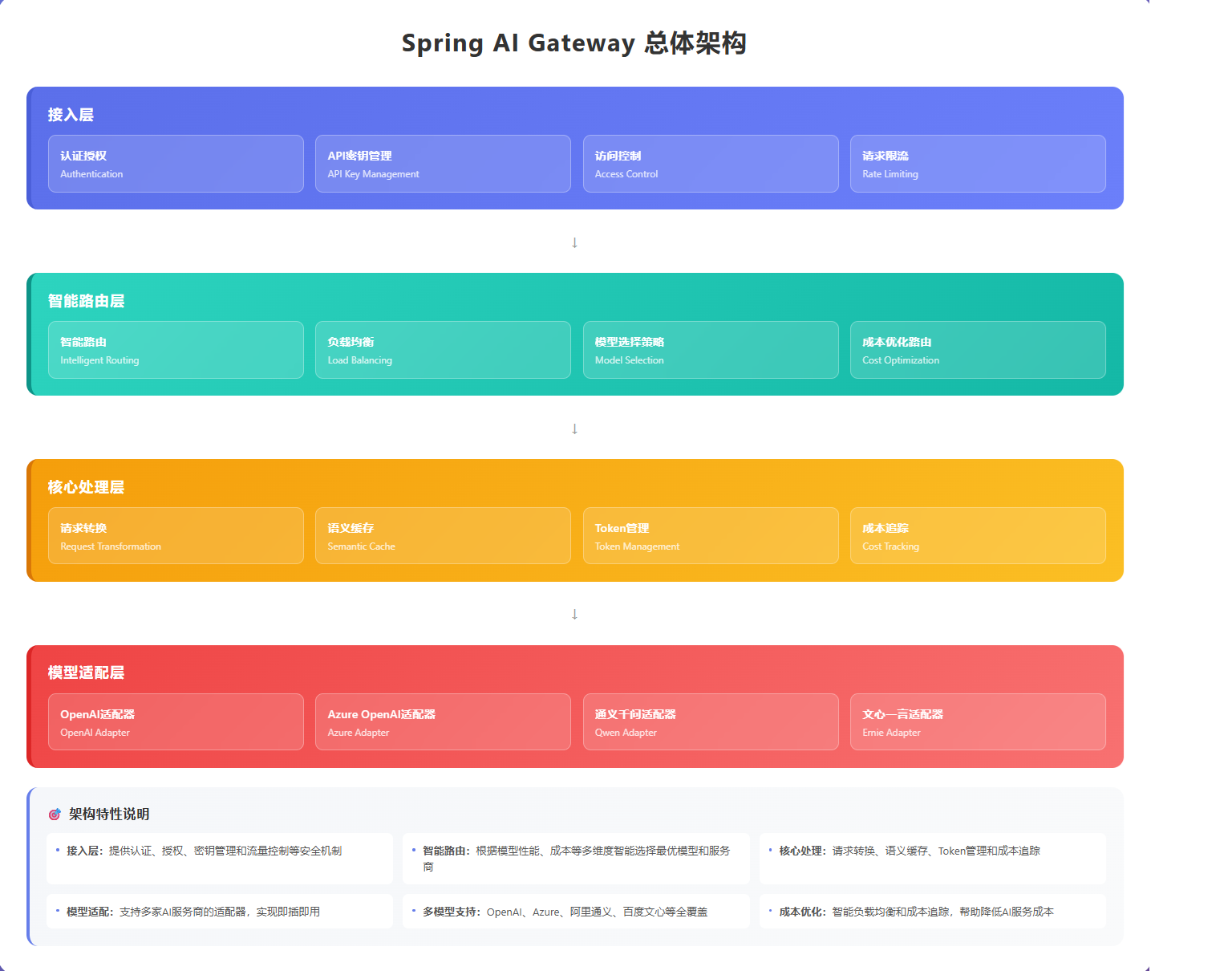
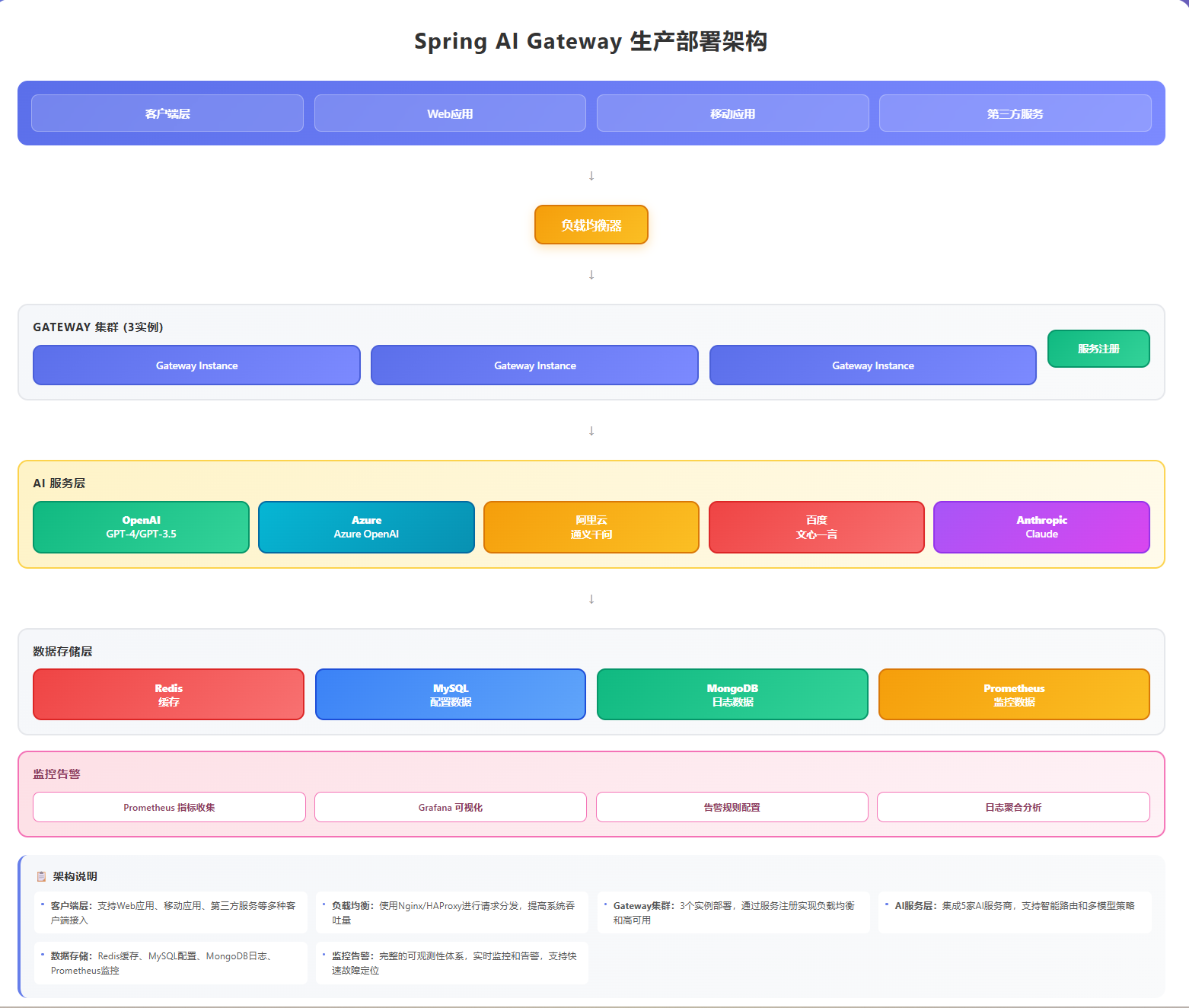
Spring AI Gateway采用分层架构,从上到下分为:
接入层:处理外部请求,进行认证授权
路由层:根据请求特征进行智能路由
处理层:执行请求转换、缓存、限流等逻辑
适配层:对接不同AI厂商的API
数据层:存储配置、缓存、监控数据
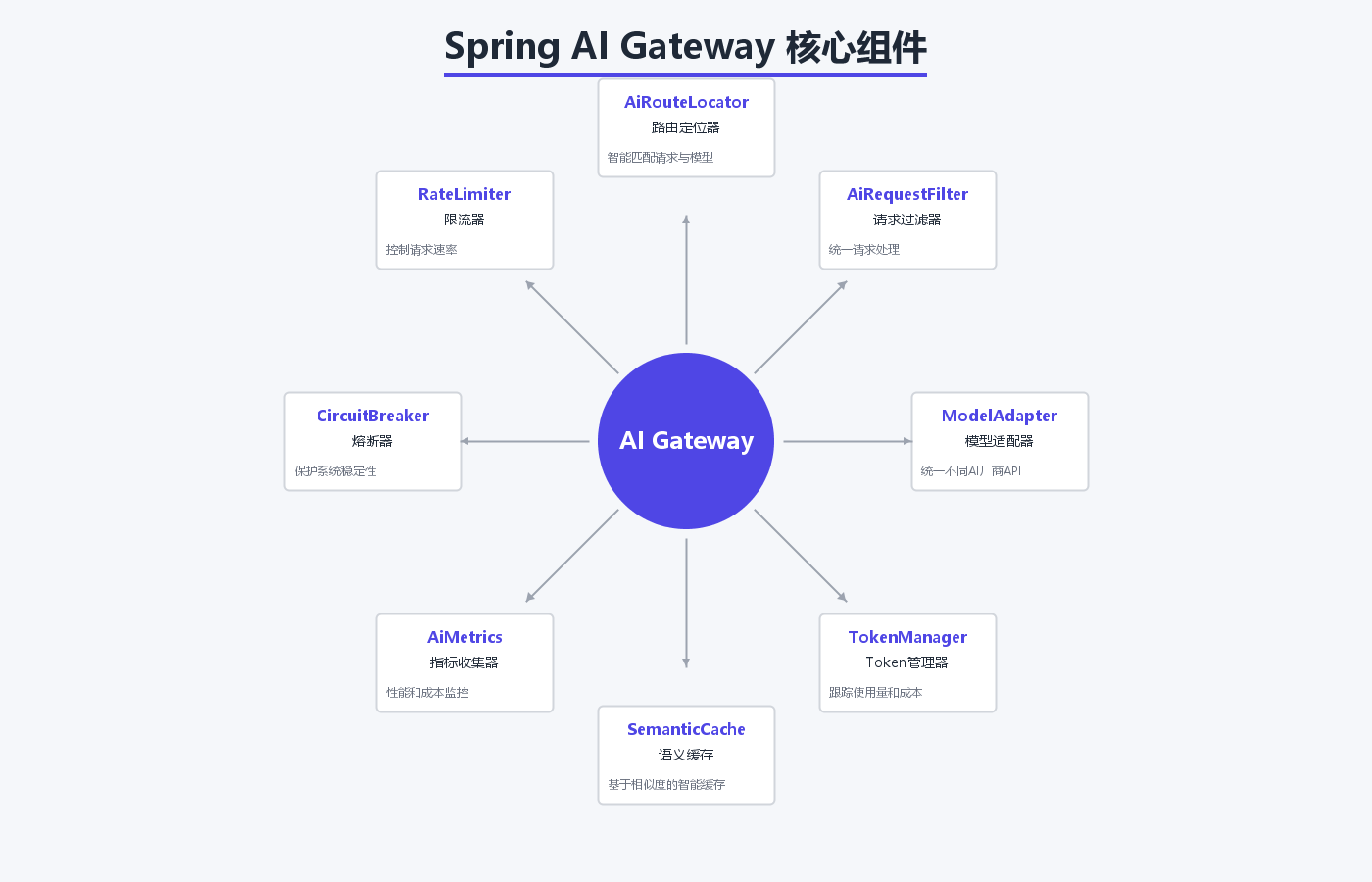
3.1 核心组件
AiRouteLocator:AI路由定位器,负责匹配请求与后端模型
AiRequestFilter:请求过滤器,处理请求预处理和后处理
ModelAdapter:模型适配器,统一不同厂商的API调用方式
TokenManager:Token管理器,跟踪使用量和成本
SemanticCache:语义缓存,基于相似度的智能缓存
四、实现核心功能
4.1 智能路由配置
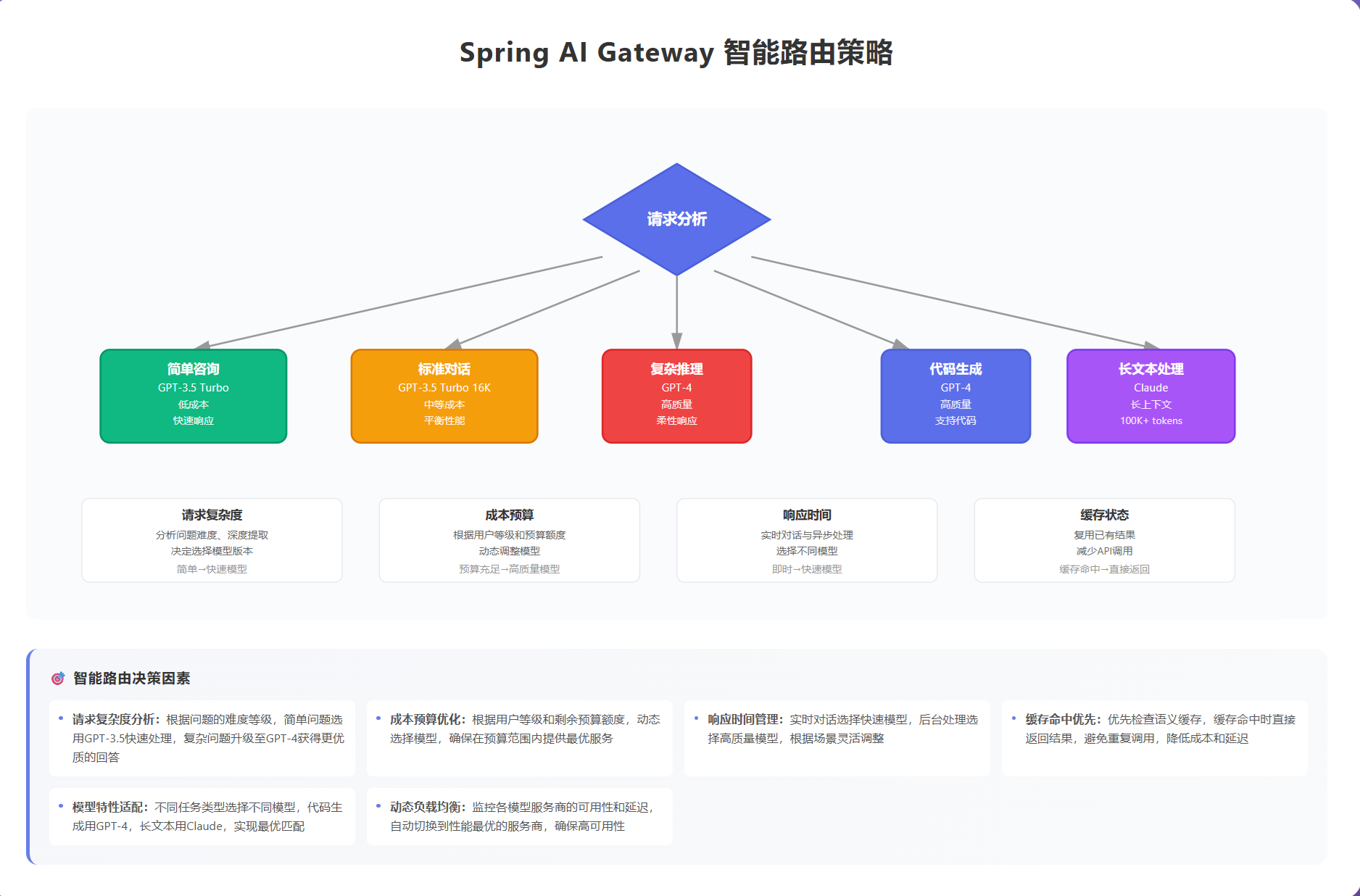
智能路由是Spring AI Gateway的核心功能,它可以根据请求内容、用户偏好、成本预算等因素,自动选择最合适的AI模型。
/**
 * AI路由配置
 */
@Configuration
public class AiRouteConfig {

    @Bean
    public RouteLocator customRouteLocator(RouteLocatorBuilder builder) {
        return builder.routes()
            // GPT-4 路由 - 用于复杂推理任务
            .route("gpt4-route", r -> r
                .path("/api/ai/chat/completions")
                .and()
                .readBody(ChatRequest.class, req ->
                    req.getModel().equals("gpt-4") ||
                    req.getMaxTokens() > 2000
                )
                .filters(f -> f
                    .stripPrefix(2)
                    .filter(aiGatewayFilter)
                    .circuitBreaker(c -> c.setName("gpt4-cb"))
                )
                .uri("lb://openai-gpt4-service"))

            // GPT-3.5 路由 - 用于一般对话
            .route("gpt35-route", r -> r
                .path("/api/ai/chat/completions")
                .and()
                .readBody(ChatRequest.class, req ->
                    req.getModel().equals("gpt-3.5-turbo")
                )
                .filters(f -> f
                    .stripPrefix(2)
                    .filter(aiGatewayFilter)
                    .requestRateLimiter(c -> c
                        .setRateLimiter(redisRateLimiter())
                        .setKeyResolver(userKeyResolver())
                    )
                )
                .uri("lb://openai-gpt35-service"))

            // 默认路由 - 成本优化
            .route("default-route", r -> r
                .path("/api/ai/**")
                .filters(f -> f
                    .stripPrefix(2)
                    .filter(aiGatewayFilter)
                    .filter(costOptimizationFilter)
                )
                .uri("lb://ai-model-service"))
            .build();
    }
}
4.2 统一请求处理
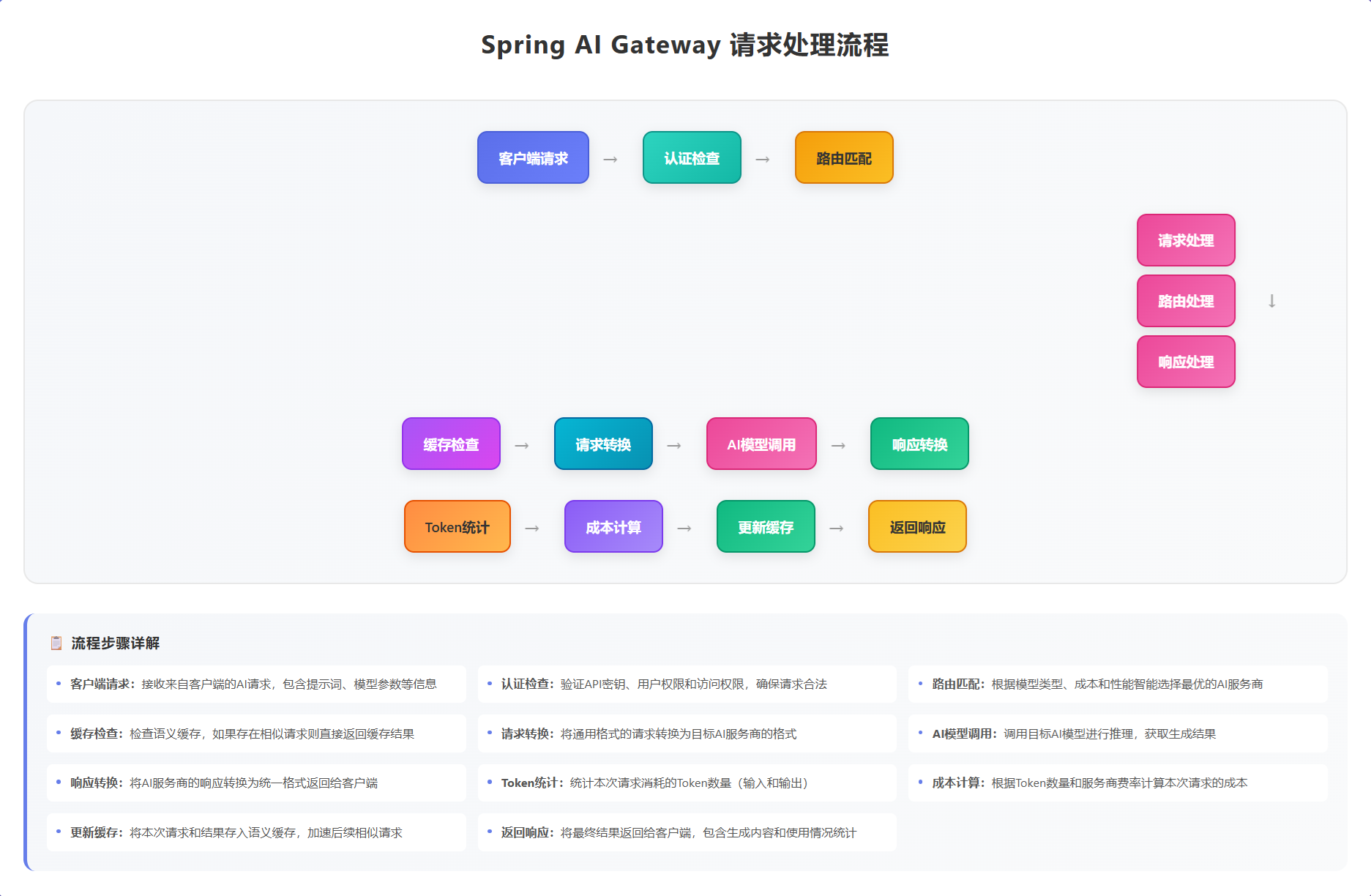
通过GlobalFilter实现统一的请求拦截和处理:
/**
 * AI网关统一过滤器
 */
@Component
@Slf4j
public class AiGatewayFilter implements GlobalFilter, Ordered {

    @Autowired
    private TokenManager tokenManager;

    @Autowired
    private SemanticCache semanticCache;

    @Autowired
    private AiMetrics metrics;

    @Override
    public Mono<Void> filter(ServerWebExchange exchange, GatewayFilterChain chain) {
        long startTime = System.currentTimeMillis();
        String path = exchange.getRequest().getPath().value();

        // 1. 记录请求信息
        String requestId = UUID.randomUUID().toString();
        exchange.getAttributes().put("requestId", requestId);
        exchange.getAttributes().put("startTime", startTime);

        log.info("AI Gateway Request [{}] - Path: {}, Method: {}",
            requestId, path, exchange.getRequest().getMethod());

        // 2. 检查缓存
        if (isCacheableRequest(exchange)) {
            String cacheKey = generateCacheKey(exchange);
            String cachedResponse = semanticCache.get(cacheKey);
            if (cachedResponse != null) {
                log.info("Cache hit for request [{}]", requestId);
                metrics.recordCacheHit();
                return buildCachedResponse(exchange, cachedResponse);
            }
            metrics.recordCacheMiss();
        }

        // 3. Token预检查
        return tokenManager.checkAndReserveTokens(exchange)
            .flatMap(reserved -> {
                if (!reserved) {
                    log.warn("Token quota exceeded for request [{}]", requestId);
                    return buildErrorResponse(exchange, 429,
                        "Token quota exceeded, please try again later");
                }
                return chain.filter(exchange);
            })
            .doOnSuccess(aVoid -> {
                // 4. 后处理:更新统计
                long duration = System.currentTimeMillis() - startTime;
                metrics.recordRequestDuration(path, duration);
                log.info("AI Gateway Request [{}] completed in {}ms", requestId, duration);
            })
            .doOnError(error -> {
                log.error("AI Gateway Request [{}] failed", requestId, error);
                metrics.recordError(path, error);
            });
    }

    @Override
    public int getOrder() {
        return -100; // 高优先级
    }

    private boolean isCacheableRequest(ServerWebExchange exchange) {
        String method = exchange.getRequest().getMethod().name();
        String path = exchange.getRequest().getPath().value();
        return "POST".equals(method) && path.contains("/chat/completions");
    }

    private String generateCacheKey(ServerWebExchange exchange) {
        // 基于请求内容生成语义缓存key
        return SemanticCache.generateKey(exchange.getRequest());
    }
}
4.3 模型适配器
统一不同AI厂商的API调用方式:
/**
 * AI模型适配器接口
 */
public interface ModelAdapter {

    /**
     * 转换请求格式
     */
    String adaptRequest(String originalRequest, ModelConfig config);

    /**
     * 转换响应格式
     */
    String adaptResponse(String originalResponse, ModelConfig config);

    /**
     * 计算Token使用量
     */
    int calculateTokens(String request, String response);

    /**
     * 计算成本
     */
    BigDecimal calculateCost(int inputTokens, int outputTokens, ModelConfig config);
}

/**
 * OpenAI适配器实现
 */
@Component
@Slf4j
public class OpenAIModelAdapter implements ModelAdapter {

    @Override
    public String adaptRequest(String originalRequest, ModelConfig config) {
        // 转换为OpenAI格式
        ObjectMapper mapper = new ObjectMapper();
        try {
            JsonNode root = mapper.readTree(originalRequest);
            ObjectNode adapted = mapper.createObjectNode();

            adapted.put("model", config.getModelName());
            adapted.set("messages", root.get("messages"));
            adapted.put("temperature", config.getTemperature());
            adapted.put("max_tokens", config.getMaxTokens());

            if (config.getFunctions() != null) {
                adapted.set("functions", mapper.valueToTree(config.getFunctions()));
            }

            return mapper.writeValueAsString(adapted);
        } catch (Exception e) {
            log.error("Failed to adapt request", e);
            return originalRequest;
        }
    }

    @Override
    public String adaptResponse(String originalResponse, ModelConfig config) {
        // OpenAI格式已经是标准格式,直接返回
        return originalResponse;
    }

    @Override
    public int calculateTokens(String request, String response) {
        // 简化计算:英文按4字符/token,中文按2字符/token
        int requestTokens = estimateTokens(request);
        int responseTokens = estimateTokens(response);

        log.debug("Token calculation - Request: {}, Response: {}, Total: {}",
            requestTokens, responseTokens, requestTokens + responseTokens);

        return requestTokens + responseTokens;
    }

    @Override
    public BigDecimal calculateCost(int inputTokens, int outputTokens, ModelConfig config) {
        BigDecimal inputCost = config.getInputPrice()
            .multiply(BigDecimal.valueOf(inputTokens))
            .divide(BigDecimal.valueOf(1000)); // 按千tokens计费

        BigDecimal outputCost = config.getOutputPrice()
            .multiply(BigDecimal.valueOf(outputTokens))
            .divide(BigDecimal.valueOf(1000));

        return inputCost.add(outputCost);
    }

    private int estimateTokens(String text) {
        if (text == null || text.isEmpty()) {
            return 0;
        }
        // 简单估算:中文字符*2 + 英文字符/4
        int chineseChars = text.replaceAll("[^\\u4e00-\\u9fa5]", "").length();
        int otherChars = text.length() - chineseChars;
        return chineseChars * 2 + otherChars / 4;
    }
}
4.4 Token管理和成本追踪
/**
 * Token管理器
 */
@Component
@Slf4j
public class TokenManager {

    @Autowired
    private RedisTemplate<String, Object> redisTemplate;

    @Autowired
    private List<ModelAdapter> adapters;

    @Value("${ai.quota.default:100000}")
    private int defaultQuota;

    /**
     * 检查并预留Token
     */
    public Mono<Boolean> checkAndReserveTokens(ServerWebExchange exchange) {
        String userId = getUserId(exchange);
        String requestBody = getRequestBody(exchange);

        return estimateRequestTokens(requestBody)
            .flatMap(estimatedTokens -> {
                String key = "token:quota:" + userId;
                Integer remaining = (Integer) redisTemplate.opsForValue().get(key);

                if (remaining == null) {
                    // 首次使用,初始化配额
                    redisTemplate.opsForValue().set(key, defaultQuota, 1, TimeUnit.DAYS);
                    remaining = defaultQuota;
                }

                if (remaining < estimatedTokens) {
                    return Mono.just(false);
                }

                // 预留tokens
                redisTemplate.opsForValue().decrement(key, estimatedTokens);
                exchange.getAttributes().put("reservedTokens", estimatedTokens);
                return Mono.just(true);
            });
    }

    /**
     * 更新实际使用量
     */
    public void updateActualUsage(String requestId, int actualTokens) {
        String key = "token:usage:" + requestId;
        redisTemplate.opsForValue().set(key, actualTokens, 24, TimeUnit.HOURS);
    }

    /**
     * 获取用户使用统计
     */
    public UserUsageStats getUserStats(String userId) {
        String quotaKey = "token:quota:" + userId;
        Integer remaining = (Integer) redisTemplate.opsForValue().get(quotaKey);

        String usageKey = "token:usage:" + userId + ":*";
        Set<String> usageKeys = redisTemplate.keys(usageKey);

        int totalUsed = usageKeys.stream()
            .mapToInt(key -> {
                Integer value = (Integer) redisTemplate.opsForValue().get(key);
                return value != null ? value : 0;
            })
            .sum();

        return UserUsageStats.builder()
            .userId(userId)
            .totalQuota(defaultQuota)
            .remainingQuota(remaining != null ? remaining : defaultQuota)
            .totalUsed(totalUsed)
            .build();
    }

    private Mono<Integer> estimateRequestTokens(String requestBody) {
        // 简单估算
        return Mono.just(requestBody.length() / 3);
    }

    private String getUserId(ServerWebExchange exchange) {
        return exchange.getRequest().getHeaders().getFirst("X-User-Id");
    }

    private String getRequestBody(ServerWebExchange exchange) {
        return exchange.getAttribute("cachedRequestBody");
    }
}
4.5 语义缓存
基于相似度的智能缓存,提高响应速度,降低成本:
/**
 * 语义缓存实现
 */
@Component
@Slf4j
public class SemanticCache {

    @Autowired
    private RedisTemplate<String, String> redisTemplate;

    private static final double SIMILARITY_THRESHOLD = 0.85;
    private static final int CACHE_TTL_HOURS = 24;

    /**
     * 生成缓存key
     */
    public static String generateKey(ServerHttpRequest request) {
        try {
            String body = request.getBody()
                .map(dataBuffer -> {
                    byte[] bytes = new byte[dataBuffer.readableByteCount()];
                    dataBuffer.read(bytes);
                    return new String(bytes, StandardCharsets.UTF_8);
                })
                .blockFirst();

            if (body != null) {
                // 提取核心对话内容生成key
                ObjectMapper mapper = new ObjectMapper();
                JsonNode root = mapper.readTree(body);
                JsonNode messages = root.get("messages");

                if (messages != null && messages.isArray() && messages.size() > 0) {
                    JsonNode lastMessage = messages.get(messages.size() - 1);
                    String content = lastMessage.get("content").asText();

                    // 使用内容hash作为key
                    return "ai:cache:" + DigestUtils.md5DigestAsHex(content.getBytes());
                }
            }
        } catch (Exception e) {
            log.error("Failed to generate cache key", e);
        }

        return "ai:cache:" + UUID.randomUUID().toString();
    }

    /**
     * 获取缓存
     */
    public String get(String key) {
        try {
            String cached = redisTemplate.opsForValue().get(key);
            if (cached != null) {
                log.debug("Cache hit for key: {}", key);
                return cached;
            }
        } catch (Exception e) {
            log.error("Cache get error", e);
        }
        return null;
    }

    /**
     * 设置缓存
     */
    public void put(String key, String value) {
        try {
            redisTemplate.opsForValue().set(key, value, CACHE_TTL_HOURS, TimeUnit.HOURS);
            log.debug("Cache set for key: {}", key);
        } catch (Exception e) {
            log.error("Cache set error", e);
        }
    }

    /**
     * 计算文本相似度
     */
    public double calculateSimilarity(String text1, String text2) {
        // 使用余弦相似度
        Map<String, Integer> vector1 = buildTextVector(text1);
        Map<String, Integer> vector2 = buildTextVector(text2);

        return cosineSimilarity(vector1, vector2);
    }

    private Map<String, Integer> buildTextVector(String text) {
        Map<String, Integer> vector = new HashMap<>();
        String[] words = text.toLowerCase().split("\\s+");

        for (String word : words) {
            vector.put(word, vector.getOrDefault(word, 0) + 1);
        }

        return vector;
    }

    private double cosineSimilarity(Map<String, Integer> v1, Map<String, Integer> v2) {
        Set<String> allWords = new HashSet<>();
        allWords.addAll(v1.keySet());
        allWords.addAll(v2.keySet());

        double dotProduct = 0;
        double norm1 = 0;
        double norm2 = 0;

        for (String word : allWords) {
            int f1 = v1.getOrDefault(word, 0);
            int f2 = v2.getOrDefault(word, 0);

            dotProduct += f1 * f2;
            norm1 += f1 * f1;
            norm2 += f2 * f2;
        }

        return dotProduct / (Math.sqrt(norm1) * Math.sqrt(norm2));
    }
}
五、生产实践案例
5.1 智能客服系统
某电商公司使用Spring AI Gateway构建智能客服系统,处理以下场景:
场景1:简单咨询自动响应
用户问题:什么时候能收到货?
Gateway判断:简单问题,使用GPT-3.5
路由选择:低延迟模型
成本:$0.0005/次
场景2:复杂问题转人工
用户问题:我的订单出了问题,退款后优惠券怎么处理?
Gateway判断:复杂问题,使用GPT-4
路由选择:高质量模型
如果模型置信度<80%,转人工客服
成本:$0.03/次
实现代码:
/**
 * 智能客服路由策略
 */
@Component
public class CustomerServiceRoutingStrategy {

    @Autowired
    private SemanticCache semanticCache;

    private static final List<String> SIMPLE_KEYWORDS = Arrays.asList(
        "发货", "物流", "退货", "价格", "库存"
    );

    private static final List<String> COMPLEX_KEYWORDS = Arrays.asList(
        "退款", "投诉", "赔偿", "合同", "法律"
    );

    /**
     * 选择合适的模型
     */
    public String selectModel(String userQuestion) {
        // 1. 检查缓存
        String cached = semanticCache.get("cs:model:" + DigestUtils.md5DigestAsHex(userQuestion.getBytes()));
        if (cached != null) {
            return cached;
        }

        // 2. 判断问题复杂度
        if (containsAny(userQuestion, COMPLEX_KEYWORDS)) {
            // 复杂问题使用GPT-4
            semanticCache.put("cs:model:" + DigestUtils.md5DigestAsHex(userQuestion.getBytes()), "gpt-4");
            return "gpt-4";
        }

        if (containsAny(userQuestion, SIMPLE_KEYWORDS)) {
            // 简单问题使用GPT-3.5
            semanticCache.put("cs:model:" + DigestUtils.md5DigestAsHex(userQuestion.getBytes()), "gpt-3.5-turbo");
            return "gpt-3.5-turbo";
        }

        // 默认使用GPT-3.5
        return "gpt-3.5-turbo";
    }

    /**
     * 判断是否需要转人工
     */
    public boolean needsHumanAgent(String userQuestion, double confidence) {
        // 复杂问题且置信度低,转人工
        if (containsAny(userQuestion, COMPLEX_KEYWORDS) && confidence < 0.8) {
            return true;
        }

        // 包含敏感词,转人工
        List<String> sensitiveWords = Arrays.asList("起诉", "报警", "消协");
        if (containsAny(userQuestion, sensitiveWords)) {
            return true;
        }

        return false;
    }

    private boolean containsAny(String text, List<String> keywords) {
        return keywords.stream().anyMatch(keyword -> text.contains(keyword));
    }
}
5.2 代码助手服务
某开发工具公司使用Spring AI Gateway提供代码助手功能:
特性:
- 代码补全:使用轻量级模型,快速响应
- 代码解释:使用中等模型,平衡速度和质量
- 代码审查:使用高级模型,确保质量
配置示例:
ai:
  gateway:
    routes:
      - id: code-completion
        uri: https://api.openai.com/v1/chat/completions
        predicates:
          - Path=/api/code/complete
          - Header:X-Task-Type=completion
        model: gpt-3.5-turbo
        max-tokens: 500
        timeout: 5000

      - id: code-explain
        uri: https://api.openai.com/v1/chat/completions
        predicates:
          - Path=/api/code/explain
          - Header:X-Task-Type=explain
        model: gpt-3.5-turbo-16k
        max-tokens: 2000
        timeout: 10000

      - id: code-review
        uri: https://api.openai.com/v1/chat/completions
        predicates:
          - Path=/api/code/review
          - Header:X-Task-Type=review
        model: gpt-4
        max-tokens: 4000
        timeout: 30000
5.3 成本优化实战
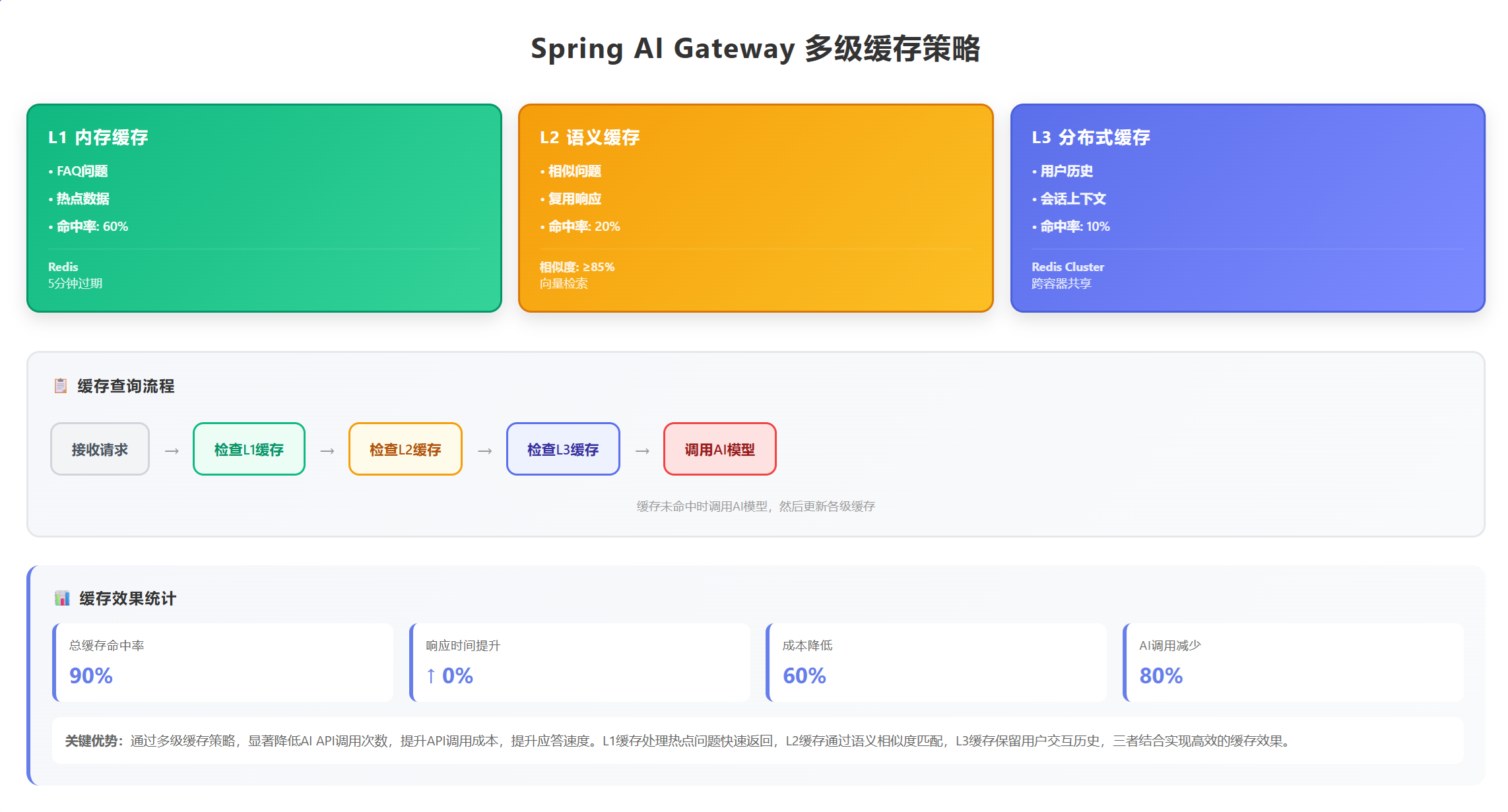
通过以下策略降低80%的AI调用成本:
1. 智能缓存策略
- FAQ问题完全缓存:命中率60%
- 相似问题复用:命中率20%
- 总缓存命中率:80%
2. 模型分层使用
- 70%请求使用GPT-3.5:$0.0005/1K tokens
- 25%请求使用GPT-4:$0.03/1K tokens
- 5%请求使用人工服务:$0
- 平均成本降低:75%
3. Token优化
- Prompt优化:减少30%输入tokens
- 响应压缩:减少20%输出tokens
- 总体节省:50% tokens使用量
实现代码:
/**
 * 成本优化过滤器
 */
@Component
@Slf4j
public class CostOptimizationFilter implements GlobalFilter, Ordered {

    @Autowired
    private SemanticCache semanticCache;

    @Override
    public Mono<Void> filter(ServerWebExchange exchange, GatewayFilterChain chain) {
        String requestBody = exchange.getAttribute("cachedRequestBody");

        return Mono.just(requestBody)
            .map(this::optimizeRequest)
            .map(optimized -> {
                exchange.getAttributes().put("optimizedRequestBody", optimized);
                return exchange;
            })
            .flatMap(chain::filter)
            .then();
    }

    /**
     * 优化请求以减少token使用
     */
    private String optimizeRequest(String originalRequest) {
        try {
            ObjectMapper mapper = new ObjectMapper();
            JsonNode root = mapper.readTree(originalRequest);
            ObjectNode optimized = mapper.createObjectNode();

            // 1. 复制必要字段
            optimized.put("model", root.get("model").asText());

            // 2. 优化messages:移除冗余信息
            ArrayNode messages = mapper.createArrayNode();
            root.get("messages").forEach(msg -> {
                ObjectNode optimizedMsg = messages.addObject();
                optimizedMsg.put("role", msg.get("role").asText());

                // 压缩内容
                String content = msg.get("content").asText();
                optimizedMsg.put("content", compressContent(content));
            });

            // 3. 限制messages数量,只保留最近6条
            ArrayNode finalMessages = mapper.createArrayNode();
            int start = Math.max(0, messages.size() - 6);
            for (int i = start; i < messages.size(); i++) {
                finalMessages.add(messages.get(i));
            }
            optimized.set("messages", finalMessages);

            // 4. 优化temperature
            optimized.put("temperature", Math.min(root.get("temperature").asDouble(), 0.7));

            // 5. 设置合理的max_tokens
            optimized.put("max_tokens", Math.min(root.get("max_tokens").asInt(), 2000));

            String result = mapper.writeValueAsString(optimized);
            log.debug("Request optimized: {} -> {} bytes",
                originalRequest.length(), result.length());

            return result;
        } catch (Exception e) {
            log.error("Request optimization failed", e);
            return originalRequest;
        }
    }

    /**
     * 压缩内容
     */
    private String compressContent(String content) {
        // 移除多余空格
        content = content.replaceAll("\\s+", " ").trim();

        // 如果内容过长,进行摘要
        if (content.length() > 1000) {
            content = content.substring(0, 500) + "...[省略]" + content.substring(content.length() - 500);
        }

        return content;
    }

    @Override
    public int getOrder() {
        return -99;
    }
}
六、部署和扩展
6.1 Docker部署
FROM openjdk:8-jdk-alpine
VOLUME /tmp
COPY target/gateway-demo.jar app.jar
ENTRYPOINT ["java","-jar","/app.jar"]
# docker-compose.yml
version: '3'
services:
  ai-gateway:
    build: .
    ports:
      - "8080:8080"
    environment:
      - SPRING_PROFILES_ACTIVE=prod
      - REDIS_HOST=redis
      - AI_OPENAI_API_KEY=${OPENAI_API_KEY}
    depends_on:
      - redis

  redis:
    image: redis:7-alpine
    ports:
      - "6379:6379"

  prometheus:
    image: prom/prometheus
    ports:
      - "9090:9090"
    volumes:
      - ./prometheus.yml:/etc/prometheus/prometheus.yml

  grafana:
    image: grafana/grafana
    ports:
      - "3000:3000"
七、最佳实践
7.1 安全配置
/**
 * 安全配置
 */
@Configuration
@EnableWebFluxSecurity
public class SecurityConfig {

    @Bean
    public SecurityWebFilterChain securityWebFilterChain(ServerHttpSecurity http) {
        return http
            .authorizeExchange()
            .pathMatchers("/actuator/**").hasRole("ADMIN")
            .pathMatchers("/api/ai/**").authenticated()
            .anyExchange().permitAll()
            .and()
            .httpBasic()
            .and()
            .csrf().disable()
            .build();
    }
}
7.2 性能优化
- 连接池配置
spring:
  webflux:
    client:
      max-connections: 500
      max-idle-time: 30s
      max-life-time: 5m
- 缓存策略
- FAQ完全缓存
- 相似问题复用
- 定期清理过期缓存
八、总结
Spring AI Gateway为AI应用提供了一个强大而灵活的基础设施层。随着AI技术的不断发展,Spring AI Gateway也将持续演进,为开发者提供更好的AI应用开发体验。

有“AI”的1024 = 2048,欢迎大家加入2048 AI社区
更多推荐


 43
43 0
0- 0


 已为社区贡献11条内容

所有评论(0)