【Spring AI实战:基于工厂+模板模式的多格式文档向量化微服务架构设计】
·
系列文章目录
前言
在智慧园区项目的RAG内部资料库系统中,面临一个核心挑战:如何优雅地处理多种格式的文档数据并将其转换为向量表示。传统的硬编码方式会导致代码臃肿、难以维护,而简单的if-else分支则会让系统随着业务增长变得越来越混乱。
本文总结一个基于Spring AI + 设计模式的向量化服务架构,详细解释为什么采用这样的设计,如何通过@Primary注解实现智能路由,以及工厂模式、模板模式等设计模式如何协同工作来解决实际业务问题。
一、问题背景与挑战
1.1 业务场景分析
正在开发一个校园AI助手系统,知识库来源主要有下列两种,且均需要向量化后才能交给AI模型使用:
- 公告(NOTICE):纯文本内容,结构相对简单
- 学习资料(MATERIALS):包含多种格式(PDF、TXT、DOCX等),每种格式需要不同的解析方式
1.2 面临的挑战
- 格式多样性:PDF需要分页解析,TXT可以直接读取,未来可能支持DOCX、PPT等
- 扩展性需求:新格式支持不应该影响现有代码
- 统一接口:对外提供一致的调用方式
- 代码复用:避免重复的存储逻辑、元数据处理等
- 维护性:代码结构清晰,便于团队协作和维护
二、架构设计核心思想
2.1 总体架构图
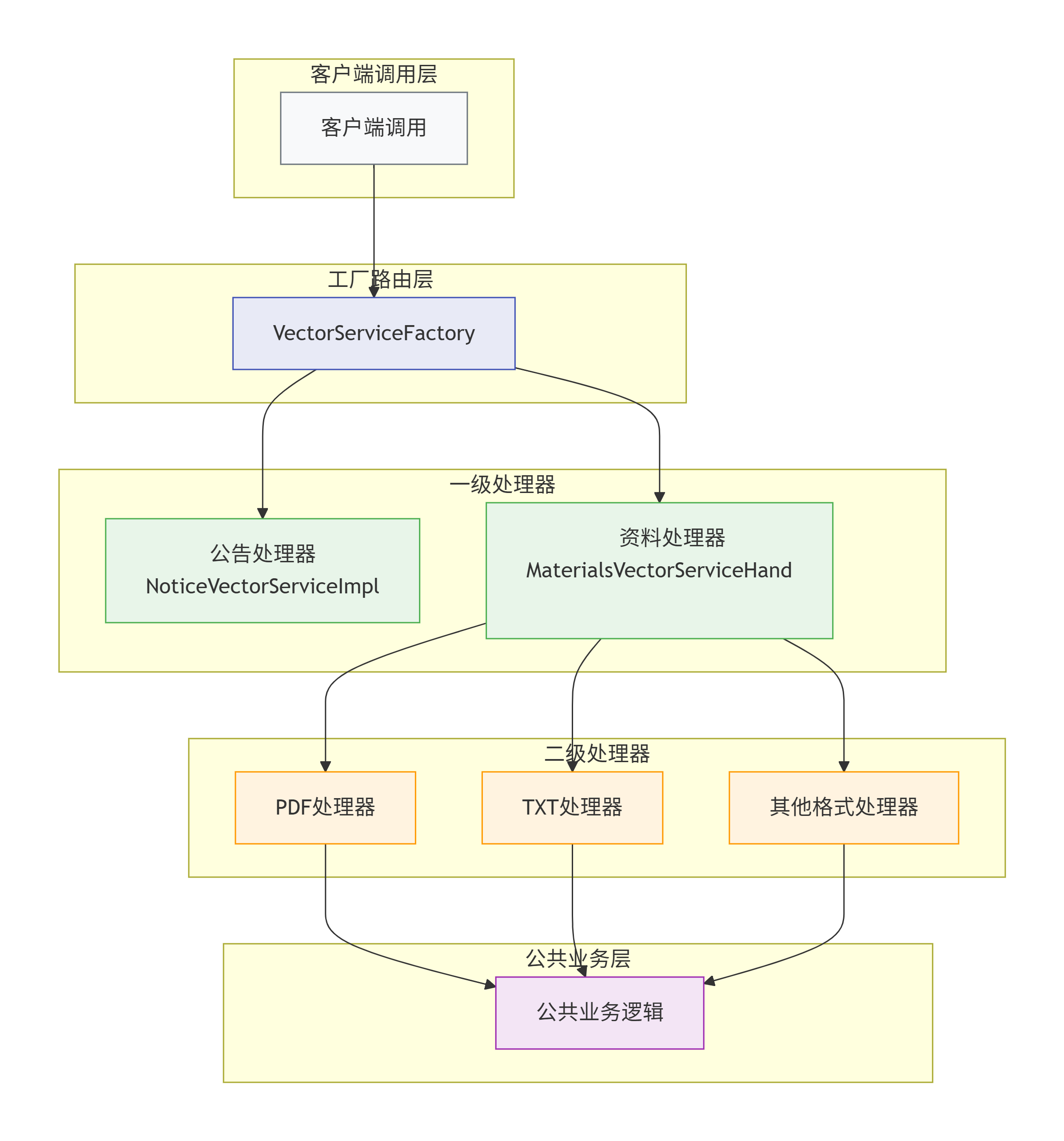
2.2 设计原则应用
- 开闭原则:对扩展开放,对修改关闭
- 单一职责:每个类只负责一个功能
- 依赖倒置:依赖抽象,而非具体实现
- 接口隔离:最小化接口依赖
三、核心代码实现
3.1 统一接口设计
为什么需要这个接口?
- 为所有向量化处理器定义统一的方案
- 实现多态,客户端无需关心具体实现
- 便于工厂模式统一管理
/**
 * 向量化服务统一接口
 */
public interface IVectorService {

    /**
     * 添加文档到向量库
     * @param messageDto 包含文档ID和业务类型
     */
    void addDocument(MessageDto messageDto);

    /**
     * 更新向量库中的文档
     * 先删除旧向量,再添加新向量
     */
    void updateDocument(MessageDto messageDto);

    /**
     * 从向量库删除文档
     */
    void deleteDocument(MessageDto messageDto);
}
3.2 工厂模式:统一创建入口
设计意图
- 集中管理所有向量化处理器的创建逻辑
- 客户端只需知道工厂,无需了解具体实现类
- 降低耦合,便于扩展新处理器
为什么不用简单if-else?
- 如果if-else散落在各处,新增类型时需要修改多处代码
- 工厂模式将变化点封装在一处
/**
 * 向量服务工厂类 - 工厂模式的核心体现
 */
@Component
@RequiredArgsConstructor
public class VectorServiceFactory {

    // 通过构造器注入所有处理器
    private final NoticeVectorServiceImpl noticeVectorService;
    private final MaterialsVectorServiceHandler materialsVectorServiceHandler;

    /**
     * 根据消息类型获取对应的向量化处理器
     * @param messageType 业务类型标识
     * @return 对应的处理器实例
     * @throws IllegalArgumentException 不支持的业务类型
     */
    public IVectorService of(String messageType) {
        return switch (messageType) {
            case "CAMPUSAI_NOTICE" -> noticeVectorService;
            case "CAMPUSAI_MATERIALS" -> materialsVectorServiceHandler;
            default -> throw new IllegalArgumentException(
                String.format("不支持的业务类型: %s,请检查配置", messageType)
            );
        };
    }

    /**
     * 可选的:添加类型校验方法
     */
    public boolean supports(String messageType) {
        return messageType != null &&
               (messageType.equals("CAMPUSAI_NOTICE") ||
                messageType.equals("CAMPUSAI_MATERIALS"));
    }
}
3.3 @Primary注解的妙用:智能路由处理器
为什么使用@Primary?
- Spring容器中有多个IVectorService的实现类
- @Primary告诉Spring:当有多个候选bean时,优先选择我
- 这里作为材料处理的"总入口",负责路由到具体的格式处理器
解决的问题
- 避免使用复杂的if-else判断文件格式
- 将格式判断逻辑集中管理
- 便于添加新的格式支持
/**
 * 资料向量化服务处理器
 */
@Service
@Primary // ← 关键注解:标记为主要处理器
@Slf4j
@RequiredArgsConstructor
public class MaterialsVectorServiceHandler implements IVectorService {

    // 依赖注入具体的格式处理器
    private final IMaterialsService materialsService;
    private final PdfMaterialsVectorServiceImpl pdfMaterialsVectorService;
    private final TxtMaterialsVectorServiceImpl txtMaterialsVectorService;
    private final MaterialsCommonService materialsCommonService;

    /**
     * 添加文档的核心逻辑
     */
    @Override
    @Transactional
    public void addDocument(MessageDto messageDto) {
        Long materialId = Long.valueOf(messageDto.getIds());
        Materials materials = materialsService.getById(materialId);

        if (materials == null) {
            log.error("未找到资料记录,ID: {}", materialId);
            throw new ResourceNotFoundException("资料不存在,ID: " + materialId);
        }

        // 获取文件URL并统一转为小写,避免大小写问题
        String url = materials.getUrl().toLowerCase();

        // 根据文件后缀选择具体的处理器
        // 后续拓展:新增格式只需添加新的if分支,不影响现有逻辑
        if (url.endsWith(".pdf")) {
            log.info("检测到PDF格式,路由至PDF处理器:{}", materials.getTitle());
            pdfMaterialsVectorService.writeToVectorStore(materials);
        } else if (url.endsWith(".txt")) {
            log.info("检测到TXT格式,路由至TXT处理器:{}", materials.getTitle());
            txtMaterialsVectorService.writeToVectorStore(materials);
        } else if (url.endsWith(".docx") || url.endsWith(".doc")) {
            // 预留扩展点:未来支持Word文档
            log.warn("暂不支持Word文档格式: {}", url);
            throw new UnsupportedFormatException("暂不支持Word文档格式");
        } else {
            log.error("不支持的文档格式: {}", url);
            throw new UnsupportedFormatException("不支持的文档格式: " + url);
        }

        log.info("资料向量化完成:{} (ID: {})", materials.getTitle(), materialId);
    }

    /**
     * 更新文档:先删后增策略
     * 为什么这样设计?
     * 1. 向量更新本质是替换,不是修改
     * 2. 保证数据一致性
     * 3. 简化实现逻辑
     */
    @Override
    @Transactional
    public void updateDocument(MessageDto messageDto) {
        log.info("开始更新向量化文档,ID: {}", messageDto.getIds());
        // 先删除旧向量
        this.deleteDocument(messageDto);
        // 再添加新向量
        this.addDocument(messageDto);
        log.info("向量化更新完成,ID: {}", messageDto.getIds());
    }

    /**
     * 删除文档:委托给公共服务处理
     */
    @Override
    public void deleteDocument(MessageDto messageDto) {
        materialsCommonService.deleteDocument(messageDto);
    }

    /**
     * 扩展:添加批量处理方法
     */
    public void batchAddDocuments(List<MessageDto> messageDtos) {
        messageDtos.forEach(this::addDocument);
    }
}
3.4 具体格式处理器
PDF处理器实现
设计要点
- 不直接实现IVectorService接口,专注PDF处理
- 通过依赖注入获取所需资源
- 调用公共逻辑完成存储
为什么不用@Service直接暴露?
- 如果直接暴露,Factory需要管理太多细节处理器
- 通过Handler统一管理
/**
 * PDF文档向量化处理器
 */
@Service
@Slf4j
@RequiredArgsConstructor
public class PdfMaterialsVectorServiceImpl {

    private final VectorStore vectorStore;
    private final IDocumentIdsService documentIdsService;
    private final MaterialsCommonService commonService;

    /**
     * PDF文档处理核心方法
     * 技术要点:
     * 1. 使用Spring AI的PagePdfDocumentReader
     * 2. 配置页面提取策略
     * 3. 异常处理与日志记录
     */
    public void writeToVectorStore(Materials material) {
        log.info("开始处理PDF文档:{}", material.getTitle());

        try {
            // 1. 创建PDF阅读器 - 使用Builder模式配置参数
            PagePdfDocumentReader reader = new PagePdfDocumentReader(
                new UrlResource(material.getUrl()),
                PdfDocumentReaderConfig.builder()
                    .withPageExtractedTextFormatter(
                        ExtractedTextFormatter.defaults()
                            .withNumberOfBottomTextLinesToDelete(0)
                            .withNumberOfTopTextLinesToDelete(1)
                    )
                    .withPagesPerDocument(1) // 每页作为一个文档片段
                    .withMaxTokensPerPage(2000) // 限制每页token数
                    .build()
            );

            // 2. 读取并解析PDF
            List<Document> documents = reader.read();
            log.info("PDF解析成功,文档:{},共切分为 {} 个片段",
                    material.getTitle(), documents.size());

            // 3. 验证解析结果
            if (documents.isEmpty()) {
                log.warn("PDF文档解析后无内容:{}", material.getUrl());
                return;
            }

            // 4. 调用公共存储逻辑 - 体现模板方法模式
            commonService.commonStoreLogic(documents, material);

            log.info("PDF向量化完成:{},生成 {} 个向量片段",
                    material.getTitle(), documents.size());

        } catch (MalformedURLException e) {
            log.error("PDF URL格式错误:{}", material.getUrl(), e);
            throw new VectorizationException("PDF URL格式错误", e);
        } catch (IOException e) {
            log.error("PDF文件读取失败:{}", material.getUrl(), e);
            throw new VectorizationException("PDF文件读取失败", e);
        } catch (Exception e) {
            log.error("PDF向量化处理异常:{}", material.getTitle(), e);
            throw new VectorizationException("PDF向量化失败", e);
        }
    }
}
TXT处理器实现
与PDF处理器结构相似,但解析逻辑不同
/**
 * TXT文档向量化处理器
 */
@Service
@Slf4j
@RequiredArgsConstructor
public class TxtMaterialsVectorServiceImpl {

    private final VectorStore vectorStore;
    private final IDocumentIdsService documentIdsService;
    private final MaterialsCommonService commonService;

    /**
     * TXT文档处理核心方法
     * 对比PDF处理器:
     * 1. 使用TextReader而非PagePdfDocumentReader
     * 2. 无需分页配置
     */
    public void writeToVectorStore(Materials material) {
        log.info("开始处理TXT文档:{}", material.getTitle());

        try {
            // 1. 创建文本阅读器
            TextReader reader = new TextReader(new UrlResource(material.getUrl()));

            // 2. 配置文本读取参数
            reader.getCustomMetadata().put("charset", "UTF-8");
            reader.getCustomMetadata().put("source", material.getUrl());

            // 3. 读取文本内容
            List<Document> documents = reader.read();
            log.info("TXT解析成功,文档:{},共切分为 {} 个片段",
                    material.getTitle(), documents.size());

            // 4. 调用公共存储逻辑
            commonService.commonStoreLogic(documents, material);

            log.info("TXT向量化完成:{},生成 {} 个向量片段",
                    material.getTitle(), documents.size());

        } catch (Exception e) {
            log.error("TXT向量化失败:{}", material.getTitle(), e);
            throw new VectorizationException("TXT向量化失败", e);
        }
    }
}
3.5 模板方法模式:公共逻辑抽象
设计意图
- 将公共业务逻辑提取到公共类中
- 避免PDF、TXT等处理器重复相同的存储逻辑
模板方法模式特点
- 定义算法骨架
- 具体步骤由子类/调用者提供
- 这里将"存储向量"定义为模板,文档解析由具体处理器实现
/**
 * 材料向量化公共业务服务
 */

@Slf4j
@Service
@RequiredArgsConstructor
public class MaterialsCommonService {

    private final VectorStore store;
    private final IMaterialsService materialsService;
    private final IDocumentIdsService documentIdsService;

    public Materials getMaterialsById(Long id) {
        Materials materials = materialsService.getById(id);
        if (materials == null) {
            log.error("未找到资料记录,ID: {}", id);
        }
        return materials;
    }

    public void deleteDocument(MessageDto messageDto) {
        String sourceId = messageDto.getIds();
        List<DocumentIds> list = documentIdsService.list(
                new LambdaQueryWrapper<DocumentIds>()
                        .eq(DocumentIds::getSourceId, sourceId)
        );

        if (!CollectionUtils.isEmpty(list)) {
            List<String> docIds = list.stream()
                    .map(DocumentIds::getDocumentId)
                    .toList();
            store.delete(docIds);

            documentIdsService.remove(
                    new LambdaQueryWrapper<DocumentIds>()
                            .eq(DocumentIds::getSourceId, sourceId)
            );

            log.info("已清理资料向量数据,sourceId: {}", sourceId);
        }
    }

    public void commonStoreLogic(List<Document> documents, Materials material) {
        // 1. 补充元数据
        documents.forEach(doc -> {
            doc.getMetadata().put("source_id", material.getId());
            doc.getMetadata().put("type", "MATERIALS");
            doc.getMetadata().put("title", material.getTitle());
        });

        // 2. 存入 Redis 向量库
        store.add(documents);

        // 3. 构造中间表记录并批量保存
        List<DocumentIds> recordList = documents.stream().map(doc -> {
            DocumentIds record = new DocumentIds();
            record.setSourceId(material.getId().toString());
            record.setDocumentId(doc.getId());
            record.setType("CAMPUSAI_MATERIALS");
            return record;
        }).collect(Collectors.toList());

        documentIdsService.saveBatch(recordList);
    }
}
3.6 公告处理器
/**
 * 公告向量化处理器
 */
@Service
@Slf4j
@RequiredArgsConstructor
public class NoticeVectorServiceImpl implements IVectorService {

    @Autowired
    private VectorStore store;
    @Autowired
    private INoticeService noticeService;
    @Autowired
    private IDocumentIdsService documentIdsService;
    @Override
    public void addDocument(MessageDto messageDto) {
        //获取dto里的messageId,对应Notice表的id
        Long noticeId = Long.valueOf(messageDto.getIds());

        //查找Notice表,找到后台录入的校园墙记录
        Notice notice = noticeService.getById(noticeId);
        if (notice == null) {
            log.error("找不到对应的公告记录,id:{}",noticeId);
            return;
        }

        //构建Document对象,并调用store的add保存到向量库
        String textChunk = "【公告标题】:" + notice.getTitle() + "\n【公告内容】:" + notice.getContent();
        Document document = new Document(textChunk, Map.of("source_id", noticeId, "type", "NOTICE"));

        store.add(List.of(document));  // 写入向量库

        //从上步中的Document对象,获取id(向量库的id)记录到document_ids表,后续删除要用
        DocumentIds docRecord = new DocumentIds();
        docRecord.setSourceId(noticeId.toString());
        docRecord.setDocumentId(document.getId()); // 这是 Spring AI 自动生成的 UUID
        docRecord.setType("CAMPUSAI_NOTICE");
        documentIdsService.save(docRecord);

        log.info("公告向量化完成: noticeId={}, docId={}", noticeId, document.getId());
    }

    @Override
    public void updateDocument(MessageDto messageDto) {
        //先删除,再新增
        this.deleteDocument(messageDto);
        this.addDocument(messageDto);
        log.info("向量化更新成功,公告ID: {}", messageDto.getIds());
    }

    @Override
    public void deleteDocument(MessageDto messageDto) {
        //从dto中获取Notice的id
        String sourceId = messageDto.getIds();
        Long noticeId = Long.parseLong(sourceId);

        //查中间表得到所有旧的向量id
        List<DocumentIds> list = documentIdsService.list(new LambdaQueryWrapper<DocumentIds>()
                .eq(DocumentIds::getSourceId, sourceId));

        //调store的delete删除向量库中的数据
        if (!CollectionUtils.isEmpty(list)) {
            List<String> docIds = list.stream().map(DocumentIds::getDocumentId).toList();
            // 调用 Spring AI 接口物理删除向量
            store.delete(docIds);
            // 清理中间表
            documentIdsService.remove(new LambdaQueryWrapper<DocumentIds>()
                    .eq(DocumentIds::getSourceId, sourceId));
        }

        log.info("向量化删除成功,公告ID: {}, 删除向量文档数: {}", noticeId, list.size());
    }
}
四、设计模式深度解析
4.1 工厂模式(Factory Pattern)的实际价值
解决的问题:
// 不好的代码 - 硬编码创建逻辑散落在各处
public void processDocument(String type, MessageDto dto) {
    if ("NOTICE".equals(type)) {
        NoticeVectorServiceImpl service = new NoticeVectorServiceImpl();
        service.addDocument(dto);
    } else if ("PDF".equals(type)) {
        PdfMaterialsVectorServiceImpl service = new PdfMaterialsVectorServiceImpl();
        service.writeToVectorStore(dto);
    }
    // 每新增一个类型,就要修改这里
}

// 改进后的代码 - 工厂模式
public void processDocument(String type, MessageDto dto) {
    IVectorService service = vectorServiceFactory.of(type);
    service.addDocument(dto);
    // 新增类型只需修改Factory,调用方无需改动
}
核心优势:
- 降低耦合:客户端不依赖具体实现类
- 集中管理:创建逻辑统一在工厂中
- 易于扩展:新增类型不影响现有代码
4.2 @Primary注解的智能路由机制
Spring容器中的bean冲突问题:
// 当有多个IVectorService实现时
@Autowired
private IVectorService vectorService; // Spring该注入哪个?

// 解决方案1:@Qualifier指定bean名称
@Autowired
@Qualifier("noticeVectorServiceImpl")
private IVectorService vectorService;

// 解决方案2:@Primary标记主要bean
@Service
@Primary // 当有多个候选时,优先选我
public class MaterialsVectorServiceHandler implements IVectorService
4.3 模板方法模式(Template Method Pattern)的优雅之处
模板方法模式结构:
// 抽象类定义模板
abstract class DocumentProcessor {
    // 模板方法 - 定义算法骨架
    public final void process() {
        parseDocument();    // 抽象方法,子类实现
        validateContent();  // 具体方法,公共逻辑
        storeToVector();    // 钩子方法,可选重写
        saveMetadata();     // 抽象方法,子类实现
    }

    protected abstract void parseDocument();
    protected abstract void saveMetadata();

    protected void validateContent() {
        // 公共验证逻辑
    }

    protected void storeToVector() {
        // 默认存储逻辑
    }
}

// 具体实现
class PdfProcessor extends DocumentProcessor {
    protected void parseDocument() {
        // PDF特有解析逻辑
    }

    protected void saveMetadata() {
        // PDF元数据保存
    }
}
在本架构中的变体:
使用组合而非继承,MaterialsCommonService作为模板方法的提供者,具体处理器作为算法的使用者。
4.4 多态思想
多态的核心:
// 统一接口
interface DocumentParseStrategy {
    List<Document> parse(String url);
}

// 具体逻辑
class PdfParseStrategy implements DocumentParseStrategy {
    public List<Document> parse(String url) {
        // PDF解析逻辑
    }
}

class TxtParseStrategy implements DocumentParseStrategy {
    public List<Document> parse(String url) {
        // TXT解析逻辑
    }
}

// 上下文类
class DocumentParser {
    private DocumentParseStrategy strategy;

    public void setStrategy(DocumentParseStrategy strategy) {
        this.strategy = strategy;
    }

    public List<Document> parseDocument(String url) {
        return strategy.parse(url);
    }
}
本架构中的多态思想变体:MaterialsVectorServiceHandler作为上下文,根据文件后缀选择具体的处理器策略。
五、架构演进与扩展
5.1 支持新格式的扩展步骤
假设需要支持DOCX格式:
// 1. 创建DOCX处理器
@Service
@Slf4j
public class DocxMaterialsVectorServiceImpl {

    public void writeToVectorStore(Materials material) {
        // DOCX解析逻辑
        // 使用Apache POI或其他库
    }
}

// 2. 在Handler中添加路由逻辑
@Service
@Primary
public class MaterialsVectorServiceHandler implements IVectorService {

    // 注入DOCX处理器
    private final DocxMaterialsVectorServiceImpl docxMaterialsVectorService;

    @Override
    public void addDocument(MessageDto messageDto) {
        // ... 其他代码

        if (url.endsWith(".docx") || url.endsWith(".doc")) {
            log.info("检测到Word格式,路由至DOCX处理器");
            docxMaterialsVectorService.writeToVectorStore(materials);
        }

        // ... 其他代码
    }
}
5.2 拓展:配置化路由策略
将格式与处理器的映射配置化:
# application.yml
document:
  processors:
    mapping:
      pdf: pdfMaterialsVectorServiceImpl
      txt: txtMaterialsVectorServiceImpl
      docx: docxMaterialsVectorServiceImpl
      pptx: pptxMaterialsVectorServiceImpl
@Component
public class ProcessorRouter {

    @Value("${document.processors.mapping}")
    private Map<String, String> processorMapping;

    @Autowired
    private ApplicationContext context;

    public Object getProcessor(String fileExtension) {
        String beanName = processorMapping.get(fileExtension);
        if (beanName != null) {
            return context.getBean(beanName);
        }
        return null;
    }
}
5.3 拓展:异步处理优化
对于大文件处理,引入异步机制:
@Service
public class AsyncVectorService {

    @Autowired
    private VectorServiceFactory factory;

    @Async("vectorTaskExecutor")
    @Transactional(propagation = Propagation.REQUIRES_NEW)
    public CompletableFuture<Void> processAsync(MessageDto messageDto) {
        IVectorService service = factory.of(messageDto.getMessageType());
        service.addDocument(messageDto);
        return CompletableFuture.completedFuture(null);
    }

    // 配置线程池
    @Bean("vectorTaskExecutor")
    public ThreadPoolTaskExecutor taskExecutor() {
        ThreadPoolTaskExecutor executor = new ThreadPoolTaskExecutor();
        executor.setCorePoolSize(5);
        executor.setMaxPoolSize(10);
        executor.setQueueCapacity(100);
        executor.setThreadNamePrefix("vector-processor-");
        executor.initialize();
        return executor;
    }
}
六、总结与实践
6.1 架构优势总结
- 高内聚低耦合:每个类职责单一,依赖关系清晰
- 开闭原则:支持新格式无需修改现有代码
- 易于测试:每个处理器可以独立测试
- 可维护性:代码结构清晰,新人上手快
- 可监控性:每个步骤都有日志,便于问题排查
6.2 关键设计
| 设计 | 解决的问题 | 替代方案对比 |
|---|---|---|
| 工厂模式统一入口 | 避免创建逻辑散落各处 | 简单if-else:难以维护,违反开闭原则 |
| @Primary注解标记主处理器 | 解决多bean选择问题 | @Qualifier:需要在每个注入点指定,不够灵活 |
| 多态思想处理不同格式 | 算法可互换,易于扩展 | 超大类包含所有逻辑:代码臃肿,难以维护 |
| 模板方法提取公共逻辑 | 避免代码重复 | 每个处理器重复实现:代码冗余,修改困难 |
| 统一异常处理 | 提供一致错误体验 | 各处try-catch:异常处理不一致 |
通过本文的详细解析,不仅实现了一个功能完整的多格式文档向量化系统,更重要的是展示了如何运用设计模式解决实际工程问题。这种架构设计思想可以推广到其他需要处理多种变体的业务场景中,如支付系统(多种支付方式)、通知系统(多种通知渠道)等。
核心收获:优秀的架构不是追求最复杂的设计,而是找到最适合业务需求、最易于维护扩展的平衡点。本次Spring AI实战最大的收获就是实战了对于一个较复杂的项目,如何选择合适的架构进行设计。

有“AI”的1024 = 2048,欢迎大家加入2048 AI社区
更多推荐


 17
17 0
0- 0


 已为社区贡献2条内容

所有评论(0)