LangcChain4J - Java必备技能
LangChain4j 的目标是简化将大型语言模型集成到 Java 应用中官网地址文档地址@AiService官网地址低阶api有最多的选择,可以使用所有底层组件,比如ChatModel等。这些是基于LLM的应用中的“primitives”。可以完全控制组合它们,但需要写更多的代码。Embedding高阶api在程序员自己定义接口,通过AiServices类里面的方法实现,优点是Api封装度较高,
目录
1、介绍
LangChain4j 的目标是简化将大型语言模型集成到 Java 应用中
官网地址 https://docs.langchain4j.dev/
 文档地址https://docs.langchain4j.dev/get-started
2、入门案例
(1)LangcChain4J支持的语言模型
支持的模型地址https://docs.langchain4j.dev/category/language-models案例中使用阿里的通义千问和deepseek模型
(2)获取百炼平台信息
1)获取Key
地址https://bailian.console.aliyun.com/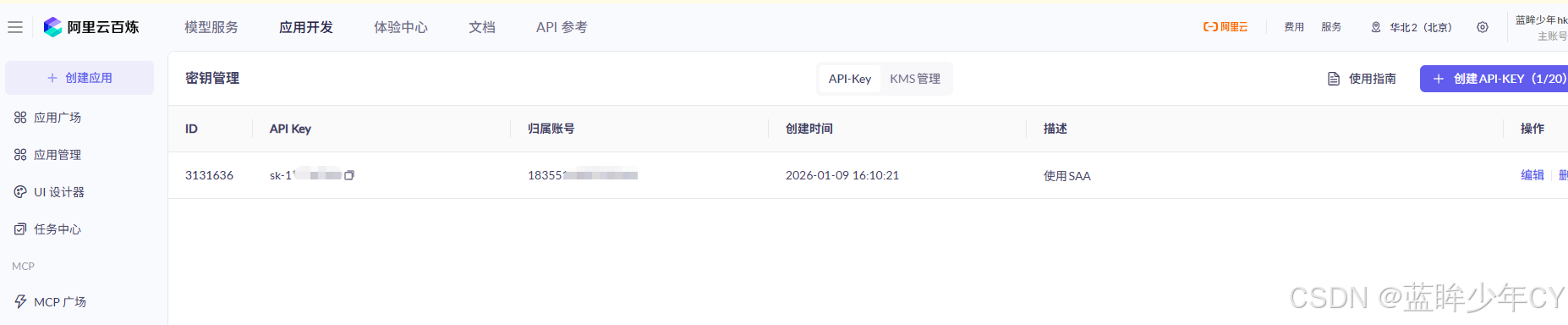
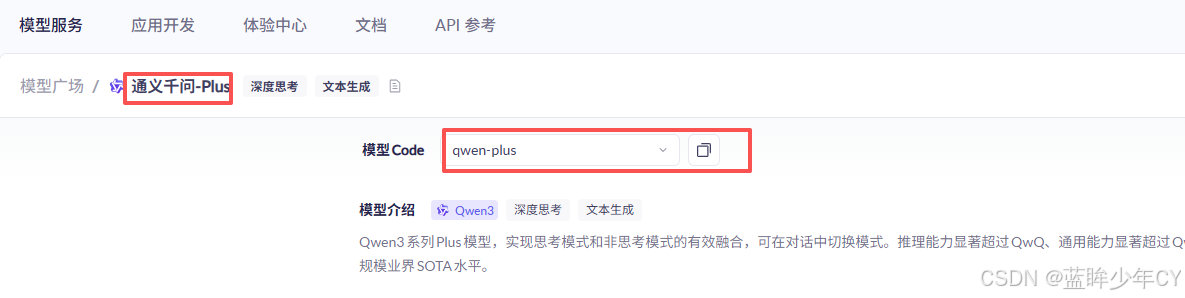
2)获取模型名称
qwen-plus
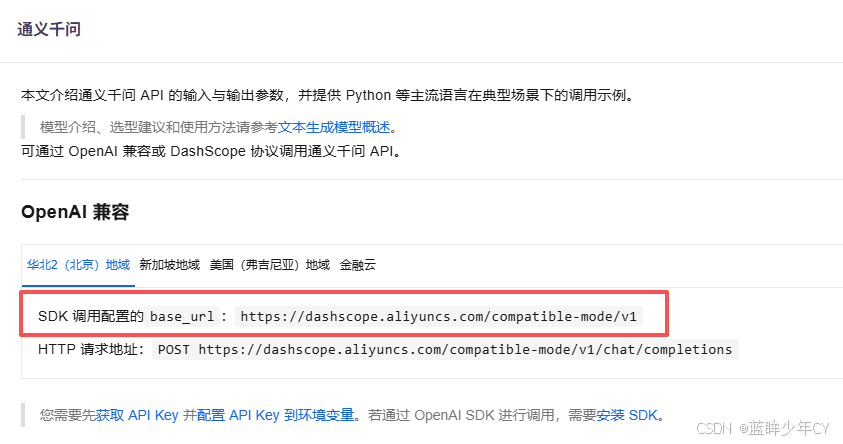
3)获取baseUrl
https://dashscope.aliyuncs.com/compatible-mode/v1
(3)创建父工程
1)创建工程
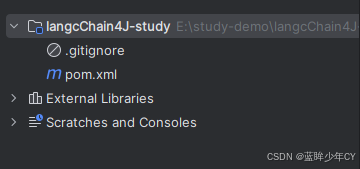
2)修改pom文件
<?xml version="1.0" encoding="UTF-8"?>
<project xmlns="http://maven.apache.org/POM/4.0.0"
         xmlns:xsi="http://www.w3.org/2001/XMLSchema-instance"
         xsi:schemaLocation="http://maven.apache.org/POM/4.0.0 http://maven.apache.org/xsd/maven-4.0.0.xsd">
    <modelVersion>4.0.0</modelVersion>

    <groupId>com.hk</groupId>
    <artifactId>langcChain4J-study</artifactId>
    <version>1.0-SNAPSHOT</version>

    <packaging>pom</packaging>
    <name>langchain4j-study父工程</name>

    <properties>
        <project.build.sourceEncoding>UTF-8</project.build.sourceEncoding>
        <project.reporting.outputEncoding>UTF-8</project.reporting.outputEncoding>
        <java.version>17</java.version>
        <maven.compiler.source>21</maven.compiler.source>
        <maven.compiler.target>21</maven.compiler.target>
        <!-- Spring Boot -->
        <spring-boot.version>3.5.0</spring-boot.version>
        <!-- Spring AI -->
        <spring-ai.version>1.0.0</spring-ai.version>
        <!-- Spring AI Alibaba -->
        <spring-ai-alibaba.version>1.0.0-M6.1</spring-ai-alibaba.version>
        <!-- langchain4j -->
        <langchain4j.version>1.0.1</langchain4j.version>
        <!--langchain4j-community 引入阿里云百炼平台依赖管理清单-->
        <langchain4j-community.version>1.0.1-beta6</langchain4j-community.version>
        <!-- maven plugin -->
        <maven-deploy-plugin.version>3.1.1</maven-deploy-plugin.version>
        <flatten-maven-plugin.version>1.3.0</flatten-maven-plugin.version>
        <maven-compiler-plugin.version>3.8.1</maven-compiler-plugin.version>
    </properties>

    <dependencyManagement>
        <dependencies>
            <!-- Spring Boot -->
            <dependency>
                <groupId>org.springframework.boot</groupId>
                <artifactId>spring-boot-dependencies</artifactId>
                <version>${spring-boot.version}</version>
                <type>pom</type>
                <scope>import</scope>
            </dependency>
            <!-- Spring AI -->
            <dependency>
                <groupId>org.springframework.ai</groupId>
                <artifactId>spring-ai-bom</artifactId>
                <version>${spring-ai.version}</version>
                <type>pom</type>
                <scope>import</scope>
            </dependency>
            <!-- Spring AI Alibaba -->
            <dependency>
                <groupId>com.alibaba.cloud.ai</groupId>
                <artifactId>spring-ai-alibaba-starter</artifactId>
                <version>${spring-ai-alibaba.version}</version>
            </dependency>
            <!--langchain4j的依赖清单,加载BOM后所有langchain4j版本号可以被统一管理起来
            https://docs.langchain4j.dev/get-started
            -->
            <dependency>
                <groupId>dev.langchain4j</groupId>
                <artifactId>langchain4j-bom</artifactId>
                <version>${langchain4j.version}</version>
                <type>pom</type>
                <scope>import</scope>
            </dependency>
            <!--引入阿里云百炼平台依赖管理清单
           https://docs.langchain4j.dev/integrations/language-models/dashscope
           -->
            <dependency>
                <groupId>dev.langchain4j</groupId>
                <artifactId>langchain4j-community-bom</artifactId>
                <version>${langchain4j-community.version}</version>
                <type>pom</type>
                <scope>import</scope>
            </dependency>
        </dependencies>
    </dependencyManagement>

    <build>
        <plugins>
            <plugin>
                <groupId>org.springframework.boot</groupId>
                <artifactId>spring-boot-maven-plugin</artifactId>
                <version>${spring-boot.version}</version>
            </plugin>
            <plugin>
                <groupId>org.apache.maven.plugins</groupId>
                <artifactId>maven-deploy-plugin</artifactId>
                <version>${maven-deploy-plugin.version}</version>
                <configuration>
                    <skip>true</skip>
                </configuration>
            </plugin>
            <plugin>
                <groupId>org.apache.maven.plugins</groupId>
                <artifactId>maven-compiler-plugin</artifactId>
                <version>${maven-compiler-plugin.version}</version>
                <configuration>
                    <release>${java.version}</release>
                    <compilerArgs>
                        <compilerArg>-parameters</compilerArg>
                    </compilerArgs>
                </configuration>
            </plugin>
            <plugin>
                <groupId>org.codehaus.mojo</groupId>
                <artifactId>flatten-maven-plugin</artifactId>
                <version>${flatten-maven-plugin.version}</version>
                <inherited>true</inherited>
                <executions>
                    <execution>
                        <id>flatten</id>
                        <phase>process-resources</phase>
                        <goals>
                            <goal>flatten</goal>
                        </goals>
                        <configuration>
                            <updatePomFile>true</updatePomFile>
                            <flattenMode>ossrh</flattenMode>
                            <pomElements>
                                <distributionManagement>remove</distributionManagement>
                                <dependencyManagement>remove</dependencyManagement>
                                <repositories>remove</repositories>
                                <scm>keep</scm>
                                <url>keep</url>
                                <organization>resolve</organization>
                            </pomElements>
                        </configuration>
                    </execution>
                    <execution>
                        <id>flatten.clean</id>
                        <phase>clean</phase>
                        <goals>
                            <goal>clean</goal>
                        </goals>
                    </execution>
                </executions>
            </plugin>
        </plugins>
    </build>

    <repositories>
        <repository>
            <id>spring-milestones</id>
            <name>Spring Milestones</name>
            <url>https://repo.spring.io/milestone</url>
            <snapshots>
                <enabled>false</enabled>
            </snapshots>
        </repository>
        <repository>
            <id>spring-snapshots</id>
            <name>Spring Snapshots</name>
            <url>https://repo.spring.io/snapshot</url>
            <releases>
                <enabled>false</enabled>
            </releases>
        </repository>
        <repository>
            <id>aliyunmaven</id>
            <name>aliyun</name>
            <url>https://maven.aliyun.com/repository/public</url>
        </repository>
    </repositories>

    <pluginRepositories>
        <pluginRepository>
            <id>public</id>
            <name>aliyun nexus</name>
            <url>https://maven.aliyun.com/repository/public</url>
            <releases>
                <enabled>true</enabled>
            </releases>
            <snapshots>
                <enabled>false</enabled>
            </snapshots>
        </pluginRepository>
    </pluginRepositories>
</project>
(4)建立第一个案例模块
1)新建模块
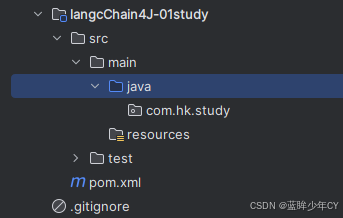
2)修改pom文件
文档出处https://docs.langchain4j.dev/get-started
<?xml version="1.0" encoding="UTF-8"?>
<project xmlns="http://maven.apache.org/POM/4.0.0"
         xmlns:xsi="http://www.w3.org/2001/XMLSchema-instance"
         xsi:schemaLocation="http://maven.apache.org/POM/4.0.0 http://maven.apache.org/xsd/maven-4.0.0.xsd">
    <modelVersion>4.0.0</modelVersion>
    <parent>
        <groupId>com.hk</groupId>
        <artifactId>langcChain4J-study</artifactId>
        <version>1.0-SNAPSHOT</version>
    </parent>

    <artifactId>langcChain4J-01study</artifactId>

    <properties>
        <maven.compiler.source>21</maven.compiler.source>
        <maven.compiler.target>21</maven.compiler.target>
        <project.build.sourceEncoding>UTF-8</project.build.sourceEncoding>
    </properties>
    <dependencies>
        <dependency>
            <groupId>org.springframework.boot</groupId>
            <artifactId>spring-boot-starter-web</artifactId>
        </dependency>
        <!--所有调用均基于 OpenAI 协议标准,实现一致的接口设计与规范LangChain4j 提供与许多 LLM 提供商的集成
        从最简单的开始方式是从 OpenAI 集成开始https://docs.langchain4j.dev/get-started    -->
        <dependency>
            <groupId>dev.langchain4j</groupId>
            <artifactId>langchain4j-open-ai</artifactId>
        </dependency>
        <!--langchain4j 高阶-->
        <dependency>
            <groupId>dev.langchain4j</groupId>
            <artifactId>langchain4j</artifactId>
        </dependency>
        <!--lombok-->
        <dependency>
            <groupId>org.projectlombok</groupId>
            <artifactId>lombok</artifactId>
            <optional>true</optional>
        </dependency>
        <!--test-->
        <dependency>
            <groupId>org.springframework.boot</groupId>
            <artifactId>spring-boot-starter-test</artifactId>
            <scope>test</scope>
        </dependency>
    </dependencies>

    <build>
        <plugins>
            <plugin>
                <groupId>org.springframework.boot</groupId>
                <artifactId>spring-boot-maven-plugin</artifactId>
            </plugin>
        </plugins>
    </build>
</project>
3)添加配置文件
server.port=8001
spring.application.name=langchain4j-01study
4)添加配置类
@Configuration
public class LLMConfig {

    @Bean
    public ChatModel chatModel() {
        return OpenAiChatModel.builder()
                .apiKey(System.getenv("aliQwen-api"))
                .baseUrl("https://dashscope.aliyuncs.com/compatible-mode/v1")
                .modelName("qwen-plus")
                .build();
    }
}
5)编写业务类
@RestController
public class Study01Controller {

    @Resource
    private ChatModel chatModel;

    @GetMapping("/chat")
    public String chat(@RequestParam(name = "msg", defaultValue = "你是谁") String msg) {
        return chatModel.chat(msg);
    }
}
6)测试
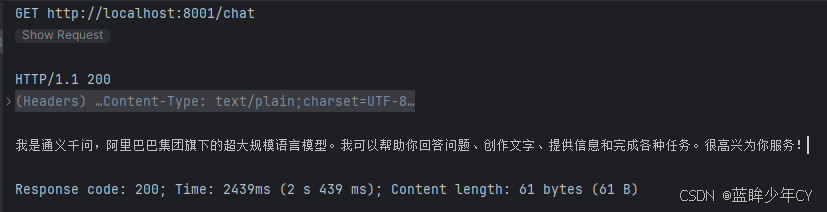
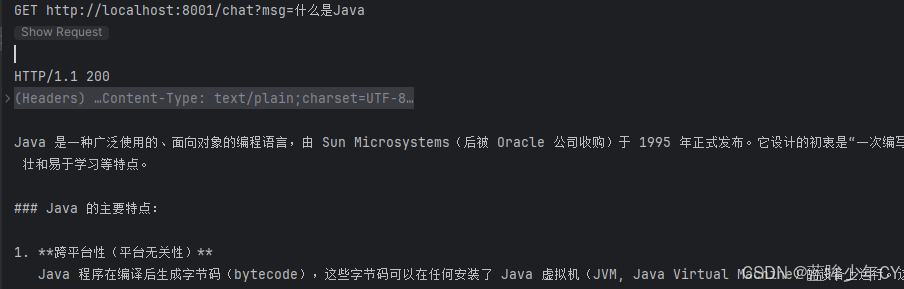
(5)多模型共存(deepseek)
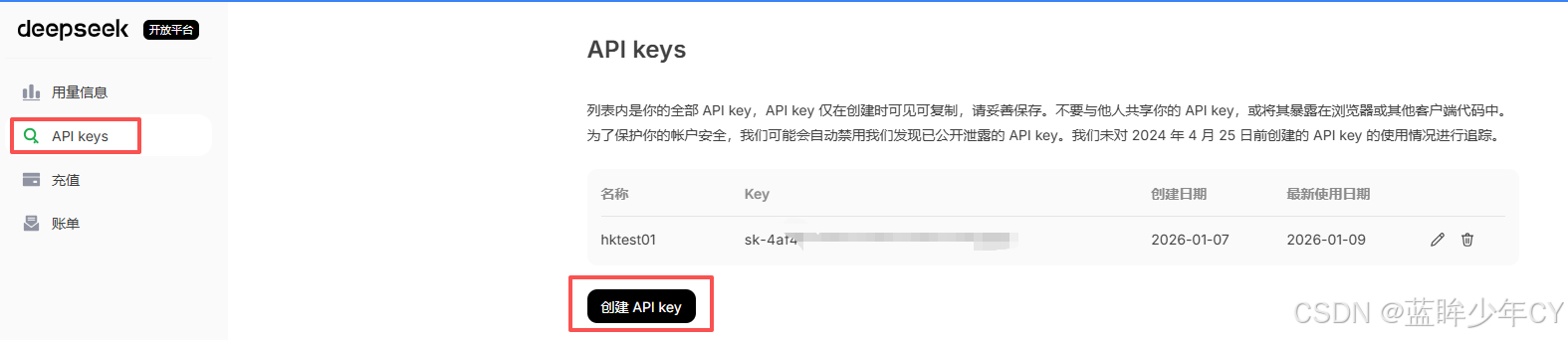
官网地址https://platform.deepseek.com/usage
1)获取Key
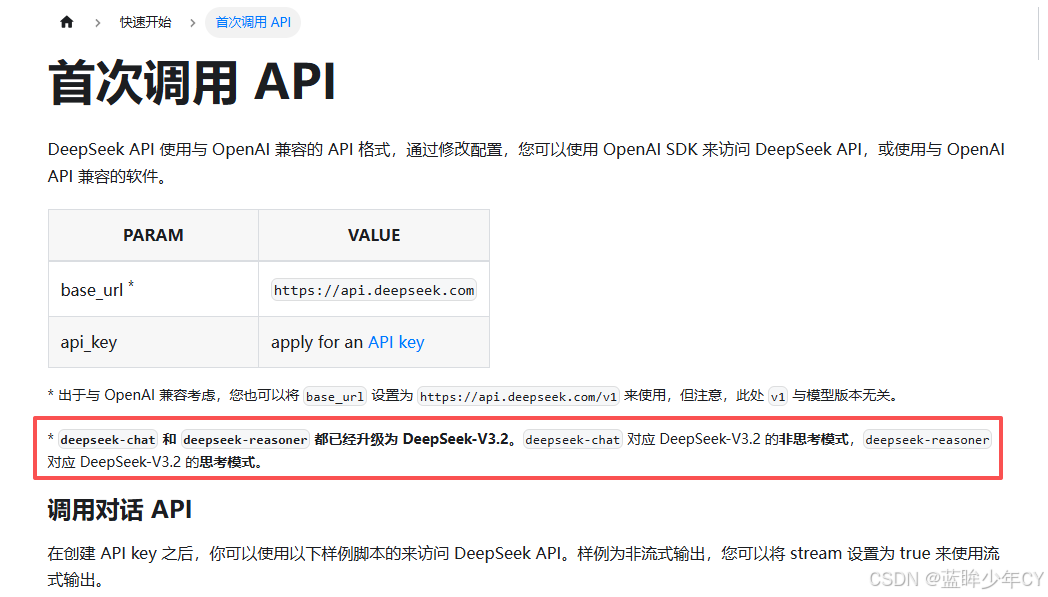
2)获取模型名称
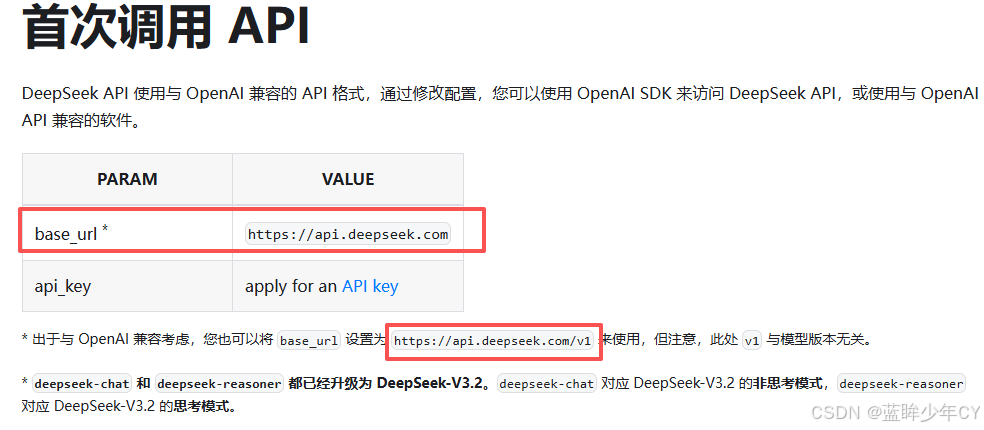
3)获取baseUrl
(6)修改工程
1)修改配置类
@Configuration
public class LLMConfig {

    @Bean("qwen")
    public ChatModel qwenChatModel() {
        return OpenAiChatModel.builder()
                .apiKey(System.getenv("aliQwen-api"))
                .baseUrl("https://dashscope.aliyuncs.com/compatible-mode/v1")
                .modelName("qwen-plus")
                .build();
    }

    @Bean("deepseek")
    public ChatModel deepseekChatModel() {
        return OpenAiChatModel.builder()
                .apiKey("sk-4af********")
                .baseUrl("https://api.deepseek.com/v1")
                .modelName("deepseek-chat")
                .build();
    }
}
2)修改业务类
@RestController
public class Study01Controller {

    @Resource(name = "qwen")
    private ChatModel qwenChatModel;

    @Resource(name = "deepseek")
    private ChatModel deepseekChatModel;

    @GetMapping("/chat/v1")
    public String chatV1(@RequestParam(name = "msg", defaultValue = "你是谁") String msg) {
        return qwenChatModel.chat(msg);
    }

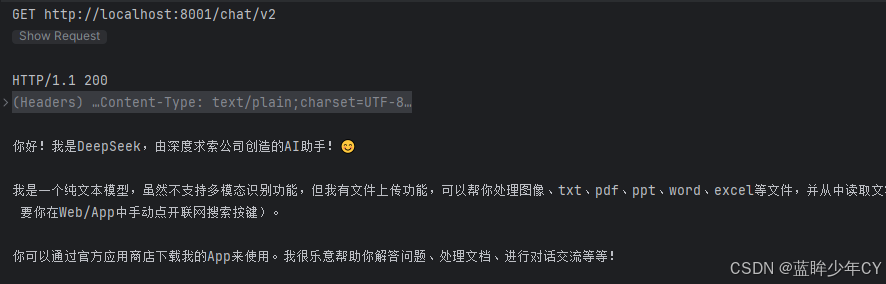
    @GetMapping("/chat/v2")
    public String chatV2(@RequestParam(name = "msg", defaultValue = "你是谁") String msg) {
        return deepseekChatModel.chat(msg);
    }
}
3)测试

3、与springBoot整合
(1)了解
官网地址https://docs.langchain4j.dev/tutorials/spring-boot-integration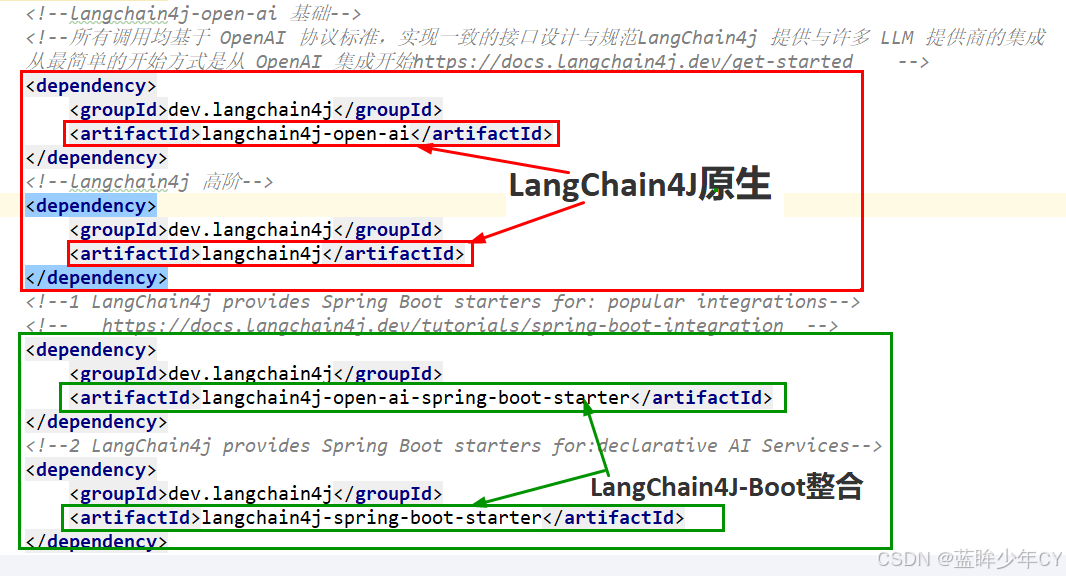
(2)案例实现
1)新建模块
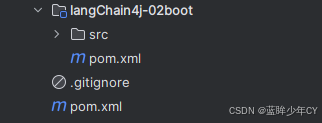
2)修改pom文件
<?xml version="1.0" encoding="UTF-8"?>
<project xmlns="http://maven.apache.org/POM/4.0.0"
         xmlns:xsi="http://www.w3.org/2001/XMLSchema-instance"
         xsi:schemaLocation="http://maven.apache.org/POM/4.0.0 http://maven.apache.org/xsd/maven-4.0.0.xsd">
    <modelVersion>4.0.0</modelVersion>
    <parent>
        <groupId>com.hk</groupId>
        <artifactId>langcChain4J-study</artifactId>
        <version>1.0-SNAPSHOT</version>
    </parent>

    <artifactId>langChain4j-02boot</artifactId>

    <properties>
        <maven.compiler.source>21</maven.compiler.source>
        <maven.compiler.target>21</maven.compiler.target>
        <project.build.sourceEncoding>UTF-8</project.build.sourceEncoding>
    </properties>

    <dependencies>
        <dependency>
            <groupId>org.springframework.boot</groupId>
            <artifactId>spring-boot-starter-web</artifactId>
        </dependency>
        <!--langchain4j原生 基础-->
        <dependency>
            <groupId>dev.langchain4j</groupId>
            <artifactId>langchain4j-open-ai</artifactId>
        </dependency>
        <!--langchain4j原生 高阶-->
        <dependency>
            <groupId>dev.langchain4j</groupId>
            <artifactId>langchain4j</artifactId>
        </dependency>
        <!--1 LangChain4j 整合boot底层支持-->
        <!--   https://docs.langchain4j.dev/tutorials/spring-boot-integration  -->
        <dependency>
            <groupId>dev.langchain4j</groupId>
            <artifactId>langchain4j-open-ai-spring-boot-starter</artifactId>
        </dependency>
        <!--2 LangChain4j 整合boot高阶支持-->
        <dependency>
            <groupId>dev.langchain4j</groupId>
            <artifactId>langchain4j-spring-boot-starter</artifactId>
        </dependency>
        <!--lombok-->
        <dependency>
            <groupId>org.projectlombok</groupId>
            <artifactId>lombok</artifactId>
            <optional>true</optional>
        </dependency>
        <!--test-->
        <dependency>
            <groupId>org.springframework.boot</groupId>
            <artifactId>spring-boot-starter-test</artifactId>
            <scope>test</scope>
        </dependency>
    </dependencies>

    <build>
        <plugins>
            <plugin>
                <groupId>org.springframework.boot</groupId>
                <artifactId>spring-boot-maven-plugin</artifactId>
            </plugin>
        </plugins>
    </build>
</project>
3)添加配置文件
server.port=8002

spring.application.name=langchain4j-02boot

# https://docs.langchain4j.dev/tutorials/spring-boot-integration
langchain4j.open-ai.chat-model.api-key=${aliQwen-api}
langchain4j.open-ai.chat-model.model-name=qwen-plus
langchain4j.open-ai.chat-model.base-url=https://dashscope.aliyuncs.com/compatible-mode/v1
4)低阶Api业务类
@RestController
public class PopularIntegrationsController {

    @Resource
    private ChatModel chatModel;

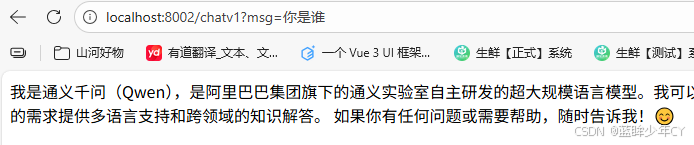
    @GetMapping("/chatv1")
    public String chat(String msg) {
        return chatModel.chat(msg);
    }
}
5)自定义接口类
@AiService
public interface ChatAssistant {

    String chat(String prompt);
}
6)高阶Api业务类
@RestController
public class DeclarativeAIServiceController {

    @Resource
    private ChatAssistant chatAssistant;

    @GetMapping("/chatv2")
    public String chat(String msg) {
        return chatAssistant.chat(msg);
    }
}
7)测试

4、低阶Api和高阶Api
(1)介绍
官网地址https://docs.langchain4j.dev/intro/#2-levels-of-abstraction
低阶api 有最多的选择,可以使用所有底层组件,比如ChatModel等。 这些是基于LLM的应用中的“primitives”。 可以完全控制组合它们,但需要写更多的代码。UserMessage AiMessage
EmbeddingStore Embedding
高阶api 在程序员自己定义接口,通过AiServices类里面的方法实现,优点是Api封装度较高,减少代码的复杂度,但是仍可以进行微调
(2)案例实现
1)新建模块
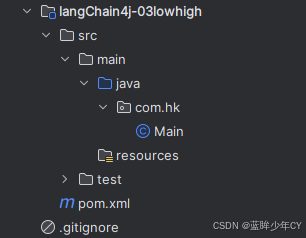
2)修改pom文件
<?xml version="1.0" encoding="UTF-8"?>
<project xmlns="http://maven.apache.org/POM/4.0.0"
         xmlns:xsi="http://www.w3.org/2001/XMLSchema-instance"
         xsi:schemaLocation="http://maven.apache.org/POM/4.0.0 http://maven.apache.org/xsd/maven-4.0.0.xsd">
    <modelVersion>4.0.0</modelVersion>
    <parent>
        <groupId>com.hk</groupId>
        <artifactId>langcChain4J-study</artifactId>
        <version>1.0-SNAPSHOT</version>
    </parent>

    <artifactId>langChain4j-03lowhigh</artifactId>

    <properties>
        <maven.compiler.source>21</maven.compiler.source>
        <maven.compiler.target>21</maven.compiler.target>
        <project.build.sourceEncoding>UTF-8</project.build.sourceEncoding>
    </properties>

    <dependencies>
        <dependency>
            <groupId>org.springframework.boot</groupId>
            <artifactId>spring-boot-starter-web</artifactId>
        </dependency>
        <!--langchain4j-open-ai 基础-->
        <!--所有调用均基于 OpenAI 协议标准,实现一致的接口设计与规范LangChain4j 提供与许多 LLM 提供商的集成
        从最简单的开始方式是从 OpenAI 集成开始https://docs.langchain4j.dev/get-started    -->
        <dependency>
            <groupId>dev.langchain4j</groupId>
            <artifactId>langchain4j-open-ai</artifactId>
        </dependency>
        <!--langchain4j 高阶-->
        <dependency>
            <groupId>dev.langchain4j</groupId>
            <artifactId>langchain4j</artifactId>
        </dependency>
        <!--lombok-->
        <dependency>
            <groupId>org.projectlombok</groupId>
            <artifactId>lombok</artifactId>
            <optional>true</optional>
        </dependency>
        <!--test-->
        <dependency>
            <groupId>org.springframework.boot</groupId>
            <artifactId>spring-boot-starter-test</artifactId>
            <scope>test</scope>
        </dependency>
    </dependencies>

    <build>
        <plugins>
            <plugin>
                <groupId>org.springframework.boot</groupId>
                <artifactId>spring-boot-maven-plugin</artifactId>
            </plugin>
        </plugins>
    </build>
</project>
3)添加配置文件
server.port=8003
spring.application.name=langChain4j-03lowhigh
4)添加配置类
@Configuration
public class LLMConfig {

    @Bean
    public ChatModel chatModel() {
        return OpenAiChatModel.builder()
                .apiKey(System.getenv("aliQwen-api"))
                .modelName("qwen-plus")
                .baseUrl("https://dashscope.aliyuncs.com/compatible-mode/v1")
                .build();
    }
}
5)低阶api调用业务类
@RestController
public class LowApiController {

    @Resource
    private ChatModel chatModel;

    @GetMapping("/chat1")
    public String chat1(@RequestParam(name = "msg", defaultValue = "你是谁") String msg) {
        return chatModel.chat(msg);
    }
}
6)测试低阶api调用

7)修改业务类获取Token调用
@RestController
public class LowApiController {

    @Resource
    private ChatModel chatModel;

    @GetMapping("/chat1")
    public String chat1(@RequestParam(name = "msg", defaultValue = "你是谁") String msg) {
        return chatModel.chat(msg);
    }

    @GetMapping("/chat2")
    public String chat2(@RequestParam(name = "msg", defaultValue = "你是谁") String msg) {
        ChatResponse chatResponse = chatModel.chat(UserMessage.from(msg));
        String text = chatResponse.aiMessage().text();
        TokenUsage tokenUsage = chatResponse.tokenUsage();
        System.out.println("本次token消耗:" + tokenUsage);
        return text;
    }
}
8)高阶api调用
官网地址https://docs.langchain4j.dev/tutorials/ai-services#simplest-ai-service
1、定义AiServices接口
public interface ChatAssistant {
    String chat(String prompt);
}
2、修改配置类
AiService接口实现
package com.hk.study.config;

import com.hk.study.service.ChatAssistant;
import dev.langchain4j.model.chat.ChatModel;
import dev.langchain4j.model.openai.OpenAiChatModel;
import dev.langchain4j.service.AiServices;
import org.springframework.context.annotation.Bean;
import org.springframework.context.annotation.Configuration;

@Configuration
public class LLMConfig {

    @Bean
    public ChatModel chatModel() {
        return OpenAiChatModel.builder()
                .apiKey(System.getenv("aliQwen-api"))
                .modelName("qwen-plus")
                .baseUrl("https://dashscope.aliyuncs.com/compatible-mode/v1")
                .build();
    }

    @Bean
    public ChatAssistant chatAssistant(ChatModel chatModel) {
        return AiServices.create(ChatAssistant.class, chatModel);
    }
}
3、业务类
@RestController
public class HighApiController {

    @Resource
    private ChatAssistant chatAssistant;

    @GetMapping("chatv2")
    public String chatv2 (String msg) {
        return chatAssistant.chat(msg);
    }
}
9)测试高阶api
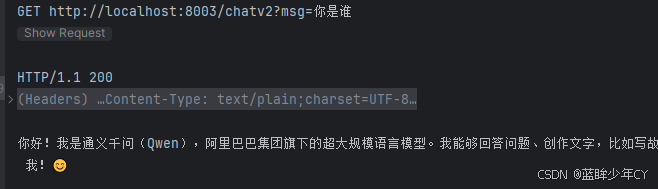
5、模型的参数配置
在03模块的基础上配置
官网地址https://docs.langchain4j.dev/tutorials/model-parameters
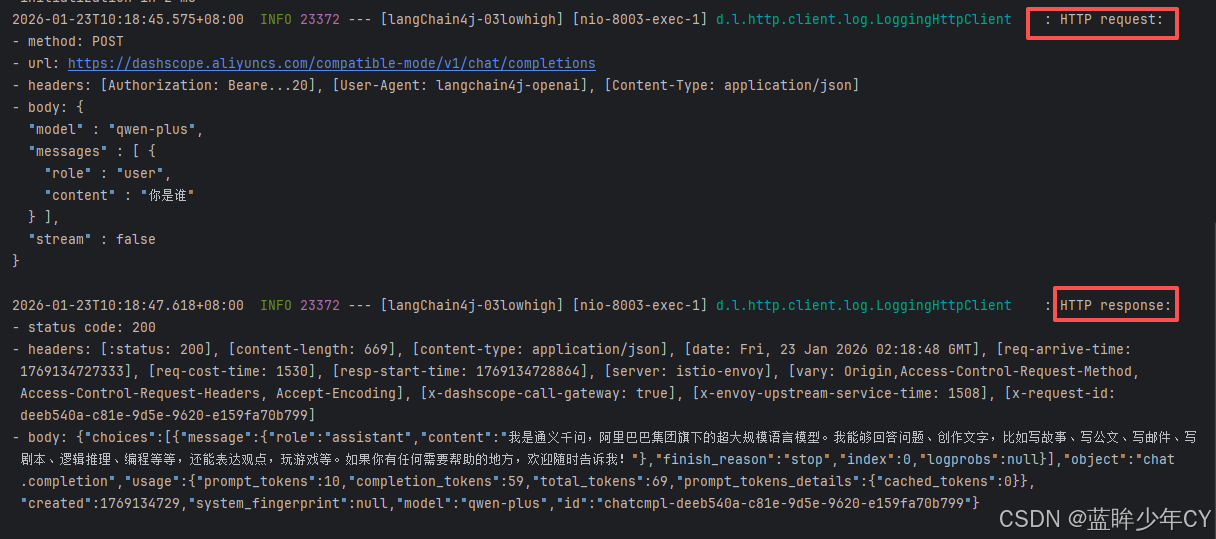
(1)日志配置
官网地址https://docs.langchain4j.dev/tutorials/logging
1)修改配置类
    @Bean
    public ChatModel chatModel() {
        return OpenAiChatModel.builder()
                .apiKey(System.getenv("aliQwen-api"))
                .modelName("qwen-plus")
                .baseUrl("https://dashscope.aliyuncs.com/compatible-mode/v1")
                // 开启日志, 日志级别设置为DEBUG才会打印日志
                .logRequests(true)
                .logResponses(true)
                .build();
    }
2)修改配置文件
server.port=8003
spring.application.name=langChain4j-03lowhigh

# 开启langchain4j的日志, 日志级别设置为DEBUG才会打印日志
logging.level.dev.langchain4j=DEBUG
3)测试
(2)监控配置
官网地址https://docs.langchain4j.dev/tutorials/observability
1)编写监听类
public class TestChatModelListener implements ChatModelListener {

    @Override
    public void onRequest(ChatModelRequestContext requestContext) {
        // onRequest配置的k:v键值对,在onResponse阶段可以获得,上下文传递参数好用
        String uuidValue = IdUtil.simpleUUID();
        requestContext.attributes().put("TraceID",uuidValue);
        System.out.println("配置请求参数:TraceID == "+ uuidValue);
    }

    @Override
    public void onResponse(ChatModelResponseContext responseContext) {
        Object object = responseContext.attributes().get("TraceID");

        System.out.println("获取请求参数:TraceID == "+ object);
    }

    @Override
    public void onError(ChatModelErrorContext errorContext) {
        System.out.println("出错了...");
    }
}
2)修改配置类
    @Bean
    public ChatModel chatModel() {
        return OpenAiChatModel.builder()
                .apiKey(System.getenv("aliQwen-api"))
                .modelName("qwen-plus")
                .baseUrl("https://dashscope.aliyuncs.com/compatible-mode/v1")
                .listeners(List.of(new TestChatModelListener()))
                .build();
    }
3)测试

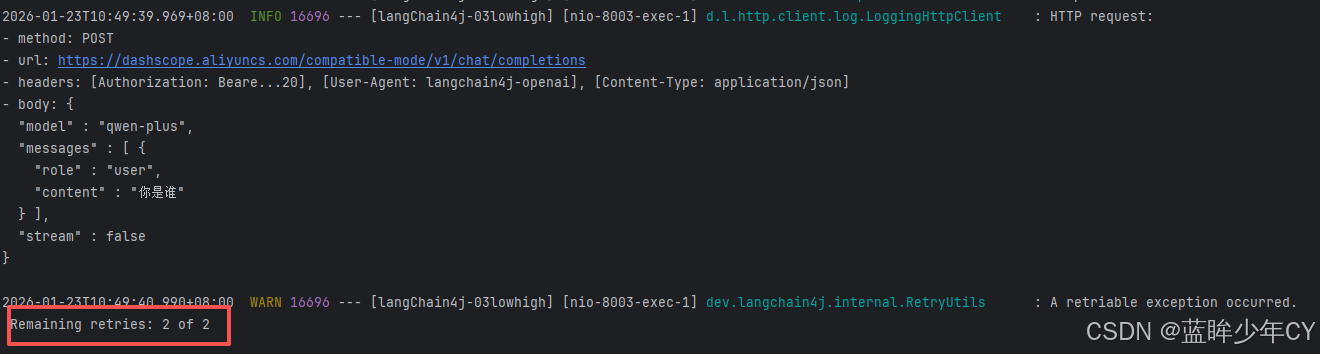
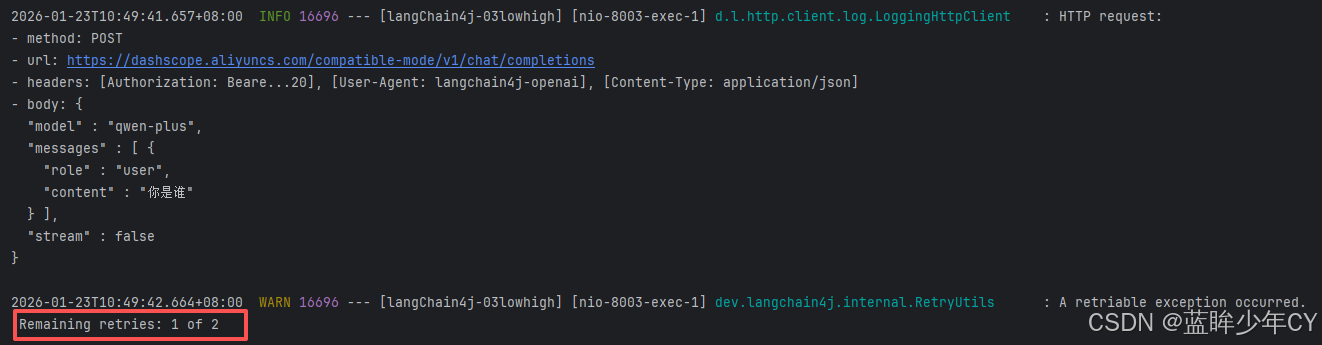
(3)重试机制
1)修改配置类
    @Bean
    public ChatModel chatModel() {
        return OpenAiChatModel.builder()
                .apiKey(System.getenv("aliQwen-api"))
                .modelName("qwen-plus")
                .baseUrl("https://dashscope.aliyuncs.com/compatible-mode/v1")
                .logRequests(true)
                .logResponses(true)
                .maxRetries(2)
                .build();
    }
2)测试
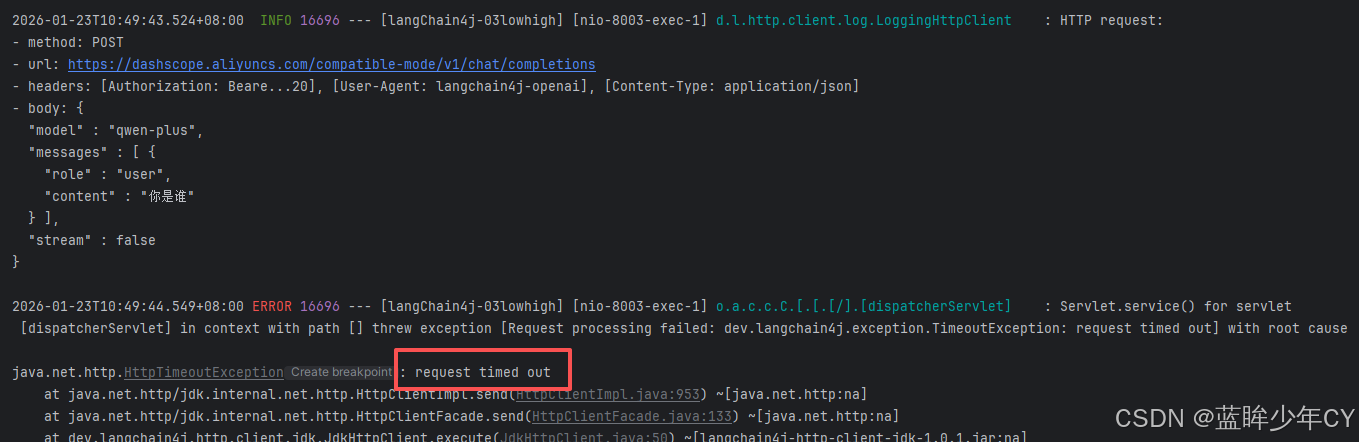
断开网络,再次访问
(4)超时机制
1)修改配置类
    @Bean
    public ChatModel chatModel() {
        return OpenAiChatModel.builder()
                .apiKey(System.getenv("aliQwen-api"))
                .modelName("qwen-plus")
                .baseUrl("https://dashscope.aliyuncs.com/compatible-mode/v1")
                .logRequests(true)
                .maxRetries(2)
                .timeout(Duration.ofSeconds(1))
                .build();
    }
2)测试
6、多模态视觉
(1)出处
官网地址https://docs.langchain4j.dev/tutorials/chat-and-language-models#multimodalityUserMessage不仅可以包含文本,还可以包含其他类型的内容。 包含一个 。 是一个接口,具有以下实现方式:UserMessageList<Content> contentsContent
TextContentImageContentAudioContentVideoContentPdfFileContent
本次选择的模型:qwen-vl-max
阿里地址https://help.aliyun.com/zh/model-studio/models#850732b1aabs0
(2)图形理解案例实现
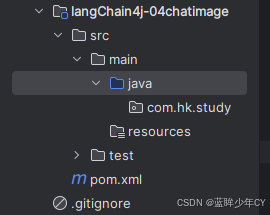
1)创建模块
2)修改pom
<?xml version="1.0" encoding="UTF-8"?>
<project xmlns="http://maven.apache.org/POM/4.0.0"
         xmlns:xsi="http://www.w3.org/2001/XMLSchema-instance"
         xsi:schemaLocation="http://maven.apache.org/POM/4.0.0 http://maven.apache.org/xsd/maven-4.0.0.xsd">
    <modelVersion>4.0.0</modelVersion>
    <parent>
        <groupId>com.hk</groupId>
        <artifactId>langcChain4J-study</artifactId>
        <version>1.0-SNAPSHOT</version>
    </parent>

    <artifactId>langChain4j-04chatimage</artifactId>

    <properties>
        <maven.compiler.source>21</maven.compiler.source>
        <maven.compiler.target>21</maven.compiler.target>
        <project.build.sourceEncoding>UTF-8</project.build.sourceEncoding>
    </properties>

    <dependencies>
        <dependency>
            <groupId>org.springframework.boot</groupId>
            <artifactId>spring-boot-starter-web</artifactId>
        </dependency>
        <!--langchain4j-open-ai 基础-->
        <!--所有调用均基于 OpenAI 协议标准,实现一致的接口设计与规范LangChain4j 提供与许多 LLM 提供商的集成
        从最简单的开始方式是从 OpenAI 集成开始https://docs.langchain4j.dev/get-started    -->
        <dependency>
            <groupId>dev.langchain4j</groupId>
            <artifactId>langchain4j-open-ai</artifactId>
        </dependency>
        <!--langchain4j 高阶-->
        <dependency>
            <groupId>dev.langchain4j</groupId>
            <artifactId>langchain4j</artifactId>
        </dependency>
        <!--lombok-->
        <dependency>
            <groupId>org.projectlombok</groupId>
            <artifactId>lombok</artifactId>
            <optional>true</optional>
        </dependency>
        <!--hutool-->
        <dependency>
            <groupId>cn.hutool</groupId>
            <artifactId>hutool-all</artifactId>
            <version>5.8.22</version>
        </dependency>
        <!--test-->
        <dependency>
            <groupId>org.springframework.boot</groupId>
            <artifactId>spring-boot-starter-test</artifactId>
            <scope>test</scope>
        </dependency>
    </dependencies>

    <build>
        <plugins>
            <plugin>
                <groupId>org.springframework.boot</groupId>
                <artifactId>spring-boot-maven-plugin</artifactId>
            </plugin>
        </plugins>
    </build>
</project>
3)添加配置文件
server.port=8004
spring.application.name=langchain4j-04chatimage
4)添加配置类
@Configuration
public class LLMConfig {

    @Bean
    public ChatModel chatModel() {
        return OpenAiChatModel.builder()
                .apiKey(System.getenv("aliQwen-api"))
                .modelName("qwen-vl-max")
                .baseUrl("https://dashscope.aliyuncs.com/compatible-mode/v1")
                .build();
    }
}
5)编写业务类
@RestController
public class ImageModelController {

    @Resource
    private ChatModel chatModel;

    @Value("classpath:mi.jpg")
    private org.springframework.core.io.Resource imageResource;

    @GetMapping("/image")
    public String image() throws IOException {
        // 1、将图片通过Base64编码转为字符串
        byte[] imageBytes = imageResource.getContentAsByteArray();
        String encodeToString = Base64.getEncoder().encodeToString(imageBytes);
        // 2、构建提示词userMessage
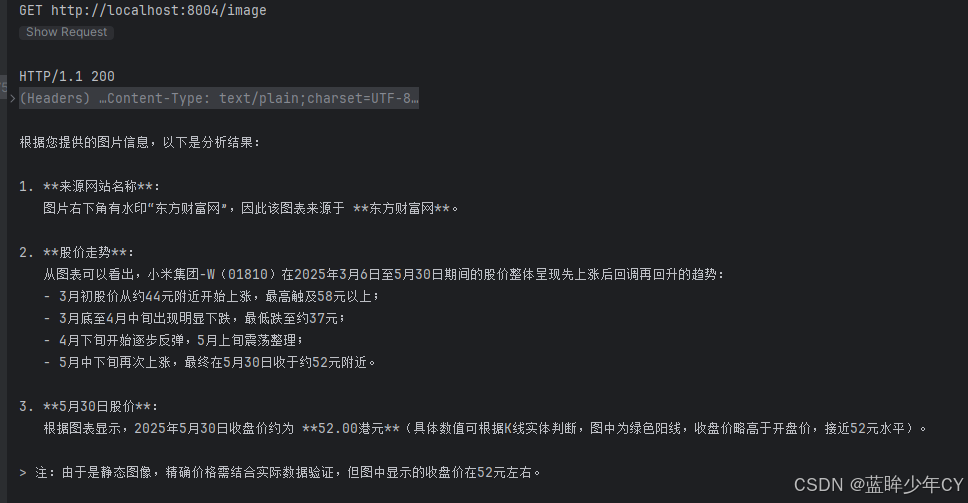
        UserMessage userMessage = UserMessage.from(
                TextContent.from("从以下图片中获取来源网站名称,股价走势和5月30号股价"),
                ImageContent.from(encodeToString, "image/jpg")
        );
        // 3、调用模型获取回答
        ChatResponse chatResponse = chatModel.chat(userMessage);
        String response = chatResponse.aiMessage().text();
        return response;
    }

}
6)测试
(3)引入第三方案例实现
结合阿里巴巴的通义万象进行图像理解,所有出处均来自官网,模型使用阿里的wanx2.1-t2i-turbo
官网文档地址https://docs.langchain4j.dev/integrations/language-models/dashscope
0)修改父工程pom文件
<properties>
......
<!--langchain4j-community 引入阿里云百炼平台依赖管理清单-->
<langchain4j-community.version>1.0.1-beta6</langchain4j-community.version>........
</properties>
<dependencyManagement>......
<!--引入阿里云百炼平台依赖管理清单
https://docs.langchain4j.dev/integrations/language-models/dashscope
-->
<dependency>
<groupId>dev.langchain4j</groupId>
<artifactId>langchain4j-community-bom</artifactId>
<version>${langchain4j-community.version}</version>
<type>pom</type>
<scope>import</scope>
</dependency>......
</dependencyManagement>
<?xml version="1.0" encoding="UTF-8"?>
<project xmlns="http://maven.apache.org/POM/4.0.0"
         xmlns:xsi="http://www.w3.org/2001/XMLSchema-instance"
         xsi:schemaLocation="http://maven.apache.org/POM/4.0.0 http://maven.apache.org/xsd/maven-4.0.0.xsd">
    <modelVersion>4.0.0</modelVersion>

    <groupId>com.hk</groupId>
    <artifactId>langcChain4J-study</artifactId>
    <version>1.0-SNAPSHOT</version>

    <packaging>pom</packaging>
    <name>langchain4j-study父工程</name>
    <modules>
        <module>langChain4J-01study</module>
        <module>langChain4J-02boot</module>
        <module>langChain4j-03lowhigh</module>
        <module>langChain4j-04chatimage</module>
    </modules>

    <properties>
        <project.build.sourceEncoding>UTF-8</project.build.sourceEncoding>
        <project.reporting.outputEncoding>UTF-8</project.reporting.outputEncoding>
        <java.version>17</java.version>
        <maven.compiler.source>21</maven.compiler.source>
        <maven.compiler.target>21</maven.compiler.target>
        <!-- Spring Boot -->
        <spring-boot.version>3.5.0</spring-boot.version>
        <!-- Spring AI -->
        <spring-ai.version>1.0.0</spring-ai.version>
        <!-- Spring AI Alibaba -->
        <spring-ai-alibaba.version>1.0.0-M6.1</spring-ai-alibaba.version>
        <!-- langchain4j -->
        <langchain4j.version>1.0.1</langchain4j.version>
        <!--langchain4j-community 引入阿里云百炼平台依赖管理清单-->
        <langchain4j-community.version>1.0.1-beta6</langchain4j-community.version>
        <!-- maven plugin -->
        <maven-deploy-plugin.version>3.1.1</maven-deploy-plugin.version>
        <flatten-maven-plugin.version>1.3.0</flatten-maven-plugin.version>
        <maven-compiler-plugin.version>3.8.1</maven-compiler-plugin.version>
    </properties>

    <dependencyManagement>
        <dependencies>
            <!-- Spring Boot -->
            <dependency>
                <groupId>org.springframework.boot</groupId>
                <artifactId>spring-boot-dependencies</artifactId>
                <version>${spring-boot.version}</version>
                <type>pom</type>
                <scope>import</scope>
            </dependency>
            <!-- Spring AI -->
            <dependency>
                <groupId>org.springframework.ai</groupId>
                <artifactId>spring-ai-bom</artifactId>
                <version>${spring-ai.version}</version>
                <type>pom</type>
                <scope>import</scope>
            </dependency>
            <!-- Spring AI Alibaba -->
            <dependency>
                <groupId>com.alibaba.cloud.ai</groupId>
                <artifactId>spring-ai-alibaba-starter</artifactId>
                <version>${spring-ai-alibaba.version}</version>
            </dependency>
            <!--langchain4j的依赖清单,加载BOM后所有langchain4j版本号可以被统一管理起来
            https://docs.langchain4j.dev/get-started
            -->
            <dependency>
                <groupId>dev.langchain4j</groupId>
                <artifactId>langchain4j-bom</artifactId>
                <version>${langchain4j.version}</version>
                <type>pom</type>
                <scope>import</scope>
            </dependency>
            <!--引入阿里云百炼平台依赖管理清单
           https://docs.langchain4j.dev/integrations/language-models/dashscope
           -->
            <dependency>
                <groupId>dev.langchain4j</groupId>
                <artifactId>langchain4j-community-bom</artifactId>
                <version>${langchain4j-community.version}</version>
                <type>pom</type>
                <scope>import</scope>
            </dependency>
        </dependencies>
    </dependencyManagement>

    <build>
        <plugins>
            <plugin>
                <groupId>org.springframework.boot</groupId>
                <artifactId>spring-boot-maven-plugin</artifactId>
                <version>${spring-boot.version}</version>
            </plugin>
            <plugin>
                <groupId>org.apache.maven.plugins</groupId>
                <artifactId>maven-deploy-plugin</artifactId>
                <version>${maven-deploy-plugin.version}</version>
                <configuration>
                    <skip>true</skip>
                </configuration>
            </plugin>
            <plugin>
                <groupId>org.apache.maven.plugins</groupId>
                <artifactId>maven-compiler-plugin</artifactId>
                <version>${maven-compiler-plugin.version}</version>
                <configuration>
                    <release>${java.version}</release>
                    <compilerArgs>
                        <compilerArg>-parameters</compilerArg>
                    </compilerArgs>
                </configuration>
            </plugin>
            <plugin>
                <groupId>org.codehaus.mojo</groupId>
                <artifactId>flatten-maven-plugin</artifactId>
                <version>${flatten-maven-plugin.version}</version>
                <inherited>true</inherited>
                <executions>
                    <execution>
                        <id>flatten</id>
                        <phase>process-resources</phase>
                        <goals>
                            <goal>flatten</goal>
                        </goals>
                        <configuration>
                            <updatePomFile>true</updatePomFile>
                            <flattenMode>ossrh</flattenMode>
                            <pomElements>
                                <distributionManagement>remove</distributionManagement>
                                <dependencyManagement>remove</dependencyManagement>
                                <repositories>remove</repositories>
                                <scm>keep</scm>
                                <url>keep</url>
                                <organization>resolve</organization>
                            </pomElements>
                        </configuration>
                    </execution>
                    <execution>
                        <id>flatten.clean</id>
                        <phase>clean</phase>
                        <goals>
                            <goal>clean</goal>
                        </goals>
                    </execution>
                </executions>
            </plugin>
        </plugins>
    </build>

    <repositories>
        <repository>
            <id>spring-milestones</id>
            <name>Spring Milestones</name>
            <url>https://repo.spring.io/milestone</url>
            <snapshots>
                <enabled>false</enabled>
            </snapshots>
        </repository>
        <repository>
            <id>spring-snapshots</id>
            <name>Spring Snapshots</name>
            <url>https://repo.spring.io/snapshot</url>
            <releases>
                <enabled>false</enabled>
            </releases>
        </repository>
        <repository>
            <id>aliyunmaven</id>
            <name>aliyun</name>
            <url>https://maven.aliyun.com/repository/public</url>
        </repository>
    </repositories>

    <pluginRepositories>
        <pluginRepository>
            <id>public</id>
            <name>aliyun nexus</name>
            <url>https://maven.aliyun.com/repository/public</url>
            <releases>
                <enabled>true</enabled>
            </releases>
            <snapshots>
                <enabled>false</enabled>
            </snapshots>
        </pluginRepository>
    </pluginRepositories>
</project>
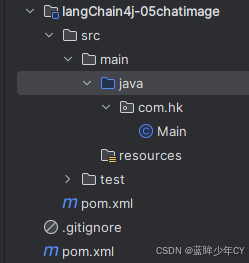
1)创建模块
2)修改pom
<?xml version="1.0" encoding="UTF-8"?>
<project xmlns="http://maven.apache.org/POM/4.0.0"
         xmlns:xsi="http://www.w3.org/2001/XMLSchema-instance"
         xsi:schemaLocation="http://maven.apache.org/POM/4.0.0 http://maven.apache.org/xsd/maven-4.0.0.xsd">
    <modelVersion>4.0.0</modelVersion>
    <parent>
        <groupId>com.hk</groupId>
        <artifactId>langcChain4J-study</artifactId>
        <version>1.0-SNAPSHOT</version>
    </parent>

    <artifactId>langChain4j-05chatimage</artifactId>

    <properties>
        <maven.compiler.source>21</maven.compiler.source>
        <maven.compiler.target>21</maven.compiler.target>
        <project.build.sourceEncoding>UTF-8</project.build.sourceEncoding>
    </properties>

    <dependencies>
        <dependency>
            <groupId>org.springframework.boot</groupId>
            <artifactId>spring-boot-starter-web</artifactId>
        </dependency>
        <!--langchain4j-open-ai 基础-->
        <!--所有调用均基于 OpenAI 协议标准,实现一致的接口设计与规范LangChain4j 提供与许多 LLM 提供商的集成
        从最简单的开始方式是从 OpenAI 集成开始https://docs.langchain4j.dev/get-started    -->
        <dependency>
            <groupId>dev.langchain4j</groupId>
            <artifactId>langchain4j-open-ai</artifactId>
        </dependency>
        <!--langchain4j 高阶-->
        <dependency>
            <groupId>dev.langchain4j</groupId>
            <artifactId>langchain4j</artifactId>
        </dependency>
        <!--DashScope (Qwen)接入阿里云百炼平台
            https://docs.langchain4j.dev/integrations/language-models/dashscope
        -->
        <dependency>
            <groupId>dev.langchain4j</groupId>
            <artifactId>langchain4j-community-dashscope-spring-boot-starter</artifactId>
        </dependency>
        <!--lombok-->
        <dependency>
            <groupId>org.projectlombok</groupId>
            <artifactId>lombok</artifactId>
            <optional>true</optional>
        </dependency>
        <!--hutool-->
        <dependency>
            <groupId>cn.hutool</groupId>
            <artifactId>hutool-all</artifactId>
            <version>5.8.22</version>
        </dependency>
        <!--test-->
        <dependency>
            <groupId>org.springframework.boot</groupId>
            <artifactId>spring-boot-starter-test</artifactId>
            <scope>test</scope>
        </dependency>
    </dependencies>

    <build>
        <plugins>
            <plugin>
                <groupId>org.springframework.boot</groupId>
                <artifactId>spring-boot-maven-plugin</artifactId>
            </plugin>
        </plugins>
    </build>
</project>
3)添加配置文件
server.port=8005
spring.application.name=langchain4j-05chatimage
4)添加配置类
@Configuration
public class LLMConfig {

    @Bean
    public WanxImageModel wanxImageModel() {
        return WanxImageModel.builder()
                .apiKey(System.getenv("aliQwen-api"))
                .modelName("wanx2.1-t2i-turbo")
                .build();
    }
}
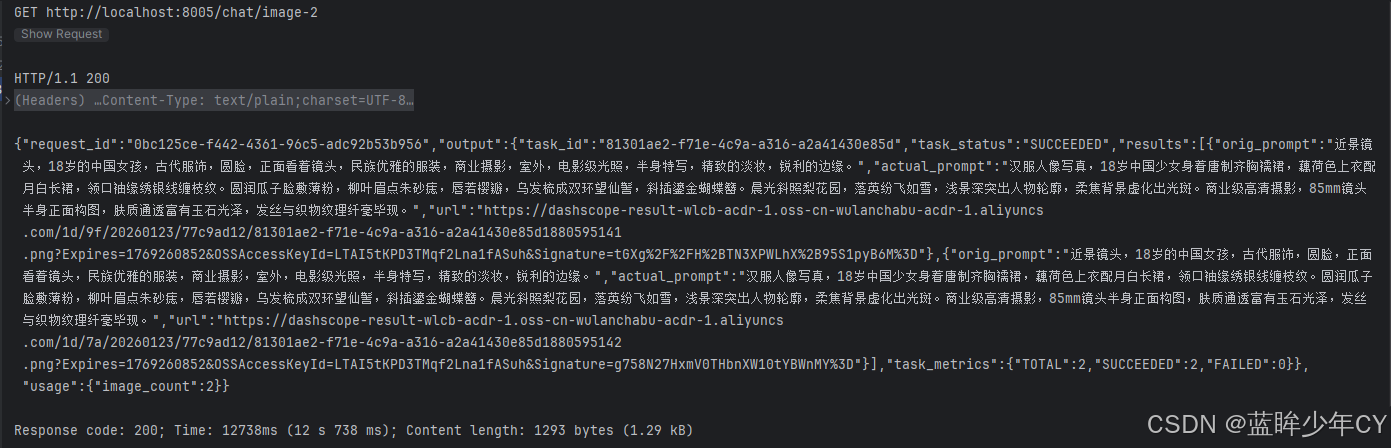
5)编写业务类
@RestController
public class ImageModelController {

    @Resource
    private WanxImageModel wanxImageModel;

    @GetMapping("/chat/image-1")
    public String image1() {
        Response<Image> generate = wanxImageModel.generate("一张图,描述:一个人在沙滩上");
        return generate.content().url().toString();
    }

    @GetMapping("/chat/image-2")
    public String image2() throws NoApiKeyException {
        String prompt = "近景镜头,18岁的中国女孩,古代服饰,圆脸,正面看着镜头," +
                "民族优雅的服装,商业摄影,室外,电影级光照,半身特写,精致的淡妆,锐利的边缘。";
        ImageSynthesisParam build = ImageSynthesisParam.builder()
                .apiKey(System.getenv("aliQwen-api"))
                .model("wanx2.1-t2i-turbo")
                .prompt(prompt)
                .n(2)
                .size("1024*1024")
                .build();
        ImageSynthesis imageSynthesis = new ImageSynthesis();
        ImageSynthesisResult result = imageSynthesis.call(build);
        return JsonUtils.toJson(result);
    }
}
6)测试



7、流式输出
(1)介绍
流式输出(StreamingOutput)是一种逐步返回大模型生成结果的技术,允许服务器将响应内容分批次实时传输给客户端,而不是等待全部内容生成完毕后再一次性返回。这种机制能显著提升用户体验,尤其适用于大模型响应较慢的场景(如生成长文本或复杂推理结果)。
低阶出处https://docs.langchain4j.dev/tutorials/response-streaming高阶出处https://docs.langchain4j.dev/tutorials/ai-services#flux
(2)案例实现
1)创建模块
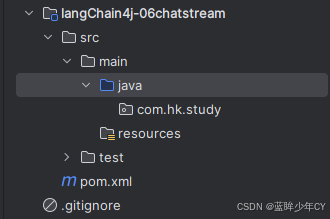
2)修改pom
<?xml version="1.0" encoding="UTF-8"?>
<project xmlns="http://maven.apache.org/POM/4.0.0"
         xmlns:xsi="http://www.w3.org/2001/XMLSchema-instance"
         xsi:schemaLocation="http://maven.apache.org/POM/4.0.0 http://maven.apache.org/xsd/maven-4.0.0.xsd">
    <modelVersion>4.0.0</modelVersion>
    <parent>
        <groupId>com.hk</groupId>
        <artifactId>langcChain4J-study</artifactId>
        <version>1.0-SNAPSHOT</version>
    </parent>

    <artifactId>langChain4j-06chatstream</artifactId>

    <properties>
        <maven.compiler.source>21</maven.compiler.source>
        <maven.compiler.target>21</maven.compiler.target>
        <project.build.sourceEncoding>UTF-8</project.build.sourceEncoding>
    </properties>

    <dependencies>
        <dependency>
            <groupId>org.springframework.boot</groupId>
            <artifactId>spring-boot-starter-web</artifactId>
        </dependency>
        <!--langchain4j-open-ai + langchain4j + langchain4j-reactor-->
        <dependency>
            <groupId>dev.langchain4j</groupId>
            <artifactId>langchain4j-open-ai</artifactId>
        </dependency>
        <dependency>
            <groupId>dev.langchain4j</groupId>
            <artifactId>langchain4j</artifactId>
        </dependency>
        <dependency>
            <groupId>dev.langchain4j</groupId>
            <artifactId>langchain4j-reactor</artifactId>
        </dependency>
        <!--lombok-->
        <dependency>
            <groupId>org.projectlombok</groupId>
            <artifactId>lombok</artifactId>
            <optional>true</optional>
        </dependency>
        <!--hutool-->
        <dependency>
            <groupId>cn.hutool</groupId>
            <artifactId>hutool-all</artifactId>
            <version>5.8.22</version>
        </dependency>
        <dependency>
            <groupId>org.springframework.boot</groupId>
            <artifactId>spring-boot-starter-test</artifactId>
            <scope>test</scope>
        </dependency>
    </dependencies>

    <build>
        <plugins>
            <plugin>
                <groupId>org.springframework.boot</groupId>
                <artifactId>spring-boot-maven-plugin</artifactId>
            </plugin>
        </plugins>
    </build>

</project>
3)添加配置文件
server.port=8006

spring.application.name=langchain4j-06chat-stream

# 设置响应的字符编码,避免流式返回输出乱码
server.servlet.encoding.charset=utf-8
server.servlet.encoding.enabled=true
server.servlet.encoding.force=true
4)自定义接口
public interface ChatAssistant {

    Flux<String> chat(String prompt);
}
5)编写配置类
@Configuration
public class LLMConfig {

    @Bean
    public StreamingChatModel streamingChatModel() {
        return OpenAiStreamingChatModel.builder()
                .apiKey(System.getenv("aliQwen-api"))
                .modelName("qwen-plus")
                .baseUrl("https://dashscope.aliyuncs.com/compatible-mode/v1")
                .build();
    }

    @Bean
    public ChatAssistant chatAssistant(StreamingChatModel streamingChatModel){
        return AiServices.create(ChatAssistant.class, streamingChatModel);
    }
}
6)编写业务类
@RestController
public class StreamingChatModelController {

    @Resource
    private StreamingChatModel streamingChatModel;

    @Resource
    private ChatAssistant chatAssistant;

    // 方式一:使用 Flux.create 手动创建 Flux
    @GetMapping("/chat1")
    public Flux<String> chat1(String msg) {
        return Flux.create(fluxSink -> {
            streamingChatModel.chat(msg, new StreamingChatResponseHandler() {

                @Override
                public void onPartialResponse(String s) {
                    System.out.println(s);
                    fluxSink.next(s);
                }

                @Override
                public void onCompleteResponse(ChatResponse chatResponse) {
                    System.out.println("---response over: "+chatResponse);
                    fluxSink.complete();
                }

                @Override
                public void onError(Throwable throwable) {
                    fluxSink.error(throwable);
                }
            });
        });
    }

    // 方式二
    @GetMapping("/chat2")
    public Flux<String> chat2(String msg) {
        return chatAssistant.chat(msg);
    }
}
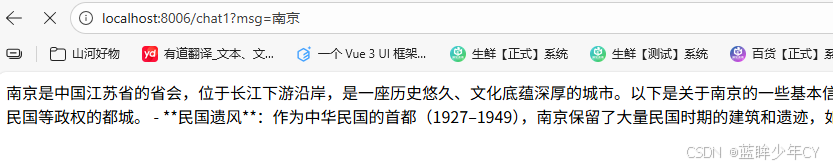
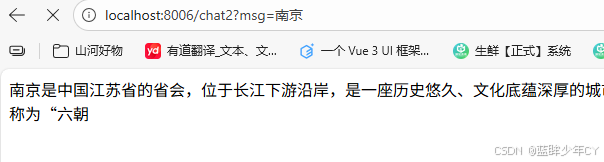
7)测试
8、记忆存储
(1)介绍
记忆缓存是聊天系统中的一个重要组件,用于存储和管理对话的上下文信息。它的主要作用是让AI助手能够"记住"之前的对话内容,从而提供连贯和个性化的回复
官网地址https://docs.langchain4j.dev/tutorials/chat-memoryLangChain4j 提供两种开箱即用实现:
- 滑动窗口:只保留最新的N条消息 MessageWindowChatMemory
- 限制Token数量:它同样作为滑动窗口,保留最新的令牌TokenWindowChatMemory,需要结合TokenCountEstimator来计算Token的数量
(2)案例实现
1)新建模块
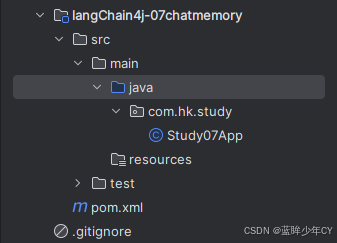
2)修改pom文件
<?xml version="1.0" encoding="UTF-8"?>
<project xmlns="http://maven.apache.org/POM/4.0.0"
         xmlns:xsi="http://www.w3.org/2001/XMLSchema-instance"
         xsi:schemaLocation="http://maven.apache.org/POM/4.0.0 http://maven.apache.org/xsd/maven-4.0.0.xsd">
    <modelVersion>4.0.0</modelVersion>
    <parent>
        <groupId>com.hk</groupId>
        <artifactId>langcChain4J-study</artifactId>
        <version>1.0-SNAPSHOT</version>
    </parent>

    <artifactId>langChain4j-07chatmemory</artifactId>

    <properties>
        <maven.compiler.source>21</maven.compiler.source>
        <maven.compiler.target>21</maven.compiler.target>
        <project.build.sourceEncoding>UTF-8</project.build.sourceEncoding>
    </properties>

    <dependencies>
        <dependency>
            <groupId>org.springframework.boot</groupId>
            <artifactId>spring-boot-starter-web</artifactId>
        </dependency>
        <!--langchain4j-open-ai + langchain4j + langchain4j-reactor-->
        <dependency>
            <groupId>dev.langchain4j</groupId>
            <artifactId>langchain4j-open-ai</artifactId>
        </dependency>
        <dependency>
            <groupId>dev.langchain4j</groupId>
            <artifactId>langchain4j</artifactId>
        </dependency>
        <dependency>
            <groupId>dev.langchain4j</groupId>
            <artifactId>langchain4j-reactor</artifactId>
        </dependency>
        <!--lombok-->
        <dependency>
            <groupId>org.projectlombok</groupId>
            <artifactId>lombok</artifactId>
            <optional>true</optional>
        </dependency>
        <!--hutool-->
        <dependency>
            <groupId>cn.hutool</groupId>
            <artifactId>hutool-all</artifactId>
            <version>5.8.22</version>
        </dependency>
        <dependency>
            <groupId>org.springframework.boot</groupId>
            <artifactId>spring-boot-starter-test</artifactId>
            <scope>test</scope>
        </dependency>
    </dependencies>

    <build>
        <plugins>
            <plugin>
                <groupId>org.springframework.boot</groupId>
                <artifactId>spring-boot-maven-plugin</artifactId>
            </plugin>
        </plugins>
    </build>
</project>
3)添加配置文件
server.port=8007

spring.application.name=langchain4j-07chat-memory

# 设置响应的字符编码
server.servlet.encoding.charset=utf-8
server.servlet.encoding.enabled=true
server.servlet.encoding.force=true
4)自定义接口
public interface ChatMemoryAssistant {
    /**
     * 聊天带记忆缓存功能
     *
     * @param userId  用户 ID
     * @param prompt 消息
     * @return String
     */
    String chatWithChatMemory(@MemoryId Long userId, @UserMessage String prompt);
}
5)编写配置类
@Configuration
public class LLMConfig {

    @Bean
    public ChatModel chatModel() {
        return OpenAiChatModel.builder()
                .apiKey(System.getenv("aliQwen-api"))
                .modelName("qwen-long")
                .baseUrl("https://dashscope.aliyuncs.com/compatible-mode/v1")
                .build();
    }

    @Bean("chatMessageWindowChatMemory")
    public ChatMemoryAssistant chatMessageWindowChatMemory(ChatModel chatModel) {
        return AiServices.builder(ChatMemoryAssistant.class)
                .chatModel(chatModel)
                // 每个memoryId对应创建一个ChatMemory
                .chatMemoryProvider(memoryId -> MessageWindowChatMemory.withMaxMessages(20))
                .build();
    }

    @Bean
    public ChatMemoryAssistant chatTokenWindowChatMemory(ChatModel chatModel) {
        // TokenCountEstimator默认的token分词器,需要结合Tokenizer计算ChatMessage的token数量
        OpenAiTokenCountEstimator openAiTokenCountEstimator = new OpenAiTokenCountEstimator("gpt-4");
        return AiServices.builder(ChatMemoryAssistant.class)
                .chatModel(chatModel)
                // 每个memoryId对应创建一个ChatMemory
                .chatMemoryProvider(memoryId -> TokenWindowChatMemory.withMaxTokens(100, openAiTokenCountEstimator))
                .build();
    }
}
6)编写业务类
@RestController
public class ChatMemoryController {

    @Resource(name = "chatMessageWindowChatMemory")
    private ChatMemoryAssistant chatMessageWindowChatMemory;

    @Resource(name = "chatTokenWindowChatMemory")
    private ChatMemoryAssistant chatTokenWindowChatMemory;

    // MessageWindowChatMemory实现聊天功能
    @GetMapping("/chatv1")
    public void chatv1() {
        chatMessageWindowChatMemory.chatWithChatMemory(1L, "你好!我的名字是Java.");
        String answer01 = chatMessageWindowChatMemory.chatWithChatMemory(1L, "我的名字是什么");
        System.out.println("answer01返回结果:"+answer01);

        chatMessageWindowChatMemory.chatWithChatMemory(3L, "你好!我的名字是C++");
        String answer02 = chatMessageWindowChatMemory.chatWithChatMemory(3L, "我的名字是什么");
        System.out.println("answer02返回结果:"+answer02);
    }

    // TokenWindowChatMemory实现聊天功能
    @GetMapping("/chatv2")
    public void chatv2() {
        chatTokenWindowChatMemory.chatWithChatMemory(1L, "你好!我的名字是Java.");
        String answer01 = chatTokenWindowChatMemory.chatWithChatMemory(1L, "我的名字是什么");
        System.out.println("answer01返回结果:"+answer01);

        chatTokenWindowChatMemory.chatWithChatMemory(3L, "你好!我的名字是C++");
        String answer02 = chatTokenWindowChatMemory.chatWithChatMemory(3L, "我的名字是什么");
        System.out.println("answer02返回结果:"+answer02);
    }
}
7)测试
GET http://localhost:8007/chatv1


9、提示词工程
(1)出处
官网地址https://docs.langchain4j.dev/tutorials/chat-and-language-models
五种类型的聊天的消息:
- SystemMessage:系统消息,通常,作为开发人员,你应该定义这条消息的内容。通常,你会在这里写关于LLM在这次对话中的角色、应该如何表现、以什么风格回答等指令。
- UserMessage:用户消息;这是用户发来的信息。 用户可以是你应用的最终用户(人类)或你的应用本身
- AiMessage:由AI生成的消息;
- ToolExecutionResultMessage:模型结合工具
CustomMessage: 这是一个可以包含任意属性的自定义消息。这种消息类型只能被支持它的实现使用(目前仅支持 Ollama)。
(2)案例实现
1)基础工程搭建
- 创建模块
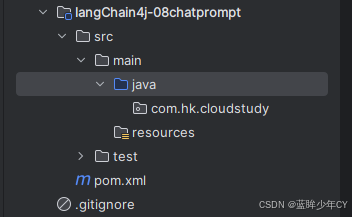
- 修改pom文件
<?xml version="1.0" encoding="UTF-8"?>
<project xmlns="http://maven.apache.org/POM/4.0.0"
         xmlns:xsi="http://www.w3.org/2001/XMLSchema-instance"
         xsi:schemaLocation="http://maven.apache.org/POM/4.0.0 http://maven.apache.org/xsd/maven-4.0.0.xsd">
    <modelVersion>4.0.0</modelVersion>
    <parent>
        <groupId>com.hk</groupId>
        <artifactId>langcChain4J-study</artifactId>
        <version>1.0-SNAPSHOT</version>
    </parent>

    <artifactId>langChain4j-08chatprompt</artifactId>

    <properties>
        <maven.compiler.source>21</maven.compiler.source>
        <maven.compiler.target>21</maven.compiler.target>
        <project.build.sourceEncoding>UTF-8</project.build.sourceEncoding>
    </properties>

    <dependencies>
        <dependency>
            <groupId>org.springframework.boot</groupId>
            <artifactId>spring-boot-starter-web</artifactId>
        </dependency>
        <!--langchain4j-open-ai + langchain4j + langchain4j-reactor-->
        <dependency>
            <groupId>dev.langchain4j</groupId>
            <artifactId>langchain4j-open-ai</artifactId>
        </dependency>
        <dependency>
            <groupId>dev.langchain4j</groupId>
            <artifactId>langchain4j</artifactId>
        </dependency>
        <dependency>
            <groupId>dev.langchain4j</groupId>
            <artifactId>langchain4j-reactor</artifactId>
        </dependency>
        <!--lombok-->
        <dependency>
            <groupId>org.projectlombok</groupId>
            <artifactId>lombok</artifactId>
            <optional>true</optional>
        </dependency>
        <!--hutool-->
        <dependency>
            <groupId>cn.hutool</groupId>
            <artifactId>hutool-all</artifactId>
            <version>5.8.22</version>
        </dependency>
        <dependency>
            <groupId>org.springframework.boot</groupId>
            <artifactId>spring-boot-starter-test</artifactId>
            <scope>test</scope>
        </dependency>
    </dependencies>

    <build>
        <plugins>
            <plugin>
                <groupId>org.springframework.boot</groupId>
                <artifactId>spring-boot-maven-plugin</artifactId>
            </plugin>
        </plugins>
    </build>
</project>- 添加配置文件
server.port=8008

spring.application.name=langchain4j-08chat-prompt

# 设置响应的字符编码
server.servlet.encoding.charset=utf-8
server.servlet.encoding.enabled=true
server.servlet.encoding.force=true
2)方式一
@SystemMessage + @UserMessage + @V
- 编写自定义接口
public interface LawAssistant {

    @SystemMessage("你是一位专业的中国法律顾问,只回答与中国法律相关的问题。" +
            "输出限制:对于其他领域的问题禁止回答,直接返回'抱歉,我只能回答中国法律相关的问题。'")
    @UserMessage("请回答以下法律问题:{{question}},字数控制在{{length}}以内")
    String chat(@V("question") String question, @V("length") int length);
}- 添加配置类
@Configuration
public class LLMConfig {

    @Bean
    public ChatModel chatModel() {
        return OpenAiChatModel.builder()
                .apiKey(System.getenv("aliQwen-api"))
                .modelName("qwen-long")
                .baseUrl("https://dashscope.aliyuncs.com/compatible-mode/v1")
                .build();
    }

    @Bean
    public LawAssistant lawAssistant(ChatModel chatModel) {
        return AiServices.create(LawAssistant.class, chatModel);
    }
}- 编写业务类
@RestController
public class ChatPromptController {

    @Resource
    private LawAssistant lawAssistant;

    @GetMapping(value = "/chatprompt/test1")
    public void test1() {
        String chat = lawAssistant.chat("什么是知识产权?",2000);
        System.out.println(chat);

        System.out.println("========================================================");
        String chat2 = lawAssistant.chat("什么是java?",2000);
        System.out.println(chat2);

        System.out.println("========================================================");
        String chat3 = lawAssistant.chat("介绍下西瓜和芒果",2000);
        System.out.println(chat3);

        System.out.println("========================================================");
        String chat4 = lawAssistant.chat("飞机发动机原理",2000);
        System.out.println(chat4);

    }
}

3)方式二
使用@structuredPrompt业务实体类
- 新建业务实体类
@Data
@StructuredPrompt("根据中国{{legal}}法律,解答以下问题:{{question}}")
public class LawPrompt {
    private String legal;
    private String question;
}
- 修改自定义接口
public interface LawAssistant {

    @SystemMessage("你是一位专业的中国法律顾问,只回答与中国法律相关的问题。" +
            "输出限制:对于其他领域的问题禁止回答,直接返回'抱歉,我只能回答中国法律相关的问题。'")
    @UserMessage("请回答以下法律问题:{{question}},字数控制在{{length}}以内")
    String chat(@V("question") String question, @V("length") int length);

    @SystemMessage("你是一位专业的中国法律顾问,只回答与中国法律相关的问题。" +
            "输出限制:对于其他领域的问题禁止回答,直接返回'抱歉,我只能回答中国法律相关的问题。'")
    String chat(LawPrompt lawPrompt);
}- 修改业务类测试
@RestController
public class ChatPromptController {

    @Resource
    private LawAssistant lawAssistant;

    ......

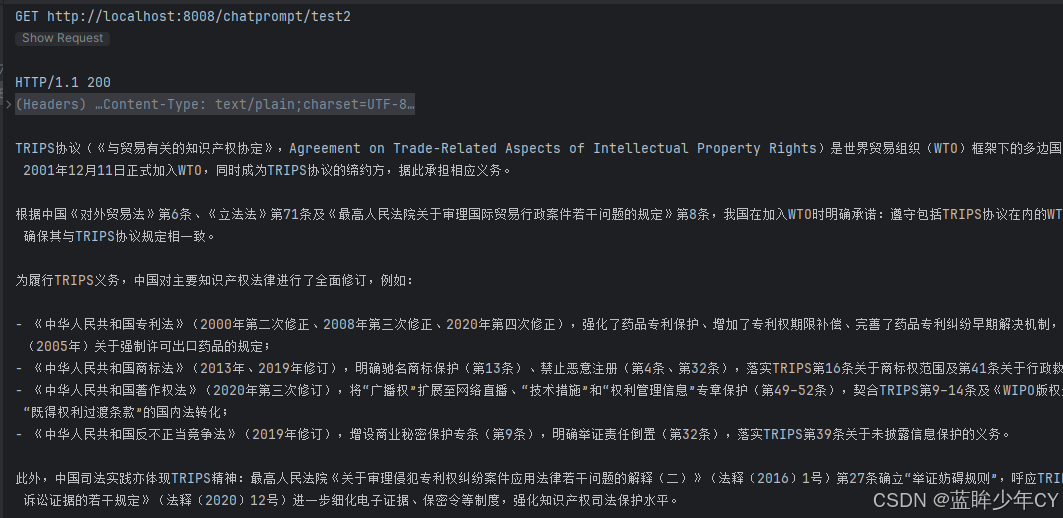
    @GetMapping(value = "/chatprompt/test2")
    public String test2() {
        LawPrompt prompt = new LawPrompt();

        prompt.setLegal("知识产权");
        prompt.setQuestion("TRIPS协议?");

        String chat = lawAssistant.chat(prompt);
        System.out.println(chat);
        return chat;
    }
}
4)方式三
在LangChain4j中有两个对象PromptTemplate以及Prompt用来实现提示词相关功能
单个参数可以使用{it}"占位符或者"{{参数名}",如果为其他字符,系统不能自动识别会报错。
- 修改业务类测试
    @Resource
    private ChatModel chatModel;

    @GetMapping(value = "/chatprompt/test3")
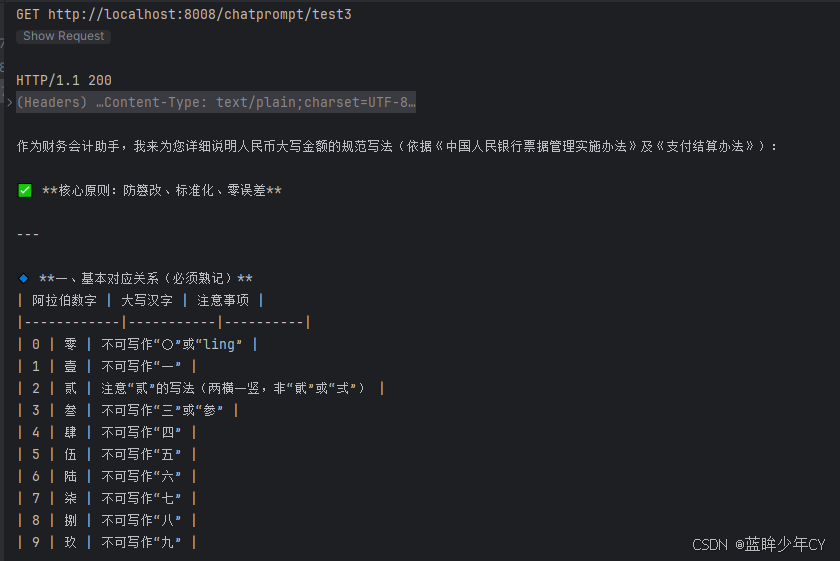
    public String test3(){
        // 默认 PromptTemplate 构造使用 it 属性作为默认占位符
        String role = "财务会计";
        String question = "人民币大写";

        //1 构造PromptTemplate模板
        PromptTemplate template = PromptTemplate.from("你是一个{{it}}助手,{{question}}怎么办");
        //2 由PromptTemplate生成Prompt
        Prompt prompt = template.apply(Map.of("it",role,"question",question));
        //3 Prompt提示词变成UserMessage
        UserMessage userMessage = prompt.toUserMessage();
        //4 调用大模型
        ChatResponse chatResponse = chatModel.chat(userMessage);
        //4.1 后台打印
        System.out.println(chatResponse.aiMessage().text());
        //4.2 前台返回
        return chatResponse.aiMessage().text();
    }
10、持久化
持续更新中......
11、Tools工具
持续更新中......
12、向量数据库
持续更新中......
13、RAG检索增强
持续更新中......
14、MCP模型上下文切换
持续更新中......

有“AI”的1024 = 2048,欢迎大家加入2048 AI社区
更多推荐

 13
13 0
0- 0


 已为社区贡献3条内容

所有评论(0)