AI重构代码搜索:DeepAudit RAG系统让大模型读懂你的代码,告别grep时代!
本文解析DeepAudit项目中RAG系统的四大核心组件:使用Tree-sitter按语义分割代码并标记安全风险;支持多种嵌入服务实现批量向量化;采用ChromaDB构建智能索引,支持全量/增量更新;提供语义检索、安全专项检索和函数上下文追踪三种检索方式。该系统让大模型能够理解代码语义,实现比传统关键词搜索更精准的代码检索,大幅提升代码审计效率。
前言
假设要找"处理用户输入的函数"。用 grep 只能搜关键词:user_input、request.body、form.data…但代码里可能用的是 sanitize_data()、validate_params(),这些函数名跟"用户输入"没有字面关系,grep 找不到。
RAG 的思路不一样:先把代码转成向量,搜索时按语义匹配。LLM 理解"处理用户输入"是什么意思,能找到语义相关的函数。
系统架构
DeepAudit 的 RAG 有四个组件:
源代码 → Splitter → Embeddings → ChromaDB
↓
Retriever → Agent
代码位置在 backend/app/services/rag/,总共 3600 多行:
splitter.py:代码分割embeddings.py:向量化indexer.py:索引管理retriever.py:检索
Splitter:按语义分割代码
直接按行分割代码会切断函数、类,语义不完整。DeepAudit 用 Tree-sitter 做 AST 解析,按语义单元分割。
支持十种语言:
# backend/app/services/rag/splitter.py
DEFINITION_TYPES = {
"python": {
"class": ["class_definition"],
"function": ["function_definition"],
"method": ["function_definition"],
"import": ["import_statement", "import_from_statement"],
},
"javascript": {
"class": ["class_declaration", "class"],
"function": ["function_declaration", "function", "arrow_function", "method_definition"],
"import": ["import_statement"],
},
"typescript": {
"class": ["class_declaration", "class"],
"function": ["function_declaration", "function", "arrow_function", "method_definition"],
"interface": ["interface_declaration"],
"import": ["import_statement"],
},
"java": {
"class": ["class_declaration"],
"method": ["method_declaration", "constructor_declaration"],
"interface": ["interface_declaration"],
"import": ["import_declaration"],
},
"go": {
"struct": ["type_declaration"],
"function": ["function_declaration", "method_declaration"],
"interface": ["type_declaration"],
"import": ["import_declaration"],
},
}
分割后每个块的数据结构:
# backend/app/services/rag/splitter.py
@dataclass
class CodeChunk:
"""代码块"""
id: str
content: str
file_path: str
language: str
chunk_type: ChunkType
# 位置信息
line_start: int = 0
line_end: int = 0
byte_start: int = 0
byte_end: int = 0
# 语义信息
name: Optional[str] = None
parent_name: Optional[str] = None
signature: Optional[str] = None
docstring: Optional[str] = None
# AST 信息
ast_type: Optional[str] = None
# 关联信息
imports: List[str] = field(default_factory=list)
calls: List[str] = field(default_factory=list)
dependencies: List[str] = field(default_factory=list)
definitions: List[str] = field(default_factory=list)
# 安全相关
security_indicators: List[str] = field(default_factory=list)
# 元数据
metadata: Dict[str, Any] = field(default_factory=dict)
# Token 估算
estimated_tokens: int = 0
注意最后一个字段 security_indicators,分割时会自动检测安全相关模式:
# backend/app/services/rag/splitter.py
SECURITY_PATTERNS = {
"python": [
(r"\bexec\s*\(", "exec"),
(r"\beval\s*\(", "eval"),
(r"\bcompile\s*\(", "compile"),
(r"\bos\.system\s*\(", "os_system"),
(r"\bsubprocess\.", "subprocess"),
(r"\bcursor\.execute\s*\(", "sql_execute"),
(r"\.execute\s*\(.*%", "sql_format"),
(r"\bpickle\.loads?\s*\(", "pickle"),
(r"\byaml\.load\s*\(", "yaml_load"),
(r"\brequests?\.", "http_request"),
(r"password\s*=", "password_assign"),
(r"secret\s*=", "secret_assign"),
(r"api_key\s*=", "api_key_assign"),
],
"javascript": [
(r"\beval\s*\(", "eval"),
(r"\bFunction\s*\(", "function_constructor"),
(r"innerHTML\s*=", "innerHTML"),
(r"outerHTML\s*=", "outerHTML"),
(r"document\.write\s*\(", "document_write"),
(r"\.exec\s*\(", "exec"),
(r"\.query\s*\(.*\+", "sql_concat"),
(r"password\s*[=:]", "password_assign"),
(r"apiKey\s*[=:]", "api_key_assign"),
],
# ...
}
在分割阶段就标记高风险代码,后面检索时可以优先返回这些块。
分割完就是向量化。
Embeddings:向量化
把代码块转成向量。支持七个提供商:
# backend/app/services/rag/embeddings.py
class OpenAIEmbedding(EmbeddingProvider):
"""OpenAI 嵌入服务"""
MODELS = {
"text-embedding-3-small": 1536,
"text-embedding-3-large": 3072,
"text-embedding-ada-002": 1536,
}
async def embed_texts(self, texts: List[str]) -> List[EmbeddingResult]:
# ...
async with httpx.AsyncClient(timeout=60) as client:
response = await client.post(url, headers=headers, json=payload)
response.raise_for_status()
data = response.json()
# ...
class OllamaEmbedding(EmbeddingProvider):
"""Ollama 本地嵌入服务"""
MODELS = {
"nomic-embed-text": 768,
"mxbai-embed-large": 1024,
"all-minilm": 384,
"snowflake-arctic-embed": 1024,
"bge-m3": 1024,
}
# Azure, Cohere, HuggingFace, Jina, Qwen
本地部署可以用 Ollama,不用调 API。
代码库大的时候需要批量处理。
批量嵌入
大量代码块需要批量处理,减少 API 调用次数:
# backend/app/services/rag/embeddings.py
async def embed_batch(
self,
texts: List[str],
batch_size: int = 100,
show_progress: bool = False,
progress_callback: Optional[callable] = None,
cancel_check: Optional[callable] = None,
) -> List[List[float]]:
"""批量嵌入文本"""
if not texts:
return []
embeddings = []
uncached_indices = []
uncached_texts = []
# 检查缓存
for i, text in enumerate(texts):
...
if self.cache_enabled:
cache_key = self._cache_key(text)
if cache_key in self._cache:
embeddings.append(self._cache[cache_key])
continue
embeddings.append(None)  # 占位
uncached_indices.append(i)
uncached_texts.append(text)
# 批量处理未缓存的文本
if uncached_texts:
for i in range(0, len(uncached_texts), batch_size):
...
batch = uncached_texts[i:i + batch_size]
batch_indices = uncached_indices[i:i + batch_size]
results = await self._provider.embed_texts(batch)
for idx, result in zip(batch_indices, results):
embeddings[idx] = result.embedding
...
return embeddings
100 个文本一批,避免单次请求太大。
模型变更检测
换嵌入模型后,索引器通过 vector_store 获取配置并检测变更:
# backend/app/services/rag/indexer.py
async def _check_rebuild_needed(self) -> Tuple[bool, str]:
"""检查是否需要重建索引"""
# ...
stored_config = self.vector_store.get_embedding_config()
# 检查 embedding 提供商
stored_provider = stored_config.get("provider")
current_provider = self.embedding_config.get("provider")
if stored_provider and current_provider and stored_provider != current_provider:
return True, f"Embedding 提供商变更: {stored_provider} -> {current_provider}"
# 检查 embedding 模型
stored_model = stored_config.get("model")
current_model = self.embedding_config.get("model")
if stored_model and current_model and stored_model != current_model:
return True, f"Embedding 模型变更: {stored_model} -> {current_model}"
# 检查维度
stored_dimension = stored_config.get("dimension")
current_dimension = self.embedding_config.get("dimension")
if stored_dimension and current_dimension and stored_dimension != current_dimension:
return True, f"Embedding 维度变更: {stored_dimension} -> {current_dimension}"
return False, ""
provider + model + dimension 拼成配置信息,通过对比判断是否需要重建索引。
Indexer:智能索引
索引器做三件事:扫描文件、生成向量、存到 ChromaDB。
ChromaDB 向量存储
# backend/app/services/rag/indexer.py
class ChromaVectorStore(VectorStore):
"""Chroma 向量存储"""
async def initialize(self, force_recreate: bool = False):
"""初始化 Chroma"""
import chromadb
from chromadb.config import Settings
if self.persist_directory:
self._client = chromadb.PersistentClient(
path=self.persist_directory,
settings=Settings(anonymized_telemetry=False),
)
else:
self._client = chromadb.Client(...)
# 构建 collection 元数据
collection_metadata = {
"hnsw:space": "cosine",  # 余弦相似度
"index_version": INDEX_VERSION,
"embedding_provider": self.embedding_config.get("provider", "openai"),
"embedding_model": self.embedding_config.get("model", "text-embedding-3-small"),
"embedding_dimension": self.embedding_config.get("dimension", 1536),
}
self._collection = self._client.get_or_create_collection(
name=self.collection_name,
metadata=collection_metadata,
)
async def query(
self,
query_embedding: List[float],
n_results: int = 10,
where: Optional[Dict[str, Any]] = None,
) -> Dict[str, Any]:
result = await asyncio.to_thread(
self._collection.query,
query_embeddings=[query_embedding],
n_results=n_results,
where=where,
include=["documents", "metadatas", "distances"],
)
return {
"ids": result["ids"][0] if result["ids"] else [],
"documents": result["documents"][0] if result["documents"] else [],
"metadatas": result["metadatas"][0] if result["metadatas"] else [],
"distances": result["distances"][0] if result["distances"] else [],
}
用 HNSW 算法做近似最近邻检索,余弦相似度作为距离度量。
索引进度跟踪
# backend/app/services/rag/indexer.py
@dataclass
class IndexingProgress:
"""索引进度"""
total_files: int = 0
processed_files: int = 0
total_chunks: int = 0
indexed_chunks: int = 0
current_file: str = ""
errors: List[str] = None
# 增量更新统计
added_files: int = 0
updated_files: int = 0
deleted_files: int = 0
skipped_files: int = 0
update_mode: str = "full"
# 状态消息(用于前端显示)
status_message: str = ""
@property
def progress_percentage(self) -> float:
if self.total_files == 0:
return 0.0
return (self.processed_files / self.total_files) * 100
每处理一个文件就 yield 一次进度,前端可以实时展示。
索引模式
有三种模式:
# backend/app/services/rag/indexer.py
class IndexUpdateMode(Enum):
"""索引更新模式"""
FULL = "full"           # 全量重建:删除旧索引,完全重新索引
INCREMENTAL = "incremental"  # 增量更新:只更新变化的文件
SMART = "smart"         # 智能模式:根据情况自动选择
SMART 模式会计算文件哈希,对比变更:
# backend/app/services/rag/indexer.py
async def _incremental_index(self, directory: str, ...):
"""增量索引"""
# 获取已索引文件的 hash
indexed_file_hashes = await self.vector_store.get_file_hashes()
indexed_files = set(indexed_file_hashes.keys())
# 收集当前文件
current_files = self._collect_files(directory, exclude_patterns, include_patterns)
current_file_map = {}
for file_path in current_files:
relative_path = os.path.relpath(file_path, directory)
current_file_map[relative_path] = file_path
current_file_set = set(current_file_map.keys())
# 计算差异
files_to_add = current_file_set - indexed_files
files_to_delete = indexed_files - current_file_set
files_to_check = current_file_set & indexed_files
# 检查需要更新的文件(hash 变化)
files_to_update = set()
for relative_path in files_to_check:
content = await asyncio.to_thread(self._read_file_sync, file_path)
current_hash = hashlib.md5(content.encode()).hexdigest()
if current_hash != indexed_file_hashes.get(relative_path):
files_to_update.add(relative_path)
# ...
只处理变化的文件,大项目不用每次全量重建。
Retriever:检索
检索器提供三种方式:
1. 语义检索(rag_query)
# backend/app/services/rag/retriever.py
async def retrieve(
self,
query: str,
top_k: int = 10,
filter_file_path: Optional[str] = None,
filter_language: Optional[str] = None,
filter_chunk_type: Optional[str] = None,
min_score: float = 0.0,
) -> List[RetrievalResult]:
"""语义检索"""
await self.initialize()
# 生成查询嵌入
query_embedding = await self.embedding_service.embed(query)
# 构建过滤条件
where = {}
if filter_file_path:
where["file_path"] = filter_file_path
if filter_language:
where["language"] = filter_language
if filter_chunk_type:
where["chunk_type"] = filter_chunk_type
# 查询向量存储
raw_results = await self.vector_store.query(
query_embedding=query_embedding,
n_results=top_k * 2,  # 多查一些,后面过滤
where=where if where else None,
)
# 转换结果
results = []
for id_, doc, meta, dist in zip(...):
score = 1 - dist  # 将距离转换为相似度分数
if score < min_score:
continue
result = RetrievalResult(...)
results.append(result)
results.sort(key=lambda x: x.score, reverse=True)
return results[:top_k]
就是标准的向量检索。
2. 安全相关检索(security_search)
# backend/app/services/rag/retriever.py
async def retrieve_security_related(
self,
vulnerability_type: Optional[str] = None,
top_k: int = 20,
) -> List[RetrievalResult]:
"""检索与安全相关的代码"""
# 根据漏洞类型构建查询
security_queries = {
"sql_injection": "SQL query execute database user input",
"xss": "HTML render user input innerHTML template",
"command_injection": "system exec command shell subprocess",
"path_traversal": "file path read open user input",
"ssrf": "HTTP request URL user input fetch",
"deserialization": "deserialize pickle yaml load object",
"auth_bypass": "authentication login password token session",
"hardcoded_secret": "password secret key token credential",
}
if vulnerability_type and vulnerability_type in security_queries:
query = security_queries[vulnerability_type]
else:
query = "security vulnerability dangerous function user input"
return await self.retrieve(query, top_k=top_k)
先检索,再按安全评分重排。有安全标记的代码块排在前面。
3. 函数上下文检索(function_context)
# backend/app/services/rag/retriever.py
async def retrieve_function_context(
self,
function_name: str,
file_path: Optional[str] = None,
include_callers: bool = True,
include_callees: bool = True,
top_k: int = 10,
) -> Dict[str, List[RetrievalResult]]:
"""检索函数上下文"""
context = {
"definition": [],
"callers": [],
"callees": [],
}
# 查找函数定义
definition_query = f"function definition {function_name}"
definitions = await self.retrieve(
definition_query,
top_k=5,
filter_file_path=file_path,
)
# 过滤出真正的定义
for result in definitions:
if result.name == function_name or function_name in (result.content or ""):
context["definition"].append(result)
if include_callers:
# 查找调用此函数的代码
caller_query = f"calls {function_name} invoke {function_name}"
callers = await self.retrieve(caller_query, top_k=top_k)
for result in callers:
# 检查是否真的调用了这个函数
if re.search(rf'\b{re.escape(function_name)}\s*\(', result.content):
if result not in context["definition"]:
context["callers"].append(result)
if include_callees and context["definition"]:
# 从函数定义中提取调用的其他函数
for definition in context["definition"]:
calls = re.findall(r'\b(\w+)\s*\(', definition.content)
unique_calls = list(set(calls))[:5]  # 限制数量
for call in unique_calls:
if call == function_name:
continue
callees = await self.retrieve(f"function {call} definition", top_k=2)
context["callees"].extend(callees)
return context
追踪函数调用链,分析数据流用得上。
Agent 怎么用 RAG
审计任务初始化时,会创建索引器和检索器:
# backend/app/api/v1/endpoints/agent_tasks.py
# 创建索引器
indexer = CodeIndexer(
collection_name=f"project_{project_id}",
embedding_service=embedding_service,
)
# 索引项目代码
async for progress in indexer.smart_index_directory(
directory=project_root,
exclude_patterns=exclude_patterns or [],
include_patterns=target_files,
update_mode=IndexUpdateMode.SMART,
embedding_progress_callback=on_embedding_progress,
cancel_check=cancel_check,
):
await emit(f"索引进度: {progress.processed_files}/{progress.total_files}")
# 创建检索器
retriever = CodeRetriever(collection_name, embedding_service)
RAG 工具的分配有讲究。Recon 只有 rag_query,Analysis 有全部三个:
# backend/app/services/agent/tools/__init__.py
# Recon Agent - 只有通用搜索
recon_tools = {
"rag_query": RAGQueryTool(retriever),
}
# Analysis Agent - 全套 RAG 工具
analysis_tools = {
"rag_query": RAGQueryTool(retriever),
"security_search": SecurityCodeSearchTool(retriever),
"function_context": FunctionContextTool(retriever),
}
Verification Agent 没有 RAG 工具,它的任务是执行验证,不是搜索代码。
如果 retriever 初始化失败(比如向量数据库没配置),这些工具就不会注册,Agent 会回退到 search_code 做关键词匹配。
LLM 什么时候选 RAG
System Prompt 明确引导:
🔍 代码搜索工具对比
| 工具 | 特点 | 适用场景 |
|------|------|---------|
| rag_query | 🔥 语义搜索 | **首选!** 查找"处理用户输入的函数" |
| security_search | 🔥 安全专用 | **首选!** 查找"SQL注入相关代码" |
| search_code | ❌ 关键词匹配 | **不推荐**,仅查找精确字符串 |
几个典型场景:
场景 1:初始代码探索
Thought: 需要找到项目中处理用户认证的代码
Action: rag_query
Action Input: {"query": "用户登录认证逻辑", "top_k": 10}
返回结果:
找到 10 个相关代码片段:
--- 结果 1 (相似度: 0.89) ---
文件: app/views.py
行号: 45-60
名称: login_handler
安全指标: user_input, database_query
代码:
def login_handler(request):
username = request.POST.get('username')
...
场景 2:漏洞定向搜索
Semgrep 报了 SQL 注入警告,需要找更多相关代码:
Thought: 需要查找可能存在 SQL 注入的代码
Action: security_search
Action Input: {"vulnerability_type": "sql_injection", "top_k": 20}
返回结果会按安全评分重排:
找到 5 个可能与 sql_injection 相关的代码:
--- 可疑代码 1 ---
文件: app/models.py:45
⚠️ 安全指标: database_query, string_concat
代码:
cursor.execute("SELECT * FROM users WHERE id = " + user_id)
有安全标记的代码块排在前面。
场景 3:数据流追踪
找到可疑函数后,追踪谁调用了它:
Thought: execute_query 可能有 SQL 注入,需要看谁调用了它
Action: function_context
Action Input: {"function_name": "execute_query", "include_callers": true}
返回结果包含完整的调用链:
函数 'execute_query' 的上下文分析:
### 函数定义:
文件: app/db.py:23
def execute_query(sql, params=None):
cursor = conn.cursor()
cursor.execute(sql, params)
return cursor.fetchall()
### 调用此函数的代码 (3 处):
- app/views.py:45
- app/api.py:78
- app/models.py:123
### 此函数调用的其他函数:
- cursor (app/db.py)
- fetchall (builtin)
方便判断用户输入能不能流到这个函数。
Agent 使用时就像调其他工具一样:
Thought: 需要找数据库查询相关的代码
Action: rag_query
Action Input: {"query": "database query execute SQL", "top_k": 15}
Thought: 追踪 execute_query 函数的调用链
Action: function_context
Action Input: {"function_name": "execute_query"}
一些设计亮点
几个设计细节:
- 分割阶段做安全标记:不在检索时才判断,而是在分割阶段就用正则检测打标记,后续检索可以直接过滤或加权。
- 嵌入模型变更检测:换了模型自动重建索引,用配置签名(provider + model + dimension 的哈希)检测变更,不用手动清理。
- 增量更新:大项目几十万行代码全量索引太慢,用文件哈希检测变更,只处理新增、修改、删除的文件。
- 分层检索:不只一种检索方式,通用搜索、安全搜索、函数上下文,不同场景用不同方法。
局限
也有一些局限:
- 没有重排序。Retriever 直接返回向量检索结果,没用 Cross-Encoder 做精排
- 代码跨文件引用分析不够。function_context 只追踪一层调用
- 没有缓存层。相同查询会重复计算
这个 RAG 实现功能比较完整。
小结
- Tree-sitter 按语义分割,保证代码块完整
- 分割时标记安全相关代码
- 支持多种嵌入模型,包括本地部署
- 智能增量索引,检测模型变更
- 三种检索方式适配不同场景
学AI大模型的正确顺序,千万不要搞错了
🤔2026年AI风口已来!各行各业的AI渗透肉眼可见,超多公司要么转型做AI相关产品,要么高薪挖AI技术人才,机遇直接摆在眼前!
有往AI方向发展,或者本身有后端编程基础的朋友,直接冲AI大模型应用开发转岗超合适!
就算暂时不打算转岗,了解大模型、RAG、Prompt、Agent这些热门概念,能上手做简单项目,也绝对是求职加分王🔋
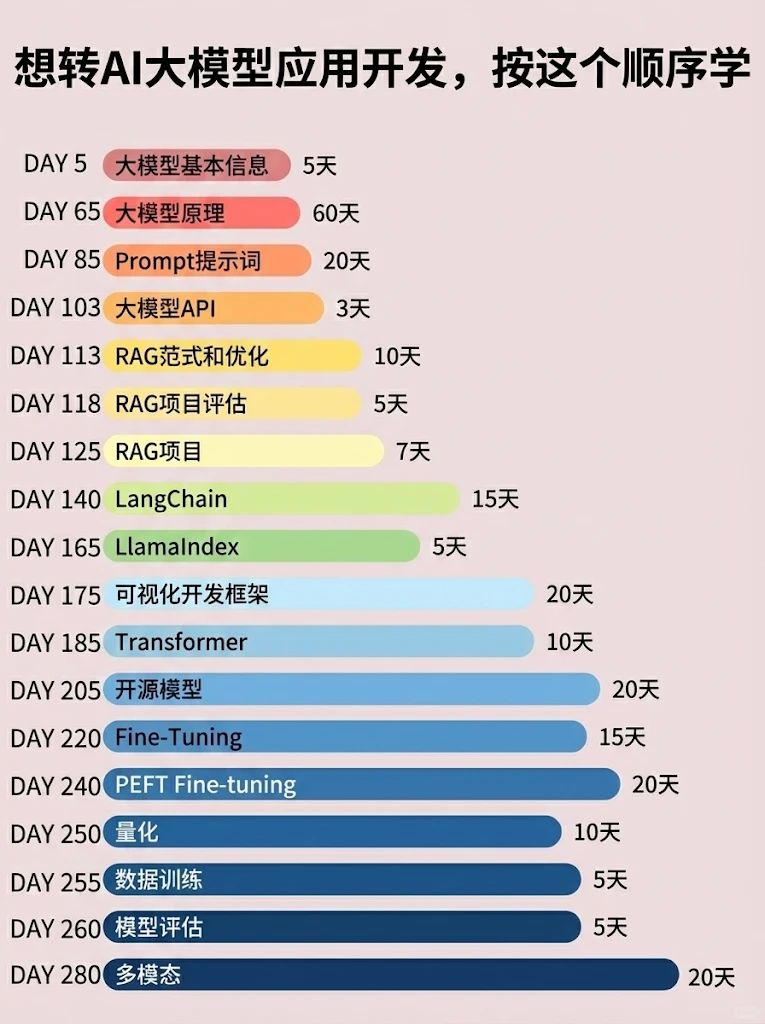
📝给大家整理了超全最新的AI大模型应用开发学习清单和资料,手把手帮你快速入门!👇👇
学习路线:
✅大模型基础认知—大模型核心原理、发展历程、主流模型(GPT、文心一言等)特点解析
✅核心技术模块—RAG检索增强生成、Prompt工程实战、Agent智能体开发逻辑
✅开发基础能力—Python进阶、API接口调用、大模型开发框架(LangChain等)实操
✅应用场景开发—智能问答系统、企业知识库、AIGC内容生成工具、行业定制化大模型应用
✅项目落地流程—需求拆解、技术选型、模型调优、测试上线、运维迭代
✅面试求职冲刺—岗位JD解析、简历AI项目包装、高频面试题汇总、模拟面经
以上6大模块,看似清晰好上手,实则每个部分都有扎实的核心内容需要吃透!
我把大模型的学习全流程已经整理📚好了!抓住AI时代风口,轻松解锁职业新可能,希望大家都能把握机遇,实现薪资/职业跃迁~
这份完整版的大模型 AI 学习资料已经上传CSDN,朋友们如果需要可以微信扫描下方CSDN官方认证二维码免费领取【保证100%免费】


有“AI”的1024 = 2048,欢迎大家加入2048 AI社区
更多推荐

 12
12 0
0- 0


 已为社区贡献627条内容

所有评论(0)