我的C++规范 - 你该如何使用容器
在 main.cpp 文件与打印结果都太长了,这一篇文章我把他们放在了文章最后,文章后半段有容器结构图、完整代码、打印结果在编程中,我们总需要处理一些数据,当数据的数量变得庞大之后,不同存储数据的方式将会影响到处理数据的速度,而且这个影响是非常大的,我们需要注意使用合适的数据结构对数据进行储存在 main.cpp 文件中,我列出了 STL 标准库的常用容器用法,他们的一些简单用法足以覆盖平时的使用
你该如何使用容器
容器的使用
在 main.cpp 文件与打印结果都太长了,这一篇文章我把他们放在了文章最后,文章后半段有容器结构图、完整代码、打印结果
在编程中,我们总需要处理一些数据,当数据的数量变得庞大之后,不同存储数据的方式将会影响到处理数据的速度,而且这个影响是非常大的,我们需要注意使用合适的数据结构对数据进行储存
在 main.cpp 文件中,我列出了 STL 标准库的常用容器用法,他们的一些简单用法足以覆盖平时的使用
在这里我还是要强调一下新手应该优先考虑使用 vector 容器,如果你的数据需要特殊处理,在考虑使用其他更适合的容器
在最后 map set 这两个容器产生了很多变体,但实际是都用处不大,他们的区别是底层数据存储是红黑树还是哈希表(hash table),使用最多的容器还是 map set unordered_map 这三个容器
据说STL实现的容器性能不佳,如果真的遇到了瓶颈还需要引入第三方容器
接下在我会简单讲一讲什么容器该怎么用,希望能让你认识到几种容器的作用与优缺点
合适的容器
线性容器
在容器上,我喜欢将 array vector deque 容器称为线性容器,因为他们是数据连续的,可以通过下标快速的访问,经过 deque 实际是分开存储的,但是在逻辑上依旧是线性数据
在这些线性容器上,最明显的特点就是遍历快,添加快,访问快,但是缺点也很明显,删除数据时,需要移动附近的数据到被删除的部分,以填住这个空缺,因为他们要保持数据连贯性
最明显的例子就是 vector ,当删除第一个时,需要将第二个放入第一个的位置,第三个放入第二个的位置,以此类推,删除一个就要移动所有数据
尽管如此,我也是推荐优先使用 vector 容器,它完全可以代替普通数组和 array 的使用,我推荐你优先使用 vector 容器,因为他可以动态扩展容量
那 array 什么该使用了,当你知道数据的个数一定不变时才推荐你使用,比如我要保存 108 好汉的名字,要声明 4 大名著的书名等数量不变的东西时,才建议你使用 array ,因为只有这时 array 比 vector 生成快的优先才能覆盖掉容量不可变的劣势
deque 则是解决 vector 首部插入很慢的问题,它可以让两端都可以快速插入,但是如果从中间插入则速度也会变慢,所以当你总是需要从两则删除或者插入时推荐你使用 deque,如果只是单边的话,比如总是从第一个位置插入,使用反向的 vector 会更快
队列和栈
queue stack 被称为队列和栈,他们本身是封装了 deque 容器,他们只是约束了 deque 的使用
deque 有两边插入删除都快的特性,所以这两个容器都利用了这一点来制造约束
queue 队列是先进先出,从一边进,另一边出的模式,它约束了类似排队的机制,使用者只能观察容器的两端,中间的数据是看不见的,这个容器在网络编程中十分常见,可以让网络客户端先来后到的接入,正是因为它可以排队的特性
stack 栈是先进后出,从顶部进,顶部出,一个被三面包围的容器,只有一个口可以进出,常用来做数据嵌套,可以保持数据与本层一致,返回时弹出又会显示出上一层数据,常用于做撤销返回功能,因为它记录了上一次做了什么
链表
链表也是一个相当常用的容器,list forward_list 两个链表的数据是通过指针去指向下一个数据的,也就是说还没有指针跳转之前是不知道数据在那你的,每访问下一个数据都需要跳转指针,所以遍历的数据会很慢
所以当你使用指针时,你大概是不需要遍历的,而是需要知道数据所在指针位置,通过指针去向前向后移动
链表的好处在于,插入和删除都很快,但是遍历和查找和随机访问都非常慢,所以链表应该储存需要反复修改的数据,且不需要经常遍历的数据
查找容器
1 2 4 8 16 // 5次
32 64 128 256 512 // 10次
1024 2048 4096 8192 16384 // 15次
32768 65536 131072 262144 524288 // 20次
map set unordered_map 等结构类型的容器都是为了查找而生的,他们的优点就是找的快
使用 map 时,你的数据总是散的,一个一个互不相干,然后你总是需要查找,通过 key 去找到 value 这种用法,比如将一个万人学校的人名字存入 map ,它仅需要十几次跳转就可以找到,如果存入 vector 可能需要几千上万次跳转
map 是二叉树数据结构,它可以让数据指数型上升的进行有序排列,如果数据是一万,在二叉树看来只需要查到 8192 这个阶段,查 9 次就可以覆盖一万的数据,查到 524288 时为 20 次,此时的覆盖范围是 524288*2-1 的数据,已经达到百万级别,这意味这百万数据也只需要查询 20 次,与长度为 20 的链表的遍历速度基本一致
unordered_map 对比 map 胜在更快,unordered_map 是哈希结构(hash),为什么不命名为 hash_map 我也很迷惑
unordered_map 的优势是大数据下的查询,因为使用 hash 计算随机值,可以一次找到目标所在位置,然后深入查找,但如果深入查找时链条很深,就会导致效率也成指数级降低不低 map 的指数查找
之所以 unordered_map 在大数据下可以比 map 快是因为 map 的启动很长慢,map 启动到 十万数据就需要 17 次的查询,这些低速区就是 map 在大数据下不如 unordered_map 的原因,因为 unordered_map 通常一次就跳转到指定位置,只要深度不超过 10 个,那几乎就是更快的
在 map 代码的后面我列举了 multimap unordered_multimap 等一系列的 map set 容器变体,实际上你只需要关心是否需要重复就可以了,因为 map 可以覆盖 90% 的查找容器需求
操作时间
我在 main.cpp 文件的最好部分,编写了一些对容器的计算操作,让各种容器的优缺点进行对比,让你更直观的感受到用对或者用错容器参审的性能差异
这些容器的使用总是有优缺点的,有时候需求是复杂的,可能也是冲突的,你要衡量到底应该如果使用这些容器,或者是组合使用他们
容器结构图
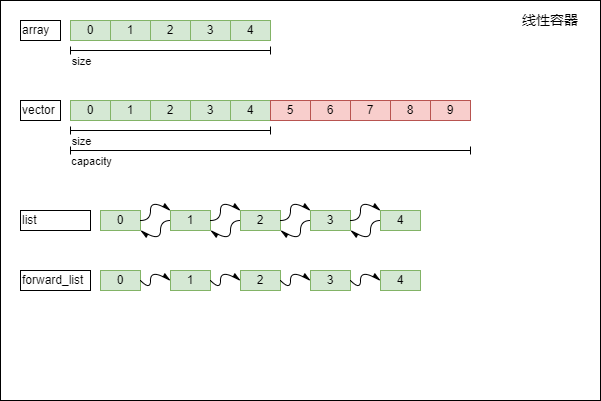
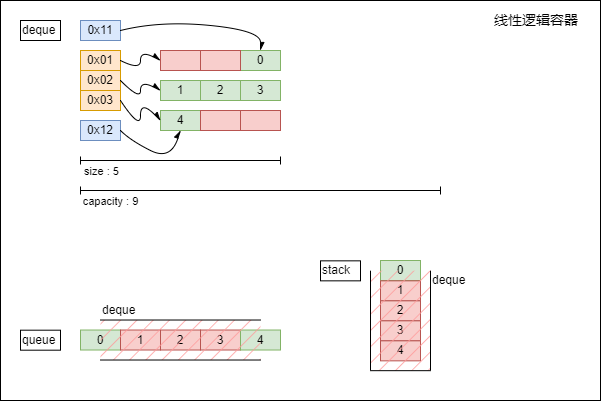
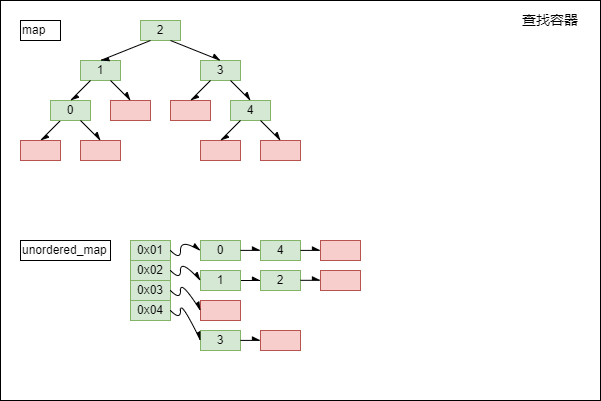
代码演示
main.cpp
#include <iostream>
#include <array>
#include <vector>
#include <list>
#include <deque>
#include <queue>
#include <stack>
#include <forward_list>
#include <map>
#include <set>
#include <unordered_map>
#include <unordered_set>
#include <functional>
#include <chrono>

#include "mclog.h"

// 普遍版本转字符串
template <typename T>
std::string to_str(const T &val)
{
    return std::to_string(val);
}

// 重载版本,不处理 std::string 类型
std::string to_str(const std::string &str)
{
    return str;
}

// 重载版本,处理 pair 键值对版本,引用普遍版本转字符串
template <typename T1, typename T2>
std::string to_str(const std::pair<T1, T2> &val)
{
    return "[" + to_str(val.first) + ": " + to_str(val.second) + "]";
}

// 格式化打印
template <typename T>
void print_cont(const T &con, std::string label = "")
{
    // 使用快捷遍历方式遍历
    // 该方法需要存在前进迭代器,依旧返回的对象可直接使用
    // 使用 to_str 将 ele 的数据转为字符串
    std::cout << "| label: " << label << std::endl;
    for (auto &ele : con)
    {
        std::cout << "| " << to_str(ele) << " ";
    }
    std::cout << std::endl
              << std::endl;
}

int main(int argc, char **argv)
{
    // array
    {
        // 特点分析
        // 和 int buf[5] 普通数组效果一致,需要在初始化时指定数组空间大小
        // 使用 array 比普通数组要方便,支持判空和反向迭代器等
        // 空间是固定的,需要扩容可以新建一个
        // 支持下标遍历
        MCLOG("使用 array 容器")

        std::array<int, 5> arr{101, 202, 303, 404, 505};
        MCLOG("初始化后容器大小 " $(arr.size()));

        MCLOG("下标遍历")
        for (size_t i = 0; i < arr.size(); i++)
        {
            std::cout << arr[i] << " ";
        }
        std::cout << std::endl;

        // 使用下标赋值,数组的第一个下标为 0,最后一个是size - 1
        arr[0] = 10;
        arr[arr.size() - 1] = 20;

        MCLOG("快捷遍历")
        for (auto &a : arr)
        {
            std::cout << a << " ";
        }
        std::cout << std::endl;

        MCLOG("print_cont 函数打印格式对比")
        print_cont(arr, "array 容器");
    }

    // vector
    {
        // 特点分析
        // 动态数组,可以自动扩展容量,数据是连续存放的
        // 使用上和 array 与普通数组是否相似,可以使用下标
        MCLOG("使用 vector 容器")

        std::vector<int> vec;
        MCLOG("初始化后容器大小 " $(vec.size()));

        // 赋值 5 次,从尾部赋值最快
        for (int i = 0; i < 5; i++)
        {
            vec.push_back(i + 100);
        }

        MCLOG("赋值后容器大小 " $(vec.size()));
        MCLOG("实际内存分配 " $(vec.capacity()));

        // 赋值 10 次
        for (int i = 0; i < 10; i++)
        {
            vec.push_back(i + 200);
        }
        MCLOG("第二次宽容后大小 " $(vec.size()));
        MCLOG("实际内存分配 " $(vec.capacity()));

        // 可以删除元素使 size 变小
        // 删除尾部元素,速度最快
        vec.erase(vec.end() - 1);
        MCLOG("删除一个值后大小 " $(vec.size()));
        MCLOG("实际内存分配 " $(vec.capacity()));

        print_cont(vec, "vector 容器");
    }

    // deque
    {
        // 用法与 vector 类似,可以访问下标
        // deque 储存的数据不是连续的,而是分段存储
        // 但是 deque 可以实现逻辑上的数据连续,从而可以访问下标
        // deque 可以从两侧高效的插入和删除 vector 只能在尾部高效的插入和删除
        MCLOG("使用 deque 容器")
        std::deque<int> deq;

        MCLOG("从两侧插入数据 ");
        deq.push_front(10);
        deq.push_front(11);
        deq.push_front(12);
        deq.push_back(20);
        deq.push_back(21);
        deq.push_back(22);

        MCLOG("第一个位置的数据 " << deq[0]);
        print_cont(deq, "deque 容器");
    }

    // queue
    {
        // queue 队列,继承自 deque 数据结构
        // 实际上 queue 是一种封装,而不是新的数据结构类型
        // queue 约束数据只能从尾部进,头部出,不能访问中间的数据,有先进先出的特点
        // queue 容器是封闭的,只能看第一个和最后一个数据
        MCLOG("使用 queue 容器")
        std::queue<int> que;
        for (int i = 0; i < 10; i++)
        {
            que.push(i + 100);
        }

        int val = que.front();
        MCLOG("第一个数据 " << val)

        val = que.front();
        MCLOG("没有推出的下一个数据 " << val)

        que.pop();
        val = que.front();
        MCLOG("推出之后的下一个数据 " << val)

        while (que.size() > 0)
        {
            int val = que.front();
            que.pop();
            std::cout << "| " << val << " ";
        }
        std::cout << std::endl
                  << std::endl;
    }

    // stack
    {
        // stack 栈结构,继承自 deque 数据结构
        // stack 和 queue 都是 deque 的封装,且特点与 queue 几乎相同,也是封闭的
        // 不同的是 stack 是先进后出,queue 是先进先出
        // stack 的底部是封上的,只能看见第一个顶部数据
        MCLOG("使用 stack 容器")
        std::stack<int> stk;
        for (int i = 0; i < 10; i++)
        {
            stk.push(i + 100);
        }
        int val = stk.top();
        MCLOG("第一个数据 " << val)

        val = stk.top();
        MCLOG("没有推出的下一个数据 " << val)

        stk.pop();
        val = stk.top();
        MCLOG("推出之后的下一个数据 " << val)

        while (stk.size() > 0)
        {
            int val = stk.top();
            stk.pop();
            std::cout << "| " << val << " ";
        }
        std::cout << std::endl
                  << std::endl;
    }

    // list
    {
        // 双向链表,数据存储在下一个指针指向的单独地址,数据不连续
        // 数据不是连续的,不管是实际内存地址还是逻辑地址,使用不能使用下标
        // 链表的好处是删除和添加不需要移动其他数据,只需要移动本身
        MCLOG("使用 list 容器")
        std::list<int> ls;
        for (int i = 0; i < 5; i++)
        {
            ls.push_back(i + 100);
        }
        MCLOG("赋值后容器大小 " $(ls.size()));

        // 无法通过下标查询,需要通过迭代器查询
        // 前进3步
        auto go = ls.begin();
        for (int i = 0; i < 3; i++)
        {
            go++;
        }
        MCLOG("前进3步 " $(*go));

        // 后退1步
        go--;
        MCLOG("后退1步 " $(*go));

        // 删除只能通过迭代器
        ls.erase(go);

        MCLOG("删除后容器大小 " $(ls.size()));
        print_cont(ls, "list 容器");
    }

    // forward_list
    {
        // 单向链表,比 list 的双向链表要快,但是无法后退
        MCLOG("使用 forward_list 容器")
        std::forward_list<int> fls;
        for (int i = 0; i < 5; i++)
        {
            fls.push_front(i + 100);
        }

        // forward_list 是单向列表,只能向前访问下一位,无法后退
        // 前进3步
        auto go = fls.begin();
        for (int i = 0; i < 3; i++)
        {
            go++;
        }
        MCLOG("前进3步 " $(*go));

        print_cont(fls, "forward_list 容器");
    }

    // map
    {
        // 红黑树树结构(red-black-tree)数据总是可以通过key值快速找到
        MCLOG("使用 map 容器")
        std::map<int, std::string> mp;
        for (int i = 0; i < 5; i++)
        {
            mp.emplace(i + 100, std::string("value" + std::to_string(i)));
        }

        // 下标法访问,添加一个值
        mp[10] = "value10";

        // 添加一个值,键值对的方式,很麻烦不推荐
        std::pair<int, std::string> pr(20, "value20");
        mp.insert(pr);

        MCLOG("获取一个值-存在 " << $(mp[10]))

        // 使用下标法访问时,不存在时会自动添加一个空的新值
        MCLOG("获取一个值-不存在 " << $(mp[30]))

        // 使用 at 函数获取,不存在会抛异常,但不会推荐新值
        try
        {
            mp.at(40);
        }
        catch (...)
        {
            MCLOG("出现异常,不存在 40 这个 key")
        }

        // 添加已存在的值为替换
        mp[10] = "new value 10";
        MCLOG("替换值 " << $(mp[10]))

        // 查找值,判断返回值是否有效,通过迭代器范围确认
        auto it = mp.find(10);
        if (it != mp.end())
        {
            MCLOG("存在 " << it->first)
        }
        else
        {
            MCLOG("不存在 " << it->first)
        }

        // 查找值,不存咋
        it = mp.find(1000);
        if (it != mp.end())
        {
            MCLOG("存在 " << it->first)
        }
        else
        {
            MCLOG("不存在 " << it->first)
        }

        MCLOG("赋值后容器大小 " $(mp.size()));
        print_cont(mp, "map 容器");
    }

    // multimap
    {
        // 是 map 的变体,可以存储多个key相同的数据
        // 因为 key 存在多个数据,下标不可用
        MCLOG("使用 multimap 容器")
        std::multimap<int, std::string> mmp;

        mmp.emplace(10, "v10");
        mmp.emplace(11, "v11");
        mmp.emplace(12, "v12");

        mmp.emplace(10, "v10-1");
        mmp.emplace(10, "v10-2");
        mmp.emplace(10, "v10-3");

        // 遍历 key 下的值
        auto range = mmp.equal_range(10);
        for (auto it = range.first; it != range.second; it++)
        {
            std::cout << to_str(*it) << " ";
        }
        std::cout << std::endl;

        auto it = mmp.find(10);
        MCLOG("存在10吗 " << (it != mmp.end()))

        it = mmp.find(200);
        MCLOG("存在200吗 " << (it != mmp.end()))

        print_cont(mmp, "multimap 容器");
    }

    // 总结 map set 的多种容器变体
    // unordered 代表 hash 结构, mul 代表可以可重复存储数据
    // 没有前缀代表不可重复的红黑树类型
    {
        // 红黑树,不可重复,带键值对 key - value
        std::map<int, std::string> mp;

        // 红黑树,可重复
        std::multimap<int, std::string> mmp;

        // 哈希表(hash),不可重复
        std::unordered_map<int, std::string> ump;

        // 哈希表,可重复
        std::unordered_multimap<int, std::string> ummp;

        // 红黑树,不可重复,只有值 value
        std::set<int> st;

        // 红黑树,可重复
        std::multiset<int> mst;

        // 哈希表,不可重复
        std::unordered_set<int> ust;

        // 哈希表,可重复
        std::unordered_multiset<int> umst;
    }

    MCLOG("容器的费时测试")

    // 定义数量一百万的值
    int size_million = 100 * 10000;

    // 定义 fn_time_calc 匿名函数(lambda)
    // 这个函数会计算一个函数运行的时间
    using namespace std::chrono;
    auto fn_time_calc = [](std::string label = "", std::function<void()> fn = nullptr) -> void
    {
        auto begin = steady_clock::now();
        if (fn)
        {
            fn();
        }
        auto end = steady_clock::now();
        auto time = duration_cast<nanoseconds>(end - begin).count();
        auto interval = std::to_string(time) + "ns";
        MCLOG($(interval) $(label))
    };

    // 总是操作首位数据,推荐 deque
    {
        std::vector<int> vec;
        std::deque<int> deq;
        for (int i = 0; i < size_million; i++)
        {
            vec.push_back(i);
            deq.push_back(i);
        }

        // 当你总是需要从第一个位置插入时
        fn_time_calc("vector 尾部插入费时 ", [&]()
                     { vec.push_back(100); });

        fn_time_calc("vector 首部插入费时 ", [&]()
                     { vec.insert(vec.begin(), 100); });

        fn_time_calc("deque 首部插入费时 ", [&]()
                     { deq.push_front(100); });

        // 当你总是需要从第一个移除时
        fn_time_calc("vector 首部移除费时 ", [&]()
                     { vec.erase(vec.begin()); });

        fn_time_calc("deque 首部移除费时 ", [&]()
                     { deq.erase(deq.begin()); });
    }

    // 总是操作中间数据,推荐 list
    {
        std::deque<int> deq;
        std::list<int> ls;
        for (int i = 0; i < size_million; i++)
        {
            ls.push_back(i);
            deq.push_back(i);
        }

        // 迭代器停留在中间位置
        // list 很慢,deque 很快
        auto it_ls = ls.begin();
        auto it_deq = deq.begin();
        fn_time_calc("list 到达中间位置费时 ", [&]() {
            for (int i = 0; i < ls.size() / 2; i++)
            {
                it_ls++;
            }
        });

        fn_time_calc("deque 到达中间位置费时 ", [&]() {
            it_deq = deq.begin() + (deq.size() / 2);
        });

        // 当你总是需要从中间位置插入时
        fn_time_calc("list 插入中间位置费时 ", [&]() {
            for(int i=0;i<10;i++)
            {
                ls.insert(it_ls,i);
            }
        });

        fn_time_calc("deque 插入中间位置费时 ", [&]() {
            for(int i=0;i<10;i++)
            {
                deq.insert(it_deq,i);
            }
        });
    }

    // 总是在查数据,推荐 unordered_map
    // 需要注意的是 map 总是稳定的,unordered_map 时快时慢
    {
        std::vector<std::string> vec;
        std::map<std::string, int> mp;
        std::unordered_map<std::string, int> ump;

        for (int i = 0; i < size_million; i++)
        {
            vec.push_back(std::to_string(i));
            mp.emplace(std::to_string(i), i);
            ump.emplace(std::to_string(i), i);
        }

        mp.emplace("hello", 100);
        ump.emplace("hello", 100);
        vec.push_back("hello");

        // 查数据
        fn_time_calc("map 查数据速度费时", [&]()
                     { int val = mp["hello"]; });

        fn_time_calc("unordered_map 查数据速度费时", [&]()
                     { int val = ump["hello"]; });

        fn_time_calc("vector 查数据速度费时", [&]() {
            int val = -1;
            for (int i = 0; i < vec.size(); i++)
            {
                if (vec[i] == "hello")
                {
                    val = i;
                    break;
                }
            }
        });
    }

    return 0;
}
打印结果
使用 array 容器 [/home/red/open/github/mcpp/example/13/main.cpp:63]
初始化后容器大小 [arr.size(): 5]  [/home/red/open/github/mcpp/example/13/main.cpp:66]
下标遍历 [/home/red/open/github/mcpp/example/13/main.cpp:68]
101 202 303 404 505
快捷遍历 [/home/red/open/github/mcpp/example/13/main.cpp:79]
10 202 303 404 20
print_cont 函数打印格式对比 [/home/red/open/github/mcpp/example/13/main.cpp:86]
| label: array 容器
| 10 | 202 | 303 | 404 | 20

使用 vector 容器 [/home/red/open/github/mcpp/example/13/main.cpp:95]
初始化后容器大小 [vec.size(): 0]  [/home/red/open/github/mcpp/example/13/main.cpp:98]
赋值后容器大小 [vec.size(): 5]  [/home/red/open/github/mcpp/example/13/main.cpp:106]
实际内存分配 [vec.capacity(): 8]  [/home/red/open/github/mcpp/example/13/main.cpp:107]
第二次宽容后大小 [vec.size(): 15]  [/home/red/open/github/mcpp/example/13/main.cpp:114]
实际内存分配 [vec.capacity(): 16]  [/home/red/open/github/mcpp/example/13/main.cpp:115]
删除一个值后大小 [vec.size(): 14]  [/home/red/open/github/mcpp/example/13/main.cpp:120]
实际内存分配 [vec.capacity(): 16]  [/home/red/open/github/mcpp/example/13/main.cpp:121]
| label: vector 容器
| 100 | 101 | 102 | 103 | 104 | 200 | 201 | 202 | 203 | 204 | 205 | 206 | 207 | 208

使用 deque 容器 [/home/red/open/github/mcpp/example/13/main.cpp:132]
从两侧插入数据  [/home/red/open/github/mcpp/example/13/main.cpp:135]
第一个位置的数据 12 [/home/red/open/github/mcpp/example/13/main.cpp:143]
| label: deque 容器
| 12 | 11 | 10 | 20 | 21 | 22

使用 queue 容器 [/home/red/open/github/mcpp/example/13/main.cpp:153]
第一个数据 100 [/home/red/open/github/mcpp/example/13/main.cpp:161]
没有推出的下一个数据 100 [/home/red/open/github/mcpp/example/13/main.cpp:164]
推出之后的下一个数据 101 [/home/red/open/github/mcpp/example/13/main.cpp:168]
| 101 | 102 | 103 | 104 | 105 | 106 | 107 | 108 | 109

使用 stack 容器 [/home/red/open/github/mcpp/example/13/main.cpp:186]
第一个数据 109 [/home/red/open/github/mcpp/example/13/main.cpp:193]
没有推出的下一个数据 109 [/home/red/open/github/mcpp/example/13/main.cpp:196]
推出之后的下一个数据 108 [/home/red/open/github/mcpp/example/13/main.cpp:200]
| 108 | 107 | 106 | 105 | 104 | 103 | 102 | 101 | 100

使用 list 容器 [/home/red/open/github/mcpp/example/13/main.cpp:217]
赋值后容器大小 [ls.size(): 5]  [/home/red/open/github/mcpp/example/13/main.cpp:223]
前进3步 [*go: 103]  [/home/red/open/github/mcpp/example/13/main.cpp:232]
后退1步 [*go: 102]  [/home/red/open/github/mcpp/example/13/main.cpp:236]
删除后容器大小 [ls.size(): 4]  [/home/red/open/github/mcpp/example/13/main.cpp:241]
| label: list 容器
| 100 | 101 | 103 | 104

使用 forward_list 容器 [/home/red/open/github/mcpp/example/13/main.cpp:248]
前进3步 [*go: 101]  [/home/red/open/github/mcpp/example/13/main.cpp:262]
| label: forward_list 容器
| 104 | 103 | 102 | 101 | 100

使用 map 容器 [/home/red/open/github/mcpp/example/13/main.cpp:270]
获取一个值-存在 [mp[10]: value10]  [/home/red/open/github/mcpp/example/13/main.cpp:284]
获取一个值-不存在 [mp[30]: ]  [/home/red/open/github/mcpp/example/13/main.cpp:287]
出现异常,不存在 40 这个 key [/home/red/open/github/mcpp/example/13/main.cpp:296]
替换值 [mp[10]: new value 10]  [/home/red/open/github/mcpp/example/13/main.cpp:301]
存在 10 [/home/red/open/github/mcpp/example/13/main.cpp:307]
不存在 8 [/home/red/open/github/mcpp/example/13/main.cpp:322]
赋值后容器大小 [mp.size(): 8]  [/home/red/open/github/mcpp/example/13/main.cpp:325]
| label: map 容器
| [10: new value 10] | [20: value20] | [30: ] | [100: value0] | [101: value1] | [102: value2] | [103: value3] | [104: value4]

使用 multimap 容器 [/home/red/open/github/mcpp/example/13/main.cpp:333]
[10: v10] [10: v10-1] [10: v10-2] [10: v10-3]
存在10吗 1 [/home/red/open/github/mcpp/example/13/main.cpp:353]
存在200吗 0 [/home/red/open/github/mcpp/example/13/main.cpp:356]
| label: multimap 容器
| [10: v10] | [10: v10-1] | [10: v10-2] | [10: v10-3] | [11: v11] | [12: v12]

容器的费时测试 [/home/red/open/github/mcpp/example/13/main.cpp:390]
[interval: 567ns] [label: vector 尾部插入费时 ]  [/home/red/open/github/mcpp/example/13/main.cpp:408]
[interval: 181332ns] [label: vector 首部插入费时 ]  [/home/red/open/github/mcpp/example/13/main.cpp:408]
[interval: 702ns] [label: deque 首部插入费时 ]  [/home/red/open/github/mcpp/example/13/main.cpp:408]
[interval: 119053ns] [label: vector 首部移除费时 ]  [/home/red/open/github/mcpp/example/13/main.cpp:408]
[interval: 1372ns] [label: deque 首部移除费时 ]  [/home/red/open/github/mcpp/example/13/main.cpp:408]
[interval: 2591838ns] [label: list 到达中间位置费时 ]  [/home/red/open/github/mcpp/example/13/main.cpp:408]
[interval: 1211ns] [label: deque 到达中间位置费时 ]  [/home/red/open/github/mcpp/example/13/main.cpp:408]
[interval: 1120ns] [label: list 插入中间位置费时 ]  [/home/red/open/github/mcpp/example/13/main.cpp:408]
[interval: 3587019ns] [label: deque 插入中间位置费时 ]  [/home/red/open/github/mcpp/example/13/main.cpp:408]
[interval: 1475ns] [label: map 查数据速度费时]  [/home/red/open/github/mcpp/example/13/main.cpp:408]
[interval: 1429ns] [label: unordered_map 查数据速度费时]  [/home/red/open/github/mcpp/example/13/main.cpp:408]
[interval: 11082564ns] [label: vector 查数据速度费时]  [/home/red/open/github/mcpp/example/13/main.cpp:408]
项目路径
https://github.com/HellowAmy/mcpp.git
~~~

有“AI”的1024 = 2048,欢迎大家加入2048 AI社区
更多推荐
 12
12 0
0- 0


 已为社区贡献6条内容

所有评论(0)