Jetson Orin 部署FastLivo2,踩坑集锦
出现 #Could not find a package configuration file provided by "pcl_ros" with any。删除过期密钥# refer: https://blog.csdn.net/qq_44849479/article/details/118518701。gpg: 密钥 F42ED6FBAB17C654:“Open Robotics <info@
前期工作:安装必须的库
出现 #Could not find a package configuration file provided by "pcl_ros" with any
of the following names:
pcl_rosConfig.cmake
pcl_ros-config.cmake
1 . 安装pcl-ros
$sudo apt-get install ros-noetic-pcl-ros
出现 error!
E: Unable to locate package ros-neotic-pcl-ros
sudo gedit /etc/apt/sources.list
add:
# 默认注释了源码镜像以提高 apt update 速度,如有需要可自行取消注释
deb https://mirrors.tuna.tsinghua.edu.cn/ubuntu-ports/ focal main restricted universe multiverse
# deb-src https://mirrors.tuna.tsinghua.edu.cn/ubuntu-ports/ focal main restricted universe multiverse
deb https://mirrors.tuna.tsinghua.edu.cn/ubuntu-ports/ focal-updates main restricted universe multiverse
# deb-src https://mirrors.tuna.tsinghua.edu.cn/ubuntu-ports/ focal-updates main restricted universe multiverse
deb https://mirrors.tuna.tsinghua.edu.cn/ubuntu-ports/ focal-backports main restricted universe multiverse
# deb-src https://mirrors.tuna.tsinghua.edu.cn/ubuntu-ports/ focal-backports main restricted universe multiverse
deb https://mirrors.tuna.tsinghua.edu.cn/ubuntu-ports/ focal-security main restricted universe multiverse
# deb-src https://mirrors.tuna.tsinghua.edu.cn/ubuntu-ports/ focal-security main restricted universe multiverse
# 默认注释了源码仓库,如有需要可自行取消注释
deb https://mirrors.ustc.edu.cn/ubuntu-ports/ focal main restricted universe multiverse
# deb-src https://mirrors.ustc.edu.cn/ubuntu-ports/ focal main main restricted universe multiverse
deb https://mirrors.ustc.edu.cn/ubuntu-ports/ focal-updates main restricted universe multiverse
# deb-src https://mirrors.ustc.edu.cn/ubuntu-ports/ focal-updates main restricted universe multiverse
deb https://mirrors.ustc.edu.cn/ubuntu-ports/ focal-backports main restricted universe multiverse
# deb-src https://mirrors.ustc.edu.cn/ubuntu-ports/ focal-backports main restricted universe multiverse
deb https://mirrors.ustc.edu.cn/ubuntu-ports/ focal-security main restricted universe multiverse
# deb-src https://mirrors.ustc.edu.cn/ubuntu-ports/ focal-security main restricted universe multiverse
# 预发布软件源,不建议启用
# deb https://mirrors.ustc.edu.cn/ubuntu-ports/ focal-proposed main restricted universe multiverse
# deb-src https://mirrors.ustc.edu.cn/ubuntu-ports/ focal-proposed main restricted universe multiverse
sudo apt-get update
出现密钥过期问题:
# The following signatures were invalid: EXPKEYSIG F42ED6FBAB17C654 Open Robotics <info@osrfoundation.org>
删除过期密钥# refer: https://blog.csdn.net/qq_44849479/article/details/118518701
¥ $ sudo apt-key adv --keyserver keyserver.ubuntu.com --recv-keys F42ED6FBAB17C654
结果:
Executing: /tmp/apt-key-gpghome.5TagWlcB99/gpg.1.sh --keyserver keyserver.ubuntu.com --recv-keys F42ED6FBAB17C654
gpg: 密钥 F42ED6FBAB17C654:“Open Robotics <info@osrfoundation.org>”1 个新的签名
gpg: 合计被处理的数量:1
gpg: 新的签名:1
$ vsudo apt-get update
# 安装PCL-Ros
sudo apt-get install ros-noetic-pcl-ros
# ok!
2. 重新编译 FastLivo2
~/sevnce_ros$ catkin_make
# ok! lucky!!!
[ 97%] Building CXX object slam2v/FAST-LIVO2/CMakeFiles/fastlivo_mapping.dir/src/main.cpp.o
[100%] Linking CXX executable /home/jetson/sevnce_ros/devel/lib/fast_livo/fastlivo_mapping
/usr/bin/ld: warning: libopencv_highgui.so.4.5, needed by /home/jetson/sevnce_ros/devel/lib/libvikit_common.so, may conflict with libopencv_highgui.so.4.2
/usr/bin/ld: warning: libopencv_calib3d.so.4.5, needed by /home/jetson/sevnce_ros/devel/lib/libvikit_common.so, may conflict with libopencv_calib3d.so.4.2
[100%] Built target fastlivo_mapping
jetson@unbutu:~/sevnce_ros$
# error
# warning /usr/bin/ld: warning: libopencv_calib3d.so.4.5, needed by /home/jetson/sevnce_ros/devel/lib/libvikit_common.so, may conflict with libopencv_calib3d.so.4.2
[ INFO] [1768985665.459227571]: Found parameter: laserMapping/cam_d3, value: 0.000251
PinholeCamera init start... scale: 0.5
cvK_: [646.78473, 0, 313.45679;
0, 646.65778, 261.3996;
0, 0, 1]
cvD_: [-0.076159999, 0.123001, -0.00113, 0.00025099999, 0]
问题:OpenCV版本问题!
# sudo apt-cache show libopencv-dev
sudo apt-get install libopencv-dev=4.2.0+dfsg-5
#error!
--------
libopencv-calib3d-dev:arm64 (version 4.2.0+dfsg-5) is to be installed.
dpkg: error processing archive /tmp/apt-dpkg-install-PmmQSp/20-libopencv-calib3d-dev_4.2.0+dfsg-5_arm64.deb (--unpack):
conflicting packages - not installing libopencv-calib3d-dev:arm64
No apport report written because MaxReports is reached already
Errors were encountered while processing:
/tmp/apt-dpkg-install-PmmQSp/00-libopencv-dev_4.2.0+dfsg-5_arm64.deb
/tmp/apt-dpkg-install-PmmQSp/01-libopencv-core-dev_4.2.0+dfsg-5_arm64.deb
/tmp/apt-dpkg-install-PmmQSp/02-libopencv-dnn-dev_4.2.0+dfsg-5_arm64.deb
/tmp/apt-dpkg-install-PmmQSp/03-libopencv-flann-dev_4.2.0+dfsg-5_arm64.deb
/tmp/apt-dpkg-install-PmmQSp/04-libopencv-imgproc-dev_4.2.0+dfsg-5_arm64.deb
/tmp/apt-dpkg-install-PmmQSp/05-libopencv-imgcodecs-dev_4.2.0+dfsg-5_arm64.deb
/tmp/apt-dpkg-install-PmmQSp/06-libopencv-videoio-dev_4.2.0+dfsg-5_arm64.deb
/tmp/apt-dpkg-install-PmmQSp/07-libopencv-highgui-dev_4.2.0+dfsg-5_arm64.deb
/tmp/apt-dpkg-install-PmmQSp/08-libopencv-ml-dev_4.2.0+dfsg-5_arm64.deb
/tmp/apt-dpkg-install-PmmQSp/09-libopencv-features2d-dev_4.2.0+dfsg-5_arm64.deb
/tmp/apt-dpkg-install-PmmQSp/10-libopencv-objdetect-dev_4.2.0+dfsg-5_arm64.deb
/tmp/apt-dpkg-install-PmmQSp/11-libopencv-photo-dev_4.2.0+dfsg-5_arm64.deb
/tmp/apt-dpkg-install-PmmQSp/12-libopencv-video-dev_4.2.0+dfsg-5_arm64.deb
/tmp/apt-dpkg-install-PmmQSp/14-libopencv-stitching-dev_4.2.0+dfsg-5_arm64.deb
/tmp/apt-dpkg-install-PmmQSp/19-libopencv-ts-dev_4.2.0+dfsg-5_arm64.deb
/tmp/apt-dpkg-install-PmmQSp/20-libopencv-calib3d-dev_4.2.0+dfsg-5_arm64.deb
E: Sub-process /usr/bin/dpkg returned an error code (1)
# look the versons in stalled!
查看OpenCV版本
sudo apt-cache show libopencv-dev
#
Version: 4.5.4-8-g3e4c170df4
Installed-Size: 6336
#
4.2.0+dfsg-5
# remove!
sudo apt remove libopencv-dev=4.5.4-8-g3e4c170df4
sudo apt-get install libopencv-dev=4.2.0+dfsg-5
出现问题:
# errors!
Unpacking libopencv-dev (4.2.0+dfsg-5) ...
dpkg: error processing archive /tmp/apt-dpkg-install-x0oAwC/20-libopencv-dev_4.2.0+dfsg-5_arm64.deb (--unpack):
trying to overwrite '/usr/share/licenses/opencv4/SoftFloat-COPYING.txt', which is also in package opencv-licenses 4.5.4-8-g3e4c170df4
Errors were encountered while processing:
/tmp/apt-dpkg-install-x0oAwC/20-libopencv-dev_4.2.0+dfsg-5_arm64.deb
E: Sub-process /usr/bin/dpkg returned an error code (1)
jetson@unbutu:~/sevnce_ros$
# rm the file!
/usr/share/licenses$ sudo rm -fr opencv4/
#error also!
sudo apt-get --fix-broken install
# no use!
把OpenCV全部purge掉!
sudo apt purge libopencv-dev=4.5.4-8-g3e4c170df4
sudo apt purge libopencv-dev
#sudo apt purge opencv
sudo apt purge '^opencv*'
#
Use 'sudo apt autoremove' to remove them.
The following packages will be REMOVED:
opencv-licenses*
0 upgraded, 0 newly installed, 1 to remove and 706 not upgraded.
After this operation, 59.4 kB disk space will be freed.
Do you want to continue? [Y/n] y
(Reading database ... 245248 files and directories currently installed.)
Removing opencv-licenses (4.5.4-8-g3e4c170df4) ...
# ok!
sudo apt purge libopencv-dev=4.5.4-8-g3e4c170df4
sudo apt-get install libopencv-dev=4.2.0+dfsg-5
# catkin_make
catkin_make
重装cv-bridge
#error!
cv_bridgeConfig.cmake
cv_bridge-config.cmake
sudo apt-get install ros-noetic-cv-bridge
# catkin_make
catkin_make
# sh lvif.sh
process[republish-3]: started with pid [4090113]
terminate called after throwing an instance of 'image_transport::TransportLoadException'
what(): Unable to load plugin for transport 'compressed', error string:
According to the loaded plugin descriptions the class image_transport/compressed_sub with base class type image_transport::SubscriberPlugin does not exist. Declared types are image_transport/raw_sub
[republish-3] process has died [pid 4090113, exit code -6, cmd /opt/ros/noetic/lib/image_transport/republish compressed in:=/left_camera/image raw out:=/left_camera/image __name:=republish __log:=/home/jetson/.ros/log/778434a2-f5e0-11f0-b1c6-488f4cfdda50/republish-3.log].
log file: /home/jetson/.ros/log/778434a2-f5e0-11f0-b1c6-488f4cfdda50/republish-3*.log
# the node image_transport has a error!
# intall all library!
sudo apt-get install ..................
##dont use !!!
##sudo apt-get install libopencv-dev
sudo apt purge libopencv-dev=4.5.4-8-g3e4c170df4
sudo apt-get install libopencv-dev=4.2.0+dfsg-5
sudo apt-get install ros-noetic-cv-bridge
重装image-transport-plugins
# no use!
# refer: https://blog.csdn.net/BIT_HXZ/article/details/125435326
sudo apt-get install ros-noetic-image-transport-plugins
以release版本编译运行
# cmakelist
set(CMAKE_BUILD_TYPE "Release")
~/sevnce_ros$ catkin_make
# No mapping!!!
No TF data
no topic rgb (the image with point features)
接受不到TF,设置use_sim_time
#in livf.sh
rosparam set use_sim_time false;
#run ok!
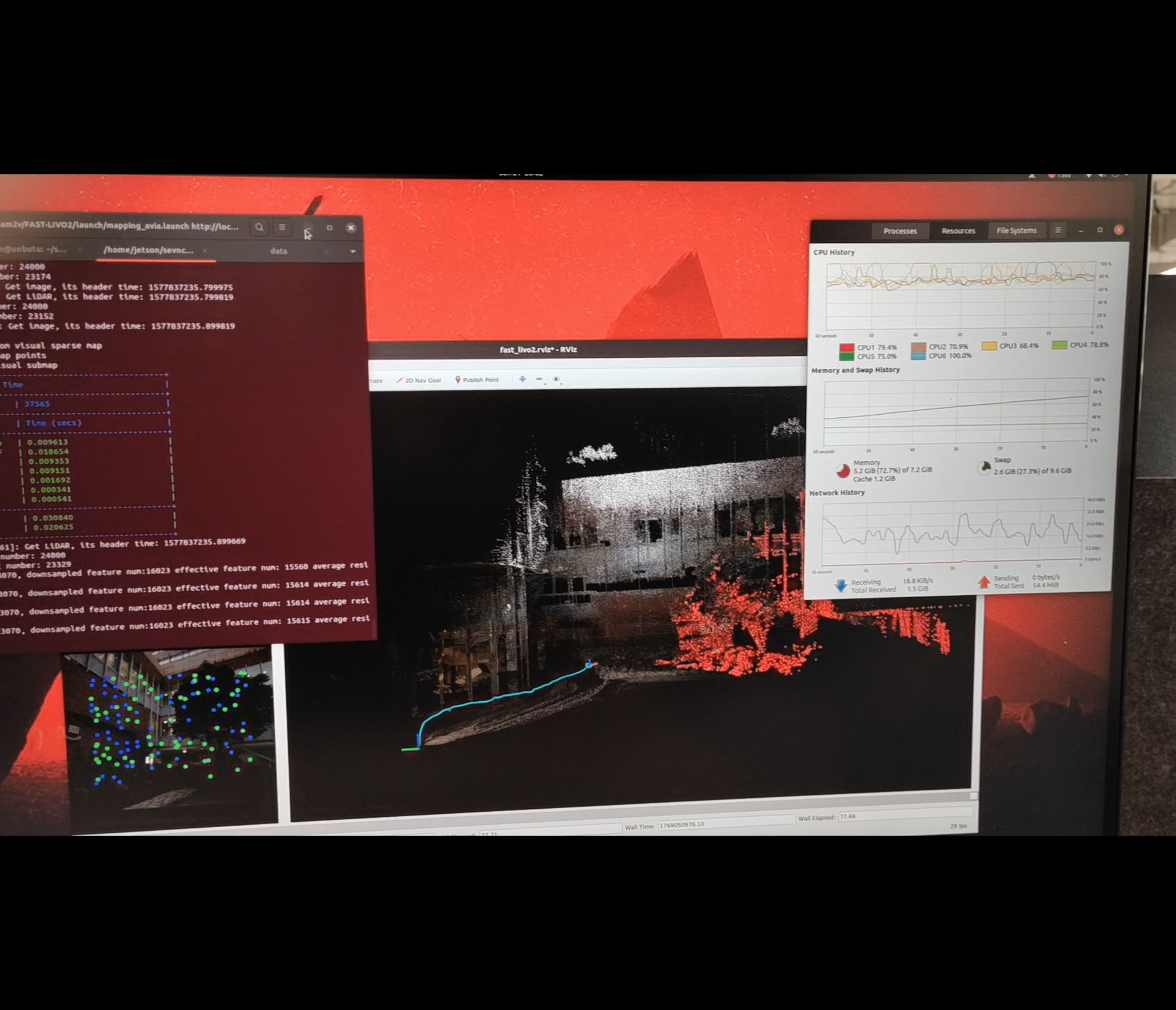
Data hku2.bag Download URL: https://download.csdn.net/download/wishchin/92599999

有“AI”的1024 = 2048,欢迎大家加入2048 AI社区
更多推荐
 12
12 0
0- 0


 已为社区贡献9条内容

所有评论(0)