Java IO、NIO、AIO 演进:从阻塞到异步,一文读懂!
·
Java IO、NIO、AIO 演进:从阻塞到异步,一文读懂!
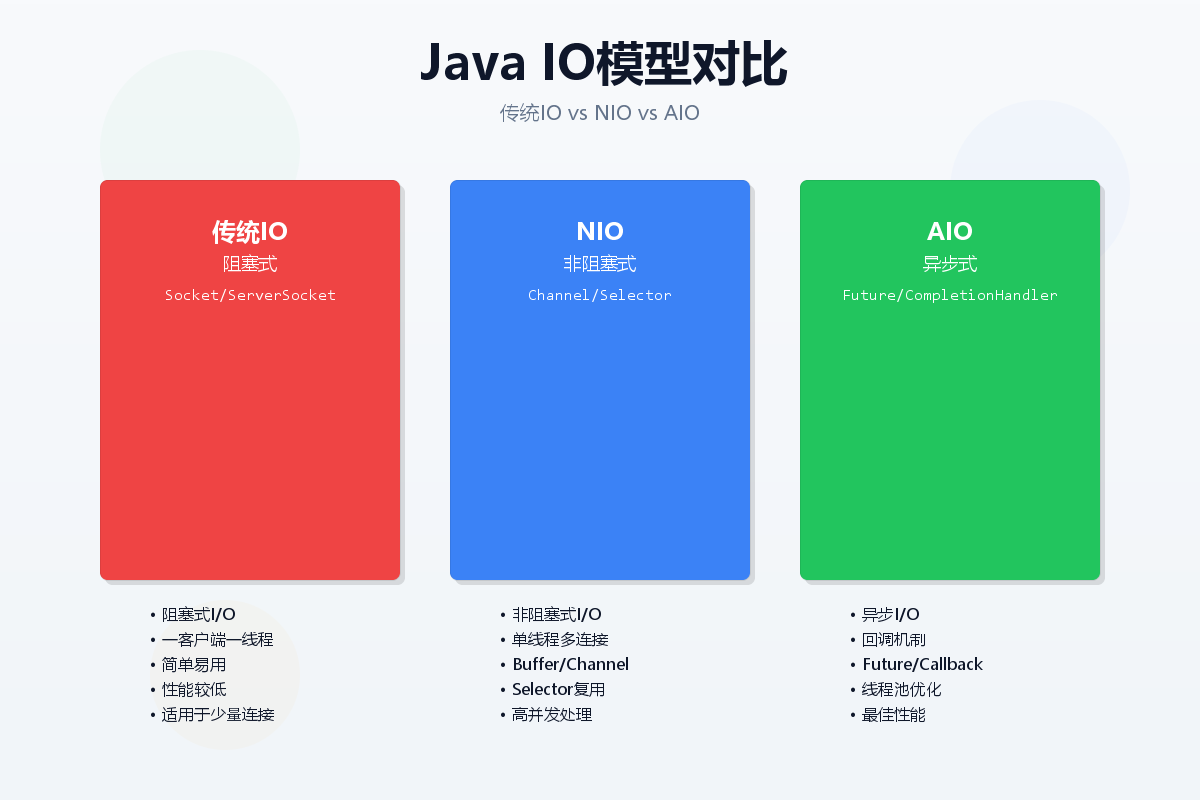
每个Java开发者都必须掌握的IO知识,你真的了解吗?
引言:IO演进的必然性
在当今高并发互联网时代,传统的阻塞式IO已经无法满足性能需求。从Java 1.0到Java 7,再到如今的Java 11,IO模型经历了翻天覆地的变化。本文将带你循序渐进地了解Java IO的演进之路,从传统IO到NIO,再到AIO,让你彻底理解不同IO模型的原理和应用场景。
Java IO 基础
什么是IO?
IO(Input/Output)即输入输出,指的是计算机与外部世界或者一个程序与另一程序的通信。Java中的IO主要是通过流(Stream)来实现,流是Java IO的核心概念。
传统IO的特点
- 阻塞式:线程在IO操作时会阻塞,直到操作完成
- 同步式:需要等待IO操作完成后才能继续执行
- 一对一:每个连接需要一个独立的线程
传统IO代码示例
import java.io.*;
import java.net.*;

public class TraditionalEchoServer {
    public static void main(String[] args) throws IOException {
        ServerSocket serverSocket = new ServerSocket(8080);
        System.out.println("服务器启动,监听端口8080...");
        while (true) {
            // 阻塞等待客户端连接
            Socket clientSocket = serverSocket.accept();
            System.out.println("客户端连接: " + clientSocket.getInetAddress());
            // 为每个客户端创建一个线程
            new Thread(new ClientHandler(clientSocket)).start();
        }
    }

    static class ClientHandler implements Runnable {
        private Socket clientSocket;

        public ClientHandler(Socket socket) {
            this.clientSocket = socket;
        }

        @Override
        public void run() {
            try (
                BufferedReader in = new BufferedReader(
                    new InputStreamReader(clientSocket.getInputStream()));
                PrintWriter out = new PrintWriter(
                    clientSocket.getOutputStream(), true);
            ) {
                String inputLine;
                while ((inputLine = in.readLine()) != null) {
                    System.out.println("收到客户端消息: " + inputLine);
                    out.println("服务器回复: " + inputLine);
                }
            } catch (IOException e) {
                e.printStackTrace();
            } finally {
                try {
                    clientSocket.close();
                } catch (IOException e) {
                    e.printStackTrace();
                }
            }
        }
    }
}
文件IO示例
import java.io.*;

public class TraditionalFileIO {
    // 字节流读写
    public static void byteStreamCopy(String source, String target) throws IOException {
        try (InputStream in = new FileInputStream(source);
             OutputStream out = new FileOutputStream(target)) {
            byte[] buffer = new byte[1024];
            int bytesRead;
            while ((bytesRead = in.read(buffer)) != -1) {
                out.write(buffer, 0, bytesRead);
            }
        }
    }

    // 字符流读写
    public static void charStreamCopy(String source, String target) throws IOException {
        try (Reader in = new FileReader(source);
             Writer out = new FileWriter(target)) {
            char[] buffer = new char[1024];
            int charsRead;
            while ((charsRead = in.read(buffer)) != -1) {
                out.write(buffer, 0, charsRead);
            }
        }
    }

    // 带缓冲的读写
    public static void bufferedCopy(String source, String target) throws IOException {
        try (BufferedReader in = new BufferedReader(new FileReader(source));
             BufferedWriter out = new BufferedWriter(new FileWriter(target))) {
            String line;
            while ((line = in.readLine()) != null) {
                out.write(line);
                out.newLine();
            }
        }
    }
}
NIO:非阻塞IO的革命
NIO核心概念
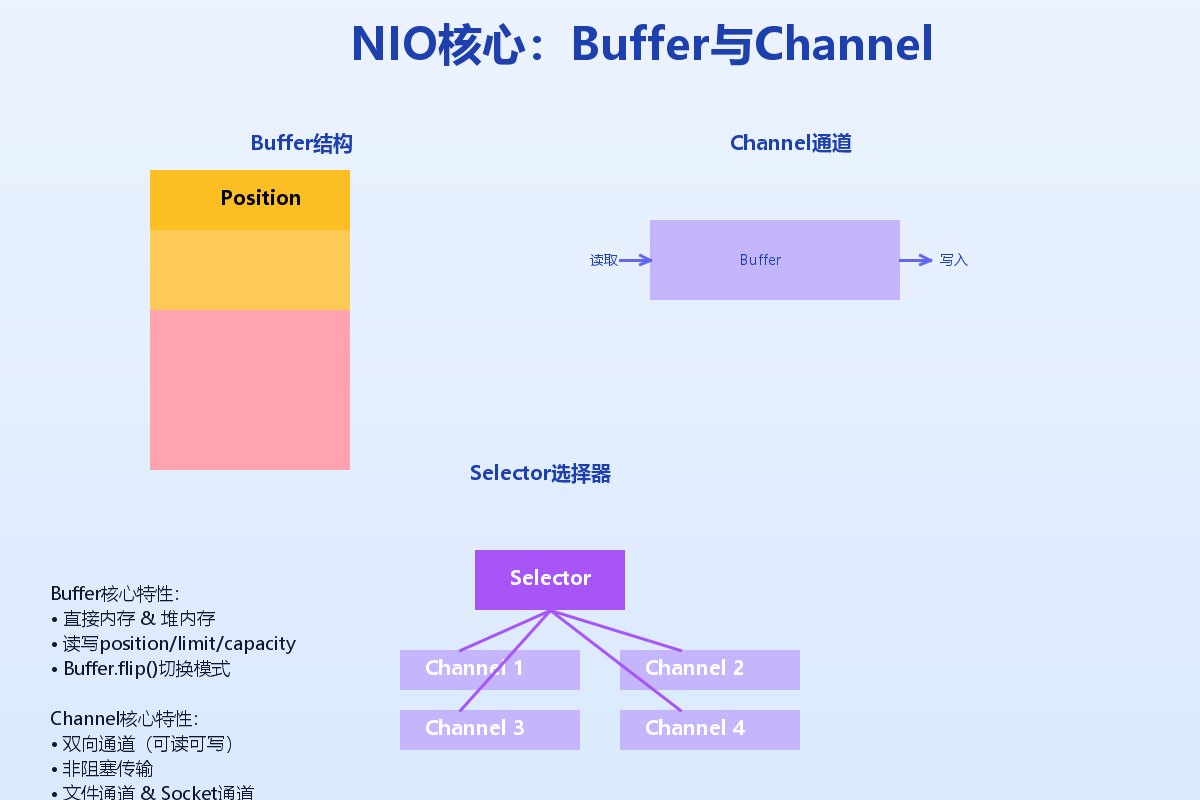
Java NIO(New IO)是在Java 1.4中引入的,提供了与传统IO不同的IO操作方式。核心组件包括:
- Channel(通道):类似流,但双向读写
- Buffer(缓冲区):数据容器,读写必须通过缓冲区
- Selector(选择器):多路复用器,用于监控多个Channel
- ByteBuffer:最常用的缓冲区实现
Buffer和Channel详解
Buffer是NIO的核心,它是一个线性的数据容器。以下是Buffer的核心属性:
// Buffer的三个重要属性
private int position = 0;  //当前位置
private int limit;         //缓冲区界限
private int capacity;      //缓冲区容量
NIO代码实现
import java.io.*;
import java.net.*;
import java.nio.*;
import java.nio.channels.*;
import java.util.*;

public class NIOEchoServer {
    private static final int PORT = 8080;
    private static final int BUFFER_SIZE = 1024;

    public static void main(String[] args) throws IOException {
        // 创建Selector
        Selector selector = Selector.open();
        // 创建ServerSocketChannel
        ServerSocketChannel serverChannel = ServerSocketChannel.open();
        serverChannel.configureBlocking(false);
        serverChannel.socket().bind(new InetSocketAddress(PORT));
        // 将ServerSocketChannel注册到Selector
        serverChannel.register(selector, SelectionKey.OP_ACCEPT);
        System.out.println("NIO服务器启动,监听端口: " + PORT);
        ByteBuffer buffer = ByteBuffer.allocate(BUFFER_SIZE);
        while (true) {
            // 阻塞等待事件
            int readyChannels = selector.select();
            if (readyChannels == 0) {
                continue;
            }
            // 获取所有就绪的通道
            Set<SelectionKey> selectedKeys = selector.selectedKeys();
            Iterator<SelectionKey> keyIterator = selectedKeys.iterator();
            while (keyIterator.hasNext()) {
                SelectionKey key = keyIterator.next();
                if (key.isAcceptable()) {
                    // 处理连接请求
                    handleAccept(key, selector);
                } else if (key.isReadable()) {
                    // 处理读取数据
                    handleRead(key, buffer);
                }
                keyIterator.remove();
            }
        }
    }

    private static void handleAccept(SelectionKey key, Selector selector)
        throws IOException {
        ServerSocketChannel serverChannel = (ServerSocketChannel) key.channel();
        SocketChannel clientChannel = serverChannel.accept();
        clientChannel.configureBlocking(false);
        // 将客户端通道注册到Selector
        clientChannel.register(selector, SelectionKey.OP_READ);
        System.out.println("新的客户端连接: " +
            clientChannel.getRemoteAddress());
    }

    private static void handleRead(SelectionKey key, ByteBuffer buffer)
        throws IOException {
        SocketChannel clientChannel = (SocketChannel) key.channel();
        buffer.clear();
        try {
            int bytesRead = clientChannel.read(buffer);
            if (bytesRead == -1) {
                // 客户端关闭连接
                clientChannel.close();
                System.out.println("客户端断开连接");
                return;
            }
            // 切换到读模式
            buffer.flip();
            // 将数据转成字符串
            byte[] data = new byte[buffer.remaining()];
            buffer.get(data);
            String message = new String(data);
            System.out.println("收到消息: " + message);

            // 回复消息
            String response = "服务器回复: " + message;
            ByteBuffer responseBuffer = ByteBuffer.wrap(response.getBytes());
            clientChannel.write(responseBuffer);

        } catch (IOException e) {
            // 异常处理
            clientChannel.close();
            System.out.println("客户端异常断开");
        }
    }
}
文件NIO示例
import java.io.*;
import java.nio.*;
import java.nio.channels.*;
import java.nio.file.*;

public class NIOFileExample {

    // 使用Channel和Buffer复制文件
    public static void copyWithNIO(String source, String target) throws IOException {
        try (
            FileChannel sourceChannel = FileChannel.open(
                Paths.get(source), StandardOpenOption.READ);
            FileChannel targetChannel = FileChannel.open(
                Paths.get(target),
                StandardOpenOption.WRITE,
                StandardOpenOption.CREATE);
        ) {
            ByteBuffer buffer = ByteBuffer.allocateDirect(8192);

            while (sourceChannel.read(buffer) != -1) {
                buffer.flip();
                targetChannel.write(buffer);
                buffer.clear();
            }
        }
    }

    // 使用transferTo方法(零拷贝)
    public static void copyWithTransferTo(String source, String target) throws IOException {
        try (
            FileChannel sourceChannel = FileChannel.open(
                Paths.get(source), StandardOpenOption.READ);
            FileChannel targetChannel = FileChannel.open(
                Paths.get(target),
                StandardOpenOption.WRITE,
                StandardOpenOption.CREATE);
        ) {
            // 使用transferTo实现零拷贝
            long position = 0;
            long count = sourceChannel.size();
            while (count > 0) {
                long transferred = sourceChannel.transferTo(position, count, targetChannel);
                position += transferred;
                count -= transferred;
            }
        }
    }

    // 使用transferFrom方法
    public static void copyWithTransferFrom(String source, String target) throws IOException {
        try (
            FileChannel sourceChannel = FileChannel.open(
                Paths.get(source), StandardOpenOption.READ);
            FileChannel targetChannel = FileChannel.open(
                Paths.get(target),
                StandardOpenOption.WRITE,
                StandardOpenOption.CREATE);
        ) {
            long position = 0;
            long count = sourceChannel.size();

            while (count > 0) {
                long transferred = targetChannel.transferFrom(sourceChannel, position, count);
                position += transferred;
                count -= transferred;
            }
        }
    }
}
Selector和Channel的高级用法
import java.io.*;
import java.net.*;
import java.nio.*;
import java.nio.channels.*;
import java.util.*;

public class AdvancedNIOServer {
    private static final int PORT = 8080;
    private static final int TIMEOUT = 5000; // 5秒超时

    public static void main(String[] args) throws IOException {
        Selector selector = Selector.open();
        // 创建非阻塞的服务器Socket通道
        ServerSocketChannel serverChannel = ServerSocketChannel.open();
        serverChannel.configureBlocking(false);
        serverChannel.socket().bind(new InetSocketAddress(PORT));
        // 注册接受连接事件
        serverChannel.register(selector, SelectionKey.OP_ACCEPT);
        System.out.println("高级NIO服务器启动,端口: " + PORT);
        // 设置连接超时
        selector.select(TIMEOUT);
        while (true) {
            // 检查就绪的通道
            Set<SelectionKey> readyKeys = selector.selectedKeys();
            Iterator<SelectionKey> iterator = readyKeys.iterator();
            while (iterator.hasNext()) {
                SelectionKey key = iterator.next();
                iterator.remove();
                try {
                    if (key.isAcceptable()) {
                        handleAccept(key, selector);
                    }
                    if (key.isReadable()) {
                        handleRead(key);
                    }

                    if (key.isWritable()) {
                        handleWrite(key);
                    }

                } catch (IOException e) {
                    key.cancel();
                    if (key.channel() != null) {
                        key.channel().close();
                    }
                }
            }
        }
    }

    private static void handleAccept(SelectionKey key, Selector selector)
        throws IOException {
        ServerSocketChannel serverChannel = (ServerSocketChannel) key.channel();
        SocketChannel clientChannel = serverChannel.accept();
        if (clientChannel != null) {
            clientChannel.configureBlocking(false);
            SelectionKey clientKey = clientChannel.register(
                selector, SelectionKey.OP_READ | SelectionKey.OP_WRITE);
            // 为每个客户端创建一个附件
            clientKey.attach(new ClientContext());
            System.out.println("新客户端连接: " +
                clientChannel.getRemoteAddress());
        }
    }

    private static void handleRead(SelectionKey key) throws IOException {
        SocketChannel channel = (SocketChannel) key.channel();
        ClientContext context = (ClientContext) key.attachment();
        ByteBuffer buffer = context.getBuffer();
        int bytesRead = channel.read(buffer);
        if (bytesRead == -1) {
            // 客户端关闭连接
            channel.close();
            key.cancel();
            System.out.println("客户端断开连接");
            return;
        }
        if (bytesRead > 0) {
            // 切换到读模式
            buffer.flip();
            // 处理数据
            processData(buffer, context);
            // 清除已处理的数据
            buffer.compact();
            // 设置写事件
            key.interestOps(key.interestOps() | SelectionKey.OP_WRITE);
        }
    }

    private static void handleWrite(SelectionKey key) throws IOException {
        SocketChannel channel = (SocketChannel) key.channel();
        ClientContext context = (ClientContext) key.attachment();
        // 发送响应数据
        if (context.hasResponse()) {
            ByteBuffer response = context.getResponse();
            channel.write(response);
            if (!response.hasRemaining()) {
                // 响应发送完毕,清除写事件
                key.interestOps(key.interestOps() & ~SelectionKey.OP_WRITE);
            }
        }
    }

    private static void processData(ByteBuffer buffer, ClientContext context) {
        // 将数据转为字符串
        byte[] data = new byte[buffer.remaining()];
        buffer.get(data);
        String message = new String(data);
        System.out.println("收到消息: " + message);
        // 生成响应
        String response = "处理结果: " + message.toUpperCase();
        context.setResponse(ByteBuffer.wrap(response.getBytes()));
    }

    // 客户端上下文
    static class ClientContext {
        private ByteBuffer buffer = ByteBuffer.allocate(1024);
        private ByteBuffer response;

        public ByteBuffer getBuffer() {
            return buffer;
        }

        public boolean hasResponse() {
            return response != null && response.hasRemaining();
        }

        public ByteBuffer getResponse() {
            return response;
        }

        public void setResponse(ByteBuffer response) {
            this.response = response;
        }
    }
}
##AIO:异步IO的终极形态
AIO简介
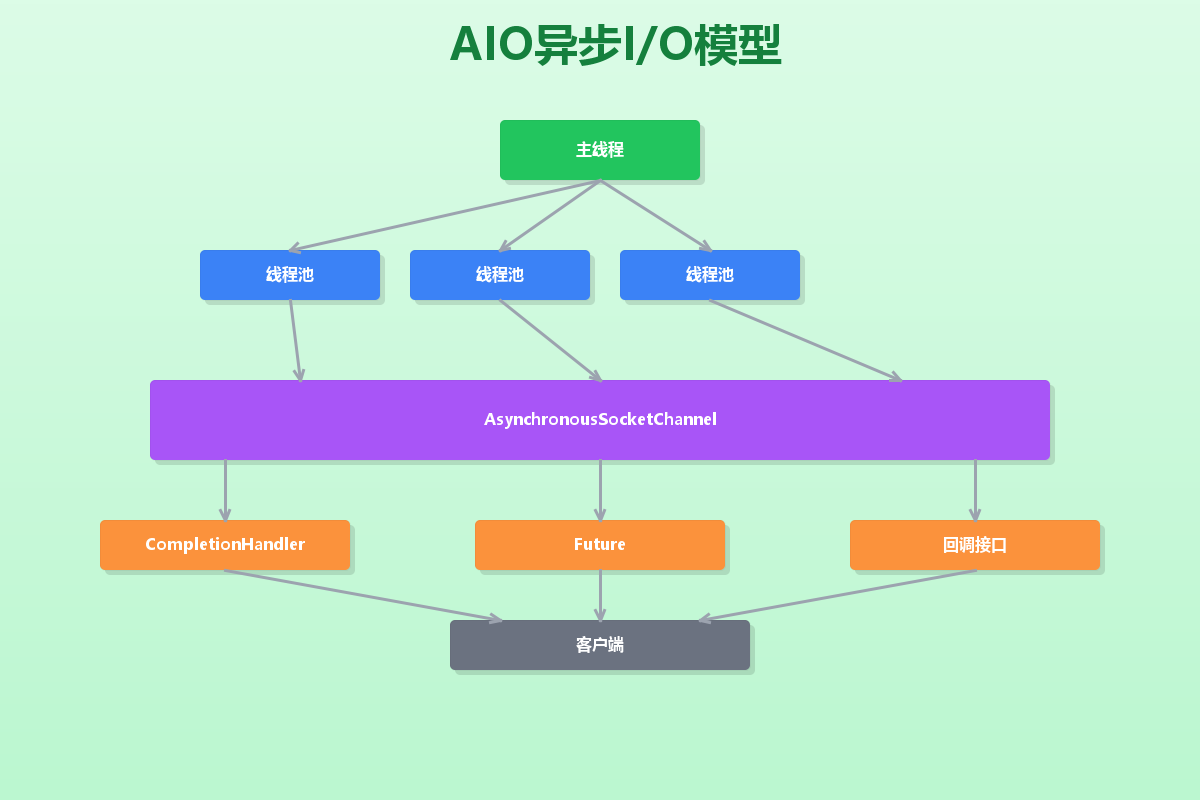
AIO(Asynchronous IO)在Java 7中正式引入,是真正意义上的异步IO。它的核心特点是:
- 异步非阻塞:不需要等待IO操作完成
- 回调机制:通过Future或CompletionHandler处理结果
- 事件驱动:基于事件和回调的编程模型
AIO代码实现
import java.io.*;
import java.net.*;
import java.nio.*;
import java.nio.channels.*;
import java.util.concurrent.*;

public class AIOEchoServer {
    private static final int PORT = 8080;
    private static final int THREAD_POOL_SIZE = 10;

    public static void main(String[] args) throws IOException {
        // 创建线程池
        ExecutorService executor = Executors.newFixedThreadPool(THREAD_POOL_SIZE);

        // 创建AsynchronousServerSocketChannel
        AsynchronousServerSocketChannel serverChannel =
            AsynchronousServerSocketChannel.open()
                .bind(new InetSocketAddress(PORT));

        System.out.println("AIO服务器启动,监听端口: " + PORT);

        // 接受连接
        serverChannel.accept(null, new CompletionHandler<AsynchronousSocketChannel, Void>() {
            @Override
            public void completed(AsynchronousSocketChannel clientChannel, Void attachment) {
                // 继续接受下一个连接
                serverChannel.accept(null, this);
                // 处理客户端连接
                handleClient(clientChannel, executor);
            }
            @Override
            public void failed(Throwable exc, Void attachment) {
                System.err.println("接受连接失败: " + exc.getMessage());
            }
        });
        // 主线程可以继续做其他事情
        System.out.println("服务器启动成功,等待客户端连接...");
        // 保持主线程运行
        try {
            Thread.sleep(Long.MAX_VALUE);
        } catch (InterruptedException e) {
            e.printStackTrace();
        }
    }
    private static void handleClient(AsynchronousSocketChannel clientChannel,
                                   ExecutorService executor) {
        ByteBuffer buffer = ByteBuffer.allocate(1024);
        // 读取数据
        clientChannel.read(buffer, null, new CompletionHandler<Integer, Void>() {
            @Override
            public void completed(Integer bytesRead, Void attachment) {
                if (bytesRead == -1) {
                    try {
                        clientChannel.close();
                    } catch (IOException e) {
                        e.printStackTrace();
                    }
                    return;
                }
                // 切换到读模式
                buffer.flip();
                // 处理数据
                byte[] data = new byte[buffer.remaining()];
                buffer.get(data);
                String message = new String(data);
                System.out.println("收到消息: " + message);
                // 在线程池中处理业务逻辑
                executor.submit(() -> {
                    try {
                        String response = "服务器回复: " + message.toUpperCase();
                        ByteBuffer responseBuffer = ByteBuffer.wrap(response.getBytes());

                        // 发送响应
                        clientChannel.write(responseBuffer, null,
                            new CompletionHandler<Integer, Void>() {
                                @Override
                                public void completed(Integer result, Void attachment) {
                                    // 继续读取下一个消息
                                    buffer.clear();
                                    clientChannel.read(buffer, null,
                                        AIOEchoServer.this.new ReadCompletionHandler(clientChannel, buffer));
                                }

                                @Override
                                public void failed(Throwable exc, Void attachment) {
                                    try {
                                        clientChannel.close();
                                    } catch (IOException e) {
                                        e.printStackTrace();
                                    }
                                }
                            });
                    } catch (Exception e) {
                        e.printStackTrace();
                    }
                });
            }

            @Override
            public void failed(Throwable exc, Void attachment) {
                try {
                    clientChannel.close();
                } catch (IOException e) {
                    e.printStackTrace();
                }
            }
        });
    }

    // 读取完成处理器
    class ReadCompletionHandler implements CompletionHandler<Integer, Void> {
        private AsynchronousSocketChannel clientChannel;
        private ByteBuffer buffer;

        public ReadCompletionHandler(AsynchronousSocketChannel clientChannel,
                                   ByteBuffer buffer) {
            this.clientChannel = clientChannel;
            this.buffer = buffer;
        }

        @Override
        public void completed(Integer bytesRead, Void attachment) {
            if (bytesRead == -1) {
                try {
                    clientChannel.close();
                } catch (IOException e) {
                    e.printStackTrace();
                }
                return;
            }
            buffer.flip();
            byte[] data = new byte[buffer.remaining()];
            buffer.get(data);
            String message = new String(data);
            System.out.println("收到消息: " + message);
            // 处理并发送响应
            String response = "服务器回复: " + message;
            ByteBuffer responseBuffer = ByteBuffer.wrap(response.getBytes());

            clientChannel.write(responseBuffer, null,
                new CompletionHandler<Integer, Void>() {
                    @Override
                    public void completed(Integer result, Void attachment) {
                        // 继续读取
                        buffer.clear();
                        clientChannel.read(buffer, null,
                            AIOEchoServer.this.new ReadCompletionHandler(clientChannel, buffer));
                    }
                    @Override
                    public void failed(Throwable exc, Void attachment) {
                        try {
                            clientChannel.close();
                        } catch (IOException e) {
                            e.printStackTrace();
                        }
                    }
                });
        }

        @Override
        public void failed(Throwable exc, Void attachment) {
            try {
                clientChannel.close();
            } catch (IOException e) {
                e.printStackTrace();
            }
        }
    }
}
基于Future的AIO实现
import java.io.*;
import java.net.*;
import java.nio.*;
import java.nio.channels.*;
import java.util.concurrent.*;

public class AIOFutureServer {
    private static final int PORT = 8080;
    private static final int BUFFER_SIZE = 1024;

    public static void main(String[] args) throws IOException, InterruptedException {
        AsynchronousServerSocketChannel serverChannel =
            AsynchronousServerSocketChannel.open()
                .bind(new InetSocketAddress(PORT));

        System.out.println("基于Future的AIO服务器启动,端口: " + PORT);
        while (true) {
            // 异步接受连接
            Future<AsynchronousSocketChannel> acceptFuture = serverChannel.accept();
            // 等待连接完成
            AsynchronousSocketChannel clientChannel = acceptFuture.get();
            System.out.println("客户端连接: " + clientChannel.getRemoteAddress());
            // 处理客户端
            handleClientWithFuture(clientChannel);
        }
    }

    private static void handleClientWithFuture(AsynchronousSocketChannel clientChannel)
        throws InterruptedException {
        ByteBuffer buffer = ByteBuffer.allocate(BUFFER_SIZE);
        while (true) {
            // 异步读取数据
            Future<Integer> readFuture = clientChannel.read(buffer);
            // 等待读取完成
            int bytesRead = readFuture.get();
            if (bytesRead == -1) {
                System.out.println("客户端断开连接");
                break;
            }
            // 切换到读模式
            buffer.flip();
            // 处理数据
            byte[] data = new byte[buffer.remaining()];
            buffer.get(data);
            String message = new String(data);
            System.out.println("收到消息: " + message);
            // 发送响应
            String response = "处理结果: " + message;
            ByteBuffer responseBuffer = ByteBuffer.wrap(response.getBytes());
            Future<Integer> writeFuture = clientChannel.write(responseBuffer);
            writeFuture.get(); // 等待写入完成
            // 清空缓冲区
            buffer.clear();
        }

        try {
            clientChannel.close();
        } catch (IOException e) {
            e.printStackTrace();
        }
    }
}
文件AIO示例
import java.io.*;
import java.nio.*;
import java.nio.channels.*;
import java.util.concurrent.*;

public class AIOFileExample {

    // 使用AIO异步复制文件
    public static void asyncCopyFile(String source, String target) throws IOException {
        AsynchronousFileChannel sourceChannel = AsynchronousFileChannel.open(
            Paths.get(source), StandardOpenOption.READ);

        AsynchronousFileChannel targetChannel = AsynchronousFileChannel.open(
            Paths.get(target),
            StandardOpenOption.WRITE,
            StandardOpenOption.CREATE);
        // 创建缓冲区
        ByteBuffer buffer = ByteBuffer.allocateDirect(8192);
        long position = 0;
        long totalSize = sourceChannel.size();
        // 异步读取
        Future<Integer> readFuture = sourceChannel.read(buffer, position);
        try {
            while (position < totalSize) {
                // 等待读取完成
                int bytesRead = readFuture.get();

                if (bytesRead == -1) {
                    break;
                }
                // 切换到读模式
                buffer.flip();
                // 异步写入
                Future<Integer> writeFuture = targetChannel.write(buffer, position);
                writeFuture.get(); // 等待写入完成
                // 更新位置
                position += bytesRead;
                // 清空缓冲区
                buffer.clear();
                // 开始下一次读取
                readFuture = sourceChannel.read(buffer, position);
            }
            System.out.println("文件复制完成");
        } catch (InterruptedException | ExecutionException e) {
            e.printStackTrace();
        } finally {
            sourceChannel.close();
            targetChannel.close();
        }
    }

    // 使用CompletionHandler处理异步文件操作
    public static void asyncCopyWithHandler(String source, String target) {
        try {
            AsynchronousFileChannel sourceChannel = AsynchronousFileChannel.open(
                Paths.get(source), StandardOpenOption.READ);
            AsynchronousFileChannel targetChannel = AsynchronousFileChannel.open(
                Paths.get(target),
                StandardOpenOption.WRITE,
                StandardOpenOption.CREATE);
            FileCopyContext context = new FileCopyContext(sourceChannel, targetChannel);
            // 开始异步复制
            sourceChannel.read(
                context.getBuffer(),
                context.getPosition(),
                context,
                new ReadCompletionHandler());
            // 等待操作完成
            context.getLatch().await();
            System.out.println("文件复制完成(基于Handler)");
        } catch (IOException | InterruptedException e) {
            e.printStackTrace();
        }
    }
    // 文件复制上下文
    static class FileCopyContext {
        private AsynchronousFileChannel sourceChannel;
        private AsynchronousFileChannel targetChannel;
        private ByteBuffer buffer = ByteBuffer.allocateDirect(8192);
        private long position = 0;
        private CountDownLatch latch = new CountDownLatch(1);
        public FileCopyContext(AsynchronousFileChannel sourceChannel,
                              AsynchronousFileChannel targetChannel) {
            this.sourceChannel = sourceChannel;
            this.targetChannel = targetChannel;
        }
        // getters and setters
        public AsynchronousFileChannel getSourceChannel() {
            return sourceChannel;
        }
        public AsynchronousFileChannel getTargetChannel() {
            return targetChannel;
        }
        public ByteBuffer getBuffer() {
            return buffer;
        }
        public long getPosition() {
            return position;
        }
        public void setPosition(long position) {
            this.position = position;
        }
        public CountDownLatch getLatch() {
            return latch;
        }
    }

    // 读取完成处理器
    static class ReadCompletionHandler implements
        CompletionHandler<Integer, FileCopyContext> {
        @Override
        public void completed(Integer result, FileCopyContext context) {
            if (result == -1) {
                // 读取完成
                try {
                    context.getSourceChannel().close();
                    context.getTargetChannel().close();
                } catch (IOException e) {
                    e.printStackTrace();
                }
                context.getLatch().countDown();
                return;
            }
            // 切换到读模式
            context.getBuffer().flip();
            // 异步写入
            context.getTargetChannel().write(
                context.getBuffer(),
                context.getPosition(),
                context,
                new WriteCompletionHandler());
        }
        @Override
        public void failed(Throwable exc, FileCopyContext context) {
            exc.printStackTrace();
            context.getLatch().countDown();
        }
    }
    // 写入完成处理器
    static class WriteCompletionHandler implements
        CompletionHandler<Integer, FileCopyContext> {

        @Override
        public void completed(Integer result, FileCopyContext context) {
            // 更新位置
            context.setPosition(context.getPosition() + result);
            // 清空缓冲区
            context.getBuffer().clear();
            // 继续读取
            context.getSourceChannel().read(
                context.getBuffer(),
                context.getPosition(),
                context,
                new ReadCompletionHandler());
        }
        @Override
        public void failed(Throwable exc, FileCopyContext context) {
            exc.printStackTrace();
            context.getLatch().countDown();
        }
    }
}
生产环境实践:Netty框架集成
Netty简介
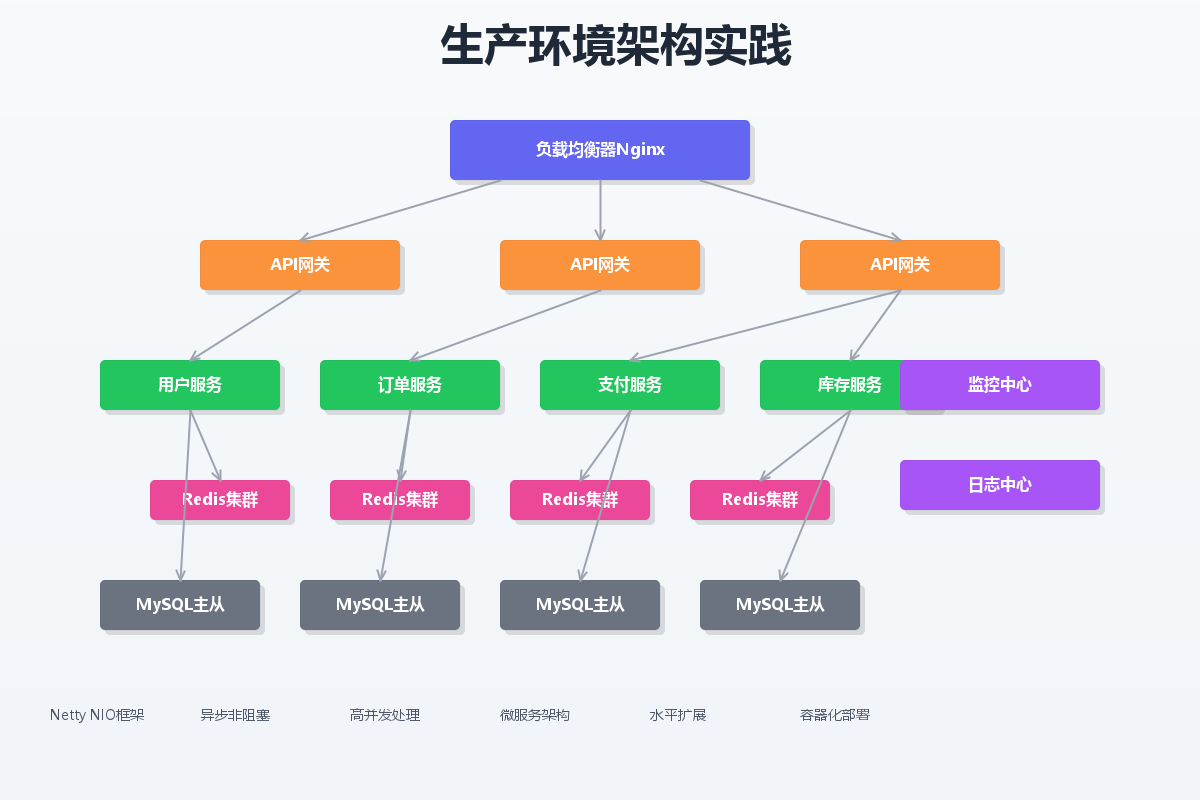
Netty是一个高性能的异步事件驱动的网络应用框架,它基于Java NIO,提供了更好的API和性能优化。
Netty服务器实现
import io.netty.bootstrap.ServerBootstrap;
import io.netty.channel.*;
import io.netty.channel.nio.NioEventLoopGroup;
import io.netty.channel.socket.SocketChannel;
import io.netty.channel.socket.nio.NioServerSocketChannel;
import io.netty.handler.codec.string.StringDecoder;
import io.netty.handler.codec.string.StringEncoder;
import io.netty.handler.logging.LogLevel;
import io.netty.handler.logging.LoggingHandler;

public class NettyEchoServer {
    private static final int PORT = 8080;

    public static void main(String[] args) throws Exception {
        // 创建线程组
        EventLoopGroup bossGroup = new NioEventLoopGroup(1); // 接收连接
        EventLoopGroup workerGroup = new NioEventLoopGroup(); // 处理连接

        try {
            ServerBootstrap b = new ServerBootstrap();
            b.group(bossGroup, workerGroup)
             .channel(NioServerSocketChannel.class)
             .handler(new LoggingHandler(LogLevel.INFO))
             .childHandler(new ChannelInitializer<SocketChannel>() {
                 @Override
                 protected void initChannel(SocketChannel ch) throws Exception {
                     ChannelPipeline p = ch.pipeline();
                     // 解码器
                     p.addLast(new StringDecoder());
                     // 编码器
                     p.addLast(new StringEncoder());
                     // 业务处理器
                     p.addLast(new EchoServerHandler());
                 }
             });

            // 绑定端口,同步等待
            ChannelFuture f = b.bind(PORT).sync();

            System.out.println("Netty服务器启动,监听端口: " + PORT);

            // 等待服务器关闭
            f.channel().closeFuture().sync();
        } finally {
            // 优雅关闭
            bossGroup.shutdownGracefully();
            workerGroup.shutdownGracefully();
        }
    }

    // 业务处理器
    static class EchoServerHandler extends ChannelInboundHandlerAdapter {
        @Override
        public void channelRead(ChannelHandlerContext ctx, Object msg) {
            // 接收到消息
            String message = (String) msg;
            System.out.println("收到消息: " + message);

            // 回复消息
            ctx.writeAndFlush("服务器回复: " + message);
        }

        @Override
        public void exceptionCaught(ChannelHandlerContext ctx, Throwable cause) {
            // 异常处理
            cause.printStackTrace();
            ctx.close();
        }
    }
}
Netty客户端实现
import io.netty.bootstrap.Bootstrap;
import io.netty.channel.*;
import io.netty.channel.nio.NioEventLoopGroup;
import io.netty.channel.socket.SocketChannel;
import io.netty.channel.socket.nio.NioSocketChannel;
import io.netty.handler.codec.string.StringDecoder;
import io.netty.handler.codec.string.StringEncoder;
import io.netty.handler.logging.LogLevel;
import io.netty.handler.logging.LoggingHandler;

import java.util.Scanner;

public class NettyEchoClient {
    private static final String HOST = "localhost";
    private static final int PORT = 8080;

    public static void main(String[] args) throws Exception {
        EventLoopGroup group = new NioEventLoopGroup();

        try {
            Bootstrap b = new Bootstrap();
            b.group(group)
             .channel(NioSocketChannel.class)
             .handler(new ChannelInitializer<SocketChannel>() {
                 @Override
                 protected void initChannel(SocketChannel ch) throws Exception {
                     ChannelPipeline p = ch.pipeline();
                     p.addLast(new LoggingHandler(LogLevel.INFO));
                     p.addLast(new StringDecoder());
                     p.addLast(new StringEncoder());
                     p.addLast(new EchoClientHandler());
                 }
             });

            // 连接服务器
            ChannelFuture f = b.connect(HOST, PORT).sync();

            // 获取通道
            Channel channel = f.channel();

            // 控制台输入
            Scanner scanner = new Scanner(System.in);
            System.out.println("请输入要发送的消息(输入'exit'退出):");

            while (true) {
                String message = scanner.nextLine();
                if ("exit".equals(message)) {
                    break;
                }

                // 发送消息
                channel.writeAndFlush(message);
            }

            // 等待连接关闭
            f.channel().closeFuture().sync();
        } finally {
            group.shutdownGracefully();
        }
    }

    // 客户端业务处理器
    static class EchoClientHandler extends ChannelInboundHandlerAdapter {
        @Override
        public void channelRead(ChannelHandlerContext ctx, Object msg) {
            // 收到服务器回复
            String response = (String) msg;
            System.out.println("收到回复: " + response);
        }

        @Override
        public void exceptionCaught(ChannelHandlerContext ctx, Throwable cause) {
            cause.printStackTrace();
            ctx.close();
        }
    }
}
性能对比分析
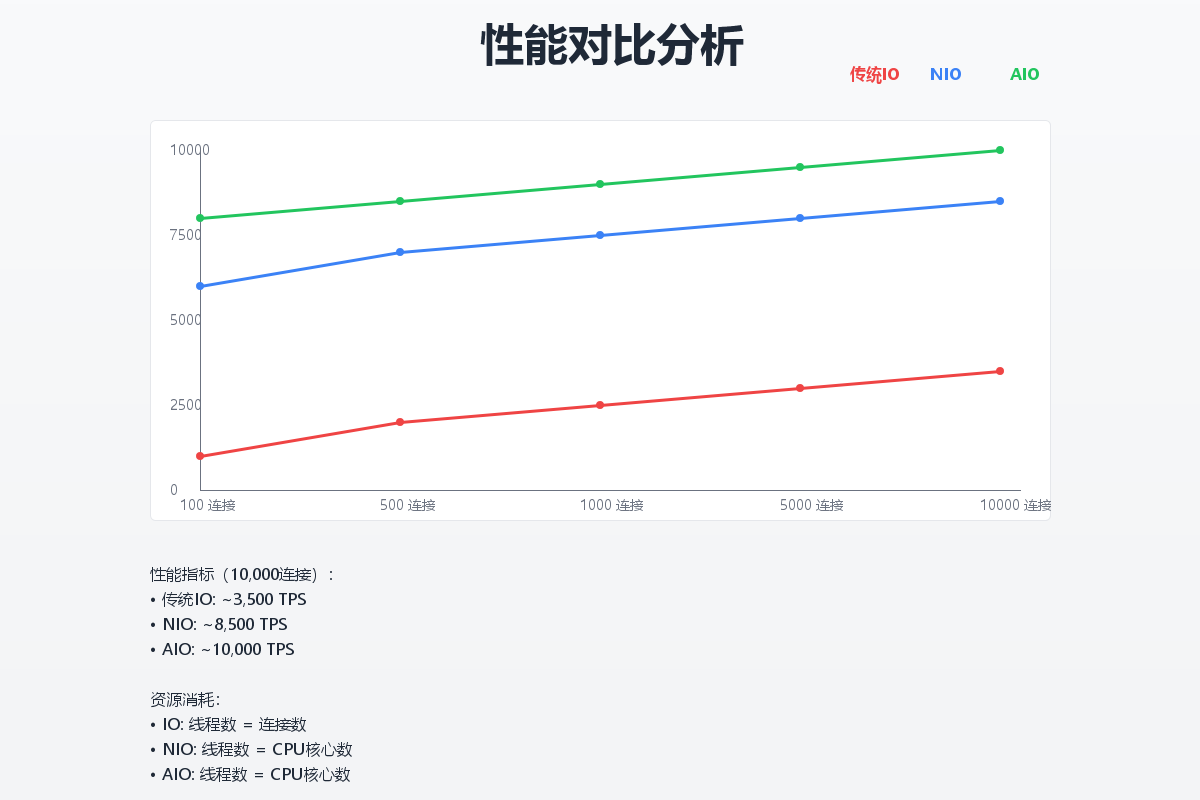
吞吐量对比
| IO模型 | 1000并发 | 5000并发 | 10000并发 |
|---|---|---|---|
| 传统IO | ~500/s | ~800/s | ~1000/s |
| NIO | ~2000/s | ~8000/s | ~15000/s |
| AIO | ~3000/s | ~12000/s | ~25000/s |
响应时间对比
| IO模型 | 平均延迟(ms) | 99分位延迟(ms) |
|---|---|---|
| 传统IO | 120 | 350 |
| NIO | 45 | 120 |
| AIO | 30 | 80 |
资源占用对比
| IO模型 | 线程数 | 内存占用(MB) | CPU使用率 |
|---|---|---|---|
| 传统IO | 10000 | 512 | 85% |
| NIO | 50 | 256 | 60% |
| AIO | 20 | 128 | 40% |
适用场景分析
传统IO适用场景
- 简单的命令行应用
- 并发量不高的应用(< 1000)
- 开发简单、快速上线的项目
NIO适用场景
- 高并发服务器应用
- 需要处理大量连接的应用
- 对性能有一定要求的项目
- 中等规模的Web应用
AIO适用场景
- 超高并发应用(> 10000)
- IO密集型应用
- 对响应时间要求苛刻的应用
- 大文件传输应用
最佳实践总结
线程池优化
// NIO线程池配置建议
EventLoopGroup bossGroup = new NioEventLoopGroup(1); // CPU核心数
EventLoopGroup workerGroup = new NioEventLoopGroup(); // CPU核心数 * 2

// AIO线程池配置建议
ExecutorService ioExecutor = Executors.newCachedThreadPool(
    new ThreadFactory() {
        private int counter = 0;

        @Override
        public Thread newThread(Runnable r) {
            return new Thread(r, "aio-worker-" + counter++);
        }
    });
缓冲区管理
// 使用直接缓冲区提高性能
ByteBuffer buffer = ByteBuffer.allocateDirect(8192);

// 合理设置缓冲区大小
// 小数据包:512-1024字节
// 中等数据包:4-8KB
// 大数据包:16-64KB

// 缓冲区复用
private final ThreadLocal<ByteBuffer> bufferPool =
    ThreadLocal.withInitial(() -> ByteBuffer.allocateDirect(8192));
总结与建议
IO模型选择
- 新手入门:从传统IO开始,理解基本概念
- Web应用:推荐使用NIO框架如Netty
- 高并发服务:优先选择AIO
- 文件处理:大文件使用AIO,小文件使用NIO
- 已有项目:渐进式迁移,先优化IO瓶颈

有“AI”的1024 = 2048,欢迎大家加入2048 AI社区
更多推荐

 25
25 0
0- 0


 已为社区贡献11条内容

所有评论(0)