Agent智能体开发——langchain(1)第一章agent
从零开始,手把手教会你使用langchain框架搭建一个属于你的AI Agent。第一章——agent
第一章 agent
代理将语言模型结合起来工具创建能够推理任务、决定使用哪些工具并迭代寻找解决方案的系统。
creat_agent函数提供生产准备的agent实现
LLM agent会循环运行工具以实现目标。agent运行直到满足停止条件——即模型输出最终输出或达到迭代极限。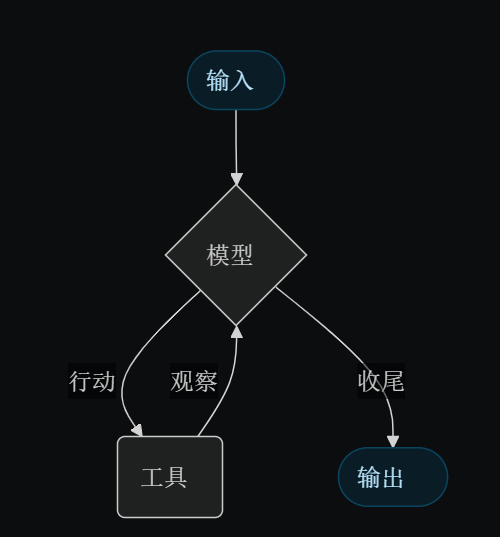
1.model
该模型是你代理人的推理引擎。它可以以多种方式进行指定,支持静态和动态模型选择。
1.1 静态模型
静态模型在创建代理时仅配置一次,执行过程中保持不变。这是最常见且最直接的方法。
从一个型号标识符字符串:
# 官方文档示例

from langchain.agents import create_agent

agent = create_agent("openai:gpt-5", tools=tools)
运行上述代码时会出现以下问题:
1.“NameError: name ‘tools’ is not defined” 【注解】:显然工具tools没有被定义,因为我们在此之前从未写有关tools的定义
2.将tools删除后会出现这个报错"OpenAIError: The api_key client option must be set either by passing api_key to the client or by setting the
OPENAI_API_KEY environment variable"
【注解】:示例中使用的模型为gpt-5供应商为openai,因此需要openai的API_KEY
#使用简单的Qwen模型,供应商为huggingface
"""【注意】:在使用时,直接替换模型名称会报错,因为create_agent函数内部并没有对该模型进行适配处理,无法识别模型供应商。
    需要进行模型供应商的适配处理,才能成功创建代理。
"""

#-----------------huggingface模型适配示例---------------------

from langchain_huggingface import ChatHuggingFace,HuggingFacePipeline
from transformers import AutoModelForCausalLM, AutoTokenizer, pipeline

# 1. 加载模型和分词器
model_name = "Qwen/Qwen2.5-1.5B-Instruct"
tokenizer = AutoTokenizer.from_pretrained(model_name)
model = AutoModelForCausalLM.from_pretrained(model_name)

# 2. 创建 pipeline
pipe = pipeline(
    "text-generation",     #任务类型
    model=model,           #模型名
    tokenizer=tokenizer,   #分词器
    max_new_tokens=1000,   #生成文本最大长度
    temperature=0.7,       #温度参数,0-1之间,值越大生成文本多样性越丰富
    device_map="auto"      #自动选择设备(GPU/CPU)进行推理
)

# 3. 封装为 HuggingFacePipeline
llm = HuggingFacePipeline(pipeline=pipe)

"""适配完成,可以使用该llm创建代理"""

#-----------------创建代理---------------------
from langchain.agents import create_agent

agent = create_agent(model=llm)
这时,create_agent便可以识别模型供应商,并且创建成功
1.2 动态配置
动态模型的选择在运行时间根据当前情况州以及背景。这支持了复杂的路由逻辑和成本优化。
要使用动态模型,可以创建中间件@wrap_model_call修改请求中模型的装饰者:
from langchain_huggingface import ChatHuggingFace,HuggingFacePipeline
from transformers import AutoModelForCausalLM, AutoTokenizer, pipeline

# 1. 加载模型1
model_name_1 = "Qwen/Qwen2.5-1.5B-Instruct"
tokenizer_1 = AutoTokenizer.from_pretrained(model_name_1)
model_1 = AutoModelForCausalLM.from_pretrained(model_name_1)

# 2. 创建 pipeline
pipe = pipeline(
    "text-generation",     #任务类型
    model=model_1,           #模型名
    tokenizer=tokenizer_1,   #分词器
    max_new_tokens=1000,   #生成文本最大长度
    temperature=0.7,       #温度参数,0-1之间,值越大生成文本多样性越丰富
    device_map="auto"      #自动选择设备(GPU/CPU)进行推理
)

# 3. 封装为 HuggingFacePipeline
llm_1 = HuggingFacePipeline(pipeline=pipe)

# 1. 加载模型2
model_name_2 = "Qwen/Qwen2-1.5B"
tokenizer_2 = AutoTokenizer.from_pretrained(model_name_2)
model_2 = AutoModelForCausalLM.from_pretrained(model_name_2)

# 2. 创建 pipeline
pipe = pipeline(
    "text-generation",     #任务类型
    model=model_2,           #模型名
    tokenizer=tokenizer_2,   #分词器
    max_new_tokens=1000,   #生成文本最大长度
    temperature=0.7,       #温度参数,0-1之间,值越大生成文本多样性越丰富
    device_map="auto"      #自动选择设备(GPU/CPU)进行推理
)

# 3. 封装为 HuggingFacePipeline
llm_2 = HuggingFacePipeline(pipeline=pipe)


from langchain.agents import create_agent
from langchain.agents.middleware import wrap_model_call, ModelRequest, ModelResponse

@wrap_model_call
def dynamic_model_selection(request: ModelRequest, handler) -> ModelResponse:
    """Choose model based on conversation complexity."""
    message_count = len(request.state["messages"])

    if message_count > 10:
        # Use an advanced model for longer conversations
        model = llm_1
    else:
        model = llm_2

    return handler(request.override(model=model))

agent = create_agent(
    model=llm_2, # Default model
    middleware=[dynamic_model_selection]
)
2.tools
(1).工具赋予代理采取行动的能力。代理不仅仅限模型工具绑定,还促进了:
(2).多个工具调用依次触发(由一个提示触发)
(3).适当时并行工具调用
(4).基于以往结果的动态工具选择
(5).工具重试逻辑与错误处理
(6).工具调用间的状态持久性
2.1 定义工具
from langchain.tools import tool
from langchain.agents import create_agent


@tool
def search(query: str) -> str:
    """Search for information."""
    return f"Results for: {query}"

@tool
def get_weather(location: str) -> str:
    """Get weather information for a location."""
    return f"Weather in {location}: Sunny, 72°F"

agent = create_agent(model, tools=[search, get_weather])
2.2 工具错误处理
要自定义工具错误的处理方式,请使用@wrap_tool_call装饰器用于创建中间件:
from langchain.agents import create_agent
from langchain.agents.middleware import wrap_tool_call
from langchain.messages import ToolMessage


@wrap_tool_call
def handle_tool_errors(request, handler):
    """Handle tool execution errors with custom messages."""
    try:
        return handler(request)
    except Exception as e:
        # Return a custom error message to the model
        return ToolMessage(
            content=f"Tool error: Please check your input and try again. ({str(e)})",
            tool_call_id=request.tool_call["id"]
        )

agent = create_agent(
    model="gpt-4o",
    tools=[search, get_weather],
    middleware=[handle_tool_errors]
)
2.3 ReAct 循环中的工具使用
代理遵循ReAct(“推理+行动”)模式,交替进行简短的推理步骤和针对性工具调用,并将所得观察反馈到后续决策中,直到能够给出最终答案。
详解ReAct环路示例
# prompt:识别当前最受欢迎的无线耳机并核实供应情况。

"""
================================ Human Message =================================

Find the most popular wireless headphones right now and check if they're in stock

【Reasoning】: “Popularity is time-sensitive, I need to use the provided search tool.”
【Acting】: Call search_products("wireless headphones")


================================== Ai Message ==================================
Tool Calls:
  search_products (call_abc123)
 Call ID: call_abc123
  Args:
    query: wireless headphones

================================= Tool Message =================================

Found 5 products matching "wireless headphones". Top 5 results: WH-1000XM5, ...

【Reasoning】: “I need to confirm availability for the top-ranked item before answering.”
【Acting】: Call check_inventory("WH-1000XM5")

================================== Ai Message ==================================
Tool Calls:
  check_inventory (call_def456)
 Call ID: call_def456
  Args:
    product_id: WH-1000XM5

================================= Tool Message =================================

Product WH-1000XM5: 10 units in stock

【Reasoning】: “I have the most popular model and its stock status. I can now answer the user’s question.”
【Acting】: Produce final answer

================================== Ai Message ==================================

I found wireless headphones (model WH-1000XM5) with 10 units in stock...
"""
3. System prompt
可以通过提供提示来塑造代理处理任务的方式。该system_prompt参数可以作为字符串提供:
agent = create_agent(
    model,
    tools,
    system_prompt="You are a helpful assistant. Be concise and accurate."
)
当没有给出system_prompt时,agent将从message中直接推断处理任务方式
from langchain.agents import create_agent
from langchain.messages import SystemMessage, HumanMessage

literary_agent = create_agent(
    model="anthropic:claude-sonnet-4-5",
    system_prompt=SystemMessage(
        content=[
            {
                "type": "text",
                "text": "You are an AI assistant tasked with analyzing literary works.",
            },
            {
                "type": "text",
                "text": "<the entire contents of 'Pride and Prejudice'>",
                "cache_control": {"type": "ephemeral"}
            }
        ]
    )
)

result = literary_agent.invoke(
    {"messages": [HumanMessage("Analyze the major themes in 'Pride and Prejudice'.")]}
)
这里由于使用create_agent函数创建了一个智能体(会处理更复杂的问题)所以在invoke中必须输入一个字典,该字典必须指明消息类别如HumanMessage。但之前所提到的使用ChatHuggingFace所创建的是一个简单的用于聊天的模型,它的invoke函数支持接收一个字符串作为函数输入
3.1 动态系统提示
对于需要根据运行时上下文或代理状态修改系统提示符的高级用例,你可以使用中间件.
该**@dynamic_promptDecorator** 创建中间件,根据模型请求生成系统提示:
from typing import TypedDict

from langchain.agents import create_agent
from langchain.agents.middleware import dynamic_prompt, ModelRequest


class Context(TypedDict):
    user_role: str

@dynamic_prompt
def user_role_prompt(request: ModelRequest) -> str:
    """Generate system prompt based on user role."""
    user_role = request.runtime.context.get("user_role", "user")
    base_prompt = "You are a helpful assistant."

    if user_role == "expert":
        return f"{base_prompt} Provide detailed technical responses."
    elif user_role == "beginner":
        return f"{base_prompt} Explain concepts simply and avoid jargon."

    return base_prompt

agent = create_agent(
    model="gpt-4o",
    tools=[web_search],
    middleware=[user_role_prompt],
    context_schema=Context
)

# The system prompt will be set dynamically based on context
result = agent.invoke(
    {"messages": [{"role": "user", "content": "Explain machine learning"}]},
    context={"user_role": "expert"}
)
4. Structured Output
在某些情况下,你可能希望代理以特定格式返回输出。LangChain 通过response_format参数。
4.1 使用ToolStrategy
ToolStrategy使用人工工具调用来生成结构化输出。这适用于任何支持工具调用的模型。 当提供者原生结构化输出(通过ToolStrategyProviderStrategy)不可用也不可靠。
from pydantic import BaseModel
from langchain.agents import create_agent
from langchain.agents.structured_output import ToolStrategy


class ContactInfo(BaseModel):
    name: str
    email: str
    phone: str

agent = create_agent(
    model="gpt-4o-mini",
    tools=[search_tool],
    response_format=ToolStrategy(ContactInfo)
)

result = agent.invoke({
    "messages": [{"role": "user", "content": "Extract contact info from: John Doe, john@example.com, (555) 123-4567"}]
})

result["structured_response"]
# ContactInfo(name='John Doe', email='john@example.com', phone='(555) 123-4567')
4.2 使用ProviderStrategy
ProviderStrategy使用模型提供者的原生结构化输出生成。这种方法更可靠,但只适用于支持原生结构化输出的提供者:
from langchain.agents.structured_output import ProviderStrategy

agent = create_agent(
    model="gpt-4o",
    response_format=ProviderStrategy(ContactInfo)
)
5.Memory
代理通过消息状态自动维护对话历史。你还可以配置代理使用自定义状态模式,以便在对话中记住额外信息。
存储在状态中的信息可以理解为短期记忆代理人的:
自定义状态模式必须扩展AgentState作为一个 .TypedDict
定义自定义状态有两种方式:
(1)Via中间件(优先)
(2)Viastate_schema关于create_agent
5.1 通过中间件定义状态
当需要通过特定中间件钩子和附加在中间件上的工具访问自定义状态时,使用中间件来定义自定义状态。
from langchain.agents import AgentState
from langchain.agents.middleware import AgentMiddleware
from typing import Any


class CustomState(AgentState):
    user_preferences: dict

class CustomMiddleware(AgentMiddleware):
    state_schema = CustomState
    tools = [tool1, tool2]

    def before_model(self, state: CustomState, runtime) -> dict[str, Any] | None:
        ...

agent = create_agent(
    model,
    tools=tools,
    middleware=[CustomMiddleware()]
)

# The agent can now track additional state beyond messages
result = agent.invoke({
    "messages": [{"role": "user", "content": "I prefer technical explanations"}],
    "user_preferences": {"style": "technical", "verbosity": "detailed"},
})
5.2 定义状态通过state_schema
使用该state_schema参数作为定义自定义状态的快捷方式,仅用于工具中。
from langchain.agents import AgentState


class CustomState(AgentState):
    user_preferences: dict

agent = create_agent(
    model,
    tools=[tool1, tool2],
    state_schema=CustomState
)
# The agent can now track additional state beyond messages
result = agent.invoke({
    "messages": [{"role": "user", "content": "I prefer technical explanations"}],
    "user_preferences": {"style": "technical", "verbosity": "detailed"},
})
6. Streaming
我们已经看到如何与代理通话以获得最终响应。如果代理执行多个步骤,可能需要一段时间。为了显示中间进展,我们可以实时回传消息。invoke
for chunk in agent.stream({
    "messages": [{"role": "user", "content": "Search for AI news and summarize the findings"}]
}, stream_mode="values"):
    # Each chunk contains the full state at that point
    latest_message = chunk["messages"][-1]
    if latest_message.content:
        print(f"Agent: {latest_message.content}")
    elif latest_message.tool_calls:
        print(f"Calling tools: {[tc['name'] for tc in latest_message.tool_calls]}")
这里我给出一个我实践出来可运行的一段代码
"""流式调用方式"""
        full_text=[]
        print("AI:", end=' ', flush=True)
        for chunk in chat_model.stream(history):
            full_text.append(chunk.text)
            print(chunk.text, end='', flush=True)
        print("\n",end="")  # 换行
这段代码实现了一个简单的流式输出。后续会讲到stream流式的三种模式,每一种模式对应一种流式输出效果
Summary
1. 总体讲述Agent的各个组件及功能
2. model模型配置:agent所驱动的LLM大模型
3. tools工具使用:agent区别于大模型的本质就是它可以调用外部工具
4. System prompt系统提示词:让你的智能体更个性化
5. Structured output结构化输出:让你的智能体response结构化,而不是单一的字符串
6. memory记忆:让智能体更好理解上下文语境并存储历史信息
7. stream 流式:可以看到智能体的实时输出响应

有“AI”的1024 = 2048,欢迎大家加入2048 AI社区
更多推荐


 13
13 0
0- 0


 已为社区贡献5条内容

所有评论(0)