SpringAI系列1:初识SpringAI
千呼万唤始出来,今天将开始我们springAI系列的第一讲,初识SpringAI。这里没有底层知识,只有复制即用的保姆教程,在开始之前,先用简单的描述介绍一下什么是AGI、AIGC和LLM。简单的几行配置,就能实现与AI的第一次对话,看到这里,是不AI对大家也不是很遥远,很神秘所以,让我们保持热情,去拥抱AI吧!!!
SpringAI系列1:初识SpringAI
文章目录
前言
提示:这里可以添加本文要记录的大概内容:
千呼万唤始出来,今天将开始我们springAI系列的第一讲,初识SpringAI。
这里没有底层知识,只有复制即用的保姆教程,在开始之前,先用简单的描述介绍一下什么是AGI、AIGC和LLM。
📚 官方文档(可收藏):https://docs.spring.io/spring-ai/reference/index.html
一、AGI、AIGC和LLM
· AGI通用人工智能(Artificial General Intelligence):是指具有高效的学习和泛化能力、能够根据所处的复杂动态环境自主产生并完成任务的通用人工智能体,具备自主的感知、认知、决策、学习、执行和社会协作等能力,且符合人类情感、伦理与道德观念。目前仍处于理论探索阶段,尚未实现。
· AIGC人工智能生成内容(Artificial Intelligence Generated Content):指利用人工智能技术自动生成文本、图像、音频、视频等内容的技术范畴。它本质上是一种内容创作工具,通过学习海量数据来生成新的媒体内容,广泛应用于写作、设计、娱乐等领域。
· LLM大语言模型(Large Language Model):是一种专注于理解和生成人类语言的人工智能模型,通过在超大规模文本数据上进行训练,实现翻译、问答、摘要等自然语言处理任务。LLM是AIGC的重要技术基础之一,但其能力主要集中在语言领域。典型如 GPT-4、通义千问、豆包等。
简单来说,LLM 是一种特定类型的 AI 模型(擅长语言),而 AIGC 是 AI 生成内容的总称——LLM 是实现文本 AIGC 的主要工具,但 AIGC 的范畴远大于 LLM。
二、大模型apikey的配置
这里我分别介绍阿里百炼平台(阿里通义)及deepseek的配置方法
2.1 阿里百炼平台(阿里通义)
2.1.1 点击此链接https://bailian.console.aliyun.com/cn-beijing/?spm=5176.29597918.J_SEsSjsNv72yRuRFS2VknO.2.52007b089i5D48&tab=api#/api)

2.2 Deepseek
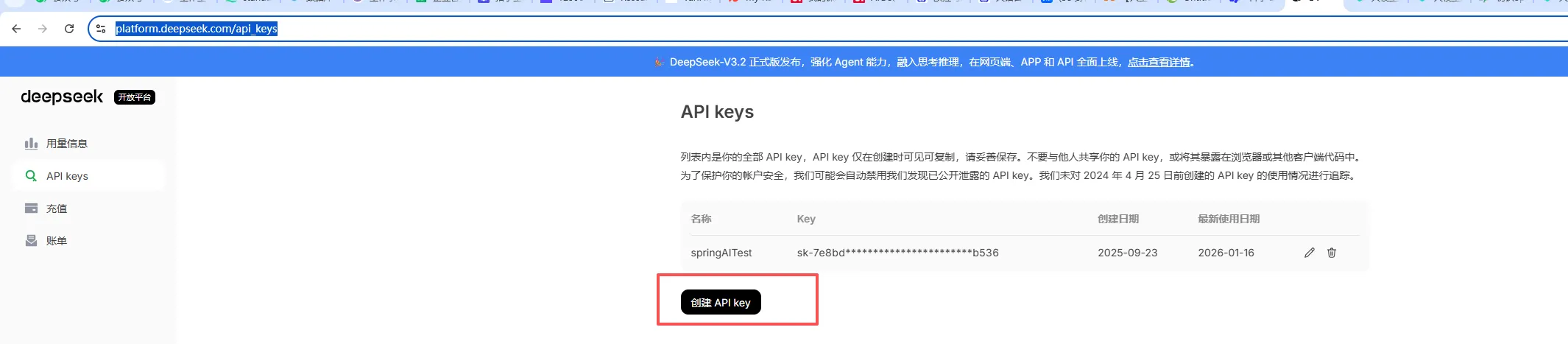
2.2.1 点击此链接https://platform.deepseek.com/api_keys完成配置
三、创建第一个SpringAI Demo
3.1 开发环境要求
jdk:17+
maven:3.8+
springboot:3.x
提示:本系列使用的都是maven,如果使用的是Gradle,需自行下载对应版本
3.2 maven pom.xml文件
<?xml version="1.0" encoding="UTF-8"?>
<project xmlns="http://maven.apache.org/POM/4.0.0" xmlns:xsi="http://www.w3.org/2001/XMLSchema-instance"
         xsi:schemaLocation="http://maven.apache.org/POM/4.0.0 https://maven.apache.org/xsd/maven-4.0.0.xsd">
    <modelVersion>4.0.0</modelVersion>
    <parent>
        <groupId>org.springframework.boot</groupId>
        <artifactId>spring-boot-starter-parent</artifactId>
        <version>3.5.6</version>
        <relativePath/> <!-- lookup parent from repository -->
    </parent>
    <groupId>com.example</groupId>
    <artifactId>spring-ai-test</artifactId>
    <version>0.0.1-SNAPSHOT</version>
    <name>spring-ai-test</name>
    <description>spring-ai-test</description>
    <properties>
        <java.version>17</java.version>
        <spring.ai.version>1.1.0-M2</spring.ai.version>
        <spring-ai-alibaba.version>1.0.0.2</spring-ai-alibaba.version>
    </properties>
    <dependencies>
        <!--spring-boot-starter-->
        <dependency>
            <groupId>org.springframework.boot</groupId>
            <artifactId>spring-boot-starter-web</artifactId>
        </dependency>
        <dependency>
            <groupId>org.springframework.boot</groupId>
            <artifactId>spring-boot-starter-test</artifactId>
            <scope>test</scope>
        </dependency>
        <!-- Spring AI 对 OpenAI API 标准的客户端支持 (用于兼容 DeepSeek API) -->
        <dependency>
            <groupId>org.springframework.ai</groupId>
            <artifactId>spring-ai-starter-model-openai</artifactId>
        </dependency>
        <!-- 阿里百炼 -->
        <dependency>
            <groupId>com.alibaba.cloud.ai</groupId>
            <artifactId>spring-ai-alibaba-starter-dashscope</artifactId>
        </dependency>
        <!-- DeepSeek -->
        <dependency>
            <groupId>org.springframework.ai</groupId>
            <artifactId>spring-ai-starter-model-deepseek</artifactId>
        </dependency>
    </dependencies>
    <dependencyManagement>
        <dependencies>
            <!-- 引入 Spring AI BOM 管理依赖版本 -->
            <dependency>
                <groupId>org.springframework.ai</groupId>
                <artifactId>spring-ai-bom</artifactId>
                <version>${spring.ai.version}</version>
                <type>pom</type>
                <scope>import</scope>
            </dependency>
            <!-- 引入 Spring alibaba AI BOM 管理依赖版本 -->
            <dependency>
                <groupId>com.alibaba.cloud.ai</groupId>
                <artifactId>spring-ai-alibaba-bom</artifactId>
                <version>${spring-ai-alibaba.version}</version>
                <type>pom</type>
                <scope>import</scope>
            </dependency>
        </dependencies>
    </dependencyManagement>
    <!--仓库镜像-->
    <repositories>
        <repository>
            <id>spring-milestones</id>
            <name>Spring Milestones</name>
            <url>https://repo.spring.io/milestone</url>
            <snapshots>
                <enabled>false</enabled>
            </snapshots>
        </repository>
        <repository>
            <id>spring-snapshots</id>
            <name>Spring Snapshots</name>
            <url>https://repo.spring.io/snapshot</url>
            <releases>
                <enabled>false</enabled>
            </releases>
        </repository>
        <!-- 阿⾥云镜像,⽤来下载SpringAI之外的依赖 -->
        <repository>
            <id>aliyun</id>
            <name>aliyun</name>
            <url>https://maven.aliyun.com/repository/public</url>
        </repository>
        <repository>
            <id>embabel-releases</id>
            <url>https://repo.embabel.com/artifactory/libs-release</url>
            <releases>
                <enabled>true</enabled>
            </releases>
            <snapshots>
                <enabled>false</enabled>
            </snapshots>
        </repository>
        <repository>
            <id>embabel-snapshots</id>
            <url>https://repo.embabel.com/artifactory/libs-snapshot</url>
            <releases>
                <enabled>false</enabled>
            </releases>
            <snapshots>
                <enabled>true</enabled>
            </snapshots>
        </repository>
    </repositories>
    <build>
        <plugins>
            <plugin>
                <groupId>org.springframework.boot</groupId>
                <artifactId>spring-boot-maven-plugin</artifactId>
            </plugin>
            <plugin>
                <groupId>org.apache.maven.plugins</groupId>
                <artifactId>maven-clean-plugin</artifactId>
                <version>2.5</version>
            </plugin>
        </plugins>
    </build>
</project>
3.3 applicaton.properties配置文件
spring.application.name=spring-ai-test
server.port=8088

#deepseek openai 配置
spring.ai.openai.api-key="你自己的deepseek apikey"
spring.ai.openai.base-url=https://api.deepseek.com
spring.ai.openai.chat.options.model=deepseek-chat
#spring.ai.openai.chat.options.model=deepseek-reasoner

#deepseek 配置
spring.ai.deepseek.api-key="你自己的deepseek apikey"
spring.ai.deepseek.chat.options.model=deepseek-chat
#spring.ai.deepseek.model=deepseek-reasoner

#阿里百炼 配置
spring.ai.dashscope.api-key="你自己的阿里百炼apikey"
spring.ai.chat.client.enabled=false
3.4 第一次用程序跟AI对话
package com.example.springaitest;

import org.junit.jupiter.api.Test;
import org.springframework.ai.chat.client.ChatClient;
import org.springframework.beans.factory.annotation.Autowired;
import org.springframework.boot.test.context.SpringBootTest;

@SpringBootTest
public class TestFirstSeeAI {

    @Autowired
    private ChatClient chatClient;

    @Test
    public void hello(){
        String content = chatClient.prompt()
                .user("你是谁")
                .call().content();
        System.out.println(content);
    }
}
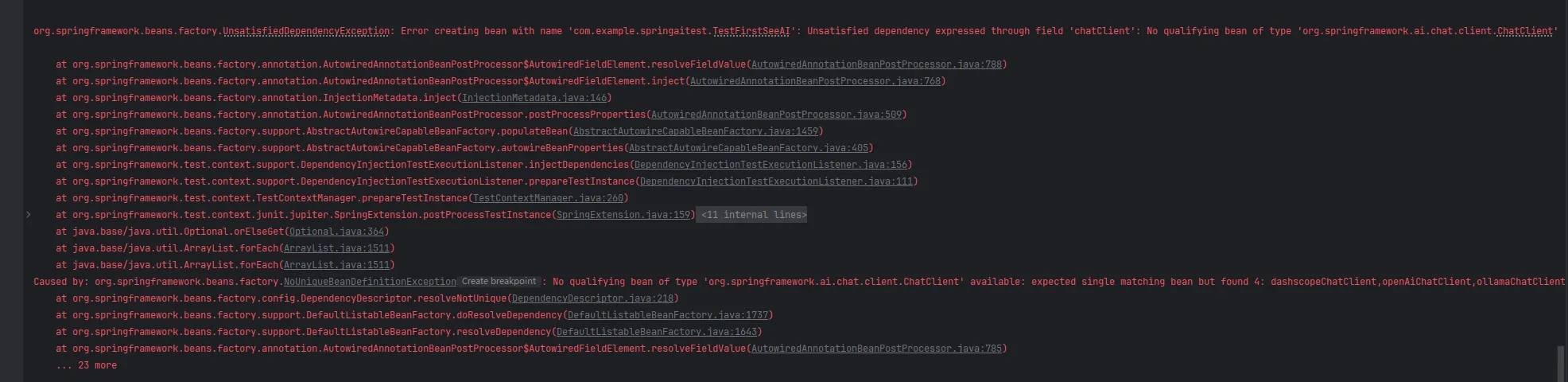
❌居然报错了,各位Java大佬肯定一眼都看出来why了,因为我们上面的applicaton.properties文件同时配置了deepseek和阿里百炼,调用的时候不能匹配到对应的ChatClient
所以我们创建一个config配置类,指定对应的ChatClient即可
package com.example.springaitest.config;

import org.springframework.ai.chat.client.ChatClient;
import org.springframework.ai.chat.model.ChatModel;
import org.springframework.beans.factory.annotation.Qualifier;
import org.springframework.context.annotation.Bean;
import org.springframework.context.annotation.Configuration;

@Configuration
public class ChatClientConfig {

    @Bean
    public ChatClient dashscopeChatClient(@Qualifier("dashscopeChatModel") ChatModel dashscopeModel) {
        return ChatClient.builder(dashscopeModel)
                .build();
    }

    @Bean
    public ChatClient openAiChatClient(@Qualifier("openAiChatModel") ChatModel openAiModel) {
        return ChatClient.builder(openAiModel)
                .build();
    }

    @Bean
    public ChatClient deepSeekChatClient(@Qualifier("deepSeekChatModel") ChatModel deepSeekModel) {
        return ChatClient.create(deepSeekModel);
    }


}
package com.example.springaitest;

import jakarta.annotation.Resource;
import org.junit.jupiter.api.Test;
import org.springframework.ai.chat.client.ChatClient;
import org.springframework.boot.test.context.SpringBootTest;

@SpringBootTest
public class TestFirstSeeAI {

    @Resource(name = "dashscopeChatClient")
    private ChatClient dashscopeChatClient;

    @Resource(name = "deepSeekChatClient")
    private ChatClient deepSeekChatClient;

    @Test
    public void hello(){
        String content = deepSeekChatClient.prompt()
                .user("你是谁")
                .call().content();
        System.out.println(content);
    }
}

我们使用了deepSeekChatClient进行了与AI大模型的第一次对话,如果需要切换阿里百炼,使用dashscopeChatClient即可
好了,通过上面的教程,大家应该可以轻松完成第一次使用Java程序与AI大模型的第一次对话了!!
🎉四、结语:你已经触摸到AI应用的门槛了
简单的几行配置,就能实现与AI的第一次对话,看到这里,是不AI对大家也不是很遥远,很神秘
所以,让我们保持热情,去拥抱AI吧!!!
🔜 五、下期预告
什么?大模型也能本地部署《Spring AI + Ollama 本地大模型入门》
下期,请跟我一起学习如果使用Ollama不是大模型吧!
🎯 小白友好,全程保姆级教程,敬请期待!!!!
💬这里只有干货,没有废话,废话我也不会写,只写你直接复制就能跑起来的代码。
AI 不会取代 程序员,
但会取代不懂 AI 的 程序员。
关注我,走出拥抱AI的第一步。

有“AI”的1024 = 2048,欢迎大家加入2048 AI社区
更多推荐
 16
16 0
0- 0


 已为社区贡献2条内容

所有评论(0)