Kubernetes管理
Kubernetes集群管理摘要:kubectl是Kubernetes集群管理的主要命令行工具,提供丰富的操作命令。基本命令包括创建资源(create)、查看资源(get)、删除资源(delete)等;部署命令包含滚动更新(rollout)和扩缩容(scale);集群管理命令涉及节点调度(cordon/uncordon)和维护(drain);调试命令如查看日志(logs)和执行命令(exec)。通
文章目录
Kubernetes 管理
客户端命令kubectl
命令帮助
[root@master ~ 13:41:19]# kubectl -h
kubectl controls the Kubernetes cluster manager.

 Find more information at: https://kubernetes.io/docs/reference/kubectl/

Basic Commands (Beginner):
  create          Create a resource from a file or from stdin
  expose          Take a replication controller, service, deployment or pod and expose it as a new
Kubernetes service
  run             在集群上运行特定镜像
  set             为对象设置指定特性

Basic Commands (Intermediate):
  explain         Get documentation for a resource
  get             显示一个或多个资源
  edit            编辑服务器上的资源
  delete          Delete resources by file names, stdin, resources and names, or by resources and
label selector

Deploy Commands:
  rollout         Manage the rollout of a resource
  scale           Set a new size for a deployment, replica set, or replication controller
  autoscale       Auto-scale a deployment, replica set, stateful set, or replication controller

Cluster Management Commands:
  certificate     Modify certificate resources
  cluster-info    Display cluster information
  top             Display resource (CPU/memory) usage
  cordon          标记节点为不可调度
  uncordon        标记节点为可调度
  drain           清空节点以准备维护
  taint           更新一个或者多个节点上的污点

Troubleshooting and Debugging Commands:
  describe        显示特定资源或资源组的详细信息
  logs            打印 Pod 中容器的日志
  attach          挂接到一个运行中的容器
  exec            在某个容器中执行一个命令
  port-forward    将一个或多个本地端口转发到某个 Pod
  proxy           运行一个指向 Kubernetes API 服务器的代理
  cp              Copy files and directories to and from containers
  auth            Inspect authorization
  debug           Create debugging sessions for troubleshooting workloads and nodes
  events          List events

Advanced Commands:
  diff            Diff the live version against a would-be applied version
  apply           Apply a configuration to a resource by file name or stdin
  patch           Update fields of a resource
  replace         Replace a resource by file name or stdin
  wait            Experimental: Wait for a specific condition on one or many resources
  kustomize       Build a kustomization target from a directory or URL

Settings Commands:
  label           更新某资源上的标签
  annotate        更新一个资源的注解
  completion      Output shell completion code for the specified shell (bash, zsh, fish, or
powershell)

Other Commands:
  api-resources   Print the supported API resources on the server
  api-versions    Print the supported API versions on the server, in the form of "group/version"
  config          修改 kubeconfig 文件
  plugin          Provides utilities for interacting with plugins
  version         输出客户端和服务端的版本信息

Usage:
  kubectl [flags] [options]

Use "kubectl <command> --help" for more information about a given command.
Use "kubectl options" for a list of global command-line options (applies to all commands).
查看Kubernetes集群当前支持的所有API资源列表
资源类型以及版本
[root@master ~ 13:46:53]# kubectl api-resources
NAME                              SHORTNAMES   APIVERSION                             NAMESPACED   KIND
bindings                                       v1                                     true         Binding
componentstatuses                 cs           v1                                     false        ComponentStatus
configmaps                        cm           v1                                     true         ConfigMap
endpoints                         ep           v1                                     true         Endpoints
events                            ev           v1                                     true         Event
limitranges                       limits       v1                                     true         LimitRange
namespaces                        ns           v1                                     false        Namespace
nodes                             no           v1                                     false        Node
persistentvolumeclaims            pvc          v1                                     true         PersistentVolumeClaim
persistentvolumes                 pv           v1                                     false        PersistentVolume
pods                              po           v1                                     true         Pod
podtemplates                                   v1                                     true         PodTemplate
replicationcontrollers            rc           v1                                     true         ReplicationController
resourcequotas                    quota        v1                                     true         ResourceQuota
secrets                                        v1                                     true         Secret
serviceaccounts                   sa           v1                                     true         ServiceAccount
services                          svc          v1                                     true         Service
mutatingwebhookconfigurations                  admissionregistration.k8s.io/v1        false        MutatingWebhookConfiguration
validatingwebhookconfigurations                admissionregistration.k8s.io/v1        false        ValidatingWebhookConfiguration
customresourcedefinitions         crd,crds     apiextensions.k8s.io/v1                false        CustomResourceDefinition
apiservices                                    apiregistration.k8s.io/v1              false        APIService
controllerrevisions                            apps/v1                                true         ControllerRevision
daemonsets                        ds           apps/v1                                true         DaemonSet
deployments                       deploy       apps/v1                                true         Deployment
replicasets                       rs           apps/v1                                true         ReplicaSet
statefulsets                      sts          apps/v1                                true         StatefulSet
selfsubjectreviews                             authentication.k8s.io/v1               false        SelfSubjectReview
tokenreviews                                   authentication.k8s.io/v1               false        TokenReview
localsubjectaccessreviews                      authorization.k8s.io/v1                true         LocalSubjectAccessReview
selfsubjectaccessreviews                       authorization.k8s.io/v1                false        SelfSubjectAccessReview
selfsubjectrulesreviews                        authorization.k8s.io/v1                false        SelfSubjectRulesReview
subjectaccessreviews                           authorization.k8s.io/v1                false        SubjectAccessReview
horizontalpodautoscalers          hpa          autoscaling/v2                         true         HorizontalPodAutoscaler
cronjobs                          cj           batch/v1                               true         CronJob
jobs                                           batch/v1                               true         Job
certificatesigningrequests        csr          certificates.k8s.io/v1                 false        CertificateSigningRequest
leases                                         coordination.k8s.io/v1                 true         Lease
bgpconfigurations                              crd.projectcalico.org/v1               false        BGPConfiguration
bgppeers                                       crd.projectcalico.org/v1               false        BGPPeer
blockaffinities                                crd.projectcalico.org/v1               false        BlockAffinity
caliconodestatuses                             crd.projectcalico.org/v1               false        CalicoNodeStatus
clusterinformations                            crd.projectcalico.org/v1               false        ClusterInformation
felixconfigurations                            crd.projectcalico.org/v1               false        FelixConfiguration
globalnetworkpolicies                          crd.projectcalico.org/v1               false        GlobalNetworkPolicy
globalnetworksets                              crd.projectcalico.org/v1               false        GlobalNetworkSet
hostendpoints                                  crd.projectcalico.org/v1               false        HostEndpoint
ipamblocks                                     crd.projectcalico.org/v1               false        IPAMBlock
ipamconfigs                                    crd.projectcalico.org/v1               false        IPAMConfig
ipamhandles                                    crd.projectcalico.org/v1               false        IPAMHandle
ippools                                        crd.projectcalico.org/v1               false        IPPool
ipreservations                                 crd.projectcalico.org/v1               false        IPReservation
kubecontrollersconfigurations                  crd.projectcalico.org/v1               false        KubeControllersConfiguration
networkpolicies                                crd.projectcalico.org/v1               true         NetworkPolicy
networksets                                    crd.projectcalico.org/v1               true         NetworkSet
endpointslices                                 discovery.k8s.io/v1                    true         EndpointSlice
events                            ev           events.k8s.io/v1                       true         Event
flowschemas                                    flowcontrol.apiserver.k8s.io/v1beta3   false        FlowSchema
prioritylevelconfigurations                    flowcontrol.apiserver.k8s.io/v1beta3   false        PriorityLevelConfiguration
ingressclasses                                 networking.k8s.io/v1                   false        IngressClass
ingresses                         ing          networking.k8s.io/v1                   true         Ingress
networkpolicies                   netpol       networking.k8s.io/v1                   true         NetworkPolicy
runtimeclasses                                 node.k8s.io/v1                         false        RuntimeClass
poddisruptionbudgets              pdb          policy/v1                              true         PodDisruptionBudget
clusterrolebindings                            rbac.authorization.k8s.io/v1           false        ClusterRoleBinding
clusterroles                                   rbac.authorization.k8s.io/v1           false        ClusterRole
rolebindings                                   rbac.authorization.k8s.io/v1           true         RoleBinding
roles                                          rbac.authorization.k8s.io/v1           true         Role
priorityclasses                   pc           scheduling.k8s.io/v1                   false        PriorityClass
csidrivers                                     storage.k8s.io/v1                      false        CSIDriver
csinodes                                       storage.k8s.io/v1                      false        CSINode
csistoragecapacities                           storage.k8s.io/v1                      true         CSIStorageCapacity
storageclasses                    sc           storage.k8s.io/v1                      false        StorageClass
volumeattachments                              storage.k8s.io/v1                      false        VolumeAttachment
命令详解
命令格式:
kubectl 命令 资源类型 资源名称 <参数1,参数2,参数3>
基础命令
| 命令 | 描述 |
|---|---|
| create | 通过文件名或标准输入创建资源 |
| expose | 将一个资源公开为一个新的service |
| run | 在集群中运行一个特定的镜像 |
| set | 在对象上设置特定的功能 |
| get | 显示一个或多个资源 |
| explain | 文档参考资料 |
| edit | 使用默认的编辑器编辑一个资源 |
| delete | 通过文件名、标准输入、资源名称或标签选择器来删除资源 |
explain 用来帮助我们写yaml脚本去自动创建资源,当我们有哪些资源的内容不清楚,可以使用explain来解决
比如查看创建资源对象deployment的类型和版本
[root@master ~ 17:29:03]# kubectl explain deployment
GROUP:      apps
KIND:       Deployment
VERSION:    v1

DESCRIPTION:
    Deployment enables declarative updates for Pods and ReplicaSets.

FIELDS:
  apiVersion	<string>
    APIVersion defines the versioned schema of this representation of an object.
    Servers should convert recognized schemas to the latest internal value, and
    may reject unrecognized values. More info:
    https://git.k8s.io/community/contributors/devel/sig-architecture/api-conventions.md#resources

  kind	<string>
    Kind is a string value representing the REST resource this object
    represents. Servers may infer this from the endpoint the client submits
    requests to. Cannot be updated. In CamelCase. More info:
    https://git.k8s.io/community/contributors/devel/sig-architecture/api-conventions.md#types-kinds

  metadata	<ObjectMeta>
    Standard object's metadata. More info:
    https://git.k8s.io/community/contributors/devel/sig-architecture/api-conventions.md#metadata

  spec	<DeploymentSpec>
    Specification of the desired behavior of the Deployment.

  status	<DeploymentStatus>
    Most recently observed status of the Deployment.

# 还可以继续深入
[root@master ~ 17:29:40]# kubectl explain deployment.spec
GROUP:      apps
KIND:       Deployment
VERSION:    v1

FIELD: spec <DeploymentSpec>

DESCRIPTION:
    Specification of the desired behavior of the Deployment.
    DeploymentSpec is the specification of the desired behavior of the
    Deployment.

FIELDS:
  minReadySeconds	<integer>
    Minimum number of seconds for which a newly created pod should be ready
    without any of its container crashing, for it to be considered available.
    Defaults to 0 (pod will be considered available as soon as it is ready)

  paused	<boolean>
    Indicates that the deployment is paused.

  progressDeadlineSeconds	<integer>
    The maximum time in seconds for a deployment to make progress before it is
    considered to be failed. The deployment controller will continue to process
    failed deployments and a condition with a ProgressDeadlineExceeded reason
    will be surfaced in the deployment status. Note that progress will not be
    estimated during the time a deployment is paused. Defaults to 600s.

  replicas	<integer>
    Number of desired pods. This is a pointer to distinguish between explicit
    zero and not specified. Defaults to 1.

  revisionHistoryLimit	<integer>
    The number of old ReplicaSets to retain to allow rollback. This is a pointer
    to distinguish between explicit zero and not specified. Defaults to 10.

  selector	<LabelSelector> -required-
    Label selector for pods. Existing ReplicaSets whose pods are selected by
    this will be the ones affected by this deployment. It must match the pod
    template's labels.

  strategy	<DeploymentStrategy>
    The deployment strategy to use to replace existing pods with new ones.

  template	<PodTemplateSpec> -required-
    Template describes the pods that will be created. The only allowed
    template.spec.restartPolicy value is "Always".
部署命令
| 命令 | 描述 |
|---|---|
| rollout | 管理资源的发布 |
| rolling-update | 对给定的复制控制器滚动更新 |
| scale | 扩容或缩容Pod数量,Deployment、ReplicaSet、RC或Job |
| autoscale | 创建1个自动选择扩容或缩容并设置Pod数量 |
比如,我们在挂起虚拟机重新开启后,集群可能会出现网络CNI组建失败,这样我们在创建资源的时候会导致资源创建不起来,所以我们需要去重新启动CNI,这里我们使用的是calico
重启calico,再去创建资源
[root@master ~ 17:23:55]# kubectl rollout restart daemonset calico-node -n kube-system
daemonset.apps/calico-node restarted
集群管理命令
| 命令 | 描述 |
|---|---|
| certificate | 修改证书资源 |
| cluster-info | 显示集群信息 |
| top | 显示资源(CPU、内存、存储)使用。需要heapster运行 |
| cordon | 标记节点不可调度 |
| uncordon | 标记节点可调度 |
| drain | 驱逐节点上的应用,准备下线维护 |
| taint | 修改节点taint标记 |
metrics-server可以查看资源(CPU、内存、存储)使用
如果不装这个服务,那么k8s无法使用top命令查看资源使用
[root@master ~ 17:03:06]# kubectl top pod
error: Metrics API not available
所以,先创建metrics-server 资源
[root@master ~ 17:03:34]# wget https://github.com/kubernetes-sigs/metrics-server/releases/latest/download/components.yaml -O metrics-server-components.yaml
[root@master ~ 17:08:15]# sed -i 's/registry.k8s.io\/metrics-server/registry.cn-hangzhou.aliyuncs.com\/google_containers/g' metrics-server-components.yaml

[root@master ~ 17:08:15]# vim metrics-server-components.yaml
# metrics-server v0.8.0 版本后,安全要求较高,默认情况下必须配置 --kubelet-insecure-tls,否则无法从 kubelet 拉取指标,导致探针失败
... ...
containers:
      - args:
        - --cert-dir=/tmp
        - --secure-port=10250
        - --kubelet-insecure-tls		`添加此句`
        - --kubelet-preferred-address-types=InternalIP,ExternalIP,Hostname
        - --kubelet-use-node-status-port
        - --metric-resolution=15s
        image: registry.cn-hangzhou.aliyuncs.com/google_containers/metrics-server:v0.8.0
... ...

[root@master ~ 17:10:57]# kubectl apply -f metrics-server-components.yaml
查看pod信息
-n:指定命名空间
[root@master ~ 17:12:54]# kubectl get pods -n kube-system
NAME                                       READY   STATUS    RESTARTS      AGE
calico-kube-controllers-658d97c59c-dnj7l   1/1     Running   1 (27h ago)   27h
calico-node-49plc                          1/1     Running   0             10m
calico-node-c462q                          1/1     Running   0             10m
calico-node-fzdxw                          1/1     Running   0             10m
coredns-66f779496c-nzpjw                   1/1     Running   1 (27h ago)   27h
coredns-66f779496c-wzrkp                   1/1     Running   1 (27h ago)   27h
etcd-master                                1/1     Running   2 (27h ago)   27h
kube-apiserver-master                      1/1     Running   4 (27h ago)   27h
kube-controller-manager-master             1/1     Running   2 (27h ago)   27h
kube-proxy-qjz9p                           1/1     Running   1 (27h ago)   27h
kube-proxy-stz98                           1/1     Running   2 (27h ago)   27h
kube-proxy-tzsgh                           1/1     Running   1 (27h ago)   27h
kube-scheduler-master                      1/1     Running   2 (27h ago)   27h
metrics-server-57999c5cf7-56szn            1/1     Running   0             56s
删除不再使用的pod
# 可以把不再使用的pod删除
kubectl delete pod pod_name -n ns_name
# 强制删除
kubectl delete pod pod_name -n ns_name --grace-period=0 --force
查看资源创建过程
[root@master ~ 17:13:27]# kubectl describe pod metrics-server-57999c5cf7-56szn -n kube-system
现在可以使用kubectl top 查看资源了
# pod
[root@master ~ 18:42:32]# kubectl top pod -n kube-system
NAME                                       CPU(cores)   MEMORY(bytes)
calico-kube-controllers-658d97c59c-dnj7l   2m           72Mi
calico-node-b2nrt                          17m          96Mi
calico-node-d74vl                          14m          86Mi
calico-node-z8w5n                          18m          128Mi
coredns-66f779496c-nzpjw                   1m           18Mi
coredns-66f779496c-wzrkp                   1m           66Mi
etcd-master                                12m          154Mi
kube-apiserver-master                      28m          279Mi
kube-controller-manager-master             7m           153Mi
kube-proxy-qjz9p                           4m           81Mi
kube-proxy-stz98                           3m           81Mi
kube-proxy-tzsgh                           4m           82Mi
kube-scheduler-master                      3m           74Mi
metrics-server-57999c5cf7-56szn            2m           21Mi

# 指定pod
[root@master ~ 17:17:12]# kubectl top pod kube-apiserver-master -n kube-system
NAME                    CPU(cores)   MEMORY(bytes)
kube-apiserver-master   28m          282Mi

# node
[root@master ~ 17:18:29]# kubectl top node node1
NAME    CPU(cores)   CPU%   MEMORY(bytes)   MEMORY%
node1   61m          1%     1295Mi          33%
[root@master ~ 17:19:36]# kubectl top node node2
NAME    CPU(cores)   CPU%   MEMORY(bytes)   MEMORY%
node2   59m          1%     1398Mi          36%
显示集群信息
[root@master ~ 18:42:13]# kubectl cluster-info
Kubernetes control plane is running at https://192.168.108.128:6443
CoreDNS is running at https://192.168.108.128:6443/api/v1/namespaces/kube-system/services/kube-dns:dns/proxy

To further debug and diagnose cluster problems, use 'kubectl cluster-info dump'.
故障诊断和调试命令
| 命令 | 描述 |
|---|---|
| describe | 显示特定资源或资源组的详细信息 |
| logs | 在1个Pod中打印1个容器日志。如果Pod只有1个容器,容器名称是可选的 |
| attach | 附加到1个运行的容器 |
| exec | 执行命令到容器 |
| port-forward | 转发1个或多个本地端口到1个Pod |
| proxy | 运行1个proxy到kubernetes API server |
| cp | 拷贝文件或目录到容器中 |
| auth | 检查授权 |
注意,logs 查看的日志是Pod中容器的日志,而不是pod的日志,pod没有日志
高级命令
| 命令 | 描述 |
|---|---|
| apply | 通过文件名或标准输入对资源应用配置 |
| patch | 使用补丁修改、更新资源的字段 |
| replace | 通过文件名或标准输入替换1个资源 |
| convert | 不同的API版本之间转换配置文件 |
设置命令
| 命令 | 描述 |
|---|---|
| label | 更新资源上的标签 |
| annotate | 更新资源上的注释 |
| completion | 用于实现kubectl工具自动补全 |
其他命令
| 命令 | 描述 |
|---|---|
| api-versions | 打印受支持的API版本 |
| config | 修改kubeconfig文件(用于访问API,比如配置认证信息) |
| help | 所有命令帮助 |
| plugin | 运行1个命令行插件 |
| version | 打印客户端和服务版本信息 |
查看当前k8s支持的api-version
[root@master ~ 18:43:28]# kubectl api-versions
admissionregistration.k8s.io/v1
apiextensions.k8s.io/v1
apiregistration.k8s.io/v1
apps/v1
authentication.k8s.io/v1
authorization.k8s.io/v1
autoscaling/v1
autoscaling/v2
batch/v1
certificates.k8s.io/v1
coordination.k8s.io/v1
crd.projectcalico.org/v1
discovery.k8s.io/v1
events.k8s.io/v1
flowcontrol.apiserver.k8s.io/v1beta2
flowcontrol.apiserver.k8s.io/v1beta3
metrics.k8s.io/v1beta1
networking.k8s.io/v1
node.k8s.io/v1
policy/v1
rbac.authorization.k8s.io/v1
scheduling.k8s.io/v1
storage.k8s.io/v1
v1
查看k8s客户端和服务端版本
[root@master ~ 18:55:56]# kubectl version
Client Version: v1.28.0
Kustomize Version: v5.0.4-0.20230601165947-6ce0bf390ce3
Server Version: v1.28.0
集群Node管理
查看集群信息
[root@master ~ 18:56:02]# kubectl cluster-info
Kubernetes control plane is running at https://192.168.108.128:6443
CoreDNS is running at https://192.168.108.128:6443/api/v1/namespaces/kube-system/services/kube-dns:dns/proxy

To further debug and diagnose cluster problems, use 'kubectl cluster-info dump'.
查看节点信息
# 查看集群节点信息
[root@master ~ 18:57:14]# kubectl get nodes
NAME     STATUS   ROLES           AGE   VERSION
master   Ready    control-plane   29h   v1.28.0
node1    Ready    <none>          29h   v1.28.0
node2    Ready    <none>          29h   v1.28.0

# 查看集群节点详细信息
[root@master ~ 18:57:44]# kubectl get nodes -o wide
NAME     STATUS   ROLES           AGE   VERSION   INTERNAL-IP       EXTERNAL-IP   OS-IMAGE                KERNEL-VERSION                 CONTAINER-RUNTIME
master   Ready    control-plane   29h   v1.28.0   192.168.108.128   <none>        CentOS Linux 7 (Core)   3.10.0-1160.119.1.el7.x86_64   docker://26.1.4
node1    Ready    <none>          29h   v1.28.0   192.168.108.129   <none>        CentOS Linux 7 (Core)   3.10.0-1160.119.1.el7.x86_64   docker://26.1.4
node2    Ready    <none>          29h   v1.28.0   192.168.108.136   <none>        CentOS Linux 7 (Core)   3.10.0-1160.119.1.el7.x86_64   docker://26.1.4

# 查看节点描述详细信息
[root@master ~ 18:58:15]# kubectl describe node master
Name:               master
Roles:              control-plane
Labels:             beta.kubernetes.io/arch=amd64
                    beta.kubernetes.io/os=linux
                    kubernetes.io/arch=amd64
                    kubernetes.io/hostname=master
                    kubernetes.io/os=linux
                    node-role.kubernetes.io/control-plane=
                    node.kubernetes.io/exclude-from-external-load-balancers=
Annotations:        kubeadm.alpha.kubernetes.io/cri-socket: unix:///var/run/cri-dockerd.sock
                    node.alpha.kubernetes.io/ttl: 0
                    projectcalico.org/IPv4Address: 192.168.108.128/24
                    projectcalico.org/IPv4IPIPTunnelAddr: 10.244.219.64
                    volumes.kubernetes.io/controller-managed-attach-detach: true
CreationTimestamp:  Wed, 14 Jan 2026 13:18:45 +0800
Taints:             node-role.kubernetes.io/control-plane:NoSchedule
Unschedulable:      false
Lease:
  HolderIdentity:  master
  AcquireTime:     <unset>
  RenewTime:       Thu, 15 Jan 2026 19:00:28 +0800
Conditions:
  Type                 Status  LastHeartbeatTime                 LastTransitionTime                Reason                       Message
  ----                 ------  -----------------                 ------------------                ------                       -------
  NetworkUnavailable   False   Thu, 15 Jan 2026 17:24:43 +0800   Thu, 15 Jan 2026 17:24:43 +0800   CalicoIsUp                   Calico is running on this node
  MemoryPressure       False   Thu, 15 Jan 2026 18:58:04 +0800   Wed, 14 Jan 2026 13:18:43 +0800   KubeletHasSufficientMemory   kubelet has sufficient memory available
  DiskPressure         False   Thu, 15 Jan 2026 18:58:04 +0800   Wed, 14 Jan 2026 13:18:43 +0800   KubeletHasNoDiskPressure     kubelet has no disk pressure
  PIDPressure          False   Thu, 15 Jan 2026 18:58:04 +0800   Wed, 14 Jan 2026 13:18:43 +0800   KubeletHasSufficientPID      kubelet has sufficient PID available
  Ready                True    Thu, 15 Jan 2026 18:58:04 +0800   Wed, 14 Jan 2026 13:36:01 +0800   KubeletReady                 kubelet is posting ready status
Addresses:
  InternalIP:  192.168.108.128
  Hostname:    master
Capacity:
  cpu:                2
  ephemeral-storage:  51175Mi
  hugepages-1Gi:      0
  hugepages-2Mi:      0
  memory:             4025936Ki
  pods:               110
Allocatable:
  cpu:                2
  ephemeral-storage:  48294789041
  hugepages-1Gi:      0
  hugepages-2Mi:      0
  memory:             3923536Ki
  pods:               110
System Info:
  Machine ID:                 a2577c64b416419ab2e1e8bc9dd8a71d
  System UUID:                3D344D56-B458-78AB-81FF-4DAD0293F9D6
  Boot ID:                    770c6db9-3cf2-429e-b878-2ad476a86431
  Kernel Version:             3.10.0-1160.119.1.el7.x86_64
  OS Image:                   CentOS Linux 7 (Core)
  Operating System:           linux
  Architecture:               amd64
  Container Runtime Version:  docker://26.1.4
  Kubelet Version:            v1.28.0
  Kube-Proxy Version:         v1.28.0
PodCIDR:                      10.244.0.0/24
PodCIDRs:                     10.244.0.0/24
Non-terminated Pods:          (9 in total)
  Namespace                   Name                                        CPU Requests  CPU Limits  Memory Requests  Memory Limits  Age
  ---------                   ----                                        ------------  ----------  ---------------  -------------  ---
  kube-system                 calico-kube-controllers-658d97c59c-dnj7l    0 (0%)        0 (0%)      0 (0%)           0 (0%)         29h
  kube-system                 calico-node-d74vl                           250m (12%)    0 (0%)      0 (0%)           0 (0%)         95m
  kube-system                 coredns-66f779496c-nzpjw                    100m (5%)     0 (0%)      70Mi (1%)        170Mi (4%)     29h
  kube-system                 coredns-66f779496c-wzrkp                    100m (5%)     0 (0%)      70Mi (1%)        170Mi (4%)     29h
  kube-system                 etcd-master                                 100m (5%)     0 (0%)      100Mi (2%)       0 (0%)         29h
  kube-system                 kube-apiserver-master                       250m (12%)    0 (0%)      0 (0%)           0 (0%)         29h
  kube-system                 kube-controller-manager-master              200m (10%)    0 (0%)      0 (0%)           0 (0%)         29h
  kube-system                 kube-proxy-stz98                            0 (0%)        0 (0%)      0 (0%)           0 (0%)         29h
  kube-system                 kube-scheduler-master                       100m (5%)     0 (0%)      0 (0%)           0 (0%)         29h
Allocated resources:
  (Total limits may be over 100 percent, i.e., overcommitted.)
  Resource           Requests     Limits
  --------           --------     ------
  cpu                1100m (55%)  0 (0%)
  memory             240Mi (6%)   340Mi (8%)
  ephemeral-storage  0 (0%)       0 (0%)
  hugepages-1Gi      0 (0%)       0 (0%)
  hugepages-2Mi      0 (0%)       0 (0%)
Events:              <none>
Worker Node节点管理集群
在工作节点使用kubeadm安装,在node节点管理就会报错
[root@node1 ~ 19:02:18]# kubectl get nodes
E0115 19:02:31.739224   80489 memcache.go:265] couldn't get current server API group list: Get "http://localhost:8080/api?timeout=32s": dial tcp [::1]:8080: connect: connection refused
E0115 19:02:31.740080   80489 memcache.go:265] couldn't get current server API group list: Get "http://localhost:8080/api?timeout=32s": dial tcp [::1]:8080: connect: connection refused
E0115 19:02:31.741875   80489 memcache.go:265] couldn't get current server API group list: Get "http://localhost:8080/api?timeout=32s": dial tcp [::1]:8080: connect: connection refused
E0115 19:02:31.743474   80489 memcache.go:265] couldn't get current server API group list: Get "http://localhost:8080/api?timeout=32s": dial tcp [::1]:8080: connect: connection refused
E0115 19:02:31.745347   80489 memcache.go:265] couldn't get current server API group list: Get "http://localhost:8080/api?timeout=32s": dial tcp [::1]:8080: connect: connection refused
The connection to the server localhost:8080 was refused - did you specify the right host or port?
解决方法:只要把master上的管理文件/etc/kubernetes/admin.conf拷贝到node节点的 $HOME/.kube/config就可以让node节点也可以实现kubectl命令管理
重点:kubectl命令,指向api-server节点以及证书
-
在node节点的用户家目录创建
.kube目录[root@node1 ~ 19:04:50]# mkdir -p /root/.kube [root@node1 ~ 19:05:09]# ls -a . .bash_profile .pki .. .bashrc .tcshrc anaconda-ks.cfg cri-dockerd-0.3.4-3.el7.x86_64.rpm .viminfo .bash_history .cshrc .bash_logout .kube -
在master节点把
admin.conf文件复制到node节点[root@master ~ 19:06:03]# scp /etc/kubernetes/admin.conf node1:/root/.kube/config root@node1's password: `输入node1节点密码` admin.conf 100% 5651 7.8MB/s 00:00 -
在node节点验证
[root@node1 ~ 19:05:12]# kubectl get nodes
NAME     STATUS   ROLES           AGE   VERSION
master   Ready    control-plane   29h   v1.28.0
node1    Ready    <none>          29h   v1.28.0
node2    Ready    <none>          29h   v1.28.0
Dashboard 界面
k8s的可视化web界面
下载并安装
[root@master ~ 19:08:11]# wget https://raw.githubusercontent.com/kubernetes/dashboard/v2.6.1/aio/deploy/recommended.yaml

# 修改文件
# 从32行开始
kind: Service
apiVersion: v1
metadata:
  labels:
    k8s-app: kubernetes-dashboard
  name: kubernetes-dashboard
  namespace: kubernetes-dashboard
spec:
  ports:
    - port: 443
      targetPort: 8443
      nodePort: 30001		`添加这条`
  selector:
    k8s-app: kubernetes-dashboard
  type: NodePort			`添加这条`

# 应用修改后的配置
[root@master ~ 19:12:28]# kubectl apply -f recommended.yaml

# 查看pod状态
[root@master ~ 19:12:28]# kubectl get pods -n kubernetes-dashboard
NAME                                         READY   STATUS    RESTARTS   AGE
dashboard-metrics-scraper-5657497c4c-bgnbv   1/1     Running   0          27h
kubernetes-dashboard-746fbfd67c-gwwxq        1/1     Running   0          27h

# 查看Service暴露的端口
[root@master ~ 19:13:26]# kubectl get svc -n kubernetes-dashboard
NAME                        TYPE        CLUSTER-IP       EXTERNAL-IP   PORT(S)         AGE
dashboard-metrics-scraper   ClusterIP   10.102.104.170   <none>        8000/TCP        27h
kubernetes-dashboard        NodePort    10.109.71.209    <none>        443:30001/TCP   27h
访问Dashborad界面
在浏览器中输入master_IP:https://192.168.108.128:30001/(注意:https协议)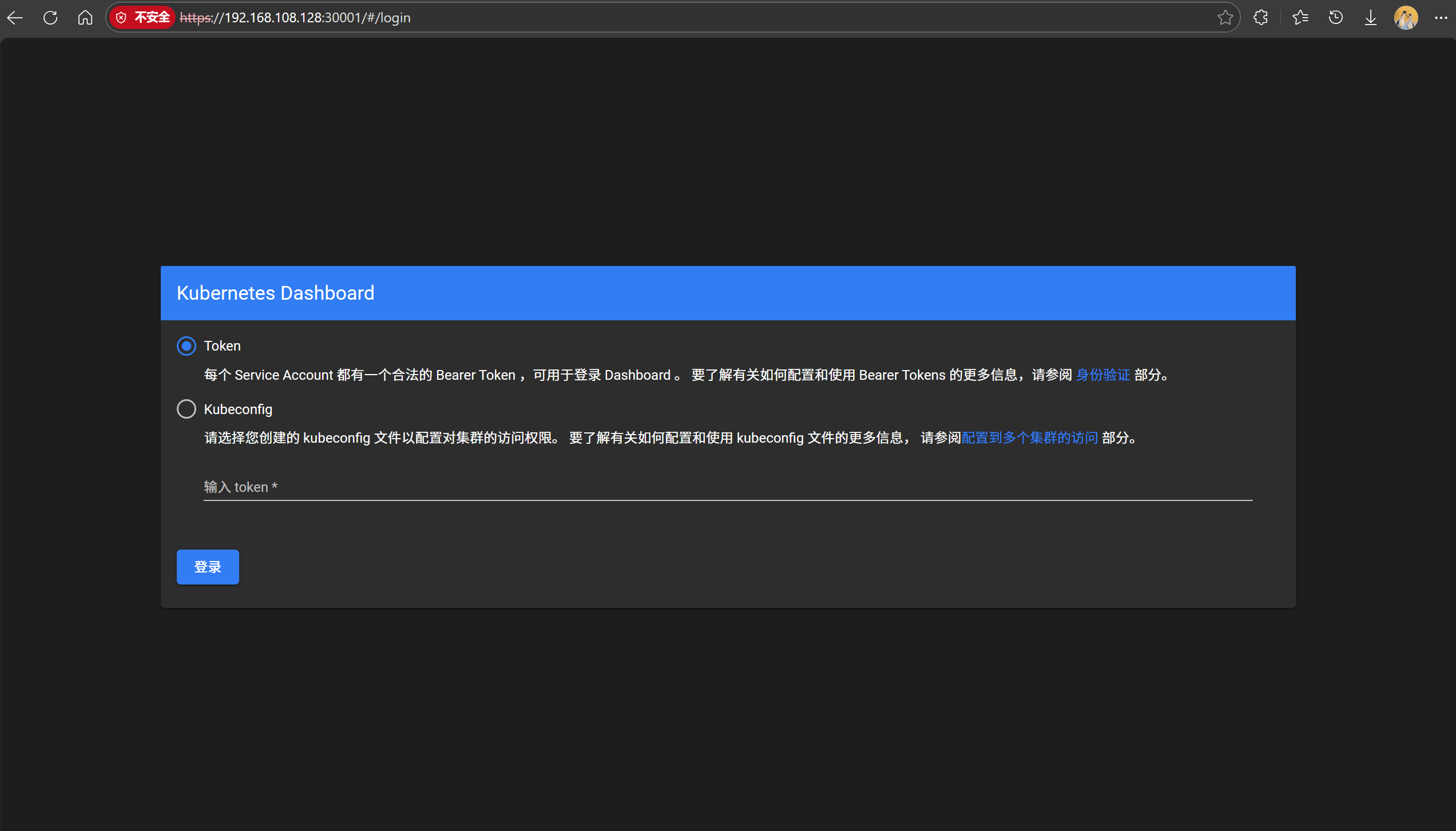
创建访问令牌token
配置管理员账户
创建rbac.yaml文件,内容如下:
[root@master ~ 19:14:12]# vim rbac.yaml
apiVersion: v1
kind: ServiceAccount
metadata:
  name: dashboard-admin
  namespace: kube-system
---
apiVersion: rbac.authorization.k8s.io/v1
kind: ClusterRoleBinding
metadata:
  name: dashboard-admin
roleRef:
 apiGroup: rbac.authorization.k8s.io
 kind: ClusterRole
 name: cluster-admin
subjects:
- kind: ServiceAccount
  name: dashboard-admin
  namespace: kube-system
应用配置并获取token
[root@master ~ 19:31:10]# kubectl apply -f rbac.yaml
serviceaccount/dashboard-admin created
clusterrolebinding.rbac.authorization.k8s.io/dashboard-admin created
注意:获取token,k8s1.22版本引入,默认有效期1小时,每次执行命令会生成新token,旧token会自动消失
[root@master ~ 19:32:42]# kubectl create token dashboard-admin  --namespace kube-system
eyJhbGciOiJSUzI1NiIsImtpZCI6Ijg3ck9Kc2JNNmR3azNoVi0zb0tQYTRSLVd6dzNsX3hzdWdCUXNGMXNVZGMifQ.eyJhdWQiOlsiaHR0cHM6Ly9rdWJlcm5ldGVzLmRlZmF1bHQuc3ZjLmNsdXN0ZXIubG9jYWwiXSwiZXhwIjoxNzY4NDgwMzY4LCJpYXQiOjE3Njg0NzY3NjgsImlzcyI6Imh0dHBzOi8va3ViZXJuZXRlcy5kZWZhdWx0LnN2Yy5jbHVzdGVyLmxvY2FsIiwia3ViZXJuZXRlcy5pbyI6eyJuYW1lc3BhY2UiOiJrdWJlLXN5c3RlbSIsInNlcnZpY2VhY2NvdW50Ijp7Im5hbWUiOiJkYXNoYm9hcmQtYWRtaW4iLCJ1aWQiOiI3NWUxMzcyYS04MzA0LTRiOGYtODY5NC0xZGRjN2NjYTc3ZjgifX0sIm5iZiI6MTc2ODQ3Njc2OCwic3ViIjoic3lzdGVtOnNlcnZpY2VhY2NvdW50Omt1YmUtc3lzdGVtOmRhc2hib2FyZC1hZG1pbiJ9.nmHRiMjyeETIF8qHauRz5DGVljzOmpngSheaJJiIu2udXne2Va4ANdu933X_HV0MSO9pYwYMsuugiTYOaupFb9jPV-Z4OINsNOAdTx-AL6Rwk45ncXr6OWNuCBKGvkFZeLaQXZVvuuTySflbZT-JoaZzxgReoHAdr8KlgzOpaPCM19UlWcjxolKIyAAhG1f7ChMWzqnvkwn215Fak34BARTucE3Be3PWYM62bMCTNYTzesF0g92DIwAwkkfDkK0i4azvtKuuno_iYypmept3GHIV0UzW7FqWPYdP_2b7kT2ZFCAtqO8EDmTN8zMN_jhXV4jB_IXW3KUDnyNkE7f3rg
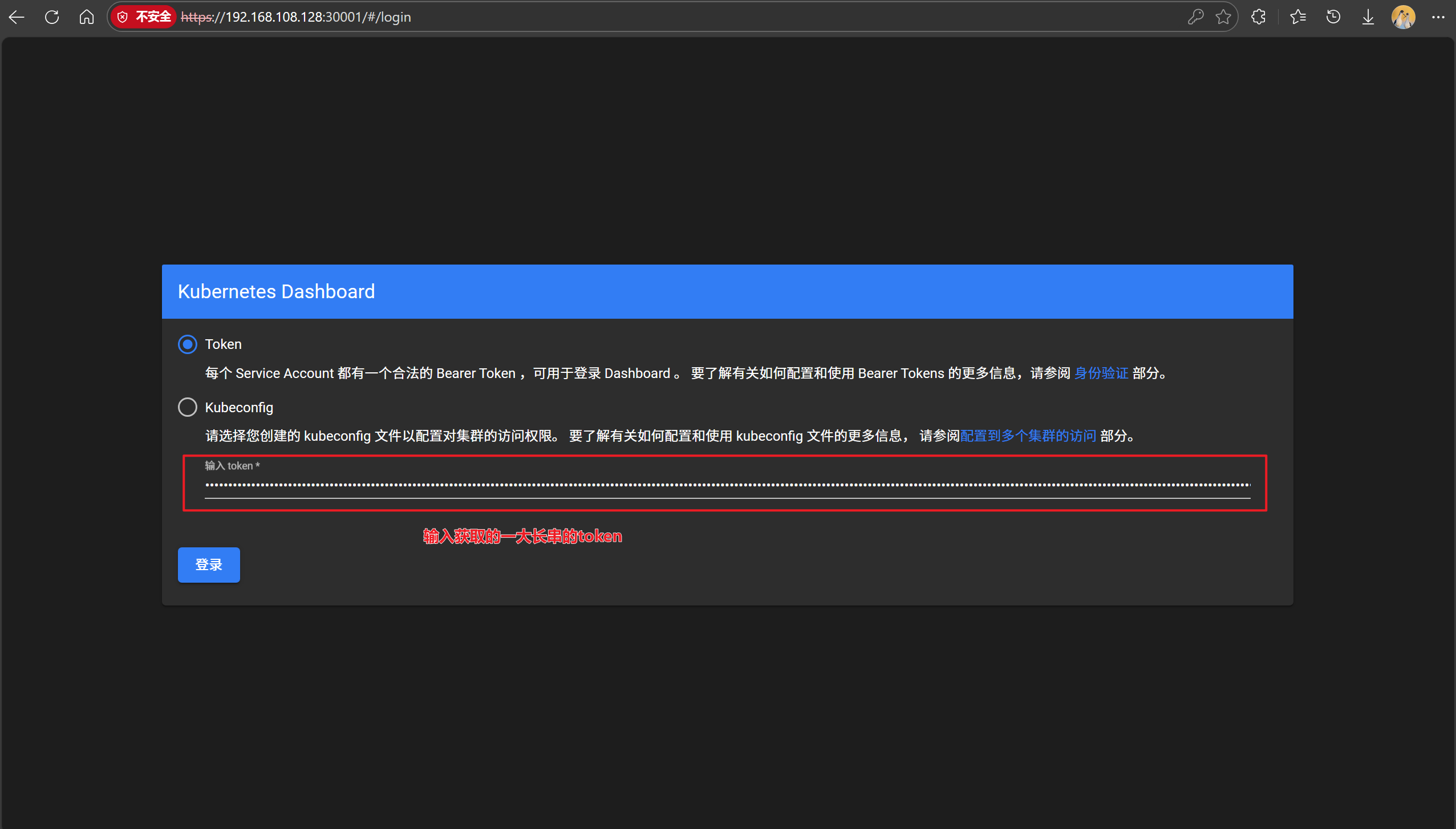
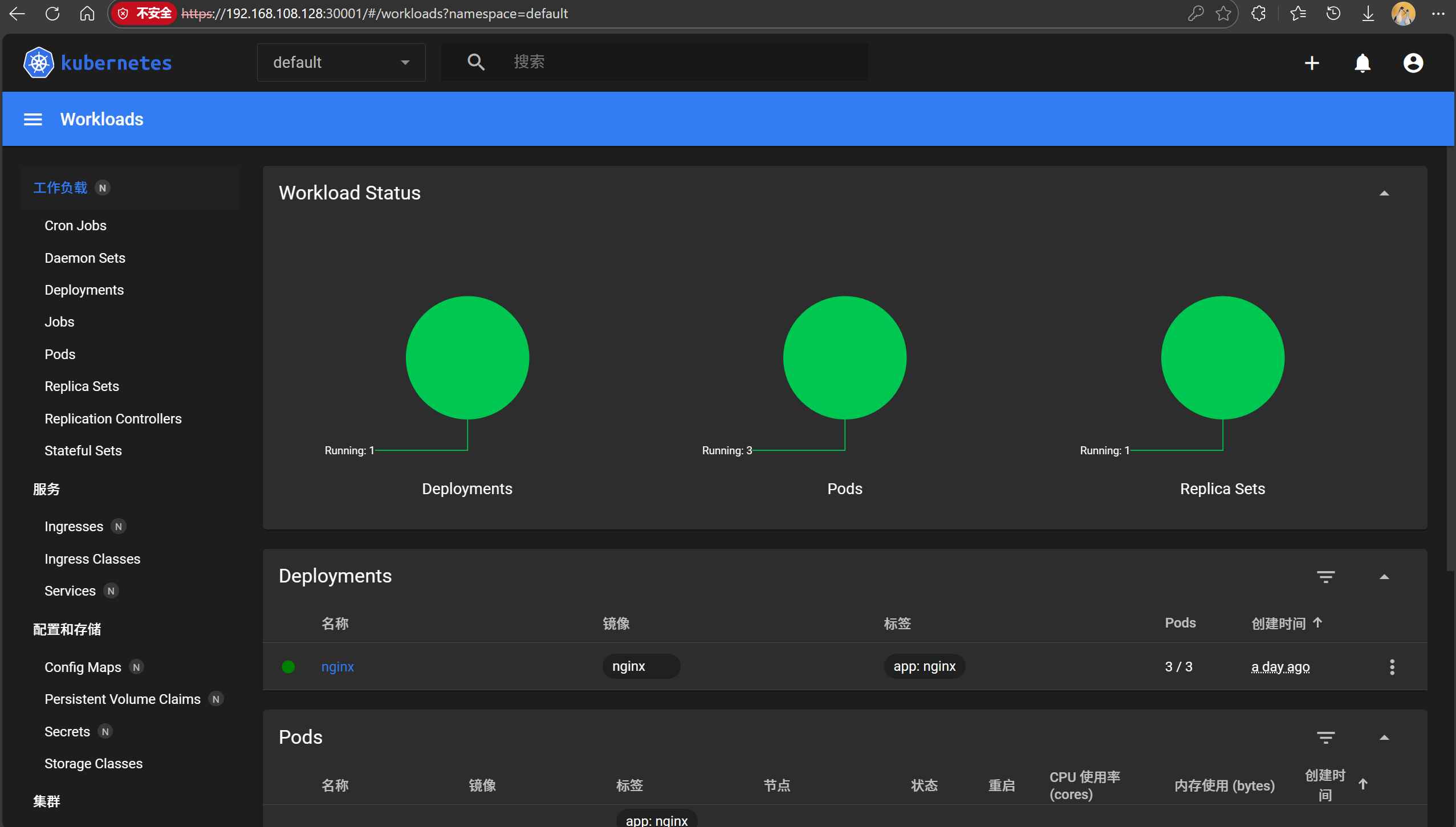
输入token
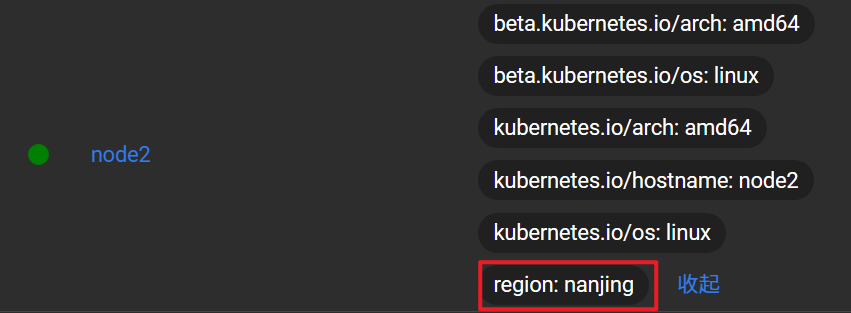
节点标签label
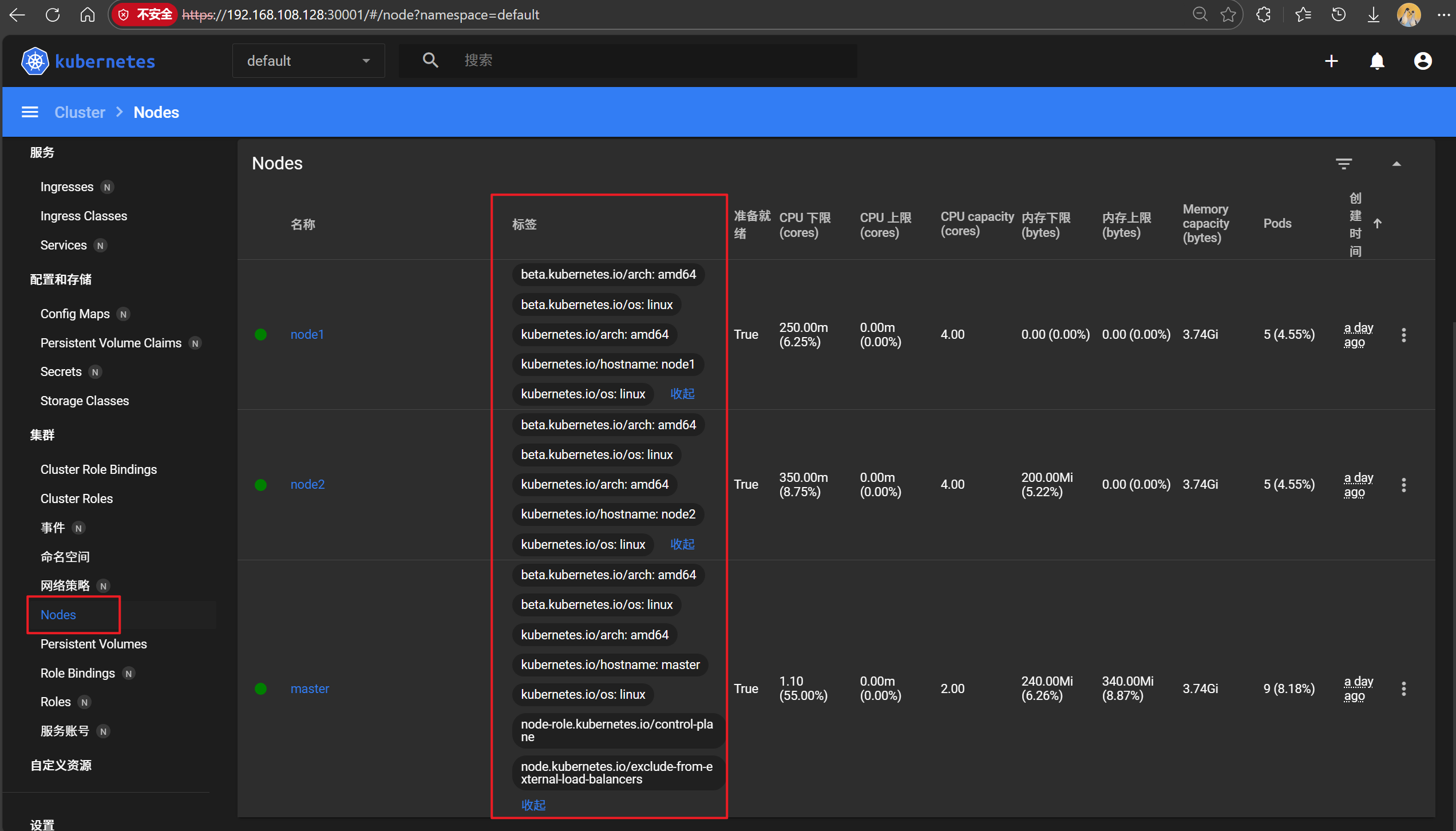
kubernetes集群由大量节点组成,可将节点打上对应的标签,然后通过标签进行筛选及查看,更好的进 行资源对象的相关选择与匹配
我们可以在dashborad界面中看见
查看节点标签信息
显示的标签以键值对形式出现,键名=值
[root@master ~ 19:40:18]# kubectl get nodes --show-labels
NAME     STATUS   ROLES           AGE   VERSION   LABELS
master   Ready    control-plane   30h   v1.28.0   beta.kubernetes.io/arch=amd64,beta.kubernetes.io/os=linux,kubernetes.io/arch=amd64,kubernetes.io/hostname=master,kubernetes.io/os=linux,node-role.kubernetes.io/control-plane=,node.kubernetes.io/exclude-from-external-load-balancers=
node1    Ready    <none>          30h   v1.28.0   beta.kubernetes.io/arch=amd64,beta.kubernetes.io/os=linux,kubernetes.io/arch=amd64,kubernetes.io/hostname=node1,kubernetes.io/os=linux
node2    Ready    <none>          30h   v1.28.0   beta.kubernetes.io/arch=amd64,beta.kubernetes.io/os=linux,kubernetes.io/arch=amd64,kubernetes.io/hostname=node2,kubernetes.io/os=linux
设置节点标签信息
为节点node2打上一个region=nanjing的标签
[root@master ~ 19:42:32]# kubectl label node node2 region=nanjing
node/node2 labeled

# 查看标签
[root@master ~ 19:45:15]# kubectl get nodes --show-labels
NAME     STATUS   ROLES           AGE   VERSION   LABELS
... ...
node2    Ready    <none>          30h   v1.28.0   beta.kubernetes.io/arch=amd64,beta.kubernetes.io/os=linux,kubernetes.io/arch=amd64,kubernetes.io/hostname=node2,kubernetes.io/os=linux,region=nanjing
查看所有节点带region的标签
[root@master ~ 19:47:10]# kubectl get nodes -L region
NAME     STATUS   ROLES           AGE   VERSION   REGION
master   Ready    control-plane   30h   v1.28.0
node1    Ready    <none>          30h   v1.28.0
node2    Ready    <none>          30h   v1.28.0   nanjing
多维度标签
设置多维度标签,用于不同的需要区分的场景
比如把node1标签为合肥,南区机房,测试环境,AI业务
[root@master ~ 19:47:18]# kubectl get nodes node1 --show-labels NAME    STATUS   ROLES    AGE   VERSION   LABELS
node1   Ready    <none>   30h   v1.28.0   beta.kubernetes.io/arch=amd64,beta.kubernetes.io/os=linux,kubernetes.io/arch=amd64,kubernetes.io/hostname=node1,kubernetes.io/os=linux

[root@master ~ 19:48:20]# kubectl label node node1 region=hefei zone=south env=test bussiness=AI
node/node1 labeled

[root@master ~ 19:49:46]# kubectl get nodes node1 --show-labels NAME    STATUS   ROLES    AGE   VERSION   LABELS
node1   Ready    <none>   30h   v1.28.0   beta.kubernetes.io/arch=amd64,beta.kubernetes.io/os=linux,bussiness=AI,env=test,kubernetes.io/arch=amd64,kubernetes.io/hostname=node1,kubernetes.io/os=linux,region=hefei,zone=south
显示节点的相应标签
-L大写L只需要写键名即可
[root@master ~ 19:50:07]# kubectl get nodes -L region,zone,env
NAME     STATUS   ROLES           AGE   VERSION   REGION    ZONE    ENV
master   Ready    control-plane   30h   v1.28.0
node1    Ready    <none>          30h   v1.28.0   hefei     south   test
node2    Ready    <none>          30h   v1.28.0   nanjing
键值匹配标签-l小写的L(键值对用小写l;键名用大写L)
需要键值写全
[root@master ~ 19:52:19]# kubectl get nodes -l region=hefei
NAME    STATUS   ROLES    AGE   VERSION
node1   Ready    <none>   30h   v1.28.0
标签修改(overwrite:使用复写功能)
[root@master test_dir 15:59:13]# kubectl label nodes node1 zone=west --overwrite
node/node1 labeled
[root@master test_dir 16:02:41]# kubectl get nodes node1 -L zone
NAME    STATUS   ROLES    AGE    VERSION   ZONE
node1   Ready    <none>   2d2h   v1.28.0   west
标签删除
使用key后面加-减号的写法来取消标签
[root@master test_dir 16:03:26]# kubectl get node node1 --show-labels
NAME    STATUS   ROLES    AGE    VERSION   LABELS
node1   Ready    <none>   2d2h   v1.28.0   beta.kubernetes.io/arch=amd64,beta.kubernetes.io/os=linux,bussiness=AI,env=test,kubernetes.io/arch=amd64,kubernetes.io/hostname=node1,kubernetes.io/os=linux,region=hefei,zone=west

# 批量删除标签
[root@master test_dir 16:04:59]# kubectl label node node1 env- bussiness- region- zone-
node/node1 unlabeled

# 查看标签
[root@master test_dir 16:06:04]# kubectl get node node1 --show-labels
NAME    STATUS   ROLES    AGE    VERSION   LABELS
node1   Ready    <none>   2d2h   v1.28.0   beta.kubernetes.io/arch=amd64,beta.kubernetes.io/os=linux,kubernetes.io/arch=amd64,kubernetes.io/hostname=node1,kubernetes.io/os=linux
标签选择
用于筛选匹配到特定标签的资源,主要分两类:
-
等值匹配(Equality-based)
- 精确匹配键值:
app=nginx(匹配 app 值为 nginx 的资源) - 排除匹配:
env!=dev(排除 env=dev 的资源)
- 精确匹配键值:
-
集合匹配(Set-based)
"key in (value1, value2)":匹配值在集合中的资源"key notin (value1)":拆除指定值- 存在性检查:
key(仅检查键时候存在)
[root@master test_dir 16:06:07]# kubectl label node node1 env=test1
node/node1 labeled
[root@master test_dir 17:07:06]# kubectl label node node2 env=test2
node/node2 labeled
[root@master test_dir 17:07:20]# kubectl get nodes -l env!=test1
NAME     STATUS   ROLES           AGE    VERSION
master   Ready    control-plane   2d3h   v1.28.0
node2    Ready    <none>          2d3h   v1.28.0
[root@master test_dir 17:07:46]# kubectl get nodes -l "env in(test1,test2)"
NAME    STATUS   ROLES    AGE    VERSION
node1   Ready    <none>   2d3h   v1.28.0
node2   Ready    <none>   2d3h   v1.28.0
YAML声明式文件
YAML:是一种标记语言,但为了强调这种语言以数据做为中心,而不是以标记语言为重点。是一个可读性高,用来表达数据序列的格式
基本语法
- 低版本(1.0、2.0)缩进时不允许使用Tab键,只允许使用空格
- 缩进的空格数目不重要,只要相同层级的元素左侧对齐即可
#标识注释,从这个字符一直到行尾,都会被解释器忽略
数据结构
- 对象:键值对的集合,也称映射(mapping)/哈希(hashes)/字典(dictionary)
- 数组:一组按次序排列的值,又称为序列(sequence)/列表(list)
- 纯量(scalars):单个的,不可再分的值
yaml文件,我们在学习ansible章节的时候也有学习,具体可以查看之前的文章
这里提一下纯量
纯量是最基本的、不可再分的值。以下数据类型都属于纯量
# 1 字符串 布尔值 整数 浮点数 Nu11
# 2 时间 日期

# 数值直接以字面量的形式表示
number: 3.14

# 布尔值用true和fa1se表示
isSet: true

# nu11用 ~ 表示
parent: ~
parent: Null

# 时间采用 ISO8601 格式
iso8601:2025-7-11t20:00:00.10-05:00

# 日期采用复合 iso8601 格式的年、月、日表示
date: 1990-07-10

# YAML 允许使用两个感叹号,强制转换数据类型
e: !!str 123
f: !!str true
YAML资源对象描述方法
在kubernetes中,一般使用yaml格式的文件来创建符合我们预期期望的pod,这样的yaml文件称为资源清单文件
所以在我们需要灵活的使用kubectl explain命令来帮助写yaml文件
常用字段
| 参数名 | 字段类型 | 说明 |
|---|---|---|
| version | String | 指的是 K8S API 的版本,目前基本上是 v1,可用 kubectl api-versions 查询 |
| kind | String | 指的是 YAML 文件定义的资源类型和角色,如:Pod、Service、Deployment 等 |
| metadata | Object | 元数据对象,固定值写 metadata |
| metadata.name | String | 元数据对象的名字,自定义,如 Pod 的名称 |
| metadata.namespace | String | 元数据对象的命名空间,自定义 |
| Spec | Object | 详细定义对象,固定值写 Spec |
| spec.containers[] | list | Spec 对象的容器列表定义,是一个列表 |
| spec.containers[].name | String | 定义容器的名称 |
| spec.containers[].image | String | 定义要用到的镜像名称 |
| spec.containers[].imagePullPolicy | String | 定义镜像拉取策略,可选:Always、Never、IfNotPresent。默认是 Always |
Always:每次都尝试重新拉取镜像
Never:仅使用本地镜像,如果没有本地镜像以前不会去拉取镜像
IfNotPresent:如果本地有镜像就使用本地镜像,没有就拉取在线镜像
| 参数名 | 字段类型 | 说明 |
|---|---|---|
| spec.containers[].command[] | List | 指定容器启动命令,数组格式,可指定多个。不指定则使用镜像默认命令 |
| spec.containers[].args | List | 指定容器启动命令参数,数组格式,可指定多个 |
| spec.containers[].workDir | String | 指定容器的工作目录 |
| spec.containers[].volumeMounts[] | List | 指定容器内部的存储卷配置 |
| spec.containers[].volumeMounts[].name | String | 指定可以被容器挂载的存储卷的名称 |
| spec.containers[].volumeMounts[].mountPath | String | 指定可以被容器挂载的存储卷的路径 |
| spec.containers[].volumeMounts[].readOnly | String | 设置存储卷路径的读写模式,true 或 false,默认为读写模式 |
| spec.containers[].ports[] | String | 容器需要用到的端口列表 |
| spec.containers[].ports[].name | String | 指定端口名称 |
| spec.containers[].ports[].containerPort | String | 指定容器需要监听的端口号 |
| spec.containers[].ports[].hostPort | String | 指定容器所在主机需要监听的端口号,默认与 containerPort 相同。注意:设置后同一台主机无法启动该容器的相同副本 |
| spec.containers[].ports[].protocol | String | 指定端口协议,支持 TCP 和 UDP,默认值为 TCP |
| spec.containers[].env[] | List | 指定容器运行前需设置的环境变量列表 |
| spec.containers[].env[].name | String | 指定环境变量名称 |
| spec.containers[].env[].value | String | 指定环境变量值 |
资源限制参数
| 参数名 | 字段类型 | 说明 |
|---|---|---|
| spec.containers[].resources | Object | 指定资源限制和资源请求的值 |
| spec.containers[].resources.limits | Object | 指定设置容器运行时资源的运行上限 |
| spec.containers[].resources.limits.cpu | String | 指定 CPU 限制,单位为 core 数 |
| spec.containers[].resources.limits.memory | String | 指定内存限制,单位为 MiB、GiB |
| spec.containers[].resources.requests | Object | 指定容器启动和调度时的限制设置 |
| spec.containers[].resources.requests.cpu | String | CPU 请求,单位为 core 数,容器启动时初始化可用数量 |
| spec.containers[].resources.requests.memory | String | 内存请求,单位为 MiB、GiB,容器启动时初始化可用数量 |
limits参数是容器运行时的资源限制
requests参数是容器启动时的资源限制
资源限制会影响服务的卡顿,但是查看外部资源使用情况会看不出来
所以资源限制要合理使用,当出现服务卡顿在外部监控看不出的时第一时间考虑是否是资源限制的问题
| 参数名 | 字段类型 | 说明 |
|---|---|---|
| spec.restartPolicy | String | 定义 Pod 的重启策略,可选:Always、OnFailure、Never。默认值为 Always |
| spec.nodeSelector | Object | 定义 Node 的 Label 过滤标签,格式为 key:value |
| spec.imagePullSecrets | Object | 定义拉取镜像时使用的 secret 名称,格式为 name:secretkey |
| spec.hostNetwork | Boolean | 定义是否使用主机网络模式,默认 false。设为 true 表示使用宿主机网络,不经过 Docker 网桥,且无法在同一台宿主机上启动第二个副本 |
Always:Pod无论怎么终止的,当终止后kubelet服务都会重启它
Never:Pod终止后,kubelet将退出码报告给Master,不会重启该Pod
OnFailure:当Pod异常退出时(退出码非0),kubelet会重启该Pod;当Pod正常退出时(退出码为0),kubelet不会重启它
restartPolicy重启策略一般结合探针使用:
- 存活探针
- 就绪探针
主要和存活探针配合,存活探针影响重启策略
案例说明
查阅资源对象使用手册说明
pod的spec中包含可用属性设置
[root@master ~ 17:26:23]# kubectl explain pod.spec
创建namespace
[root@master ~ 17:59:35]# cd test_dir/
[root@master test_dir 17:59:46]# vim namespace.yaml
apiVersion: v1
kind: Namespace
metadata:
  name: web-test
验证
[root@master test_dir 18:00:53]# kubectl apply -f namespace.yaml
namespace/web-test created
[root@master test_dir 18:01:02]# kubectl get ns
NAME                   STATUS   AGE
default                Active   2d4h
kube-node-lease        Active   2d4h
kube-public            Active   2d4h
kube-system            Active   2d4h
kubernetes-dashboard   Active   2d2h
web-test               Active   22s
创建pod资源
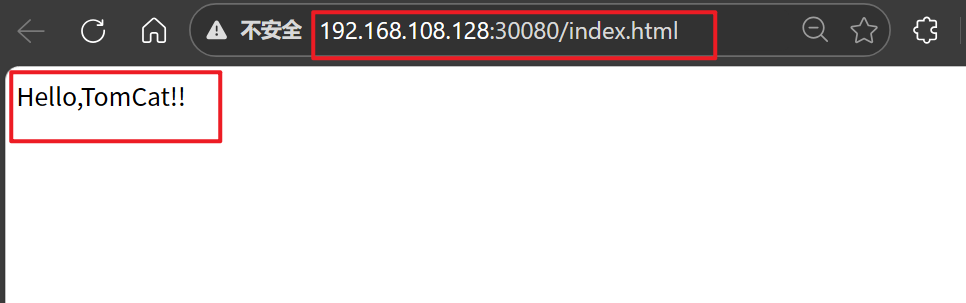
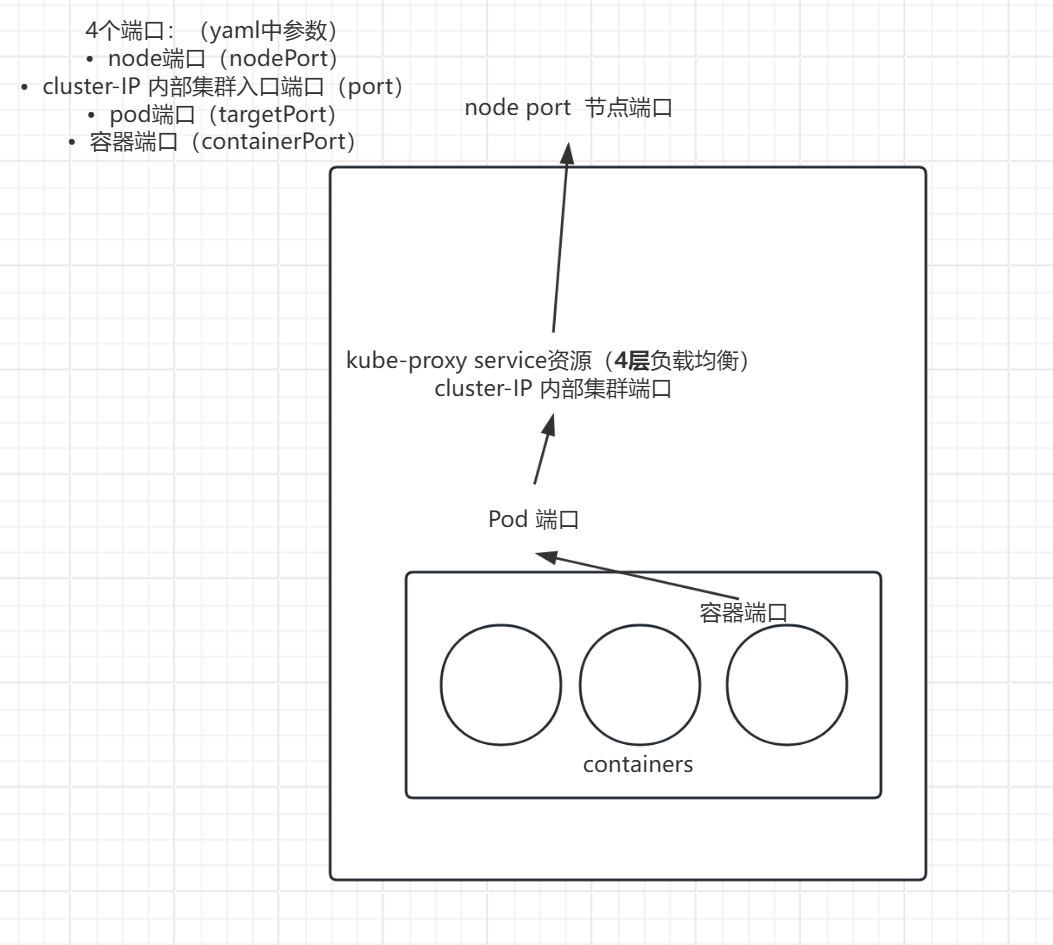
该配置包含Deployment和Service两部分。Deployment创建2个Tomcat Pod副本(使用官方镜像), Service通过NodePort类型将容器8080端口映射到主机30080端口,并通过8888服务端口暴露。访问方式:<节点IP>:
[root@master test_dir 18:02:37]# vim tomcat.yaml
apiVersion: v1
kind: ConfigMap
metadata:
  name: tomcat-web-content
data:
  index.html: |
    <html><body>Hello,TomCat!!</body></html>
---
apiVersion: apps/v1
kind: Deployment
metadata:
  name: tomcat-test
spec:
  replicas: 2
  selector:
    matchLabels:
      app: tomcat		# 必须与template.metadata.labels完全匹配
  template:
    metadata:
      labels:
        app: tomcat		# 必须与selector.matchLabels一致
    spec:
      securityContext:
        runAsUser: 1000
        fsGroup: 1000
      containers:
      - name: tomcat
        image: tomcat:9.0.85-jdk11
        ports:
        - containerPort: 8080
        volumeMounts:
        - name: web-content
          mountPath: /usr/local/tomcat/webapps/ROOT/index.html
          subPath: index.html
      volumes:
      - name: web-content
        configMap:
          name: tomcat-web-content
---
apiVersion: v1
kind: Service
metadata:
  name: tomcat-service
spec:
  type: NodePort
  selector:
    app: tomcat			# 需与Pod标签匹配
  ports:
  - port: 80
    targetPort: 8080
    nodePort: 30080
创建资源
[root@master test_dir 18:15:05]# kubectl apply -f tomcat.yaml
configmap/tomcat-web-content created
deployment.apps/tomcat-test created
service/tomcat-service created
查看端口
[root@master test_dir 18:15:17]# kubectl get svc | grep tomcat
tomcat-service   NodePort    10.109.105.208   <none>        80:30080/TCP   32s
打开网页地址192.168.108.128:30080/index.html
k8s中的端口详解:
Namespace 命名空间
作用
- Namespace是对一组资源和对象的抽象集合
- 常见的 pod, service,deployment 等都是属于某一个namespace的(默认是 default)
- 不是所有资源都属于namespace,如nodes,persistent volume,namespace 等资源则不属于任何namespace
查看namespace
[root@master ~ 09:14:14]# kubectl get namespaces
# namespaces可以简写成namespace或ns
NAME                   STATUS   AGE
default                Active   4d20h	# 所有未指定Namespace的对象都会被默认分配在default命名空间
kube-node-lease        Active   4d20h
kube-public            Active   4d20h	# 此命名空间下的资源可以被所有人访问
kube-system            Active   4d20h	# 所有由Kubernetes系统创建的资源都处于这个命名空间
kubernetes-dashboard   Active   4d18h
web-test               Active   2d15h
查看namespace中的资源
命令kubectl get all --namespace=命名空间名称 可以查看此命名空间下的所有资源
[root@master ~ 09:59:07]# kubectl get all --namespace=kube-system
NAME                                           READY   STATUS    RESTARTS        AGE
pod/calico-kube-controllers-658d97c59c-dnj7l   1/1     Running   1 (4d19h ago)   4d20h
pod/calico-node-5rk9s                          1/1     Running   0               2d9h
pod/calico-node-ptclz                          1/1     Running   0               2d9h
pod/calico-node-wlk7v                          1/1     Running   0               2d9h
pod/coredns-66f779496c-nzpjw                   1/1     Running   1 (4d19h ago)   4d20h
pod/coredns-66f779496c-wzrkp                   1/1     Running   1 (4d19h ago)   4d20h
pod/etcd-master                                1/1     Running   2 (4d19h ago)   4d20h
pod/kube-apiserver-master                      1/1     Running   4 (4d19h ago)   4d20h
pod/kube-controller-manager-master             1/1     Running   2 (4d19h ago)   4d20h
pod/kube-proxy-qjz9p                           1/1     Running   1 (4d20h ago)   4d20h
pod/kube-proxy-stz98                           1/1     Running   2 (4d19h ago)   4d20h
pod/kube-proxy-tzsgh                           1/1     Running   1 (4d20h ago)   4d20h
pod/kube-scheduler-master                      1/1     Running   2 (4d19h ago)   4d20h
pod/metrics-server-57999c5cf7-56szn            1/1     Running   0               3d16h

NAME                     TYPE        CLUSTER-IP    EXTERNAL-IP   PORT(S)                  AGE
service/kube-dns         ClusterIP   10.96.0.10    <none>        53/UDP,53/TCP,9153/TCP   4d20h
service/metrics-server   ClusterIP   10.99.68.52   <none>        443/TCP                  3d16h

NAME                         DESIRED   CURRENT   READY   UP-TO-DATE   AVAILABLE   NODE SELECTOR            AGE
daemonset.apps/calico-node   3         3         3       3            3           kubernetes.io/os=linux   4d20h
daemonset.apps/kube-proxy    3         3         3       3            3           kubernetes.io/os=linux   4d20h

NAME                                      READY   UP-TO-DATE   AVAILABLE   AGE
deployment.apps/calico-kube-controllers   1/1     1            1           4d20h
deployment.apps/coredns                   2/2     2            2           4d20h
deployment.apps/metrics-server            1/1     1            1           3d16h

NAME                                                 DESIRED   CURRENT   READY   AGE
replicaset.apps/calico-kube-controllers-658d97c59c   1         1         1       4d20h
replicaset.apps/coredns-66f779496c                   2         2         2       4d20h
replicaset.apps/metrics-server-57999c5cf7            1         1         1       3d16h
查看所有pod资源
[root@master ~ 10:02:40]# kubectl get pods -A
# -A指所有命名空间
NAMESPACE              NAME                                         READY   STATUS    RESTARTS        AGE
default                node-nginx                                   1/1     Running   0               2d18h
default                tomcat-test-75469fdc74-8n8cm                 1/1     Running   0               2d15h
default                tomcat-test-75469fdc74-ztt8f                 1/1     Running   0               2d15h
kube-system            calico-kube-controllers-658d97c59c-dnj7l     1/1     Running   1 (4d19h ago)   4d20h
kube-system            calico-node-5rk9s                            1/1     Running   0               2d9h
kube-system            calico-node-ptclz                            1/1     Running   0               2d9h
kube-system            calico-node-wlk7v                            1/1     Running   0               2d9h
kube-system            coredns-66f779496c-nzpjw                     1/1     Running   1 (4d19h ago)   4d20h
kube-system            coredns-66f779496c-wzrkp                     1/1     Running   1 (4d19h ago)   4d20h
kube-system            etcd-master                                  1/1     Running   2 (4d19h ago)   4d20h
kube-system            kube-apiserver-master                        1/1     Running   4 (4d19h ago)   4d20h
kube-system            kube-controller-manager-master               1/1     Running   2 (4d19h ago)   4d20h
kube-system            kube-proxy-qjz9p                             1/1     Running   1 (4d20h ago)   4d20h
kube-system            kube-proxy-stz98                             1/1     Running   2 (4d19h ago)   4d20h
kube-system            kube-proxy-tzsgh                             1/1     Running   1 (4d20h ago)   4d20h
kube-system            kube-scheduler-master                        1/1     Running   2 (4d19h ago)   4d20h
kube-system            metrics-server-57999c5cf7-56szn              1/1     Running   0               3d16h
kubernetes-dashboard   dashboard-metrics-scraper-5657497c4c-bgnbv   1/1     Running   0               4d18h
kubernetes-dashboard   kubernetes-dashboard-746fbfd67c-gwwxq        1/1     Running   0               4d18h
创建namespace
命令创建
[root@master ~ 10:04:49]# kubectl create namespace web1
namespace/web1 created
[root@master ~ 10:05:00]# kubectl get ns
NAME                   STATUS   AGE
default                Active   4d20h
kube-node-lease        Active   4d20h
kube-public            Active   4d20h
kube-system            Active   4d20h
kubernetes-dashboard   Active   4d18h
web-test               Active   2d16h
web1                   Active   6s
YAML文件创建
- k8s中几乎所有的资源都可以通过yaml编排创建
- 可以使用
kubectl edit 资源类型 资源名 编辑资源的yaml语法
[root@master ~ 10:05:45]# kubectl edit namespaces web1
- 也可以使用
kubectl get 资源类型 资源名 -o yaml来查看
[root@master ~ 10:07:08]# kubectl get ns web1 -o yaml
apiVersion: v1
kind: Namespace
metadata:
  creationTimestamp: "2026-01-19T02:05:00Z"
  labels:
    kubernetes.io/metadata.name: web1
  name: web1
  resourceVersion: "174330"
  uid: 9f02a36f-15e0-4177-a946-610d4915652f
spec:
  finalizers:
  - kubernetes
status:
  phase: Active
- 还可以使用==
kubectl explain 资源类型==来查看语法文档
编写创建namespace的yaml文件
[root@master ~ 10:10:09]# cd test_dir/
[root@master test_dir 10:10:16]# vim create_web2.yaml
apiVersion: v1		# api版本
kind: Namespace		# 类型为namespace
metadata:			# 定义namespace的元数据
  name: web2		# 定义名称为web2

[root@master test_dir 10:11:23]# kubectl apply -f create_web2.yaml
namespace/web2 created
[root@master test_dir 10:12:28]# kubectl get ns
NAME                   STATUS   AGE
default                Active   4d20h
kube-node-lease        Active   4d20h
kube-public            Active   4d20h
kube-system            Active   4d20h
kubernetes-dashboard   Active   4d18h
web-test               Active   2d16h
web1                   Active   7m36s
web2                   Active   8s
删除namespace
- 删除一个namespace会自动删除所有属于该namespace的资源(类似MySQL中drop库会删除库里 的所有表一样,请慎重操作)
- default,kube-system,kube-public命名空间不可删除
命令删除
[root@master test_dir 10:12:39]# kubectl delete namespaces web1
namespace "web1" deleted
[root@master test_dir 10:14:09]# kubectl get ns
NAME                   STATUS   AGE
default                Active   4d20h
kube-node-lease        Active   4d20h
kube-public            Active   4d20h
kube-system            Active   4d20h
kubernetes-dashboard   Active   4d18h
web-test               Active   2d16h
web2                   Active   108s
YAML文件删除
[root@master test_dir 10:14:16]# kubectl delete -f create_web2.yaml
namespace "web2" deleted
[root@master test_dir 10:14:50]# kubectl get ns
NAME                   STATUS   AGE
default                Active   4d20h
kube-node-lease        Active   4d20h
kube-public            Active   4d20h
kube-system            Active   4d20h
kubernetes-dashboard   Active   4d18h
web-test               Active   2d16h

有“AI”的1024 = 2048,欢迎大家加入2048 AI社区
更多推荐



 19
19 0
0- 0


 已为社区贡献5条内容

所有评论(0)