MySQL中的explain关键字
索引字段中使用的最大字节数,比如索引(username,age,sex),where语句写成username = "xiaoming" and age > 10 and sex = 0这时候用于age使用了范围查询导致age字段后面的索引字段失效,那key_len就是username+age的字节数;explain用于查看数据库执行器对SQL语句的执行计划,执行下面的SQL语句,在控制台可以看到一
explain关键字
explain用于查看数据库执行器对SQL语句的执行计划,执行下面的SQL语句,在控制台可以看到一些基本参数,在进行SQL语句性能优化时一般会查看type,key_len,row字段
explain select * from user
列参数详解
id
id表示查询中操作的执行顺序,数字越大执行优先级越高,相同数字从上到下执行
- 执行顺序相同
explain select username from user
explain select u.username, o.amount from `user` u
join `order` o on u.id = o.user_id
- 执行顺序不同
这是一条子查询语句,查询每个用户的总订单金额
explain select u.id, u.username,
  (select IFNULL(SUM(o.amount), 0)
   from `order` o
   where o.user_id = u.id) as total_amount
from `user` u
这里id为2的会先执行,执行顺序 2 -> 1
select_type
- simple:简单select查询,不包含子查询或者union查询
- primary:查询中包含子查询,最外层的查询会被标记为primary
- subquery:在select或者where中包含子查询
- derived:在from后面包含子查询,这些子查询会存入临时表
- union:union关键字后面的select语句
- union_result:从union表获取结果
查询所有用户的用户名和金额,同时区分有订单和无订单记录的用户
explain select
  combined.username,
  combined.amount,
  combined.order_status
from (
  select u.username, o.amount, '有订单' as order_status
  from `user` u
  join `order` o on u.id = o.user_id
  union
  select u.username, 0 as amount, '无订单' as order_status
  from `user` u
  where u.id not in (select distinct user_id from `order`)
) as combined;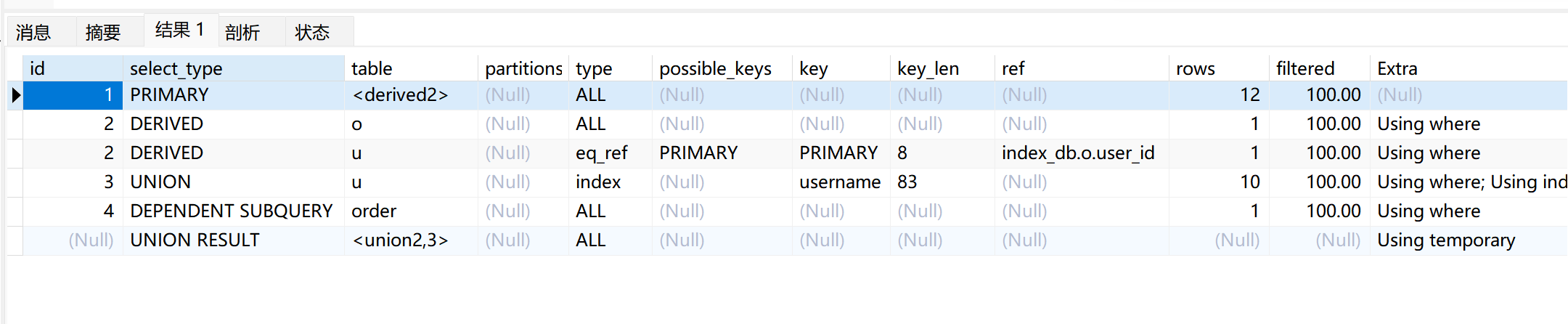
table
查询时使用的表,如果显示derived则表示使用了中间表
type
性能分级,一般优化索引会查看这里
- system:表中只有一行记录
- const:通过索引一次就查询到结果,比如使用主键查询
- eq_ref:唯一索引扫描,创建的索引与表中只有一条数据匹配,常见与主键索引和唯一索引
- ref:非唯一索引扫描,返回匹配到的多行数据
- range:范围扫描,一般是使用了<,>等范围查询
- index:全索引扫描,扫描整个索引树,可以理解为遍历了一整个B+树的叶子节点,性能比全表扫描好一点
- all:全表扫描
性能排序:system>const>eq_ref>ref>range>index>all
一般SQL语句索引优化中至少要达到range级别
possibles_keys
可能用到的索引,不一定会全部使用
key
实际使用的索引
key_len
索引字段中使用的最大字节数,比如索引(username,age,sex),where语句写成username = "xiaoming" and age > 10 and sex = 0这时候用于age使用了范围查询导致age字段后面的索引字段失效,那key_len就是username+age的字节数;如果是写成username = "xiaoming" and age = 10 and sex = 0,那key_len就是username+age+sex的字节数
ref
显示哪些索引或者常量被引用了
rows
根据选择的索引计算出优化的行数,一般越少越好
extra
额外的信息
- using where:使用了where进行过滤
- using index:使用了覆盖索引,不需要进行回表操作
- using filesort:文件内排序,出现这个时表示MySQL无法对索引进行排序,效率会变低
- using temporary:使用了临时表,效率不是很好

有“AI”的1024 = 2048,欢迎大家加入2048 AI社区
更多推荐

 11
11 0
0- 0


 已为社区贡献2条内容

所有评论(0)