Flutter框架跨平台鸿蒙开发——文件下载器综合应用
文件下载器综合展示了Future、Stream、async/await的协同使用。fill:#333;important;important;fill:none;color:#333;color:#333;important;fill:none;fill:#333;height:1em;否是是否开始下载创建下载任务Stream通知进度更新UI显示下载完成?标记完成还有文件?全部完成。
·
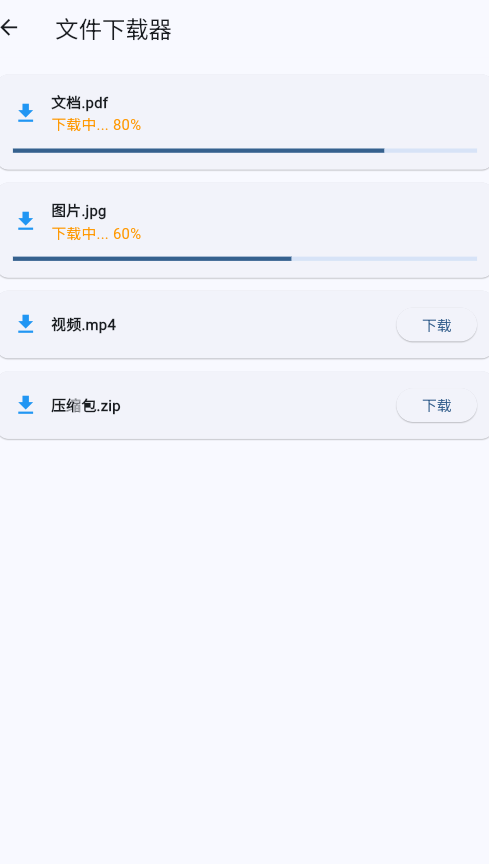
一、功能概述
文件下载器综合展示了Future、Stream、async/await的协同使用。
二、下载管理
Future<void> _downloadAll() async {
  if (_isDownloading) return;

  setState(() {
    _isDownloading = true;
    _downloads.clear();
  });

  final files = [
    '文件1.pdf',
    '文件2.docx',
    '文件3.jpg',
    '文件4.mp4',
    '文件5.zip',
  ];

  for (int i = 0; i < files.length; i++) {
    final item = DownloadItem(
      name: files[i],
      progress: 0,
      status: DownloadStatus.downloading,
    );
    _downloads.add(item);
    _controller.add(item);

    if (mounted) setState(() {});

    // 模拟下载进度
    for (int progress = 0; progress <= 100; progress += 10) {
      await Future.delayed(const Duration(milliseconds: 100));
      item.progress = progress;
      _controller.add(item);
      if (mounted) setState(() {});
    }

    item.status = DownloadStatus.completed;
    _controller.add(item);
    if (mounted) setState(() {});
  }

  setState(() {
    _isDownloading = false;
  });
}
三、进度显示
四、下载状态
| 状态 | 图标 | 颜色 | 说明 |
|---|---|---|---|
| 下载中 | downloading | 蓝色 | 正在下载 |
| 已完成 | check_circle | 绿色 | 下载成功 |
| 失败 | error | 红色 | 下载失败 |
五、工作流程
六、综合特性
| 技术 | 应用场景 | 作用 |
|---|---|---|
| Stream | 实时更新进度 | 持续通知UI |
| async/await | 顺序下载 | 控制执行顺序 |
| Future | 延迟模拟 | 模拟网络请求 |
| StreamController | 事件管理 | 控制数据流 |
七、最佳实践
要点:
- 使用Stream通知实时进度
- 及时更新UI状态
- 检查mounted避免内存泄漏
- 支持取消操作
- 提供清晰的状态反馈
欢迎加入开源鸿蒙跨平台社区:https://openharmonycrossplatform.csdn.net

有“AI”的1024 = 2048,欢迎大家加入2048 AI社区
更多推荐


 0
0 0
0- 0


 已为社区贡献1条内容

所有评论(0)