AIGC(生成式AI)试用 44 -- 个人知识库 DocsGpt
AIGC(生成式AI)试用 44 -- 个人知识库 DocsGpt
·
一切从DocsGPT的API调用开始。
1. Python API调用
(千问) 提问:python调用API方法
Python 中调用 API(通常指 HTTP 接口,如 RESTful API)最常用的方式是使用 requests 库。
| 场景 | 方法 |
|---|---|
| 获取数据 | requests.get(url, params=...) |
| 提交 JSON | requests.post(url, json=...) |
| 上传文件 | requests.post(url, files=...) |
| 带 Token | headers={"Authorization": "Bearer xxx"} |
| 安全健壮 | 加 timeout + try-except + raise_for_status() |
import requests

# GET方法
Parameters = {}
response = requests.get(GET_URL, Parameters)
# return: response.status_code, response.text

# POST方法
Data = {}   # headers, json
response = requests.post(post_URL, Data, headers)
2. 调用DocsGPT --
| answer | Answer related operations |
| analytics | Analytics and reporting operations |
| attachments | File attachments and media operations |
| conversations | Conversation management operations |
| models | Available models |
| agents | Agent management operations |
| prompts | Prompt management operations |
| sharing | Conversation sharing operations |
| sources | Source document management operations |
| tools | Tool management operations |
| connectors | Connector operations |
- payload Parameters -- 待确认、实际验证
| question | 用户提问或输入 |
| api_key | agent API key |
| chunk | 上下文数量,指定从向量数据库中检索多少个相关文本片段(chunks)作为上下文 |
| retriever | 检索器类型(即如何从文档中查找相关信息): default;parent_document, 先子块再父文档;multi_query |
| temperature | 控制大语言模型(LLM)生成文本的随机性/创造性,0.0~2.0,确定~随机,注意幻觉的产生 |
| passthrough | 是否启用 “直通模式”:True,不查RAG文档直接提问;执行RAG流程(检索+提问) |
| history | 对话历史, JSON |
| model_id | 指定LLM模型类型 |
| prompt_id | local 或 prompt_id,本地无需验证 |
| isNoneDoc | False,查看RAG文档 |
| save_conversation | True: 保留对话历史 |
| tools | LLM 可调用的外部函数/插件 |
| attachments | 上传附件,知识库补充 |
| json_schema | LLM 输出必须符合的 JSON 结构,用于强制格式化响应 |
- POST: api/answer
import requests

purl = "http://localhost:7091/api/answer"

payload = {
  "question": "who are you?",
##  "history": [string],
##  "conversation_id": "string",
  "prompt_id": "default",
  "chunks": 2,
  "retriever": "",
##  "api_key": "string",
  "active_docs": "",
  "isNoneDoc": True,
  "save_conversation": True,
  "model_id": "docsgpt-local",
  "passthrough": {},
  "temperature": 0.0,
  "top_k": 5
}

response = requests.post(purl, json=payload)

if response.status_code == 200:
    result = response.json()
    print(f">> Answer: {result.get('answer')}, \n>> StatusCode: {response.status_code}, \n>> Text: {response.text}")
else:
    print(f"Fail: {response.status_code}, {response.text}")


###############
>> Answer: I am your DocsGPT. I am an AI assistant designed to provide helpful and accurate responses, assist with documentation, and engage in meaningful conversations. I aim to be proactive and helpful in answering your questions based on both your input and any additional context provided.,
>> StatusCode: 200,
>> Text: {
  "answer": "I am your DocsGPT. I am an AI assistant designed to provide helpful and accurate responses, assist with documentation, and engage in meaningful conversations. I aim to be proactive and helpful in answering your questions based on both your input and any additional context provided.",
  "conversation_id": "6967afe8066b58e22408544f",
  "sources": [],
  "thought": "",
  "tool_calls": []
}

################ Error List
--> "model_id": "deepseek-r1:1.5b",
Fail: 500, {
  "error": "Invalid model_id 'deepseek-r1:1.5b'. Available models: docsgpt-local, gpt-5.1, gpt-5-mini"
}

--> not set "model_id"
>> Answer: None,
>> StatusCode: 200,
>> Text: {
  "answer": null,
  "conversation_id": null,
  "sources": null,
  "thought": "Please try again later. We apologize for any inconvenience.",
  "tool_calls": null
}

--> "history": [],
Fail: 500, {
  "error": "the JSON object must be str, bytes or bytearray, not list"
}

--> "conversation_id": "string",
Fail: 500, {
  "error": "Conversation not found or unauthorized"
}
- POST: stream
import requests, json

purl = "http://localhost:7091/stream"

payload = {
  "question": "who are you?",
##  "history": ["string"],
##  "conversation_id": "",
##  "prompt_id": "default",
##  "chunks": 2,
##  "retriever": "string",
####  "api_key": "string",
##  "active_docs": "string",
##  "isNoneDoc": True,
##  "index": 0,
##  "save_conversation": True,
  "model_id": "docsgpt-local",
##  "attachments": ["string"],
##  "passthrough": {}
}

response = requests.post(purl, json=payload)

if response.status_code == 200:
    result = response.iter_lines()

    answer= ""
    jid = ""
    for line in result:
        if line:
            text = line.decode('utf-8', errors='ignore')
            data = text.split("data:")[1].strip()

            jdata = json.loads(data)
            if jdata.get("answer"):
                answer = answer + jdata["answer"]
            if jdata.get("id"):
                jid = jdata["id"]

    print(f">> Answer: {answer}, \n>> StatusCode: {response.status_code}, \n>> ID: {jid}")
else:
    print(f"Fail: {response.status_code}, {jid}")

##########################
>> Answer: I am DocsGPT, an AI assistant designed to help you with documents and answer questions. I analyze uploaded documents (PDF, DOCX, TXT, etc.) to provide contextualized answers. I can also use available tools, like APIs, to fetch real-time data when needed. My goal is to deliver accurate, relevant, and actionable responses.,
>> StatusCode: 200,
>> ID: 696a382be304c4e05c085443

########################## Error List
--> <Response [200]> <class 'requests.models.Response'>
result = response.iter_lines()

--> json.decoder.JSONDecodeError: Expecting value: line 1 column 1 (char 0)
line:  b'data: {"type": "id", "id": "696a3ab5e304c4e05c085453"}'
text = line.decode('utf-8', errors='ignore')
text:  data: {"type": "id", "id": "696a3ab5e304c4e05c085453"}
- POST: api/create_prompt
import requests, json

curl = "http://localhost:7091/api/create_prompt"
gsurl = "http://localhost:7091/api/get_prompts"
gurl = "http://localhost:7091/api/get_single_prompt"
purl = "http://localhost:7091/stream"

payload = {
  "content": "",
  "name": "who are you?",
}

response = requests.post(curl, json=payload)
result = response.json()


payload = {
  "question": "你是谁?来自哪里?能做什么?",
##  "history": ["string"],
##  "conversation_id": "",
  "prompt_id": f"{result.get("id")}",
##  "chunks": 2,
##  "retriever": "string",
####  "api_key": "string",
##  "active_docs": "string",
##  "isNoneDoc": True,
##  "index": 0,
##  "save_conversation": True,
  "model_id": "docsgpt-local",
##  "attachments": ["string"],
##  "passthrough": {}
}

response = requests.post(purl, json=payload)

if response.status_code == 200:
    result = response.iter_lines()

    answer= ""
    jid = ""
    for line in result:
        if line:
            text = line.decode('utf-8', errors='ignore')
            data = text.split("data:")[1].strip()

            jdata = json.loads(data)
            if jdata.get("answer"):
                answer = answer + jdata["answer"]
            if jdata.get("id"):
                jid = jdata["id"]

    print(f">> Answer: {answer}, \n>> StatusCode: {response.status_code}, \n>> ID: {jid}")
else:
    print(f"Fail: {response.status_code}")

#############################################
>> Answer: 我是 **Kimi**,由 **月之暗面科技有限公司**(Moonshot AI)训练的大语言模型。我出生于 **2023 年 10 月**,知识截止于 **2025 年 4 月**。

我擅长用自然流畅的语言和你交流,能做的事情包括但不限于:

- 回答各类知识和信息咨询
- 帮你阅读、总结长文档或网页内容
- 协助写作、翻译、润色文本
- 帮你写代码、解释代码、调试程序
- 制定计划、提供建议、模拟对话等

你可以随时向我提问,我会尽力帮你解决。,
>> StatusCode: 200,
>> ID: 696cf48bbb06b2fb690853c9
- POST:api/create_agent
import requests, json

purl = "http://localhost:7091/api/create_agent"

payload = {
  "name": "NewAgent",
  "description": "This is new angent",
##  "image": {},
  "source": "Default",
##  "sources": [
##    "string"
##  ],
  "chunks": 2,
  "retriever": "string",
  "prompt_id": "default",
##  "tools": [
##    "string"
##  ],
  "agent_type": "Classic",
  "status": "published",
##  "json_schema": {},
##  "limited_token_mode": true,
##  "token_limit": 0,
##  "limited_request_mode": true,
##  "request_limit": 0,
##  "models": [
##    "string"
##  ],
  "default_model_id": "docsgpt-local",
}

response = requests.post(purl, json=payload, stream=True)

if response.status_code == 200:
    result = response.json()
    print("result: ", result)
    print(result)
    print(f">> Answer: {result.get('answer')}, \n>> StatusCode: {response.status_code}, \n>> Text: {response.text}")
else:
    print(f"Fail: {response.status_code}, {response.text}")

#####################################
Fail: 201, {
  "id": "696cdd93e304c4e05c0854eb",
  "key": "7524f0b4-e4ec-4cc6-9cd5-faa2869274ca"

########################## Error List
--> Fail: 400, {
  "message": "Status must be either 'draft' or 'published'",
  "success": false
}
--> Fail: 400, {
  "message": "Either 'source' or 'sources' field is required for published agents",
  "success": false
}
--> Fail: 400, {
  "message": "Missing required fields: description, chunks, retriever, prompt_id, agent_type",
  "success": false
}
- Get:api/get_agent(s)
import requests, json

purl = "http://localhost:7091/api/delete_agent"
gurl = "http://localhost:7091/api/get_agent"
gsurl = "http://localhost:7091/api/get_agents"

response = requests.get(gsurl)
result = response.json()
for gid in result:
    response = requests.get(gurl+"?id="+gid.get("id"))
    result = response.json()

    print("---------->Agent: ")
    for agent in result:
        print(agent,": ",result[agent])

###################################
---------->Agent:
agent_type :  classic
chunks :  2
created_at :  Wed, 31 Dec 2025 14:09:38 GMT
default_model_id :
description :  pic word recognize
id :  69552ea240d00b40db5f1543
image :
json_schema :  None
key :  8d64...4b85
last_used_at :  Wed, 31 Dec 2025 15:50:50 GMT
limited_request_mode :  False
limited_token_mode :  False
models :  []
name :  PicWordReg
pinned :  False
prompt_id :  69552e8040d00b40db5f1542
request_limit :  0
retriever :
shared :  True
shared_metadata :  {'shared_at': 'Wed, 31 Dec 2025 14:09:46 GMT', 'shared_by': ''}
shared_token :  ml7EmEkaTFYeHh_QAkWOnhvqsN5wEpkpKEwbdeSM3Qk
source :
sources :  []
status :  published
token_limit :  0
tool_details :  []
tools :  []
updated_at :  Wed, 31 Dec 2025 14:09:38 GMT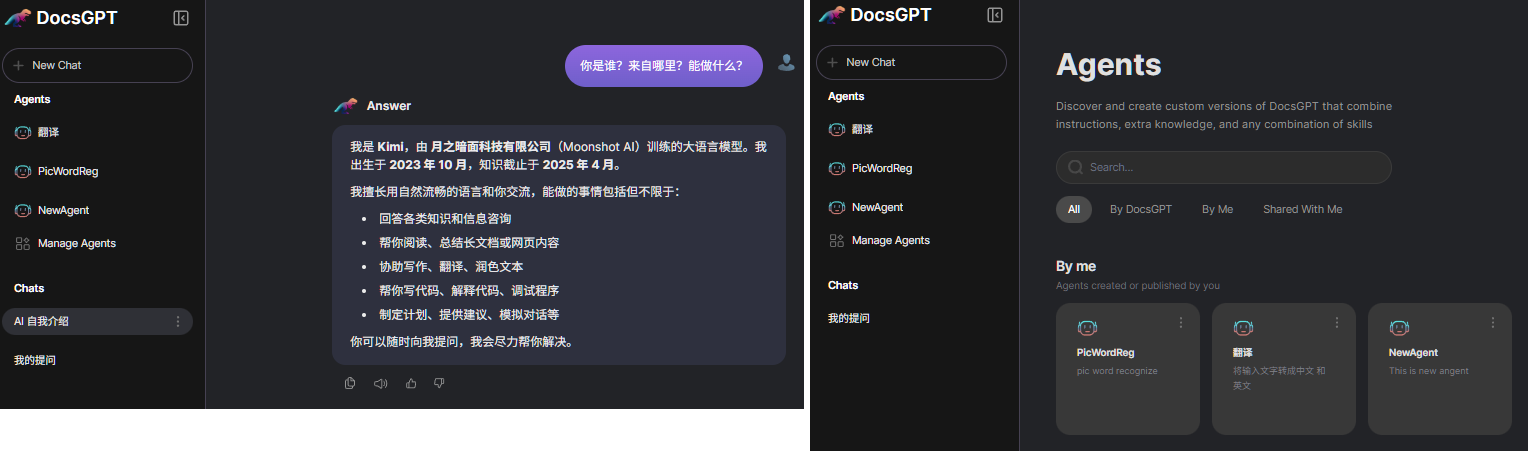
3. Issues
- api/answer, stream的区别
| 特性 | 非流式(如 /api/answer) |
流式(stream=true) |
|---|---|---|
| 响应方式 | 一次性返回完整答案 | 逐字/逐 token 返回 |
| 等待时间 | 需等待模型生成完整内容后才返回(延迟高) | 首字几乎立即返回(延迟低) |
| 网络传输 | 单次 HTTP 响应 | 持续的 HTTP 流(如 SSE、Chunked Transfer) |
| 用户体验 | “转圈 → 突然全部出现” | “打字机效果”,边生成边显示 |
| 资源占用 | 服务端需缓存完整结果 | 服务端边生成边发送,内存更省 |
| 适用场景 | 后台处理、批量任务 | 聊天界面、实时交互 |
| 效果对比 |
用户点击“发送” 等待 5 秒(模型思考 + 生成) 屏幕突然显示完整回答 |
用户点击“发送” 0.5 秒后第一个字出现 后续文字像打字机一样逐字输出 |
| 场景 | 后台自动化任务(如生成报告) API 被其他程序调用(非人交互) |
Web 聊天界面(如微信、网页助手) 移动 App 聊天 |
| 简单、适合机器调用,但用户体验差 | 复杂一点,但提供实时反馈,是聊天类应用的标准做法。 |
4. DocsGPT Port
- Port: 5173, DocsGPT running
setup.ps1: Write-ColorText "DocsGPT is running at http://localhost:5173"
DocsGPT-main\application\app.py: redirect("http://localhost:5173") - Port: 11434, AI Model
.env: OPENAI_BASE_URL=http://host.docker.internal:11434
deployment\optional\docker-compose.optional.ollama-cpu.yaml: ports: - "11434:11434" - Port: 7091, API access
deployment\docker-compose-local.yaml: VITE_API_HOST=http://localhost:7091
4. DocsGPT environment
- ollama
ollama list ########################################################## NAME ID SIZE MODIFIED deepseek-r1:1.5b a42b25d8c10a 1.1 GB 11 months ago - Docker
docker --version
docker-compose --version
docker system info

##########################################################
Docker version 29.1.3, build f52814d
Docker Compose version v2.40.3-desktop.1
Client:
 Version:    29.1.3
 Context:    desktop-linux
......
Server:
 Containers: 9
  Running: 6

wsl --list --verbose
##########################################################
  NAME              STATE           VERSION
* docker-desktop    Running         2


docker images
##########################################################                                                                                                       i Info →   U  In Use
IMAGE                         ID             DISK USAGE   CONTENT SIZE   EXTRA
arc53/docsgpt-fe:develop      89a336ecda3a        973MB          236MB    U
arc53/docsgpt:develop         f49f4d12dd3c         12GB         4.28GB    U
docsgpt-oss-backend:latest    61116975e170       15.2GB         5.45GB    U
docsgpt-oss-frontend:latest   7bdb0c8f98ed        973MB          236MB    U
docsgpt-oss-worker:latest     9c3988fdb2f3       15.2GB         5.45GB    U
mongo:6                       03cda579c8ca       1.06GB          273MB    U
ollama/ollama:latest          2c9595c555fd       6.14GB         2.17GB    U
redis:6-alpine                37e002448575       45.1MB         12.9MB    U
参考:

有“AI”的1024 = 2048,欢迎大家加入2048 AI社区
更多推荐

 18
18 0
0- 0


 已为社区贡献26条内容

所有评论(0)