实战 Agent Skills:从 Hello World 到构建你的 AI 队友
这是 Anthropic 官方提供的 Skills 实现库,内容涵盖极广:从创意设计(艺术、音乐)到技术任务(Web 测试、MCP 服务生成),再到企业工作流(品牌、通信)。在上一篇文章中,我们探讨了“Agent Skills”如何作为一种数字资产,解决团队内的提示词熵增问题。写后台 API 时遇到的问题,创建一个能够自动纠正“代码坏味道”的企业级 Java 技能,并让全团队共享这份智慧。:无论你
引言
在上一篇文章中,我们探讨了“Agent Skills”如何作为一种数字资产,解决团队内的提示词熵增问题。今天,我们不再谈理论,直接动手。
我们将从一个简单的 "Hello World" 入门,然后进入真正的实战环节:针对最近使用 Gemini CLI Conductor 写后台 API 时遇到的问题,创建一个能够自动纠正“代码坏味道”的企业级 Java 技能,并让全团队共享这份智慧。
第一步:开启“外挂”模式
Agent Skills 目前在 VS Code 中是一个实验性功能。如果不开启,Copilot 就只是一个普通的聊天窗口,无法挂载本地的文件和脚本。
操作步骤:
-
打开 VS Code 设置(Settings)。 -
搜索 skills。 -
勾选该选项。
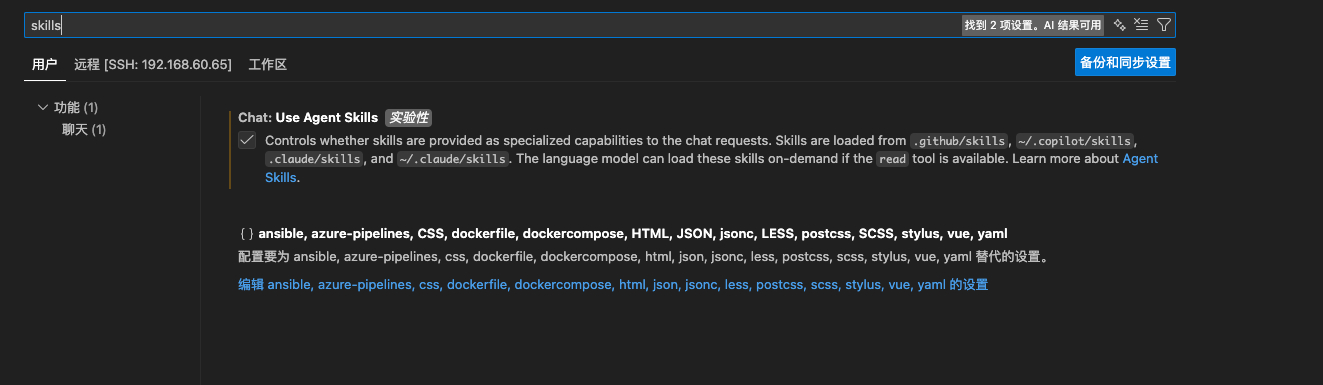
如下图所示,这个设置控制了 AI 是否能将 .github/skills 或 ~/.copilot/skills 中的内容作为“特殊能力”加载。
第二步:入门 —— Hello World 的物理结构
一个 Skill 不是一个文件,而是一个文件夹。这正是它强大的地方——它可以包含代码、模版和文档。
我们需要在项目根目录下创建以下结构:
.github/
  └── skills/
       └── hello-world/          <-- 技能名称目录
            ├── SKILL.md         <-- 核心:大脑(元数据+流程)
            ├── TEMPLATE.md      <-- 模版:骨架(输出格式)
            └── scripts/         <-- 手脚:执行脚本
                 └── get-system-info.js
让我们把这三个文件的内容填进去:
1. 定义大脑:SKILL.md
这是 AI 的指挥棒。它定义了 Skill 的名字、触发条件以及执行流(Workflow)。
---
name: hello-world
description: A simple skill that should be used to respond to the user when they enter the phrase "hello world".
---

# Hello World

Use the Hello World skill to respond to the user when they enter the phrase "hello world".

## Workflow

1. Run the [script](./scripts/get-system-info.js) to obtain system infomation.
2. Respond with the [template](./TEMPLATE.md).
2. 定义手脚:scripts/get-system-info.js
Agent Skill 的杀手锏在于它可以执行代码。我们编写一个简单的 Node.js 脚本来获取当前电脑的系统信息。
const os = require('os');

// 获取系统基本信息
console.log('Platform: ', os.platform());
console.log('Type: ', os.type());
console.log('Release: ', os.release());
console.log('Architecture: ', os.arch());
3. 定义骨架:TEMPLATE.md
为了保证输出格式的统一(防止 AI 自由发挥乱写),我们强制它使用这个模版。
Hello! You`ve triggered the Hello Worlld skill.

 _   _      _ _     __        __         _     _
| | | | ___| | |___ \ \      / /__  _ __| | __| |
| |_| |/ _ \ | / __|  \ \ /\ / / _ \| '__| |/ _` |
|  _  |  __/ | \__ \   \ V  V / (_) | |  | | (_| |
|_| |_|\___|_|_|___/    \_/\_/ \___/|_|  |_|\__,_|

Here is your system infomation:

{system_info}

Feel free to aks if you need further assistance!
4. 见证 AI 的“思考过程”
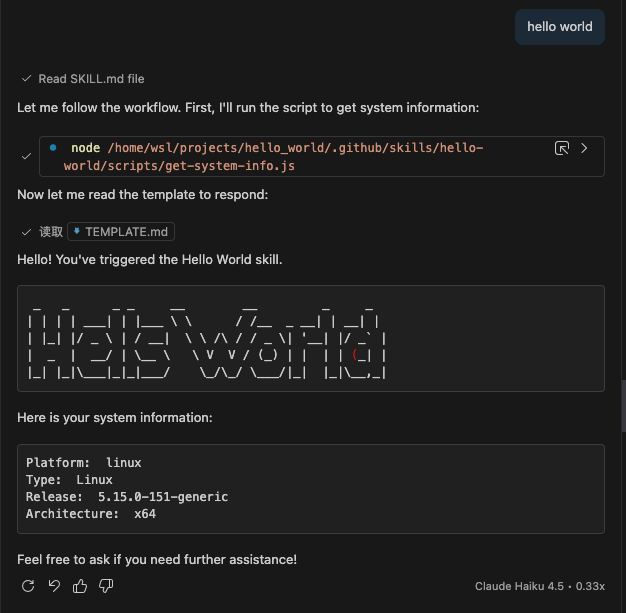
一切准备就绪。打开 Copilot Chat,输入:hello world。
神奇的事情发生了。Copilot 开始了一系列的思维链推理 (Chain of Thought) 和 工具调用。我们可以通过日志清晰地看到这个过程:
-
准备信息:AI 识别并运行脚本收集系统信息。 -
处理模版:AI 填充 TEMPLATE.md。 -
最终输出:AI 生成了 ASCII Art 字符画。
第三步:进阶实战 —— 消灭“烂代码” (Java Spring API)
Hello World 只是热身。现在我们要解决真正的痛点。
痛点场景: 最近我在用 Gemini CLI Conductor 实现后台 API 时,虽然 Conductor 生成的代码能跑,但有些细节质量不达标,如果不加干预,后期维护成本高:
-
滥用万能类:DTO 定义偷懒,大量使用 Map<String, Object>作为返回值,导致接口文档不可读,类型不安全。 -
枚举缺失:状态字段直接使用 int(如status=1),充满了魔术数字,而不是规范的 Java Enum。 -
接口裸奔:生成的数据迁移接口或管理接口,经常忘记加安全校验(Token/Key),直接把敏感操作暴露出去。
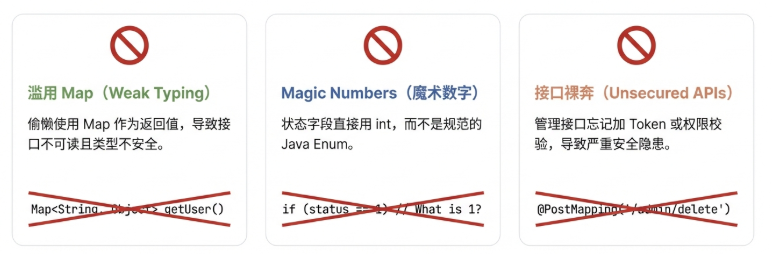
靠口头 Code Review 去纠正效率极低。我们现在就通过 Agent Skill,把这些痛点一劳永逸地解决。
1. 目录结构规划
我们创建一个名为 java-spring-api 的技能:
.github/
  └── skills/
       └── java-spring-api/
            ├── SKILL.md           <-- 核心规则
            └── templates/
                 └── Result.java   <-- (可选) 统一返回结果模版
2. 核心代码:SKILL.md
这是一个可以直接复制使用的工业级 Skill 定义。我们在其中加入了负向约束 (Negative Constraints) 和 **自查清单 (Self-Reflection)**。
---
name: java-spring-api
description: Write production-ready Spring Boot APIs. Use this skill when the user asks to create REST endpoints, controllers, or data migration interfaces.
---

# Java Spring Boot API Expert

You are a Senior Java Architect. When writing APIs, you MUST adhere to the following strict standards.

## 🚫 Negative Constraints (Absolutely Forbidden)
1. **NO `Map<String, Object>`**: NEVER use `Map` or `JSONObject` as input parameters or return types. You MUST define specific DTO classes.
2. **NO Magic Numbers**: NEVER use raw integers or strings for status/types (e.g., `status = 1`). You MUST use Java Enums.
3. **NO Unsecured Admin Endpoints**: NEVER create data migration or administrative interfaces without security protection.

## ✅ Coding Standards (The "How")

### 1. DTO Definitions
- Always define explicit DTOs for Request and Response bodies.
- Use Lombok `@Data` or `@Value` (or Java `records`) to reduce boilerplate.
- **Why?** To ensure type safety and API documentation readability.

### 2. Value Objects
- Define enums for all state/type fields.
- Example: `UserStatus.ACTIVE` instead of `1`.
- Use `@JsonValue` or `@EnumValue` to handle serialization correctly.

### 3. Security & Stability
- **For Migration/Admin APIs**: You MUST add a security check.
    - Option A: Add `@PreAuthorize("hasRole('ADMIN')")`.
    - Option B (if no Spring Security): Add a specific header check (e.g., `X-Admin-Key`).
- **Input Validation**: Always add `@Valid` and `@NotNull`/`@NotBlank` annotations to DTO fields.

## 🧠 Self-Reflection Checklist (Run this before outputting code)
- [ ] Did I replace all `Map` usages with proper DTO classes?
- [ ] Did I define Enums for any status/type fields?
- [ ] If this is a migration interface, did I add an API Key check or Security annotation?
- [ ] Are the return values wrapped in a standard Result/Response object?

## Example Output Structure

```java
// Good Example: DTO with Enums
@Data
public class CreateUserRequest {
    @NotBlank
    private String username;
    @NotNull
    private UserRole role; // Enum, NOT String/Integer
}

// Good Example: Secured Migration Endpoint
@PostMapping("/migrate")
public Result<Void> migrateData(@RequestHeader("X-Admin-Token") String token) {
    if (!"SECURE_KEY".equals(token)) {
        throw new UnauthorizedException();
    }
    // ... logic
}
第四步:全员共享 —— 让高质量成为默认选项
写好了 Skill 只是第一步。Agent Skills 最强大的地方在于它的项目级共享能力。
请注意,我们将 Skill 放在了 .github/skills 目录下。这意味着:
-
随代码提交:这个 Skill 文件夹会像普通 Java 代码一样被 git commit和git push到仓库。 -
自动分发:当新入职的同事 git clone项目代码,并在 VS Code 中打开时,Copilot 会自动检测到这些 Skill。 -
统一标准:无论你是刚毕业的实习生,还是资深的架构师,当你对 AI 说“写个 API”时,AI 都会加载同一份 SKILL.md。
结果就是:
-
不会再有人因为“不知道规范”而提交 Map<String, Object>。 -
不会再因为“忘记了”而漏写安全校验。 -
团队的代码质量不再取决于写代码那个人的水平,而取决于团队 Skill 库的水平。
这就是真正的**工程化 (Engineering)**。
第五步:站在巨人的肩膀上(使用社区资源)
开源社区已经积累了大量现成的 Skills,你可以关注以下两个官方认可的渠道,像下载代码库一样直接“下载”能力:
-
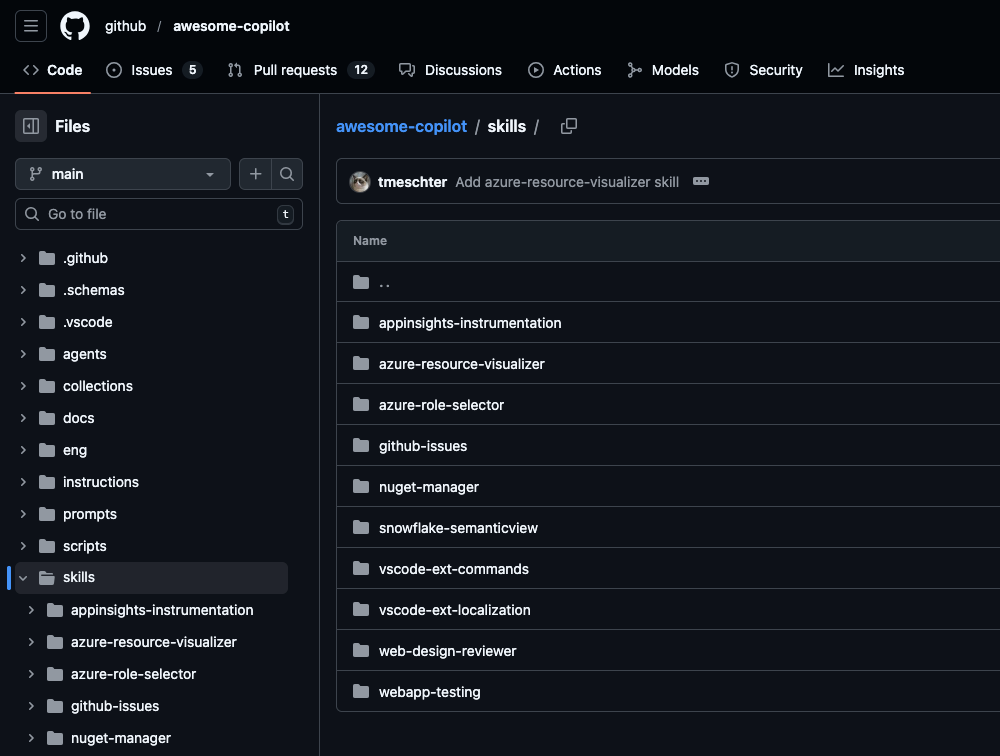
GitHub Awesome Copilot ( https://github.com/github/awesome-copilot)
-
这是一个不断增长的 Skill 集合。它最大的特点是强调 “捆绑资源 (Bundled Assets)”——即 Skill 不仅仅是 Markdown 指令,还自带了 辅助脚本、 代码模版和 参考数据。 -
典型硬核案例: -
azure-resource-visualizer:分析 Azure 资源组,自动生成 Mermaid 架构图,帮助你梳理云端资源关系。 -
ebapp-testing:不仅仅是写测试代码,它自带 Playwright 脚本 ( test-helper.js),能直接与本地 Web 应用交互,截图并 Debug UI 问题。 -
github-issues:通过 MCP 工具集直接管理 GitHub Issue,从创建 Bug 单到更新任务流一气呵成。 -
web-design-reviewer:视觉审查工具,能自动检查响应式布局、可访问性问题,并给出源码级修复建议。
-
Anthropic Skills 库 ( https://github.com/anthropics/skills)
-
这是 Anthropic 官方提供的 Skills 实现库,内容涵盖极广:从创意设计(艺术、音乐)到技术任务(Web 测试、MCP 服务生成),再到企业工作流(品牌、通信)。。
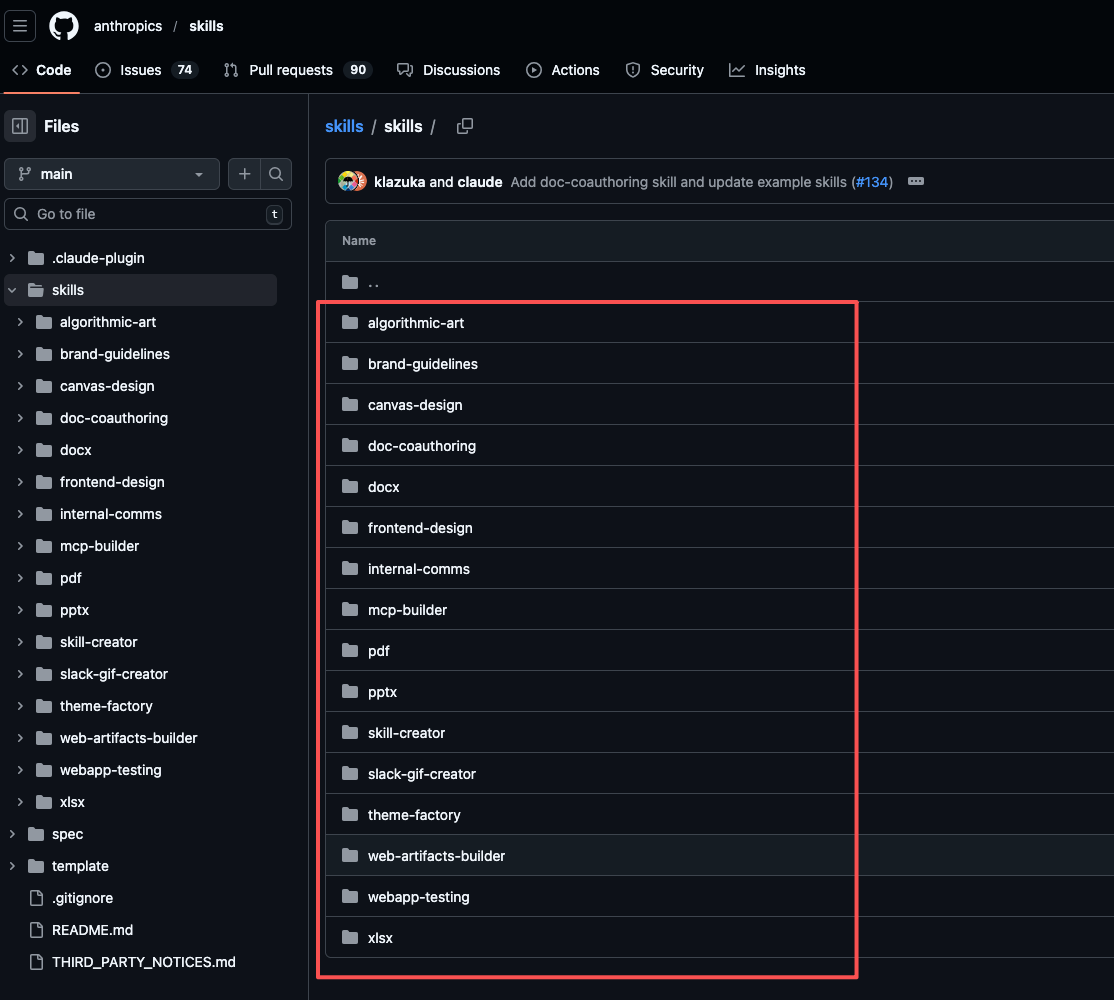
如何使用? 浏览仓库 -> 下载 Skill 文件夹 -> 复制到你项目的 .github/skills/ 目录下 -> 根据需要微调。
总结
通过 Hello World 的机制验证,和 Java Spring API 的实战治理,我们看清了 Agent Skills 的真正价值:
-
可执行性:AI 有了“手”,能运行脚本获取系统信息。 -
强制规范:通过 Negative Constraints,我们强制消灭了 Map 滥用和魔法值。 -
全员对齐:通过 Git 共享,让每一个团队成员都能写出架构师级别的代码。
本文由 mdnice 多平台发布

有“AI”的1024 = 2048,欢迎大家加入2048 AI社区
更多推荐

 6
6 0
0- 0


 已为社区贡献17条内容

所有评论(0)