Flutter 框架跨平台鸿蒙开发 - 开发经典贪吃蛇游戏
游戏循环:Timer.periodic 驱动定时更新移动算法:头部添加 + 尾部移除碰撞检测:边界检测 + 自身碰撞方向控制:防反向 + 多种输入方式难度递增:分数驱动速度变化视觉效果:CustomPainter 绘制渐变蛇身贪吃蛇虽然简单,但包含了游戏开发的核心要素。希望这篇文章能帮你理解游戏循环和状态管理的基本思想!🐍 完整源码已上传,欢迎Star支持!---**欢迎加入开源鸿蒙跨平台社区:
🐍 Flutter + HarmonyOS 实战:开发经典贪吃蛇游戏

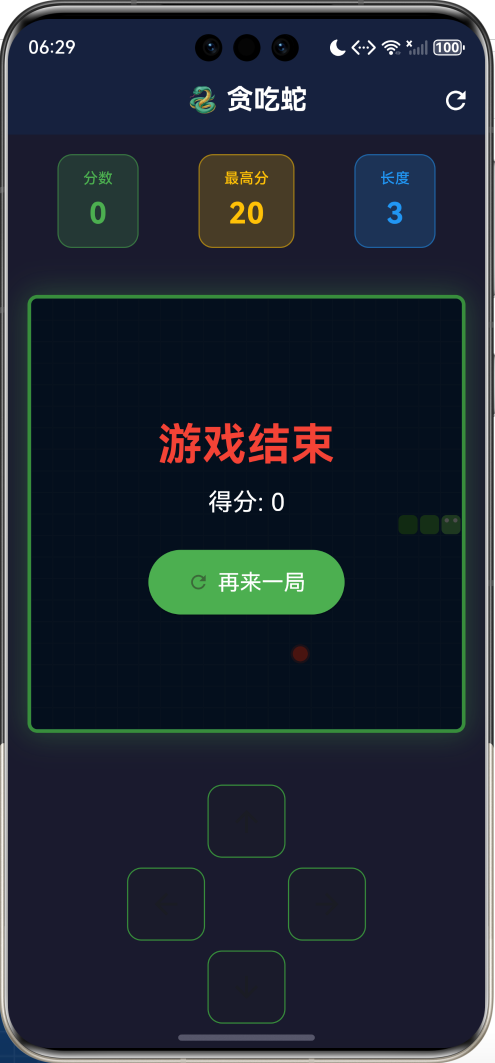
📋 文章导读
| 章节 | 内容概要 | 预计阅读 |
|---|---|---|
| 一 | 贪吃蛇游戏规则与设计 | 3分钟 |
| 二 | 核心数据结构设计 | 5分钟 |
| 三 | 游戏循环与移动算法 | 10分钟 |
| 四 | 碰撞检测与游戏状态 | 6分钟 |
| 五 | UI渲染与交互设计 | 8分钟 |
| 六 | 完整源码与运行 | 3分钟 |
💡 写在前面:贪吃蛇是一款承载了无数人童年回忆的经典游戏。从诺基亚手机到现代智能设备,它的魅力经久不衰。本文将带你用Flutter从零实现这款经典游戏,深入讲解游戏循环、碰撞检测、状态管理等核心技术点。
一、游戏规则与设计
1.1 贪吃蛇游戏规则
-
移动规则
- 蛇会持续向当前方向移动,玩家可以改变方向但不能反向
1.2 功能设计
1.3 游戏参数设计
| 参数 | 值 | 说明 |
|---|---|---|
| 棋盘大小 | 20×20 | 400个格子 |
| 初始长度 | 3节 | 蛇的初始长度 |
| 初始速度 | 200ms | 每次移动间隔 |
| 最快速度 | 100ms | 速度上限 |
| 加速条件 | 每50分 | 速度减少20ms |
| 食物分值 | 10分 | 每个食物得分 |
二、核心数据结构
2.1 坐标表示
使用 Point<int> 表示二维坐标:
import 'dart:math';

// 蛇身体:列表存储,头部在末尾
List<Point<int>> snake = [];

// 食物位置
Point<int>? food;

// 初始化蛇(3节,在中间位置)
snake = [
  Point(cols ~/ 2 - 2, rows ~/ 2),  // 尾部
  Point(cols ~/ 2 - 1, rows ~/ 2),  // 身体
  Point(cols ~/ 2, rows ~/ 2),      // 头部
];
2.2 方向枚举
enum Direction { up, down, left, right }

// 当前方向
Direction direction = Direction.right;

// 下一个方向(防止快速按键导致反向)
Direction nextDirection = Direction.right;
2.3 蛇的数据结构图解
蛇的移动过程(向右):

移动前:
  [0]    [1]    [2]
  尾部 → 身体 → 头部
  (3,5)  (4,5)  (5,5)

移动后(未吃食物):
  [0]    [1]    [2]
  尾部 → 身体 → 头部
  (4,5)  (5,5)  (6,5)  ← 新头部
  ↑
  原尾部被移除

移动后(吃到食物):
  [0]    [1]    [2]    [3]
  尾部 → 身体 → 身体 → 头部
  (3,5)  (4,5)  (5,5)  (6,5)  ← 新头部
  ↑
  尾部保留,蛇变长
三、游戏循环与移动算法
3.1 游戏循环
贪吃蛇的核心是一个定时器驱动的游戏循环:
3.2 定时器实现
Timer? gameTimer;
int speed = 200;  // 毫秒

void _startGame() {
  gameTimer?.cancel();
  gameTimer = Timer.periodic(Duration(milliseconds: speed), (_) {
    _moveSnake();
  });
}

void _pauseGame() {
  gameTimer?.cancel();
}
3.3 移动算法
void _moveSnake() {
  if (!isPlaying) return;

  setState(() {
    // 1. 更新方向
    direction = nextDirection;

    // 2. 计算新头部位置
    final head = snake.last;
    Point<int> newHead;

    switch (direction) {
      case Direction.up:
        newHead = Point(head.x, head.y - 1);
        break;
      case Direction.down:
        newHead = Point(head.x, head.y + 1);
        break;
      case Direction.left:
        newHead = Point(head.x - 1, head.y);
        break;
      case Direction.right:
        newHead = Point(head.x + 1, head.y);
        break;
    }

    // 3. 检查碰撞
    if (_checkCollision(newHead)) {
      _endGame();
      return;
    }

    // 4. 添加新头部
    snake.add(newHead);

    // 5. 检查是否吃到食物
    if (newHead == food) {
      score += 10;
      _generateFood();
      // 不移除尾部,蛇变长
    } else {
      // 移除尾部,蛇长度不变
      snake.removeAt(0);
    }
  });
}
3.4 方向变化的坐标计算
| 方向 | X变化 | Y变化 | 说明 |
|---|---|---|---|
| ↑ 上 | 0 | -1 | Y坐标减小 |
| ↓ 下 | 0 | +1 | Y坐标增大 |
| ← 左 | -1 | 0 | X坐标减小 |
| → 右 | +1 | 0 | X坐标增大 |
3.5 防止反向移动
void _changeDirection(Direction newDirection) {
  // 防止反向移动(会导致立即撞到自己)
  if ((direction == Direction.up && newDirection == Direction.down) ||
      (direction == Direction.down && newDirection == Direction.up) ||
      (direction == Direction.left && newDirection == Direction.right) ||
      (direction == Direction.right && newDirection == Direction.left)) {
    return;  // 忽略反向操作
  }

  nextDirection = newDirection;
}
⚠️ 为什么用 nextDirection?
如果直接修改 direction,在两次移动之间快速按两次键可能导致反向。
使用 nextDirection 缓存,在下次移动时才生效,避免这个问题。
四、碰撞检测与游戏状态
4.1 碰撞检测
bool _checkCollision(Point<int> head) {
  // 1. 撞墙检测
  if (head.x < 0 || head.x >= cols ||
      head.y < 0 || head.y >= rows) {
    return true;
  }

  // 2. 撞自己检测(不包括尾部)
  // 为什么不包括尾部?因为移动时尾部会移走
  for (int i = 0; i < snake.length - 1; i++) {
    if (snake[i] == head) {
      return true;
    }
  }

  return false;
}
4.2 碰撞类型图解
撞墙:
┌────────────────────┐
│                    │
│        🐍→         │ ← 蛇头超出边界
│                    │
└────────────────────┘

撞自己:
    ┌──┐
    │  ↓
    │  🐍←──┐
    │       │
    └───────┘
    蛇头撞到身体
4.3 食物生成
void _generateFood() {
  // 收集所有空白位置
  List<Point<int>> emptySpaces = [];

  for (int x = 0; x < cols; x++) {
    for (int y = 0; y < rows; y++) {
      final point = Point(x, y);
      // 排除蛇身占据的位置
      if (!snake.contains(point)) {
        emptySpaces.add(point);
      }
    }
  }

  // 随机选择一个空白位置
  if (emptySpaces.isNotEmpty) {
    food = emptySpaces[random.nextInt(emptySpaces.length)];
  }
}
4.4 难度递增
// 每50分加速一次
if (score % 50 == 0 && speed > 100) {
  speed -= 20;  // 速度减少20ms

  // 重启定时器
  gameTimer?.cancel();
  gameTimer = Timer.periodic(Duration(milliseconds: speed), (_) {
    _moveSnake();
  });
}
| 分数 | 速度 | 难度 |
|---|---|---|
| 0-40 | 200ms | ⭐ |
| 50-90 | 180ms | ⭐⭐ |
| 100-140 | 160ms | ⭐⭐⭐ |
| 150-190 | 140ms | ⭐⭐⭐⭐ |
| 200-240 | 120ms | ⭐⭐⭐⭐⭐ |
| 250+ | 100ms | 🔥极限 |
五、UI渲染与交互
5.1 整体布局
5.2 CustomPainter 绘制蛇和食物
class SnakePainter extends CustomPainter {
final List<Point<int>> snake;
final Point<int>? food;
final int cols, rows;
void paint(Canvas canvas, Size size) {
final cellWidth = size.width / cols;
final cellHeight = size.height / rows;
// 绘制食物(带光晕效果)
if (food != null) {
final center = Offset(
food!.x * cellWidth + cellWidth / 2,
food!.y * cellHeight + cellHeight / 2,
);
// 光晕
canvas.drawCircle(center, cellWidth * 0.45,
Paint()..color = Colors.red.withOpacity(0.3));
// 本体
canvas.drawCircle(center, cellWidth * 0.35,
Paint()..color = Colors.red);
}
// 绘制蛇(渐变色)
for (int i = 0; i < snake.length; i++) {
final segment = snake[i];
final isHead = i == snake.length - 1;
// 渐变色:尾部深,头部浅
final color = isHead
? Colors.green.shade400
: Color.lerp(
Colors.green.shade700,
Colors.green.shade400,
i / snake.length,
)!;
final rect = RRect.fromRectAndRadius(
Rect.fromLTWH(
segment.x * cellWidth + 1,
segment.y * cellHeight + 1,
cellWidth - 2,
cellHeight - 2,
),
const Radius.circular(4),
);
canvas.drawRRect(rect, Paint()..color = color);
// 蛇头眼睛
if (isHead) {
_drawEyes(canvas, segment, cellWidth, cellHeight);
}
}
}
}
5.3 交互方式
| 方式 | 操作 | 说明 |
|---|---|---|
| 键盘 | ↑↓←→ / WASD | 方向控制 |
| 键盘 | 空格 | 开始/暂停 |
| 触屏 | 滑动 | 方向控制 |
| 按钮 | 点击方向键 | 方向控制 |
5.4 手势识别
GestureDetector(
  onVerticalDragUpdate: (details) {
    if (details.delta.dy < -5) {
      _changeDirection(Direction.up);
    } else if (details.delta.dy > 5) {
      _changeDirection(Direction.down);
    }
  },
  onHorizontalDragUpdate: (details) {
    if (details.delta.dx < -5) {
      _changeDirection(Direction.left);
    } else if (details.delta.dx > 5) {
      _changeDirection(Direction.right);
    }
  },
  child: // 游戏区域
)
六、完整源码与运行
6.1 项目结构
flutter_snake/
├── lib/
│   └── main.dart       # 贪吃蛇游戏代码(约400行)
├── ohos/               # 鸿蒙平台配置
├── pubspec.yaml        # 依赖配置
└── README.md           # 项目说明
6.2 运行命令
# 获取依赖
flutter pub get

# 运行游戏
flutter run

# 运行到鸿蒙设备
flutter run -d ohos
6.3 功能清单
| 功能 | 状态 | 说明 |
|---|---|---|
| 20×20游戏区域 | ✅ | 400个格子 |
| 自动移动 | ✅ | 定时器驱动 |
| 方向控制 | ✅ | 键盘+触屏+按钮 |
| 吃食物长大 | ✅ | 核心玩法 |
| 碰撞检测 | ✅ | 撞墙+撞自己 |
| 分数统计 | ✅ | 实时更新 |
| 最高分记录 | ✅ | 本次游戏内 |
| 难度递增 | ✅ | 每50分加速 |
| 开始/暂停 | ✅ | 空格键控制 |
| 蛇身渐变 | ✅ | 视觉效果 |
| 蛇头眼睛 | ✅ | 可爱细节 |
七、扩展方向
7.1 功能扩展
7.2 穿墙模式实现
// 修改碰撞检测,实现穿墙
Point<int> _wrapPosition(Point<int> head) {
  int x = head.x;
  int y = head.y;

  if (x < 0) x = cols - 1;
  if (x >= cols) x = 0;
  if (y < 0) y = rows - 1;
  if (y >= rows) y = 0;

  return Point(x, y);
}
7.3 道具系统设计
| 道具 | 效果 | 持续时间 |
|---|---|---|
| 🚀 加速 | 移动速度×2 | 5秒 |
| 🐢 减速 | 移动速度÷2 | 5秒 |
| ⭐ 无敌 | 不会撞死 | 3秒 |
| 💎 双倍分 | 得分×2 | 10秒 |
| ✂️ 缩短 | 蛇身减半 | 立即 |
八、常见问题
Q1: 为什么蛇头在列表末尾而不是开头?这是为了优化性能:
- 添加头部:
list.add()是 O(1) 操作 - 移除尾部:
list.removeAt(0)是 O(n) 操作
虽然移除尾部是 O(n),但如果头部在开头,添加头部就变成 O(n) 了。
考虑到蛇通常不会太长,这个设计是合理的。
如果追求极致性能,可以使用双端队列 Queue。
两者都可以实现游戏循环:
Timer.periodic:简单直接,适合固定间隔的逻辑更新AnimationController:更适合需要平滑动画的场景
贪吃蛇是离散移动(一格一格跳),用 Timer 更合适。
如果要实现平滑移动动画,可以结合 AnimationController。
可以使用插值动画:
// 记录每个蛇节的目标位置和当前位置
// 使用 AnimationController 驱动插值
// 每帧计算当前位置 = lerp(旧位置, 新位置, 动画进度)
这会增加不少复杂度,但视觉效果会更好。
九、总结
本文从零实现了经典的贪吃蛇游戏,核心技术点包括:
- 游戏循环:Timer.periodic 驱动定时更新
- 移动算法:头部添加 + 尾部移除
- 碰撞检测:边界检测 + 自身碰撞
- 方向控制:防反向 + 多种输入方式
- 难度递增:分数驱动速度变化
- 视觉效果:CustomPainter 绘制渐变蛇身
贪吃蛇虽然简单,但包含了游戏开发的核心要素。希望这篇文章能帮你理解游戏循环和状态管理的基本思想!
🐍 完整源码已上传,欢迎Star支持!
--- **欢迎加入开源鸿蒙跨平台社区:https://openharmonycrossplatform.csdn.net**
有“AI”的1024 = 2048,欢迎大家加入2048 AI社区
更多推荐
 16
16 0
0- 0



 已为社区贡献1条内容

所有评论(0)