如何将大模型(Gemini)集成到 Android 语音助手中
/ ==================== 意图处理管道 ====================// ==================== TTS 服务 ====================// ==================== 核心模型类 ====================// ==================== 对话处理器 ===================
项目关键设计点说明:
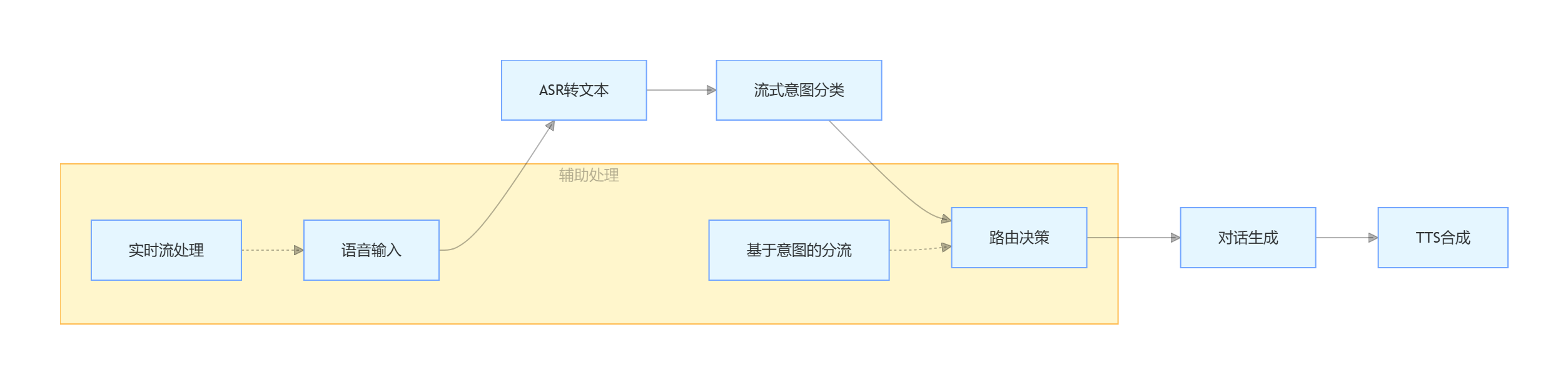
1. 流式处理架构
-
使用 Kotlin Flow 实现音频流和文本流的处理
-
支持边生成边播放,减少延迟感知
2. 意图识别管道
-
主分类器:Gemini 流式意图识别
-
后备分类器:用于低置信度情况
-
多级分类:意图 + 复杂度 + 置信度
3. 对话生成策略
-
单次生成模式:
一次完成,无二次调用 -
主动澄清:当输入不明确时主动反问
-
上下文感知:支持历史对话
4. TTS集成
-
Google Cloud TTS 服务
-
gRPC 调用,支持超时控制
-
任务队列管理
5. 性能优化
-
异步协程处理
-
并行 TTS 合成
-
实时回调机制
直接上代码:
// ==================== 核心模型类 ====================
/**
* 大模型抽象接口
*/
interface LargeLanguageModel {
suspend fun generateStreamingResponse(
input: String,
context: ConversationContext?
): Flow<TextChunk>
suspend fun classifyIntent(
audioStream: Flow<AudioChunk>? = null,
text: String? = null
): IntentResult
}/**
* Google Gemini 模型实现
*/
class GeminiModel(
private val apiKey: String,
private val config: ModelConfig
) : LargeLanguageModel {
// Google Cloud API 客户端
private val grpcChannel: ManagedChannel by lazy {
ManagedChannelBuilder
.forAddress("generativelanguage.googleapis.com", 443)
.build()
}
private val textService: TextService by lazy {
TextService.newBlockingStub(grpcChannel)
.withCallCredentials(GoogleCredentialsProvider())
}
private val streamingService: StreamingService by lazy {
StreamingService.newStub(grpcChannel)
}
override suspend fun generateStreamingResponse(
input: String,
context: ConversationContext?
): Flow<TextChunk> = flow {
// 构建请求
val request = GenerateContentRequest.newBuilder()
.setModel("gemini-pro")
.addContents(content {
role = "user"
parts { text = input }
if (context != null) {
context.history.forEach { history ->
// 添加上下文历史
}
}
})
.setGenerationConfig(generationConfig {
temperature = 0.7f
topP = 0.95f
maxOutputTokens = 1000
})
.build()
// 流式调用
textService.generateContentStream(request).collect { response ->
response.candidatesList.forEach { candidate ->
candidate.content.partsList.forEach { part ->
emit(TextChunk(
text = part.text,
isFirst = false, // 实际需要根据位置判断
isComplete = false
))
}
}
}
emit(TextChunk(text = "", isFirst = false, isComplete = true))
}
override suspend fun classifyIntent(
audioStream: Flow<AudioChunk>?,
text: String?
): IntentResult = withContext(Dispatchers.IO) {
// 流式意图识别实现
val startTime = System.currentTimeMillis()
// 如果有音频流,先转文本
val inputText = if (audioStream != null) {
transcribeAudio(audioStream)
} else {
text ?: throw IllegalArgumentException("需要输入文本或音频")
}
// 调用 Gemini 进行意图分类
val classificationRequest = ClassifyIntentRequest.newBuilder()
.setModel("gemini-intent-classifier")
.setInputText(inputText)
.build()
val response = streamingService.classifyIntentStream(classificationRequest)
.first() // 获取第一个结果
IntentResult(
intent = mapToIntent(response.intentLabel),
confidence = response.confidence,
complexity = mapToComplexity(response.complexityScore),
processingTime = System.currentTimeMillis() - startTime
)
}
private suspend fun transcribeAudio(audioStream: Flow<AudioChunk>): String {
// 音频转文本实现(简化)
val audioData = audioStream.toList()
// 调用 ASR 服务
return "温度" // 示例返回
}
}// ==================== 意图处理管道 ====================
/**
* 意图分类管道
*/
class IntentClassifierPipeline(
private val streamingClassifier: LargeLanguageModel,
private val fallbackClassifier: IntentClassifier? = null
) {
private val logger = LoggerFactory.getLogger(IntentClassifierPipeline::class.java)
suspend fun process(
audioStream: Flow<AudioChunk>? = null,
text: String? = null
): ClassificationResult {
val startTime = System.currentTimeMillis()
return try {
// 1. 流式意图识别
logger.debug("开始流式意图识别")
val streamingResult = streamingClassifier.classifyIntent(audioStream, text)
logger.debug("流式分类器完成,结果: ${streamingResult.intent}, 耗时: ${streamingResult.processingTime}ms")
// 2. 如果置信度低,使用后备分类器
val finalResult = if (streamingResult.confidence < 0.7 && fallbackClassifier != null) {
logger.debug("置信度低(${streamingResult.confidence}),使用后备分类器")
fallbackClassifier.classify(text ?: "")
} else {
streamingResult
}
// 3. 记录处理详情
val totalTime = System.currentTimeMillis() - startTime
logger.info("Pipeline 完成,总耗时: ${totalTime}ms")
ClassificationResult(
intent = finalResult.intent,
confidence = finalResult.confidence,
complexity = finalResult.complexity,
rawInput = text,
processingTime = totalTime
)
} catch (e: Exception) {
logger.error("意图分类失败", e)
ClassificationResult(
intent = Intent.UNKNOWN,
confidence = 0.0,
complexity = Complexity.SIMPLE,
rawInput = text,
processingTime = System.currentTimeMillis() - startTime,
error = e
)
}
}
}// ==================== 对话处理器 ====================
/**
* 对话意图处理器
*/
class ConversationalIntentHandler(
private val llm: LargeLanguageModel,
private val ttsService: TTSService
) {
private val logger = LoggerFactory.getLogger(ConversationalIntentHandler::class.java)
suspend fun handleConversation(
input: String,
context: ConversationContext
): ConversationResult {
val startTime = System.currentTimeMillis()
logger.info("处理对话意图")
// 1. 生成回复(流式)
val responseFlow = llm.generateStreamingResponse(input, context)
// 2. 边生成边播放(减少延迟)
val ttsTasks = mutableListOf<Deferred<Unit>>()
responseFlow.collect { chunk ->
if (chunk.text.isNotEmpty()) {
// 提交 TTS 任务
val task = CoroutineScope(Dispatchers.IO).async {
ttsService.synthesize(chunk.text)
}
ttsTasks.add(task)
// 实时回调(如果需要)
context.listener?.onTextChunk(chunk)
}
}
// 3. 等待所有 TTS 任务完成
ttsTasks.awaitAll()
val totalTime = System.currentTimeMillis() - startTime
logger.info("流式处理完成,总耗时 ${totalTime}ms")
return ConversationResult(
success = true,
response = "", // 实际应从chunks组合
processingTime = totalTime
)
}
}// ==================== TTS 服务 ====================
/**
* Google Cloud TTS 服务
*/
class GoogleCloudTTSService(
private val credentials: GoogleCredentials,
private val config: TTSConfig
) : TTSService {
private val logger = LoggerFactory.getLogger(GoogleCloudTTSService::class.java)
private val pendingTasks = AtomicInteger(0)
private val speechClient: TextToSpeechClient by lazy {
TextToSpeechClient.create(
TextToSpeechSettings.newBuilder()
.setCredentialsProvider(FixedCredentialsProvider.create(credentials))
.build()
)
}
override suspend fun synthesize(text: String): ByteArray {
logger.d("开始合成语音,文本: $text")
pendingTasks.incrementAndGet()
return try {
val synthesisInput = SynthesisInput.newBuilder()
.setText(text)
.build()
val voiceSelection = VoiceSelectionParams.newBuilder()
.setLanguageCode("cmn-CN")
.setName("cmn-CN-Standard-A")
.build()
val audioConfig = AudioConfig.newBuilder()
.setAudioEncoding(AudioEncoding.LINEAR16)
.setSampleRateHertz(16000)
.build()
logger.d("调用 gRPC synthesizeSpeech (timeout=20s)...")
logger.d("请求详情: language=cmn-CN, voice=cmn-CN-Standard-A, " +
"sampleRate=16000, text=${text.take(20)}...")
val response = withTimeout(20000) {
speechClient.synthesizeSpeech(
synthesisInput,
voiceSelection,
audioConfig
)
}
response.audioContent.toByteArray()
} finally {
val remaining = pendingTasks.decrementAndGet()
logger.d("任务完成,待处理任务: $remaining")
}
}
}// ==================== 主控制器 ====================
/**
* 助手主控制器
*/
class AssistantController(
private val intentPipeline: IntentClassifierPipeline,
private val intentHandlers: Map<Intent, IntentHandler>,
private val ttsService: TTSService
) {
private val logger = LoggerFactory.getLogger(AssistantController::class.java)
suspend fun processInput(
audioStream: Flow<AudioChunk>? = null,
textInput: String? = null
): ProcessResult {
logger.info("========== 开始处理用户输入 ==========")
// 1. 意图识别
val classification = intentPipeline.process(audioStream, textInput)
logger.info("""
========== 意图识别详情 ==========
原始输入: ${classification.rawInput}
识别意图: ${classification.intent}
意图类别: ${classification.intent.category}
复杂度: ${classification.complexity}
置信度: ${classification.confidence}
是否有回复: ${classification.intent.hasResponse}
""".trimIndent())
// 2. 路由到对应处理器
val handler = intentHandlers[classification.intent]
?: intentHandlers[Intent.UNKNOWN]!!
logger.info("路由: ${handler.description}")
// 3. 处理并生成回复
val result = handler.handle(
input = classification.rawInput ?: "",
context = ConversationContext(
history = emptyList(),
sessionId = generateSessionId()
)
)
// 4. TTS 合成(如果支持语音输出)
if (result.response.isNotEmpty() && result.shouldSpeak) {
ttsService.synthesize(result.response)
}
val totalTime = classification.processingTime + result.processingTime
logger.info("处理完成,总耗时: ${totalTime}ms")
return ProcessResult(
intent = classification.intent,
response = result.response,
shouldSpeak = result.shouldSpeak,
totalProcessingTime = totalTime
)
}
fun onTTSChunk(chunk: TextChunk, isFirst: Boolean) {
logger.v("LLM tts chunk (isFirst=$isFirst): ${chunk.text}")
}
}// ==================== 数据模型 ====================
/**
* 意图枚举
*/
enum class Intent(
val category: IntentCategory,
val hasResponse: Boolean = true
) {
CHITCHAT(IntentCategory.CONVERSATIONAL, true),
WEATHER_QUERY(IntentCategory.INFORMATIONAL, true),
DEVICE_CONTROL(IntentCategory.ACTION, true),
UNKNOWN(IntentCategory.OTHER, false);
enum class IntentCategory {
CONVERSATIONAL, INFORMATIONAL, ACTION, OTHER
}
}/**
* 复杂度级别
*/
enum class Complexity {
SIMPLE, CONVERSATIONAL, COMPLEX
}/**
* 文本块(用于流式输出)
*/
data class TextChunk(
val text: String,
val isFirst: Boolean,
val isComplete: Boolean
)/**
* 音频块(用于流式输入)
*/
data class AudioChunk(
val data: ByteArray,
val timestamp: Long
)/**
* 意图识别结果
*/
data class IntentResult(
val intent: Intent,
val confidence: Double,
val complexity: Complexity,
val processingTime: Long
)// ==================== 使用示例 ====================
fun main() = runBlocking {
// 1. 初始化服务
val geminiModel = GeminiModel(
apiKey = "your-api-key",
config = ModelConfig(
temperature = 0.7,
maxTokens = 1000
)
)
val ttsService = GoogleCloudTTSService(
credentials = GoogleCredentials.getApplicationDefault(),
config = TTSConfig(
languageCode = "cmn-CN",
voiceName = "cmn-CN-Standard-A",
sampleRate = 16000
)
)
// 2. 构建意图管道
val intentPipeline = IntentClassifierPipeline(
streamingClassifier = geminiModel
)
// 3. 注册意图处理器
val intentHandlers = mapOf(
Intent.CHITCHAT to ConversationalIntentHandler(geminiModel, ttsService),
Intent.WEATHER_QUERY to WeatherIntentHandler(),
Intent.DEVICE_CONTROL to DeviceControlHandler(),
Intent.UNKNOWN to FallbackIntentHandler()
)
// 4. 创建控制器
val controller = AssistantController(
intentPipeline = intentPipeline,
intentHandlers = intentHandlers,
ttsService = ttsService
)
// 5. 处理用户输入
val result = controller.processInput(
textInput = "温度"
)
println("回复: ${result.response}")
println("处理时间: ${result.totalProcessingTime}ms")
} -

有“AI”的1024 = 2048,欢迎大家加入2048 AI社区
更多推荐
 42
42 0
0- 0


 已为社区贡献6条内容

所有评论(0)