Flutter 框架跨平台鸿蒙开发 —— Container 装饰:边框、阴影、渐变
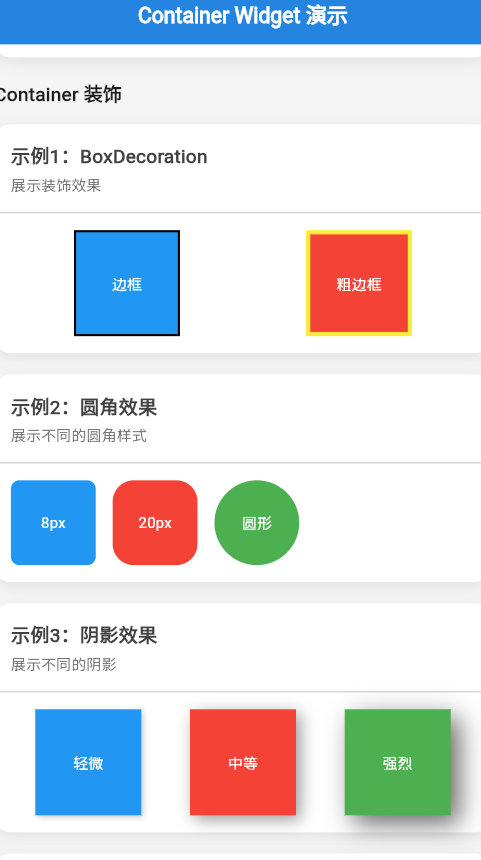
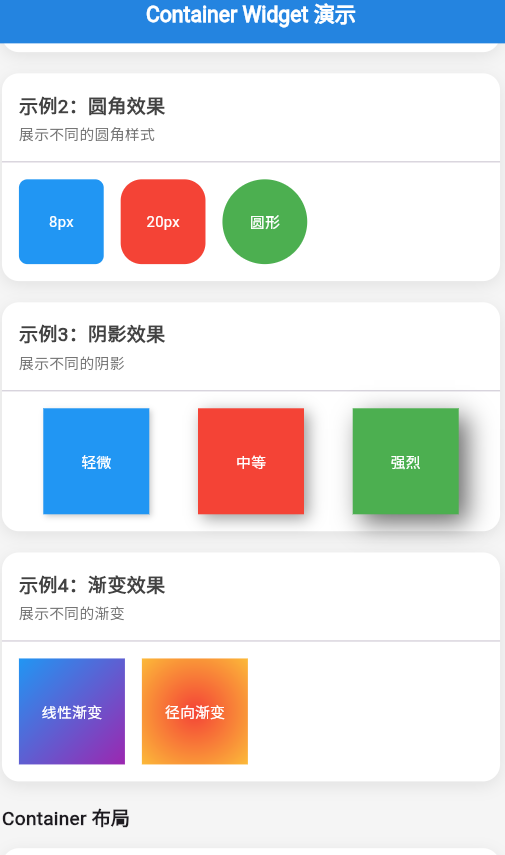
Container 的decoration属性提供了强大的装饰功能,包括边框、圆角、阴影和渐变。这些装饰可以让 Container 看起来更美观、更现代。本篇文章讲解如何使用 BoxDecoration 来装饰 Container。是一个描述容器装饰的类,可以设置背景色、渐变、边框、圆角、阴影等。边框:使用Border.all或Border设置圆角:使用或阴影:使用BoxShadow列表,支持多层
·
示例
import 'package:flutter/material.dart';
void main() => runApp(const ContainerDecorationApp());
class ContainerDecorationApp extends StatelessWidget {
const ContainerDecorationApp({Key? key}) : super(key: key);
Widget build(BuildContext context) {
return MaterialApp(
debugShowCheckedModeBanner: false,
home: Scaffold(
appBar: AppBar(title: const Text('Container 装饰')),
body: const SingleChildScrollView(
padding: EdgeInsets.all(16),
child: Column(
crossAxisAlignment: CrossAxisAlignment.start,
children: [
BorderExample(),
SizedBox(height: 20),
BorderRadiusExample(),
SizedBox(height: 20),
ShadowExample(),
SizedBox(height: 20),
GradientExample(),
],
),
),
),
);
}
}
class BorderExample extends StatelessWidget {
const BorderExample({Key? key}) : super(key: key);
Widget build(BuildContext context) {
return Card(
child: Column(
crossAxisAlignment: CrossAxisAlignment.start,
children: [
Padding(
padding: const EdgeInsets.all(12),
child: Text(
'示例1:边框',
style: TextStyle(fontWeight: FontWeight.bold, fontSize: 16),
),
),
const Padding(
padding: EdgeInsets.all(16),
child: Column(
children: [
Container(
width: double.infinity,
height: 60,
decoration: BoxDecoration(
border: Border.all(color: Colors.blue, width: 2),
),
child: Center(child: Text('蓝色边框')),
),
SizedBox(height: 12),
Container(
width: double.infinity,
height: 60,
decoration: BoxDecoration(
border: Border.all(color: Colors.red, width: 4),
),
child: Center(child: Text('红色粗边框')),
),
SizedBox(height: 12),
Container(
width: double.infinity,
height: 60,
decoration: BoxDecoration(
border: Border.all(color: Colors.green, width: 1),
color: Colors.green.shade50,
),
child: Center(child: Text('绿色细边框带背景')),
),
],
),
),
const SizedBox(height: 12),
],
),
);
}
}
class BorderRadiusExample extends StatelessWidget {
const BorderRadiusExample({Key? key}) : super(key: key);
Widget build(BuildContext context) {
return Card(
child: Column(
crossAxisAlignment: CrossAxisAlignment.start,
children: [
Padding(
padding: const EdgeInsets.all(12),
child: Text(
'示例2:圆角',
style: TextStyle(fontWeight: FontWeight.bold, fontSize: 16),
),
),
const Padding(
padding: EdgeInsets.all(16),
child: Column(
children: [
Container(
width: 150,
height: 60,
decoration: BoxDecoration(
color: Colors.blue,
borderRadius: BorderRadius.circular(8),
),
child: Center(child: Text('小圆角', style: TextStyle(color: Colors.white))),
),
SizedBox(height: 12),
Container(
width: 150,
height: 60,
decoration: BoxDecoration(
color: Colors.green,
borderRadius: BorderRadius.circular(20),
),
child: Center(child: Text('大圆角', style: TextStyle(color: Colors.white))),
),
SizedBox(height: 12),
Container(
width: 150,
height: 60,
decoration: BoxDecoration(
color: Colors.orange,
borderRadius: BorderRadius.only(
topLeft: Radius.circular(20),
bottomRight: Radius.circular(20),
),
),
child: Center(child: Text('不对称圆角', style: TextStyle(color: Colors.white))),
),
],
),
),
const SizedBox(height: 12),
],
),
);
}
}
class ShadowExample extends StatelessWidget {
const ShadowExample({Key? key}) : super(key: key);
Widget build(BuildContext context) {
return Card(
child: Column(
crossAxisAlignment: CrossAxisAlignment.start,
children: [
Padding(
padding: const EdgeInsets.all(12),
child: Text(
'示例3:阴影',
style: TextStyle(fontWeight: FontWeight.bold, fontSize: 16),
),
),
const Padding(
padding: EdgeInsets.all(16),
child: Column(
children: [
Container(
width: 150,
height: 60,
decoration: BoxDecoration(
color: Colors.white,
boxShadow: [
BoxShadow(
color: Colors.black.withOpacity(0.1),
blurRadius: 4,
offset: Offset(0, 2),
),
],
),
child: Center(child: Text('轻微阴影')),
),
SizedBox(height: 12),
Container(
width: 150,
height: 60,
decoration: BoxDecoration(
color: Colors.white,
boxShadow: [
BoxShadow(
color: Colors.black.withOpacity(0.2),
blurRadius: 8,
offset: Offset(0, 4),
),
],
),
child: Center(child: Text('中等阴影')),
),
SizedBox(height: 12),
Container(
width: 150,
height: 60,
decoration: BoxDecoration(
color: Colors.white,
boxShadow: [
BoxShadow(
color: Colors.blue.withOpacity(0.3),
blurRadius: 16,
offset: Offset(0, 8),
),
],
),
child: Center(child: Text('彩色阴影')),
),
],
),
),
const SizedBox(height: 12),
],
),
);
}
}
class GradientExample extends StatelessWidget {
const GradientExample({Key? key}) : super(key: key);
Widget build(BuildContext context) {
return Card(
child: Column(
crossAxisAlignment: CrossAxisAlignment.start,
children: [
Padding(
padding: const EdgeInsets.all(12),
child: Text(
'示例4:渐变',
style: TextStyle(fontWeight: FontWeight.bold, fontSize: 16),
),
),
const Padding(
padding: EdgeInsets.all(16),
child: Column(
children: [
Container(
width: double.infinity,
height: 80,
decoration: BoxDecoration(
gradient: LinearGradient(
colors: [Colors.blue, Colors.purple],
),
),
child: Center(
child: Text('水平渐变', style: TextStyle(color: Colors.white, fontSize: 18)),
),
),
SizedBox(height: 12),
Container(
width: double.infinity,
height: 80,
decoration: BoxDecoration(
gradient: LinearGradient(
colors: [Colors.green, Colors.blue],
begin: Alignment.topCenter,
end: Alignment.bottomCenter,
),
),
child: Center(
child: Text('垂直渐变', style: TextStyle(color: Colors.white, fontSize: 18)),
),
),
SizedBox(height: 12),
Container(
width: double.infinity,
height: 80,
decoration: BoxDecoration(
gradient: LinearGradient(
colors: [Colors.red, Colors.yellow, Colors.green],
),
),
child: Center(
child: Text('三色渐变', style: TextStyle(color: Colors.white, fontSize: 18)),
),
),
],
),
),
const SizedBox(height: 12),
],
),
);
}
}
🚀 快速运行
示例应用
本篇文章的示例项目:flutter_examples/container_widget_demo_07
运行步骤
# 进入示例项目目录
cd flutter_examples/container_widget_demo_07

# 运行应用(鸿蒙虚拟机)
flutter run -d 127.0.0.1:5555

# 或运行应用(其他设备)
flutter run
演示内容
运行应用后,您将看到本篇文章的示例:
- 示例1:边框 - 展示不同样式的边框
- 示例2:圆角 - 展示不同样式的圆角
- 示例3:阴影 - 展示不同程度和颜色的阴影
- 示例4:渐变 - 展示不同方向的渐变
一、 前言
Container 的 decoration 属性提供了强大的装饰功能,包括边框、圆角、阴影和渐变。这些装饰可以让 Container 看起来更美观、更现代。
本篇文章讲解如何使用 BoxDecoration 来装饰 Container。
二、 BoxDecoration 简介
2.1 什么是 BoxDecoration
BoxDecoration 是一个描述容器装饰的类,可以设置背景色、渐变、边框、圆角、阴影等。
2.2 BoxDecoration 属性
| 属性 | 类型 | 说明 |
|---|---|---|
color |
Color? | 背景色 |
gradient |
Gradient? | 渐变背景 |
image |
DecorationImage? | 背景图片 |
border |
BoxBorder? | 边框 |
borderRadius |
BorderRadius? | 圆角 |
boxShadow |
List? | 阴影列表 |
三、 边框(Border)
3.1 基本边框
Container(
  decoration: BoxDecoration(
    border: Border.all(
      color: Colors.blue,
      width: 2,
    ),
  ),
)
3.2 边框参数
| 参数 | 类型 | 说明 |
|---|---|---|
color |
Color | 边框颜色 |
width |
double | 边框宽度(默认1.0) |
style |
BorderStyle | 边框样式(solid/none) |
3.3 不同边框样式
// 全边框
Container(
  decoration: BoxDecoration(
    border: Border.all(color: Colors.blue, width: 2),
  ),
)

// 只设置左边框
Container(
  decoration: BoxDecoration(
    border: Border(
      left: BorderSide(color: Colors.red, width: 4),
    ),
  ),
)

// 分别设置四边
Container(
  decoration: BoxDecoration(
    border: Border(
      top: BorderSide(color: Colors.red, width: 2),
      right: BorderSide(color: Colors.green, width: 2),
      bottom: BorderSide(color: Colors.blue, width: 2),
      left: BorderSide(color: Colors.orange, width: 2),
    ),
  ),
)
3.4 边框样式
// 实线边框
BorderSide(color: Colors.blue, width: 2, style: BorderStyle.solid)

// 无边框
BorderSide(color: Colors.blue, width: 2, style: BorderStyle.none)
四、 圆角(BorderRadius)
4.1 基本圆角
// 统一圆角
Container(
  decoration: BoxDecoration(
    borderRadius: BorderRadius.circular(8),
  ),
)

// 只设置左上角
Container(
  decoration: BoxDecoration(
    borderRadius: BorderRadius.only(
      topLeft: Radius.circular(8),
    ),
  ),
)
4.2 常用圆角方法
| 方法 | 说明 |
|---|---|
BorderRadius.circular(radius) |
四角相同圆角 |
BorderRadius.only({...}) |
指定角的圆角 |
BorderRadius.vertical({...}) |
垂直方向圆角 |
BorderRadius.horizontal({...}) |
水平方向圆角 |
4.3 不同圆角样式
// 统一圆角
Container(
  decoration: BoxDecoration(
    color: Colors.blue,
    borderRadius: BorderRadius.circular(16),
  ),
)

// 不对称圆角
Container(
  decoration: BoxDecoration(
    color: Colors.green,
    borderRadius: BorderRadius.only(
      topLeft: Radius.circular(20),
      bottomRight: Radius.circular(20),
    ),
  ),
)

// 胶囊形(左右圆形)
Container(
  decoration: BoxDecoration(
    color: Colors.orange,
    borderRadius: BorderRadius.horizontal(
      left: Radius.circular(30),
      right: Radius.circular(30),
    ),
  ),
)
五、 阴影(BoxShadow)
5.1 基本阴影
Container(
  decoration: BoxDecoration(
    boxShadow: [
      BoxShadow(
        color: Colors.black.withOpacity(0.1),
        blurRadius: 8,
        offset: Offset(0, 4),
      ),
    ],
  ),
)
5.2 BoxShadow 参数
| 参数 | 类型 | 说明 |
|---|---|---|
color |
Color | 阴影颜色 |
blurRadius |
double | 模糊半径(值越大越模糊) |
spreadRadius |
double | 扩散半径(值越大范围越大) |
offset |
Offset | 阴影偏移(Offset(dx, dy)) |
blurStyle |
BlurStyle | 模糊样式 |
5.3 不同程度的阴影
// 轻微阴影
BoxShadow(
  color: Colors.black.withOpacity(0.1),
  blurRadius: 4,
  offset: Offset(0, 2),
)

// 中等阴影
BoxShadow(
  color: Colors.black.withOpacity(0.2),
  blurRadius: 8,
  offset: Offset(0, 4),
)

// 强烈阴影
BoxShadow(
  color: Colors.black.withOpacity(0.3),
  blurRadius: 16,
  offset: Offset(0, 8),
)
5.4 多层阴影
Container(
  decoration: BoxDecoration(
    boxShadow: [
      BoxShadow(
        color: Colors.black.withOpacity(0.1),
        blurRadius: 8,
        offset: Offset(0, 4),
      ),
      BoxShadow(
        color: Colors.blue.withOpacity(0.2),
        blurRadius: 16,
        offset: Offset(0, 8),
      ),
    ],
  ),
)
六、 渐变(Gradient)
6.1 LinearGradient(线性渐变)
// 水平渐变
Container(
  decoration: BoxDecoration(
    gradient: LinearGradient(
      colors: [Colors.blue, Colors.purple],
    ),
  ),
)

// 垂直渐变
Container(
  decoration: BoxDecoration(
    gradient: LinearGradient(
      colors: [Colors.green, Colors.blue],
      begin: Alignment.topCenter,
      end: Alignment.bottomCenter,
    ),
  ),
)

// 对角线渐变
Container(
  decoration: BoxDecoration(
    gradient: LinearGradient(
      colors: [Colors.red, Colors.yellow],
      begin: Alignment.topLeft,
      end: Alignment.bottomRight,
    ),
  ),
)
6.2 渐变参数
| 参数 | 类型 | 说明 |
|---|---|---|
colors |
List | 颜色列表(至少2个) |
begin |
Alignment | 渐变起点 |
end |
Alignment | 渐变终点 |
stops |
List? | 颜色停止点(0.0-1.0) |
tileMode |
TileMode | 平铺模式 |
6.3 多色渐变
// 三色渐变
Container(
  decoration: BoxDecoration(
    gradient: LinearGradient(
      colors: [Colors.red, Colors.yellow, Colors.green],
    ),
  ),
)

// 带停止点的渐变
Container(
  decoration: BoxDecoration(
    gradient: LinearGradient(
      colors: [Colors.blue, Colors.purple, Colors.pink],
      stops: [0.0, 0.5, 1.0],
    ),
  ),
)
6.4 RadialGradient(径向渐变)
Container(
  decoration: BoxDecoration(
    gradient: RadialGradient(
      colors: [Colors.blue, Colors.transparent],
      radius: 0.5,
    ),
  ),
)
七、 实战示例
7.1 现代卡片
Container(
  decoration: BoxDecoration(
    color: Colors.white,
    borderRadius: BorderRadius.circular(16),
    boxShadow: [
      BoxShadow(
        color: Colors.black.withOpacity(0.1),
        blurRadius: 12,
        offset: Offset(0, 4),
      ),
    ],
  ),
  child: Padding(
    padding: EdgeInsets.all(16),
    child: Column(
      children: [
        Text(
          '卡片标题',
          style: TextStyle(fontSize: 18, fontWeight: FontWeight.bold),
        ),
        SizedBox(height: 8),
        Text('卡片内容'),
      ],
    ),
  ),
)
7.2 渐变按钮
Container(
  decoration: BoxDecoration(
    gradient: LinearGradient(
      colors: [Colors.blue, Colors.purple],
    ),
    borderRadius: BorderRadius.circular(8),
  ),
  child: Material(
    color: Colors.transparent,
    child: InkWell(
      onTap: () {},
      borderRadius: BorderRadius.circular(8),
      child: Container(
        padding: EdgeInsets.symmetric(horizontal: 24, vertical: 12),
        child: Text(
          '渐变按钮',
          style: TextStyle(color: Colors.white, fontSize: 16),
        ),
      ),
    ),
  ),
)
7.3 浮动卡片
Container(
  decoration: BoxDecoration(
    color: Colors.white,
    borderRadius: BorderRadius.circular(12),
    boxShadow: [
      BoxShadow(
        color: Colors.black.withOpacity(0.1),
        blurRadius: 20,
        offset: Offset(0, 10),
      ),
    ],
  ),
  child: Padding(
    padding: EdgeInsets.all(20),
    child: Text('浮动卡片'),
  ),
)
八、 最佳实践
8.1 合理的阴影
// ✅ 推荐:轻微阴影
BoxShadow(
  color: Colors.black.withOpacity(0.1),
  blurRadius: 8,
)

// ❌ 不推荐:过于强烈
BoxShadow(
  color: Colors.black.withOpacity(0.5),
  blurRadius: 32,
)
8.2 统一的圆角
// ✅ 推荐:使用一致的圆角
BorderRadius.circular(8)

// ❌ 不推荐:不一致的圆角
BorderRadius.circular(7.5)
8.3 优雅的渐变
// ✅ 推荐:颜色过渡自然
LinearGradient(
  colors: [Colors.blue.shade400, Colors.purple.shade400],
)

// ❌ 不推荐:颜色冲突
LinearGradient(
  colors: [Colors.red, Colors.blue],
)
九、 总结
Container 的装饰功能非常强大:
- 边框:使用
Border.all或Border设置 - 圆角:使用
BorderRadius.circular或BorderRadius.only - 阴影:使用
BoxShadow列表,支持多层 - 渐变:使用
LinearGradient或RadialGradient - 组合使用:边框、圆角、阴影、渐变可以组合使用
记住,好的装饰设计应该简洁、优雅、符合设计规范。
参考资源
欢迎加入开源鸿蒙跨平台社区https://openharmonycrossplatform.csdn.net

有“AI”的1024 = 2048,欢迎大家加入2048 AI社区
更多推荐

 10
10 0
0- 0



 已为社区贡献2条内容

所有评论(0)