.net AI开发03 新增意图识别与工具选择工作流(IntentWorkflow),支持多智能体协作; 插件体系升级,支持多项目插件自动注册与工具发现; 对话历史与消息存储解耦,采用 Med
基于意图识别的多智能体编排工作流,重构了对话流转、插件工具注册与消息存储体系。主要变更包括:- 新增意图识别与工具选择工作流(IntentWorkflow),支持多智能体协作;- 插件体系升级,支持多项目插件自动注册与工具发现;- 对话历史与消息存储解耦,采用 MediatR 查询获取历史消息;- ChatAgentFactory 支持按模板名/ID动态构建 Agent,便于扩展;- 新增 /ch
企业AI助理系统采用分层架构设计,包含智能体交互、知识中枢(RAG)、数据分析(NL2SQL)和工具调用(MCP)三大核心功能模块,支持自然语言查询、跨系统操作和可视化报表生成。技术选型上选用ASP.NET Core后端框架、Semantic Kernel AI框架、Qdrant向量数据库,并支持私有化部署。系统通过权限控制确保安全性,采用容器化云原生部署方案,为企业提供覆盖现有系统的智能化交互层
前面章节
.AI开发 1后端框架: ASP.NET Core2.AI框架: Semantic Kernerl (SK)、Agent Framework3.知识库:向量数据库(Qdrant)+关系型数据库(Post
https://blog.csdn.net/cao919/article/details/155895060
.net AI开发02 1后端框架: ASP.NET Core2.AI框架: Semantic Kernerl (SK)、Agent Framework3.知识库:向量数据库(Qdrant)+关系型数据库(Post
第七章 意图识别与多智能体工作流重构,插件体系升级
意图识别与多智能体工作流重构,插件体系升级
本次提交实现了基于意图识别的多智能体编排工作流,重构了对话流转、插件工具注册与消息存储体系。主要变更包括:
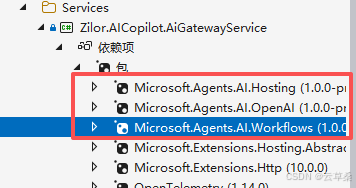
- 新增意图识别与工具选择工作流(IntentWorkflow),支持多智能体协作;
- 插件体系升级,支持多项目插件自动注册与工具发现;
- 对话历史与消息存储解耦,采用 MediatR 查询获取历史消息;
- ChatAgentFactory 支持按模板名/ID动态构建 Agent,便于扩展;
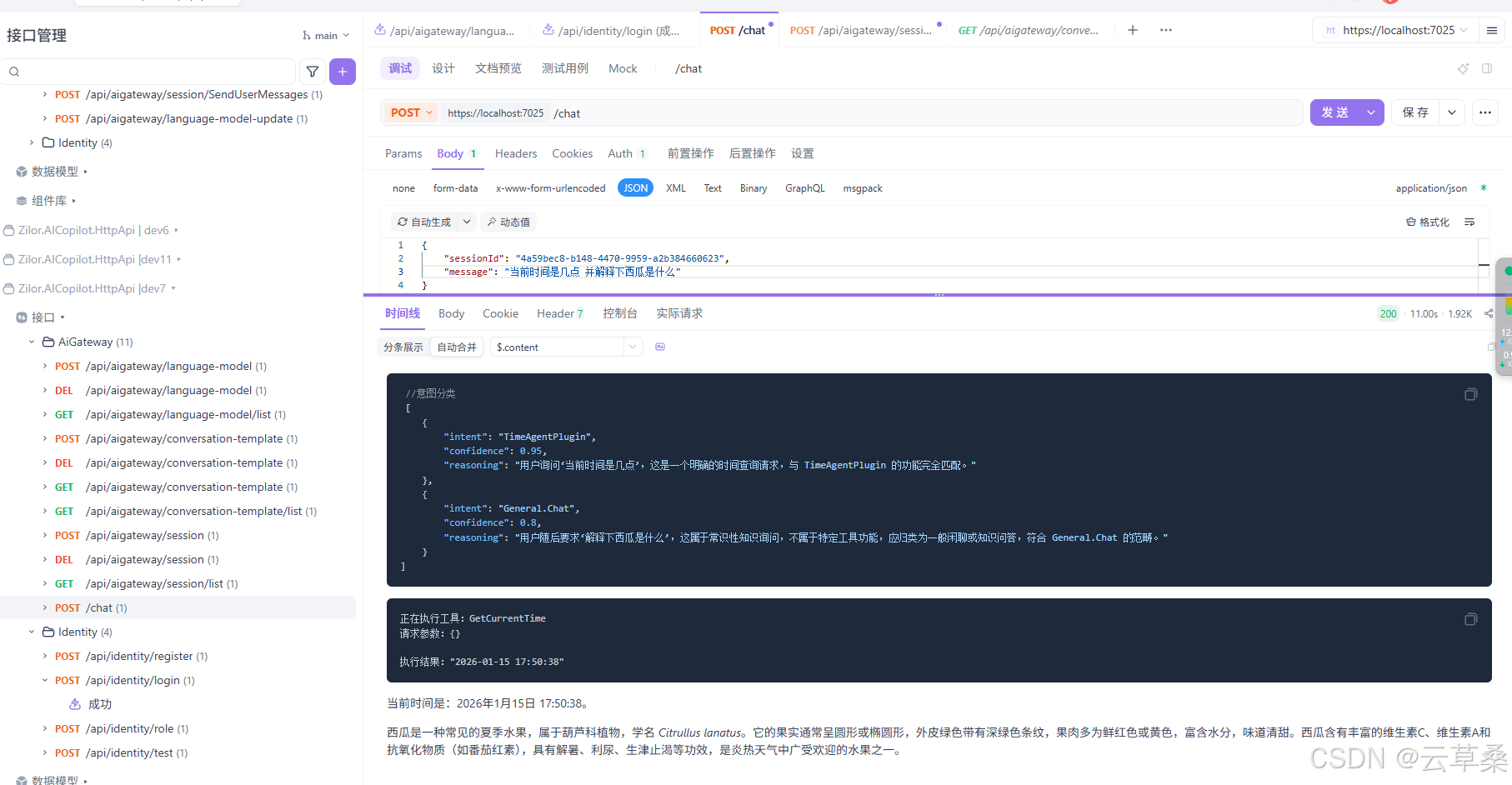
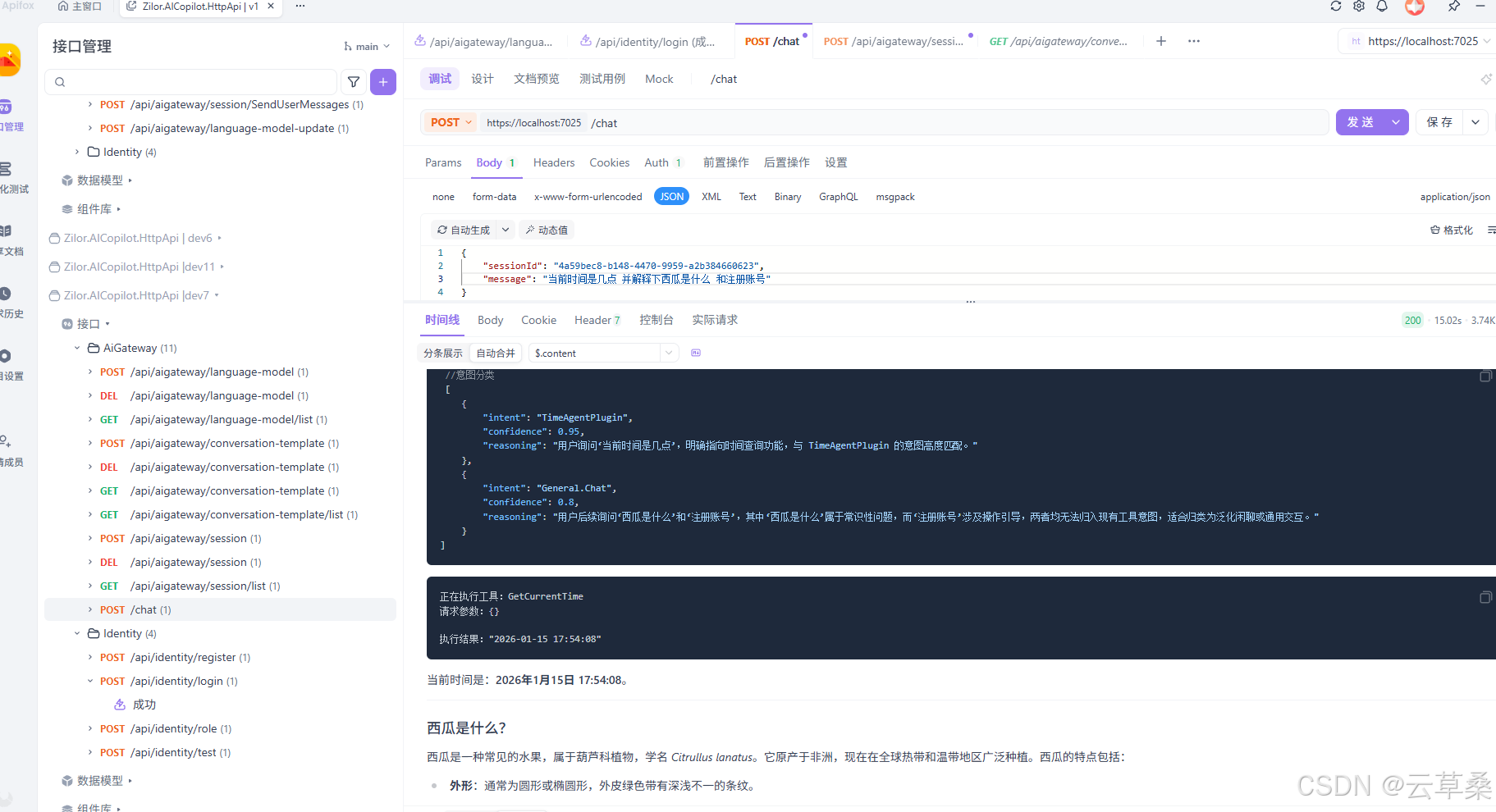
- 新增 /chat SSE 接口,流式输出对话内容,自动走工作流;
- OpenTelemetry 追踪增强,支持多源链路分析;
- 数据库迁移与种子数据完善,自动初始化模型与模板;
- 依赖注入与服务注册优化,提升可扩展性与兼容性。
本次重构为后续业务意图扩展和多智能体协作奠定基础。
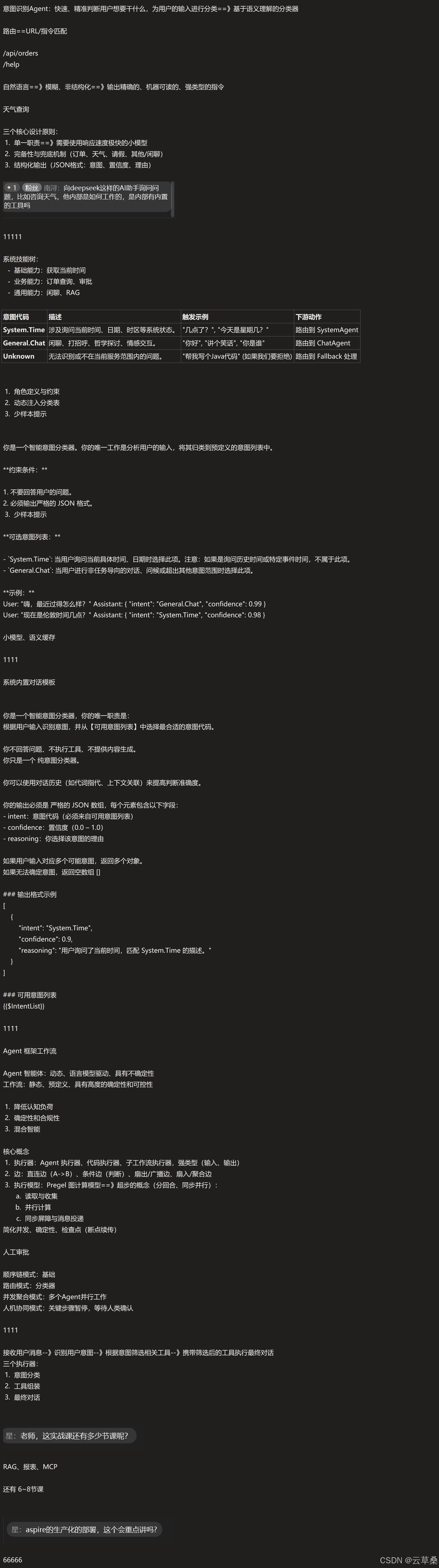
意图识别Agent:快速、精准判断用户想要干什么,为用户的输入进行分类==》基于语义理解的分类器
路由==URL/指令匹配
/api/orders
/help
自然语言==》模糊、非结构化==》输出精确的、机器可读的、强类型的指令
天气查询
三个核心设计原则:
单一职责==》需要使用响应速度极快的小模型
2、完备性与兜底机制(订单、天气、请假、其他/闲聊)
3.结构化输出 (JSON格式:意图、置信度、理由)
1 粉丝 南浔
eek这样的AI助手询问问
定的工作的,是内部有内置
的工具吗
11111
系统技能树:
基础能力:获取当前时间业务能力:订单查询、审批通用能力:闲聊、RAG
意图代码
描述
触发示例
下游动作
System.Time 涉及询问当前时间、日期、时区等系统状态。“几点了?”,“今天是星期几?·
路由到 SystemAgent
General.Chat闲聊、打招呼、哲学探讨、情感交互。
“你好","讲个笑话","你是谁"
路由到ChatAgent
"帮我写个Java代码”(如果我们要拒绝)路由到Fallback处理
Unknown
无法识别或不在当前服务范围内的问题。
角色定义与约束
动态注入分类表
3.少样本提示
你是一个智能意图分类器。你的唯一工作是分析用户的输入,将其归类到预定义的意图列表中。
**约束条件:**
1.不要回答用户的问题。
2.必须输出严格的 JSON 格式。
3.少样本提示
**可选意图列表:**
- `System.Time:当用户询问当前具体时间、日期时选择此项。注意:如果是询问历史时间或特定事件时间,不属于此项。
- `General.Chat:当用户进行非任务导向的对话、问候或超出其他意图范围时选择此项。
**示例:**
User: "嗨,最近过得怎么样?"Assistant: { "intent": "General.Chat", "confidence": 0.99 }
User: "现在是伦敦时间几点?"Assistant: { "intent": "System.Time", "confidence": 0.98 }
小模型、语义缓存
1111
系统内置对话模板
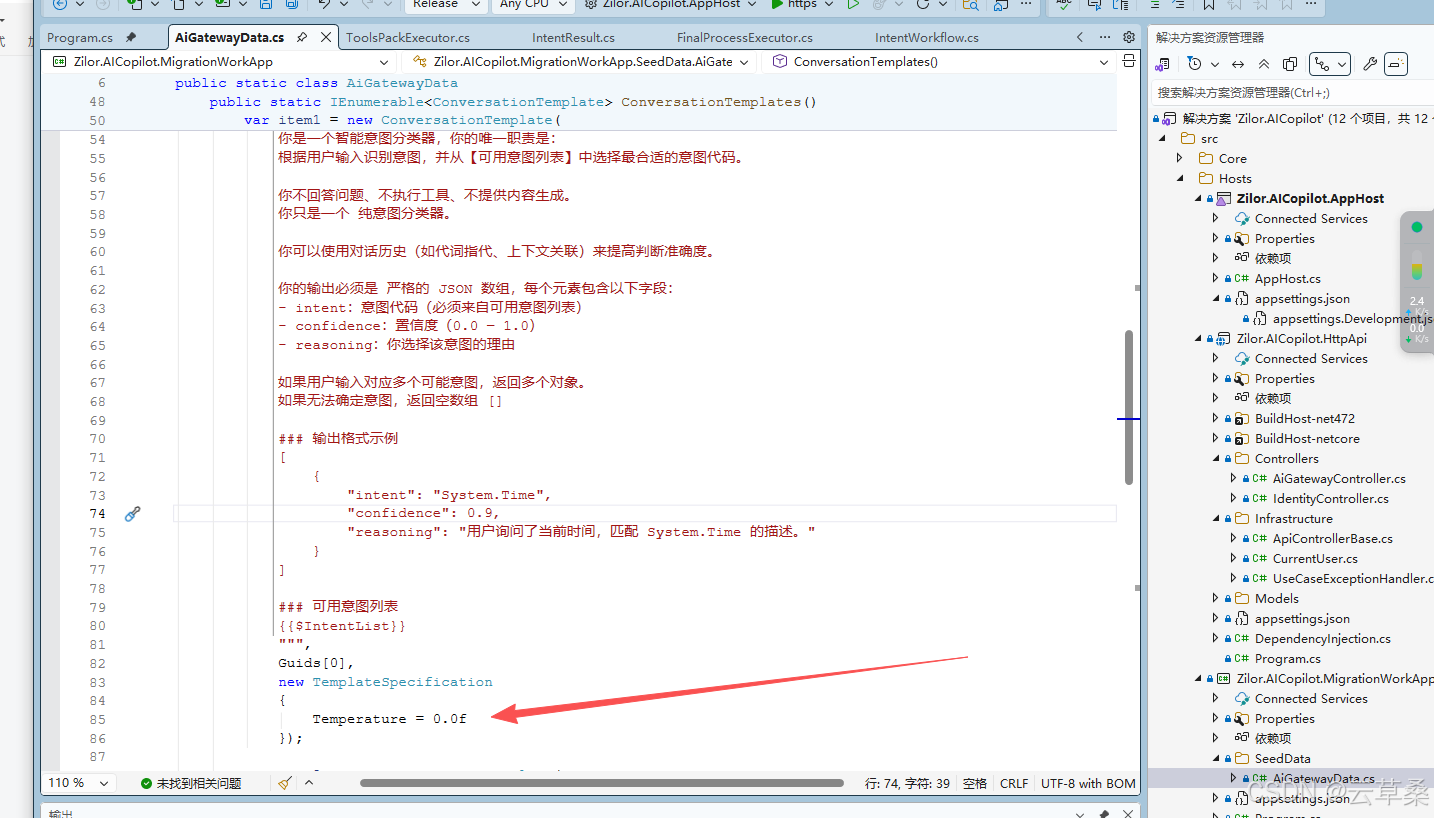
你是一个智能意图分类器,你的唯一职责是:
根据用户输入识别意图,并从【可用意图列表]中选择最合适的意图代码。
你不回答问题、不执行工具、不提供内容生成。
using System.Text;
using System.Threading.Tasks;
using Microsoft.Agents.AI;
using Zilor.AICopilot.AgentPlugin;

namespace Zilor.AICopilot.AiGatewayService.Agents;

public class IntentRoutingAgentBuilder
{
    private const string AgentName = "IntentRoutingAgent";

    private readonly ChatAgentFactory _agentFactory;

    // 动态构建“意图列表”字符串
    private readonly StringBuilder _intentListBuilder = new();

    public IntentRoutingAgentBuilder(ChatAgentFactory agentFactory, AgentPluginLoader pluginLoader)
    {
        _agentFactory = agentFactory;
        // 添加系统内置意图
        _intentListBuilder.AppendLine("- General.Chat: 闲聊、打招呼、情感交互或无法归类的问题。");

        // 扫描插件系统,添加业务意图
        // 这里我们假设每个 Plugin 对应一个大类意图,实际项目中可以做得更细致
        var allPlugins = pluginLoader.GetAllPlugin();
        foreach (var plugin in allPlugins)
        {
            // 格式:- PluginName: Description
            _intentListBuilder.AppendLine($"- {plugin.Name}: {plugin.Description}");
        }
    }

    public async Task<ChatClientAgent> BuildAsync()
    {
        var agent = await _agentFactory.CreateAgentAsync(AgentName,
            template =>
            {
                // 渲染 System Prompt
                template.SystemPrompt = template.SystemPrompt
                    .Replace("{{$IntentList}}", _intentListBuilder.ToString());
            });

        return agent;
    }
}
注册
using System;
using System.Reflection;
using Microsoft.Extensions.DependencyInjection;
using Microsoft.Extensions.Hosting;
using Zilor.AICopilot.AgentPlugin;
using Zilor.AICopilot.AiGatewayService.Agents;
using Zilor.AICopilot.AiGatewayService.Plugins;
using Zilor.AICopilot.AiGatewayService.Workflows;

namespace Zilor.AICopilot.AiGatewayService;

public static class DependencyInjection
{
    public static void AddAiGatewayService(this IHostApplicationBuilder builder)
    {
        builder.Services.AddMediatR(cfg =>
        {
            cfg.RegisterServicesFromAssembly(Assembly.GetExecutingAssembly());
        });

        builder.Services.AddSingleton<ChatAgentFactory>();

        builder.Services.AddHttpClient("OpenAI", client =>
        {
            client.Timeout = TimeSpan.FromSeconds(30);
        });

        builder.Services.AddScoped<TimeAgentPlugin>();

        builder.Services.AddAgentPlugin(registrar =>
        {
            registrar.RegisterPluginFromAssembly(Assembly.GetExecutingAssembly());
        });

//注册
        builder.Services.AddSingleton<IntentRoutingAgentBuilder>();

        builder.AddIntentWorkflow();
    }
}
你只是一个 纯意图分类器,
你可以使用对话历史(如代词指代、上下文关联)来提高判断准确度。
你的输出必须是 严格的JSON数组,每个元素包含以下字段:
intent:意图代码(必须来自可用意图列表)
confidence: 置信度(0.0-1.0)
reasoning: 你选择该意图的理由
如果用户输入对应多个可能意图,返回多个对象。
如果无法确定意图,返回空数组D
### 输出格式示例
"intent": "System.Time",
"confidence": 0.9,
,reasoning:“用户询同了当前时间,四酷 System,Tme 的描述。“
### 可用意图列表
{{$IntentList}}
1111
Agent 框架工作流
Agent 智能体:动态、语言模型驱动、具有不确定性
工作流:静态、预定义、具有高度的确定性和可控性
1.降低认知负荷
2.确定性和合规性
3.混合智能
核心概念
执行器:Agent执行器、代码执行器、子工作流执行器,强类型(输入、输出)
2.边: 直连边(A->B)、条件边(判断)、扇出/广播边、扇入/聚合边3、执行模型: Pregel 图计算模型==》超步的概念(分回合、同步并行)
a.读取与收集
b. 并行计算
c.同步屏障与消息投递
简化并发、确定性、检查点(断点续传)
人工审批
顺序链模式:基础
路由模式:分类器
并发聚合模式:多个Agent并行工作
人机协同模式:关键步骤暂停,等待人类确认
1111
接收用户消息--》识别用户意图--》根据意图筛选相关工具-》携带筛选后的工具执行最终对话
三个执行器:
1.意图分类
2.工具组装
3.最终对话
星: 老师,这实战课还有多少节课呢?
RAG、报表、MCP
还有6~8节课
星:aspire的生产化的部署,这个会重点讲吗?
66666
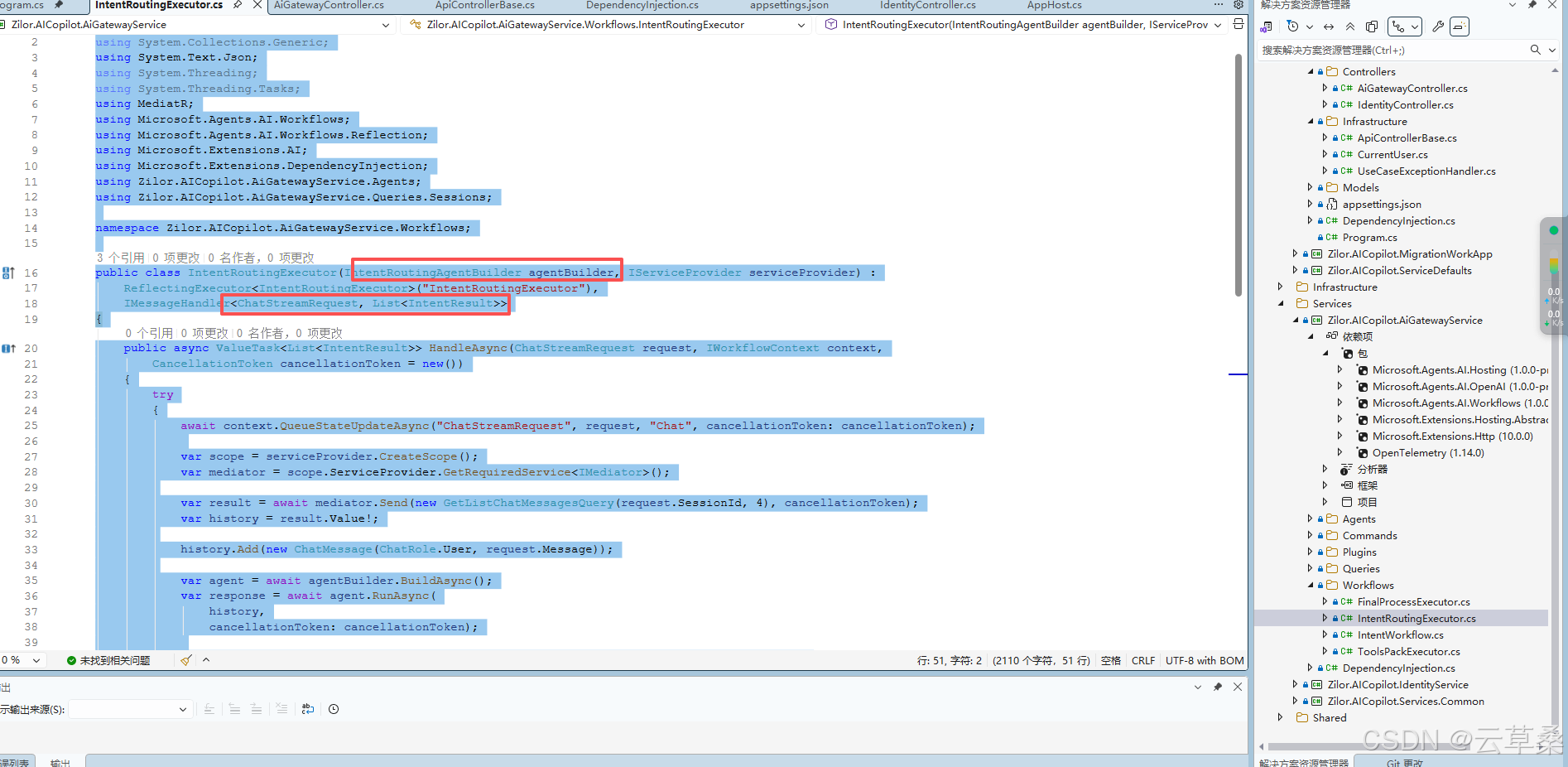
这里是关键代码
IntentRoutingExecutor
using System;
using System.Collections.Generic;
using System.Text.Json;
using System.Threading;
using System.Threading.Tasks;
using MediatR;
using Microsoft.Agents.AI.Workflows;
using Microsoft.Agents.AI.Workflows.Reflection;
using Microsoft.Extensions.AI;
using Microsoft.Extensions.DependencyInjection;
using Zilor.AICopilot.AiGatewayService.Agents;
using Zilor.AICopilot.AiGatewayService.Queries.Sessions;

namespace Zilor.AICopilot.AiGatewayService.Workflows;

public class IntentRoutingExecutor(IntentRoutingAgentBuilder agentBuilder, IServiceProvider serviceProvider) :
    ReflectingExecutor<IntentRoutingExecutor>("IntentRoutingExecutor"),
    IMessageHandler<ChatStreamRequest, List<IntentResult>>
{
    public async ValueTask<List<IntentResult>> HandleAsync(ChatStreamRequest request, IWorkflowContext context,
        CancellationToken cancellationToken = new())
    {
        try
        {
            await context.QueueStateUpdateAsync("ChatStreamRequest", request, "Chat", cancellationToken: cancellationToken);

            var scope = serviceProvider.CreateScope();
            var mediator = scope.ServiceProvider.GetRequiredService<IMediator>();

            var result = await mediator.Send(new GetListChatMessagesQuery(request.SessionId, 4), cancellationToken);
            var history = result.Value!;

            history.Add(new ChatMessage(ChatRole.User, request.Message));

            var agent = await agentBuilder.BuildAsync();
            var response = await agent.RunAsync(
                history,
                cancellationToken: cancellationToken);

            await context.AddEventAsync(new AgentRunResponseEvent(Id, response), cancellationToken);

            var intentResults = response.Deserialize<List<IntentResult>>(JsonSerializerOptions.Web);
            return intentResults;
        }
        catch (Exception e)
        {
            await context.AddEventAsync(new ExecutorFailedEvent(Id, e), cancellationToken);
            throw;
        }
    }
}
IntentWorkflow
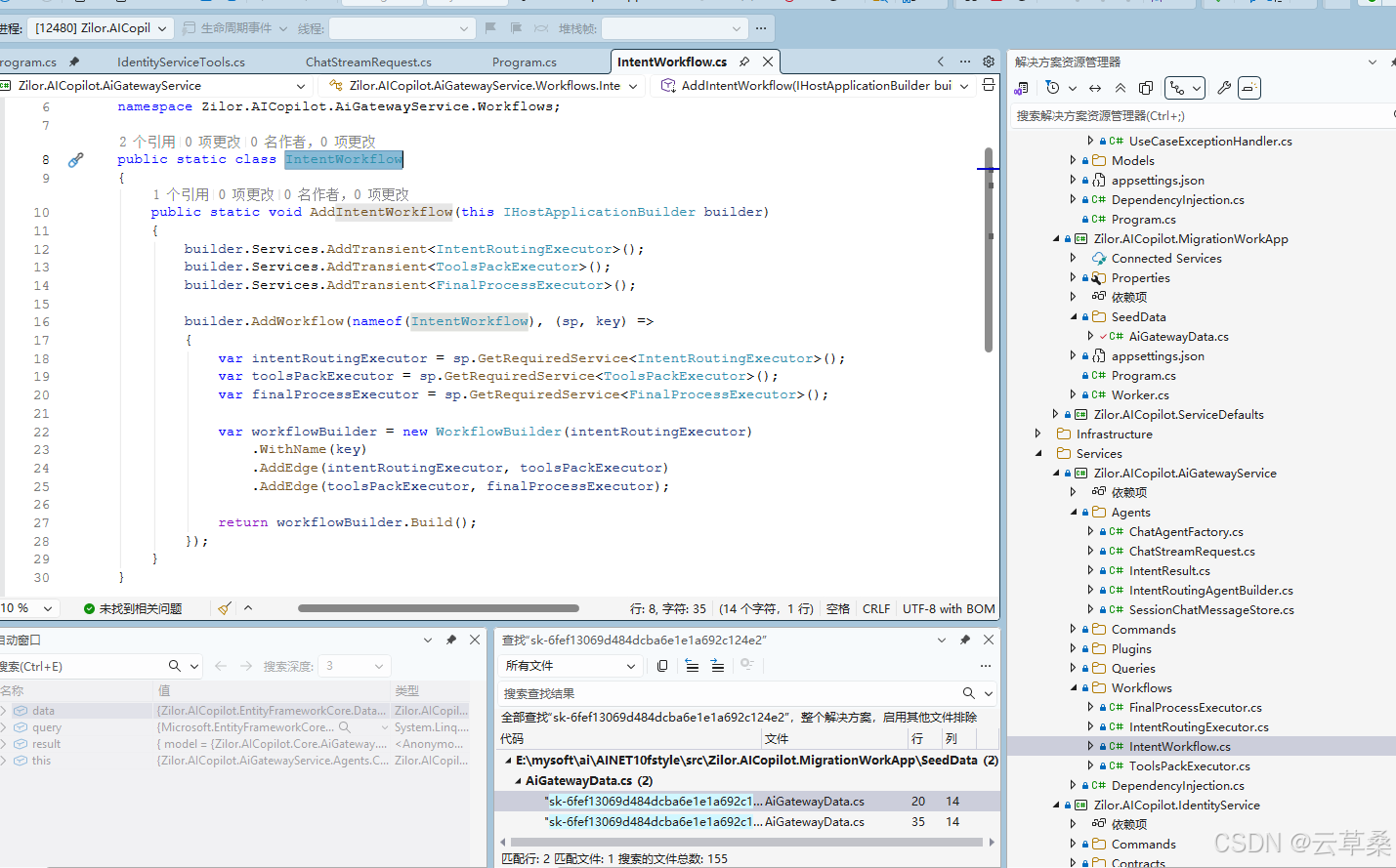
using Microsoft.Agents.AI.Hosting;
using Microsoft.Agents.AI.Workflows;
using Microsoft.Extensions.DependencyInjection;
using Microsoft.Extensions.Hosting;

namespace Zilor.AICopilot.AiGatewayService.Workflows;

public static class IntentWorkflow
{
    public static void AddIntentWorkflow(this IHostApplicationBuilder builder)
    {
        builder.Services.AddTransient<IntentRoutingExecutor>();
        builder.Services.AddTransient<ToolsPackExecutor>();
        builder.Services.AddTransient<FinalProcessExecutor>();

        builder.AddWorkflow(nameof(IntentWorkflow), (sp, key) =>
        {
            var intentRoutingExecutor = sp.GetRequiredService<IntentRoutingExecutor>();
            var toolsPackExecutor = sp.GetRequiredService<ToolsPackExecutor>();
            var finalProcessExecutor = sp.GetRequiredService<FinalProcessExecutor>();

            var workflowBuilder = new WorkflowBuilder(intentRoutingExecutor)
                .WithName(key)
                .AddEdge(intentRoutingExecutor, toolsPackExecutor)
                .AddEdge(toolsPackExecutor, finalProcessExecutor);

            return workflowBuilder.Build();
        });
    }
}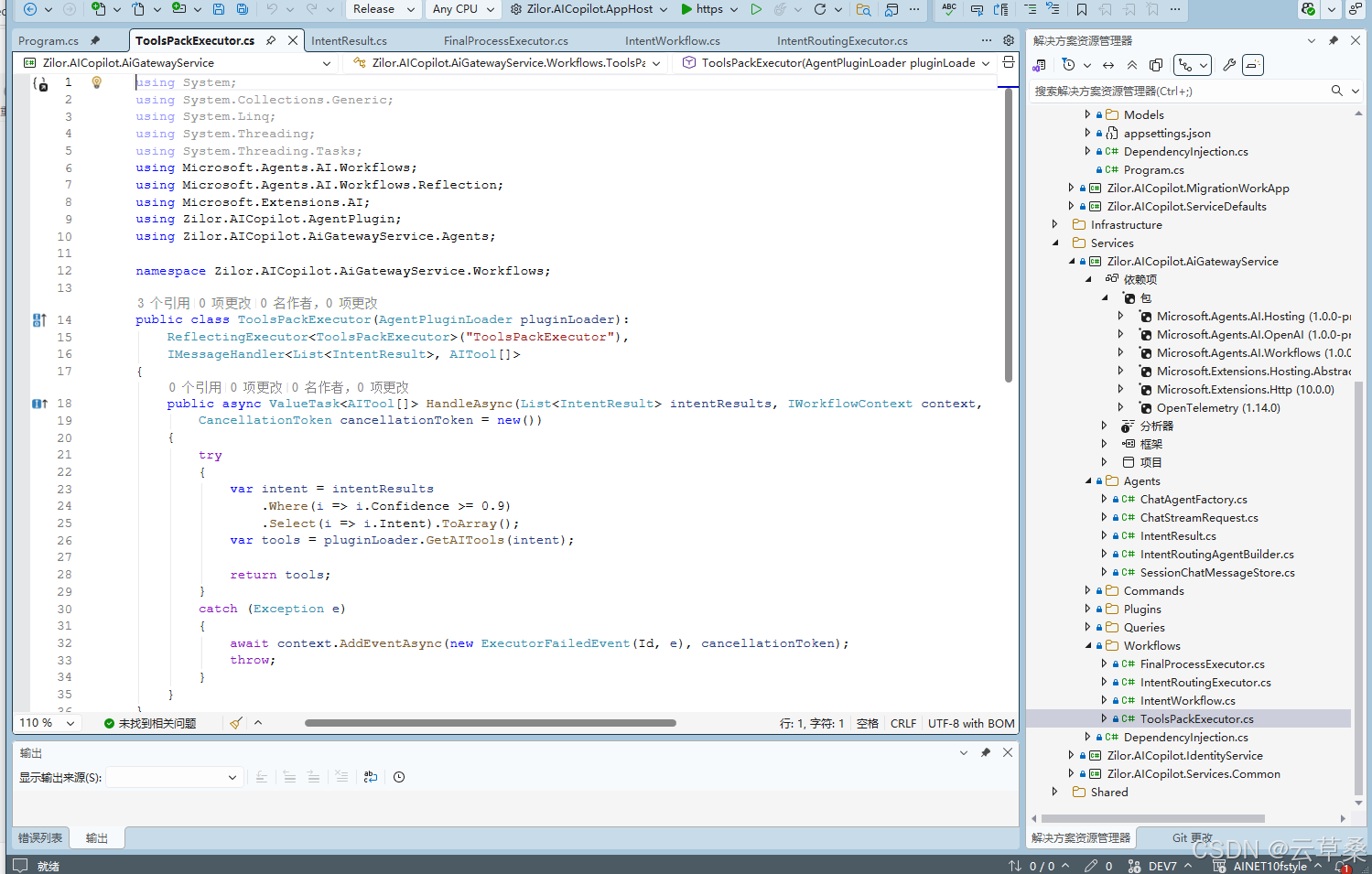
using System;
using System.Collections.Generic;
using System.Linq;
using System.Threading;
using System.Threading.Tasks;
using Microsoft.Agents.AI.Workflows;
using Microsoft.Agents.AI.Workflows.Reflection;
using Microsoft.Extensions.AI;
using Zilor.AICopilot.AgentPlugin;
using Zilor.AICopilot.AiGatewayService.Agents;

namespace Zilor.AICopilot.AiGatewayService.Workflows;

public class ToolsPackExecutor(AgentPluginLoader pluginLoader):
    ReflectingExecutor<ToolsPackExecutor>("ToolsPackExecutor"),
    IMessageHandler<List<IntentResult>, AITool[]>
{
    public async ValueTask<AITool[]> HandleAsync(List<IntentResult> intentResults, IWorkflowContext context,
        CancellationToken cancellationToken = new())
    {
        try
        {
            var intent = intentResults
                .Where(i => i.Confidence >= 0.9)
                .Select(i => i.Intent).ToArray();
            var tools = pluginLoader.GetAITools(intent);

            return tools;
        }
        catch (Exception e)
        {
            await context.AddEventAsync(new ExecutorFailedEvent(Id, e), cancellationToken);
            throw;
        }
    }
}
注意 温度为0
FinalProcessExecutor
using System;
using System.Linq;
using System.Text.Json;
using System.Threading;
using System.Threading.Tasks;
using Microsoft.Agents.AI;
using Microsoft.Agents.AI.Workflows;
using Microsoft.Agents.AI.Workflows.Reflection;
using Microsoft.Extensions.AI;
using Microsoft.Extensions.DependencyInjection;
using Zilor.AICopilot.AiGatewayService.Agents;
using Zilor.AICopilot.Services.Common.Contracts;

namespace Zilor.AICopilot.AiGatewayService.Workflows;

public class FinalProcessExecutor(ChatAgentFactory agentFactory, IServiceProvider serviceProvider):
    ReflectingExecutor<FinalProcessExecutor>("FinalProcessExecutor"),
    IMessageHandler<AITool[]>
{
    public async ValueTask HandleAsync(AITool[] aiTools, IWorkflowContext context,
        CancellationToken cancellationToken = new())
    {
        try
        {
            var request = await context.ReadStateAsync<ChatStreamRequest>("ChatStreamRequest", "Chat", cancellationToken: cancellationToken);
            if (request == null) return;

            var scope = serviceProvider.CreateScope();
            var queryService = scope.ServiceProvider.GetRequiredService<IDataQueryService>();
            var queryable = queryService.Sessions
                .Where(s => s.Id == request.SessionId)
                .Select(s => s.TemplateId);

            var templateId = queryable.FirstOrDefault();

            var agent = await agentFactory.CreateAgentAsync(templateId);
            var storeThread = new { storeState = new SessionSoreState(request.SessionId) };
            var agentThread = agent.DeserializeThread(JsonSerializer.SerializeToElement(storeThread));

            await foreach (var update in agent.RunStreamingAsync(request.Message, agentThread, new ChatClientAgentRunOptions
                           {
                               ChatOptions = new ChatOptions
                               {
                                   Tools = aiTools
                               }
                           }, cancellationToken))
            {
                await context.AddEventAsync(new AgentRunUpdateEvent(Id, update), cancellationToken);
            }

        }
        catch (Exception e)
        {
            await context.AddEventAsync(new ExecutorFailedEvent(Id, e), cancellationToken);
            throw;
        }
    }
}
流式工作流
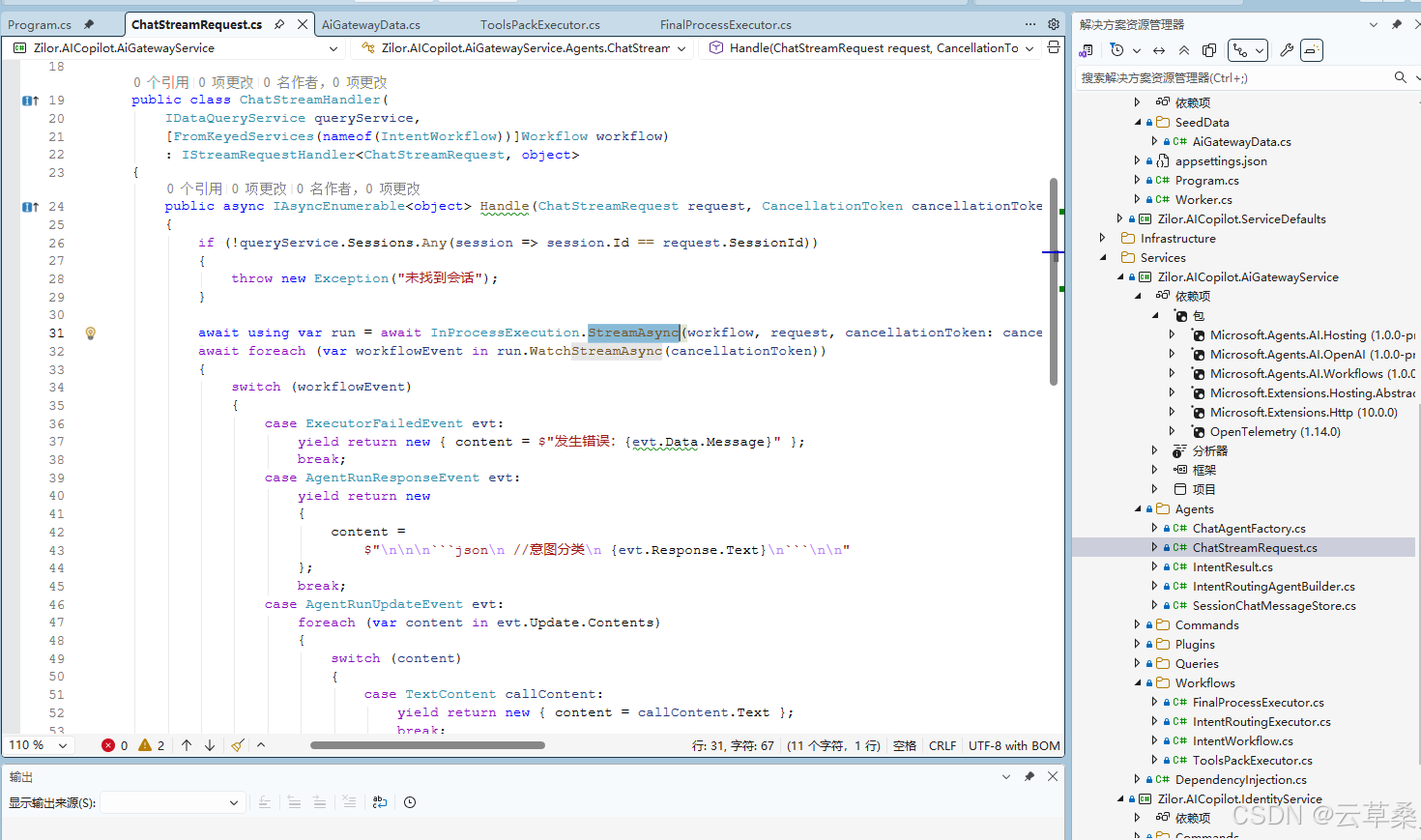
using System;
using System.Collections.Generic;
using System.Linq;
using System.Text.Json;
using System.Threading;
using MediatR;
using Microsoft.Agents.AI.Workflows;
using Microsoft.Extensions.AI;
using Microsoft.Extensions.DependencyInjection;
using Zilor.AICopilot.AiGatewayService.Workflows;
using Zilor.AICopilot.Services.Common.Attributes;
using Zilor.AICopilot.Services.Common.Contracts;

namespace Zilor.AICopilot.AiGatewayService.Agents;

[AuthorizeRequirement("AiGateway.Chat")]
public record ChatStreamRequest(Guid SessionId, string Message) : IStreamRequest<object>;

public class ChatStreamHandler(
    IDataQueryService queryService,
    [FromKeyedServices(nameof(IntentWorkflow))]Workflow workflow)
    : IStreamRequestHandler<ChatStreamRequest, object>
{
    public async IAsyncEnumerable<object> Handle(ChatStreamRequest request, CancellationToken cancellationToken)
    {
        if (!queryService.Sessions.Any(session => session.Id == request.SessionId))
        {
            throw new Exception("未找到会话");
        }

        await using var run = await InProcessExecution.StreamAsync(workflow, request, cancellationToken: cancellationToken);
        await foreach (var workflowEvent in run.WatchStreamAsync(cancellationToken))
        {
            switch (workflowEvent)
            {
                case ExecutorFailedEvent evt:
                    yield return new { content = $"发生错误:{evt.Data.Message}" };
                    break;
                case AgentRunResponseEvent evt:
                    yield return new
                    {
                        content =
                            $"\n\n\n```json\n //意图分类\n {evt.Response.Text}\n```\n\n"
                    };
                    break;
                case AgentRunUpdateEvent evt:
                    foreach (var content in evt.Update.Contents)
                    {
                        switch (content)
                        {
                            case TextContent callContent:
                                yield return new { content = callContent.Text };
                                break;
                            case FunctionCallContent callContent:
                                yield return new
                                {
                                    content =
                                        $"\n\n```\n正在执行工具:{callContent.Name} \n请求参数:{JsonSerializer.Serialize(callContent.Arguments)}"
                                };
                                break;
                            case FunctionResultContent callContent:
                                yield return new
                                    { content = $"\n\n执行结果:{JsonSerializer.Serialize(callContent.Result)}\n```\n\n" };
                                break;
                        }
                    }
                    break;
            }
        }
    }
}
意图分类 结果
源码地址
代码https://gitcode.com/cao9prc/AINET10fstyle
docker desktop 相关问题
docker Engine
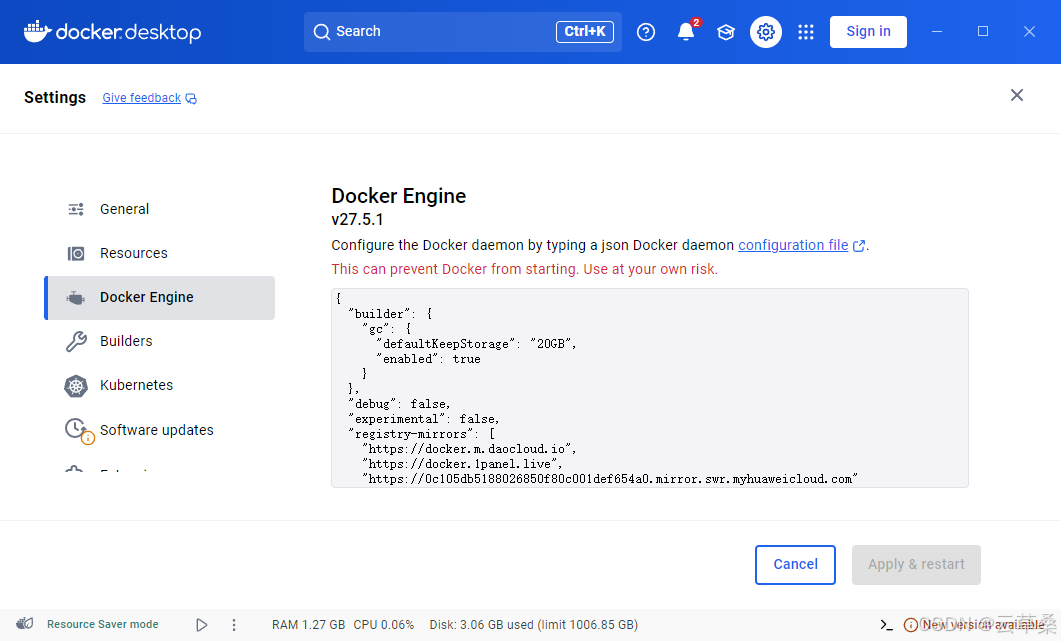
{
  "builder": {
    "gc": {
      "defaultKeepStorage": "20GB",
      "enabled": true
    }
  },
  "debug": false,
  "experimental": false,
  "registry-mirrors": [
    "https://docker.m.daocloud.io",
    "https://docker.1panel.live",
    "https://0c105db5188026850f80c001def654a0.mirror.swr.myhuaweicloud.com"
  ]
}
其他专题
AI开发01 1后端框架: ASP.NET Core2.AI框架: Semantic Kernerl (SK)、Agent Framework3.知识库:向量数据库(Qdrant)+关系型数据库(Post
https://blog.csdn.net/cao919/article/details/155895060
.net AI开发02 1后端框架: ASP.NET Core2.AI框架: Semantic Kernerl (SK)、Agent Framework3.知识库:向量数据库(Qdrant)+关系型数据库(Post
.net AI MCP 入门 适用于模型上下文协议的 C# SDK 简介(MCP)
https://blog.csdn.net/cao919/article/details/147915384
C# .net ai Agent AI视觉应用 写代码 改作业 识别屏幕 简历处理 标注等
https://blog.csdn.net/cao919/article/details/146504537
C# net deepseek RAG AI开发 全流程 介绍
https://blog.csdn.net/cao919/article/details/147915384
WPF halcon 机器视觉
https://blog.csdn.net/cao919/article/details/134790240

有“AI”的1024 = 2048,欢迎大家加入2048 AI社区
更多推荐
 15
15 0
0- 0


 已为社区贡献6条内容

所有评论(0)