Spring ai 指标监控
Spring AI 通过 Spring Boot Actuator 提供可观测性功能,支持对 AI 操作(如聊天、嵌入、图像处理等)进行监控和追踪。配置需添加spring-boot-starter-actuator依赖,核心组件会自动生成指标和追踪数据。关键特性包括:低基数键用于指标聚合(如操作类型、流式调用标识),高基数键仅用于追踪(如完整提示文本、会话ID)。1.0.0-RC1版本对相关配置属
Spring AI 可观测性详解
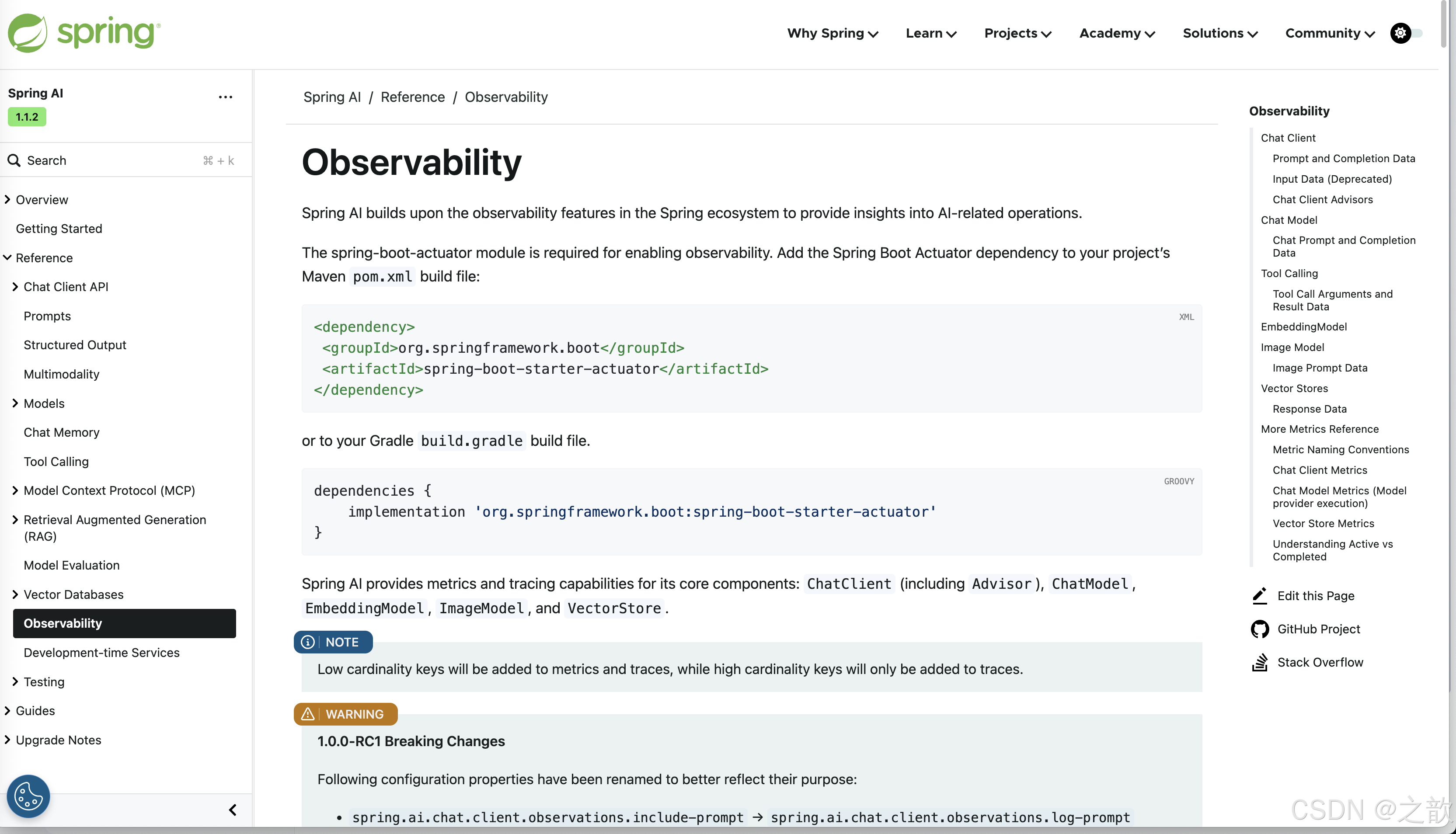
Spring AI 基于 Spring 生态系统中的可观测性功能,为 AI 相关操作提供洞察能力。
依赖配置
启用可观测性功能需要 spring-boot-actuator 模块。在项目的 Maven pom.xml 构建文件中添加 Spring Boot Actuator 依赖:
<dependency>
 <groupId>org.springframework.boot</groupId>
 <artifactId>spring-boot-starter-actuator</artifactId>
</dependency>
或者在 Gradle build.gradle 构建文件中添加:
dependencies {
    implementation 'org.springframework.boot:spring-boot-starter-actuator'
}
Spring AI 为其核心组件提供指标和追踪功能:ChatClient(包括 Advisor)、ChatModel、EmbeddingModel、ImageModel 和 VectorStore。
注意:低基数键(Low cardinality keys)将被添加到指标和追踪中,而高基数键(High cardinality keys)仅添加到追踪中。
1.0.0-RC1 版本破坏性变更:以下配置属性已重命名以更好地反映其用途:
spring.ai.chat.client.observations.include-prompt→spring.ai.chat.client.observations.log-promptspring.ai.chat.observations.include-prompt→spring.ai.chat.observations.log-promptspring.ai.chat.observations.include-completion→spring.ai.chat.observations.log-completionspring.ai.image.observations.include-prompt→spring.ai.image.observations.log-promptspring.ai.vectorstore.observations.include-query-response→spring.ai.vectorstore.observations.log-query-response
Chat Client(聊天客户端)
当调用 ChatClient 的 call() 或 stream() 操作时,会记录 spring.ai.chat.client 观测数据。它们测量执行调用所花费的时间,并传播相关的追踪信息。
表 1. 低基数键
| 名称 | 描述 | 示例 | 用途 |
|---|---|---|---|
| gen_ai.operation.name | 操作名称(固定值) | "framework" |
用于指标聚合和过滤,标识操作类型 |
| gen_ai.system | 系统标识(固定值) | "spring_ai" |
区分不同 AI 框架,便于多框架环境下的监控 |
| spring.ai.chat.client.stream | 是否为流式响应 | true 或 false |
区分流式和非流式调用,分析性能差异 |
| spring.ai.kind | API 类型 | "chat_client" |
用于指标分类,区分不同类型的 Spring AI 操作 |
表 2. 高基数键
| 名称 | 描述 | 示例 | 用途 |
|---|---|---|---|
| gen_ai.prompt | 发送给模型的完整 prompt(需启用 log-prompt) | "Translate this text to Chinese: Hello" |
调试时查看实际发送的 prompt,排查问题 |
| spring.ai.chat.client.advisor.params (已弃用) | Advisor 参数(已弃用,会话 ID 改用 conversation.id) | - | - |
| spring.ai.chat.client.advisors | 配置的 Advisor 列表 | ["SimpleLoggerAdvisor"] |
追踪哪些 Advisor 被调用,分析 Advisor 链的执行情况 |
| spring.ai.chat.client.conversation.id | 会话 ID(使用 ChatMemory 时) | "conv-12345" |
关联同一会话的所有请求,追踪完整对话流程 |
| spring.ai.chat.client.system.params (已弃用) | System 参数(已弃用,改用 gen_ai.prompt) | - | - |
| spring.ai.chat.client.system.text (已弃用) | System 文本(已弃用,改用 gen_ai.prompt) | - | - |
| spring.ai.chat.client.tool.function.names (已弃用) | 工具函数名称列表(已弃用,改用 tool.names) | - | - |
| spring.ai.chat.client.tool.function.callbacks (已弃用) | 工具回调列表(已弃用,改用 tool.names) | - | - |
| spring.ai.chat.client.tool.names | 工具名称列表 | ["weather", "calculator"] |
分析哪些工具被使用,优化工具配置和性能 |
| spring.ai.chat.client.user.params (已弃用) | User 参数(已弃用,改用 gen_ai.prompt) | - | - |
| spring.ai.chat.client.user.text (已弃用) | User 文本(已弃用,改用 gen_ai.prompt) | - | - |
提示和完成数据
ChatClient 的提示和完成数据通常很大,可能包含敏感信息。因此,默认情况下不会导出这些数据。
Spring AI 支持记录提示和完成数据,以帮助调试和故障排除。
| 属性 | 描述 | 默认值 |
|---|---|---|
| spring.ai.chat.client.observations.log-prompt | 是否记录聊天客户端提示内容 | false |
| spring.ai.chat.client.observations.log-completion | 是否记录聊天客户端完成内容 | false |
警告:如果启用聊天客户端提示和完成数据的记录,存在暴露敏感或私人信息的风险。请务必小心!
输入数据(已弃用)
注意:
spring.ai.chat.client.observations.include-input属性已弃用,已被spring.ai.chat.client.observations.log-prompt取代。参见提示内容。
ChatClient 的输入数据通常很大,可能包含敏感信息。因此,默认情况下不会导出这些数据。
Spring AI 支持记录输入数据,以帮助调试和故障排除。
| 属性 | 描述 | 默认值 |
|---|---|---|
| spring.ai.chat.client.observations.include-input | 是否在观测中包含输入内容 | false |
警告:如果在观测中包含输入内容,存在暴露敏感或私人信息的风险。请务必小心!
Chat Client Advisors(聊天客户端顾问)
当执行顾问时,会记录 spring.ai.advisor 观测数据。它们测量在顾问中花费的时间(包括内部顾问花费的时间),并传播相关的追踪信息。
表 3. 低基数键
| 名称 | 描述 | 示例 | 用途 |
|---|---|---|---|
| gen_ai.operation.name | 操作名称(固定值) | "framework" |
标识 Advisor 操作类型,用于指标聚合 |
| gen_ai.system | 系统标识(固定值) | "spring_ai" |
标识系统来源,便于在多系统环境下区分 |
| spring.ai.advisor.type (已弃用) | Advisor 类型(已弃用,所有 Advisor 现在类型相同) | - | - |
| spring.ai.kind | API 类型 | "advisor" |
区分 Advisor 操作与其他 Spring AI 操作,用于分类监控 |
表 4. 高基数键
| 名称 | 描述 | 示例 | 用途 |
|---|---|---|---|
| spring.ai.advisor.name | Advisor 名称 | "SimpleLoggerAdvisor" |
识别具体执行的 Advisor,分析各 Advisor 的性能和影响 |
| spring.ai.advisor.order | Advisor 执行顺序 | 0, 1, 2 |
追踪 Advisor 链的执行顺序,排查执行流程问题 |
Chat Model(聊天模型)
注意:可观测性功能目前仅支持以下 AI 模型提供商的 ChatModel 实现:Anthropic、Azure OpenAI、Mistral AI、Ollama、OpenAI、Vertex AI、MiniMax、Moonshot、QianFan、ZhiPu AI。其他 AI 模型提供商将在未来版本中支持。
调用 ChatModel 的 call 或 stream 方法时,会记录 gen_ai.client.operation 观测数据。它们测量方法完成所花费的时间,并传播相关的追踪信息。
注意:
gen_ai.client.token.usage指标测量单个模型调用使用的输入和输出令牌数量。
表 5. 低基数键
| 名称 | 描述 | 示例 | 用途 |
|---|---|---|---|
| gen_ai.operation.name | 操作名称(通常是 “chat”) | "chat" |
标识操作类型,用于按操作类型聚合指标 |
| gen_ai.system | 模型提供商 | "openai", "anthropic", "azure_openai" |
按提供商分类统计,比较不同提供商的性能 |
| gen_ai.request.model | 请求的模型名称 | "gpt-4", "claude-3-opus" |
按模型统计使用情况,分析模型性能和成本 |
| gen_ai.response.model | 实际响应的模型名称 | "gpt-4-0613" |
追踪实际使用的模型版本,用于版本对比分析 |
表 6. 高基数键
| 名称 | 描述 | 示例 | 用途 |
|---|---|---|---|
| gen_ai.request.frequency_penalty | frequency_penalty 参数值 | 0.0, 0.5 |
分析参数设置对响应质量的影响,优化参数配置 |
| gen_ai.request.max_tokens | 最大生成 token 数 | 1000, 2000 |
追踪 token 限制设置,分析是否合理,优化成本 |
| gen_ai.request.presence_penalty | presence_penalty 参数值 | 0.0, 0.6 |
分析参数对生成内容的影响,调优模型输出 |
| gen_ai.request.stop_sequences | 停止序列列表 | ["\\n", "END"] |
追踪停止条件设置,分析生成中断原因 |
| gen_ai.request.temperature | temperature 参数值 | 0.7, 1.0 |
分析温度参数对响应多样性的影响,优化生成策略 |
| gen_ai.request.top_k | top_k 采样参数值 | 40, 50 |
追踪采样策略,分析对输出质量的影响 |
| gen_ai.request.top_p | top_p 采样参数值 | 0.9, 1.0 |
追踪采样策略,优化生成参数配置 |
| gen_ai.response.finish_reasons | 停止原因列表 | ["stop"], ["length"] |
分析生成停止原因,识别是否因长度限制中断 |
| gen_ai.response.id | 响应 ID | "chatcmpl-abc123" |
唯一标识响应,用于关联日志和追踪 |
| gen_ai.usage.input_tokens | 输入 token 数 | 150, 500 |
计算输入成本,分析 prompt 长度对成本的影响 |
| gen_ai.usage.output_tokens | 输出 token 数 | 200, 800 |
计算输出成本,分析生成长度对成本的影响 |
| gen_ai.usage.total_tokens | 总 token 数 | 350, 1300 |
计算总成本,用于成本分析和预算控制 |
| gen_ai.prompt | 完整 prompt(需启用 log-prompt) | "Translate: Hello world" |
调试时查看实际 prompt,排查 prompt 工程问题 |
| gen_ai.completion | 完整响应(需启用 log-completion) | "你好,世界" |
调试时查看实际响应,分析响应质量和问题 |
| spring.ai.model.request.tool.names | 工具名称列表 | ["get_weather", "calculate"] |
追踪工具使用情况,分析工具调用频率和效果 |
注意:对于测量用户令牌,上表列出了观测追踪中存在的值。使用 ChatModel 提供的指标名称
gen_ai.client.token.usage。
聊天提示和完成数据
聊天提示和完成数据通常很大,可能包含敏感信息。因此,默认情况下不会导出这些数据。
Spring AI 支持记录聊天提示和完成数据,这对故障排除场景很有用。当追踪可用时,日志将包含追踪信息以便更好地关联。
| 属性 | 描述 | 默认值 |
|---|---|---|
| spring.ai.chat.observations.log-prompt | 记录提示内容。true 或 false | false |
| spring.ai.chat.observations.log-completion | 记录完成内容。true 或 false | false |
| spring.ai.chat.observations.include-error-logging | 在观测中包含错误日志。true 或 false | false |
警告:如果启用聊天提示和完成数据的记录,存在暴露敏感或私人信息的风险。请务必小心!
Tool Calling(工具调用)
在聊天模型交互的上下文中执行工具调用时,会记录 spring.ai.tool 观测数据。它们测量工具调用完成所花费的时间,并传播相关的追踪信息。
表 7. 低基数键
| 名称 | 描述 | 示例 | 用途 |
|---|---|---|---|
| gen_ai.operation.name | 操作名称(固定值) | "framework" |
标识工具调用操作,用于指标分类和聚合 |
| gen_ai.system | 系统标识(固定值) | "spring_ai" |
标识系统来源,区分不同框架的工具调用 |
| spring.ai.kind | API 类型(固定值) | "tool_call" |
区分工具调用与其他操作类型,用于分类监控 |
| spring.ai.tool.definition.name | 工具名称 | "get_weather", "calculator" |
按工具统计调用次数和性能,分析工具使用情况 |
表 8. 高基数键
| 名称 | 描述 | 示例 | 用途 |
|---|---|---|---|
| spring.ai.tool.definition.description | 工具描述 | "Get current weather for a location" |
了解工具功能,用于文档和调试 |
| spring.ai.tool.definition.schema | 工具参数 schema(JSON Schema) | {"type":"object","properties":{...}} |
查看工具参数结构,验证参数格式 |
| spring.ai.tool.call.arguments | 工具调用参数(需启用 include-content) | {"location":"Beijing","unit":"celsius"} |
调试时查看实际调用参数,排查参数传递问题 |
| spring.ai.tool.call.result | 工具调用返回结果(需启用 include-content) | {"temperature":25,"condition":"sunny"} |
调试时查看工具返回结果,验证工具执行正确性 |
工具调用参数和结果数据
工具调用的输入参数和结果默认不导出,因为它们可能包含敏感信息。
Spring AI 支持将工具调用参数和结果数据导出为跨度属性。
| 属性 | 描述 | 默认值 |
|---|---|---|
| spring.ai.tools.observations.include-content | 在观测中包含工具调用内容。true 或 false | false |
警告:如果在观测中包含工具调用参数和结果,存在暴露敏感或私人信息的风险。请务必小心!
EmbeddingModel(嵌入模型)
注意:可观测性功能目前仅支持以下 AI 模型提供商的 EmbeddingModel 实现:Azure OpenAI、Mistral AI、Ollama 和 OpenAI。其他 AI 模型提供商将在未来版本中支持。
在嵌入模型方法调用时记录 gen_ai.client.operation 观测数据。它们测量方法完成所花费的时间,并传播相关的追踪信息。
注意:
gen_ai.client.token.usage指标测量单个模型调用使用的输入和输出令牌数量。
表 9. 低基数键
| 名称 | 描述 | 示例 | 用途 |
|---|---|---|---|
| gen_ai.operation.name | 操作名称(通常是 “embedding”) | "embedding" |
标识嵌入操作,用于按操作类型聚合指标 |
| gen_ai.system | 模型提供商 | "openai", "azure_openai", "ollama" |
按提供商统计嵌入调用,比较不同提供商性能 |
| gen_ai.request.model | 请求的模型名称 | "text-embedding-ada-002", "nomic-embed" |
按模型统计使用情况,分析模型性能和成本 |
| gen_ai.response.model | 实际响应的模型名称 | "text-embedding-ada-002" |
追踪实际使用的模型版本,用于版本对比 |
表 10. 高基数键
| 名称 | 描述 | 示例 | 用途 |
|---|---|---|---|
| gen_ai.request.embedding.dimensions | 嵌入向量维度数 | 1536, 768, 1024 |
追踪向量维度,确保与向量数据库配置一致 |
| gen_ai.usage.input_tokens | 输入 token 数 | 10, 50, 100 |
计算嵌入输入成本,分析文本长度对成本影响 |
| gen_ai.usage.total_tokens | 总 token 数 | 10, 50, 100 |
计算总成本,用于成本分析和预算控制 |
注意:对于测量用户令牌,上表列出了观测追踪中存在的值。使用 EmbeddingModel 提供的指标名称
gen_ai.client.token.usage。
Image Model(图像模型)
注意:可观测性功能目前仅支持以下 AI 模型提供商的 ImageModel 实现:OpenAI。其他 AI 模型提供商将在未来版本中支持。
在图像模型方法调用时记录 gen_ai.client.operation 观测数据。它们测量方法完成所花费的时间,并传播相关的追踪信息。
注意:
gen_ai.client.token.usage指标测量单个模型调用使用的输入和输出令牌数量。
表 11. 低基数键
| 名称 | 描述 | 示例 | 用途 |
|---|---|---|---|
| gen_ai.operation.name | 操作名称(通常是 “image_generation”) | "image_generation" |
标识图像生成操作,用于按操作类型聚合指标 |
| gen_ai.system | 模型提供商 | "openai" |
标识提供商,用于多提供商环境下的监控 |
| gen_ai.request.model | 请求的模型名称 | "dall-e-3", "dall-e-2" |
按模型统计使用情况,分析模型性能和成本 |
表 12. 高基数键
| 名称 | 描述 | 示例 | 用途 |
|---|---|---|---|
| gen_ai.request.image.response_format | 图像返回格式 | "url", "b64_json" |
追踪返回格式设置,分析对性能的影响 |
| gen_ai.request.image.size | 图像尺寸 | "1024x1024", "512x512" |
追踪图像尺寸设置,分析尺寸对成本和性能影响 |
| gen_ai.request.image.style | 图像风格 | "vivid", "natural" |
追踪风格设置,分析不同风格的使用情况 |
| gen_ai.response.id | 响应 ID | "img-abc123" |
唯一标识响应,用于关联日志和追踪 |
| gen_ai.response.model | 实际使用的模型名称 | "dall-e-3" |
追踪实际使用的模型版本,用于版本对比 |
| gen_ai.usage.input_tokens | 输入 token 数 | 50, 100 |
计算输入成本,分析 prompt 长度对成本影响 |
| gen_ai.usage.output_tokens | 输出 token 数(图像生成通常为 0) | 0 |
图像生成通常无输出 token,用于成本计算 |
| gen_ai.usage.total_tokens | 总 token 数 | 50, 100 |
计算总成本,用于成本分析和预算控制 |
| gen_ai.prompt | 完整 prompt(需启用 log-prompt) | "A beautiful sunset over mountains" |
调试时查看实际 prompt,排查 prompt 工程问题 |
注意:对于测量用户令牌,上表列出了观测追踪中存在的值。使用 ImageModel 提供的指标名称
gen_ai.client.token.usage。
图像提示数据
图像提示数据通常很大,可能包含敏感信息。因此,默认情况下不会导出这些数据。
Spring AI 支持记录图像提示数据,这对故障排除场景很有用。当追踪可用时,日志将包含追踪信息以便更好地关联。
| 属性 | 描述 | 默认值 |
|---|---|---|
| spring.ai.image.observations.log-prompt | 记录图像提示内容。true 或 false | false |
警告:如果启用图像提示数据的记录,存在暴露敏感或私人信息的风险。请务必小心!
Vector Stores(向量存储)
Spring AI 中的所有向量存储实现都经过检测,通过 Micrometer 提供指标和分布式追踪数据。
与向量存储交互时,会记录 db.vector.client.operation 观测数据。它们测量 query、add 和 remove 操作所花费的时间,并传播相关的追踪信息。
表 13. 低基数键
| 名称 | 描述 | 示例 | 用途 |
|---|---|---|---|
| db.operation.name | 操作类型 | "add", "delete", "query" |
按操作类型统计性能,分析各操作的耗时和频率 |
| db.system | 向量数据库类型 | "pgvector", "redis", "chroma", "qdrant", "weaviate", "pinecone", "milvus" 等 |
按数据库类型统计性能,比较不同向量数据库的表现 |
| spring.ai.kind | API 类型(固定值) | "vector_store" |
标识向量存储操作,用于分类监控和指标聚合 |
表 14. 高基数键
| 名称 | 描述 | 示例 | 用途 |
|---|---|---|---|
| db.collection.name | 集合/表名称 | "documents", "embeddings" |
按集合统计操作,分析不同集合的使用情况和性能 |
| db.namespace | 数据库命名空间(数据库名) | "my_database", "vector_db" |
在多数据库环境下区分不同数据库的操作 |
| db.record.id | 记录 ID | "doc-123", "embed-456" |
追踪特定记录的操作,用于调试和问题排查 |
| db.search.similarity_metric | 相似度计算方式 | "cosine", "euclidean", "dot_product" |
追踪相似度算法,分析不同算法对搜索结果的影响 |
| db.vector.dimension_count | 向量维度数 | 1536, 768, 1024 |
验证向量维度配置,确保与嵌入模型输出维度一致 |
| db.vector.field_name | 向量字段名 | "embedding", "vector" |
标识向量存储字段,用于多字段场景下的区分 |
| db.vector.query.content | 查询文本内容 | "What is Spring AI?" |
调试时查看实际查询内容,分析查询质量和相关性 |
| db.vector.query.filter | 元数据过滤条件(JSON) | {"category":"tech","year":2024} |
追踪过滤条件,分析过滤对查询结果和性能的影响 |
| db.vector.query.response.documents | 返回的文档列表(需启用 log-query-response) | [{"id":"doc1","content":"..."},{"id":"doc2","content":"..."}] |
调试时查看返回文档,验证检索质量和相关性 |
| db.vector.query.similarity_threshold | 相似度阈值(0.0-1.0) | 0.7, 0.8(0.0=接受所有,1.0=完全匹配) |
追踪阈值设置,分析阈值对结果数量和质量的影响,优化阈值配置 |
| db.vector.query.top_k | 返回的最相似向量数量 | 5, 10, 20 |
追踪返回数量设置,分析 top_k 对性能和结果的影响 |
响应数据
向量搜索响应数据通常很大,可能包含敏感信息。因此,默认情况下不会导出这些数据。
Spring AI 支持记录向量搜索响应数据,这对故障排除场景很有用。当追踪可用时,日志将包含追踪信息以便更好地关联。
| 属性 | 描述 | 默认值 |
|---|---|---|
| spring.ai.vectorstore.observations.log-query-response | 记录向量存储查询响应内容。true 或 false | false |
警告:如果启用向量搜索响应数据的记录,存在暴露敏感或私人信息的风险。请务必小心!
更多指标参考
本节记录 Spring AI 组件在 Prometheus 中发出的指标。
指标命名约定
Spring AI 使用 Micrometer。基本指标名称使用点(例如,gen_ai.client.operation),Prometheus 导出时使用下划线和标准后缀:
- 计时器 →
<base>_seconds_count、<base>_seconds_sum、<base>_seconds_max,以及(当支持时)<base>_active_count - 计数器 →
<base>_total(单调递增)
注意:以下显示基本指标名称如何扩展到 Prometheus 时间序列。
基本指标名称 导出的时间序列 gen_ai.client.operation gen_ai_client_operation_seconds_count
gen_ai_client_operation_seconds_sum
gen_ai_client_operation_seconds_max
gen_ai_client_operation_active_countdb.vector.client.operation db_vector_client_operation_seconds_count
db_vector_client_operation_seconds_sum
db_vector_client_operation_seconds_max
db_vector_client_operation_active_count
参考资料
- OpenTelemetry — 生成式 AI 的语义约定(概述)
- Micrometer — 命名仪表
Chat Client 指标
| 指标名称 | 类型 | 单位 | 描述 |
|---|---|---|---|
| gen_ai_chat_client_operation_seconds_sum | Timer | seconds | ChatClient 操作(call/stream)花费的总时间 |
| gen_ai_chat_client_operation_seconds_count | Counter | count | 已完成的 ChatClient 操作数量 |
| gen_ai_chat_client_operation_seconds_max | Gauge | seconds | 观察到的 ChatClient 操作的最大持续时间 |
| gen_ai_chat_client_operation_active_count | Gauge | count | 当前正在进行的 ChatClient 操作数量 |
活动 vs 已完成:*_active_count 显示正在进行的调用;seconds 系列仅反映已完成的调用。
Chat Model 指标(模型提供商执行)
| 指标名称 | 类型 | 单位 | 描述 |
|---|---|---|---|
| gen_ai_client_operation_seconds_sum | Timer | seconds | 执行聊天模型操作的总时间 |
| gen_ai_client_operation_seconds_count | Counter | count | 已完成的聊天模型操作数量 |
| gen_ai_client_operation_seconds_max | Gauge | seconds | 聊天模型操作的最大观察持续时间 |
| gen_ai_client_operation_active_count | Gauge | count | 当前正在进行的聊天模型操作数量 |
令牌使用
| 指标名称 | 类型 | 单位 | 描述 |
|---|---|---|---|
| gen_ai_client_token_usage_total | Counter | tokens | 总令牌消耗,按令牌类型标记 |
标签
| 标签 | 含义 |
|---|---|
| gen_ai_token_type=input | 发送给模型的提示令牌 |
| gen_ai_token_type=output | 模型返回的完成令牌 |
| gen_ai_token_type=total | 输入 + 输出 |
Vector Store 指标
| 指标名称 | 类型 | 单位 | 描述 |
|---|---|---|---|
| db_vector_client_operation_seconds_sum | Timer | seconds | 向量存储操作(add/delete/query)花费的总时间 |
| db_vector_client_operation_seconds_count | Counter | count | 已完成的向量存储操作数量 |
| db_vector_client_operation_seconds_max | Gauge | seconds | 向量存储操作的最大观察持续时间 |
| db_vector_client_operation_active_count | Gauge | count | 当前正在进行的向量存储操作数量 |
标签
| 标签 | 含义 |
|---|---|
| db_operation_name | 操作类型(add、delete、query) |
| db_system | 向量数据库/提供商(redis、chroma、pgvector 等) |
| spring_ai_kind | vector_store |
理解活动 vs 已完成
- 活动(
*_active_count) — 正在进行的操作的瞬时测量(并发/负载)。 - 已完成(
*_seconds_sum|count|max) — 已完成操作的统计信息:_seconds_sum / _seconds_count→ 平均延迟_seconds_max→ 自上次抓取以来的最高水位(受注册表行为影响)
总结
Spring AI 的可观测性功能为 AI 应用提供了全面的监控和追踪能力,包括:
- 指标收集:通过 Micrometer 收集各种操作的性能指标
- 分布式追踪:支持 OpenTelemetry 标准,提供端到端的追踪能力
- 令牌使用监控:跟踪 AI 模型的令牌消耗情况
- 灵活的配置:可以控制是否记录敏感信息(提示、完成等)
- 多组件支持:覆盖 ChatClient、ChatModel、EmbeddingModel、ImageModel 和 VectorStore
通过合理配置和使用这些可观测性功能,可以更好地监控、调试和优化 Spring AI 应用程序。
参考文档:https://docs.spring.io/spring-ai/reference/observability/index.html
参考文章
https://docs.spring.io/spring-ai/reference/observability/index.html#
示例:
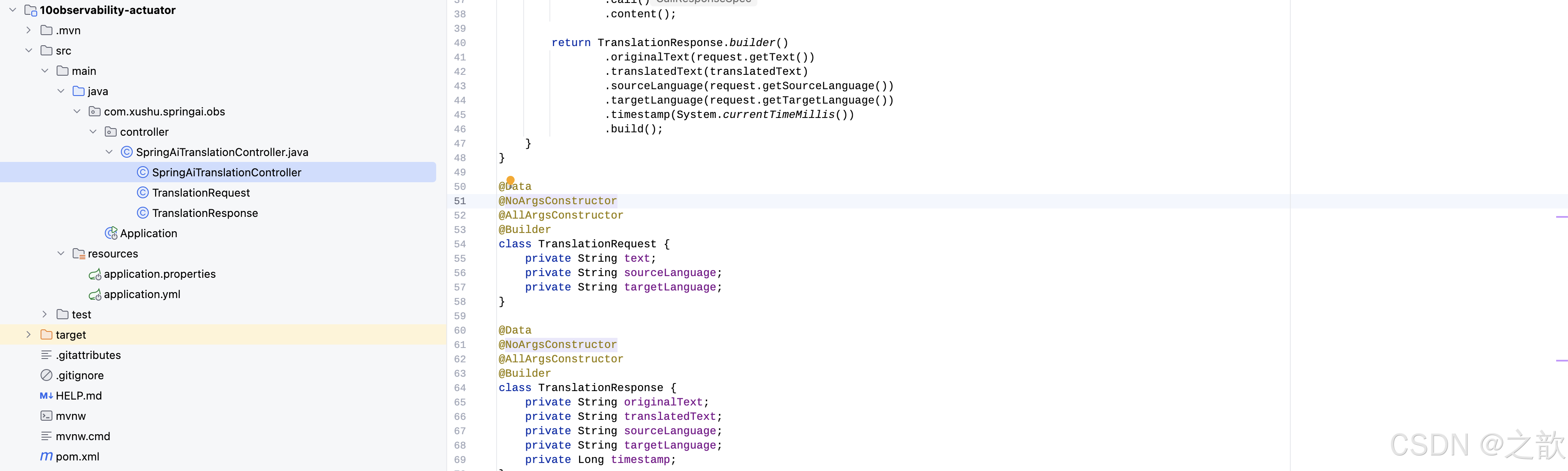
pom.xml
<?xml version="1.0" encoding="UTF-8"?>
<project xmlns="http://maven.apache.org/POM/4.0.0" xmlns:xsi="http://www.w3.org/2001/XMLSchema-instance"
         xsi:schemaLocation="http://maven.apache.org/POM/4.0.0 https://maven.apache.org/xsd/maven-4.0.0.xsd">
    <modelVersion>4.0.0</modelVersion>
    <parent>
        <groupId>com.xs.springai</groupId>
        <artifactId>spring-ai-parent</artifactId>
        <version>0.0.1-xs</version>
        <relativePath/> <!-- lookup parent from repository -->
    </parent>
    <groupId>com.xushu.springai</groupId>
    <artifactId>10observability-actuator</artifactId>

    <properties>
        <java.version>17</java.version>
        <jedis.version>5.2.0</jedis.version>
    </properties>
    <dependencies>
        <!--deepseek springai体系大模型 -->
        <dependency>
            <groupId>org.springframework.ai</groupId>
            <artifactId>spring-ai-starter-model-deepseek</artifactId>
        </dependency>
        <!-- Spring Boot Actuator 监控 -->
        <dependency>
            <groupId>org.springframework.boot</groupId>
            <artifactId>spring-boot-starter-actuator</artifactId>
        </dependency>
        <!--web-->
        <dependency>
            <groupId>org.springframework.boot</groupId>
            <artifactId>spring-boot-starter-web</artifactId>
        </dependency>
        <!--单元测试-->
        <dependency>
            <groupId>org.springframework.boot</groupId>
            <artifactId>spring-boot-starter-test</artifactId>
            <scope>test</scope>
        </dependency>

        <dependency>
            <groupId>org.projectlombok</groupId>
            <artifactId>lombok</artifactId>
        </dependency>

    </dependencies>

    <build>
        <plugins>
            <plugin>
                <groupId>org.springframework.boot</groupId>
                <artifactId>spring-boot-maven-plugin</artifactId>
            </plugin>
        </plugins>
    </build>

</project>
application.properties
#deepseek
spring.ai.deepseek.api-key= sk-xxx
spring.ai.deepseek.chat.options.model= deepseek-chat
spring.ai.deepseek.chat.options.temperature= 0.1
application.yml
# Spring AI 可观测性配置
management:
  endpoints:
    web:
      exposure:
        include: "*"
  endpoint:
    health:
      show-details: always
SpringAiTranslationController
package com.xushu.springai.obs.controller;

import lombok.*;
import lombok.extern.slf4j.Slf4j;
import org.springframework.ai.chat.client.ChatClient;
import org.springframework.ai.chat.client.advisor.SimpleLoggerAdvisor;
import org.springframework.ai.chat.model.ChatModel;
import org.springframework.web.bind.annotation.PostMapping;
import org.springframework.web.bind.annotation.RequestBody;
import org.springframework.web.bind.annotation.RequestMapping;
import org.springframework.web.bind.annotation.RestController;

@RestController
@RequestMapping("/api/v1")
@RequiredArgsConstructor
@Slf4j
public class SpringAiTranslationController {

    private final ChatClient chatClient;

    // http://localhost:8080/api/v1/translate?text=Hello, world!&sourceLanguage=en&targetLanguage=zh
    @PostMapping("/translate")
    public TranslationResponse translate(@RequestBody TranslationRequest request) {

        log.info("Spring AI翻译请求: {} -> {}", request.getSourceLanguage(), request.getTargetLanguage());

        String prompt= String.format(
                "作为专业翻译助手,请将以下%s文本翻译成%s,保持原文的语气和风格:\n%s",
                request.getSourceLanguage(),
                request.getTargetLanguage(),
                request.getText()
        );

        String translatedText= chatClient.prompt()
                .user(prompt)
                .advisors(SimpleLoggerAdvisor.builder().build())
                .call()
                .content();

        return TranslationResponse.builder()
                .originalText(request.getText())
                .translatedText(translatedText)
                .sourceLanguage(request.getSourceLanguage())
                .targetLanguage(request.getTargetLanguage())
                .timestamp(System.currentTimeMillis())
                .build();
    }
}

@Data
@NoArgsConstructor
@AllArgsConstructor
@Builder
class TranslationRequest {
    private String text;
    private String sourceLanguage;
    private String targetLanguage;
}

@Data
@NoArgsConstructor
@AllArgsConstructor
@Builder
class TranslationResponse {
    private String originalText;
    private String translatedText;
    private String sourceLanguage;
    private String targetLanguage;
    private Long timestamp;
}
配置启动类Application
package com.xushu.springai.obs;

import org.springframework.ai.chat.client.ChatClient;
import org.springframework.boot.SpringApplication;
import org.springframework.boot.actuate.web.exchanges.InMemoryHttpExchangeRepository;
import org.springframework.boot.autoconfigure.SpringBootApplication;
import org.springframework.context.annotation.Bean;

@SpringBootApplication
public class Application {

    public static void main(String[] args) {
        SpringApplication.run(Application.class, args);
    }


    @Bean
    public ChatClient chatClient(ChatClient.Builder builder) {
        return builder.build();
    }
}
一次访问
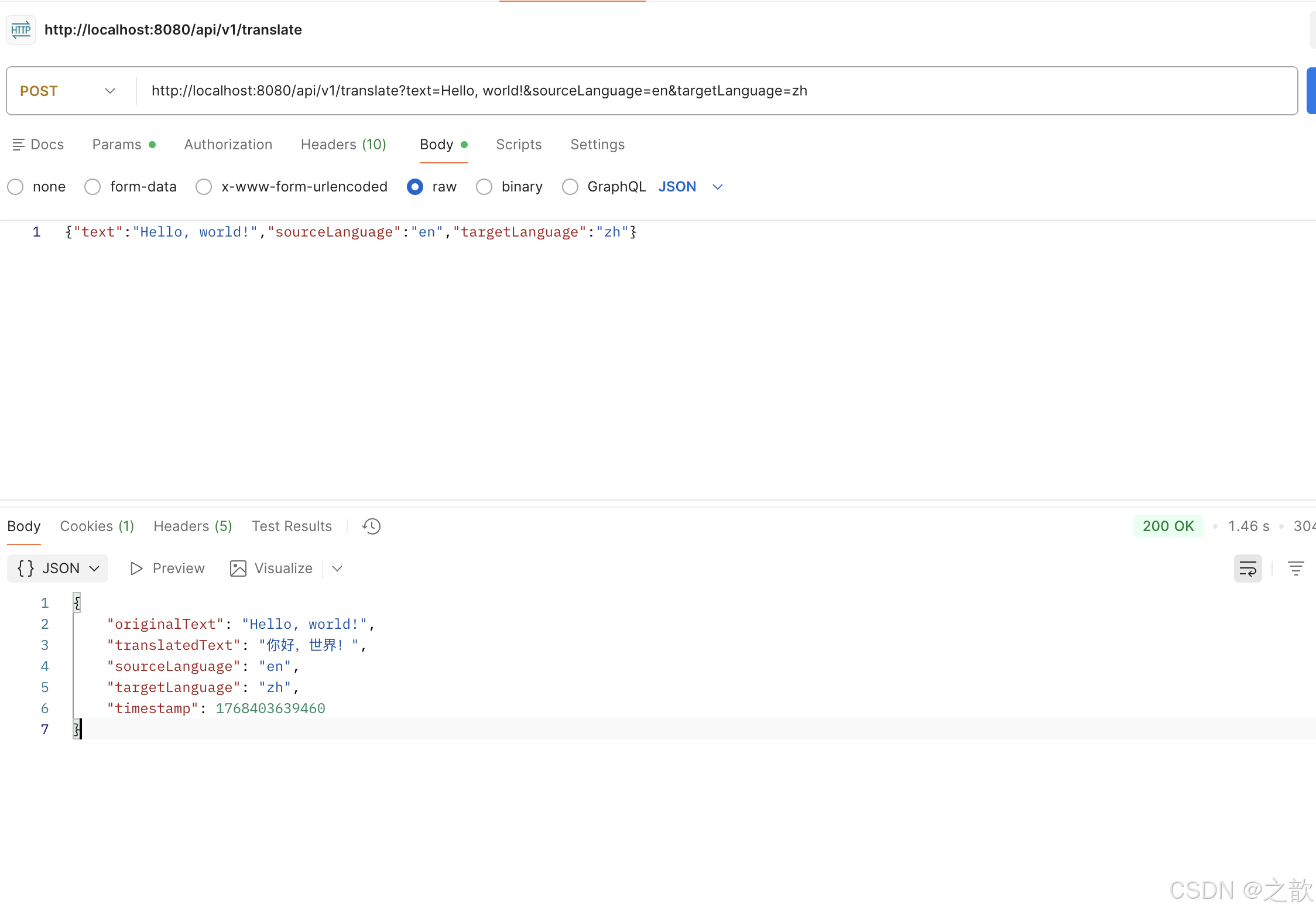
之后看访问
http://localhost:8080/actuator/metrics
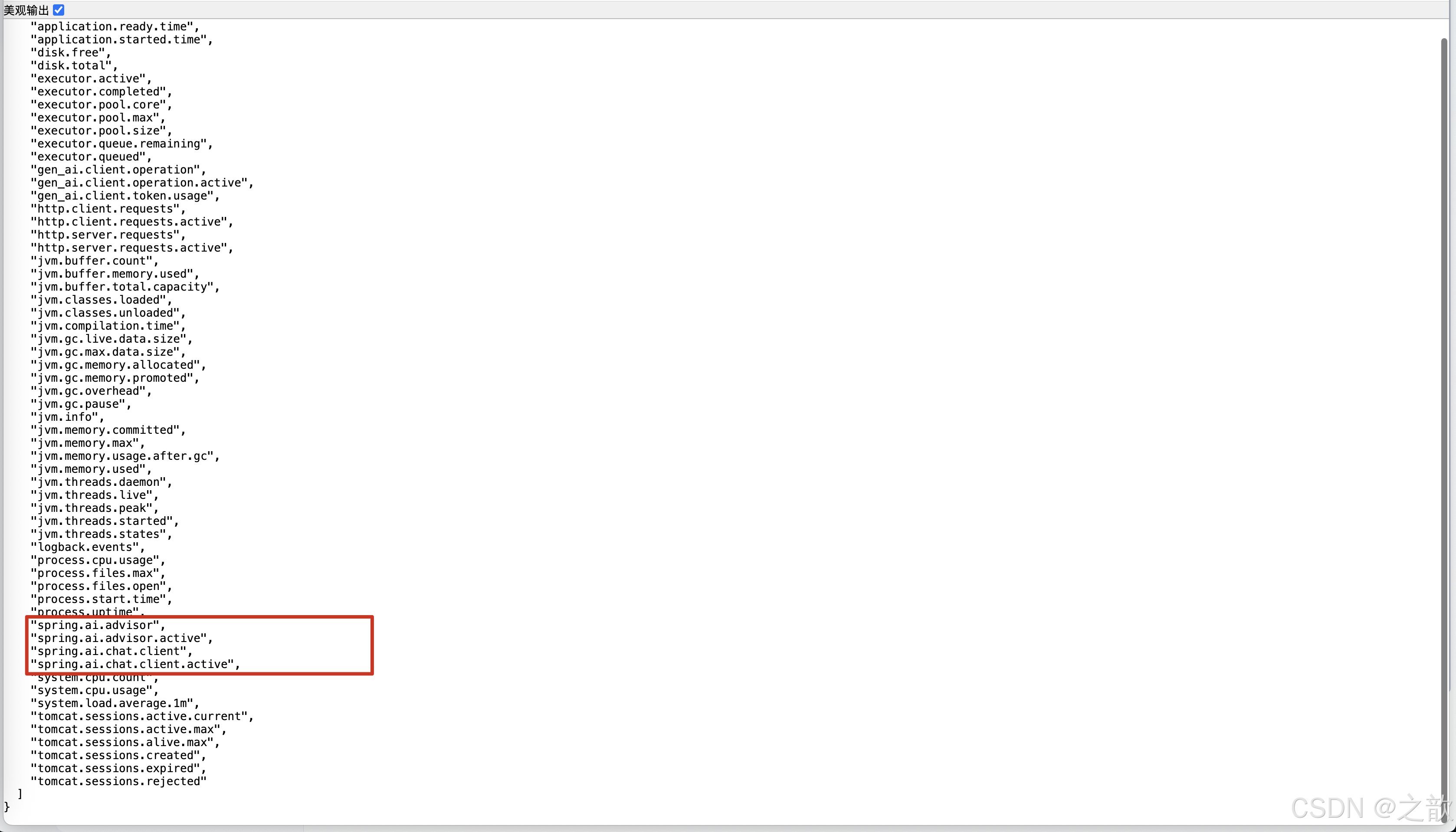
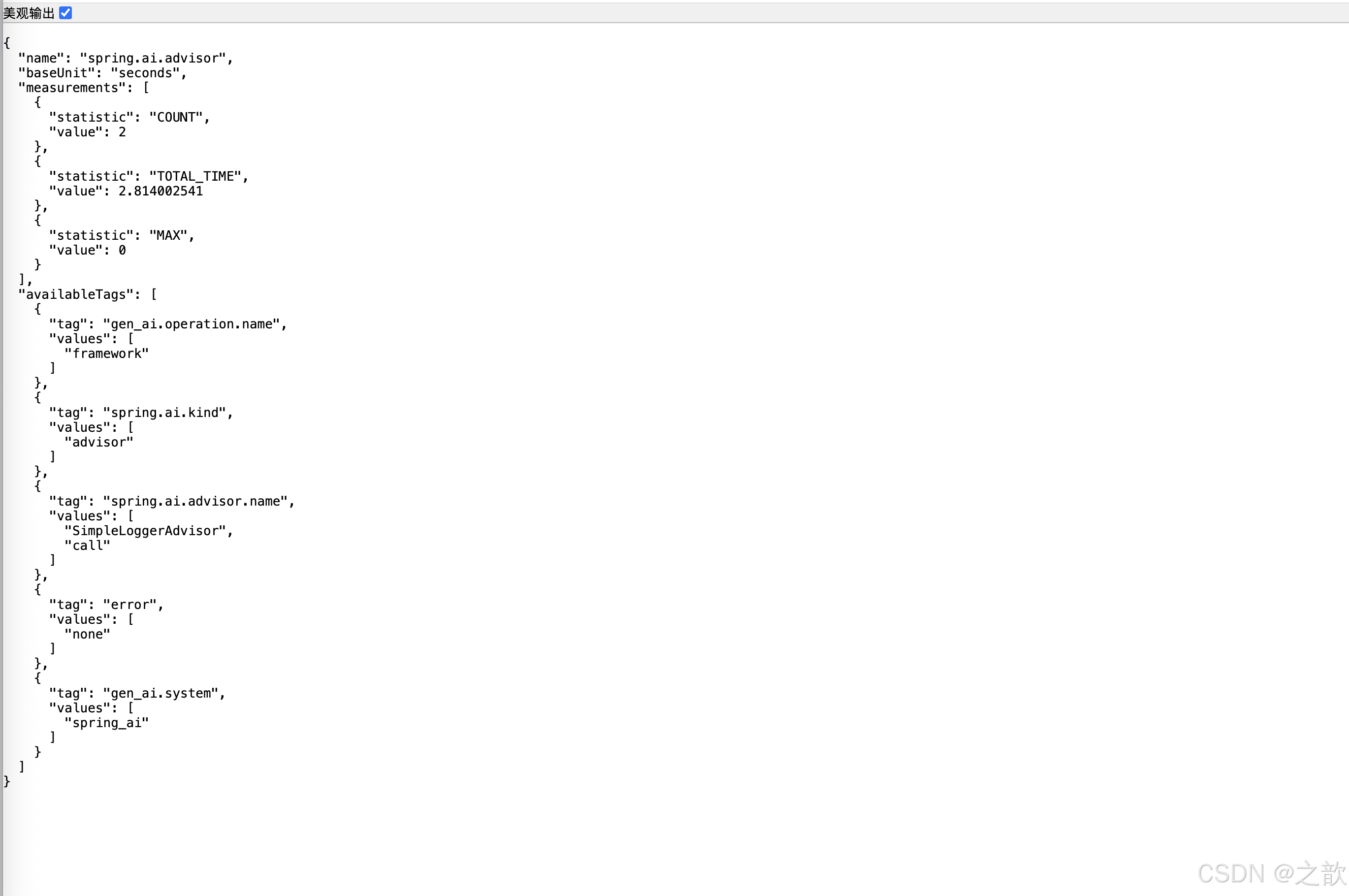
http://localhost:8080/actuator/metrics/spring.ai.advisor
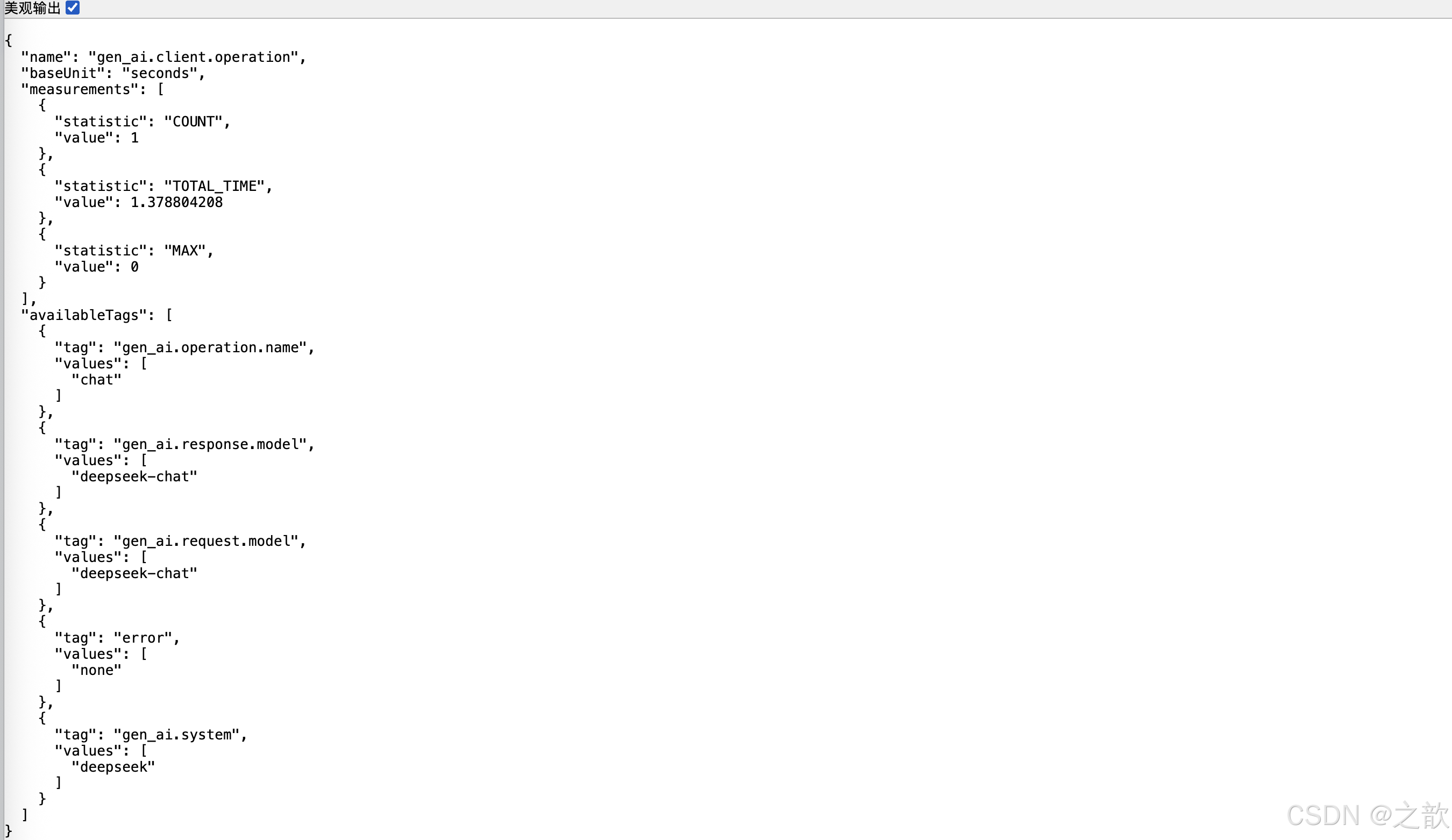
http://localhost:8080/actuator/metrics/gen_ai.client.operation

有“AI”的1024 = 2048,欢迎大家加入2048 AI社区
更多推荐

 2
2 0
0- 0


 已为社区贡献12条内容

所有评论(0)