基于LangGraph的多智能体开发流程
本文介绍了一种基于"分而治之"思想的多智能体协作系统设计方案。系统通过创建多个专用智能体(如研究智能体和图表生成智能体)来分别处理不同任务,每个智能体配备特定工具(Tavily搜索工具和Python REPL工具)。系统采用LangGraph框架实现智能体间通信与状态共享,通过定义工作流状态图来管理任务路由和执行顺序。关键实现包括:智能体创建函数、工具定义、智能体节点封装以及工
多智能体
工作流程概述
在单个领域,通常一个智能体能够有效地使用一些工具,但即使是强大的模型,在使用大量工具时效果肯能会有所降低。
一种解决复杂任务的方法是采用"分而治之"的方法:为每个任务或领域创建一个专门的智能体,并将任务路由到正确的"专家"。
- 定义辅助函数:
create_agent():为每个任务创建独立的智能体,例如研究智能体、图表生成智能体等。每个智能体用独立的语言模型和工具。 - 定义工具:为每个智能体提供专用的工具,例如Tavily搜索工具和Python REPL工具,用于执行特定任务。
- 定义辅助函数:
agent_node:将每个智能体与对应任务进行关联,定义图中的智能体节点,使其能够处理特定任务。 - 定义智能体及节点:
Researcher:研究智能体使用Tavily搜索工具,回应用户提问。 - 定义图表生成器智能体及节点:
Chart_Generator:根据提供的数据,在沙盒环境执行Python代码生成图表。 - 导入预构建的工具节点:
ToolNode:将2中定义的Tavily搜索工具和Python REPL工具作为一个工具节点,这样可以方便的在工作流中使用这些工具。 - 建立智能体节点间通信:
AgentState:通过LangGraph实现智能体间通信,智能体能够共享状态并相互协作完成复杂任务。 - 定义工作流(状态图):创建状态图以管理多智能体协作的流程,包含任务路由和边逻辑,确保正确的智能体按顺序执行。
- 执行工作流:根据状态图执行多智能体任务,通过工具调用和智能体协作,完成目标任务并生成最终输出。
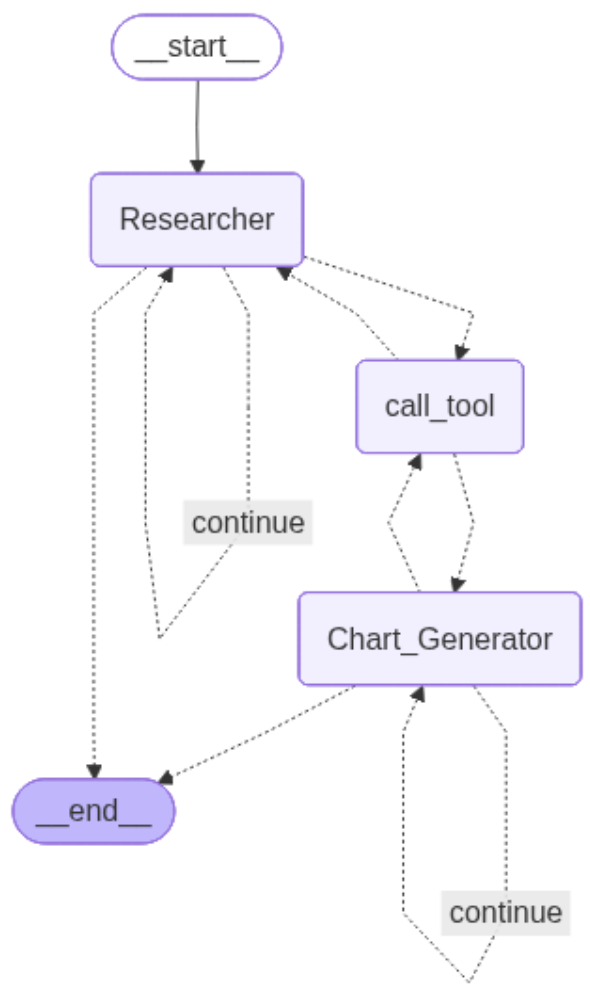
最终工作流如下图所示: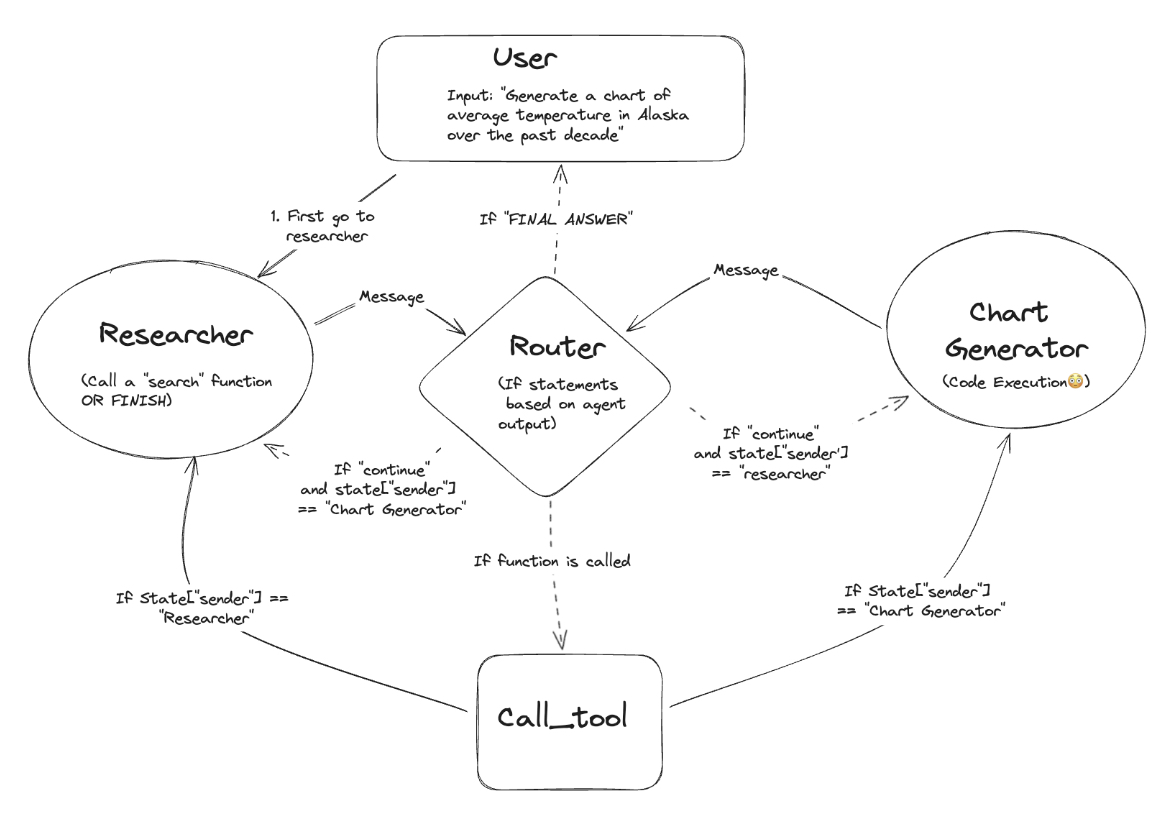
正式流程
1.创建智能体的辅助函数
#创建智能体的函数,绑定大模型和工具
def create_agent(llm, tools, system_message: str):
    """
    创建一个智能体(Agent)。

    参数说明:
    - llm: 语言模型对象(例如 ChatOpenAI)。
    - tools: 可用工具列表,每个工具需要有 .name 属性和被绑定到语言模型后可被执行。
    - system_message: 系统消息字符串,可作为整体 Prompt 的补充提示。

    返回值:
    - 返回一个流式管道(pipeline),即 prompt | llm.bind_tools(tools),用于后续执行推理。

    实现说明:
    1. 首先基于 ChatPromptTemplate.from_messages 创建一个 prompt 模板,里面有一条系统消息(system)。这条系统消息指示助手如何与其他助手协作、何时停止,以及可用哪些工具({tool_names})、包含自定义 system_message 信息。
    2. 用 MessagesPlaceholder(variable_name="messages") 占位符代表对话历史,便于多轮消息交互。
    3. 通过 prompt.partial 方法将自定义的 system_message 参数注入,并将所有工具名称提取为逗号分隔字符串后也注入模板变量 {tool_names}。
    4. 返回 prompt | llm.bind_tools(tools) —— 即将 prompt 作为输入模板与已绑定工具集合的 LLM 组合返回,用于后续的推理/调用。

    示例用法:
        agent = create_agent(llm, [tool1, tool2], "你有一个数据库查询工具和一个网页爬取工具")
    """
    # 创建 prompt 模板,指定 system message 规则和插槽
    prompt = ChatPromptTemplate.from_messages(
        [
            (
                "system",
                "You are a helpful AI assistant, collaborating with other assistants."
                " Use the provided tools to progress towards answering the question."
                " If you are unable to fully answer, that's OK, another assistant with different tools "
                " will help where you left off. Execute what you can to make progress."
                " If you or any of the other assistants have the final answer or deliverable,"
                " prefix your response with FINAL ANSWER so the team knows to stop."
                " You have access to the following tools: {tool_names}.\n{system_message}",
            ),
            # 占位符,插入消息历史,实现对话轮次记忆
            MessagesPlaceholder(variable_name="messages"),
        ]
    )

    # 把外部传入的 system_message、所有工具的名字注入到 prompt 模板中
    prompt = prompt.partial(system_message=system_message)
    prompt = prompt.partial(tool_names=", ".join([tool.name for tool in tools]))

    # 返回组合好的推理流程,把 prompt 和带工具的 llm 连接起来(管道式处理)
    return prompt | llm.bind_tools(tools)
2.定义工具
这段代码定义了两个工具,一个是搜索工具;一个是执行生成代码的工具。
from typing import Annotated
from langchain_core.prompts import ChatPromptTemplate,  MessagesPlaceholder
from langchain_community.tools.tavily_search import TavilySearchResults
from langchain_experimental.utilities import PythonREPL
from langchain_core.tools import tool

tavily_tool = TavilySearchResults(max_results=5)

repl = PythonREPL()


@tool
def python_repl(
    code: Annotated[str, "The python code to execute generate your chart."]
):
    """Use this to execute python code. If you want to see the output of a value,
    you should print it out with 'print(...)'. this is visible to the user."""
    try:
        result = repl.run(code)
    except BaseException as e:
        return f"Failed to execute. Error: {repr(e)}"

    result_str = f"Successfully executed:\n '''python\n{code}\n'''\nStdout:{result}"

    return (
        result_str + "\n\nIf you have completed all tasks, respod with FINAL ANSWER."
    )
3.辅助函数:智能体节点
使用以下智能体分别定义2个智能体节点:Resercher和chart_Generator
注释说明:
agent_node函数是一个辅助函数,用于创建一个智能体节点。它接受当前的state(状态)、agent(智能体)和name(智能体的名称),并返回一个新的状态字典,包含消息和发送者。research_agent:使用create_agent函数创建了一个研究智能体,使用research_llm作为语言模型,并绑定了tavily_tool搜索工具。chart_agent:同样适用create_agent 创建了图表生成器智能体,使用chart_llm作为语言模型,并绑定了python_repl代码执行工具。functools.oartial:用于创建特定名称的智能体节点,例如Researcher和Chart_Generator,并与各自的智能体绑定。
# 辅助函数,为智能体创建一个节点
def agent_node(state, agent, name):

    result = agent.invoke(state)

    if isinstance(result, ToolMessage):
        pass
    else:
        result = AIMessage(**result.dict(exclude={"type", "name"}), name = name)

    return {
        "messages": [result], #包含新的生成消息
        "sender":name, # 我们使用严格的工作流程,通过记录发送者来知道接下来传递给谁。
    }
关于AIMessage是LangChain中用于表示AI模型回复的类,它封装了AI生成的文本或内容。
AIMessage 类的常见构造参数:
在代码中AIMessage(**result.dict(exclude={"type", "name"}), name=name)使用了构造方法。
- content: 这是消息的主要部分,通常是AI模型生成的文本内容。
- name: 可选参数,用于标识发送消息的AI模型或智能体的名称。在我们的代码中name有两种Resercher和chart_Generator,以便在不同智能体之间进行区分。
- additional_metadata:有时候,消息不仅仅包含文本内容,还可能附加其他元数据,如调用的工具、时间戳等。
解释:
relult.dict():这一部分将result对象转化为字典,方便在构造AIMessage时传递这些数据。exclude={"tyoe", "name"}:在构造时,使用exclude排除type和name字段,因为它们可能不是AI消息本身的必要部分或已经在其他地方定义过。- name=name:这里的name标识智能体的名称。在构造AIMessage时,通过这个name参数来标识信息的来源是谁。
4. 定义 研究智能体及其节点
先定义好research_llm语言模型,然后调用creat_agent()函数给这个语言模型绑定工具,注入提示词。
最后调用functools.partial()来重新封装agent_node函数,也就是将具体的agent和name绑定上面。
customer已经写了,他不可以是最终答案的生成者。
research_llm = ChatOpenAI(
    model="qwen3-max",
    base_url="https://dashscope.aliyuncs.com/compatible-mode/v1",
    api_key="xxxxxxxxxxx",
)
# 研究智能体及其节点
reserach_agent = create_agent(
    research_llm,
    [tavily_tool],
    system_message="Before using the search engine, carefully think through and clarify the query. "
    "Then, conduct a single search that addresses all aspects of the query in one go.",  # 系统消息,指导智能体如何使用搜索工具
)

research_node = functools.partial(agent_node, agent = reserach_agent, name = "Researcher")
5. 定义图表生成器智能体及其节点
同理,创建图表生成器节点,并且它可以是最终答案的生成者。
chart_llm = ChatOpenAI(
    model="qwen3-max",
    base_url="https://dashscope.aliyuncs.com/compatible-mode/v1",
    api_key="zxxxxxxx",
)

chart_agent = create_agent(
    chart_llm,
    [python_repl],
    tool_message="Create clear and user-friendly charts based on the provided data.",  # 系统消息,指导智能体如何生成图表,
    custom_notice ="Notice:\n"
    "If you have completed all tasks, respond with FINAL ANSWER.",
)

chart_node = functools.partial(agent_node, agent=chart_agent, name="Chart_Generator")
6.导入预构建的工具节点
导入预构建的工具节点ToolNode(运行上一个AIMessage中调用工具的节点。)。将Tavily搜素工具和Python REPL 工具作为一个工具节点,这样可以方便的在工作流中使用这些工具。
什么是ToolNode?它能够从图状态(graph state)中提取消息并调用指定的工具,最后将工具调用的结果反馈回图的状态中。ToolNode非常适合与LangGraph中的ReAct agent 协同工作,但也可以与任何StateGraph配合使用,只要状态中有message键和合适的消息处理方式。
ToolNode特点:
- 工具调用:ToolNode可以根据状态中的消息自动调用指定的工具,并返回工具的执行结果。
- 兼容性:可以与任意支持工具调用的LangChain模型配合使用。
- 并行工具调用:支持同时调用多个工具,并处理工具返回的多个结果。
- 错误处理:ToolNode默认启用了错误处理,可以处理工具在执行过程中的异常情况。
与对话模型结合使用:
在使用像Anthropic这样的对话模型时,模型可以自动生成带有tool_call的AIMessage,这样我们可以直接将模型生成的消息传递给ToolNode来执行工具调用: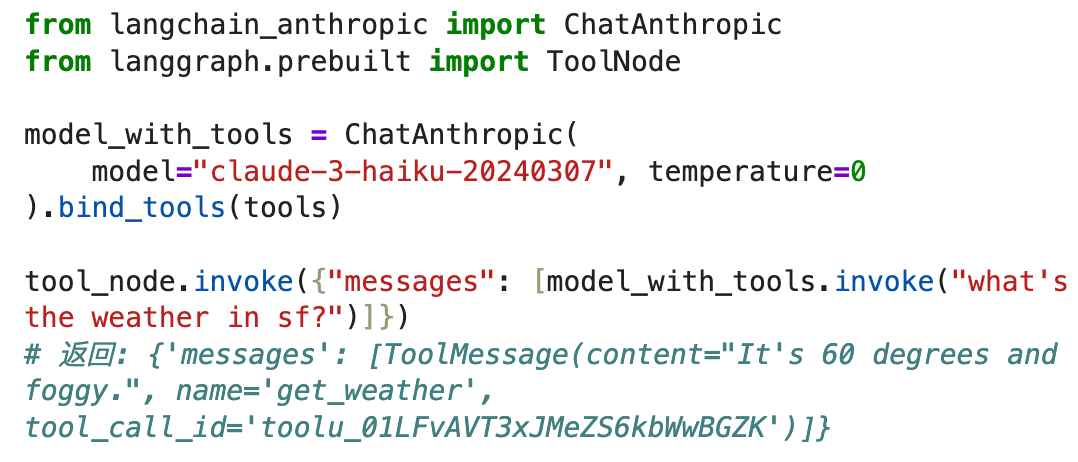
ToolNode与ReAct Agent结合
ReAct Agent是LangGraph中的一种体能体,它会反复调用工具,直到收集足够的信息来解决问题。以下是ReAct Agent的基本工作流,它通过工具节点来完成工具调用: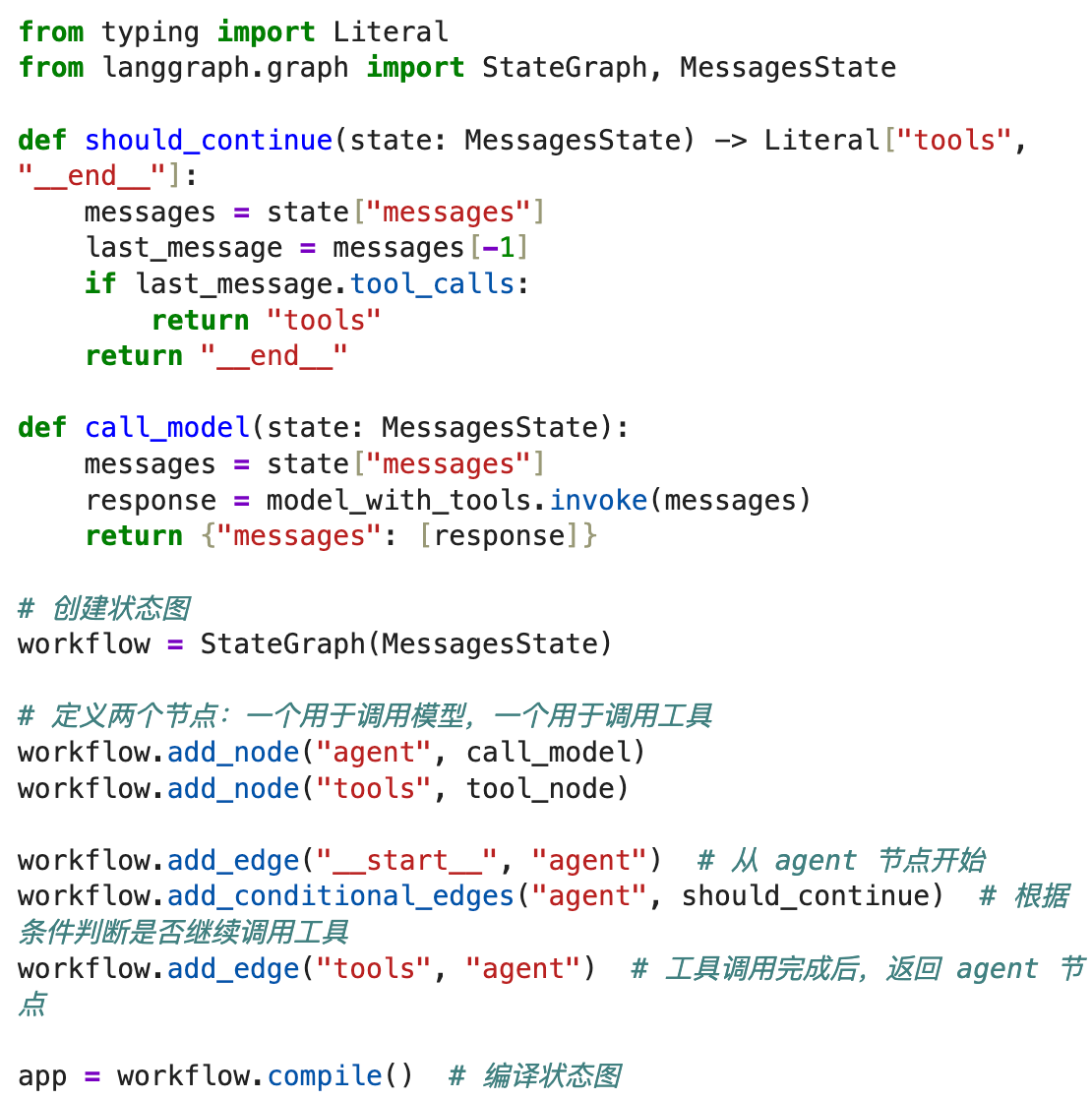
错误处理
ToolNode默认启用了错误处理,可以处理工具执行中的异常情况。如果想禁用错误处理,可以设置handle_tool_errors=False。
总结:
ToolNode是一个非常强大的组件,它能够自动调用工具并将结果反馈回工作流。它可以处理单个或多个工具调用,并与LangChain模型紧密结合,使得在复杂的多步骤任务中能够高效地调用外部API或工具。
# 定义工具列表,包括Tavily搜索工具和Python REPL工具
tools = [tavily_tool, python_repl]
# 创建工具节点,负责工具的调用
tool_node = ToolNode(tools)
7. 建立智能体节点间通信AgentState
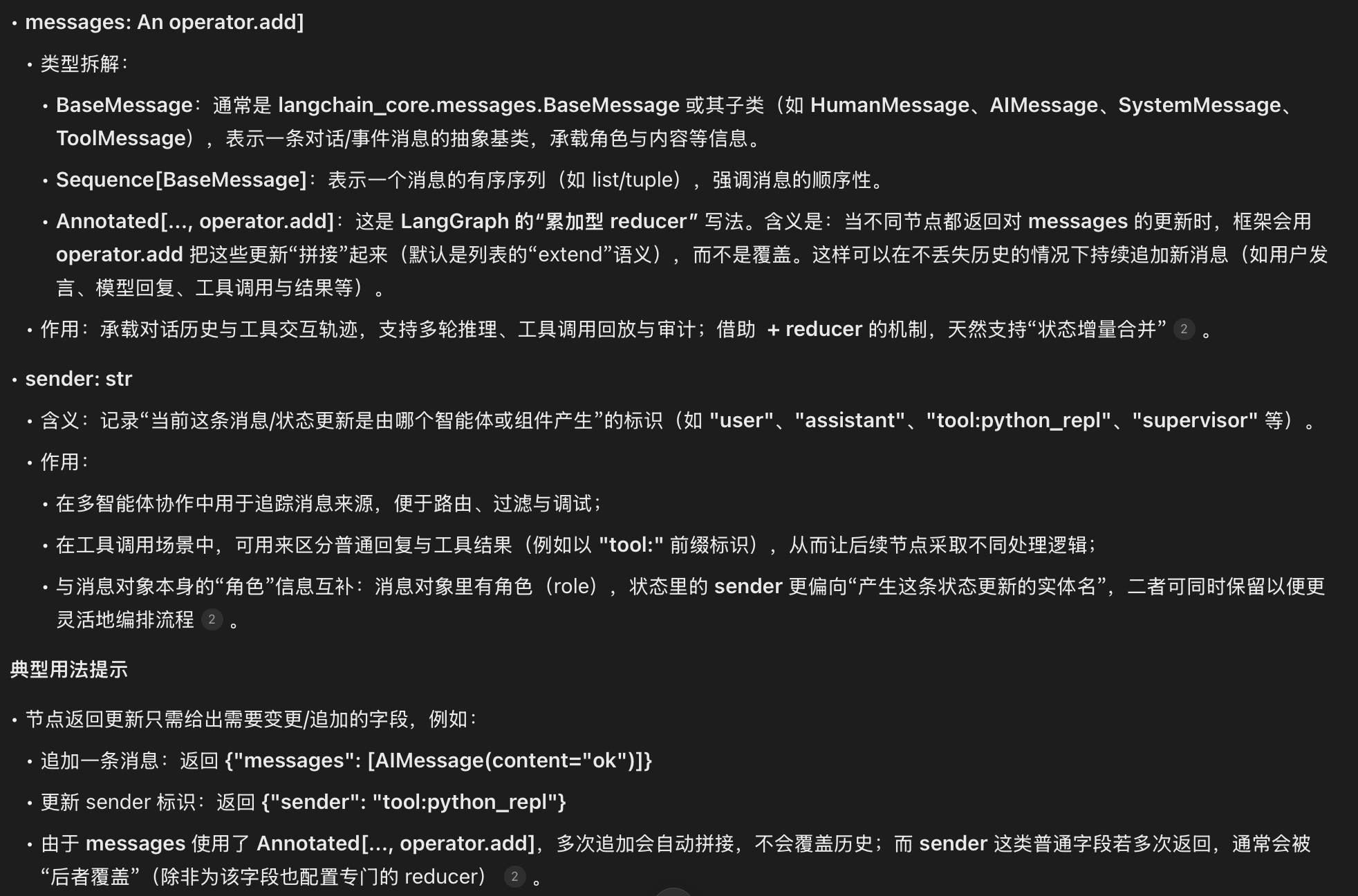
定义智能体节点和工具节点后,接下来需要在Graph中使他们互相通信。因此,我们需要定义节点间的消息传递数据结构:AgentState
使用一个消息列表,并包含一个键来跟踪最近的发送者。
注释说明:
AgentState是一个TypeDict,它定义了图中传递的状态对象,包括messages和sender。messages用于存储传递的消息,sender用于跟踪消息的发送者。
8. 定义工作流(状态图)
我们现在讲所有内容组合在一起,定义多智能体的完整状态图。
定义节点:
# 创建一个状态图 workflow,使用 AgentState 来管理状态
workflow = StateGraph(AgentState)

# 将研究智能体节点、图表生成器智能体节点和工具节点添加到状态图中
workflow.add_node("Researcher", research_node)
workflow.add_node("Chart_Generator", chart_node)
workflow.add_node("call_tool", tool_node)
定义路由函数:
# 路由器函数,用于决定下一步是执行工具还是结束任务
def router(state) -> Literal["call_tool", "__end__", "continue"]:
    messages = state["messages"]  # 获取当前状态中的消息列表
    last_message = messages[-1]  # 获取最新的一条消息

    # 如果最新消息包含工具调用,则返回 "call_tool",指示执行工具
    if last_message.tool_calls:
        return "call_tool"

    # 如果最新消息中包含 "FINAL ANSWER",表示任务已完成,返回 "__end__" 结束工作流
    if "FINAL ANSWER" in last_message.content:
        return "__end__"

    # 如果既没有工具调用也没有完成任务,继续流程,返回 "continue"
    return "continue"
定义条件边逻辑:
# 为"Researcher" 智能体节点添加条件变,根据router函数的返回值进行分支
workflow.add_conditional_edges(
    "Researcher",
    router,
    {
        "continue":"Researcher",
        "call_tool":"call_tool",
        "__end__":END,
    }
)

workflow.add_conditional_edges(
    "Chart_Generator",
    router,
    {
        "continue":"Chart_Generator",
        "call_tool":"call_tool",
        "__end__":END,
    }
)


# 为"call_tool 工具节点添加条件边,基于"sender" 字段决定下一个节点
# 工具节点不更新sender 字段, 这意味着边将返回给调用工具的智能体
workflow.add_conditional_edges(
    "call_tool",
    lambda x: x["sender"], # 根据sender字段判断调用工具的是哪个智能体
    {
        "Researcher":"Researcher", # 如果sender是Researcher,则返回给Researcher
        "Chart_Generator":"Chart_Generator", # 如果sender 是Chart_Generator,则返回给Chart_Generator
    }
)

workflow.add_edge(START, "Researcher")

graph = workflow.compile()

try:
    from IPython.display import Image, display
    graph_image = graph.get_graph().draw_mermaid_png()
    with open("MUIL_Agent.png", "wb") as f:
        f.write(graph_image)
    print("Graph saved as mychatbot_graph.png")
except Exception as e:
    print(f"Mermaid visualization not available: {e}")
9.执行工作流
接下来执行多智能体构建的工作流,最终生成一些统计图表
events = graph.stream(
    {
        "messages":[
            HumanMessage(
                content="Obtain the GDP of the United States from 2000 to 2020, "
            "and then plot a line chart with Python. End the task after generating the chart。"
            )
        ],
    },
    #设置最大递归限制
    {"recursion_limit":20},
    stream_mode="values"
)

for event in events:
    if "messages" in event:
        event["messages"][-1].pretty_print()

有“AI”的1024 = 2048,欢迎大家加入2048 AI社区
更多推荐


 31
31 0
0- 0


 已为社区贡献6条内容

所有评论(0)