多模态RAG系统的实现
多模态RAG系统扩展了传统RAG的能力,能够处理和检索多种类型的内容。其核心思想是在生成回答之前,先从外部知识库中检索相关信息,包括文本、图像、表格等多模态内容,然后将检索到的内容作为上下文输入到大语言模型中,从而生成更加准确、可靠的回答。信息完整性:能够处理文档中的图像、表格等非文本信息,避免信息丢失语义理解:利用多模态大模型对图像和表格进行理解和描述检索准确性:通过多模态内容的联合检索,提高检
随着大语言模型(LLM)的快速发展,检索增强生成(Retrieval-Augmented Generation,RAG)技术已成为构建智能问答系统的核心方案。传统RAG系统主要处理文本数据,但现实世界中的信息往往是多模态的,包含图像、表格、PPT等多种形式。本文将深入探讨多模态RAG系统的设计与实现,为开发者提供全面的技术指南。
一、多模态RAG技术概述
1.1 多模态RAG的核心原理
多模态RAG系统扩展了传统RAG的能力,能够处理和检索多种类型的内容。其核心思想是在生成回答之前,先从外部知识库中检索相关信息,包括文本、图像、表格等多模态内容,然后将检索到的内容作为上下文输入到大语言模型中,从而生成更加准确、可靠的回答。
多模态RAG具有以下优势:
-
信息完整性:能够处理文档中的图像、表格等非文本信息,避免信息丢失
-
语义理解:利用多模态大模型对图像和表格进行理解和描述
-
检索准确性:通过多模态内容的联合检索,提高检索结果的准确性
-
应用广泛性:适用于各种包含多模态内容的文档处理场景
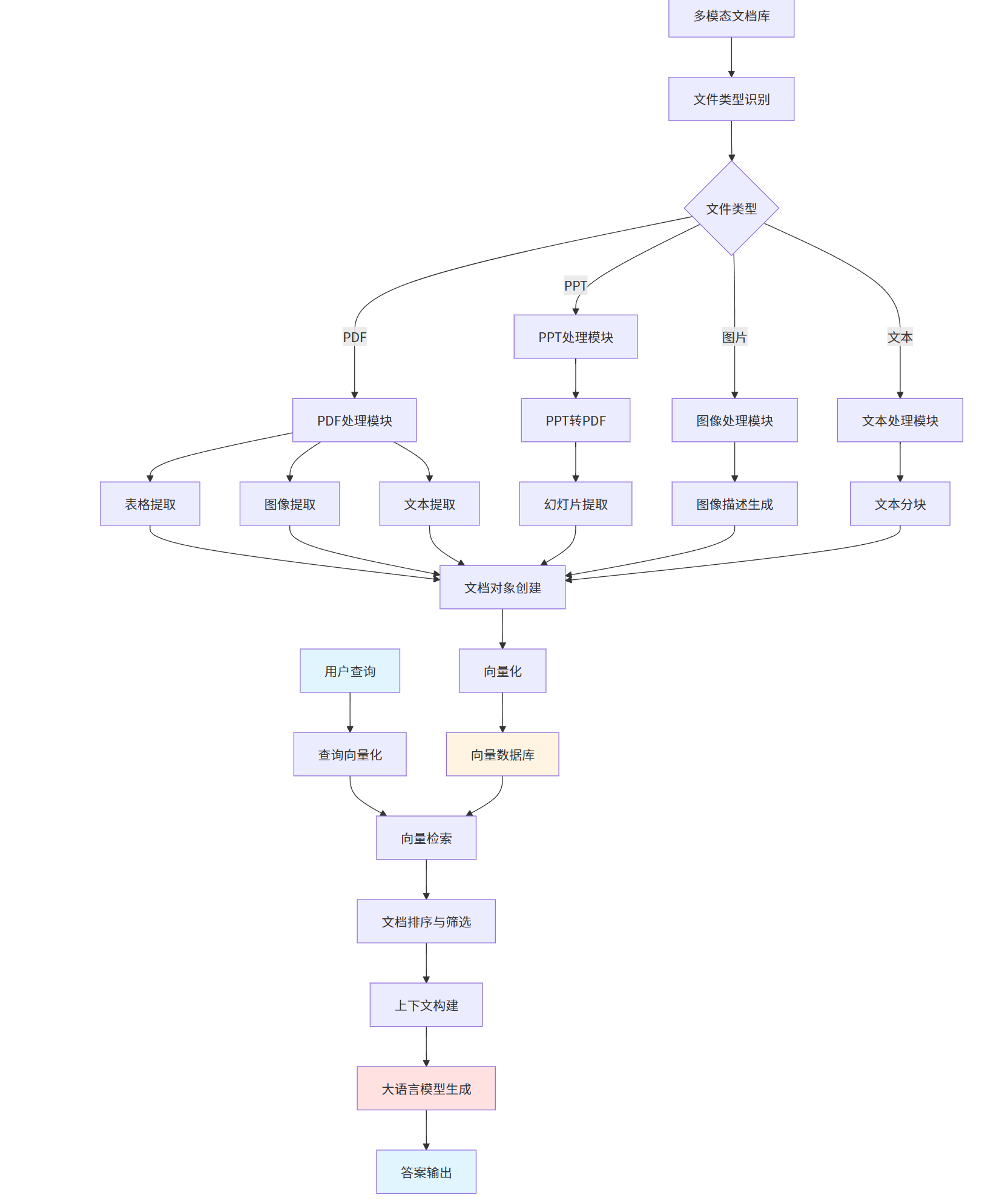
1.2 多模态RAG系统的基本架构
一个完整的多模态RAG系统通常包含以下几个核心组件:
1.3 多模态RAG的应用场景
多模态RAG系统在以下场景中具有广泛的应用价值:
-
企业知识库问答:处理包含图表、表格的技术文档和产品手册
-
学术研究辅助:分析学术论文中的实验数据图表和统计表格
-
智能客服系统:理解产品说明书中的图片和表格信息
-
金融分析:处理财务报表中的数据表格和图表
-
医疗诊断:分析医学影像和病历表格
二、多模态RAG系统架构设计
2.1 系统模块化设计
多模态RAG系统采用模块化设计,主要包含以下模块:

2.2 基础RAG类设计
BaseRAG类是整个RAG系统的核心基类,采用抽象方法模式,为不同类型的RAG实现提供统一的接口。
from abc import abstractmethod
from llama_index.core import VectorStoreIndex, load_index_from_storage
from llama_index.core.node_parser import SentenceSplitter
from llama_index.core.storage.storage_context import DEFAULT_PERSIST_DIR, StorageContext
from llama_index.vector_stores.milvus import MilvusVectorStore
class BaseRAG:
def __init__(self, files: list[str]):
self.files = files
@abstractmethod
async def load_data(self):
pass
async def create_local_index(self, persist_dir=DEFAULT_PERSIST_DIR):
data = await self.load_data()
node_parser = SentenceSplitter.from_defaults()
nodes = node_parser.get_nodes_from_documents(data)
index = VectorStoreIndex(nodes, show_progress=True)
index.storage_context.persist(persist_dir=persist_dir)
return index
async def create_cloud_index(self, collection_name="default"):
data = await self.load_data()
node_parser = SentenceSplitter.from_defaults()
nodes = node_parser.get_nodes_from_documents(data)
vector_store = MilvusVectorStore(
uri=rag_config.milvus_uri,
collection_name=collection_name,
dim=rag_config.embedding_model_dim,
overwrite=False
)
storage_context = StorageContext.from_defaults(vector_store=vector_store)
index = VectorStoreIndex(nodes, storage_context=storage_context)
return index2.3配置管理模块
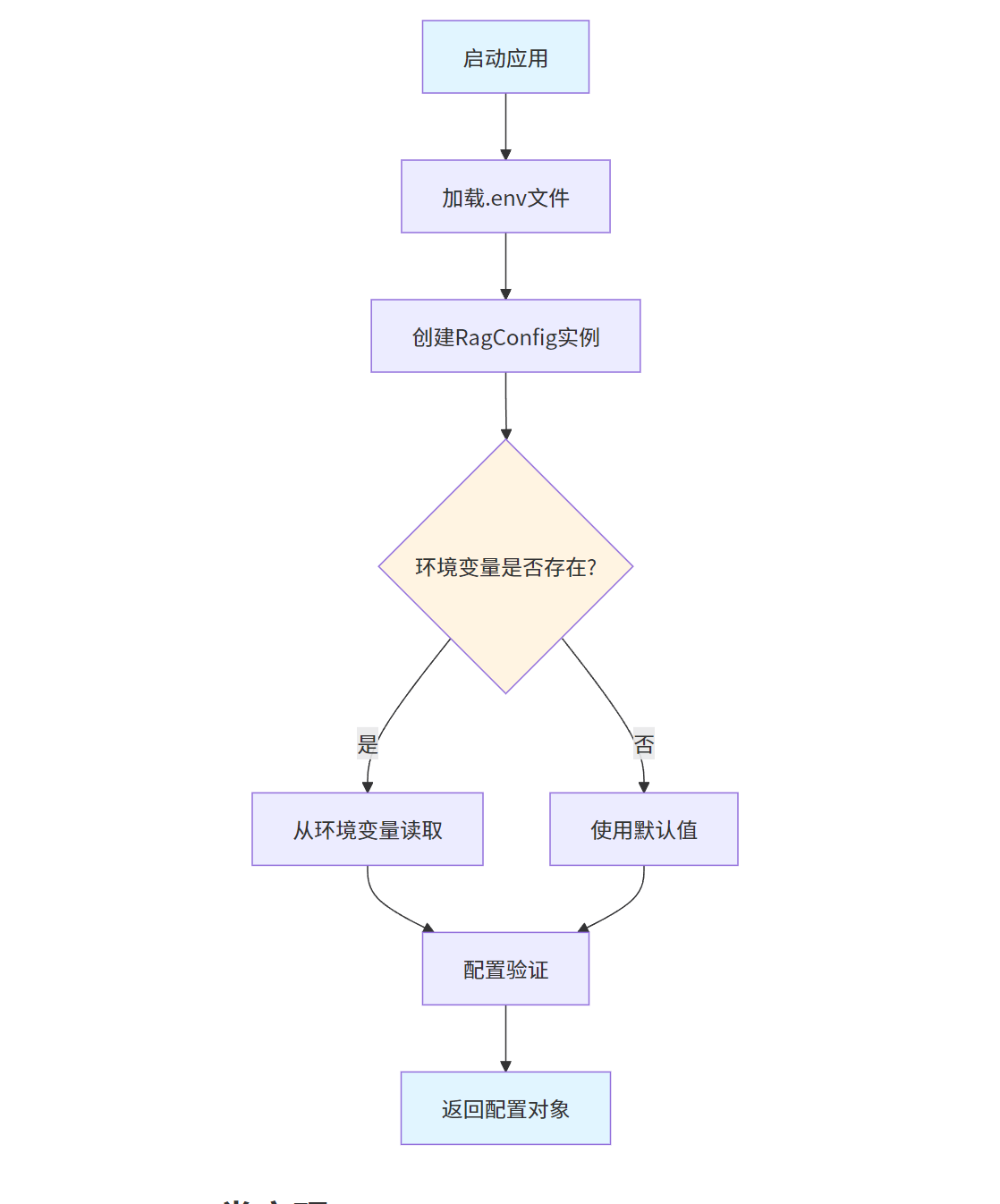
配置管理模块使用Pydantic进行数据验证,支持从环境变量加载配置。
from pydantic import BaseModel, Field
from dotenv import load_dotenv
import os
load_dotenv()
class RagConfig(BaseModel):
deepseek_api_key: str = Field(default=os.getenv("DEEPSEEK_API_KEY"), description="DeepSeek API KEY")
moontshot_api_key: str = Field(default=os.getenv("MOONSHOT_API_KEY"), description="Moontshot API KEY")
aliyun_api_key: str = Field(default=os.getenv("Aliyuan_API_KEY"), description="Aliyun API KEY")
glm_api_key: str = Field(default=os.getenv("GLM_API_KEY"), description="GLM API KEY")
milvus_uri: str = Field(default=os.getenv("MILVUS_URI"), description="MILVUS_URI")
embedding_model_dim: int = Field(default=512, description="Embedding model dimension")
rag_config = RagConfig()配置管理流程:
三、MultiModalRAG类实现
3.1 MultiModalRAG类结构
MultiModalRAG类继承自BaseRAG,实现了对多种文件类型的处理能力。
import os
import fitz
from llama_index.core import Document
from llama_index.core.async_utils import run_jobs
from .base_rag import BaseRAG
from .utils import (
describe_image,
process_text_blocks,
extract_text_around_item,
process_table,
convert_ppt_to_pdf,
convert_pdf_to_images,
extract_text_and_notes_from_ppt
)
class MultiModalRAG(BaseRAG):
async def load_data(self) -> list[Document]:
documents = []
tasks = []
for file_path in self.files:
file_name = os.path.basename(file_path)
file_extension = os.path.splitext(file_name.lower())[1]
if file_extension in ('.png', '.jpg', '.jpeg'):
task = self._process_image(file_path, file_name)
tasks.append(task)
elif file_extension == '.pdf':
task = self._process_pdf(file_path)
tasks.append(task)
elif file_extension in ('.ppt', '.pptx'):
task = self._process_ppt(file_path)
tasks.append(task)
else:
task = self._process_text(file_path)
tasks.append(task)
await run_jobs(tasks, show_progress=True, workers=3)
return documents四、PDF文件处理
PDF文件处理是多模态RAG的核心功能,需要提取文本、表格和图像三种类型的内容。
4.1 PDF文件处理主流程
@staticmethod
def process_pdf_file(pdf_file):
    all_pdf_documents = []
    ongoing_tables = {}

    try:
        f = fitz.open(filename=pdf_file, filetype="pdf")
    except Exception as e:
        print(f"pdf文件打开发生错误 : {e}")
        return []

    file_name = os.path.basename(pdf_file)

    for i in range(len(f)):
        page = f[i]
        text_blocks = [block for block in page.get_text("blocks", sort=True)
                      if block[-1] == 0 and not (
                          block[1] < page.rect.height * 0.1 or block[3] > page.rect.height * 0.9)]

        grouped_text_blocks = process_text_blocks(text_blocks)

        table_docs, table_bboxes, ongoing_tables = MultiModalRAG.parse_all_tables(
            file_name, page, i, text_blocks, ongoing_tables
        )
        all_pdf_documents.extend(table_docs)

        image_docs = MultiModalRAG.parse_all_images(file_name, page, i, text_blocks)
        all_pdf_documents.extend(image_docs)

        for text_block_ctr, (heading_block, content) in enumerate(grouped_text_blocks, 1):
            heading_bbox = fitz.Rect(heading_block[:4])

            if not any(heading_bbox.intersects(table_bbox) for table_bbox in table_bboxes):
                bbox = {
                    "x1": heading_block[0], "y1": heading_block[1],
                    "x2": heading_block[2], "y2": heading_block[3]
                }

                before_text, after_text = extract_text_around_item(text_blocks, bbox, page.rect.height)

                text_metadata = {
                    "source": f"{file_name[:-4]}-page{i}-text{text_block_ctr}",
                    "caption": before_text.replace("\n", " "),
                    "type": "text",
                    "page_num": i
                }

                doc = Document(
                    text=f"这是文本块,标题是:{before_text}\n内容是:{content}\n{after_text}",
                    metadata=text_metadata
                )
                all_pdf_documents.append(doc)

    f.close()
    return all_pdf_documents
PDF处理流程:

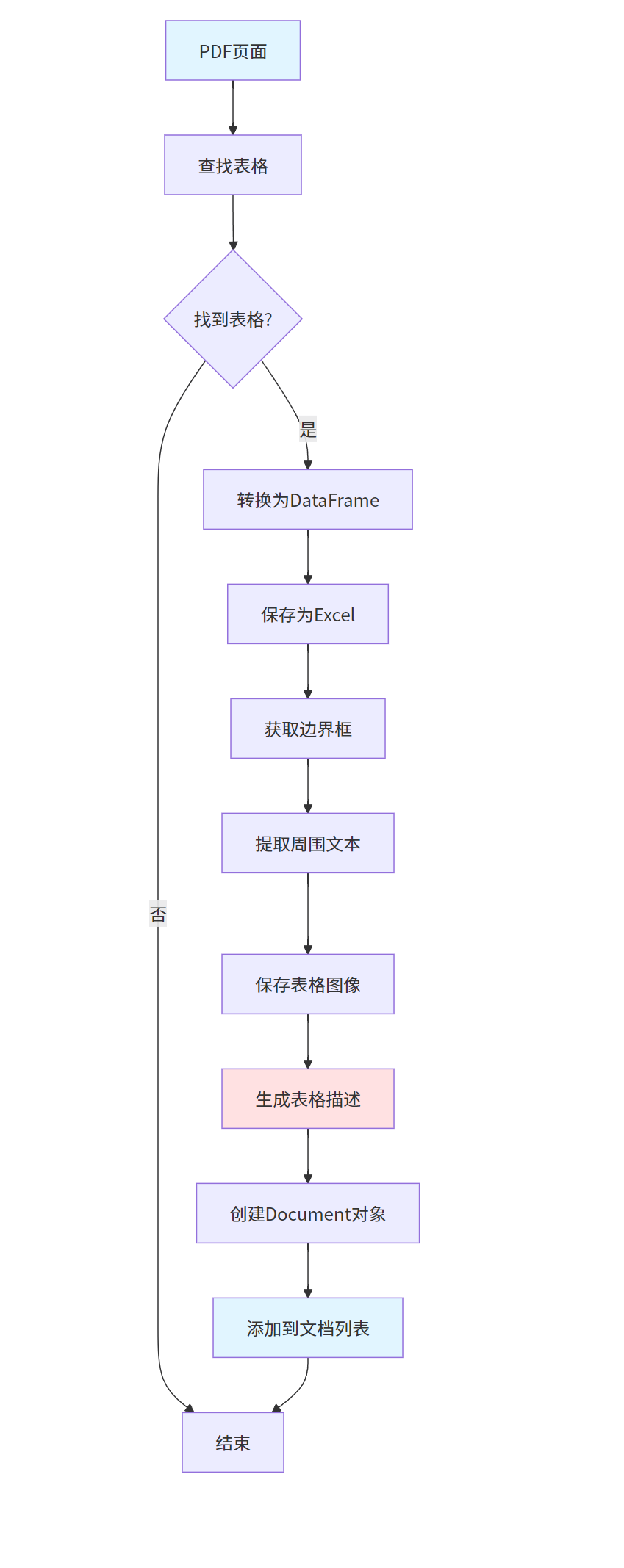
4.2 表格提取
表格提取是多模态RAG的重要功能,能够识别PDF中的表格数据并转换为可检索的格式。
@staticmethod
def parse_all_tables(filename, page, pagenum, text_blocks, ongoing_tables):
    table_docs = []
    table_bboxes = []

    try:
        tables = page.find_tables(
            horizontal_strategy="lines_strict",
            vertical_strategy="lines_strict"
        )

        for tab in tables:
            if not tab.header.external:
                pandas_df = tab.to_pandas()

                tablerefdir = os.path.join(os.getcwd(), "vectorstore/table_references")
                os.makedirs(tablerefdir, exist_ok=True)

                df_xlsx_path = os.path.join(tablerefdir, f"table{len(table_docs) + 1}-page{pagenum}.xlsx")
                pandas_df.to_excel(df_xlsx_path)

                bbox = fitz.Rect(tab.bbox)
                table_bboxes.append(bbox)

                before_text, after_text = extract_text_around_item(text_blocks, bbox, page.rect.height)

                table_img = page.get_pixmap(clip=bbox)
                table_img_path = os.path.join(tablerefdir, f"table{len(table_docs) + 1}-page{pagenum}.jpg")
                table_img.save(table_img_path)

                content, description = process_table(table_img_path)
                caption = before_text.replace("\n", " ") + " ".join(tab.header.names) + after_text.replace("\n", " ")

                table_metadata = {
                    "source": f"{filename[:-4]}-page{pagenum}-table{len(table_docs) + 1}",
                    "dataframe": df_xlsx_path,
                    "image": table_img_path,
                    "caption": caption,
                    "type": "table",
                    "page_num": pagenum
                }

                all_cols = ", ".join(list(pandas_df.columns.values))

                doc = Document(
                    text=f"这是一个表格,标题是 : {caption}\n表格的内容是:{content}\n表格的列名是:{all_cols}\n表格的解释是:{description}",
                    metadata=table_metadata
                )
                table_docs.append(doc)
    except Exception as e:
        print(f"Error during table extraction: {e}")

    return table_docs, table_bboxes, ongoing_tables
表格提取流程:
4.3 图像提取
图像提取功能能够识别PDF中的图像并提取为独立文件,同时生成图像描述。
@staticmethod
def parse_all_images(filename, page, pagenum, text_blocks):
    image_docs = []
    image_info_list = page.get_image_info(xrefs=True)
    page_rect = page.rect

    for image_info in image_info_list:
        xref = image_info['xref']
        if xref == 0:
            continue

        img_bbox = fitz.Rect(image_info['bbox'])
        if img_bbox.width < page_rect.width / 20 or img_bbox.height < page_rect.height / 20:
            continue

        extracted_image = page.parent.extract_image(xref)
        image_data = extracted_image["image"]

        imgrefpath = os.path.join(os.getcwd(), "vectorstore/image_references")
        os.makedirs(imgrefpath, exist_ok=True)
        image_path = os.path.join(imgrefpath, f"image{xref}-page{pagenum}.png")

        with open(image_path, "wb") as img_file:
            img_file.write(image_data)

        before_text, after_text = extract_text_around_item(text_blocks, img_bbox, page.rect.height)
        image_description = describe_image(image_path)
        caption = before_text.replace("\n", " ")

        image_metadata = {
            "source": f"{filename[:-4]}-page{pagenum}-image{xref}",
            "image": image_path,
            "caption": caption,
            "type": "image",
            "page_num": pagenum
        }

        image_docs.append(Document(
            text="这是一张图像,标题是:" + caption + f"\n图像的描述是:{before_text}\n" + image_description + f"\n{after_text}",
            metadata=image_metadata
        ))

    return image_docs
图像提取流程:

五、PPT文件处理
PPT文件处理功能能够将演示文稿转换为可检索的文档对象。
5.1 PPT转PDF
def convert_ppt_to_pdf(ppt_path):
    try:
        from comtypes import client
        import os

        powerpoint = client.CreateObject("PowerPoint.Application")
        powerpoint.Visible = False

        deck = powerpoint.Presentations.Open(ppt_path)
        pdf_path = os.path.splitext(ppt_path)[0] + ".pdf"
        deck.SaveAs(pdf_path, 32)
        deck.Close()
        powerpoint.Quit()

        return pdf_path
    except Exception as e:
        print(f"PPT转PDF失败: {e}")
        return None
5.2 PPT幻灯片提取
def extract_text_and_notes_from_ppt(ppt_path):
    try:
        from pptx import Presentation

        prs = Presentation(ppt_path)
        slides_data = []

        for slide_num, slide in enumerate(prs.slides, 1):
            slide_text = ""

            for shape in slide.shapes:
                if hasattr(shape, "text"):
                    slide_text += shape.text + "\n"

            notes_slide = slide.notes_slide
            if notes_slide:
                for shape in notes_slide.shapes:
                    if hasattr(shape, "text"):
                        slide_text += f"备注: {shape.text}\n"

            slides_data.append({
                "slide_number": slide_num,
                "text": slide_text
            })

        return slides_data
    except Exception as e:
        print(f"提取PPT内容失败: {e}")
        return []
PPT处理流程:

六、图像处理
图像处理功能能够对独立图像文件进行描述生成。
6.1 图像描述生成
def describe_image(image_path):
    try:
        from openai import OpenAI
        from config import rag_config

        client = OpenAI(
            api_key=rag_config.glm_api_key,
            base_url="https://open.bigmodel.cn/api/paas/v4/"
        )

        with open(image_path, "rb") as image_file:
            response = client.chat.completions.create(
                model="glm-4v",
                messages=[
                    {
                        "role": "user",
                        "content": [
                            {"type": "text", "text": "请详细描述这张图片的内容"},
                            {"type": "image_url", "image_url": {"url": image_file}}
                        ]
                    }
                ]
            )

        return response.choices[0].message.content
    except Exception as e:
        print(f"图像描述生成失败: {e}")
        return "无法生成图像描述"
图像描述生成流程:

七、工具类实现
工具类提供了文件处理、文本处理等核心功能。
7.1 文本块处理
def process_text_blocks(text_blocks):
    grouped_blocks = []
    current_heading = None
    current_content = []

    for block in text_blocks:
        text = block[4].strip()
        if not text:
            continue

        font_size = block[5]

        if font_size > 12:
            if current_heading is not None:
                grouped_blocks.append((current_heading, "\n".join(current_content)))

            current_heading = block
            current_content = []
        else:
            current_content.append(text)

    if current_heading is not None:
        grouped_blocks.append((current_heading, "\n".join(current_content)))

    return grouped_blocks
7.2 周围文本提取
def extract_text_around_item(text_blocks, item_bbox, page_height):
    before_text = ""
    after_text = ""

    item_top = item_bbox["y1"]
    item_bottom = item_bbox["y2"]

    for block in text_blocks:
        block_bottom = block[3]

        if block_bottom < item_top:
            before_text += block[4] + " "
        elif block[4] > item_bottom:
            after_text += block[4] + " "

    return before_text.strip(), after_text.strip()
7.3 表格处理
def process_table(table_image_path):
    try:
        from openai import OpenAI
        from config import rag_config

        client = OpenAI(
            api_key=rag_config.glm_api_key,
            base_url="https://open.bigmodel.cn/api/paas/v4/"
        )

        with open(table_image_path, "rb") as image_file:
            response = client.chat.completions.create(
                model="glm-4v",
                messages=[
                    {
                        "role": "user",
                        "content": [
                            {"type": "text", "text": "请提取这个表格的内容,并解释表格的含义"},
                            {"type": "image_url", "image_url": {"url": image_file}}
                        ]
                    }
                ]
            )

        description = response.choices[0].message.content

        import pandas as pd
        df = pd.read_excel(table_image_path.replace(".jpg", ".xlsx"))
        content = df.to_string()

        return content, description
    except Exception as e:
        print(f"表格处理失败: {e}")
        return "", "无法处理表格"
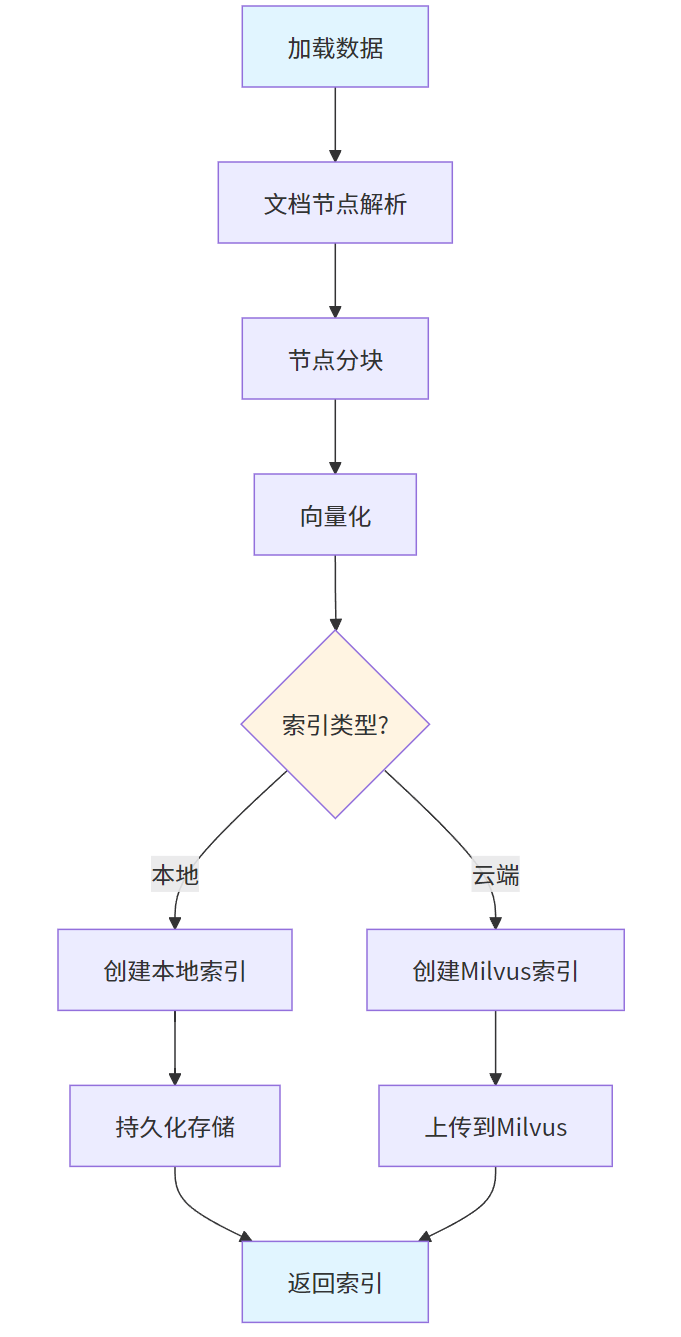
八、向量索引创建
8.1 本地索引创建
async def create_local_index(self, persist_dir=DEFAULT_PERSIST_DIR):
    data = await self.load_data()
    node_parser = SentenceSplitter.from_defaults()
    nodes = node_parser.get_nodes_from_documents(data)
    index = VectorStoreIndex(nodes, show_progress=True)
    index.storage_context.persist(persist_dir=persist_dir)
    return index
8.2 云端索引创建
async def create_cloud_index(self, collection_name="default"):
    data = await self.load_data()
    node_parser = SentenceSplitter.from_defaults()
    nodes = node_parser.get_nodes_from_documents(data)

    vector_store = MilvusVectorStore(
        uri=rag_config.milvus_uri,
        collection_name=collection_name,
        dim=rag_config.embedding_model_dim,
        overwrite=False
    )
    storage_context = StorageContext.from_defaults(vector_store=vector_store)
    index = VectorStoreIndex(nodes, storage_context=storage_context)
    return index
向量索引创建流程:
九、大模型配置
9.1 多模态大模型配置
from llama_index.llms.openai import OpenAI
from config import rag_config
def glm4vLLM():
return OpenAI(
api_key=rag_config.glm_api_key,
base_url="https://open.bigmodel.cn/api/paas/v4/",
model="glm-4v"
)
def deepseekLLM():
return OpenAI(
api_key=rag_config.deepseek_api_key,
base_url="https://api.deepseek.com/v1",
model="deepseek-chat"
)9.2 嵌入模型配置
from llama_index.embeddings.openai import OpenAIEmbedding
def embed_model_online_glm():
return OpenAIEmbedding(
api_key=rag_config.glm_api_key,
base_url="https://open.bigmodel.cn/api/paas/v4/",
model="embedding-2"
)
def embed_model_online_qwen():
return OpenAIEmbedding(
api_key=rag_config.aliyun_api_key,
base_url="https://dashscope.aliyuncs.com/compatible-mode/v1",
model="text-embedding-v2"
)十、向量数据库集成
10.1 Milvus安装
pip install pymilvuspip install llama-index-vector-stores-milvus
10.2 Milvus集成
from llama_index.vector_stores.milvus import MilvusVectorStore
vector_store = MilvusVectorStore(
uri=rag_config.milvus_uri,
collection_name=collection_name,
dim=rag_config.embedding_model_dim,
overwrite=False
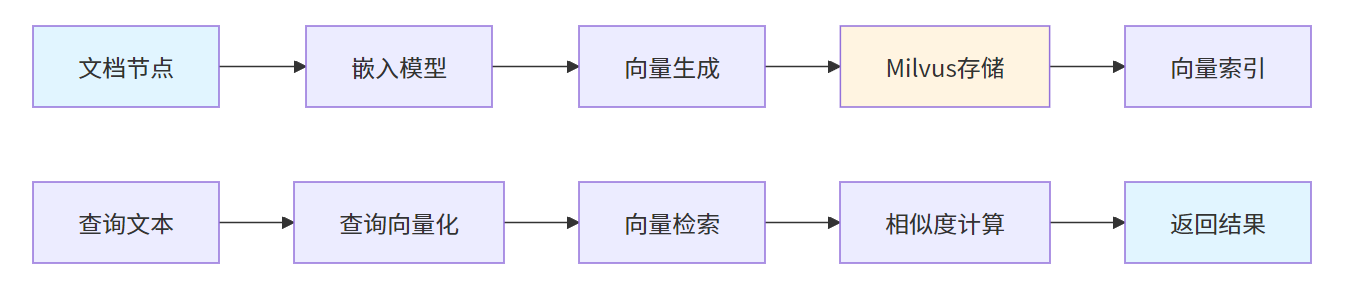
)Milvus向量存储流程:

有“AI”的1024 = 2048,欢迎大家加入2048 AI社区
更多推荐

 11
11 0
0- 0


 已为社区贡献5条内容

所有评论(0)