llamaindex(六)索引
本文介绍了基于LlamaIndex框架和阿里云百炼text-embedding-v2模型构建多文档向量化索引的完整流程。主要内容包括:1)通过SimpleDirectoryReader读取多格式文档;2)使用VectorStoreIndex.from_documents()方法实现文档分割、向量化和索引构建;3)解析索引结构,包含元数据和1024维向量数据。文章详细讲解了环境配置、代码实现和核心原
介绍
文档向量化索引是检索增强生成(RAG)系统的核心基石,它将非结构化的文档数据转化为可计算的向量索引,实现基于语义的高效检索。本文以 LlamaIndex 框架为核心,结合阿里云百炼(DashScope)的text-embedding-v2模型,从代码实战、核心原理、索引解析三个维度,讲解如何快速构建多文档的向量化索引,并理解索引的底层结构与应用价值。
VectorStoreIndex是LlamaIndex中最常用和最重要的索引类型之一,它基于向量相似度搜索技术,能够高效地检索与查询相关的文档片段。本文将深入探讨VectorStoreIndex的工作原理、实现机制以及在实际应用中的使用方法,通过丰富的代码示例帮助开发者更好地理解和运用这一强大的索引技术。
向量存储接受一系列 Node 对象,并从中构建索引。
VectorStoreIndex 是 LlamaIndex 提供的一种索引结构,专注于:
-
构建索引:将文档转换为嵌入向量,并存储在 VectorStore 中。
-
查询检索:根据查询向量,在 VectorStore 中进行相似度搜索,返回相关文档。
向量索引是一种将文本数据转换为数值向量表示,并基于向量空间中的距离或相似度进行检索的技术。其核心思想是:
- 将文本转换为高维向量(嵌入)
- 在向量空间中存储这些向量
- 查询时将问题也转换为向量
- 计算查询向量与存储向量的相似度
- 返回最相似的结果
VectorStoreIndex的工作流程
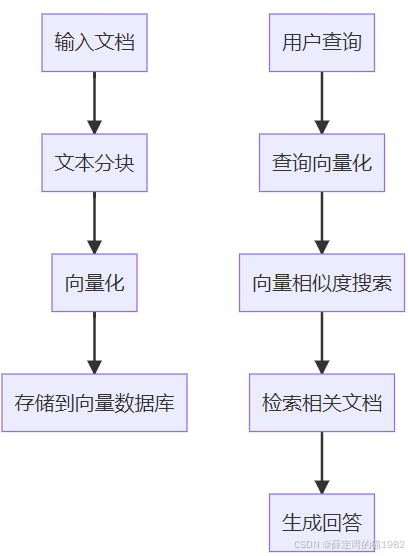
一、核心代码实战:快速构建多文档向量化索引
首先基于你提供的核心代码,补充完整的可运行版本,并逐行拆解关键逻辑,让你快速落地文档索引构建流程。
1. 环境准备与依赖安装
在运行代码前,需安装支撑文档读取、向量化、索引构建的核心依赖:
# LlamaIndex核心模块(索引构建、文档处理)
pip install llama-index-core
# 阿里云百炼Embedding适配模块(文本向量化)
pip install llama-index-embeddings-dashscope
# OpenAI-Like模型适配(可选,后续扩展问答用)
pip install llama-index-llms-openai-like
# 多格式文档读取依赖(支持PDF/Word/TXT等)
pip install llama-index-readers-file docx2txt pymupdf
# 环境变量管理(安全存储API密钥)
pip install python-dotenv
2. 完整可运行代码
以下代码包含环境配置、文档读取、索引构建、索引内容验证全流程,附带详细注释:
最简单的使用方式是加载一组文档,并使用 from_documents 方法构建索引:
import os
from dotenv import load_dotenv
from llama_index.embeddings.dashscope import DashScopeEmbedding
from llama_index.core import SimpleDirectoryReader, VectorStoreIndex

# ===================== 1. 环境配置:安全管理API密钥 =====================
# 加载.env文件(需在项目根目录创建,内容:DASHSCOPE_API_KEY=你的阿里云百炼密钥)
load_dotenv()
api_key = os.getenv("DASHSCOPE_API_KEY")

# 校验API密钥,避免运行时报错
if not api_key:
    raise ValueError("请在.env文件中配置DASHSCOPE_API_KEY!可从阿里云百炼控制台获取:https://dashscope.console.aliyun.com/apiKey")

# ===================== 2. 读取多格式文档 =====================
# SimpleDirectoryReader自动读取指定目录下的所有文档(支持PDF/Word/TXT/Markdown等)
# 文档目录:./docs(需提前创建,放入待处理的文档文件)
documents = SimpleDirectoryReader("./docs").load_data()
print(f"读取{len(documents)}个文档,开始构建索引...")

# ===================== 3. 构建文档向量化索引 =====================
# from_documents方法:一站式完成「文档分割→文本向量化→索引存储」
index = VectorStoreIndex.from_documents(
    documents,
    # 指定阿里云百炼Embedding模型(核心:文本向量化)
    embed_model=DashScopeEmbedding(
        model_name="text-embedding-v2",  # 轻量高效的嵌入模型,输出1024维向量
        api_key=api_key,                # 阿里云百炼API密钥
        timeout=30                      # 接口超时时间(避免网络问题卡死)
    )
)
print("已使用DashScopeEmbedding模型构建多文档向量化索引!")

# ===================== 4. 解析并输出索引内容(验证效果) =====================
print("\n 向量化索引示例(前4个文本块):")
# index.vector_store.data 存储索引的核心数据:元数据+向量数据
for i, uuid in enumerate(index.vector_store.data.metadata_dict.keys()):
    # 提取元数据:文件名、文件大小等
    meta = index.vector_store.data.metadata_dict[uuid]
    # 提取向量数据(仅展示前3维,完整向量为1024维)
    embedding = index.vector_store.data.embedding_dict[uuid][:3]

    print(f"文本块{i+1}:")
    print(f"  文件名:{meta.get('file_name', '未知文件')}")
    print(f"  文件大小:{meta.get('file_size', '未知大小')} Bytes")
    print(f"  向量片段(前3维):{embedding}\n")

    # 仅展示前4个文本块,避免输出过长
    if i >= 3:
        break
3. 运行结果说明
执行代码后,典型输出如下(数据为示例):
✅ 已读取2个文档,开始构建索引...
✅ 已使用DashScopeEmbedding模型构建多文档向量化索引!

📌 向量化索引示例(前4个文本块):
文本块1:
  文件名:登高.txt
  文件大小:256 Bytes
  向量片段(前3维):[0.0123, -0.0456, 0.0789]

文本块2:
  文件名:登高.txt
  文件大小:256 Bytes
  向量片段(前3维):[0.0112, -0.0445, 0.0778]

文本块3:
  文件名:春江花月夜.docx
  文件大小:1024 Bytes
  向量片段(前3维):[0.0234, -0.0567, 0.0890]

文本块4:
  文件名:春江花月夜.docx
  文件大小:1024 Bytes
  向量片段(前3维):[0.0223, -0.0556, 0.0889]
核心关键点:
- 一个文档会被分割为多个文本块(Chunk),每个文本块对应一个唯一的
uuid和一组向量; - 索引中同时存储元数据(文件名、大小、路径等)和向量数据,方便后续检索时关联原始文档;
text-embedding-v2模型输出的向量固定为 1024 维,示例中仅展示前 3 维以简化输出。
二、文档索引的核心原理:从文档到索引的完整流程
VectorStoreIndex.from_documents()是 LlamaIndex 封装的 “一站式” 索引构建方法,其底层包含三个核心步骤,理解这三步能帮你精准把控索引质量:
1. 步骤 1:文档读取与预处理(SimpleDirectoryReader)
- 核心作用:批量读取指定目录下的多格式文档(PDF/Word/TXT 等),并将其转化为 LlamaIndex 统一的
Document对象; - 底层处理:自动解析不同格式文档的文本内容,提取纯文本(如 PDF 的文字、Word 的正文),忽略格式、图片等非文本信息;
- 扩展配置:可通过
file_extractor指定特定格式的解析器,或通过required_exts过滤仅读取指定类型文件:python
运行
# 仅读取PDF和Word文件
documents = SimpleDirectoryReader(
    "./docs",
    required_exts=[".pdf", ".docx"],
    file_extractor={".pdf": "llama_index.readers.file.PyMuPDFReader"}
).load_data()
2. 步骤 2:文档分割(默认 SentenceSplitter)
- 核心作用:将长文档分割为语义连贯的小文本块(Chunk),适配 Embedding 模型的输入长度限制;
- 默认规则:LlamaIndex 默认使用
SentenceSplitter,按句子 / 段落分割,chunk_size=1024(字符数)、chunk_overlap=200; - 为什么要分割:若直接将整篇文档向量化,向量会包含大量无关信息(噪音),导致检索精度低;分割后每个文本块语义聚焦,检索更精准。
3. 步骤 3:文本向量化与索引存储
- 文本向量化:调用
DashScopeEmbedding模型,将每个文本块转化为 1024 维的稠密向量; - 索引存储:将 “文本块 uuid + 向量数据 + 元数据” 存储到索引中(默认使用内存存储,也可替换为 Qdrant/FAISS 等向量数据库);
- 索引结构:
embedding_dict:键为文本块 uuid,值为对应的向量数组;metadata_dict:键为文本块 uuid,值为对应的元数据(文件名、大小、路径、文本内容等)。
流程图:文档→索引的完整链路
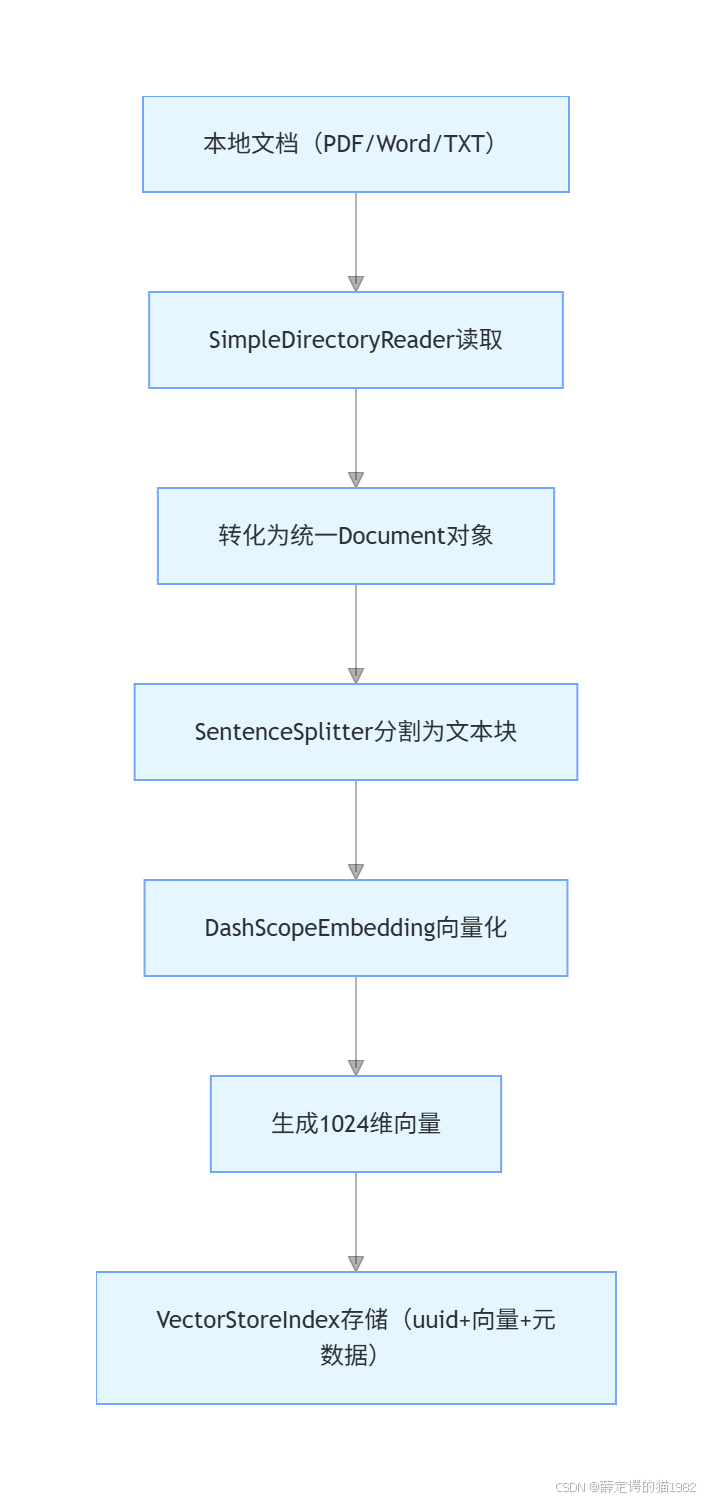
例子2
最简单的使用方式是加载一组文档,并使用 from_documents 方法构建索引:
from llama_index.core import VectorStoreIndex,SimpleDirectoryReader
from llama_index.embeddings.huggingface import HuggingFaceEmbedding

# 定义Embedding模型
embed_model = HuggingFaceEmbedding(model_name=r"D:\Test\LLMTrain\testllm\llm\BAAI\bge-m3")
# 读取一批文件
documents=SimpleDirectoryReader(r"D:\Test\LLMTrain\day22_rag_data\data2").load_data()

#从文件创建索引
vector_store_index= VectorStoreIndex.from_documents(documents,embed_model=embed_model)

print("vector_store_index:",vector_store_index)
代码说明:
-
如果在命令行中使用 from_documents,可以传入 show_progress=True 参数,以在构建索引时显示进度条。
-
使用 from_documents 方法时,文档会被拆分成多个块,并解析为 Node 对象。这些 Node 是对文本字符串的轻量级抽象,能够跟踪元数据和关系。
-
默认情况下,VectorStoreIndex 会将所有内容存储在内存中。有关如何使用持久化的向量存储,请参阅下文的“使用向量存储”部分。
-
默认情况下,VectorStoreIndex 会以每 2048 个节点为一批生成并插入向量。如果内存受限(或内存充裕),可以通过传入 insert_batch_size=2048 参数来修改批量大小。这在将数据插入远程托管的向量数据库时尤其有用。
例子3、直接创建和管理节点
如果希望完全控制索引,可以手动创建和定义节点,并将它们直接传递给索引构造函数:
from llama_index.core import VectorStoreIndex
from  llama_index.core.schema import  TextNode
from llama_index.embeddings.huggingface import HuggingFaceEmbedding

# 定义Embedding模型
embed_model = HuggingFaceEmbedding(model_name=r"D:\Test\LLMTrain\testllm\llm\BAAI\bge-m3")

node1=TextNode(id="第一章第一句",text="“咱们的村子叫做神牛村,听爷爷的爷爷说,三百年前从天上掉下了一头神牛,好像是镇压什么妖怪,救了咱们村子,所以咱们村子为了感激那头神牛,特地改了名字叫做神牛村。")
node2=TextNode(id="第一章第二句",text="“所以咱们村子感恩神牛的恩情,再也不吃牛肉了,人人都以牛姓为尊,所以俺爹给俺取了名字叫做牛大!")

nodes=[node1,node2]
index=VectorStoreIndex(nodes,embed_model=embed_model)

print(index)
例子4处理文档更新
在直接管理索引时,您可能需要处理随时间变化的数据源。Index 类提供了插入、删除、更新和刷新操作。
若需要将这些文档数据保存到向量数据库,则需要创建存储上线文StorageContext。示例代码如下:
from llama_index.core import VectorStoreIndex,StorageContext
from  llama_index.core.schema import  TextNode
from llama_index.embeddings.huggingface import HuggingFaceEmbedding
from llama_index.vector_stores.chroma import ChromaVectorStore
import chromadb

# 定义Embedding模型
embed_model = HuggingFaceEmbedding(model_name=r"D:\Test\LLMTrain\testllm\llm\BAAI\bge-m3")

node1=TextNode(id="第一章第一句",text="“咱们的村子叫做神牛村,听爷爷的爷爷说,三百年前从天上掉下了一头神牛,好像是镇压什么妖怪,救了咱们村子,所以咱们村子为了感激那头神牛,特地改了名字叫做神牛村。")
node2=TextNode(id="第一章第二句",text="“所以咱们村子感恩神牛的恩情,再也不吃牛肉了,人人都以牛姓为尊,所以俺爹给俺取了名字叫做牛大!")

nodes=[node1,node2]

# 创建chroma数据库客户端,和传关键集合collection
chroma_client = chromadb.PersistentClient(path=r"D:\Test\LLMTrain\day22_rag_data\chroma_db3")
chroma_collection = chroma_client.get_or_create_collection("quickstart")

# 确保存储上下文正确初始化
storage_context = StorageContext.from_defaults(
    vector_store=ChromaVectorStore(chroma_collection=chroma_collection)
)

index=VectorStoreIndex(nodes, storage_context=storage_context,embed_model=embed_model)

print(index)
例子5 、存储向量索引
LlamaIndex 支持多种向量存储。您可以通过传入 StorageContext 来指定使用哪一种向量存储,在其中指定 vector_store 参数,比如使用 chroma;也可以直接传vector_store,这种不需要传StorageContext。这两种写法如下:
(1)直接传vector_store
这种是可以从向量数据库里读取数据。
# import
from llama_index.core import VectorStoreIndex
from llama_index.vector_stores.chroma import ChromaVectorStore
from llama_index.embeddings.huggingface import HuggingFaceEmbedding
import chromadb


# 创建chroma数据库客户端,和传关键集合collection
chroma_client = chromadb.PersistentClient(path=r"D:\Test\LLMTrain\day22_rag_data\chroma_db2")
chroma_collection = chroma_client.get_or_create_collection("quickstart")

# 定义Embedding模型
embed_model = HuggingFaceEmbedding(model_name=r"D:\Test\LLMTrain\testllm\llm\BAAI\bge-m3")

# set up ChromaVectorStore
vector_store = ChromaVectorStore(chroma_collection=chroma_collection)

# 从chromadb中创建索引
index = VectorStoreIndex.from_vector_store(
    vector_store, embed_model=embed_model
)

print(index)
例子6传StroageContext
这种是将文档向量化后保存到向量数据库里的操作。
# import
from llama_index.core import VectorStoreIndex, StorageContext,SimpleDirectoryReader
from llama_index.vector_stores.chroma import ChromaVectorStore
from llama_index.embeddings.huggingface import HuggingFaceEmbedding
import chromadb

# 创建chroma数据库客户端,和传关键集合collection
chroma_client = chromadb.PersistentClient(path=r"D:\Test\LLMTrain\day22_rag_data\chroma_db2")
chroma_collection = chroma_client.get_or_create_collection("quickstart")

# 定义Embedding模型
embed_model = HuggingFaceEmbedding(model_name=r"D:\Test\LLMTrain\testllm\llm\BAAI\bge-m3")

# 存储上下文
storage_context= StorageContext.from_defaults(vector_store=ChromaVectorStore(chroma_collection=chroma_collection))

 # 加载文档
documents = SimpleDirectoryReader(r"D:\Test\LLMTrain\day22_rag_data\data2").load_data()

# 从文档中创建索引,并且序列化到chroma数据库
index = VectorStoreIndex.from_documents(
    documents,storage_context=storage_context, embed_model=embed_model
)

print(index)
有“AI”的1024 = 2048,欢迎大家加入2048 AI社区
更多推荐
 28
28 0
0- 0


 已为社区贡献25条内容

所有评论(0)