PySide系列-01-入门简介
PySide6是Qt官方提供的Python绑定库,用于开发跨平台GUI应用程序。它支持Qt6框架,提供丰富的模块如QtCore、QtWidgets等,并包含设计工具如pyside6-designer。安装简单,可通过pip完成。示例展示了如何创建一个包含按钮的基本窗口应用,涉及QApplication、QMainWindow和QPushButton类。PySide6适合Python开发者快速构建桌
1、PySide简介
PySide 是 Qt 官方推出的 Python 绑定库,允许使用 Python 语言调用Qt 来开发跨平台的图形用户界面(GUI)应用程序(Qt for Python旨在通过多种适配将Qt框架暴露给Python),是当前开发 Python 桌面应用的首选工具之一。
PySide 由 Qt 官方团队开发和维护。遵循LGPLv3/GPLv3许可协议以及Qt商业许可协议。
-
学习资源
建议看官方文档:https://doc.qt.io/qtforpython-6/
B站视频 -
当前版本
| 版本 | 对应 Qt | Python 包名 |
|---|---|---|
| PySide6 | Qt 6 | PySide6 |
- 开发辅助工具 (在命令行执行)
| 命令 | 说明 |
|---|---|
| pyside6-designer | 启动可视化界面设计器,创建 .ui 文件 |
| pyside6-rcc | 编译资源文件 .qrc 为 Python 代码 pyside6-rcc resources.qrc -o resources.py |
| pyside6-uic | 将 .ui 文件转换为 Python 代码 |
2、包简介
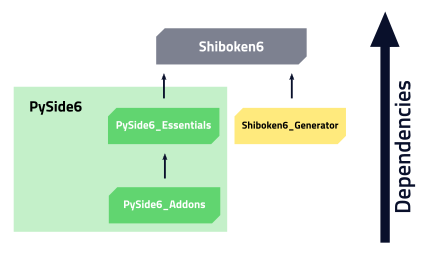
Qt Modules Supported by Qt for Python
2.1 pyside6-essentials
- QtCore:Core non-graphical classes used by other modules
- QtGui:Base classes for graphical user interface (GUI) components.
- QtWidgets:Provides the widget-based graphs API.
- QtHelp:Classes for integrating documentation into applications.
- QtNetwork:Classes to make network programming easier and more portable.
- QtConcurrent:Classes for writing multi-threaded programs without using low-level threading primitives.
- QtDBus:Classes for inter-process communication over the D-Bus protocol.
- QtDesigner:Provides classes to extend Qt Widgets Designer.
- QtOpenGL:Classes that make it easy to use OpenGL in Qt applications.
- QtOpenGLWidgets:Provides a widget for rendering OpenGL graphics.
- QtPrintSupport:Classes to make printing easier and more portable.
- QtQml:Classes for QML and JavaScript languages.
- QtQuick:A declarative framework for building highly dynamic applications with custom UIs.
- QtQuickControls2
- QtQuickTest:A unit test framework for QML applications where test cases are written as JavaScript functions.
- QtQuickWidgets:Provides a Python widget class for displaying a Qt Quick user interface.
- QtXml:Handling of XML in a Document Object Model (DOM) API.
- QtTest:Provides classes for unit testing Qt applications and libraries.
- QtSql:Classes for database integration using SQL.
- QtSvg:Classes for displaying the contents of SVG files. Supports a subset of the SVG 1.2 Tiny standard. A separate library (Qt SVG Widgets) provides support for rendering SVG files in a widget UI.
- QtSvgWidgets:Provides support for rendering SVG files in a widget UI.
- QtUiTools:Classes for loading QWidget based forms created in Qt Widgets Designer dynamically, at runtime.
2.2 pyside6-addons
- Qt3DAnimation
- Qt3DCore
- Qt3DExtras
- Qt3DInput
- Qt3DLogic
- Qt3DRender
- QtAxContainer
- QtBluetooth:Provides access to Bluetooth hardware.
- QtCharts:UI Components for displaying visually pleasing charts, driven by static or dynamic data models.
- QtDataVisualization:UI Components for creating stunning 3D data visualizations
- QtGraphs:Provides functionality for visualizing data in 3D as bar, scatter, and surface graphs, as well as 2D in area, bar, donut, line, pie, scatter, and spline graphs.
- QtGraphsWidgets
- QtMultimedia:A rich set of QML types and Python classes to handle multimedia content. Also includes APIs to handle camera access.
- QtMultimediaWidgets:Provides the widget-based multimedia API.
- QtNetworkAuth:Provides support for OAuth-based authorization to online services.
- QtNfc:Provides access to Near-Field communication (NFC) hardware. On desktop platforms NDEF access is only supported for Type 4 tags.
- QtPositioning:Provides access to position, satellite info and area monitoring classes.
- QtQuick3D:Provides a high-level API for creating 3D content or UIs based on Qt Quick.
- QtRemoteObjects
- QtScxml
- QtSensors
- QtSerialPort
- QtSerialBus
- QtSpatialAudio
- QtStateMachine
- QtTextToSpeech
- QtVirtualKeyboard
- QtWebChannel
- QtWebEngineCore
- QtWebEngineQuick
- QtWebEngineWidgets
- QtWebSockets
- QtPdf:Classes and functions for rendering PDF documents on desktop platforms.
- QtPdfWidgets:A PDF viewer widget.
- QtHttpServer:A framework for embedding an HTTP server into a Qt application.
- QtLocation
- QtAsyncio
- QtWebView
2.3 shiboken6
a utility Python module(工具包)
3、安装
- pip安装
-- 清华大学开源软件镜像站
pip install PySide6 -i https://pypi.tuna.tsinghua.edu.cn/simple/
- 测试安装
import PySide6.QtCore

print(PySide6.__version__)
print(PySide6.QtCore.__version__)
4、创建第一个QT应用程序
Qt提供了两种技术来构建用户界面,这两种技术都提供了使用拖放工具来创建界面的可能性。
- Qt Widgets:一种自Qt诞生之初就存在的命令式编程和设计方法,使其成为用户界面应用程序中稳定可靠的技术
- Qt Quick:一种声明式编程和设计方法,它使您能够通过描述简单的元素来创建流畅的用户界面。
本系列课程只针对 Qt Widgets技术
4.1 Qt Widgets
这是一个简单的PySide6应用程序,它在主窗口上显示一个按钮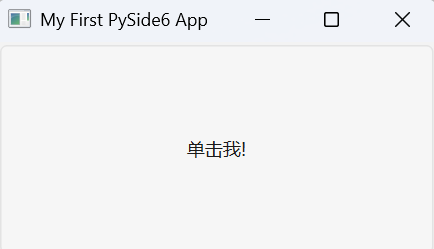
from PySide6.QtWidgets import QApplication, QMainWindow, QPushButton
import sys

app = QApplication(sys.argv)
window = QMainWindow()
window.setWindowTitle("My First PySide6 App")
button = QPushButton("单击我!")
window.setCentralWidget(button)
window.show()
app.exec()
4.2 相关类
上述示例涉及到QApplication、QMainWindow、QPushButton 3个类。在后续的学习中,对出现的新类、方法等应查阅手册以进一步了解相关信息。
对于有开发过应用程序,如用C++、C#开发Windows Form程序的程序员来说是非常好理解的。
-
QApplication:QApplication 类负责管理 GUI 应用程序的控制流和主要设置

-
QMainWindow:QMainWindow 类提供了一个主应用程序窗口,主窗口为构建应用程序的用户界面提供了一个框架,可以在其中添加菜单栏、工具栏、状态栏等部件
-
QPushButton:命令按钮

有“AI”的1024 = 2048,欢迎大家加入2048 AI社区
更多推荐


 19
19 0
0- 0


 已为社区贡献1条内容

所有评论(0)