【工业树莓派 CM0 NANO 单板计算机】基于舵机和人脸识别的智能门禁系统
本文介绍了工业树莓派 CM0 NANO 单板计算机结合 OpenCV 内置的 YuNet 算法和 SFace 模型实现人脸识别的项目设计,包括环境部署、预训练模型获取、关键代码、板端推理、效果演示等流程,为相关产品在边缘 AI 领域的快速开发和应用设计提供了参考。
【工业树莓派 CM0 NANO 单板计算机】基于舵机和人脸识别的智能门禁系统
本文介绍了工业树莓派 CM0 NANO 单板计算机结合 OpenCV 人脸识别和 PWM 舵机控制实现智能门禁系统的项目设计,包括硬件连接、舵机控制、人脸识别、网页前端设计、网页服务器设计、流程图、代码和效果演示等流程。
项目介绍
- 准备工作:硬件连接、OpenCV 安装、人脸识别模型、训练图像等;
- 舵机控制:PWM输出、转速和角度控制、代码、效果等;
- 门禁系统:文件目录、流程图、代码、效果等。
准备工作
包括硬件连接、虚拟环境创建、OpenCV 安装、模型获取、图像训练等。
硬件连接
- 连接 WiFi 实现无线网络通信;
- 使用 Micro-USB 数据线实现设备供电;
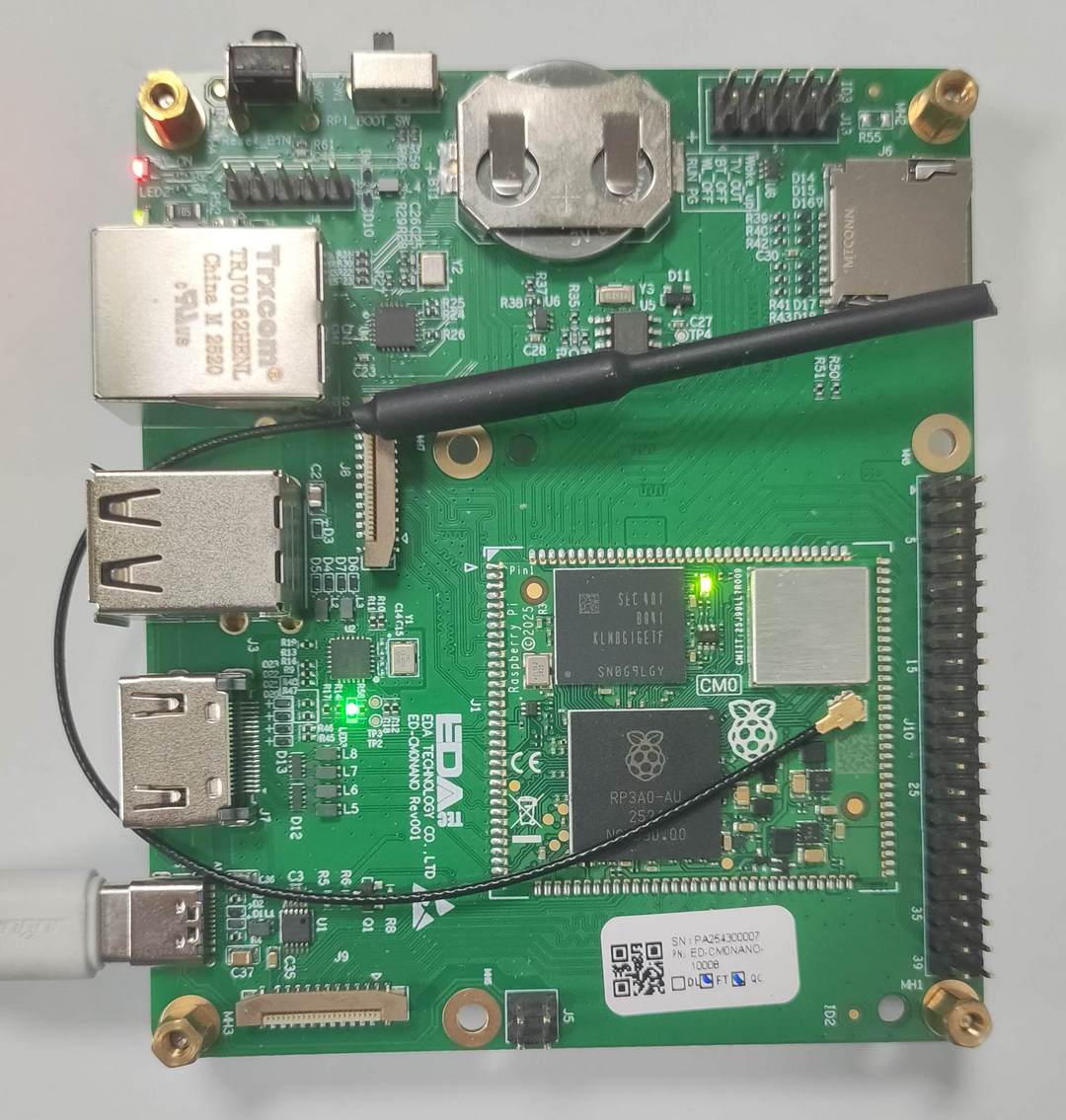
根据板载 40pin 引脚定义,驱动舵机使用支持 PWM 的物理引脚 12,对应 BCM 引脚编号 18;
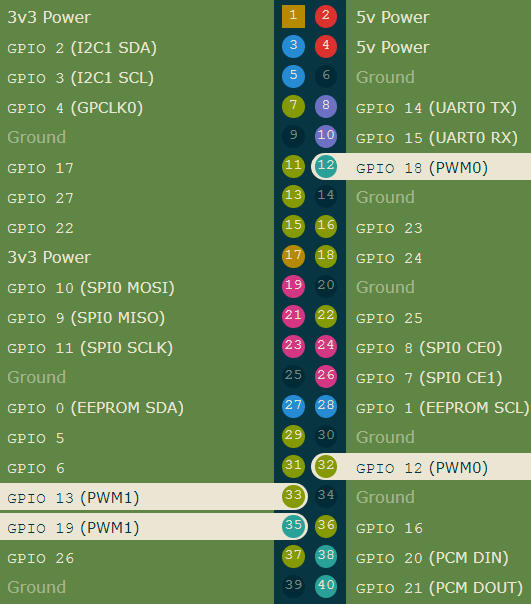
详见:https://pinout.xyz/
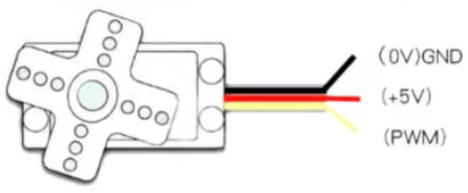
将舵机的信号线与 GPIO18 连接,还有供电和接地
| Raspberry Pi | SG90 | Describe |
|---|---|---|
| GPIO18 (Pin12) | S (Yellow) | Signal |
| 5V (Pin2) | 5V (Red) | Power supply |
| GND (Pin6) | GND (Brown) | Ground |
OpenCV 安装
- 创建并激活虚拟环境
mkdir ~/cv && cd ~/cv    # 创建 cv 文件夹,便于管理
python3 -m venv venv     # 创建虚拟环境 venv
source venv/bin/activate # 激活虚拟环境 venv
- 安装 numpy 和 opencv
pip install -U pip numpy                          # 安装 numpy
pip install opencv-python opencv-contrib-python   # opencv 主模块及 contrib
- 验证安装
python3 -c "import cv2,sys,numpy;print('OpenCV:',cv2.__version__,'NumPy:',numpy.__version__)"
详见:OpenCV .
人脸识别
OpenCV 注册并训练目标人脸,使用 YuNet 模型检测人脸,结合 sface 模型识别人脸。
详见:opencv_zoo/models/face_recognition_sface · GitHub .
模型获取
下载所需模型文件;
wget https://github.com/opencv/face_detection_yunet_2023mar.onnx
wget https://github.com/opencv/face_recognition_sface_2021dec.onnx
将文件存放在 ./model 路径
参考:SFace Recognition | Github .
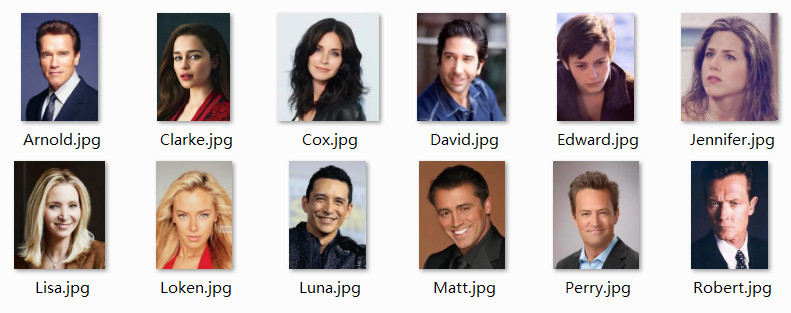
训练图片
- 将目标人脸图片裁剪至合适大小;
- 文件名为对应的人名;
- 置于
./face文件夹。
舵机控制
使用树莓派板载 40pin 引脚接口的 PWM 功能,实现 SG90 舵机驱动,并控制旋转速度和角度。
代码
终端执行指令 touch servo360.py 新建程序文件并添加如下代码
import sys, time
import RPi.GPIO as GPIO

GPIO_PIN  = 18
FREQ      = 50
CENTER    = 7.5
RANGE     = 2.5

# --------- Parameters ---------
SPEED_DPS = 480              # 实测:每秒 480 度
PWM_DEAD  = 0.05             # 停转
# ----------------------------

def duty(speed):
    return CENTER + max(-1, min(1, speed)) * RANGE

def rotate(target_deg, speed=1.0):
    """
    target_deg : 角度,负值反转
    speed      : 0~1,默认全速
    """
    if not target_deg:
        return
    direction = 1 if target_deg > 0 else -1
    run_speed = speed * direction
    run_time  = abs(target_deg) / (SPEED_DPS * speed)   # 时长

    pwm = GPIO.PWM(GPIO_PIN, FREQ)
    pwm.start(0)
    pwm.ChangeDutyCycle(duty(run_speed))
    time.sleep(run_time)
    pwm.ChangeDutyCycle(CENTER)   # 停
    time.sleep(PWM_DEAD)
    pwm.stop()

if __name__ == '__main__':
    if len(sys.argv) < 2:
        print("缺少角度"); sys.exit(1)
    deg = float(sys.argv[1])

    GPIO.setmode(GPIO.BCM)
    GPIO.setup(GPIO_PIN, GPIO.OUT)
    try:
        rotate(deg)
    finally:
        GPIO.cleanup()
保存代码。
效果
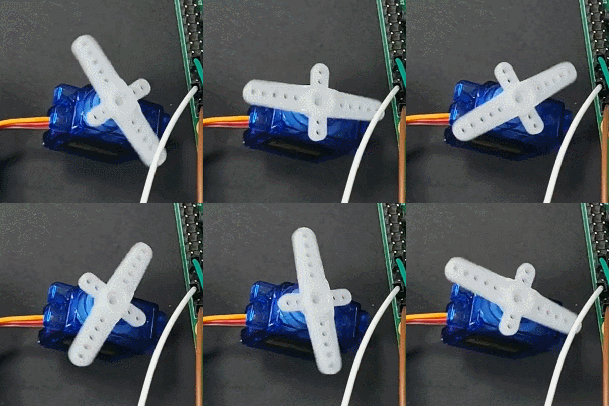
终端执行指令 python servo360.py 90 舵机逆时针转动 90 度。
门禁系统
在人脸识别和舵机控制的基础上,实现门禁系统的项目设计,包括文件目录、流程图、代码、效果演示等。
文件目录
~/AI/FaceRecognition $ tree
.
├── access.names
├── app.py
├── face
│   ├── Arnold.jpg
│   ├── Clarke.jpg
│   ├── Perry.jpg
│   └── Robert.jpg
├── model
│   ├── face_detection_yunet_2023mar.onnx
│   ├── face_recognition_sface_2021dec.onnx
│   └── face_registry.pkl
├── static
│   └── result.jpg
└── templates
    └── index.html
流程图
代码
包含三个代码文件,./access.names 为白名单,./app.py 为 flask 服务器后端,./templates/index.html 为网页前端。
Flask 后端
终端执行 touch app.py 新建网页服务器后端程序文件,并添加如下代码
#!/usr/bin/env python3
import os, cv2, numpy as np, pickle, time
from pathlib import Path
from flask import Flask, request, jsonify, render_template, url_for
import RPi.GPIO as GPIO
import threading

PIN_SERVO = 18
FREQ      = 50
GPIO.setmode(GPIO.BCM)
GPIO.setup(PIN_SERVO, GPIO.OUT)
pwm = GPIO.PWM(PIN_SERVO, FREQ)
pwm.start(0)

# 读取白名单
ACCESS_LIST = set(line.strip() for line in open('access.names') if line.strip())

# ---------- 人脸模型 ----------
detector   = cv2.FaceDetectorYN_create("model/face_detection_yunet_2023mar.onnx", "", (320, 320))
recognizer = cv2.FaceRecognizerSF_create("model/face_recognition_sface_2021dec.onnx", "")
registry   = pickle.loads(Path("model/face_registry.pkl").read_bytes()) if Path("model/face_registry.pkl").exists() else {}

def rotate(angle, speed=480):
    duty = 2.5 if angle > 0 else 12.5
    pwm.ChangeDutyCycle(duty)
    time.sleep(abs(angle) / speed)
    pwm.ChangeDutyCycle(0)

def door_cycle():
    rotate(90); time.sleep(3); rotate(-90)   # 门禁控制

# ---------- Flask ----------
app = Flask(__name__)

@app.route('/')
def index():
    return render_template('index.html')

@app.route('/upload', methods=['POST'])
def upload():
    file = request.files['image']
    img  = cv2.imdecode(np.frombuffer(file.read(), np.uint8), cv2.IMREAD_COLOR)
    h, w = img.shape[:2]
    detector.setInputSize((w, h))
    faces = detector.detect(img)[1]
    name, score = "Unknown", 0.0
    if faces is not None:
        face = faces[0]
        aligned = recognizer.alignCrop(img, face)
        feat    = recognizer.feature(aligned)
        for reg_name, reg_feat in registry.items():
            s = recognizer.match(feat, reg_feat, cv2.FaceRecognizerSF_FR_COSINE)
            if s > score:
                score, name = s, reg_name
        if score < 0.3:          # 识别阈值
            name = "Unknown"

    # 门禁动作
    if name != "Unknown" and name in ACCESS_LIST:
        threading.Thread(target=door_cycle, daemon=True).start()
        tip = f"{name} 请通行"
    else:
        tip = f"{name} 无权限,拒绝通行"

    # 保存识别结果
    if faces is not None:
        x, y, w_box, h_box = map(int, face[:4])
        cv2.rectangle(img, (x, y), (x + w_box, y + h_box), (0, 255, 0), 2)
        cv2.putText(img, f"{name}:{score:.2f}", (x, y - 6),
                    cv2.FONT_HERSHEY_SIMPLEX, 0.6, (0, 255, 0), 2)
    out_path = "./static/result.jpg"
    cv2.imwrite(out_path, img)

    return jsonify(name=name, score=round(score, 3), tip=tip,
                   result_url=url_for('static', filename='result.jpg'))

# ---------- 退出 ----------
import atexit
atexit.register(lambda: (pwm.stop(), GPIO.cleanup()))

if __name__ == '__main__':
    app.run(host='0.0.0.0', port=5000, debug=False)
Web 前端
终端执行 touch ./templates/index.html 新建 HTML 前端网页程序,并添加如下代码
<!doctype html>
<html lang="zh">
<head>
<meta charset="utf-8">
<title>树莓派门禁</title>
<meta name="viewport" content="width=device-width,initial-scale=1">
<style>
:root{
  --accent:#00c853;
  --danger:#ff1744;
  --bg:#e3f2fd;
  --card:rgba(255,255,255,.75);
  --radius:16px;
  --trans:.35s cubic-bezier(.4,0,.2,1)
}
body{margin:0;height:100vh;display:flex;align-items:center;justify-content:center;background:var(--bg);font-family:system-ui,Arial}
#card{width:320px;padding:32px 24px;background:var(--card);backdrop-filter:blur(12px);border-radius:var(--radius);box-shadow:0 8px 32px rgba(0,0,0,.1);text-align:center;transition:var(--trans)}
h2{margin:0 0 20px;font-size:22px;font-weight:600;color:#0d47a1}
input[type=file]{display:none}
label{display:inline-block;padding:10px 20px;border:2px dashed var(--accent);border-radius:var(--radius);cursor:pointer;color:var(--accent);transition:var(--trans)}
label:hover{background:var(--accent);color:#fff}
button{margin-top:16px;padding:10px 0;width:100%;border:none;border-radius:var(--radius);background:var(--accent);color:#fff;font-size:16px;cursor:pointer;transition:var(--trans);box-shadow:0 2px 8px rgba(0,200,83,.3)}
button:active{transform:scale(.97)}
.status{margin-top:18px;font-size:17px;height:24px;opacity:0;transition:var(--trans)}
.status.show{opacity:1}
.status.ok{color:var(--accent)}
.status.no{color:var(--danger)}
img{width:100%;border-radius:var(--radius);margin-top:16px;box-shadow:0 4px 16px rgba(0,0,0,.08);display:none}
</style>
</head>
<body>
<div id="card">
  <h2>人脸识别门禁</h2>
  <input type="file" id="f" accept="image/*">
  <label for="f">选择照片</label>
  <button onclick="up()">上传识别</button>
  <div id="s" class="status"></div>
  <img id="i">
</div>

<script>
async function up(){
  const file=f.files[0];
  if(!file)return alert('请选择图片');
  s.className='status show';s.textContent='识别中…';
  const fd=new FormData();fd.append('image',file);
  const r=await(fetch('/upload',{method:'POST',body:fd}).then(x=>x.json()));
  s.textContent=r.tip;
  s.classList.toggle('ok',!r.tip.includes('拒绝'));
  s.classList.toggle('no',r.tip.includes('拒绝'));
  i.src=r.result_url+'?t='+Date.now();i.style.display='block';
  setTimeout(()=>{s.textContent='已关门,等待识别';i.style.display='none'},3000)
}
</script>
</body>
</html>
白名单
终端执行 touch access.names 新建白名单文件,并添加人名列表
Linda
Edward
Clarke
保存代码。
效果
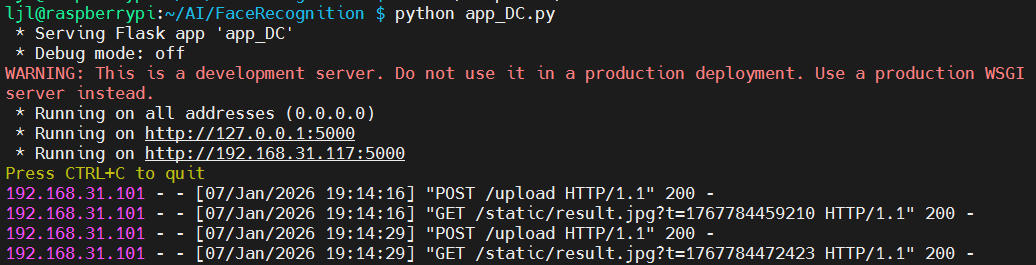
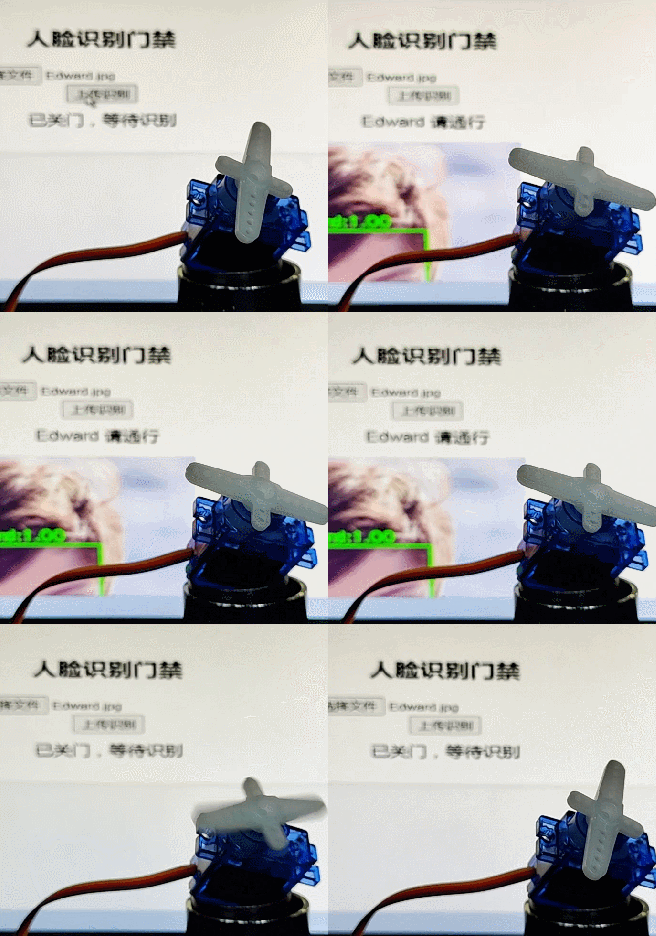
终端执行指令 python app_DC.py 运行程序;
终端打印 Web 服务器网址,如http://192.168.31.117:5000/ ;
浏览器打开服务器前端网页;
- 点击
选择文件按钮,加载目标识别人脸; - 点击
上传识别按钮,立即显示识别结果、是否允许通行;
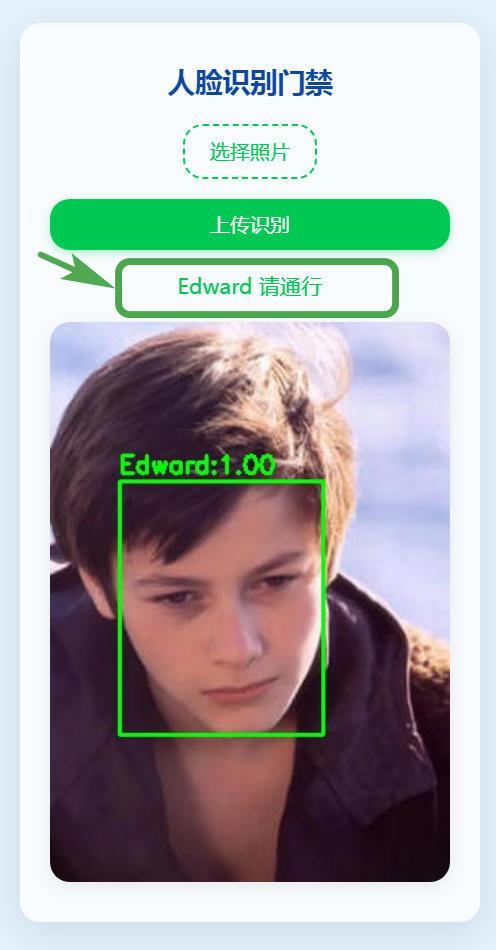
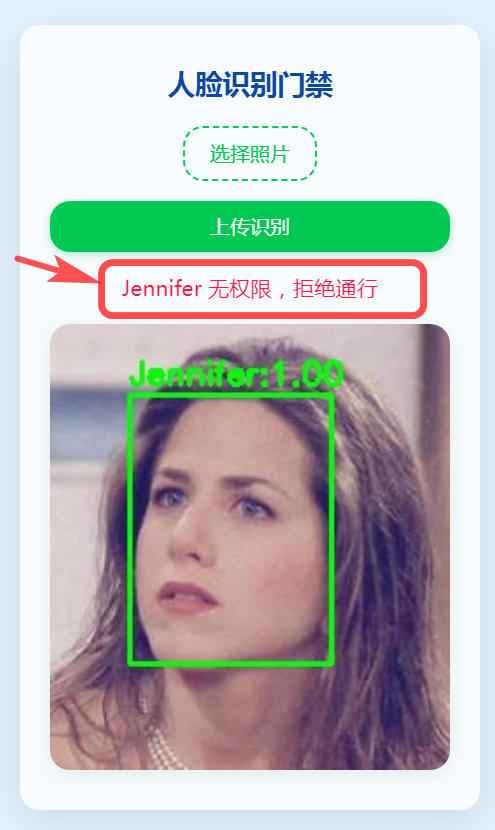
- 同时舵机逆时针转动,控制门禁档杆移动,表示允许通过;
- 待三秒钟后,舵机顺时针旋转 90 度,表示门禁关闭;
- 网页前端显示门禁已关闭,回到
等待识别状态。

动态效果
总结
本文介绍了工业树莓派 CM0 NANO 单板计算机结合 OpenCV 人脸识别和 PWM 舵机控制实现智能门禁系统的项目设计,包括环境部署、预训练模型获取、关键代码、板端推理、效果演示等流程,为相关产品在边缘 AI 领域的快速开发和应用设计提供了参考。

有“AI”的1024 = 2048,欢迎大家加入2048 AI社区
更多推荐



 20
20 0
0- 0


 已为社区贡献14条内容

所有评论(0)