MiroMind的MiroThinker大模型,确实比较聪明,在SCNet使用VLLM推理实践
MiroThinker-v1.5-30B是一款开源的搜索代理模型,支持工具增强推理和信息检索功能。该模型需要配置多种API密钥(如Serper、Jina、E2B等)才能使用其完整功能。通过VLLM在4张DCU显卡上部署时,推理速度可达30 tokens/秒。虽然测试显示其推理能力出色,但当前版本尚不支持编程功能。模型已开源并可在SCNet平台获取镜像文件,用户可通过GitHub仓库进行安装和配置。
我在SCNet放了镜像:https://www.scnet.cn/ui/aihub/models/skywalk/MiroThinker-v1.5-30B
非常难得,一个模型,如果它没有中文版说明,我还能花精力去仔细读,这就证明它确实非常不错!
我理解的大概思路是:这是一个30b的模型,应该可以正好用4卡 DCU进行VLLM推理。
工具配置:
Tool Configuration
Minimal Configuration for MiroThinker v1.5 and v1.0
| Server | Description | Tools Provided | Required Environment Variables |
|---|---|---|---|
tool-python |
Execution environment and file management (E2B sandbox) | create_sandbox, run_command, run_python_code, upload_file_from_local_to_sandbox, download_file_from_sandbox_to_local, download_file_from_internet_to_sandbox |
E2B_API_KEY |
search_and_scrape_webpage |
Google search via Serper API | google_search |
SERPER_API_KEY, SERPER_BASE_URL |
jina_scrape_llm_summary |
Web scraping with LLM-based information extraction | scrape_and_extract_info |
JINA_API_KEY, JINA_BASE_URL, SUMMARY_LLM_BASE_URL, SUMMARY_LLM_MODEL_NAME, SUMMARY_LLM_API_KEY |
免费开源替代
专门问了MicroThinker,感觉它给的答案比较ok
安装使用
我只是想用vllm进行推理,目的是能在Auto-Coder上使用。vllm推理见实践部分。
安装
# Clone the repository
git clone https://github.com/MiroMindAI/MiroThinker
cd MiroThinker

# Setup environment
cd apps/miroflow-agent
uv sync

# Configure API keys
cp .env.example .env
# Edit .env with your API keys (SERPER_API_KEY, JINA_API_KEY, E2B_API_KEY, etc.)
模型配置
Tool Configuration
Minimal Configuration for MiroThinker v1.5 and v1.0
| Server | Description | Tools Provided | Required Environment Variables |
|---|---|---|---|
tool-python |
Execution environment and file management (E2B sandbox) | create_sandbox, run_command, run_python_code, upload_file_from_local_to_sandbox, download_file_from_sandbox_to_local, download_file_from_internet_to_sandbox |
E2B_API_KEY |
search_and_scrape_webpage |
Google search via Serper API | google_search |
SERPER_API_KEY, SERPER_BASE_URL |
jina_scrape_llm_summary |
Web scraping with LLM-based information extraction | scrape_and_extract_info |
JINA_API_KEY, JINA_BASE_URL, SUMMARY_LLM_BASE_URL, SUMMARY_LLM_MODEL_NAME, SUMMARY_LLM_API_KEY |
env文件配置例子
# Required for MiroThinker v1.5 and v1.0 (minimal setup)
SERPER_API_KEY=your_serper_key
SERPER_BASE_URL="https://google.serper.dev"
JINA_API_KEY=your_jina_key
JINA_BASE_URL="https://r.jina.ai"
E2B_API_KEY=your_e2b_key

# Required for jina_scrape_llm_summary
# Note: Summary LLM can be a small model (e.g., Qwen3-14B or GPT-5-Nano)
# The choice has minimal impact on performance, use what's most convenient
SUMMARY_LLM_BASE_URL="https://your_summary_llm_base_url/v1/chat/completions"
SUMMARY_LLM_MODEL_NAME=your_llm_model_name  # e.g., "Qwen/Qwen3-14B" or "gpt-5-nano"
SUMMARY_LLM_API_KEY=your_llm_api_key  # Optional, depends on LLM provider

# Required for benchmark evaluation (LLM-as-a-Judge)
OPENAI_API_KEY=your_openai_key  # Required for running benchmark evaluations
OPENAI_BASE_URL="https://api.openai.com/v1"  # Optional, defaults to OpenAI's API
实践
准备好模型文件
先到SCNet找到模型
skywalk/MiroThinker-v1.5-30B - 模型介绍
转存到控制台,也就是自己账户
转存后地址:/public/home/ac7sc1ejvp/SothisAI/model/Aihub/MiroThinker-v1.5-30B/main/MiroThinker-v1.5-30B
启动vllm推理
创建4卡Dcu资源
vllm serve miromind-ai/MiroThinker-v1.5-30B --max-model-len 262144 --enable-reasoning
最终启动命令是:
vllm serve /public/home/ac7sc1ejvp/SothisAI/model/Aihub/MiroThinker-v1.5-30B/main/MiroThinker-v1.5-30B --max-model-len 262144 -enable-reasoning --reasoning-parser deepseek_r1 --tensor-parallel-size 4
启动后SCNet ip转发地址:
https://c-2008011125066354689.ksai.scnet.cn:58043
可惜在auto-coder下还是没法用,因为要用Instruct版本才行啊,但是现在网上没有。
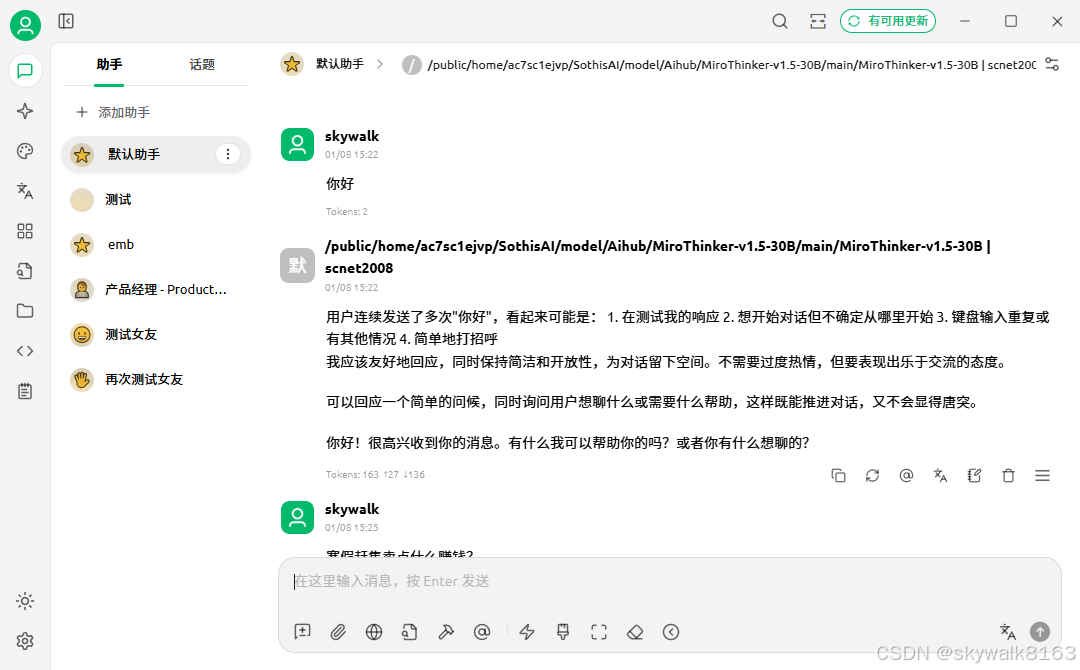
使用cherryStudio测试一下,明显能感觉到比较聪明:
总结
最终vllm启动命令
vllm serve /public/home/ac7sc1ejvp/SothisAI/model/Aihub/MiroThinker-v1.5-30B/main/MiroThinker-v1.5-30B --max-model-len 262144 --tensor-parallel-size 4 --gpu-memory-utilization 0.95推理速度较快,可以达到30tokens每秒。
INFO 01-08 15:34:29 [metrics.py:489] Avg prompt throughput: 0.0 tokens/s, Avg generation throughput: 33.4 tokens/s, Running: 1 reqs, Swapped: 0 reqs, Pending: 0 reqs, GPU KV cache usage: 0.2%, CPU KV cache usage: 0.0%.
INFO 01-08 15:34:42 [metrics.py:489] Avg prompt throughput: 0.0 tokens/s, Avg generation throughput: 7.5 tokens/s, Running: 0 reqs, Swapped: 0 reqs, Pending: 0 reqs, GPU KV cache usage: 0.0%, CPU KV cache usage: 0.0%.
INFO 01-08 15:34:52 [metrics.py:489] Avg prompt throughput: 0.0 tokens/s, Avg generation throughput: 0.0 tokens/s, Running: 0 reqs, Swapped: 0 reqs, Pending: 0 reqs, GPU KV cache usage: 0.0%, CPU KV cache usage: 0.0%.
效果相当好,除了不能在Auto-coder下编程!

有“AI”的1024 = 2048,欢迎大家加入2048 AI社区
更多推荐



 11
11 0
0- 0


 已为社区贡献118条内容

所有评论(0)