AI算力开放-yolov8适配 mmyolo大疆无人机
先更新 cuda
1如果之前有需要更新的话需要先删除
2查看 pytorch 支持的 cuda版本
https://pytorch.org/get-started/locally/?_gl=1*1nzhx7n*_up*MQ..*_ga*NjIxOTkyMDQuMTc2Nzc2OTA4NQ..*_ga_469Y0W5V62*czE3Njc3NjkwODQkbzEkZzAkdDE3Njc3NjkwODQkajYwJGwwJGgw&__hstc=76629258.724dacd2270c1ae797f3a62ecd655d50.1746547368336.1746547368336.1746547368336.1&__hssc=76629258.9.1746547368336&__hsfp=2230748894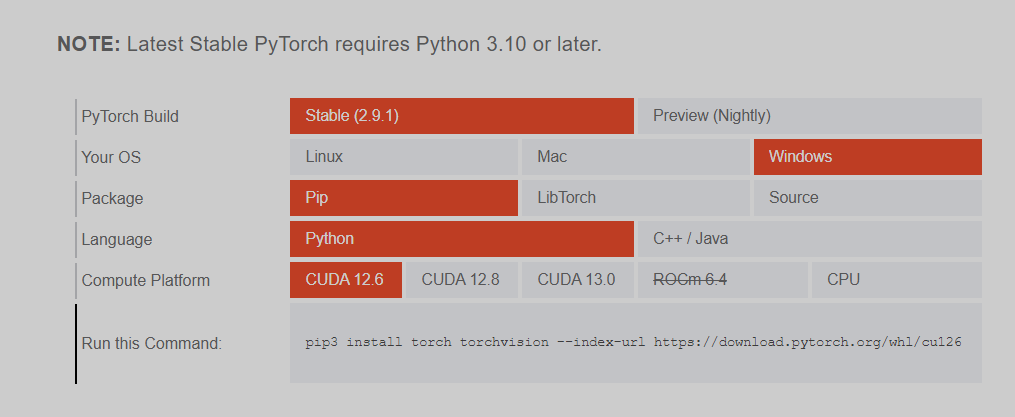
3查看 自己电脑 支持的cuda :nvidia-smi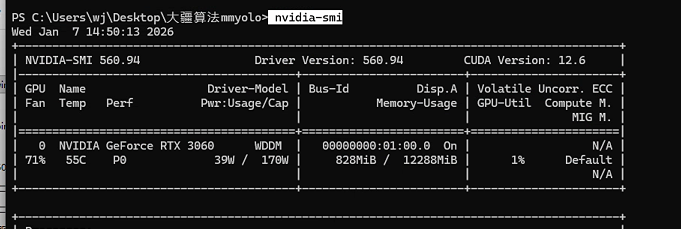
4最后然后下载合适的 cuda:https://developer.nvidia.com/cuda-toolkit-archive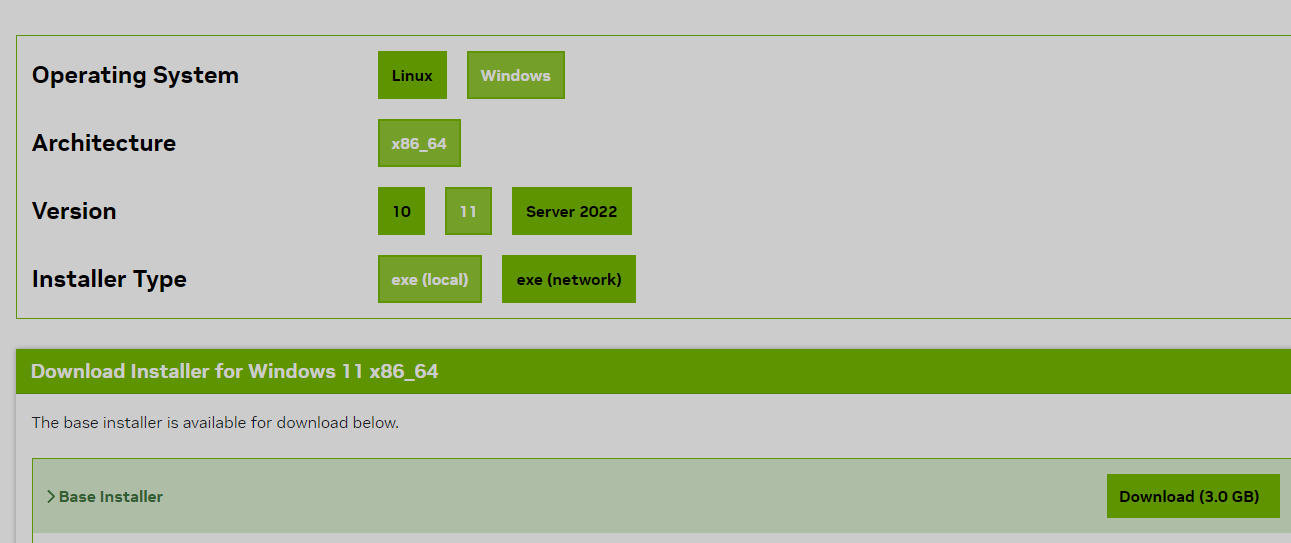
如有问题 参考:https://zhuanlan.zhihu.com/p/23464877518
5下载python 版本
推荐 3.10
https://www.python.org/downloads/windows/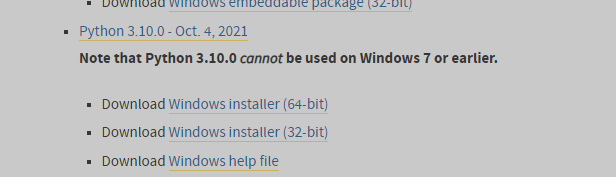
6下载anaconda :https://www.anaconda.com/download-success
7最终环境配置:
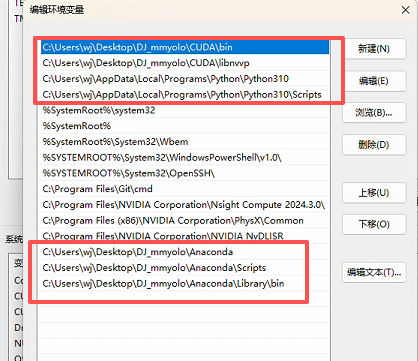
简单 anaconda 命令大全
电脑终端中
初始化 conda init
-
查看 Conda 版本:conda --versiopythonn
-
更新 Conda:conda update conda
-
创建虚拟环境:conda create -n env_name python=3.8
-
查看所有虚拟环境:conda env list
-
激活虚拟环境:conda activate env_name
-
退出虚拟环境:conda deactivate
-
删除虚拟环境:conda remove --name env_name --all
步骤 1. 创建并激活一个 conda 环境。
conda create -n mmyolo python=3.10 -y
conda activate mmyolo
步骤 2. 安装 PyTorch。指定了torch和cuda版本
pip3 install torch==2.0.0 torchvision torchaudio --index-url https://download.pytorch.org/whl/cu118
步骤 3. 验证 PyTorch 安装。正确的话,会打印版本信息和 True 字符
python -c "import torch; print(torch.__version__); print(torch.cuda.is_available())"
安装mmyolo
步骤 0. 使用 MIM 安装 MMEngine、 MMCV 和 MMDetection 。
pip install fsspec sympy==1.13.1
pip install -U openmim
mim install "mmengine>=0.6.0"
mim install "mmcv>=2.0.0rc4,<2.1.0"
mim install "mmdet>=3.0.0,<4.0.0"
步骤 1. 安装 MMYOLO
-
git clone --branch v0.6.0 https://github.com/open-mmlab/mmyolo.git
cd mmyolo
# Install albumentations
mim install -r requirements/albu.txt
# Install MMYOLO
mim install -v -e .
# "-v" 指详细说明,或更多的输出
# "-e" 表示在可编辑模式下安装项目,因此对代码所做的任何本地修改都会生效,从而无需重新安装。
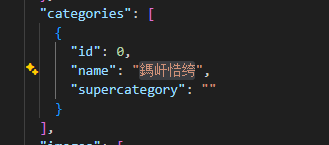
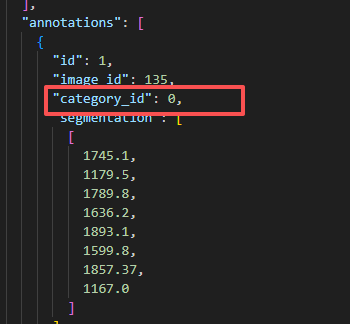
*这里 我电脑 3060显卡 cuda 12.6 python 3.10 遇到问题1:mim告警 那就不用mim 用pip 问题2 找不到PyTorch 那就修改setup 文件 把 注释掉 from torch.utils.cpp_extension import BuildExtension 修改 cmdclass={'build_ext': BuildExtension}, 为 cmdclass={'build_ext': lambda: type('BuildExtension', (), {'run': lambda self: None})}, 先把 001-NEW-ai-inside-init.patch 放在mmyolo文件下 git apply 0001-NEW-ai-inside-init.patch 让后修改 yolov8_s_syncbn_fast_8xb16-500e_coco.py 文件 路径放入正确的 训练 :用了几张卡 后面 0,1,2.... $env:CUDA_VISIBLE_DEVICES=0 python tools/train.py configs/yolov8/yolov8_s_syncbn_fast_8xb16-500e_coco.py 验证 标注与图像 python tools/analysis_tools/browse_coco_json.py --img-dir ./data/ceshi/images/Validation --ann-file ./data/ceshi/annotations/instances_Validation.json 提示 文件不是uf-8 python -c "import json; open('./data/ceshi/annotations/instances_Train.json', 'w', encoding='utf-8').write(open('./data/ceshi/annotations/instances_Train.json', 'r', encoding='gbk', errors='ignore').read()); print('文件编码已转换')" 有时候 从别的地方搞来的标注数据 id默认是从1开始的 需要修改为0
 对于单卡 训练 略微修改 yolov8_s_syncbn_fast_8xb16-500e_coco.py
_base_ = ['../_base_/default_runtime.py', '../_base_/det_p5_tta.py']

# ========================Frequently modified parameters======================

# -----data related-----

data_root = './data/ceshi/'  # 【必须修改】数据集的根目录路径,请改为你本地的实际路径

train_ann_file = 'annotations/instances_Train.json'  # 训练集标注文件路径(相对于data_root)

train_data_prefix = 'images/Train/'  # 训练集图像文件路径前缀(相对于data_root)

val_ann_file = 'annotations/instances_Validation.json'  # 验证集标注文件路径

val_data_prefix = 'images/Validation/'  # 验证集图像文件路径前缀

class_name=('拌合站',)

num_classes = len(class_name)  # Number of classes for classification

# Batch size of a single GPU during training

train_batch_size_per_gpu = 2

# Worker to pre-fetch data for each single GPU during training

train_num_workers = 6

# persistent_workers must be False if num_workers is 0

persistent_workers = True

# -----train val related-----

# Base learning rate for optim_wrapper. Corresponding to 8xb16=64 bs

# base_lr = 0.01 *(train_batch_size_per_gpu/128)-------------------------------------

base_lr = 0.01 *(train_batch_size_per_gpu/64)

max_epochs = 500  # Maximum training epochs

# Disable mosaic augmentation for final 10 epochs (stage 2)

close_mosaic_epochs = 10

model_test_cfg = dict(

    # The config of multi-label for multi-class prediction.

    multi_label=True,

    # The number of boxes before NMS

    nms_pre=30000,

    score_thr=0.001,  # Threshold to filter out boxes.

    nms=dict(type='nms', iou_threshold=0.7),  # NMS type and threshold

    max_per_img=300)  # Max number of detections of each image

# ========================Possible modified parameters========================

# -----data related-----

img_scale = (960, 960)  # width, height

img_scale = tuple([x - x % 32 for x in img_scale])  # 强制对齐32倍数

# Dataset type, this will be used to define the dataset

dataset_type = 'YOLOv5CocoDataset'

# Batch size of a single GPU during validation

val_batch_size_per_gpu = 1

# Worker to pre-fetch data for each single GPU during validation

val_num_workers = 3

# Config of batch shapes. Only on val.

# We tested YOLOv8-m will get 0.02 higher than not using it.

# batch_shapes_cfg = None ---------------------------------------------------------

# You can turn on `batch_shapes_cfg` by uncommenting the following lines.

batch_shapes_cfg = dict(

    type='BatchShapePolicy',

    batch_size=val_batch_size_per_gpu,

    img_size=img_scale[0],

    # The image scale of padding should be divided by pad_size_divisor

    size_divisor=32,

    # Additional paddings for pixel scale

    extra_pad_ratio=0.0) #extra_pad_ratio=0.5)  # 关闭额外填充,避免尺寸偏移

# -----model related-----

# The scaling factor that controls the depth of the network structure

deepen_factor = 0.33

# The scaling factor that controls the width of the network structure

widen_factor = 0.5

# Strides of multi-scale prior box

strides = [8, 16, 32]

# The output channel of the last stage

last_stage_out_channels = 1024

num_det_layers = 3  # The number of model output scales

norm_cfg = dict(type='BN', momentum=0.03, eps=0.001)  # Normalization config

# -----train val related-----

affine_scale = 0.5  # YOLOv5RandomAffine scaling ratio

# YOLOv5RandomAffine aspect ratio of width and height thres to filter bboxes

max_aspect_ratio = 100

tal_topk = 10  # Number of bbox selected in each level

tal_alpha = 0.5  # A Hyper-parameter related to alignment_metrics

tal_beta = 6.0  # A Hyper-parameter related to alignment_metrics

# TODO: Automatically scale loss_weight based on number of detection layers

loss_cls_weight = 0.5

loss_bbox_weight = 7.5

# Since the dfloss is implemented differently in the official

# and mmdet, we're going to divide loss_weight by 4.

loss_dfl_weight = 1.5 / 4

lr_factor = 0.01  # Learning rate scaling factor

weight_decay = 0.0005

# Save model checkpoint and validation intervals in stage 1

save_epoch_intervals = 10

# validation intervals in stage 2

val_interval_stage2 = 1

# The maximum checkpoints to keep.

max_keep_ckpts = 2

# Single-scale training is recommended to

# be turned on, which can speed up training.

env_cfg = dict(cudnn_benchmark=True)

# ===============================Unmodified in most cases====================

model = dict(

    type='YOLODetector',

    data_preprocessor=dict(

        type='YOLOv5DetDataPreprocessor',

        mean=[128., 128., 128.],

        std=[128., 128., 128.],

        bgr_to_rgb=True),

    backbone=dict(

        type='YOLOv8CSPDarknet',

        arch='P5',

        last_stage_out_channels=last_stage_out_channels,

        deepen_factor=deepen_factor,

        widen_factor=widen_factor,

        norm_cfg=norm_cfg,

        act_cfg=dict(type='ReLU', inplace=True)),

    neck=dict(

        type='YOLOv8PAFPN',

        deepen_factor=deepen_factor,

        widen_factor=widen_factor,

        in_channels=[256, 512, last_stage_out_channels],

        out_channels=[256, 512, last_stage_out_channels],

        num_csp_blocks=3,

        norm_cfg=norm_cfg,

        act_cfg=dict(type='ReLU', inplace=True)),

    bbox_head=dict(

        type='YOLOv8Head',

        head_module=dict(

            type='YOLOv8HeadModule',

            num_classes=num_classes,

            in_channels=[256, 512, last_stage_out_channels],

            widen_factor=widen_factor,

            reg_max=16,

            norm_cfg=norm_cfg,

            act_cfg=dict(type='ReLU', inplace=True),

            featmap_strides=strides,

            skip_dfl=False),

        prior_generator=dict(

            type='mmdet.MlvlPointGenerator', offset=0.5, strides=strides),

        bbox_coder=dict(type='DistancePointBBoxCoder'),

        # scaled based on number of detection layers

        loss_cls=dict(

            type='mmdet.CrossEntropyLoss',

            use_sigmoid=True,

            reduction='none',

            loss_weight=loss_cls_weight),

        loss_bbox=dict(

            type='IoULoss',

            iou_mode='ciou',

            bbox_format='xyxy',

            reduction='mean',

            # reduction='sum',-- # 从sum改为mean-----------------------------------------------------

            loss_weight=loss_bbox_weight,

            return_iou=False),

        loss_dfl=dict(

            type='mmdet.DistributionFocalLoss',

            reduction='mean',

            loss_weight=loss_dfl_weight)),

    train_cfg=dict(

        assigner=dict(

            type='BatchTaskAlignedAssigner',

            num_classes=num_classes,

            use_ciou=True,

            topk=13,  # 调整topk为YOLOv8默认值

            # topk=tal_topk,----------------------------------------------

            alpha=tal_alpha,

            beta=tal_beta,

            eps=1e-9)),

    test_cfg=model_test_cfg)


albu_train_transforms = [

    dict(type='Blur', p=0.01),

    dict(type='MedianBlur', p=0.01),

    dict(type='ToGray', p=0.01),

    dict(type='CLAHE', p=0.01)

]

pre_transform = [

    dict(type='LoadImageFromFile', backend_args=_base_.backend_args),

    dict(type='LoadAnnotations', with_bbox=True),

]

last_transform = [

    dict(

        type='mmdet.Albu',

        transforms=albu_train_transforms,

        bbox_params=dict(

            type='BboxParams',

            format='pascal_voc',

            label_fields=['gt_bboxes_labels', 'gt_ignore_flags']),

        keymap={

            'img': 'image',

            'gt_bboxes': 'bboxes'

        }),

    dict(type='YOLOv5HSVRandomAug'),

    dict(type='mmdet.RandomFlip', prob=0.5),

    dict(

        type='mmdet.PackDetInputs',

        meta_keys=('img_id', 'img_path', 'ori_shape', 'img_shape', 'flip',

                   'flip_direction'))

]

train_pipeline = [

    *pre_transform,

    dict(

        type='Mosaic',

        img_scale=img_scale,

        pad_val=114.0,

        pre_transform=pre_transform),

    dict(

        type='YOLOv5RandomAffine',

        max_rotate_degree=0.0,

        max_shear_degree=0.0,

        scaling_ratio_range=(1 - affine_scale, 1 + affine_scale),

        # scaling_ratio_range=(0.9, 1.1),  # 缩小缩放范围----------------------------------

        max_aspect_ratio=max_aspect_ratio,

        # img_scale is (width, height)

        border=(-img_scale[0] // 2, -img_scale[1] // 2),

        #  border=(0, 0),  # 替换原(-img_scale[0]//2, -img_scale[1]//2)-----------------------------------

        border_val=(114, 114, 114)),

    *last_transform

]

train_pipeline_stage2 = [

    *pre_transform,

    dict(type='YOLOv5KeepRatioResize', scale=img_scale),

    dict(

        type='LetterResize',

        scale=img_scale,

        # allow_scale_up=True,

        allow_scale_up=False,  # 关闭向上缩放-----------------------------

        pad_val=dict(img=114.0)

        ),

    dict(

        type='YOLOv5RandomAffine',

        max_rotate_degree=0.0,

        max_shear_degree=0.0,

        scaling_ratio_range=(1 - affine_scale, 1 + affine_scale),

        # scaling_ratio_range=(0.9, 1.1),  # 缩小缩放范围----------------------------------

        max_aspect_ratio=max_aspect_ratio,

        # border=0,

        border_val=(114, 114, 114)), *last_transform

]

train_dataloader = dict(

    batch_size=train_batch_size_per_gpu,

    num_workers=train_num_workers,

    persistent_workers=persistent_workers,

    pin_memory=True,

    sampler=dict(type='DefaultSampler', shuffle=True),

    collate_fn=dict(type='yolov5_collate'),

    dataset=dict(

        type=dataset_type,

        data_root=data_root,

        ann_file=train_ann_file,

        data_prefix=dict(img=train_data_prefix),

        filter_cfg=dict(filter_empty_gt=False, min_size=8),

        # filter_cfg=dict(filter_empty_gt=False, min_size=32),-------------------------------------------

        metainfo=dict(classes=class_name, palette=[(220, 20, 60)]),  # 添加这一行

        pipeline=train_pipeline))

test_pipeline = [

    dict(type='LoadImageFromFile', backend_args=_base_.backend_args),

    dict(type='YOLOv5KeepRatioResize', scale=img_scale),

    dict(

        type='LetterResize',

        scale=img_scale,

        allow_scale_up=False,

        pad_val=dict(img=114),

        ),

    dict(type='LoadAnnotations', with_bbox=True, _scope_='mmdet'),

    dict(

        type='mmdet.PackDetInputs',

        meta_keys=('img_id', 'img_path', 'ori_shape', 'img_shape',

                   'scale_factor', 'pad_param'))

]

val_dataloader = dict(

    batch_size=val_batch_size_per_gpu,

    num_workers=val_num_workers,

    persistent_workers=persistent_workers,

    pin_memory=True,

    drop_last=False,

    sampler=dict(type='DefaultSampler', shuffle=False),

    dataset=dict(

        type=dataset_type,

        data_root=data_root,

        test_mode=True,

        data_prefix=dict(img=val_data_prefix),

        ann_file=val_ann_file,

        metainfo=dict(classes=class_name, palette=[(220, 20, 60)]),  # 添加这一行

        pipeline=test_pipeline,

        batch_shapes_cfg=batch_shapes_cfg))

test_dataloader = val_dataloader

param_scheduler = None

optim_wrapper = dict(

    type='OptimWrapper',

    clip_grad=dict(max_norm=20.0),#---------------------10

    optimizer=dict(

        type='SGD',

        lr=base_lr,

        momentum=0.937,

        weight_decay=weight_decay,

        nesterov=True,

        batch_size_per_gpu=train_batch_size_per_gpu),

    accumulative_counts=8,

    constructor='YOLOv5OptimizerConstructor')

default_hooks = dict(

    param_scheduler=dict(

        type='YOLOv5ParamSchedulerHook',

        scheduler_type='linear',

        lr_factor=lr_factor,

        max_epochs=max_epochs),

    checkpoint=dict(

        type='CheckpointHook',

        interval=save_epoch_intervals,

        save_best='auto',

        max_keep_ckpts=max_keep_ckpts))

custom_hooks = [

    dict(

        type='EMAHook',

        ema_type='ExpMomentumEMA',

        momentum=0.0001,

        update_buffers=True,

        strict_load=False,

        priority=49),

    dict(

        type='mmdet.PipelineSwitchHook',

        switch_epoch=max_epochs - close_mosaic_epochs,

        switch_pipeline=train_pipeline_stage2)

]

val_evaluator = dict(

    type='mmdet.CocoMetric',

    proposal_nums=(100, 1, 10),

    ann_file=data_root + val_ann_file,

    metric='bbox')

test_evaluator = val_evaluator

train_cfg = dict(

    type='EpochBasedTrainLoop',

    max_epochs=max_epochs,

    val_interval=save_epoch_intervals,

    dynamic_intervals=[((max_epochs - close_mosaic_epochs),

                        val_interval_stage2)])

val_cfg = dict(type='ValLoop')

test_cfg = dict(type='TestLoop')
训练参数说明:
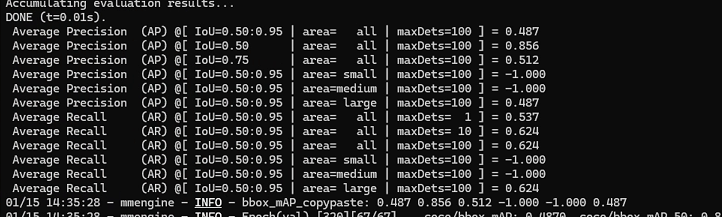
第一部分:平均精度 (Average Precision, AP)
这部分衡量模型预测的“准不准”。IoU(交并比)是预测框与真实框的重叠度,阈值越高要求越严。 -
AP @ IoU=0.50:0.95 | area=all: 0.487
核心综合指标。在IoU从0.5到0.95(步长0.05)的多个严格标准下的平均精度。0.487是一个尚可但不算优秀的分数,说明模型整体有较大提升空间。 -
AP @ IoU=0.50: 0.856
宽松标准下的精度。当只要求预测框与真实框有50%重叠时,模型准确率高达85.6%,说明它能“找到”目标,但框得不一定准。 -
AP @ IoU=0.75: 0.512
严格标准下的精度。当要求重叠度达到75%时,精度大幅下降至51.2%。这直接说明模型的定位精度不足,预测框不够贴合。 -
AP (Small/Medium/Large): -1.000, -1.000, 0.487
关键诊断点。模型在小目标和中等目标上的精度为-1.000,意味着完全没有做出任何有效检测。而大目标AP为0.487,与总AP相同,证实了当前模型只对大目标有效。
第二部分:平均召回率 (Average Recall, AR)
这部分衡量模型“找得全不全”,即在固定最大检测数量下,能找回多少比例的真实目标。 -
AR @ maxDets=1, 10, 100: 0.537, 0.624, 0.624
随着允许检测的数量增加,召回率从53.7%升至62.4%后饱和。这意味着即使无限增加预测框,也只能找到约62%的目标,有近40%的目标(主要是中小目标)彻底遗漏。 -
AR (Small/Medium/Large): -1.000, -1.000, 0.624
再次确认了模型的缺陷:对中小目标的召回率为零,所有召回都来自大目标。
例如我的中小目标没有检测到 是因为我的标注数据本来就没有中小目标: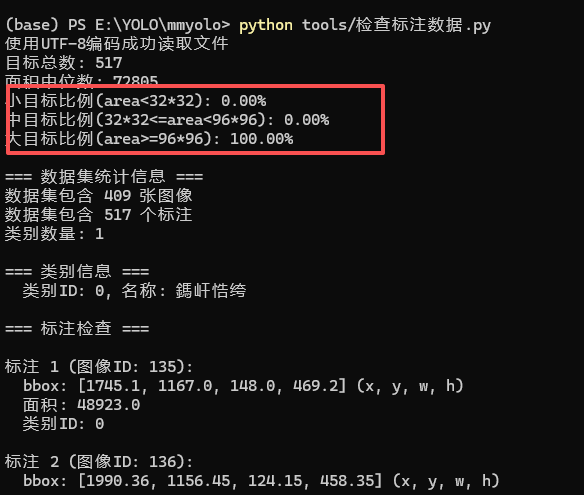
监测方法:import json import os import numpy as np # 方法1:使用正确的编码打开文件 def load_coco_annotations(file_path): with open(file_path, 'r', encoding='utf-8') as f: data = json.load(f) return data # 方法2:使用二进制模式读取,自动检测编码 def load_coco_annotations_binary(file_path): with open(file_path, 'rb') as f: content = f.read() # 尝试不同编码 try: return json.loads(content.decode('utf-8')) except UnicodeDecodeError: # 尝试其他编码 try: return json.loads(content.decode('gbk')) except UnicodeDecodeError: # 尝试utf-8-sig(带BOM的UTF-8) return json.loads(content.decode('utf-8-sig')) # 主程序 if __name__ == "__main__": annotation_file = 'data/ceshi/annotations/instances_Train.json' # 方法1:直接读取 try: coco_data = load_coco_annotations(annotation_file) print("使用UTF-8编码成功读取文件") except UnicodeDecodeError: print("UTF-8解码失败,尝试其他编码...") coco_data = load_coco_annotations_binary(annotation_file) print("使用备用编码成功读取文件") areas = [] for ann in coco_data['annotations']: w, h = ann['bbox'][2], ann['bbox'][3] area = w * h areas.append(area) areas = np.array(areas) print(f"目标总数: {len(areas)}") print(f"面积中位数: {np.median(areas):.0f}") print(f"小目标比例(area<32*32): {(areas < 1024).mean():.2%}") print(f"中目标比例(32*32<=area<96*96): {((areas >= 1024) & (areas < 9216)).mean():.2%}") print(f"大目标比例(area>=96*96): {(areas >= 9216).mean():.2%}") # 分析数据集 print(f"\n=== 数据集统计信息 ===") print(f"数据集包含 {len(coco_data['images'])} 张图像") print(f"数据集包含 {len(coco_data['annotations'])} 个标注") print(f"类别数量: {len(coco_data['categories'])}") # 打印类别信息 print("\n=== 类别信息 ===") for category in coco_data['categories']: print(f" 类别ID: {category['id']}, 名称: {category['name']}") # 检查标注的bbox是否有效 print("\n=== 标注检查 ===") invalid_bboxes = 0 zero_area = 0 for i, ann in enumerate(coco_data['annotations'][:10]): # 只检查前10个 bbox = ann['bbox'] # [x, y, width, height] area = ann['area'] print(f"\n标注 {i+1} (图像ID: {ann['image_id']}):") print(f" bbox: {bbox} (x, y, w, h)") print(f" 面积: {area}") print(f" 类别ID: {ann['category_id']}") # 检查bbox有效性 if bbox[2] <= 0 or bbox[3] <= 0: invalid_bboxes += 1 print(f" ⚠️ 警告: 无效bbox - 宽度或高度<=0") if area <= 0: zero_area += 1 print(f" ⚠️ 警告: 面积为0或负数") # 检查分割标注 print(f"\n=== 分割标注检查 ===") for i, ann in enumerate(coco_data['annotations'][:5]): # 只检查前5个 if 'segmentation' in ann: seg = ann['segmentation'] if seg and len(seg) > 0: print(f"标注 {i+1}: 分割点数量: {len(seg[0]) // 2}") else: print(f"标注 {i+1}: 无有效分割标注") # 图像尺寸统计 print(f"\n=== 图像尺寸统计 ===") sizes = [] for img in coco_data['images'][:10]: # 只检查前10个 sizes.append((img['width'], img['height'])) print(f"图像 {img['file_name']}: {img['width']}x{img['height']}") print(f"\n=== 汇总 ===") print(f"无效bbox数量: {invalid_bboxes}") print(f"零面积标注数量: {zero_area}") # 检查标注与图像的对应关系 print(f"\n=== 标注-图像对应关系 ===") image_ids = [img['id'] for img in coco_data['images']] ann_image_ids = [ann['image_id'] for ann in coco_data['annotations']] unmatched = [img_id for img_id in ann_image_ids if img_id not in image_ids] if unmatched: print(f"警告: 有 {len(set(unmatched))} 个标注对应的图像ID在图像列表中不存在") else: print("所有标注都有对应的图像")测试:
python tools/test.py configs/yolov8/yolov8_s_syncbn_fast_8xb16-500e_coco.py work_dirs/yolov8_s_syncbn_fast_8xb16-500e_coco/best_coco_bbox_mAP_epoch_50.pth

有“AI”的1024 = 2048,欢迎大家加入2048 AI社区
更多推荐



 13
13 0
0- 0


 已为社区贡献2条内容

所有评论(0)