Google Storage Bucket 的 CORS 问题
最近在研究 Google Cloud Vertex AI 时,我发现了一个有趣的细节:当我保存 Gemini 的 Prompt 数据时,系统会自动创建一个 GCS Bucket 来存储这些数据。
出于好奇,我对比了这个“自动创建的 Bucket”和我平时“手动创建的 Bucket”的 Metadata,发现了一个明显的差异——自动创建的 Bucket 多了两个属性:labels 和 cors。如下图:
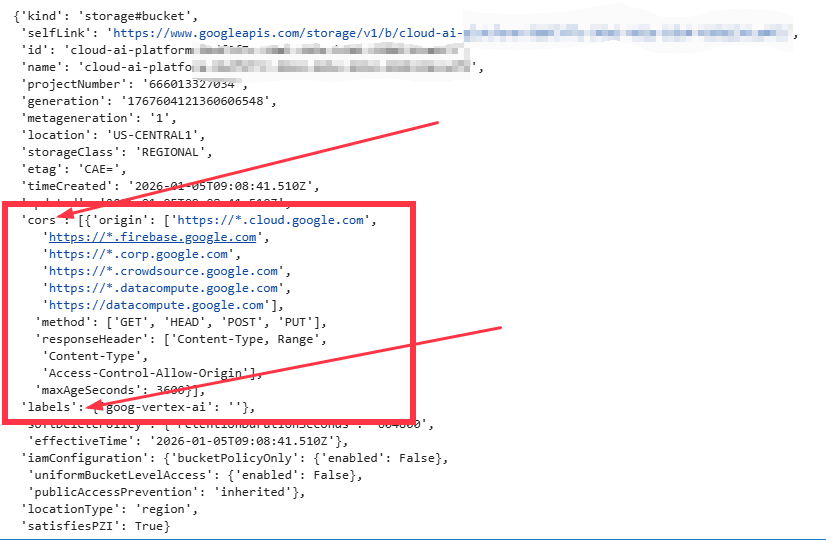
labels 很好理解,通常用于标记资源归属(例如由 Vertex AI 创建)。但 cors 是什么?为什么 Google 要自动加上它?这其实引出了前端开发与云存储集成中一个极易被忽视的核心概念:跨域资源共享 (Cross-Origin Resource Sharing)。
今天就通过几个实验,带大家彻底搞懂 GCS 中的 CORS。
1. 什么是 CORS?为什么 GCS 需要它?
CORS 是一种浏览器的安全机制。 请注意,它保护的不是服务器(GCS),而是用户。
浏览器的 “同源策略” (Same-Origin Policy) 规定:默认情况下,运行在 domain-a.com 上的 JavaScript 代码(如 fetch 或 XMLHttpRequest),不能读取 domain-b.com 上的数据,除非 domain-b.com 明确告诉浏览器:“我允许 A 访问我”。
在 GCS 的场景中:
-
服务端 (Resource): GCS 的域名 (通常是
storage.googleapis.com)。 -
客户端 (Origin): 你的 Web 应用 (例如
localhost:3000或 Google Cloud Consoleconsole.cloud.google.com)。
Vertex AI 之所以自动配置 CORS,是因为当你在 Google Cloud Console 网页上查看 Prompt 数据时,本质上是你的浏览器直接向 GCS 发起请求。如果没有 CORS,Console 页面就无法加载并显示这些存储在 Bucket 里的数据。
2. 实验一:<img> 标签 vs JavaScript fetch
为了验证这一点,我们做个简单的实验。假设有一个 Public Bucket my-bucket-01,里面有一张 image.png。
场景 A:直接使用 HTML 标签
<div class="image-container">
  <!-- 直接引用 URL -->
  <img
    src="https://storage.googleapis.com/my-bucket-01/image.png"
    alt="Public Image"
    class="displayed-image"
  >
</div>
结果: 图片正常显示。 原因: 浏览器的同源策略对 <img src>、<script src> 等标签是“豁免”的。单纯的展示资源通常不需要 CORS。
场景 B:使用 JavaScript 读取数据
如果你想通过 JS 获取图片的原始数据(比如处理像素、转存 Blob),情况就不一样了:
<script>
  // 这段代码会失败!
  fetch('https://storage.googleapis.com/my-bucket-01/image.png')
    .then(response => {
        console.log("JS 读取成功");
    })
    .catch(error => {
        console.error("JS 读取失败,因为 CORS 阻挡了", error);
    });
</script>
结果: 浏览器 Console 报错,提示 CORS 错误。 原因: fetch 请求受到同源策略的严格限制。GCS 默认没有配置 CORS Header,浏览器拦截了响应。
3. 解决方案:配置 CORS
解决这个问题非常简单,只需要告诉 GCS:“允许我的域名访问”。
1. 创建配置文件 cors.json:
[
    {
      "origin": ["https://my-domain.com"],
      "method": ["GET", "OPTIONS"],
      "responseHeader": ["Authorization", "Content-Type"],
      "maxAgeSeconds": 3600
    }
](注意:origin 列表里填入你需要访问 GCS 的网页域名)
2. 应用配置到 Bucket:
使用 gcloud 命令上传配置:
gcloud storage buckets update gs://my-bucket-01 --cors-file="cors.json"(注意:cors.json 指的是文件的完整路径,如 C:\Users\XXXXX\Desktop\cors.json)
当看到 Completed 1 的提示后,再次刷新页面,你会发现 fetch 请求成功了!如下图:
⠏Updating gs://my-bucket-01/...
  Completed 1
4. 进阶实验:私有 Bucket + 身份验证 (Token)
现实中,大部分 Bucket 不是公开的。如果一个 Bucket 既是私有的(需要 IAM 权限),又有跨域需求,该怎么办?为了彻底厘清这两者,我准备了两个 Bucket 做对照实验:
-
my-bucket-01(私有桶): 有 IAM 权限要求,默认无 CORS。 -
my-bucket-02(公有桶):allUsers拥有Storage Object Viewer权限,默认无 CORS。
我编写了一个测试网页,包含三个核心部分:
-
展示: 用
<img src>直接显示公有桶 (my-bucket-02) 的图片。 -
JS 请求 (私有): 用
fetch获取私有桶 (my-bucket-01) 的图片数据,并提供一个输入框用于传入 Access Token。 -
JS 请求 (公有): 页面底部自动运行
fetch尝试获取公有桶 (my-bucket-02) 的图片,并将结果打印在控制台对话框中。
第一阶段:默认状态(无 CORS 配置)
当我们第一次打开页面时,结果如下:
-
第一个图片 (
<img>my-bucket-02): ✅ 正常显示。-
结论:HTML 标签不受跨域限制。
-
-
第二个图片 (
fetchmy-bucket-01): ❌ 不显示。-
即使我们在输入框填入了正确的 Token,依然报错 CORS。
-
-
底部控制台 (
fetchmy-bucket-02): ❌ 报错 CORS。-
关键结论: 哪怕
my-bucket-02是 Public 的,JS 去请求它依然会因为没有 CORS 头而被浏览器拦截。Public 权限不等于开启 CORS!
-
第二阶段:只给私有桶配置 CORS
现在,我们创建一个 cors.json 文件,并且只将配置文件上传到私有桶 my-bucket-01。
刷新页面,再次测试:
-
第一个图片 (
<img>my-bucket-02): ✅ 正常显示。如下图: -
第二个图片 (
fetchmy-bucket-01):-
不输入 Token -> ❌ 403/401 错误 (CORS 通过了,但 IAM 鉴权没过)。
-
输入正确 Token -> ✅ 图片成功显示!
-
结论:CORS 解决了跨域问题,Token 解决了权限问题,两者缺一不可。
-
-
底部控制台 (
fetchmy-bucket-02): ❌ 依然报错 CORS。-
结论: 因为我们只给 01 桶传了配置,02 桶依然没有 CORS 头。这证明了 CORS 配置是 Bucket 级别的,互不影响。
-
PS:获取token的命令:
gcloud auth print-access-token4. 总结与操作指南
通过这个实验,我们可以得出关于 GCS CORS 的几个硬核结论:
-
Public ≠ CORS Enabled: 哪怕你的桶对全世界公开,JS 想要
fetch里面的数据,依然必须配置 CORS。 -
Img 标签是特例: 仅仅是在网页上展示图片,不需要 CORS;但如果涉及 JS 处理数据(如 Canvas 绘图、上传等),CORS 是必须的。
-
Vertex AI 的自动行为: Google 自动给 Bucket 加上 CORS,正是为了配合控制台的前端 JS 调用。
附:实验 HTML 核心代码
(使用前请确保替换桶名为你自己的真实 Bucket)
<!DOCTYPE html>
<html lang="zh-CN">
<head>
<meta charset="UTF-8">
<meta name="viewport" content="width=device-width, initial-scale=1.0">
<title>GCS 权限与 CORS 综合演示</title>
<style>
/* --- 基础样式 --- */
* { margin: 0; padding: 0; box-sizing: border-box; }
body { font-family: 'Segoe UI', 'Microsoft YaHei', sans-serif; background-color: #f5f7fa; color: #333; line-height: 1.6; padding: 20px; min-height: 100vh; display: flex; flex-direction: column; }
.container { max-width: 1200px; margin: 0 auto; width: 100%; }
header { text-align: center; padding: 30px 0; border-bottom: 1px solid #e1e5eb; margin-bottom: 40px; }
h1 { color: #2c3e50; font-size: 2.2rem; margin-bottom: 10px; }
.subtitle { color: #7f8c8d; font-size: 1.1rem; }
.main-content { flex: 1; display: flex; flex-direction: column; align-items: center; padding: 30px 0; }
/* --- 卡片通用样式 --- */
.image-section { background-color: white; border-radius: 12px; padding: 30px; box-shadow: 0 4px 15px rgba(0, 0, 0, 0.05); text-align: center; max-width: 800px; width: 100%; margin-bottom: 30px; transition: transform 0.2s; }
.image-section:hover { transform: translateY(-2px); box-shadow: 0 8px 20px rgba(0,0,0,0.1); }
.section-title { font-size: 1.5rem; margin-bottom: 15px; padding-bottom: 10px; border-bottom: 2px solid #f1f1f1; display: flex; align-items: center; justify-content: center; gap: 10px; }
/* --- 图片容器 --- */
.image-container { margin: 15px 0; padding: 10px; background-color: #f8f9fa; border-radius: 8px; min-height: 200px; display: flex; align-items: center; justify-content: center; position: relative; }
.displayed-image { max-width: 100%; max-height: 300px; border-radius: 4px; box-shadow: 0 2px 8px rgba(0, 0, 0, 0.1); }
/* --- 私有 Bucket 专用样式 --- */
.locked-state { color: #e74c3c; display: flex; flex-direction: column; align-items: center; }
.lock-icon { font-size: 3rem; margin-bottom: 10px; }
.btn-auth { background-color: #2980b9; color: white; border: none; padding: 10px 25px; font-size: 1rem; border-radius: 25px; cursor: pointer; margin-top: 15px; transition: all 0.3s; box-shadow: 0 4px 6px rgba(41, 128, 185, 0.3); }
.btn-auth:hover { background-color: #3498db; transform: scale(1.05); }
.success-msg { color: #27ae60; font-weight: bold; margin-top: 10px; display: none; }
.error-msg { color: #c0392b; margin-top: 10px; font-size: 0.9rem; white-space: pre-wrap; display: none; background: #fff0f0; padding: 10px; border-radius: 4px; text-align: left;}
/* --- CORS Demo 专用样式 --- */
.cors-demo-area { border: 2px dashed #e74c3c; padding: 20px; background-color: #fffbfb; border-radius: 8px; }
.btn-fail { background-color: #e74c3c; color: white; border: none; padding: 8px 20px; border-radius: 4px; cursor: pointer; }
#console-output { background-color: #2c3e50; color: #ecf0f1; font-family: monospace; padding: 15px; margin-top: 15px; border-radius: 4px; text-align: left; min-height: 80px; font-size: 0.9rem; }
footer { text-align: center; padding: 25px 0; color: #95a5a6; font-size: 0.9rem; }
</style>
</head>
<body>
<div class="container">
<header>
<h1>GCS 综合实验控制台</h1>
<p class="subtitle">Public vs Private (OAuth) vs CORS Error</p>
</header>
<main class="main-content">
<!-- 场景 1: 公共 Bucket -->
<section class="image-section">
<h2 class="section-title" style="color: #27ae60;">
<span>🌐</span> Public Bucket (my-bucket-02)
</h2>
<p>这是一个公开的 Bucket,不需要 Token,直接通过 <code><img></code> 标签加载。</p>
<div class="image-container">
<!-- 直接引用 URL -->
<img
src="https://storage.googleapis.com/my-bucket-02/image.png"
alt="Public Image"
class="displayed-image"
>
</div>
<p style="font-size: 0.9rem; color: #27ae60;">状态:✅ 正常显示 (无需认证)</p>
</section>
<!-- 场景 2: 私有 Bucket + Token 认证 -->
<section class="image-section">
<h2 class="section-title" style="color: #e67e22;">
<span>🔒</span> Private Bucket (my-bucket-01)
</h2>
<p>这是一个私有 Bucket。默认无法访问。请点击按钮输入 Token 进行解锁。</p>
<div class="image-container" id="private-img-container">
<!-- 初始状态:显示锁定图标 -->
<div id="lock-placeholder" class="locked-state">
<div class="lock-icon">🛑 403 Forbidden</div>
<span>图片受保护,无法直接加载</span>
</div>
<!-- 成功后显示的图片 (初始隐藏) -->
<img id="private-image-element" class="displayed-image" style="display: none;">
</div>
<!-- 操作区 -->
<button class="btn-auth" onclick="unlockPrivateImage()">🔑 输入 Token 并加载</button>
<!-- 消息提示 -->
<div id="private-success" class="success-msg">🎉 认证成功!图片已加载。</div>
<div id="private-error" class="error-msg"></div>
</section>
<!-- 场景 3: CORS 错误演示 (保留原功能) -->
<section class="image-section" style="border-top: 4px solid #e74c3c;">
<h2 class="section-title" style="color: #c0392b;">
<span>⚠️</span> CORS Error Demo
</h2>
<p>这里演示如果 Bucket 没配置 CORS,JS 试图 fetch 数据时会发生什么。</p>
<div class="cors-demo-area">
<p>目标:<code>my-bucket-02 (Public)</code></p>
<p style="font-size: 0.85rem; color: #666; margin-bottom: 10px;">虽然它是公开的,但如果我们用 JS fetch 并且它没配 CORS,依然会报错。</p>
<button class="btn-fail" onclick="triggerCorsError()">发起 Fetch 请求 (预期失败)</button>
<div id="console-output">等待测试...</div>
</div>
</section>
</main>
<footer>
<p>© 2026 GCS Security Demo</p>
</footer>
</div>
<script>
// ==========================================
// 场景 2: 私有 Bucket 解锁逻辑
// ==========================================
const PRIVATE_IMAGE_URL = 'https://storage.googleapis.com/my-bucket-01/image.png';
async function unlockPrivateImage() {
const errorBox = document.getElementById('private-error');
const successMsg = document.getElementById('private-success');
const imgEl = document.getElementById('private-image-element');
const lockEl = document.getElementById('lock-placeholder');
// 1. 获取用户输入
const token = prompt("请输入 my-bucket-01 的 OAuth Access Token (Bearer):");
if (!token) return;
// 重置界面状态
errorBox.style.display = 'none';
successMsg.style.display = 'none';
lockEl.innerHTML = '<div style="color:#2980b9">⏳ 正在验证 Token...</div>';
try {
// 2. 发起带 Authorization 头的 Fetch 请求
// 注意:这一步需要 my-bucket-01 配置 CORS 允许 Authorization 头
const response = await fetch(PRIVATE_IMAGE_URL, {
method: 'GET',
headers: {
'Authorization': `Bearer ${token}`
}
});
// 3. 处理错误响应 (比如 Token 过期或错误)
if (!response.ok) {
throw new Error(`认证失败 (HTTP ${response.status})。请检查 Token 是否有效。`);
}
// 4. 处理二进制数据 (Blob)
const blob = await response.blob();
const objectUrl = URL.createObjectURL(blob);
// 5. 显示图片
imgEl.src = objectUrl;
imgEl.style.display = 'block'; // 显示图片
lockEl.style.display = 'none'; // 隐藏锁
successMsg.style.display = 'block';
} catch (err) {
console.error(err);
lockEl.innerHTML = '<div class="lock-icon">❌</div><span>加载失败</span>';
errorBox.style.display = 'block';
// 智能错误提示
if (err.message.includes("Failed to fetch")) {
errorBox.innerText = `❌ 网络错误 (CORS Error)\n\n原因可能是:\n1. my-bucket-01 没有配置 CORS。\n2. CORS 配置中没有允许 'Authorization' Header。\n\n请在 GCS 后台检查 CORS 设置。`;
} else {
errorBox.innerText = `❌ 错误: ${err.message}`;
}
}
}
// ==========================================
// 场景 3: CORS 错误演示逻辑
// ==========================================
function triggerCorsError() {
const outputDiv = document.getElementById('console-output');
outputDiv.innerHTML = "正在发起请求...";
outputDiv.style.color = "#f1c40f";
// 使用 fetch 访问,但不带 Header。
// 如果 my-bucket-02 没配 CORS,这里会直接被浏览器拦截
fetch('https://storage.googleapis.com/my-bucket-02/image.png')
.then(res => {
outputDiv.innerHTML = "⚠️ 请求竟然成功了?\n这意味着 my-bucket-02 可能已经配置了允许所有 Origin 的 CORS。";
outputDiv.style.color = "#2ecc71";
})
.catch(error => {
console.error("捕获到 CORS 错误:", error);
outputDiv.innerHTML = `[预期内的失败] 浏览器拦截了请求!\n\n错误类型: ${error.name}\n错误信息: ${error.message}\n\n这证明了即使是公开 Bucket,要用 JS 读取数据也必须配置 CORS。`;
outputDiv.style.color = "#e74c3c";
});
}
</script>
</body>
</html>
有“AI”的1024 = 2048,欢迎大家加入2048 AI社区
更多推荐

 10
10 0
0- 0


 已为社区贡献2条内容

所有评论(0)