告别“凭感觉写代码” (Vibe Coding):Gemini CLI Conductor 实践指南
但当你聊到第 20 句,或者项目逻辑稍微复杂一点时,AI 开始“失忆”了——它忘记了十分钟前定义的变量,幻想出不存在的库,甚至让你在一个 React 项目里安装 jQuery。当你的 Prompt 是英文,AI 生成的文档是英文,最终生成的代码变量命名也是英文时,整个上下文(Context)的一致性会达到最高,从而大幅降低 AI“幻觉”的概率。,你会看到它不仅仅是“写代码”,而是包含了“建立基础架
你是否经历过这样的 AI 编程场景:
刚开始用 ChatGPT 或 Claude 写代码时,一切如鱼得水。但当你聊到第 20 句,或者项目逻辑稍微复杂一点时,AI 开始“失忆”了——它忘记了十分钟前定义的变量,幻想出不存在的库,甚至让你在一个 React 项目里安装 jQuery。
这种基于临时对话、缺乏整体规划的编程方式,被形象地称为 “Vibe Coding”(凭感觉编程)。它或许适合写一次性脚本,但面对真实的工程项目,这种模式往往会演变成一场灾难。
今天,我们要介绍的是 Google 生态下的开源利器 —— Gemini CLI Conductor。它通过 “上下文驱动开发” (Context-Driven Development) 的理念,试图将 AI 编程从“随意的聊天”进化为“严谨的工程管理”。
一、 为什么传统的 AI Coding 还不够好?
在深入工具之前,我们需要先剖析“聊天框编程”的局限性:
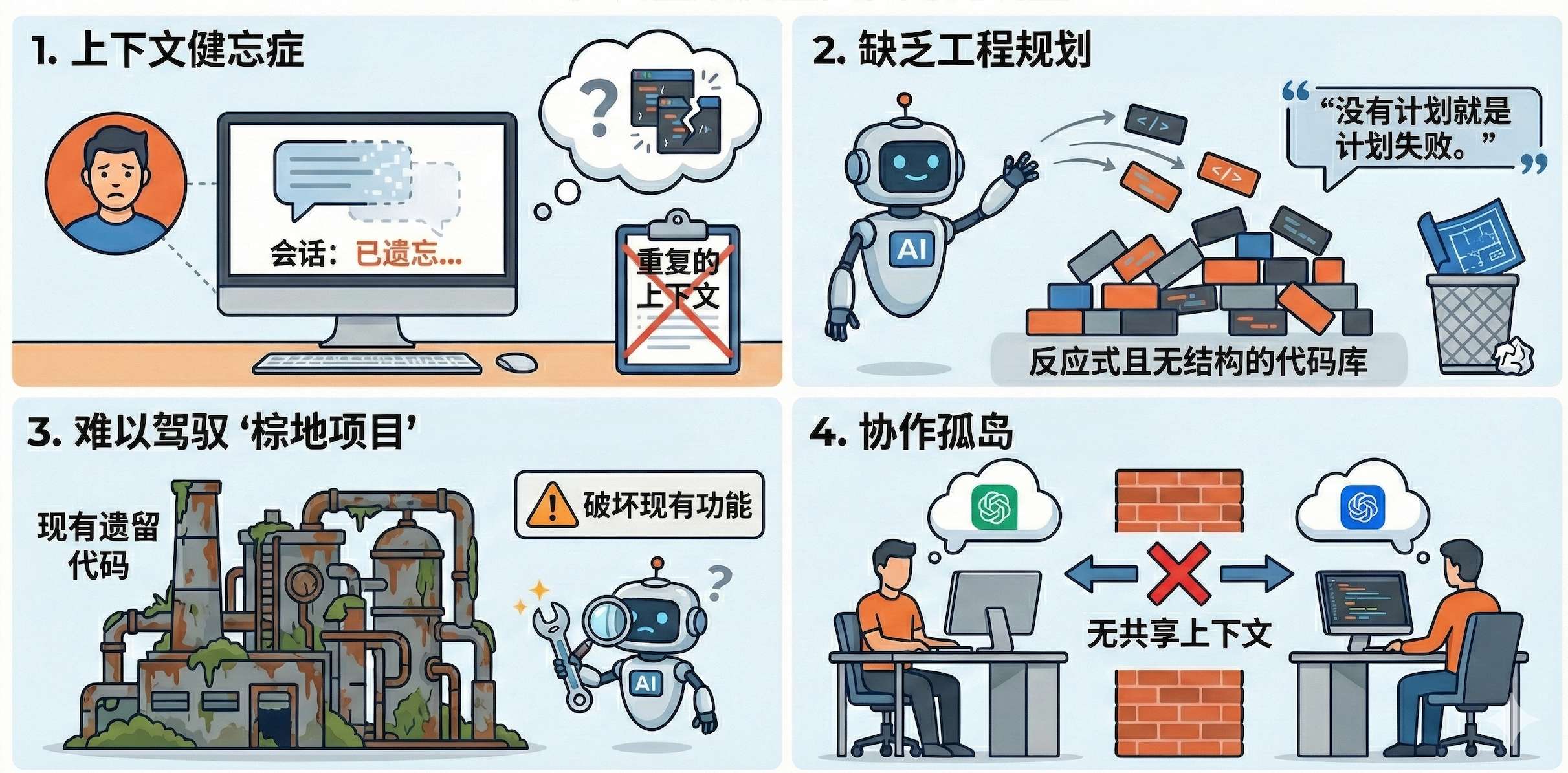
1. 上下文失忆 (Context Amnesia)
AI 的记忆仅限于当前的聊天窗口(Session)。一旦关闭窗口或对话过长,之前的项目背景就会丢失。你被迫不断复制粘贴代码,或者反复向 AI 解释“我是谁,我在做什么”。
2. 缺乏工程规划 (Reactive & Unstructured)
传统模式是“你问,它答”。AI 往往跳过需求分析和架构设计,直接开始堆砌代码。正如本杰明·富兰克林所说:“没有计划,就是计划失败”。这种方式极易导致代码结构混乱,缺乏一致性。
3. 难以驾驭“棕地项目” (Brownfield Projects)
我们大多数时间是在维护既有的、复杂的旧代码库(即“棕地项目”)。传统 AI 很难理解复杂的历史架构和技术债务,其给出的建议往往因缺乏全局视野而破坏现有功能。
4. 协作孤岛 (Collaboration Silos)
这是团队开发中最大的痛点。AI 的上下文仅存在于个人的聊天记录中,团队成员无法共享 AI 对项目的理解。这导致了不同成员在开发时重复劳动,甚至因为 Prompt 不同而产生代码标准不一致的问题。
二、 什么是 Gemini CLI Conductor?
Gemini CLI Conductor 是为 Gemini CLI 开发的一个高级扩展。
它的核心理念简单而粗暴:把 AI 的记忆从“聊天记录”里拿出来,存进你的“代码仓库”里。
它不再依赖临时的对话上下文,而是生成一系列持久化的 Markdown 文件(如 product.md, plan.md)。这些文件成为了项目的 **“单一真实来源” (Single Source of Truth)**。这意味着,无论你何时回来,或者你的队友何时接手,AI 都能通过读取这些文件瞬间找回“记忆”,无缝续接开发工作。
三、 核心工作流:Conductor 的三部曲
Conductor 强制执行一套标准化的开发流程,确保 “先规划,后执行”。
第一步:建立上下文 (Establish Context)
-
命令: /conductor:setup -
场景: 就像给新入职的高级工程师做 Onboarding(入职培训)。 -
执行动作: AI 会启动一个交互式访谈,询问项目目标、用户群体、技术栈偏好(如“必须使用 TypeScript”)以及工作流规范。如果是旧项目,它还会扫描代码库分析现有架构。 -
产出物: product.md(产品愿景)、tech-stack.md(技术栈约束)、workflow.md(开发规范)等。

第二步:规范与规划 (Specify and Plan)
-
命令: /conductor:newTrack -
场景: 需求评审会议。 -
执行动作: 当你要开发新功能(Track)时, 绝不直接写代码。AI 会根据你的描述生成详细的需求规格(Spec)和执行计划(Plan)。你必须先审查并批准这个计划。 -
产出物: 在 tracks/目录下生成针对当前需求的spec.md(做什么、为什么做) 和plan.md(分步骤的执行清单)。

第三步:执行与实现 (Implement)
-
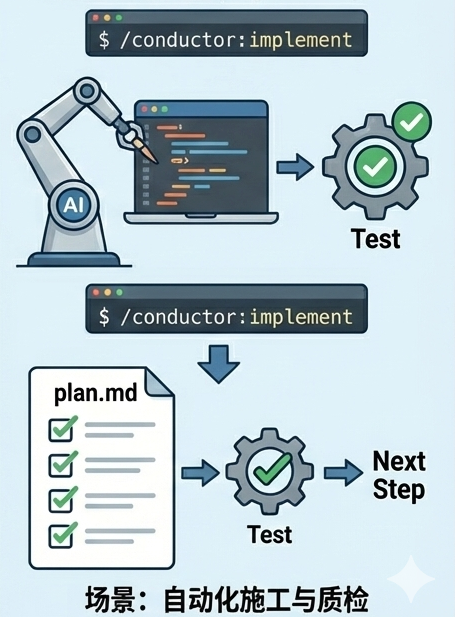
命令: /conductor:implement -
场景: 自动化施工与质检。 -
执行动作: AI 读取批准的 plan.md, 按顺序自动执行每一个步骤。 -
特性: 每完成一个步骤的代码编写,它会自动运行测试(Test),验证代码是否破坏了项目的正常运行。只有当前步骤测试通过,才会继续执行计划中的下一步。
四、 实战指南:保姆级安装与使用
Conductor 是一个命令行工具,以下是快速上手教程。
1. 环境准备
确保你的电脑上安装了 Node.js 环境。
2. 安装 Gemini CLI
在终端(Terminal)中运行以下命令全局安装:
npm install -g @google/gemini-cli
安装完成后,登录你的 Google 账号(需授权):
gemini auth
3. 安装 Conductor 扩展
从 GitHub 安装 Conductor 扩展:
gemini extensions install https://github.com/gemini-cli-extensions/conductor
4. 实战演练:构建“客服工作台”
为了演示 Conductor 如何处理复杂需求,我们将从零开始构建一个 Human-in-the-loop(人机协同)客服工作台。
Step 1: 初始化项目与建立上下文 在项目根目录下,运行 /conductor:setup。AI 不会直接写代码,而是先启动一场“入职访谈”:
AI: "这是一个新项目还是旧项目?目标用户是谁?" 你: "新项目。目标用户是客服团队。核心目标是高自动化率,但允许人工在 AI 信心不足时无缝接管。" AI: "了解。技术栈方面,考虑到你要做复杂的交互(如右键菜单、Copilot 建议堆栈),我建议使用 React + TypeScript + Vite,并使用 Tailwind CSS 处理样式。是否确认?"
当你确认后,AI 会生成 product.md(产品愿景)和 tech-stack.md(技术栈约束)。这就是项目的长期记忆。
# product.md
# Initial Concept

帮我初始化一个项目 核心技术栈 (Target Tech Stack)
* 前端框架: React (使用 TypeScript)
    * 选择理由:组件化开发,适合处理你原型中复杂的交互逻辑(如右键菜单、多选 Mention、Copilot 建议堆栈)。
* 构建工具: Vite
    * 选择理由:现代化、启动快,适合 React 项目。
* 样式方案: Tailwind CSS
    * 选择理由:你的 index.html 原型已经完全使用了 Tailwind 类名,迁移成本最低,且易于维护 Dark Mode。
* 图标库: Phosphor Icons (@phosphor-icons/react)
    * 选择理由:原型中使用了 Phosphor Icons,保持视觉一致性。
辅助工具库
* 实用工具: clsx, tailwind-merge (用于动态合并 Tailwind 类名,在组件化开发中必不可少)。
* 路由 (可选/后续): react-router-dom (如果未来将设置页面和聊天页面拆分为不同路由,目前 MVP 可能是单页)。
当前状态 vs 目标状态
* 源 (Source): 单文件 index.html + Vanilla JS (原生 JavaScript)。
* 目标 (Destination): 模块化的 React 组件结构 (src/components/...),逻辑与视图分离。

# Product Guide - Xiaoyu Agent

## Product Vision
Xiaoyu Agent is a modernized customer service platform designed to maximize efficiency through AI-first automation. It balances autonomous AI response capabilities with a seamless human-in-the-loop fallback mechanism, ensuring customers receive fast, accurate support while complex issues are handled by experts.

## Target Users
* **Customer Service Teams:** Looking to reduce workload through automation.
* **Support Agents:** Requiring an efficient workspace to manage escalations and AI-assisted replies.
* **Operations Managers:** Aiming to scale support capacity without linearly increasing headcount.

## Core Goals
* **High Automation:** Resolve the majority of inquiries autonomously using AI.
* **Seamless Escalation:** Provide a friction-less transition from AI to human agents when complexity arises.
* **Agent Efficiency:** Empower human agents with AI-driven suggestions and summaries.
* **Multi-Channel Support:** Centralize communications from diverse messaging platforms.

## Key Features (MVP)
* **Hybrid AI Engine:** An automated response system with configurable confidence thresholds for escalation.
* **Agent Workspace (Unified Inbox):** A centralized dashboard for human agents to monitor AI interactions and intervene.
* **Manual Intervention & Control:**
    * Real-time manual reply capabilities.
    * Status toggle to switch specific conversations between "AI Mode" and "Human Mode".
* **Transition Workflows:**
    * **Automatic Handover:** Triggered by low AI confidence or explicit user requests.
    * **Manual Jump-in:** Instant AI pause when an agent starts interacting.
    * **Drafting Mode:** AI-generated suggestions for agent review and manual dispatch.
# Tech Stack

## Core Technologies
* **React (TypeScript):** Primary frontend framework for building a robust, type-safe, and component-based UI.
* **Vite:** Modern build tool for fast development and optimized production builds.
* **Tailwind CSS:** Utility-first CSS framework for rapid and consistent UI styling, as established in the project's prototype.

## UI & Design Libraries
* **Phosphor Icons (@phosphor-icons/react):** Comprehensive icon library for consistent visual language.
* **clsx & tailwind-merge:** Utilities for dynamic and clean management of Tailwind CSS classes within React components.
* **Zustand:** Lightweight state management for handling global app state (sessions, theme, sidebar).

## Foundation & Scalability
* **React Router DOM:** Standard routing library to support multi-page navigation (e.g., Settings, Dashboard) as the platform grows.
* **TypeScript:** Enforced type safety to improve developer productivity and maintainability.
* **Vitest:** Modern testing framework for Unit and Component testing.
* **Testing Library (React):** For verifying UI components.

## Development Standards
* **ESLint & Prettier:** For code quality and consistent formatting.
* **Component-Based Architecture:** Logic and view separation to ensure scalability.
Step 2: 创建任务轨道 (Track) 运行 /conductor:newTrack 并输入你的核心需求(甚至可以直接引用原型图):
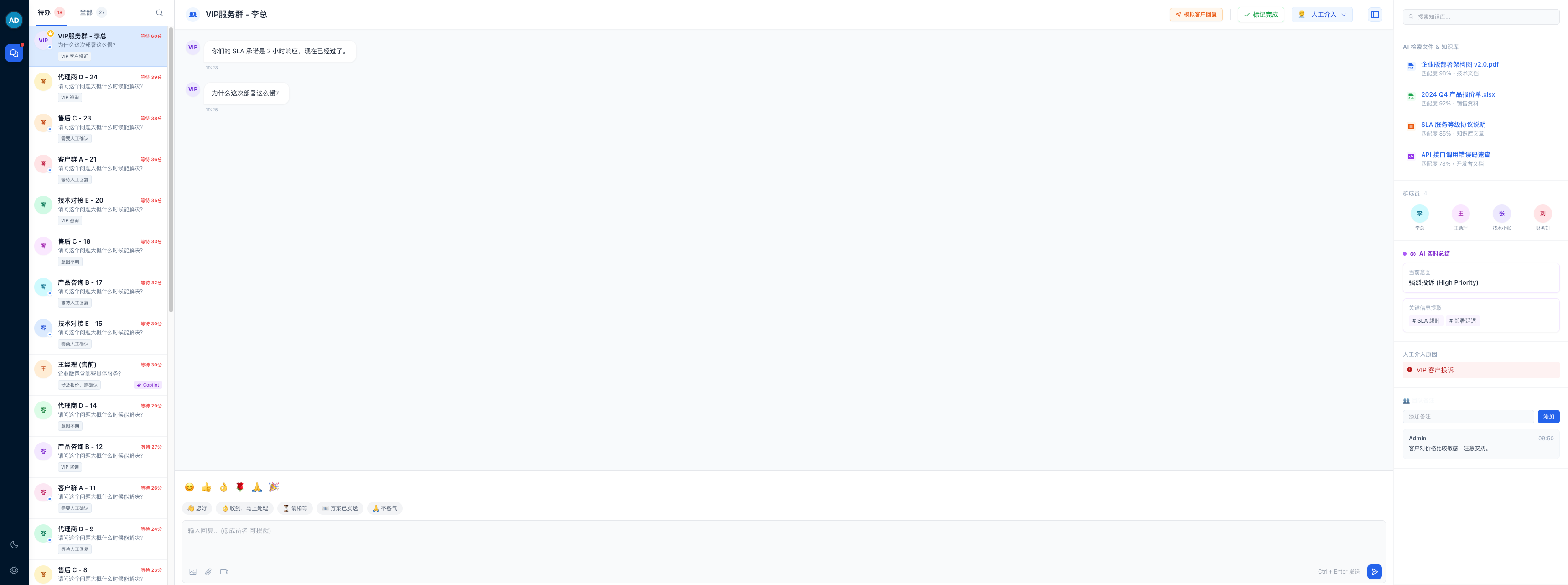
你: "基于 index.html 原型,实现 MVP 版本的 Agent 工作台。需要三栏布局:左侧会话列表(区分待办/全部),中间是聊天窗口(支持 @提及 和 Copilot 建议栈),右侧是 AI 实时摘要和知识库搜索。"
AI 会立即分析需求,并在 tracks/workspace_mvp/ 下生成两份关键文档:
-
spec.md: 详细的功能规格说明。 -
plan.md: 一份拆解为 5 个阶段、20+ 个步骤的精密施工图。
# Plan: Agent Workspace MVP

## Phase 1: Project Setup & Foundation
- [x] Task: Initialize Vite Project with React and TypeScript 1e01edc
    - Create a new Vite project using the `react-ts` template.
    - Configure `tsconfig.json` paths (e.g., `@/` alias).
    - Install core dependencies: `clsx`, `tailwind-merge`, `@phosphor-icons/react`, `zustand` (for state).
- [x] Task: Configure Tailwind CSS 00a0f6d
    - Initialize Tailwind config.
    - Define custom colors and font families based on `index.html` prototype.
    - Set up Dark Mode support in `tailwind.config.js`.
- [x] Task: Create Basic Layout Shell b1f1b40
    - Create `MainLayout` component.
    - Implement the 3-column CSS Grid or Flexbox structure.
    - Create placeholder components for `SidebarNav`, `SessionList`, `ChatWorkspace`, `InfoSidebar`.
- [x] Task: Conductor - User Manual Verification 'Project Setup & Foundation' (Protocol in workflow.md) 295b998

## Phase 2: Data Layer & State Management
- [x] Task: Define TypeScript Interfaces 7babc99
    - Create `types/index.ts`.
    - Define `Session`, `Message`, `User`, `Member`, `AIData` interfaces.
- [x] Task: Implement Mock Data Store 9382dcd
    - Create `store/useStore.ts` using Zustand.
    - Port the `generateMockSessions` logic from the prototype into a structured data generator.
    - Implement actions: `selectSession`, `sendMessage`, `toggleTheme`, `updateSessionStatus`.
- [x] Task: Conductor - User Manual Verification 'Data Layer & State Management' (Protocol in workflow.md) 779792c

## Phase 3: Session List (Left Column)
- [x] Task: Implement Navigation Rail eff0e6d
    - Build `SidebarNav` component with Avatar, "Chats" button, and Theme Toggle.
- [x] Task: Implement Session List Header c58b71f
    - Create tabs for "Todo" and "All".
    - Implement the expandable Search Bar UI logic.
- [x] Task: Implement Session List Item fbcde99
    - Create `SessionItem` component.
    - Render Avatar (logic for generating colors based on name).
    - Render Status Badges (Copilot, AI, Manual).
    - Implement active state styling.
- [x] Task: Connect List to Store fbcde99
    - Fetch sessions from store.
    - Implement filtering logic based on active Tab and Search query.
- [x] Task: Conductor - User Manual Verification 'Session List' (Protocol in workflow.md) a2174a2

## Phase 4: Chat Workspace (Center Column)
- [x] Task: Implement Chat Header 6934c7b
    - Render session title, member count, and action buttons.
    - Build the Status Dropdown (Manual/Copilot/AI).
- [x] Task: Implement Message List dba2269
    - Create `MessageBubble` component.
    - Handle "User" vs "Me" styling.
    - Implement "Quote" display within bubbles.
    - Auto-scroll to bottom logic.
- [x] Task: Implement Rich Input Area 8ebd3c2
    - Build `MessageInput` component.
    - Implement `contentEditable` or `textarea` with auto-resize.
    - Add "Smart Chips" row above input.
    - Add "Quick Emoji" bar.
- [x] Task: Implement Copilot Stack 402d026
    - Create `CopilotSuggestion` component.
    - Render stack above input area if suggestions exist.
    - Implement "Delete" and "Merge" (fill input) actions.
- [x] Task: Conductor - User Manual Verification 'Chat Workspace' (Protocol in workflow.md) e9fbd0d

## Phase 5: Context Sidebar (Right Column)
- [x] Task: Implement AI & Insight Cards a9a3f2f
    - Create components for "AI Real-time Summary" and "Manual Reason".
    - Data binding to selected session.
- [x] Task: Implement Knowledge Base & RAG 98fd4d3
    - Create "Search KB" input.
    - Create "RAG Results" list component.
- [x] Task: Implement Group Members & Remarks 56187d7
    - Render Member Grid (expandable).
    - Implement "Add Remark" input and list display.
- [x] Task: Final Polish & Integration 28dab5d
    - Ensure Dark Mode works across all new components.
    - Verify responsive behavior of the Right Sidebar (toggle visibility).
- [x] Task: Conductor - User Manual Verification 'Context Sidebar' (Protocol in workflow.md) c632917
关键动作:打开
plan.md,你会看到它不仅仅是“写代码”,而是包含了“建立基础架构”、“Mock 数据层”、“实现左侧导航”、“实现中间聊天区”等严谨的步骤。确认无误后,批准计划。
Step 3: 自动化执行 (Implement) 运行 /conductor:implement。 此刻,AI 化身为一名严谨的工程师,开始接管终端:
-
它读取 plan.md的第一项任务:“初始化 Vite 项目与 Tailwind 配置”。 -
编写代码 -> 运行测试 (Red) -> **修复代码 (Green)**。 -
每完成一个组件(例如 SessionList或CopilotSuggestion),它会自动打钩,并询问你是否继续下一步。
你不再是盯着光标发呆,而是看着一个个功能模块在测试通过的绿光中被稳健地构建出来。当进度条走完,呈现在你眼前的,是对原型设计 1:1 的完美复刻——不仅 UI 分毫不差,连交互逻辑都已就绪。
💡 Pro Tip: 为什么你该把英语作为“第二编程语言”?
在体验 Conductor 的过程中,你可能会发现:尽管 Gemini 的中文理解能力已经非常顶尖,但工具默认生成的 spec.md、plan.md 以及代码注释全都是英文的。
好好学英语,在 AI 时代依然至关重要。
-
更精准的语义控制: 在描述复杂的架构逻辑或边缘情况时,英文 Prompt 往往比中文具有更少的歧义(Ambiguity),AI 对英文指令的遵循度通常也更高。 -
无缝的工作流: 当你的 Prompt 是英文,AI 生成的文档是英文,最终生成的代码变量命名也是英文时,整个上下文(Context)的一致性会达到最高,从而大幅降低 AI“幻觉”的概率。
拥抱英语,不仅是为了迁就工具,更是为了能以“原生精度”去驾驭这些强大的 AI 工程师。
五、 总结
如果说传统的 AI 编程工具是一个 “手速极快但只有 7 秒记忆的实习生”,那么 Gemini CLI Conductor 更像是一个 “随身携带详细项目文档的技术经理”。
它不只是在写代码,更是在管理代码的生成过程。通过将上下文固化为文件,它解决了 AI 编程中最大的痛点——遗忘和幻觉,同时也打破了团队协作中的“信息孤岛”。
虽然它需要你在前期多花几分钟做 Setup 和 Planning,但这几分钟的投入,将为你节省数小时调试“AI 幻觉代码”的时间。
立即行动: 打开终端,安装 Gemini CLI,试着在一个小功能上运行一次 /conductor:newTrack,体验一下“先规划后写码”的掌控感吧!
本文由 mdnice 多平台发布

有“AI”的1024 = 2048,欢迎大家加入2048 AI社区
更多推荐
 9
9 0
0- 0


 已为社区贡献17条内容

所有评论(0)