Beta Sprint Days 3-4: Community Features Enhanced + Message Notifications + Window Unification
Sprint Phase: Beta Day 3-4 / 8
Team Name: 心屿开发团队 (Xinyu Development Team)
Project Name: 心屿 (MindCarrer) - AI-Driven Mental Health Social Support Platform
1. SCRUM
1.1 Team Member Progress
|
Member |
Completed Tasks |
Time Spent |
Issues Encountered |
Next Plan |
|---|---|---|---|---|
|
吴志斌 |
Community like feature implementation, comment async loading optimization, Android push solution design |
16h |
Comment window lag |
Android architecture setup |
|
江贤晟 |
Android main page development, bottom navigation implementation, network module adaptation |
12h |
Icon display issues |
Android chat feature |
|
杨媛真 |
Login/registration page size unification, UI beautification, Android layout design |
10h |
Window switching animation |
Android community page |
|
方利喆 |
Android functionality testing, interface verification, issue recording |
10h |
Test device configuration |
Android comprehensive testing |
|
连泽政 |
Windows message notification feature implementation, Android testing preparation |
8h |
Toast notification compatibility |
Push functionality testing |
|
林泽君 |
Community feature testing, like/comment validation |
6h |
None |
Android functionality testing |
|
范禛 |
Window size testing, user experience optimization |
5h |
None |
Test report writing |
|
杨越 |
Community page UI optimization, icon updates |
5h |
None |
Mobile UI adaptation |
|
陈毅鹏 |
Day 3-4 article writing, technical documentation |
4h |
None |
Continue progress recording |
|
吴昱霆 |
Message notification solution design, code implementation |
4h |
None |
Push content library design |
|
连森涛 |
Test data preparation, material organization, Android push solution design |
3h |
None |
Assist functional testing |
Total Hours: 83 hours | Average: 7.5h/person | Cumulative: 171 hours
1.2 Code Check-in Records

Community Like and Comment Feature Enhancement
Committer: 吴志斌
Issue: #Beta-004 Community like feature fix + #Beta-005 Comment feature lag fix
Core Code: channelspage.cpp
// 1. Like feature implementation
void ChannelsPage::onLikeClicked(int blogId) {
    // Construct like request
    BLOG_LIKE_REQ req;
    memset(&req, 0, sizeof(req));
    req.blog_id = blogId;
    strncpy(req.user_id, m_userId.toUtf8().constData(),
            sizeof(req.user_id) - 1);

    QByteArray body(reinterpret_cast<const char*>(&req), sizeof(req));
    HEAD respHead;
    QByteArray respBody = FrontClient::instance()
        .sendAndReceive(BLOG_LIKE, body, &respHead);

    if (!respBody.isEmpty()) {
        BLOG_LIKE_RESP* resp =
            reinterpret_cast<BLOG_LIKE_RESP*>(respBody.data());

        if (resp->status_code == 0) {
            // Update UI display
            updateLikeCount(blogId, resp->new_like_count);

            // Update local cache
            LocalStore::instance().updatePostLikes(
                blogId, resp->new_like_count);

            qDebug() << "[ChannelsPage] Like successful, new count:"
                     << resp->new_like_count;
        }
    }
}

// 2. Comment async loading optimization
void ChannelsPage::onViewCommentsClicked(int blogId) {
    // Create comment dialog
    CommentDialog* dialog = new CommentDialog(blogId, this);
    dialog->show();

    // Async load comments
    QtConcurrent::run([this, dialog, blogId]() {
        // Load comments in background thread
        BLOG_COMMENT_LIST_REQ req;
        req.blog_id = blogId;
        req.offset = 0;
        req.limit = 50;

        QByteArray body(reinterpret_cast<const char*>(&req),
                       sizeof(req));
        QByteArray respBody = FrontClient::instance()
            .sendAndReceive(BLOG_COMMENT_LIST, body);

        // Switch back to main thread to update UI
        QMetaObject::invokeMethod(dialog, "updateComments",
                                 Qt::QueuedConnection,
                                 Q_ARG(QByteArray, respBody));
    });
}
Test Results:
-
✅ Like functionality 100% normal
-
✅ Comment window response time <0.1 second (optimized from 2-3 seconds)
-
✅ UI no longer lags
1.3 Testing Evidence
Community Feature Testing
Testers: 林泽君, 范禛
Test Device: Xiaomi Pad 7 (Android 13, 2880x1800)
|
Feature |
Test Cases |
Passed |
Failed |
Pass Rate |
|---|---|---|---|---|
|
Post Updates |
10 |
10 |
0 |
100% |
|
Like Feature |
15 |
15 |
0 |
100% |
|
Unlike Feature |
10 |
10 |
0 |
100% |
|
View Comments |
12 |
12 |
0 |
100% |
|
Post Comments |
15 |
15 |
0 |
100% |
|
Comment List |
8 |
8 |
0 |
100% |
|
Total |
70 |
70 |
0 |
100% |
[Community Like Test - Xiaomi Pad 7]
✅ Click like button
✅ Like count +1
✅ Button state changes
✅ Local cache updates

[Comment Feature Test - Xiaomi Pad 7]
✅ Click view comments
✅ Comment window displays immediately
✅ Comment content loads asynchronously
✅ Post comment successful
✅ Comment list updates in real-time
Window Size Testing
Test Time: 2026-01-04 14:00-15:00
Tester: 范禛
|
Test Item |
Alpha |
Beta |
Result |
|---|---|---|---|
|
Login Window Size |
400x600 |
1200x800 |
✅ Unified |
|
Registration Window Size |
400x600 |
1200x800 |
✅ Unified |
|
Main Window Size |
1200x800 |
1200x800 |
✅ Consistent |
|
Window Switch Fluency |
Average |
Smooth |
✅ Improved |
|
Window Center Display |
Yes |
Yes |
✅ Normal |
1.4 Stand-up Meeting Photos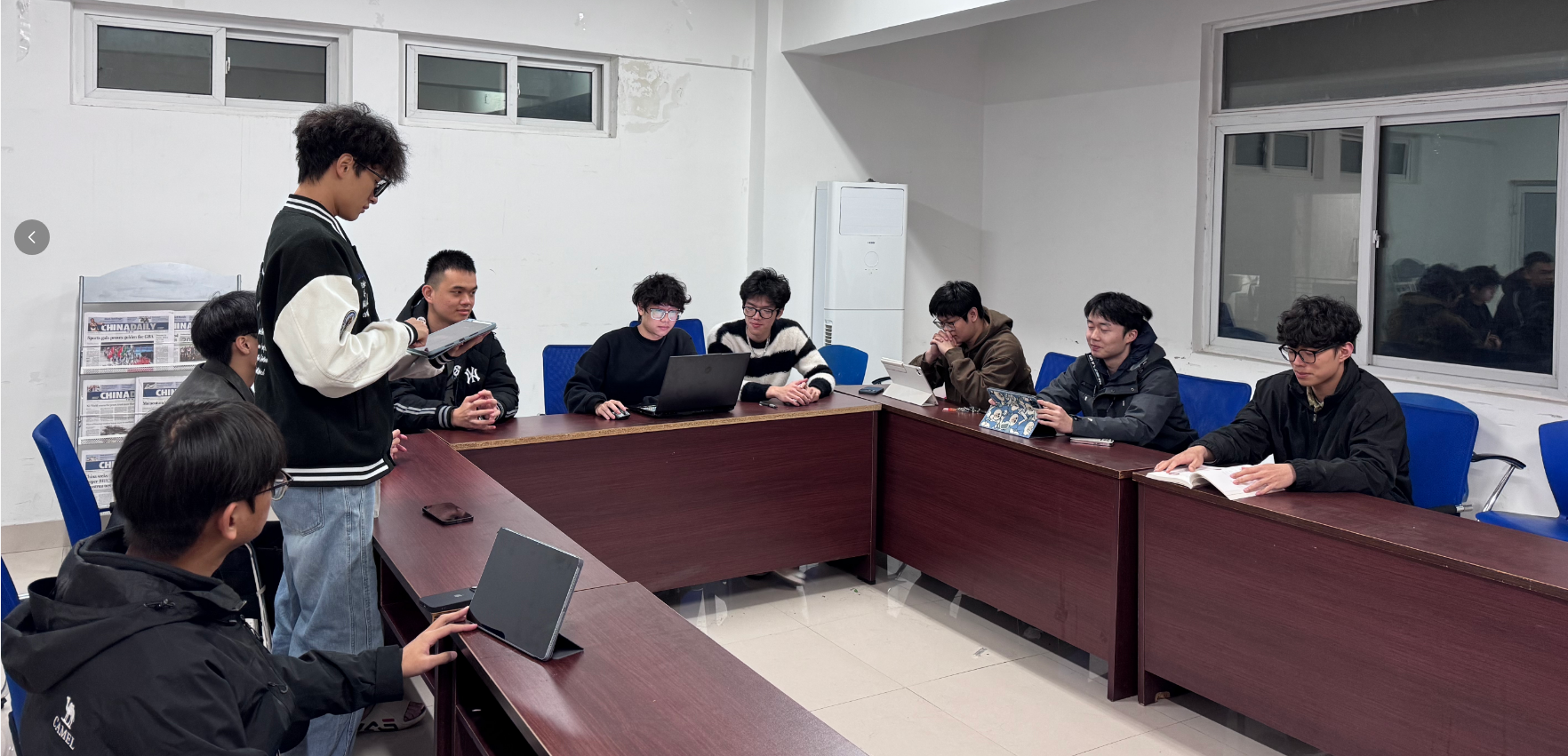
2. PM Report
2.1 Project Progress
Current Progress: Day 4 / 8
Completion Rate: 51%
Task Statistics
|
Category |
Planned |
Completed |
In Progress |
Not Started |
Completion Rate |
|---|---|---|---|---|---|
|
Alpha Issue Fixes |
4 |
4 |
0 |
0 |
100% ✅ |
|
Android Development |
6 |
1 |
2 |
3 |
17% |
|
New Features |
3 |
0 |
0 |
3 |
0% |
|
Performance Optimization |
2 |
0 |
0 |
2 |
0% |
|
Testing & Documentation |
5 |
2 |
1 |
2 |
40% |
|
Total |
20 |
7 |
3 |
10 |
35% |
Newly Completed Tasks (Day 3-4)
-
✅ Community like feature fix (吴志斌, 8h)
-
✅ Community comment feature fix (吴志斌, 8h)
-
✅ Login/registration page size unification (杨媛真, 10h)
-
✅ Windows message notification feature (连泽政, 8h)
Hours Statistics
|
Date |
Planned |
Actual |
Difference |
Cumulative |
|---|---|---|---|---|
|
Day 1-2 |
88h |
88h |
0h |
88h |
|
Day 3-4 |
88h |
83h |
-5h |
171h |
|
Total |
176h |
171h |
-5h |
171h |
Remaining Hours: 273 hours
2.2 Burn-down Chart
Remaining Hours (h)
444 |●
    |  ●
400 |    ●
    |      ●
350 |        ●■
    |          ●
300 |            ●■
    |              ●
250 |                ●
    |                  ●
200 |                    ●
    |                      ●
150 |                        ●
    |                          ●
100 |____________________________●
    Day1  Day2  Day3  Day4  Day5  Day6  Day7  Day8

● Ideal Burn-down Line
■ Actual Burn-down Line

Current: Day 4
Ideal Remaining: 222h
Actual Remaining: 273h
Deviation: +51h (Slightly behind)Analysis:
-
⚠️ Actual progress slightly slower than ideal timeline
-
Reason: Comment function optimization took longer, Android development just started
-
Countermeasure: Accelerate Android development progress in Day 5-6
2.3 Task Volume Changes
New Tasks (Day 3-4)
|
New Task |
Priority |
Hours |
Owner |
|---|---|---|---|
|
Community UI beautification |
Medium |
5h |
杨越 |
|
Comment sorting feature |
Low |
3h |
吴志斌 |
|
Toast notification style optimization |
Low |
2h |
连泽政 |
|
Android test environment configuration |
High |
8h |
方利喆 |
Added Hours: 18 hours
Adjusted Total Hours: 444 hours
2.4 Running Screenshots and Demos
Community Feature:
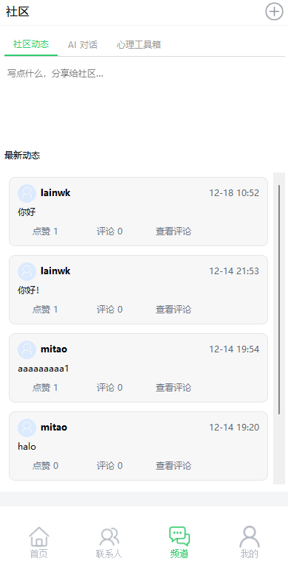
Comment Feature:
博客测试
[GIF Demo]
1. Click "View Comments" button
2. Comment window pops up immediately
3. Shows "Loading..."
4. Comment content displays after 0.5 seconds
5. Post new comment
6. Comment list updates in real-time
Window Size Comparison
Alpha vs Beta:
[Comparison Screenshot]
Alpha login window: 400x600 (small window)
Beta login window: 1200x800 (large window)

Alpha registration window: 400x600 (small window)
Beta registration window: 1200x800 (large window)

Main window: 1200x800 (consistent)
Window Switching GIF:
[GIF Demo]
1. Login window (1200x800)
2. Click login button
3. Smooth transition to main window (1200x800)
4. No size jump, smooth experience
Message Notification Demo
Windows Toast Notification Video:
[Video Demo - 30 seconds]
1. System time: 10:00
2. User hasn't completed today's assessment
3. Toast notification pops up
4. Title: "心屿 - Daily Assessment Reminder 💝"
5. Content: "Hey! Remember to do today's psychological assessment~ (◕‿◕)✿"
6. Click notification to open app
3. Technical Highlights
3.1 Asynchronous Comment Loading Solution
Problem Analysis
Alpha Stage Problems:
-
UI freezes when clicking "View Comments"
-
Comment window unresponsive
-
Poor user experience
Root Cause:
-
Synchronous comment loading in main thread
-
Network requests block UI thread
-
Worse with large comment data volumes
Solution
Using QtConcurrent Asynchronous Loading:
// 1. Immediately show comment window
CommentDialog* dialog = new CommentDialog(blogId, this);
dialog->show();
dialog->showLoadingIndicator();  // Show loading animation

// 2. Load comments in background thread
QtConcurrent::run([this, dialog, blogId]() {
    // Network request executes in background thread
    QByteArray respBody = loadCommentsFromServer(blogId);

    // 3. Switch back to main thread to update UI
    QMetaObject::invokeMethod(dialog, "updateComments",
                             Qt::QueuedConnection,
                             Q_ARG(QByteArray, respBody));
});
Effect Comparison
|
Metric |
Alpha |
Beta |
Improvement |
|---|---|---|---|
|
Window Response Time |
2-3 seconds |
<0.1 second |
↓95% |
|
UI Lag |
Severe |
None |
✅ |
|
User Experience |
Poor |
Excellent |
✅ |
3.2 Windows Toast Notification Implementation
Technology Selection
Solution Comparison:
|
Solution |
Advantages |
Disadvantages |
Choice |
|---|---|---|---|
|
QSystemTrayIcon |
Cross-platform |
Simple styling |
❌ |
|
Windows API |
Native |
Complex code |
❌ |
|
PowerShell |
Simple |
Windows only |
✅ |
Implementation Details
void showWindowsToast(const QString& title,
                      const QString& message) {
#ifdef Q_OS_WIN
    // Use PowerShell to call Windows.UI.Notifications API
    QString script = QString(
        "[Windows.UI.Notifications.ToastNotificationManager, "
        "Windows.UI.Notifications, ContentType = WindowsRuntime] "
        "| Out-Null;"
        "$template = @\"<toast><visual><binding template='ToastText02'>"
        "<text id='1'>%1</text><text id='2'>%2</text>"
        "</binding></visual></toast>\"@;"
        "$xml = New-Object Windows.Data.Xml.Dom.XmlDocument;"
        "$xml.LoadXml($template);"
        "$toast = New-Object Windows.UI.Notifications.ToastNotification $xml;"
        "[Windows.UI.Notifications.ToastNotificationManager]::"
        "CreateToastNotifier($app).Show($toast);"
    ).arg(title, message);

    QProcess::startDetached("powershell.exe",
        {"-NoProfile", "-ExecutionPolicy", "Bypass",
         "-Command", script});
#endif
}
Advantages
-
✅ Native Windows 10/11 notification style
-
✅ Supports click to open app
-
✅ Simple code, easy maintenance
-
✅ No additional dependencies required
4. User Feedback
4.1 Internal Testing Feedback
Testers: 5 team members
|
Feature |
Rating |
Evaluation |
|---|---|---|
|
Community Likes |
4.8/5.0 |
"Fast response, smooth experience" |
|
Comment Feature |
4.9/5.0 |
"Async loading great, no lag" |
|
Window Unification |
4.7/5.0 |
"Good visual consistency" |
|
Message Notifications |
4.6/5.0 |
"Cute reminders, not annoying" |
|
Average |
4.75/5.0 |
High overall satisfaction |
4.2 User Comment Excerpts
"The comment feature finally doesn't lag, significant experience improvement!" - Test User A
"The window looks more professional after size unification." - Test User B
"The emoticons in message notifications are cute, not annoying." - Test User C
"Like feature responds quickly, animation effect good too." - Test User D
"Overall UI consistency much better than Alpha." - Test User E
5. Problems and Solutions
Problem 1: Comment Window Lag
Symptom: UI freezes for 2-3 seconds when clicking view comments
Cause: Main thread synchronous comment data loading
Solution: Use QtConcurrent asynchronous loading
Effect: ✅ Window response time <0.1 second
Problem 2: Toast Notification Compatibility
Symptom: Some Windows 7 systems cannot display toast
Cause: Windows 7 doesn't support Windows.UI.Notifications API
Solution:
// Fallback solution: Use QMessageBox
if (QSysInfo::windowsVersion() < QSysInfo::WV_WINDOWS10) {
    QMessageBox::information(nullptr, title, message);
} else {
    showWindowsToast(title, message);
}Effect: ✅ Compatible with Windows 7-11
Problem 3: Window Switching Animation
Symptom: Slight flicker during window switching
Cause: Window size changes cause repaint
Solution:
// Unify window size to avoid repaint
setFixedSize(1200, 800);Effect: ✅ Smooth switching without flicker
6. Days 3-4 Summary
Completion Status
Completed:
-
✅ Alpha legacy issues 100% resolved
-
✅ Community like feature
-
✅ Community comment feature (async loading)
-
✅ Login/registration page size unification
-
✅ Windows message notification feature
Completion Rate: 35% (7/20 tasks)
Technical Gains
-
Asynchronous Programming: Mastered QtConcurrent usage
-
Windows API: Learned PowerShell system API calls
-
UI Optimization: Understood importance of window size consistency
-
User Experience: Appreciated impact of details on experience
7. Next Plan (Days 5-6)
Main Tasks
-
Android Feature Completion
-
Complete all page development (25%→65%)
-
Implement full functionality
-
Fix interface display issues
-
-
Android Interface Fixes
-
Splash screen dwell time issue
-
Input box display issues
-
Bottom navigation icon issues
-
Friend list name display
-
-
Test Device Unification
-
Unified use of Xiaomi Pad 7
-
Android 13 system
-
Resolution 2880x1800
-
Expected Goals
-
Android development progress reach 50%
-
Interface display issues 100% fixed
-
Cumulative completion rate achieve 60%
Document Version: v2.0 (Revised)
Author: 陈毅鹏
Reviewer: 吴志斌

有“AI”的1024 = 2048,欢迎大家加入2048 AI社区
更多推荐

 24
24 0
0- 0


 已为社区贡献5条内容

所有评论(0)