上传github连接超时怎么办
摘要:Git推送失败的两个解决方案。首先遇到443端口连接失败,可通过在远程地址中嵌入Token解决:删除原地址后添加https://<Token>@github.com/用户名/仓库.git。推送时出现拒绝错误,原因是远程仓库有本地不存在的文件。提供两种方案:1) 使用git pull origin main --allow-unrelated-histories合并远程更改后再推送
·
报错如下
  git push -u origin main
 fatal: unable to access 'https://github.com/MLJyyy127/NanJiang.git/': Failed to connect to github.com port 443 after 21121 ms: Could not connect to server
解决办法:将Token直接写入远程仓库地址
可以通过完成以下命令,把Token嵌入到URL中,这样Git在自动身份验证时会自动进行身份验证,无需再手动输入。
先删除之前那个连不上的远程地址:
git remote remove origin
重新添加带Token的地址: 下面命令中的<YourToken>换成你的Token,<YourUsername>换成你的用户名。
git remote add origin https://<YourToken>@github.com/YourUsername/仓库名.git
再次尝试
git push -u origin main
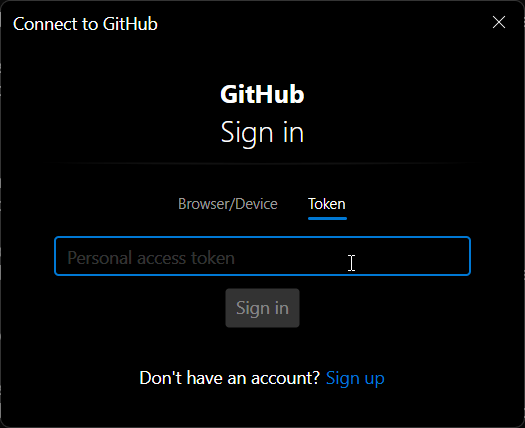
再次输入token
报错如下
git push -u origin main

 To https://github.com/xxx/xxx.git
  ! [rejected]        main -> main (fetch first)
 error: failed to push some refs to 'https://github.com/xxx/xxx.git'
 hint: Updates were rejected because the remote contains work that you do not
 hint: have locally. This is usually caused by another repository pushing to
 hint: the same ref. If you want to integrate the remote changes, use
 hint: 'git pull' before pushing again.
 hint: See the 'Note about fast-forwards' in 'git push --help' for details.
这是因为我的远程仓库里有一些我本地没有的东西,有两种解决方案:
方案一:
git pull origin main --allow-unrelated-histories
弹出了一个编辑模式
esc然后欧输入:wq,结束
输出如下
git pull origin main --allow-unrelated-histories

 remote: Enumerating objects: 3, done.
 remote: Counting objects: 100% (3/3), done.
 remote: Compressing objects: 100% (2/2), done.
 remote: Total 3 (delta 0), reused 0 (delta 0), pack-reused 0 (from 0)
 Unpacking objects: 100% (3/3), 912 bytes | 130.00 KiB/s, done.
 From https://github.com/xxx/xxx
  * branch            main       -> FETCH_HEAD
  * [new branch]      main       -> origin/main
 Merge made by the 'ort' strategy.
  README.md | 2 ++
  1 file changed, 2 insertions(+)
  create mode 100644 README.md
再次参与:
git push -u origin main
方案二:
由于我远程仓库是新建的仓库,里面只有一个readme,没什么用,可以执行下面的命令
git push -u origin main -f
注意:-f代表Force(强制)。这会直接把远程仓库构建和本地一模一样。

有“AI”的1024 = 2048,欢迎大家加入2048 AI社区
更多推荐
 4
4 0
0- 0


 已为社区贡献1条内容

所有评论(0)