【上海晶珩睿莓 1 单板计算机】人脸识别
·
【上海晶珩睿莓 1 单板计算机】人脸识别
本文介绍了上海晶珩睿莓 1 单板计算机结合 OpenCV 内置 YuNet 算法和 SFace 模型实现人脸识别的项目设计,包括环境部署、预训练模型获取、关键代码、板端推理、效果演示等流程。
项目介绍
- 准备工作:硬件连接、OpenCV 安装、所需软件包和库安装等;
- 人脸识别:模型获取、训练图片、流程图、代码、人脸识别的板端推理等;
准备工作
包括硬件连接、虚拟环境创建、OpenCV 安装、软件包和库安装等。
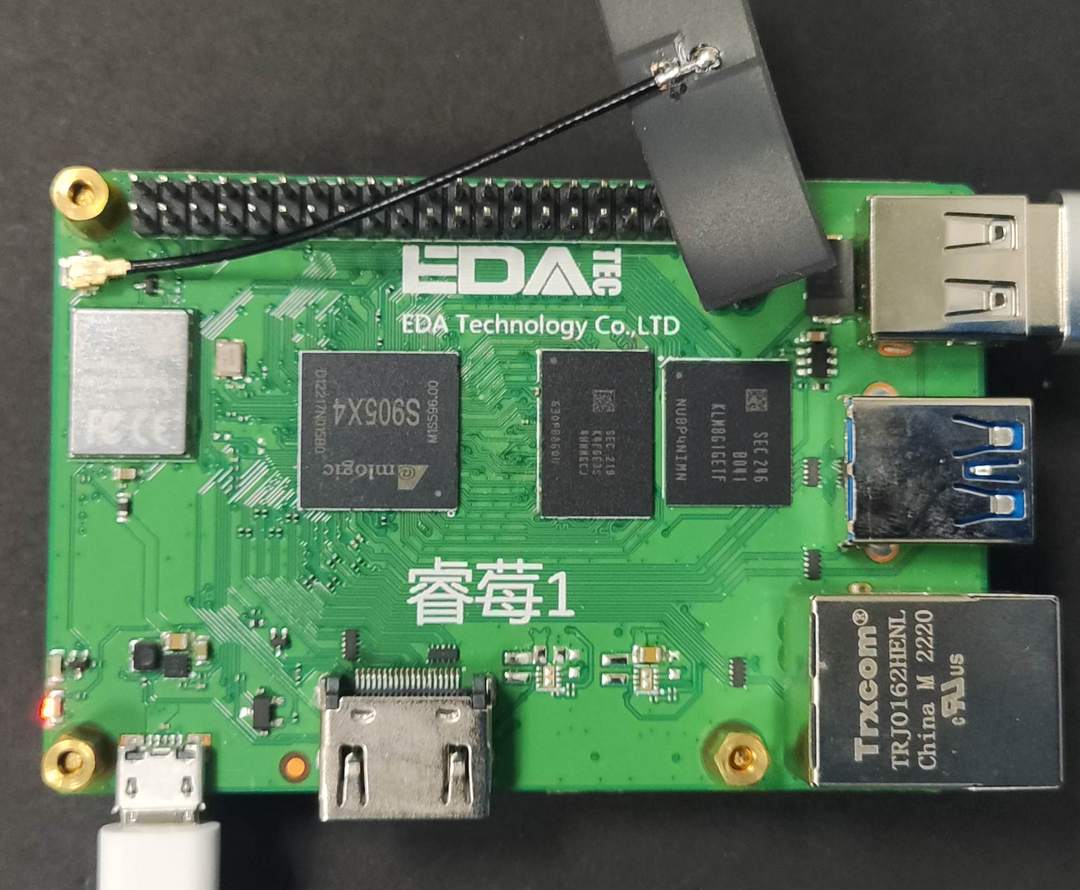
硬件连接
- 连接 WiFi 实现无线网络通信;
- 使用 Micro-USB 数据线实现设备供电;
OpenCV 安装
OpenCV 是一个开源的计算机视觉库,广泛应用于图像处理、视频分析和机器学习等领域。

为了避免影响系统 Python,采用虚拟环境的方案。
- 创建并激活虚拟环境
mkdir ~/cv && cd ~/cv    # 创建 cv 文件夹,便于管理
python3 -m venv venv     # 创建虚拟环境 venv
source venv/bin/activate # 激活虚拟环境 venv
- 安装 numpy 和 opencv
pip install -U pip numpy                          # 安装 numpy
pip install opencv-python opencv-contrib-python   # opencv 主模块及 contrib
- 验证安装
python3 -c "import cv2,sys,numpy;print('OpenCV:',cv2.__version__,'NumPy:',numpy.__version__)"
- 输出版本号

详见:OpenCV .
人脸识别
OpenCV 作为计算机视觉领域的核心库,其 Python 接口提供了高效的人脸检测与识别能力。
OpenCV 注册并训练目标人脸,使用 YuNet 模型检测人脸,之后结合 sface 模型识别人脸。
详见:opencv_zoo/models/face_recognition_sface · GitHub .
模型
下载所需模型文件;
wget https://github.com/opencv/opencv_zoo/blob/main/models/face_detection_yunet/face_detection_yunet_2023mar.onnx
wget https://github.com/opencv/opencv_zoo/blob/main/models/face_recognition_sface/face_recognition_sface_2021dec.onnx
将文件存放在 ./model 路径
参考:SFace Recognition | Github .
训练图片
- 将目标人脸图片裁剪至合适大小;
- 文件名为对应的人名;
- 置于
./face文件夹。
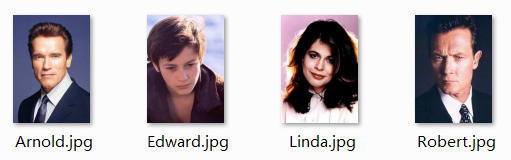
文件目录
~/AI_Vision/faceRecognition $ tree
.
├── face
│   ├── Arnold.jpg
│   ├── Edward.jpg
│   ├── Linda.jpg
│   └── Robert.jpg
├── fr_onnx.py
├── img
│   ├── test2.jpg
│   └── test.jpg
└── model
    ├── face_detection_yunet_2023mar.onnx
    └── face_recognition_sface_2021dec.onnx
将目标识别图片置于 ./img 文件夹。
流程图
代码
终端执行 touch lpr_onnx.py 新建程序文件,并添加如下代码
#!/usr/bin/env python3
import cv2
import argparse
import os
import numpy as np
from pathlib import Path

# ------------------- Face Detection ------------------
def detect_faces_yunet(image_path: str,
                       conf_threshold: float = 0.8,
                       model_path: str = "./model/face_detection_yunet_2023mar.onnx") -> None:
    img = cv2.imread(image_path)
    if img is None:
        raise FileNotFoundError(image_path)
    h, w = img.shape[:2]

    # 初始化 YuNet
    detector = cv2.FaceDetectorYN_create(
        model=model_path,
        config="",
        input_size=(w, h),
        score_threshold=conf_threshold,
        nms_threshold=0.4,
        top_k=5000
    )
    detector.setInputSize((w, h))

    # detect 返回 (status, faces)  取第 1 个元素
    faces = detector.detect(img)[1]
    if faces is None:
        faces = []

    for face in faces:
        x, y, w_box, h_box, *_ = map(int, face[:4])
        score = face[-1]
        cv2.rectangle(img, (x, y), (x + w_box, y + h_box), (0, 255, 0), 2)
        label = f"{score:.2f}"
        label_size, _ = cv2.getTextSize(label, cv2.FONT_HERSHEY_SIMPLEX, 0.5, 1)
        cv2.rectangle(img, (x, y - label_size[1] - 4),
                      (x + label_size[0], y), (0, 255, 0), -1)
        cv2.putText(img, label, (x, y - 2), cv2.FONT_HERSHEY_SIMPLEX,
                    0.5, (0, 0, 0), 1, cv2.LINE_AA)

    cv2.namedWindow("YuNet Face Detection", cv2.WINDOW_NORMAL)
    cv2.imshow("YuNet Face Detection", img)
    cv2.waitKey(0)
    cv2.destroyAllWindows()

# -------------------- Face Recognition -------------------
def recognize_faces(img_path: str,
                    face_dir: str = "./face",
                    model_path: str = "./model/face_detection_yunet_2023mar.onnx",
                    rec_model: str = "./model/face_recognition_sface_2021dec.onnx") -> None:
    """
    1. 读取 img_path 并检测人脸
    2. 对 face_dir 下的每张注册照提取特征
    3. 将目标人脸与注册照逐一比对,取最高余弦相似度
    4. 弹窗画出框+姓名(或 Unknown)
    """
    img = cv2.imread(img_path)
    if img is None:
        raise FileNotFoundError(img_path)
    h, w = img.shape[:2]

    # 检测器
    detector = cv2.FaceDetectorYN_create(
        model=model_path, config="", input_size=(w, h),
        score_threshold=0.8, nms_threshold=0.4, top_k=5000)
    detector.setInputSize((w, h))
    faces = detector.detect(img)[1]
    if faces is None:
        print("未检测到人脸")
        return

    # 识别器
    recognizer = cv2.FaceRecognizerSF_create(rec_model, "")

    # 注册照特征库
    regist = {}  # name -> feature
    for fp in Path(face_dir).glob("*.*"):
        name = fp.stem
        reg_img = cv2.imread(str(fp))
        if reg_img is None:
            continue
        rh, rw = reg_img.shape[:2]
        detector.setInputSize((rw, rh))
        reg_faces = detector.detect(reg_img)[1]
        if reg_faces is not None:
            # 只取第一张脸
            aligned = recognizer.alignCrop(reg_img, reg_faces[0])
            feat = recognizer.feature(aligned)
            regist[name] = feat
    detector.setInputSize((w, h))

    if not regist:
        print("注册库为空")
        return

    # 逐一比对
    for face in faces:
        aligned = recognizer.alignCrop(img, face)
        feat = recognizer.feature(aligned)
        best_score, best_name = -1, "Unknown"
        for name, reg_feat in regist.items():
            score = recognizer.match(feat, reg_feat, cv2.FaceRecognizerSF_FR_COSINE)
            if score > best_score:
                best_score, best_name = score, name
        # 画框+名字
        x, y, w_box, h_box = map(int, face[:4])

        SIM_TH = 0.3                         # 可调,OpenCV 推荐 0.3~0.4
        if best_score < SIM_TH:
            best_name = "Unknown"

        print(f"[{best_name}]  score={best_score:.3f}  box=({x},{y},{w_box},{h_box})")
        color = (0, 255, 0) if best_name != "Unknown" else (0, 0, 255)
        cv2.rectangle(img, (x, y), (x + w_box, y + h_box), color, 2)
        cv2.putText(img, f"{best_name}:{best_score:.2f}",
                    (x, y - 5), cv2.FONT_HERSHEY_SIMPLEX, 0.6, color, 2)

    cv2.namedWindow("Face Recognition", cv2.WINDOW_NORMAL)
    cv2.imshow("Face Recognition", img)
    cv2.waitKey(0)
    cv2.destroyAllWindows()

# ---------- 命令行入口 ----------
if __name__ == "__main__":
    parser = argparse.ArgumentParser()
    parser.add_argument("-i", "--image", required=True, help="目标图片路径")
    parser.add_argument("-m", "--mode", choices=["detect", "recognize"],
                        default="recognize", help="detect:仅检测;recognize:识别")
    args = parser.parse_args()

    if args.mode == "detect":
        detect_faces_yunet(args.image)
    else:
        recognize_faces(args.image)
保存代码。
效果
- 终端执行
python fr_onnx.py -i ./img/test.jpg指令,对目标图片进行人脸识别; - 终端打印识别到的人脸名称、置信度、坐标等信息;

- 弹窗显示识别结果
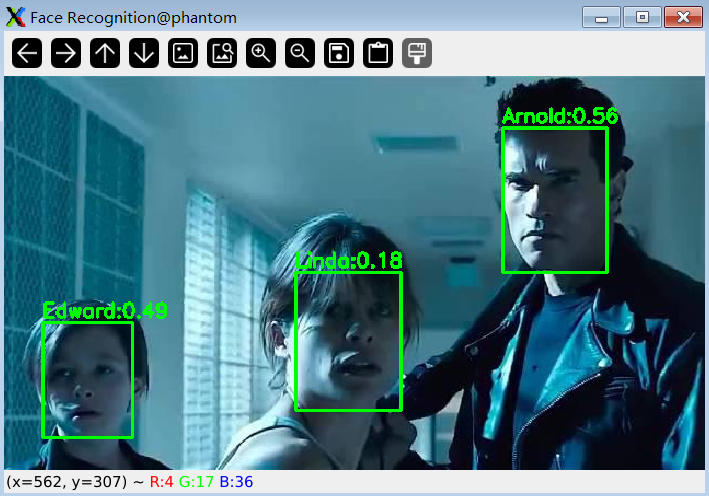
- 更多测试效果
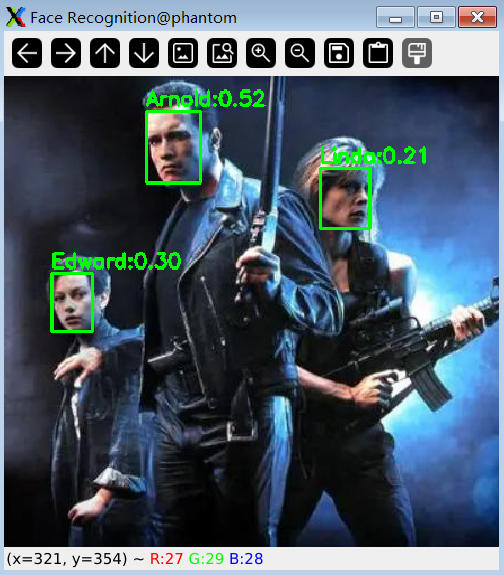
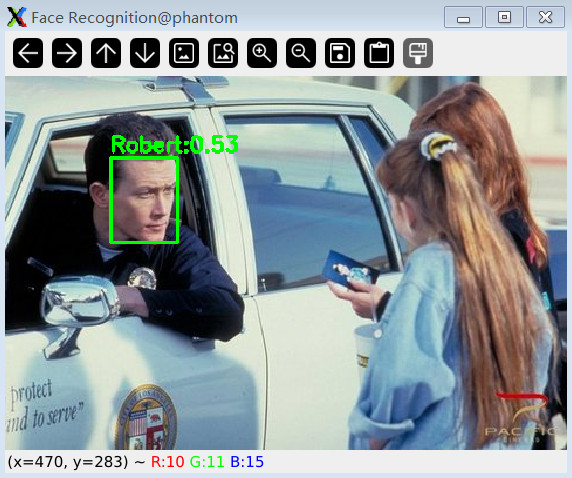
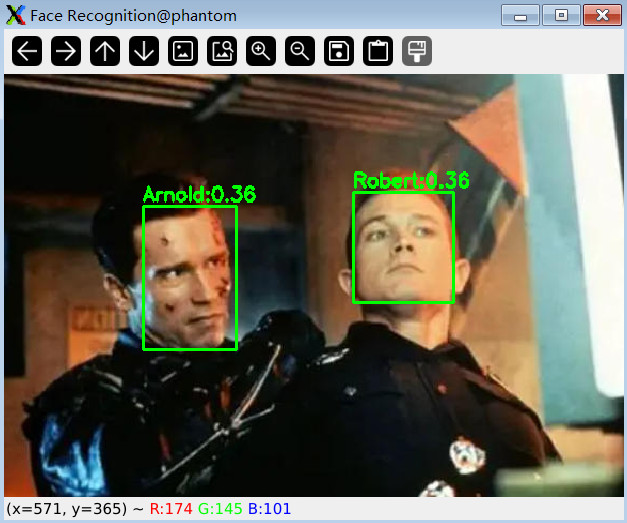
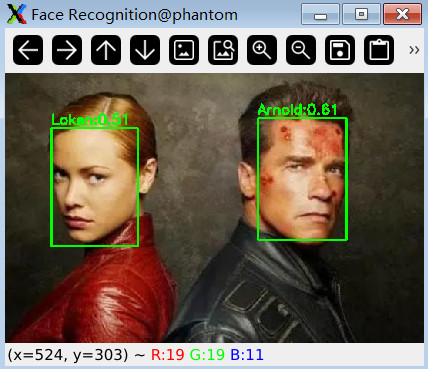
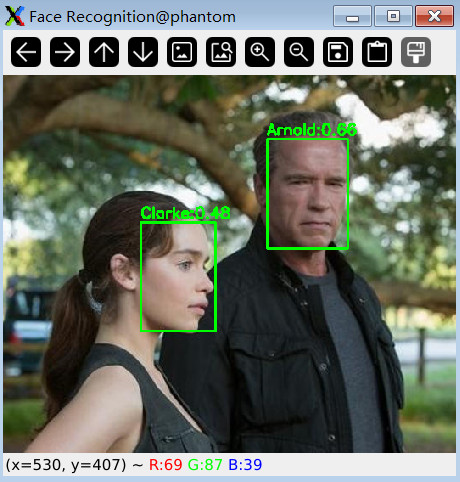
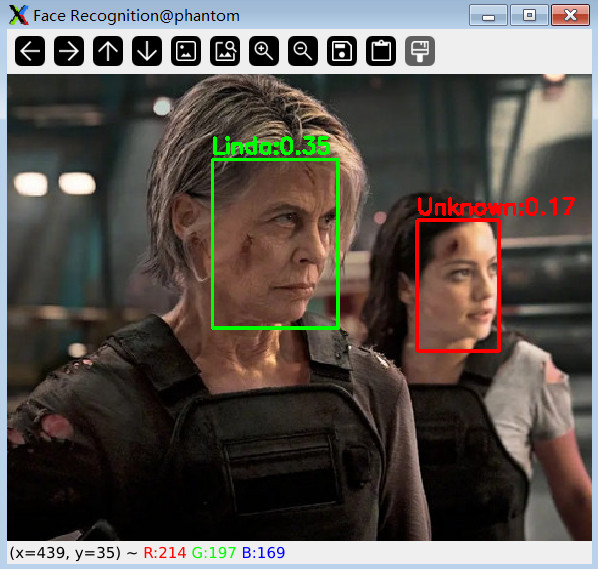
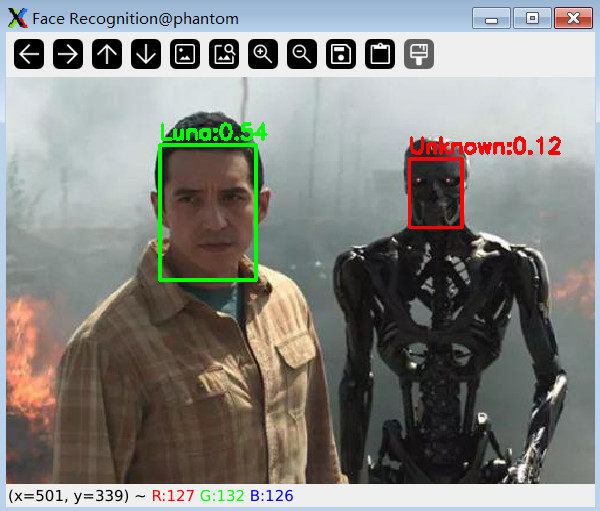
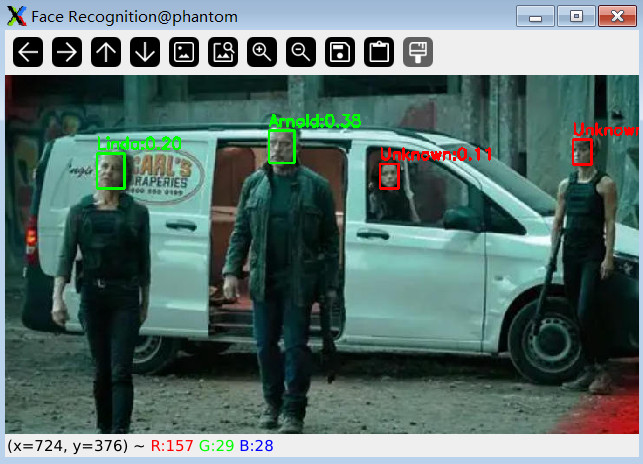
总结
本文介绍了上海晶珩睿莓 1 单板计算机结合 OpenCV 内置 YuNet 算法和 SFace 模型实现人脸识别的项目设计,包括环境部署、预训练模型获取、关键代码、板端推理、效果演示等流程,为相关产品在边缘 AI 领域的快速开发和应用设计提供了参考。

有“AI”的1024 = 2048,欢迎大家加入2048 AI社区
更多推荐

 28
28 0
0- 0


 已为社区贡献24条内容

所有评论(0)