如何使用SpringAI编写自己的Manus
本文介绍了如何使用SpringAI构建智能体(AI Agent),涵盖核心概念与关键技术。智能体是以大模型为核心,具备记忆、知识库和工具调用能力的自主系统,能感知环境、规划任务并执行多步推理。文章详细解析了智能体的三大关键技术:CoT思维链(分步推理)、Agent Loop(自主执行循环)和ReAct模式(推理-行动-观察循环)。此外,还阐述了实现智能体所需的支持系统,包括大模型、记忆系统、知识库
如何使用SpringAI编写属于自己的Manus智能体
在 AI Agent 越来越火的今天,“会用大模型”已经不够了,更重要的是把它真正接进业务里,让它能调用工具、记住上下文、按流程办事。本文将从 0 到 1 带你用 SpringAI 搭建一个属于自己的 Manus:包含基础架构、会话管理、工具调用与流式输出,最终做出一个能落地的可扩展 Agent。
什么是智能体?
智能体(Aget)是一个能够感知环境、进行推理、制定计划、做出决策并自主采取行动以实现特定目标的Al系
统。它以大语言模型为核心,集成记忆、知识库和工具等能力为一体,构造了完整的决策能力、执行能力和记忆
能力,就像一个有主观能动性的人类一样。
与普通的AI大模型不同,智能体能够:
- 感知环境:通过各种输入渠道获取信息(多模态),理解用户需求和环境状态
- 自主规划任务步骤:将复杂任务分解为可执行的子任务,并设计执行顺序
- 主动调用工具完成任务:根据需要选择并使用各种外部工具和API,扩展自身能力边界
- 进行多步推理:通过思维链(Chain of Thought)逐步分析问题并推导解决方案
- 持续学习和记忆过去的交互:保持上下文连贯性,利用历史交互改进决策
- 根据环境反馈调整行为:根据执行结果动态调整策略,实现闭环优化
智能体实现的关键技术
在自主开发智能体前,我们要先了解一下智能体的关键实现技术,也就是方案设计阶段做的事情。
CoT思维链
CoT(Chain of Thought)思维链是一种让Al像人类一样"思考”的技术,帮助AI在处理复杂问题时能够按步骤思
考。对于复杂的推理类问题,先思考后执行,效果往往更好。而且还可以让模型在生成答案时展示推理过程,便
于我们理解和优化AI。
CoT的实现方式其实很简单,可以在输入Prompt时,给模型提供额外的提示或引导,比如“让我们一步一步思考
这个问题”,让模型以逐步推理的方式生成回答。还可以运用Prompt的优化技巧few shot,给模型提供包含思维
链的示例问题和答案,让模型学习如何构建自己的思维链。
在OpenManus早期版本中,可以看到实现CoT的系统提示词:
You are an assistant focused on Chain of Thought reasoning. For each question, please follow these steps:

1. Break down the problem: Divide complex problems into smaller, more manageable parts
2. Think step by step: Think through each part in detail, showing your reasoning process
3. Synthesize conclusions: Integrate the thinking from each part into a complete solution
4. Provide an answer: Give a final concise answer

Your response should follow this format:
Thinking: [Detailed thought process, including problem decomposition, reasoning for each step, and analysis]
Answer: [Final answer based on the thought process, clear and concise]

Remember, the thinking process is more important than the final answer, as it demonstrates how you reached your conclusion.
Agent Loop执行循环
Agent Loop是智能体最核心的工作机制,指智能体在没有用户输入的情况下,自主重复执行推理和工具调用的过
程。
在传统的聊天模型中,每次用户提问后,AI回复一次就结束了。但在智能体中,A!回复后可能会继续自主执行后
续动作(如调用工具、处理结果、继续推理),形成一个自主执行的循环,直到任务完成(或者超出预设的最大步
骤数)。
Agent Loop的实现很简单,参考代码如下:
public String execute() {
    List<String> results = new ArrayList<>();
    while (currentStep < MAX_STEPS && !isFinished) {
        currentStep++;
        // 这里实现具体的步骤逻辑
        String stepResult = executeStep();
        results.add("步骤 " + currentStep + ": " + stepResult);
    }
    if (currentStep >= MAX_STEPS) {
        results.add("达到最大步骤数: " + MAX_STEPS);
    }
    return String.join("\n", results);
}
ReAct模式
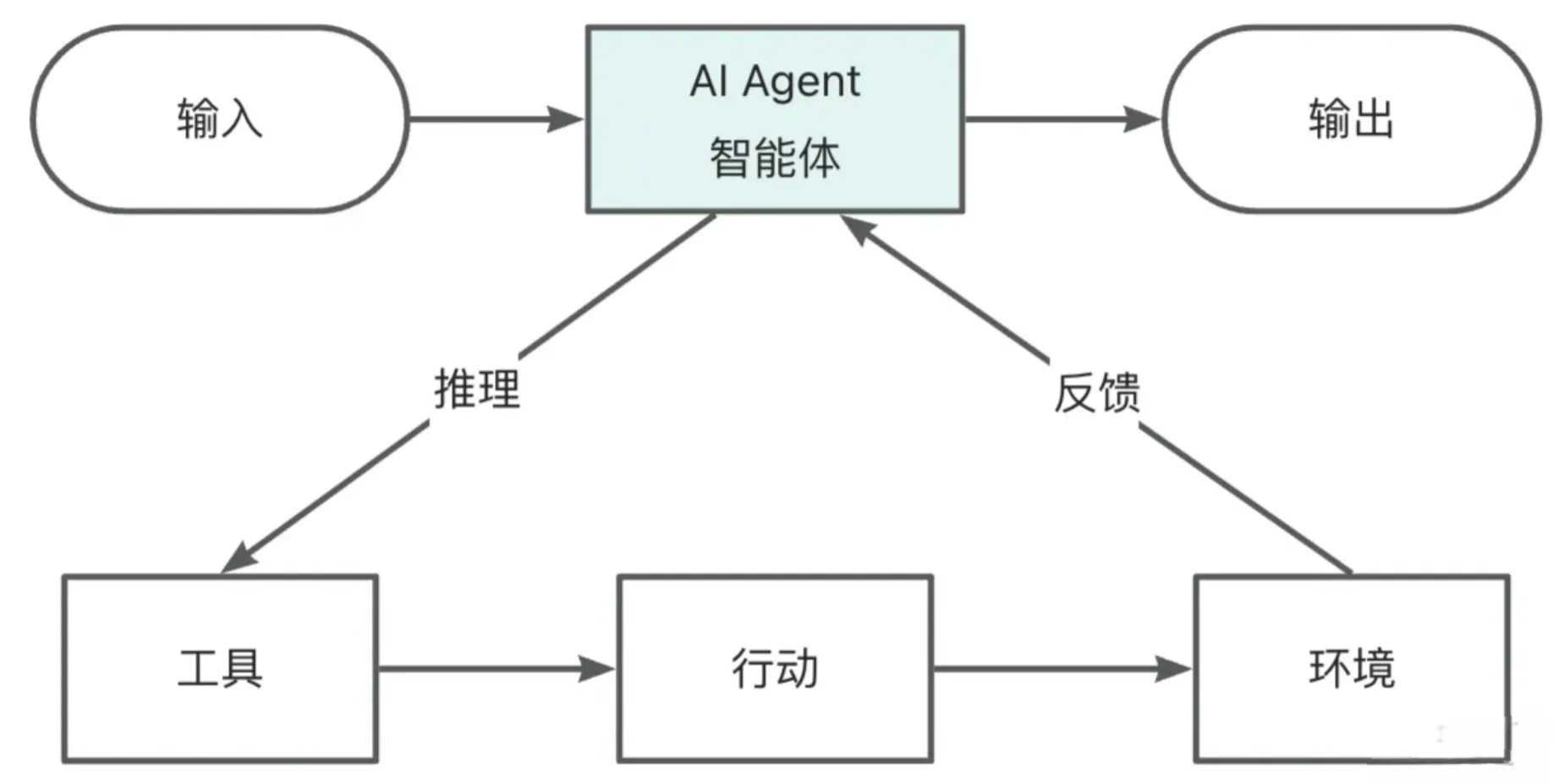
ReAct(Reasoning+Acting)是一种结合推理和行动的智能体架构,它模仿人类解决问题时"思考-行动-观察’
的循环,目的是通过交互式决策解决复杂任务,是目前最常用的智能体工作模式之一。
核心思想:
- 推理(Reason):将原始问题拆分为多步骤任务,明确当前要执行的步骤,比如“第一步需要打开编程导航网
站”。 - 行动(Act):调用外部工具执行动作,比如调用搜索引擎、打开浏览器访问网页等。
- 观察(Observe):获取工具返回的结果,反馈给智能体进行下一步决策。比如将打开的网页代码输入给Al。
- 循环迭代:不断重复上述3个过程,直到任务完成或达到终止条件。
ReAct流程如图:
代码示例:
void executeReAct(String task) {
    String state = "开始";

    while (!state.equals("完成")) {
        // 1. 推理 (Reason)
        String thought = "思考下一步行动";
        System.out.println("推理: " + thought);

        // 2. 行动 (Act)
        String action = "执行具体操作";
        System.out.println("行动: " + action);

        // 3. 观察 (Observe)
        String observation = "观察执行结果";
        System.out.println("观察: " + observation);

        // 更新状态
        state = "完成";
    }
}
所需支持的系统
除了基本的工作机制外,智能体的实现还依赖于很多支持系统。
1)首先是AI大模型,这个就不多说了,大模型提供了思考、推理和决策的核心能力,越强的AI大模型通常执行
任务的效果越好。
2)记忆系统
智能体需要记忆系统来存储对话历史、中间结果和执行状态,这样它才能够进行连续对话并根据历史对话分析接
下来的工作步骤。如使用Spring Al的ChatMemory实现对话记忆。
3)知识库
尽管大语言模型拥有丰富的参数知识,但针对特定领域的专业知识往往需要额外的知识库支持。之前我们学习
过,通过RAG检索增强生成+向量数据库等技术,智能体可以检索并利用专业知识回答问题。
4)工具调用
工具是扩展智能体能力边界的关键,智能体通过工具调用可以访问搜索引擎、数据库、API接口等外部服务,极大
地增强了其解决实际问题的能力。当然,MCP也可以算是工具调用的一种。
接下来我们将使用SpringAI对这些特性进行实现,以便于我们参考OpenManus构建自己的智能体
SpringAI接入大模型
SpringAI
Spring Al是Spring生态系统的新成员,旨在简化Al功能与Spring应用的集成。Spring Al通过提供统一接口、
支持集成多种AI服务提供商和模型类型、各种AI开发常用的特性(比如RAG知识库、Tools工具调用和MCP模
型上下文协议),简化了AI应用开发代码,使开发者能够专注于业务逻辑,提高了开发效率。
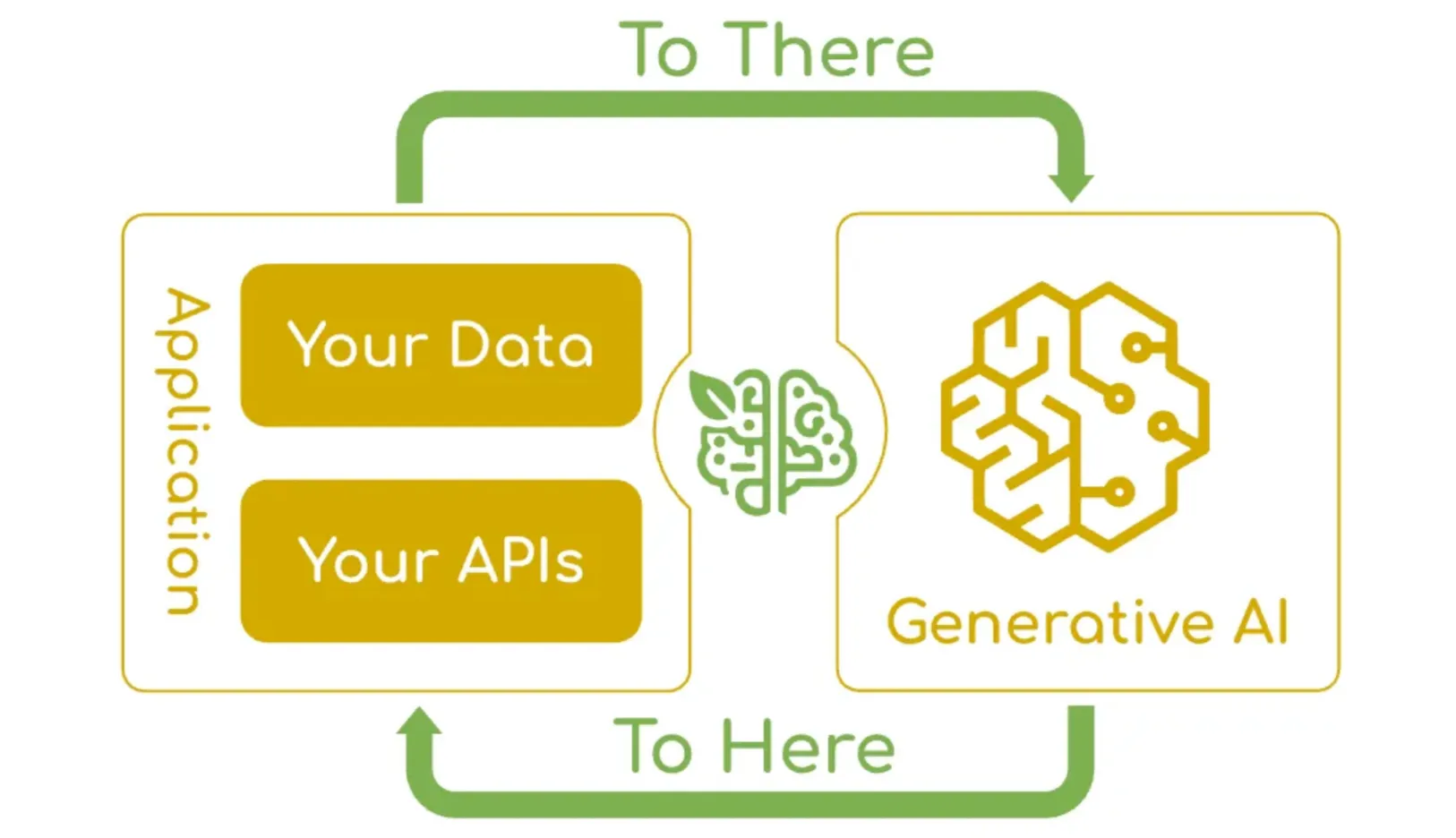
Spring Al的核心特性如下,参考官方文档:
- 跨AI供应商的可移植API支持:适用于聊天、文本转图像和嵌入模型,同时支持同步和流式API选项,并可
访问特定于模型的功能。 - 支持所有主流Al模型供应商:如Anthropic、OpenAl、微软、亚马逊、谷歌和Ollama,支持的模型类型包
括:聊天补全、嵌入、文本转图像、音频转录、文本转语音 - 结构化输出:将Al模型输出映射到Pojo(普通Java对象)。
- 支持所有主流向量数据库:如Apache Cassandra、Azure Cosmos DB、Azure Vector Search、Chroma、Elasticsearch、GemFire、MariaDB、Milvus、MongoDB Atlas、Neo4j、OpenSearch、Oracle、PostgreSQL/PGVector、PineCone、Qdrant、Redis、SAP Hana、Typesense和Weaviate.
- 跨向量存储供应商的可移植API:包括新颖的类SQL元数据过滤API。
- 工具/函数调用:允许模型请求执行客户端工具和函数,从而根据需要访问必要的实时信息并采取行动。
- 可观测性:提供与A!相关操作的监控信息。
- 文档ETL框架:适用于数据工程场景。
- AI模型评估工具:帮助评估生成内容并防范幻觉响应。
- Spring Boot自动配置和启动器:适用于Al模型和向量存储。
- ChatClient API:与Al聊天模型通信的流式API,用法类似于WebClient和RestClient API。
- Advisors API::封装常见的生成式AI模式,转换发送至语言模型(LLM)和从语言模型返回的数据,并提供
跨各种模型和用例的可移植性。 - 支持聊天对话记忆和检索增强生成(RAG)。
代码编写
- 引入依赖
<dependency
	<groupId>com.alibaba.cloud.ai</groupId>
    <artifactId>spring-ai-alibaba-starter-dashscope</artifactId>
</dependency>
- 配置文件
  ai:
    dashscope:
      api-key: <-Your owen API->
      chat:
        options:
          model: qwen3-max
      embedding:
        options:
          model: text-embedding-v4
          dimensions: 1024
- 编写测试代码
// 取消注释即可在 SpringBoot 项目启动时执行
@Component
public class SpringAiAiInvoke implements CommandLineRunner {

    @Resource
    private ChatModel dashscopeChatModel;

    @Override
    public void run(String... args) throws Exception {
        AssistantMessage output = dashscopeChatModel.call(new Prompt("你好"))
                .getResult()
                .getOutput();
        System.out.println(output.getText());
    }
}
记忆系统
没有记忆的智能体只能做一次性问答;有了记忆,它才能在多轮对话中维持上下文,并保存中间结论、计划、执行状态。Spring AI 提供了 ChatMemory 体系,常见做法是按 sessionId 维度保存历史消息。
下面给出一个“面向会话”的 Memory 配置示例(你可以替换为 Redis/DB 持久化版本):
@Configuration
public class MemoryConfig {

    @Bean
    public ChatMemory chatMemory() {
        // 简化示例:用内存保存(生产建议换 Redis / DB)
        return new InMemoryChatMemory();
    }
}
有了 ChatMemory 之后,我们可以把智能体对话封装成一个 Service:每次请求带上 sessionId,从记忆中取出历史,再把本轮消息追加进去。
@Service
@RequiredArgsConstructor
public class AgentService {

    private final ChatClient chatClient;
    private final ChatMemory chatMemory;

    public String chat(String sessionId, String userMessage) {
        // 1) 取出历史消息
        List<Message> history = chatMemory.get(sessionId);

        // 2) 组装本轮 messages(System + history + user)
        List<Message> messages = new ArrayList<>();
        messages.add(new SystemMessage(AgentPrompts.SYSTEM));
        messages.addAll(history);
        messages.add(new UserMessage(userMessage));

        // 3) 调用大模型
        String answer = chatClient.prompt()
                .messages(messages)
                .call()
                .content();

        // 4) 写入记忆:用户消息 + AI 回复
        chatMemory.add(sessionId, new UserMessage(userMessage));
        chatMemory.add(sessionId, new AssistantMessage(answer));

        return answer;
    }
}
RAG 知识库集成
RAG 的基本概念
什么是 RAG?
RAG(Retrieval-Augmented Generation,检索增强生成)是一种将信息检索与大模型生成结合的混合架构,用于缓解大模型的知识时效性不足与幻觉问题。
从流程上看,RAG 会在大模型生成回答之前,先从外部知识库中检索相关内容,并将检索结果作为额外上下文注入到提示词中,从而引导模型生成更准确、可追溯的回答。
RAG 工作流程
1)文档收集与切割
文档收集:从网页、PDF、数据库等来源获取原始文档
文档预处理:清洗、去噪、标准化文本格式
文档切割:将长文档拆分为适合检索的片段(chunks),常见策略包括:
- 固定大小(如 512 tokens)
- 语义边界(段落、章节)
- 递归切割(递归字符/分隔符策略)

2)向量转换与存储
向量转换:使用 Embedding 模型将文本块转为高维向量,以表示语义信息
向量存储:将向量与原文块一起写入向量数据库,以支持高效相似度搜索

3)检索与过滤
查询处理:将用户问题也转换为向量
过滤机制:可基于元数据、关键词或自定义规则过滤候选文档
相似度搜索:在向量库中检索最相似的 chunks(常见:余弦相似度、欧氏距离)
上下文组装:将检索到的多个 chunks 拼装为连续上下文
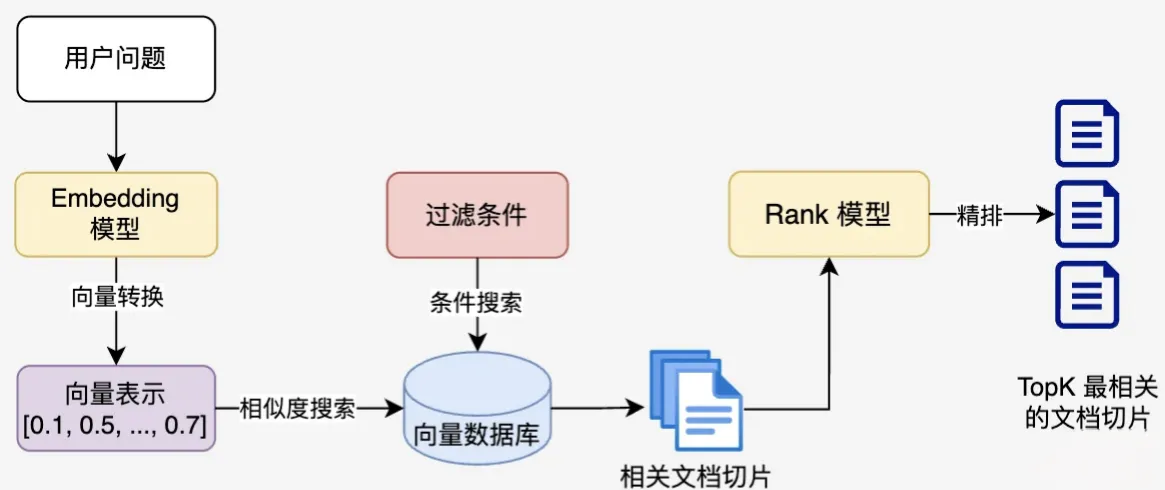
4)查询增强与生成
提示词组装:将“检索到的上下文 + 用户问题”拼为增强提示词
上下文融合:大模型基于增强提示词生成答案
源引用:可在回答中附带引用来源(可选)
后处理:格式化、摘要、结构化输出等(可选)
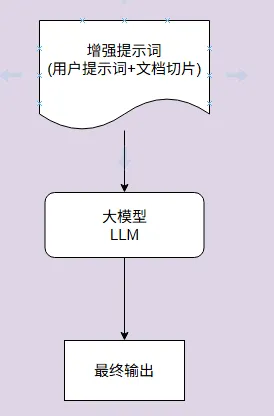
完整工作流程示意
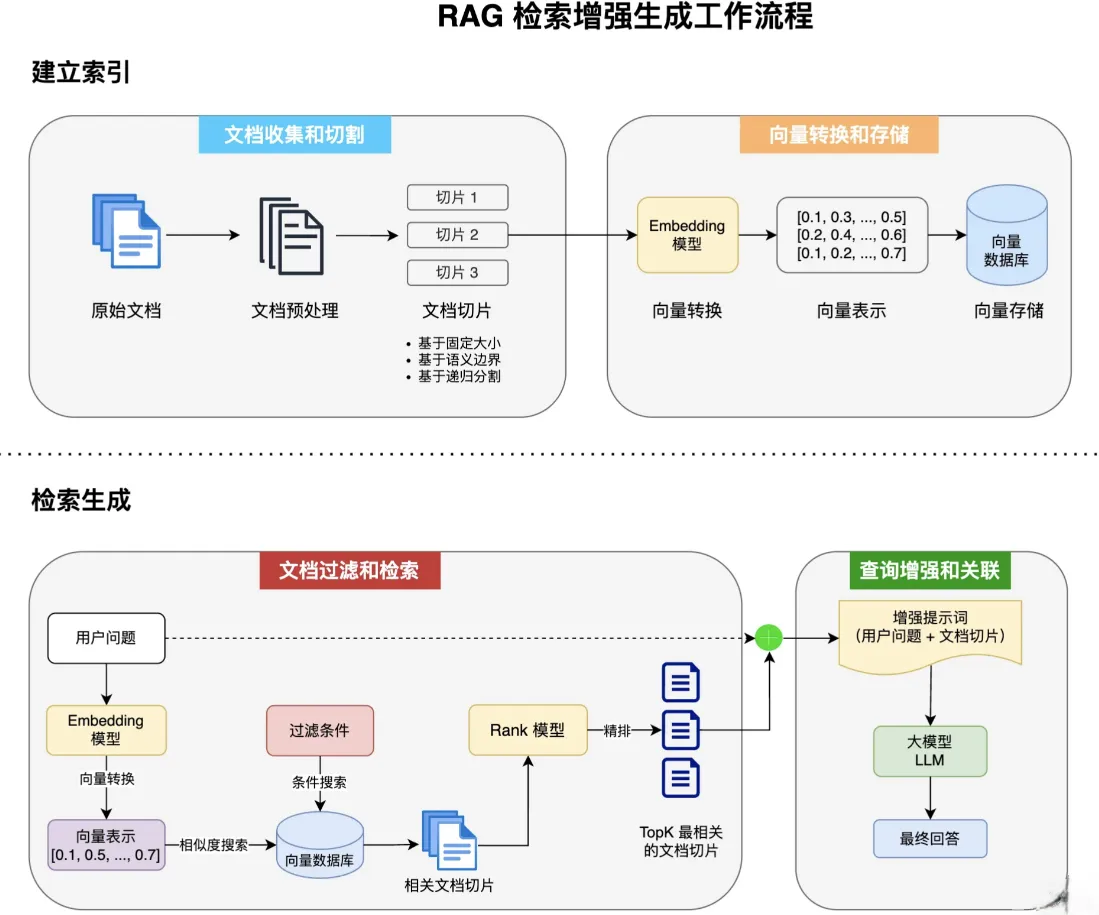
Spring AI + 本地知识库(简化版 RAG)
Spring AI 为 RAG 提供了全流程支持,可参考官方文档:
- Spring AI RAG:https://docs.spring.io/spring-ai/reference/api/retrieval-augmented-generation.html
- Spring AI Alibaba RAG:https://java2ai.com/docs/1.0.0-M6.1/tutorials/rag/
标准 RAG 开发步骤通常是:
- 文档收集和切割
- 向量转换和存储
- 切片过滤和检索
- 查询增强和关联
为了快速跑通第一个 RAG,我们做一个可落地的简化:
- 文档准备
- 文档读取
- 向量转换与存储
- 查询增强(Advisor)
1)文档准备
这里选择开源菜谱/烹饪指南作为知识库来源:
- https://github.com/Anduin2017/HowToCook
- https://github.com/Gar-b-age/CookLikeHOC
2)文档读取(ETL:Extract → Transform → Load)
Spring AI 提供 ETL Pipeline 组件,典型链路为:
- DocumentReader:读取原始文档 → 文档列表
- DocumentTransformer:清洗/切割/增强 → 处理后的文档列表
- DocumentWriter:写入存储(向量库/其它)
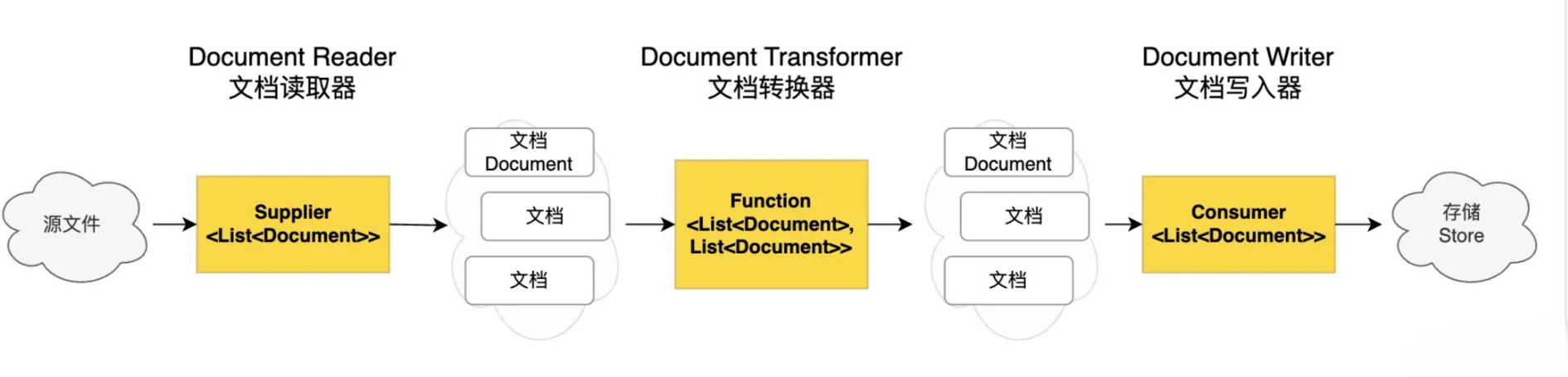
引入 PDF Reader 依赖
<dependency>
  <groupId>org.springframework.ai</groupId>
  <artifactId>spring-ai-pdf-document-reader</artifactId>
</dependency>
编写文档加载器:读取 classpath 下的 PDF
在项目根目录下新建 rag 包,编写 CookerAppDocumentLoader 负责读取所有 PDF 并转为 Document 列表。
小提示:资源匹配建议使用
classpath:document/*.pdf,避免
/**
 * 知识库文件加载
 *
 * @author: cheng fu
 **/
@Component
@Slf4j
public class CookerAppDocumentLoader {

    private final ResourcePatternResolver resourcePatternResolver;

    public CookerAppDocumentLoader(ResourcePatternResolver resourcePatternResolver) {
        this.resourcePatternResolver = resourcePatternResolver;
    }

    public List<Document> loadPDFs() {
        List<Document> allDocuments = new ArrayList<>();
        try {
            Resource[] resources = resourcePatternResolver.getResources("classpath:document/*.pdf");
            for (Resource resource : resources) {
                PdfDocumentReaderConfig config = PdfDocumentReaderConfig.builder()
                        .withPageTopMargin(0)
                        .withPageExtractedTextFormatter(ExtractedTextFormatter.builder()
                                .withNumberOfTopTextLinesToDelete(0)
                                .build())
                        .withPagesPerDocument(1) // 每页作为一个 Document
                        .build();

                PagePdfDocumentReader reader = new PagePdfDocumentReader(resource, config);
                allDocuments.addAll(reader.get());
            }
        } catch (IOException e) {
            log.error("Document loader failed", e);
        }
        return allDocuments;
    }
}
3)向量转换与存储(SimpleVectorStore)
为了先把链路跑通,可以使用 Spring AI 内置的内存向量库 SimpleVectorStore。它实现了 VectorStore 接口,同时具备写入与检索能力。
@Configuration
@Slf4j
public class CookerAppVectorStoreConfig {

    @Resource
    private CookerAppDocumentLoader cookerAppDocumentLoader;

    @Bean
    VectorStore cookerAppVectorStore(EmbeddingModel dashscopeEmbeddingModel) {
        SimpleVectorStore simpleVectorStore = SimpleVectorStore.builder(dashscopeEmbeddingModel)
                .build();

        // 加载并写入文档
        List<Document> documents = cookerAppDocumentLoader.loadPDFs();
        simpleVectorStore.add(documents);

        return simpleVectorStore;
    }
}
4)查询增强(QuestionAnswerAdvisor)
Spring AI 的 Advisor 能力可以直接把 RAG 逻辑“挂”到对话链路上。常用的两个 Advisor:
QuestionAnswerAdvisor:简单易用,适合快速上手RetrievalAugmentationAdvisor:可扩展性更强,适合生产级复杂策略
这里使用 QuestionAnswerAdvisor:当用户提问时,Advisor 会先去向量库检索相关文档,然后把检索结果拼进提示词,再交给模型生成答案。
public String doChatWithRag(String message, String chatId) {
    ChatResponse chatResponse = chatClient
            .prompt()
            .user(message)
            .advisors(advisorSpec -> advisorSpec.param(ChatMemory.CONVERSATION_ID, chatId))
            .advisors(QuestionAnswerAdvisor.builder(cookerAppVectorStore).build())
            .call()
            .chatResponse();

    String content = chatResponse.getResult().getOutput().getText();
    log.info("content: {}", content);
    return content;
}
效果示意:
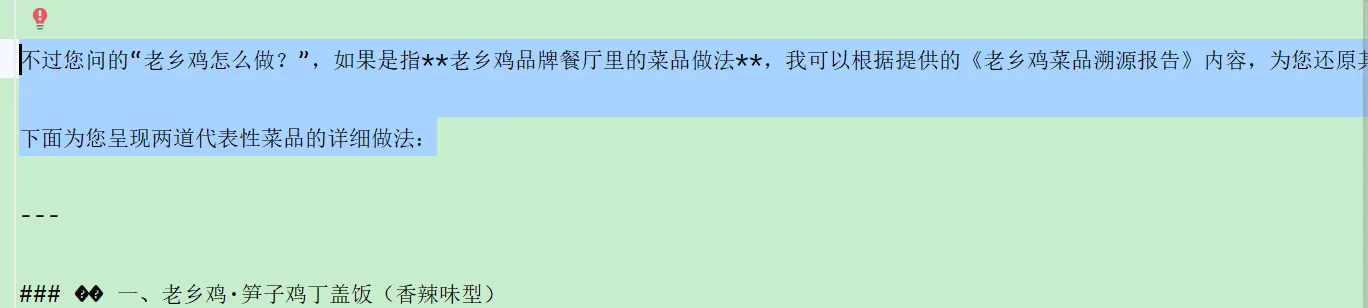
基于 PGVector 实现向量存储(生产更常用)
PGVector 是 PostgreSQL 的向量扩展,能在关系型数据库中存储/检索向量数据。它的优势是:很多企业原本就依赖 PostgreSQL,直接加扩展即可支持向量检索,不必额外维护一套独立向量库,成本低、易落地。
安装参考(示例):
- https://cloud.baidu.com/article/3229759
- https://blog.csdn.net/qq_29213799/article/details/146277755
1)引入依赖
<dependency>
  <groupId>org.springframework.ai</groupId>
  <artifactId>spring-ai-starter-vector-store-pgvector</artifactId>
  <version>1.0.3</version>
</dependency>

<dependency>
  <groupId>org.springframework.boot</groupId>
  <artifactId>spring-boot-starter-jdbc</artifactId>
</dependency>

<dependency>
  <groupId>org.postgresql</groupId>
  <artifactId>postgresql</artifactId>
  <scope>runtime</scope>
</dependency>
配置数据库与向量库参数:
spring:
  datasource:
    url: jdbc:postgresql://改为你的公网地址/yu_ai_agent
    username: 改为你的用户名
    password: 改为你的密码
  ai:
    vectorstore:
      pgvector:
        index-type: HNSW
        dimensions: 1536
        distance-type: COSINE_DISTANCE
        max-document-batch-size: 10000
2)编写 PGVector VectorStore 配置
@Configuration
public class PgVectorVectorStoreConfig {

    @Resource
    private CookerAppDocumentLoader cookerAppDocumentLoader;

    @Bean
    public VectorStore pgVectorVectorStore(JdbcTemplate jdbcTemplate,
                                           EmbeddingModel dashscopeEmbeddingModel) {

        VectorStore vectorStore = PgVectorStore.builder(jdbcTemplate, dashscopeEmbeddingModel)
                .dimensions(1536)               // 可选:默认 1536 或模型维度
                .distanceType(COSINE_DISTANCE)  // 可选:默认 COSINE
                .indexType(HNSW)                // 可选:默认 HNSW
                .initializeSchema(true)         // 建议开发期打开,生产期谨慎
                .schemaName("public")
                .vectorTableName("vector_store")
                .maxDocumentBatchSize(10000)
                .build();

        // 加载文档并写入 PGVector
        List<Document> documents = cookerAppDocumentLoader.loadPDFs();
        vectorStore.add(documents);

        return vectorStore;
    }
}
3)启动类排除自动配置(按你的工程需要)
@SpringBootApplication(exclude = PgVectorStoreAutoConfiguration.class)
public class AiCookerApplication {
    public static void main(String[] args) {
        SpringApplication.run(AiCookerApplication.class, args);
    }
}
4)接入 RAG(替换 VectorStore 即可)
public String doChatWithRag(String message, String chatId) {
    ChatResponse chatResponse = chatClient
            .prompt()
            .user(message)
            .advisors(advisorSpec -> advisorSpec.param(ChatMemory.CONVERSATION_ID, chatId))
            .advisors(QuestionAnswerAdvisor.builder(pgVectorVectorStore).build())
            .call()
            .chatResponse();

    String content = chatResponse.getResult().getOutput().getText();
    log.info("content: {}", content);
    return content;
}
小结
- 本地知识库快速跑通:
DocumentReader(PDF) + SimpleVectorStore + QuestionAnswerAdvisor - 生产更推荐:
PGVector + HNSW + 元数据过滤 + 可观测/可控策略 - 代码层面最重要的变化其实只有一个:VectorStore 的实现不同,上层 Advisor 调用方式几乎一致
工具调用
以 Spring AI 为例,我们来学习 AI 应用开发的核心能力之一:Tool Calling(工具调用)。它能把“只会回答问题的大模型”升级为“能执行任务的智能体”:会搜索、会抓取、会下载、会操作终端、会读写文件、还能生成 PDF。
需求分析
在“耄大厨”项目已经具备 AI 对话 / 自定义 Advisor / RAG / 向量存储 的基础上,本节继续补齐智能体的关键能力:工具调用。
目标是实现一组常用工具(你也可以继续扩展):
- 联网搜索(Search)
- 网页抓取(Scrape)
- 资源下载(Download)
- 终端操作(Terminal)
- 文件操作(File)
- PDF 生成(PDF)
当 AI 能够自主选择并串联这些工具时,它就不再只是“有知识的大脑”,而是具备执行力的智能体。
工具调用介绍
什么是工具调用
工具调用可以理解为:让大模型在需要时“借用外部工具”来完成它自身做不到的事情,比如访问互联网、读取本地文件、执行命令、调用 API 等。
大模型负责:判断何时需要工具、需要哪个工具、工具参数是什么
你的应用负责:真正执行工具,把执行结果回传给模型继续推理
工具调用的工作原理
工具调用并不是“把工具代码发给模型执行”,也不是“模型服务器替你调用工具”。真实流程是:
- 模型根据用户问题,输出一个“工具调用请求”(包括工具名 + 参数)。
- 应用侧捕获请求,执行对应工具方法。
- 应用把结果作为 Tool Result 回传给模型。
- 模型结合工具结果,生成最终回复(或继续调用更多工具)。
用 Spring AI 的工具调用来理解这个闭环(图示沿用你的原图):
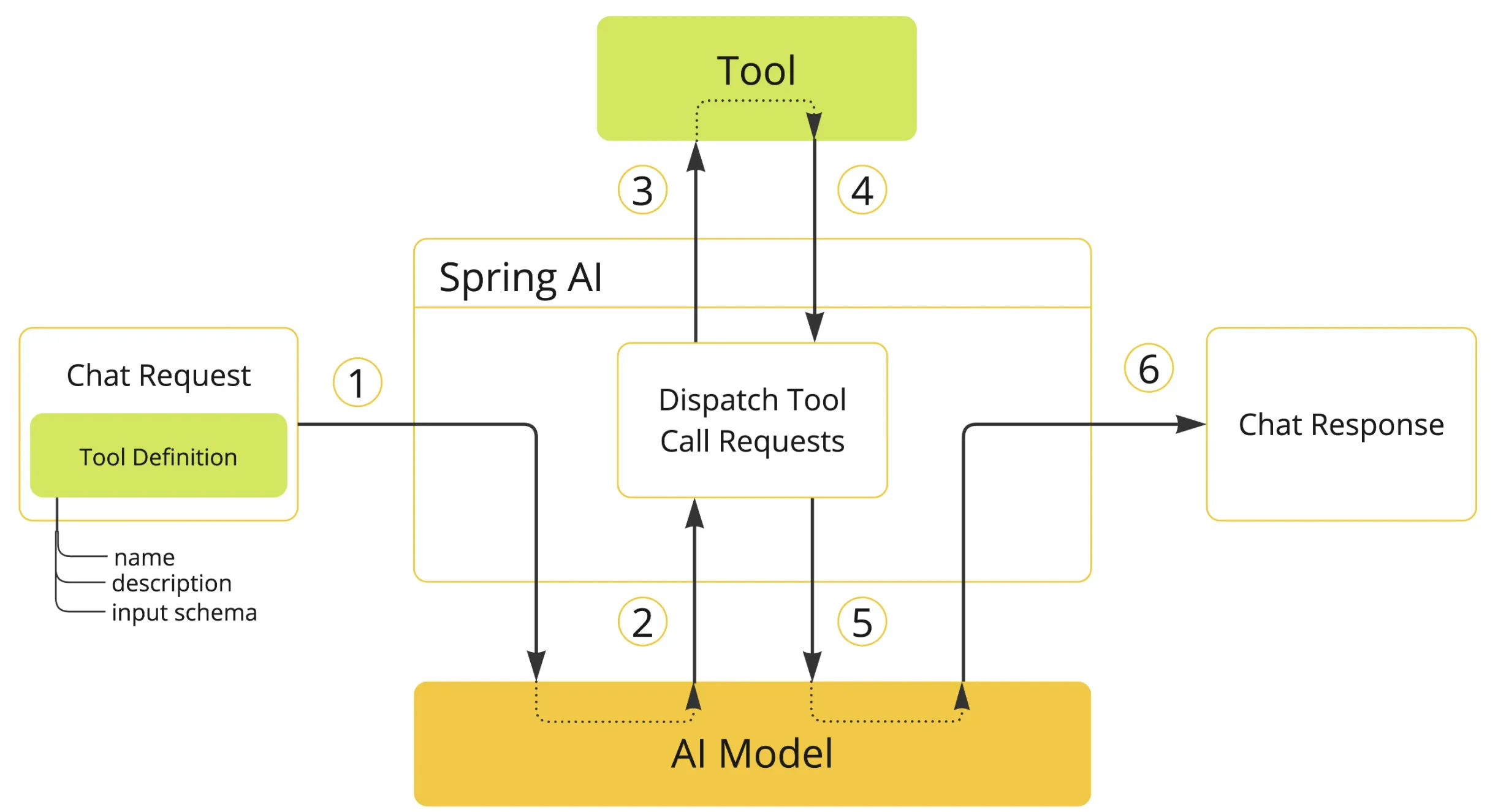
在 Spring AI 中,这个过程通常表现为:
- 工具定义与注册:
@Tool/@ToolParam自动生成工具元信息与 JSON Schema - 工具调用请求解析:框架解析模型返回的 tool_calls
- 工具执行:框架将 JSON 参数转换为 Java 参数并调用方法
- 工具结果处理:结果序列化、异常兜底、回传模型
- 生成最终响应:模型把工具结果融合进自然语言回复
Spring AI 工具开发
定义工具:Methods vs Functions
Spring AI 定义工具主要有两种方式:Methods(注解方法) 与 Functions(函数式 Bean)。实际项目里,Methods 更直观、更容易写、参数与返回类型支持也更广。
| 特性 | Methods 方式 | Functions 方式 |
|---|---|---|
| 定义方式 | @Tool + @ToolParam 标记方法 |
@Bean 提供 Function<Req, Resp> |
| 语法复杂度 | 简单直观 | 相对更繁琐 |
| 参数类型支持 | 基本类型 / POJO / 集合等 | 对基本类型、集合等支持较弱 |
| 返回类型支持 | 几乎所有可序列化类型 | 相对受限 |
| 适用场景 | 大多数业务工具开发 | 与既有函数式 API 集成 |
Methods 示例:
class WeatherTools {
    @Tool(description = "Get current weather for a location")
    public String getWeather(@ToolParam(description = "The city name") String city) {
        return "Current weather in " + city + ": Sunny, 25°C";
    }
}

String content = ChatClient.create(chatModel)
        .prompt("What's the weather in Beijing?")
        .tools(new WeatherTools())
        .call()
        .content();
Functions 示例(了解即可):
@Configuration
public class ToolConfig {

    @Bean
    @Description("Get current weather for a location")
    public Function<WeatherRequest, WeatherResponse> weatherFunction() {
        return request -> new WeatherResponse("Weather in " + request.getCity() + ": Sunny, 25°C");
    }
}
工具绑定方式
按需绑定(推荐入门)
只在某次对话中给模型提供工具:
String response = ChatClient.create(chatModel)
        .prompt("北京今天天气怎么样?")
        .tools(new WeatherTools())
        .call()
        .content();
全局默认工具
对某个 ChatClient 发起的所有对话都可用:
ChatClient chatClient = ChatClient.builder(chatModel)
        .defaultTools(new WeatherTools(), new TimeTools())
        .build();
更底层:绑定到 ChatModel
适合更细粒度控制(比如不同模型不同工具集):
ToolCallback[] weatherTools = ToolCallbacks.from(new WeatherTools());

ChatOptions chatOptions = ToolCallingChatOptions.builder()
        .toolCallbacks(weatherTools)
        .build();

Prompt prompt = new Prompt("北京今天天气怎么样?", chatOptions);

chatModel.call(prompt);
工具实战开发
建议在项目下新增 tools/ 包统一管理。为了避免工具直接读写系统敏感目录,我们先约束所有文件写入到一个隔离目录(例如项目根目录下的 /tmp)。
常量约束:统一的文件根目录
你原文这里有个小坑:System.getProperty("user.dir()") 写错了,正确 key 是 user.dir。
public interface FileConstant {
    // 文件保存根目录:<project>/tmp
    String FILE_SAVE_DIR = System.getProperty("user.dir") + "/tmp";
}
文件操作:读写文件
功能:writeFile 保存内容,readFile 读取内容。为了更安全,建议只允许读写限定目录下的文件,并对文件名做简单校验(避免 ../ 路径穿越)。
public class FileOperationTool {

    private final String FILE_DIR = FileConstant.FILE_SAVE_DIR + "/file";

    @Tool(description = "Read content from a file")
    public String readFile(@ToolParam(description = "Name of the file to read") String fileName) {
        String filePath = FILE_DIR + "/" + fileName;
        try {
            return FileUtil.readUtf8String(filePath);
        } catch (Exception e) {
            return "Error reading file: " + e.getMessage();
        }
    }

    @Tool(description = "Write content to a file")
    public String writeFile(
            @ToolParam(description = "Name of the file to write") String fileName,
            @ToolParam(description = "Content to write to the file") String content) {
        String filePath = FILE_DIR + "/" + fileName;
        try {
            FileUtil.mkdir(FILE_DIR);
            FileUtil.writeUtf8String(content, filePath);
            return "File written successfully to: " + filePath;
        } catch (Exception e) {
            return "Error writing to file: " + e.getMessage();
        }
    }
}
测试:
@SpringBootTest
public class FileOperationToolTest {

    @Test
    public void testWriteFile() {
        FileOperationTool tool = new FileOperationTool();
        String result = tool.writeFile("耄耄爱哈气.txt", "https://chengfushi.blog.csdn.net/");
        assertNotNull(result);
    }

    @Test
    public void testReadFile() {
        FileOperationTool tool = new FileOperationTool();
        String result = tool.readFile("耄耄爱哈气.txt");
        assertNotNull(result);
    }
}
联网搜索:Search API(Baidu 引擎)
核心思路:让工具返回“可用的搜索结果摘要”,而不是把一大坨原始 JSON 全塞给模型。你原来的实现直接 toString() 拼接,能跑但可读性一般;建议返回更干净的结构(标题、链接、摘要)。
public class WebSearchTool {

    private static final String SEARCH_API_URL = "https://www.searchapi.io/api/v1/search";
    private final String apiKey;

    public WebSearchTool(String apiKey) {
        this.apiKey = apiKey;
    }

    @Tool(description = "Search for information from Baidu Search Engine")
    public String searchWeb(@ToolParam(description = "Search query keyword") String query) {

        Map<String, Object> paramMap = new HashMap<>();
        paramMap.put("q", query);
        paramMap.put("api_key", apiKey);
        paramMap.put("engine", "baidu");

        try {
            String response = HttpUtil.get(SEARCH_API_URL, paramMap);
            JSONObject jsonObject = JSONUtil.parseObj(response);
            JSONArray organicResults = jsonObject.getJSONArray("organic_results");

            List<JSONObject> top = organicResults.subList(0, Math.min(5, organicResults.size()))
                    .stream()
                    .map(o -> (JSONObject) o)
                    .toList();

            // 只返回模型最需要的字段(示例:title / link / snippet)
            JSONArray compact = new JSONArray();
            for (JSONObject item : top) {
                JSONObject obj = new JSONObject();
                obj.put("title", item.getStr("title"));
                obj.put("link", item.getStr("link"));
                obj.put("snippet", item.getStr("snippet"));
                compact.add(obj);
            }
            return compact.toStringPretty();

        } catch (Exception e) {
            return "Error searching Baidu: " + e.getMessage();
        }
    }
}
配置:
search-api:
  api-key: 你的APIKey
测试:
@SpringBootTest
public class WebSearchToolTest {

    @Value("${search-api.api-key}")
    private String searchApiKey;

    @Test
    public void testSearchWeb() {
        WebSearchTool tool = new WebSearchTool(searchApiKey);
        String result = tool.searchWeb("程序员鱼皮 编程导航 codefather.cn");
        assertNotNull(result);
    }
}
网页抓取:Jsoup 抓 HTML
依赖:
<dependency>
  <groupId>org.jsoup</groupId>
  <artifactId>jsoup</artifactId>
  <version>1.19.1</version>
</dependency>
工具实现(你这里返回 doc.html() 没问题,但生产里更建议提取正文或做长度限制,否则模型上下文会被瞬间灌爆):
public class WebScrapingTool {

    @Tool(description = "Scrape the content of a web page")
    public String scrapeWebPage(@ToolParam(description = "URL of the web page to scrape") String url) {
        try {
            Document doc = Jsoup.connect(url).get();
            return doc.html();
        } catch (IOException e) {
            return "Error scraping web page: " + e.getMessage();
        }
    }
}
测试:
@SpringBootTest
public class WebScrapingToolTest {

    @Test
    public void testScrapeWebPage() {
        WebScrapingTool tool = new WebScrapingTool();
        String result = tool.scrapeWebPage("https://chengfushi.blog.csdn.net/");
        assertNotNull(result);
    }
}
终端操作:ProcessBuilder 执行命令
注意:终端工具是高危工具,务必限制可执行命令范围(白名单)、隔离目录、超时控制,否则相当于把服务器权限交给了模型。
public class TerminalOperationTool {

    @Tool(description = "Execute a command in the terminal")
    public String executeTerminalCommand(@ToolParam(description = "Command to execute in the terminal") String command) {
        StringBuilder output = new StringBuilder();
        try {
            ProcessBuilder builder = new ProcessBuilder("cmd.exe", "/c", command);
            Process process = builder.start();

            try (BufferedReader reader = new BufferedReader(new InputStreamReader(process.getInputStream()))) {
                String line;
                while ((line = reader.readLine()) != null) {
                    output.append(line).append("\n");
                }
            }

            int exitCode = process.waitFor();
            if (exitCode != 0) {
                output.append("Command execution failed with exit code: ").append(exitCode);
            }
        } catch (IOException | InterruptedException e) {
            output.append("Error executing command: ").append(e.getMessage());
        }
        return output.toString();
    }
}
测试:
@SpringBootTest
public class TerminalOperationToolTest {

    @Test
    public void testExecuteTerminalCommand() {
        TerminalOperationTool tool = new TerminalOperationTool();
        String result = tool.executeTerminalCommand("dir");
        assertNotNull(result);
    }
}
资源下载:根据 URL 下载到本地
public class ResourceDownloadTool {

    @Tool(description = "Download a resource from a given URL")
    public String downloadResource(
            @ToolParam(description = "URL of the resource to download") String url,
            @ToolParam(description = "Name of the file to save the downloaded resource") String fileName) {

        String fileDir = FileConstant.FILE_SAVE_DIR + "/download";
        String filePath = fileDir + "/" + fileName;

        try {
            FileUtil.mkdir(fileDir);
            HttpUtil.downloadFile(url, new File(filePath));
            return "Resource downloaded successfully to: " + filePath;
        } catch (Exception e) {
            return "Error downloading resource: " + e.getMessage();
        }
    }
}
测试:
@SpringBootTest
public class ResourceDownloadToolTest {

    @Test
    public void testDownloadResource() {
        ResourceDownloadTool tool = new ResourceDownloadTool();
        String result = tool.downloadResource(
                "https://i-avatar.csdnimg.cn/99cfb2a8a4b04a708780939ef43086d6_2303_82176667.jpg!1",
                "logo.png"
        );
        assertNotNull(result);
    }
}
PDF 生成:iText 输出中文 PDF
依赖:
<dependency>
  <groupId>com.itextpdf</groupId>
  <artifactId>itext-core</artifactId>
  <version>9.1.0</version>
  <type>pom</type>
</dependency>

<dependency>
  <groupId>com.itextpdf</groupId>
  <artifactId>font-asian</artifactId>
  <version>9.1.0</version>
  <scope>test</scope>
</dependency>
工具实现(使用内置中文字体 STSongStd-Light):
public class PDFGenerationTool {

    @Tool(description = "Generate a PDF file with given content")
    public String generatePDF(
            @ToolParam(description = "Name of the file to save the generated PDF") String fileName,
            @ToolParam(description = "Content to be included in the PDF") String content) {

        String fileDir = FileConstant.FILE_SAVE_DIR + "/pdf";
        String filePath = fileDir + "/" + fileName;

        try {
            FileUtil.mkdir(fileDir);

            try (PdfWriter writer = new PdfWriter(filePath);
                 PdfDocument pdf = new PdfDocument(writer);
                 Document document = new Document(pdf)) {

                PdfFont font = PdfFontFactory.createFont("STSongStd-Light", "UniGB-UCS2-H");
                document.setFont(font);

                document.add(new Paragraph(content));
            }

            return "PDF generated successfully to: " + filePath;

        } catch (IOException e) {
            return "Error generating PDF: " + e.getMessage();
        }
    }
}
测试:
@SpringBootTest
public class PDFGenerationToolTest {

    @Test
    public void testGeneratePDF() {
        PDFGenerationTool tool = new PDFGenerationTool();
        String result = tool.generatePDF("耄耄爱哈气.pdf", "耄耄爱哈气 https://chengfushi.blog.csdn.net/");
        assertNotNull(result);
    }
}
集中注册工具
当工具数量变多后,推荐提供一个“统一注册入口”,一次性把所有工具交给模型,让模型按需选择并串联。
@Configuration
public class ToolRegistration {

    @Value("${search-api.api-key}")
    private String searchApiKey;

    @Bean
    public ToolCallback[] allTools() {
        FileOperationTool fileOperationTool = new FileOperationTool();
        WebSearchTool webSearchTool = new WebSearchTool(searchApiKey);
        WebScrapingTool webScrapingTool = new WebScrapingTool();
        ResourceDownloadTool resourceDownloadTool = new ResourceDownloadTool();
        TerminalOperationTool terminalOperationTool = new TerminalOperationTool();
        PDFGenerationTool pdfGenerationTool = new PDFGenerationTool();

        return ToolCallbacks.from(
                fileOperationTool,
                webSearchTool,
                webScrapingTool,
                resourceDownloadTool,
                terminalOperationTool,
                pdfGenerationTool
        );
    }
}
这段注册代码的思想确实很“工程化”,它同时体现了几类常见设计思路:
- 工厂式创建:集中构造工具实例并统一输出
- 依赖注入:配置注入 + Bean 注入让工具可被复用
- 注册中心:工具作为能力集合被统一管理
- 适配封装:
ToolCallbacks.from(...)把各类工具适配为统一的回调协议
在对话中使用工具
把集中注册好的 ToolCallback[] 绑定到一次对话中:
@Resource
private ToolCallback[] allTools;

public String doChatWithTools(String message, String chatId) {
    ChatResponse chatResponse = chatClient
            .prompt()
            .user(message)
            .advisors(advisorSpec -> advisorSpec.param(ChatMemory.CONVERSATION_ID, chatId))
            .toolCallbacks(allTools)
            .call()
            .chatResponse();

    String content = chatResponse.getResult().getOutput().getText();
    log.info("content: {}", content);
    return content;
}
测试示例(你可以逐步放开注释,观察模型何时触发工具调用):
@SpringBootTest
class CookerAppTest {

    @Resource
    private CookerApp cookerApp;

    @Test
    void doChatWithTools() {
        testMessage("周末想给家人做一顿特别的晚餐,推荐几种适合家庭聚餐的创意食材搭配?");

        // testMessage("想做一道正宗的意大利面,看看 foodnavigator.com 上最受欢迎的做法是什么?");
        // testMessage("直接下载一张展示法式牛排完美摆盘的图片为文件");
        // testMessage("执行Python3脚本来分析这道菜的营养成分和热量");
        // testMessage("保存我设计的本周家庭菜单为文件");
        // testMessage("生成一份‘中秋家宴烹饪指南’PDF,包含采购清单、分步教程和摆盘技巧");
    }

    private void testMessage(String message) {
        String chatId = UUID.randomUUID().toString();
        String answer = cookerApp.doChatWithTools(message, chatId);
        Assertions.assertNotNull(answer);
    }
}
工具调用的工程建议
为了让工具更“可控、可靠、可上线”,建议你在后续迭代里加上三类硬约束:
- 权限与范围:文件目录隔离、终端命令白名单、下载域名白名单
- 资源与成本:抓取内容长度限制、下载文件大小限制、终端执行超时
- 可观测性:记录工具名、参数、耗时、结果摘要(避免泄露敏感数据)
工具调用的真正价值不在“能不能调”,而在“能不能稳定地调、可控地调、可审计地调”。这也是智能体从 Demo 走向可用产品的分水岭。
自主实现Manus智能体
虽然OpenManus代码量很大,但其实很多代码都是在实现智能体所需的支持系统,比如调用大模型、会话记忆、工具调用能力等。如果使用A!开发框架,这些能力都不需要我们自己实现,代码量会简单很多。下面就让我们基于Spring Al框架,实现一个简化版的Manus智能体。
定义数据模型
新建agent.model包,将所有用到的数据模型(实体类、枚举类等)都放到该包下。
目前我们只需要定义Agent的状态枚举,用于控制智能体的执行。AgentState代码如下:
/**
 * 代理执行状态的枚举类
 */
public enum AgentState {

    /**
     * 空闲状态
     */
    IDLE,

    /**
     * 运行中状态
     */
    RUNNING,

    /**
     * 已完成状态
     */
    FINISHED,

    /**
     * 错误状态
     */
    ERROR
}
核心架构开发
首先定义智能体的核心架构,包括以下类:
- BaseAgent:智能体基类,定义基本信息和多步骤执行流程
- ReActAgent:实现思考和行动两个步骤的智能体
- ToolCallAgent:实现工具调用能力的智能体
- LearningCompanyManus:最终可使用的Manus实例
1、开发基础Agent类
参考OpenManus的实现方式,BaseAgent的代码如下:
/**
 * 抽象基础代理类,用于管理代理状态和执行流程。
 *
 * 提供状态转换、内存管理和基于步骤的执行循环的基础功能。
 * 子类必须实现step方法。
 */
@Data
@Slf4j
public abstract class BaseAgent {

    // 核心属性
    private String name;

    // 提示
    private String systemPrompt;
    private String nextStepPrompt;

    // 状态
    private AgentState state = AgentState.IDLE;

    // 执行控制
    private int maxSteps = 10;
    private int currentStep = 0;

    // LLM
    private ChatClient chatClient;

    // Memory(需要自主维护会话上下文)
    private List<Message> messageList = new ArrayList<>();

    /**
     * 运行代理
     *
     * @param userPrompt 用户提示词
     * @return 执行结果
     */
    public String run(String userPrompt) {
        if (this.state != AgentState.IDLE) {
            throw new RuntimeException("Cannot run agent from state: " + this.state);
        }
        if (StringUtil.isBlank(userPrompt)) {
            throw new RuntimeException("Cannot run agent with empty user prompt");
        }
        // 更改状态
        state = AgentState.RUNNING;
        // 记录消息上下文
        messageList.add(new UserMessage(userPrompt));
        // 保存结果列表
        List<String> results = new ArrayList<>();
        try {
            for (int i = 0; i < maxSteps && state != AgentState.FINISHED; i++) {
                int stepNumber = i + 1;
                currentStep = stepNumber;
                log.info("Executing step " + stepNumber + "/" + maxSteps);
                // 单步执行
                String stepResult = step();
                String result = "Step " + stepNumber + ": " + stepResult;
                results.add(result);
            }
            // 检查是否超出步骤限制
            if (currentStep >= maxSteps) {
                state = AgentState.FINISHED;
                results.add("Terminated: Reached max steps (" + maxSteps + ")");
            }
            return String.join("\n", results);
        } catch (Exception e) {
            state = AgentState.ERROR;
            log.error("Error executing agent", e);
            return "执行错误" + e.getMessage();
        } finally {
            // 清理资源
            this.cleanup();
        }
    }

    /**
     * 执行单个步骤
     *
     * @return 步骤执行结果
     */
    public abstract String step();

    /**
     * 清理资源
     */
    protected void cleanup() {
        // 子类可以重写此方法来清理资源
    }
}
上述代码中,我们要注意3点:
- 包含chatClient属性,由调用方传入具体调用大模型的对象,而不是写死使用的大模型,更灵活
- 包含messageList属性,用于维护消息上下文列表
- 通过state属性来控制智能体的执行流程
2、开发ReActAgent类
参考OpenManus的实现方式,继承自BaseAgent,.并且将step方法分解为think和act两个抽象方法。ReActAgant的代码如下:
/**
 * ReAct (Reasoning and Acting) 模式的代理抽象类
 * 实现了思考-行动的循环模式
 */
@EqualsAndHashCode(callSuper = true)
@Data
public abstract class ReActAgent extends BaseAgent {

    /**
     * 处理当前状态并决定下一步行动
     *
     * @return 是否需要执行行动,true表示需要执行,false表示不需要执行
     */
    public abstract boolean think();

    /**
     * 执行决定的行动
     *
     * @return 行动执行结果
     */
    public abstract String act();

    /**
     * 执行单个步骤:思考和行动
     *
     * @return 步骤执行结果
     */
    @Override
    public String step() {
        try {
            boolean shouldAct = think();
            if (!shouldAct) {
                return "思考完成 - 无需行动";
            }
            return act();
        } catch (Exception e) {
            // 记录异常日志
            e.printStackTrace();
            return "步骤执行失败: " + e.getMessage();
        }
    }
}
3、开发ToolCallAgent类
ToolCallAgent负责实现工具调用能力,继承自ReActAgent,具体实现了think和act两个抽象方法。
我们有3种方案来实现ToolCallAgent:
1)基于Spring Al的工具调用能力,手动控制工具执行。
其实Spring的ChatClient已经支持选择工具进行调用(内部完成了think.、act、observe),但这里我们要自主实
现,可以使用Spring Al提供的手动控制工具执行。
2)基于Spring Al的工具调用能力,简化调用流程。
由于Spring Al完全托管了工具调用,我们可以直接把所有工具调用的代码作为think方法,而act方法不定义任
何动作。
3)自主实现工具调用能力。
也就是工具调用章节提到的实现原理:自己写Prompt,引导A!回复想要调用的工具列表和调用参数,然后再执
行工具并将结果返送给A!再次执行。
使用哪种方案呢?
如果是为了学习RAct模式,让流程更清晰,推荐第一种;如果只是为了快速实现,推荐第二种;不建议采用第
三种方案,过于原生,开发成本高。
下面我们采用第一种方案实现ToolCallAgent,.先定义所需的属性和构造方法:
/**
 * 处理工具调用的基础代理类,具体实现了 think 和 act 方法,可以用作创建实例的父类
 */
@EqualsAndHashCode(callSuper = true)
@Data
@Slf4j
public class ToolCallAgent extends ReActAgent {

    // 可用的工具
    private final ToolCallback[] availableTools;

    // 保存了工具调用信息的响应
    private ChatResponse toolCallChatResponse;

    // 工具调用管理者
    private final ToolCallingManager toolCallingManager;

    // 禁用内置的工具调用机制,自己维护上下文
    private final ChatOptions chatOptions;

    public ToolCallAgent(ToolCallback[] availableTools) {
        super();
        this.availableTools = availableTools;
        this.toolCallingManager = ToolCallingManager.builder().build();
        // 禁用 Spring AI 内置的工具调用机制,自己维护选项和消息上下文
        this.chatOptions = DashScopeChatOptions.builder()
                .withProxyToolCalls(true)
                .build();
    }
}
4. 开发LearningCompanyManus类
LearningCompanyManus是可以直接提供给其他方法调用的Al超级智能体实例,继承自ToolCallAgent,需要给智能体设置各种
参数,比如对话客户端chatClient、工具调用列表等。
代码如下:
/**
 *
 *
 * @author: cheng fu
 **/
@Component
public class LearningCompanyManus extends ToolCallAgent {

    public LearningCompanyManus(ToolCallback[] allTools, ChatModel dashscopeChatModel) {
        super(allTools);
        this.setName("LearningCompanyManus");
        String SYSTEM_PROMPT = """
        You are Learning Partner, an AI intelligent learning companion agent, dedicated to helping students learn effectively and providing personalized learning support.
        You have various educational tools at your disposal that you can call upon to efficiently complete learning-related tasks.
        When generating learning materials, you can create files and provide download links for students to access the content.
        Your role is to guide students, answer questions, provide explanations, and assist with study materials.

        """;

        this.setSystemPrompt(SYSTEM_PROMPT);
        String NEXT_STEP_PROMPT = """
        Based on student learning needs, proactively select the most appropriate tool or combination of tools.
        For complex learning tasks, you can break down the problem and use different tools step by step to solve it.
        If you want to stop the interaction at any point, use the `terminate` tool/function call.
        """;

        this.setNextStepPrompt(NEXT_STEP_PROMPT);
        this.setMaxSteps(20);
        // 初始化客户端
        ChatClient chatClient = ChatClient.builder(dashscopeChatModel)
                .defaultAdvisors(new MyLoggerAdvisor())
                .build();
        this.setChatClient(chatClient);
    }
}
ToolCallback[] allTools, ChatModel dashscopeChatModel) {
super(allTools);
this.setName(“LearningCompanyManus”);
String SYSTEM_PROMPT = “”"
You are Learning Partner, an AI intelligent learning companion agent, dedicated to helping students learn effectively and providing personalized learning support.
You have various educational tools at your disposal that you can call upon to efficiently complete learning-related tasks.
When generating learning materials, you can create files and provide download links for students to access the content.
Your role is to guide students, answer questions, provide explanations, and assist with study materials.
    """;

    this.setSystemPrompt(SYSTEM_PROMPT);
    String NEXT_STEP_PROMPT = """
    Based on student learning needs, proactively select the most appropriate tool or combination of tools.
    For complex learning tasks, you can break down the problem and use different tools step by step to solve it.
    If you want to stop the interaction at any point, use the `terminate` tool/function call.
    """;

    this.setNextStepPrompt(NEXT_STEP_PROMPT);
    this.setMaxSteps(20);
    // 初始化客户端
    ChatClient chatClient = ChatClient.builder(dashscopeChatModel)
            .defaultAdvisors(new MyLoggerAdvisor())
            .build();
    this.setChatClient(chatClient);
}
}

有“AI”的1024 = 2048,欢迎大家加入2048 AI社区
更多推荐
 7
7 0
0- 0


 已为社区贡献1条内容

所有评论(0)