ollama API 调用自己部署的大模型
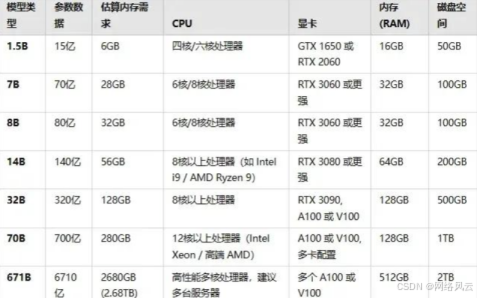
ollama 是一个开源的大语言模型本地部署工具,支持在本地计算机上运行和调用各种开源模型,无需连接外部API服务。关于ollama本地部署的详细步骤,风云在之前的博文里介绍过,如果还不会的宝子们可以出门左转,这里把安装、启动、拉取、运行的命令简单罗列一下。这里强调一点,运行大模型对计算机硬件配置要求非常高,特别是算力,请严格按下表来,风云我可是踩过坑的。# 1. 下载并安装 ollama# 访问
一、ollama 简介与部署准备
ollama 是一个开源的大语言模型本地部署工具,支持在本地计算机上运行和调用各种开源模型,无需连接外部API服务。关于ollama本地部署的详细步骤,风云在之前的博文里介绍过,如果还不会的宝子们可以出门左转,这里把安装、启动、拉取、运行的命令简单罗列一下。这里强调一点,运行大模型对计算机硬件配置要求非常高,特别是算力,请严格按下表来,风云我可是踩过坑的。
# 1. 下载并安装 ollama# 访问 https://ollama.com/ 下载对应操作系统的安装包
# 2. 安装完成后,启动 ollama 服务(通常会自动启动)# 检查服务状态
ollama serve
# 3. 拉取模型(以 llama3 为例)
ollama pull llama3
# 4. 查看已安装模型
ollama list
# 5. 运行模型(测试用)
ollama run llama3
二、ollama API 基础调用
2.1 通过 requests 直接调用 REST API
import requests
import json
from typing import Dict, List, Optional


class ollamaClient:
    """
    ollama REST API 客户端类
    默认地址:http://localhost:11434
    """

    def __init__(self, base_url: str = "http://localhost:11434"):
        self.base_url = base_url
        self.session = requests.Session()
        self.timeout = 120  # 长文本生成可能需要更长时间

    def generate_completion(self,
                          model: str,
                          prompt: str,
                          system: Optional[str] = None,
                          temperature: float = 0.7,
                          max_tokens: int = 1024,
                          stream: bool = False) -> Dict:

        """
        生成文本补全
        参数:
        - model: 模型名称 (如 "llama3")
        - prompt: 用户输入
        - system: 系统提示词
        - temperature: 温度参数 (0.0-1.0)
        - max_tokens: 最大生成token数
        - stream: 是否流式输出

        返回:
        - 字典格式的响应结果
        """

        endpoint = f"{self.base_url}/api/generate"

        payload = {
            "model": model,
            "prompt": prompt,
            "options": {
                "temperature": temperature,
                "num_predict": max_tokens
            },
            "stream": stream
        }


        # 添加系统提示词(如果提供)
        if system:
            payload["system"] = system

        try:
            if stream:
                return self._handle_stream_request(endpoint, payload)

            else:
                response = self.session.post(
                    endpoint,
                    json=payload,
                    timeout=self.timeout
                )

                response.raise_for_status()
                return response.json()

        except requests.exceptions.RequestException as e:

            raise Exception(f"API请求失败: {str(e)}")

    def _handle_stream_request(self, endpoint: str, payload: dict):
        """处理流式响应"""

        response = self.session.post(
            endpoint,
            json=payload,
            stream=True,
            timeout=self.timeout
        )

        response.raise_for_status()

        full_response = ""
        for line in response.iter_lines():

            if line:

                try:
                    json_response = json.loads(line.decode('utf-8'))
                    chunk = json_response.get("response", "")
                    full_response += chunk

                    # 实时输出(可选)
                    print(chunk, end="", flush=True)

                    # 如果生成完成,返回完整结果
                    if json_response.get("done", False):

                        return {
                            "response": full_response,
                            "model": json_response.get("model"),
                            "total_duration": json_response.get("total_duration")
                        }

                except json.JSONDecodeError:

                    continue

        return {"response": full_response}

# 使用示例
if __name__ == "__main__":

    client = ollamaClient()

    # 基础调用
    result = client.generate_completion(
        model="llama3",
        prompt="请解释什么是人工智能?",
        system="你是一个乐于助人的AI助手,请用中文回答。",
        temperature=0.8,
        max_tokens=500
    )

    print(f"模型回复:{result.get('response')}")
    print(f"生成耗时:{result.get('total_duration', 0) / 1e9:.2f}秒")
2.2 使用官方 Python 包
# 安装 ollama Python 包
pip install ollama
import ollama

from ollama import ChatResponse, GenerateResponse

import asyncio

from datetime import datetime


class ollamaPythonClient:

    """使用官方 ollama Python 包的客户端"""


    def __init__(self, host: str = "http://localhost:11434"):

        # 设置自定义主机(如果需要)

        self.client = ollama.Client(host=host)


    def list_models(self) -> List[Dict]:

        """列出本地可用的模型"""

        models = self.client.list()

        return models.get("models", [])


    def check_model(self, model_name: str) -> bool:

        """检查模型是否可用"""

        try:

            models = self.list_models()

            return any(m["name"] == model_name for m in models)

        except:

            return False


    def chat_completion(self,

                       model: str,

                       messages: List[Dict[str, str]],

                       **kwargs) -> ChatResponse:

        """

        对话式补全(推荐)


        参数:

        - messages: 消息列表,格式为:

          [

            {"role": "system", "content": "系统提示"},

            {"role": "user", "content": "用户输入"},

            {"role": "assistant", "content": "AI回复"}

          ]

        """

        try:

            response = self.client.chat(

                model=model,

                messages=messages,

                **kwargs

            )

            return response

        except Exception as e:

            raise Exception(f"聊天请求失败: {str(e)}")


    def generate_with_stream(self,

                           model: str,

                           prompt: str,

                           callback=None) -> str:

        """

        流式生成文本


        参数:

        - callback: 回调函数,接收每个token

        """

        full_response = ""


        stream = self.client.generate(

            model=model,

            prompt=prompt,

            stream=True

        )


        for chunk in stream:

            token = chunk.get("response", "")

            full_response += token


            # 如果有回调函数,调用它

            if callback and token:

                callback(token)


        return full_response

# 高级使用示例def advanced_usage_demo():

    """高级用法演示"""

    client = ollamaPythonClient()


    # 1. 检查模型

    if not client.check_model("llama3"):

        print("请先拉取模型: ollama pull llama3")

        return


    print("=" * 50)

    print("演示1: 多轮对话")

    print("=" * 50)


    # 构建对话历史

    conversation_history = [

        {"role": "system", "content": "你是一个专业的Python编程助手。"},

        {"role": "user", "content": "如何用Python读取CSV文件?"}

    ]


    # 第一轮对话

    response1 = client.chat_completion(

        model="llama3",

        messages=conversation_history,

        options={"temperature": 0.7}

    )


    print(f"AI回复: {response1['message']['content']}")


    # 将AI回复加入历史

    conversation_history.append(

        {"role": "assistant", "content": response1['message']['content']}

    )


    # 第二轮对话(基于上下文)

    conversation_history.append(

        {"role": "user", "content": "如果CSV文件很大,需要分块读取怎么办?"}

    )


    response2 = client.chat_completion(

        model="llama3",

        messages=conversation_history

    )


    print(f"\nAI回复: {response2['message']['content']}")


    # 2. 流式输出演示

    print("\n" + "=" * 50)

    print("演示2: 流式输出")

    print("=" * 50)


    def print_token(token: str):

        print(token, end="", flush=True)


    print("正在生成: ", end="")

    result = client.generate_with_stream(

        model="llama3",

        prompt="用Python写一个快速排序算法的实现,并添加详细注释。",

        callback=print_token

    )


    # 3. 获取模型信息

    print("\n\n" + "=" * 50)

    print("演示3: 模型管理")

    print("=" * 50)


    models = client.list_models()

    for model in models:

        print(f"模型: {model['name']}")

        print(f"  大小: {model.get('size', 'N/A')}")

        print(f"  修改时间: {model.get('modified_at', 'N/A')}")

if __name__ == "__main__":

    advanced_usage_demo()
三、高级功能与配置
3.1 自定义模型参数
class ollamaAdvancedClient:
    """高级配置客户端"""

    def __init__(self):
        self.client = ollama.Client()

    def generate_with_custom_options(self,
                                   model: str,
                                   prompt: str,
                                   **options):

        """
        自定义生成参数

        可用参数:
        - temperature: 温度 (0.0-2.0)
        - top_p: 核采样 (0.0-1.0)
        - top_k: 顶部k采样
        - num_predict: 最大token数
        - repeat_penalty: 重复惩罚
        - presence_penalty: 存在惩罚
        - frequency_penalty: 频率惩罚
        - seed: 随机种子
        """

        default_options = {
            "temperature": 0.7,
            "top_p": 0.9,
            "top_k": 40,
            "num_predict": 1024,
            "repeat_penalty": 1.1,
            "seed": 42
        }

        # 更新默认选项
        default_options.update(options)

        response = self.client.generate(
            model=model,
            prompt=prompt,
            options=default_options
        )

        return response

    def create_custom_model(self,
                          base_model: str,
                          custom_model_name: str,
                          system_prompt: str,
                          temperature: float = 0.7):

        """
        创建自定义模型配置
        参数:
        - base_model: 基础模型名
        - custom_model_name: 自定义模型名
        - system_prompt: 系统提示词
        - temperature: 默认温度
        """

        model_config = {
            "model": base_model,
            "name": custom_model_name,
            "options": {
                "temperature": temperature
            },
            "system": system_prompt
        }

        # 创建或更新模型配置
        try:

            result = ollama.create(
                model=custom_model_name,
                **model_config
            )

            return result

        except Exception as e:

            # 如果模型已存在,使用复制方式
            result = ollama.copy(
                from_model=base_model,
                to_model=custom_model_name
            )

            return result

# 使用示例
def advanced_config_demo():
    """高级配置演示"""

    client = ollamaAdvancedClient()

    # 1. 使用自定义参数生成
    print("自定义参数生成:")

    response = client.generate_with_custom_options(
        model="llama3",
        prompt="创作一首关于秋天的诗",
        temperature=0.9,  # 更高温度,更创造性
        top_p=0.95,
        num_predict=200,
        seed=12345  # 固定种子,可复现结果
    )

    print(f"生成结果: {response['response']}")

    # 2. 创建自定义模型
    print("\n创建自定义模型:")

    custom_model = client.create_custom_model(
        base_model="llama3",
        custom_model_name="coding-assistant",
        system_prompt="你是一个专业的代码助手。你精通Python、JavaScript、Go等编程语言。请优先提供可运行的代码示例,并解释关键概念。",
        temperature=0.3  # 代码生成使用较低温度
    )

    print(f"自定义模型创建成功: {custom_model.get('status', 'unknown')}")

    # 使用自定义模型
    response = client.generate_with_custom_options(
        model="coding-assistant",
        prompt="写一个Python函数,计算斐波那契数列的第n项",
        temperature=0.3
    )

    print(f"\n代码助手回复:\n{response['response']}")

if __name__ == "__main__":

    advanced_config_demo()
3.2 批处理和性能优化
import concurrent.futures
import time
from dataclasses import dataclass
from typing import List, Dict


@dataclass
class GenerationTask:
    """生成任务数据结构"""

    prompt: str
    model: str = "llama3"
    temperature: float = 0.7
    max_tokens: int = 512

class ollamaBatchProcessor:
    """批处理处理器"""

    def __init__(self, max_workers: int = 3):
        self.client = ollama.Client()
        self.max_workers = max_workers

    def process_batch(self,
                     tasks: List[GenerationTask],
                     timeout_per_task: int = 60) -> List[Dict]:

        """
        并行处理批处理任务
        参数:
        - tasks: 任务列表
        - timeout_per_task: 每个任务的超时时间(秒)

        返回:
        - 结果列表,顺序与输入tasks一致
        """

        results = []

        with concurrent.futures.ThreadPoolExecutor(
            max_workers=self.max_workers
        ) as executor:

            # 提交所有任务
            future_to_task = {

                executor.submit(
                    self._process_single_task,
                    task,
                    timeout_per_task
                ): task for task in tasks
            }

            # 收集结果
            for future in concurrent.futures.as_completed(future_to_task):

                task = future_to_task[future]

                try:

                    result = future.result(timeout=timeout_per_task + 5)

                    results.append({
                        "task": task,
                        "result": result,
                        "status": "success"
                    })

                except Exception as e:

                    results.append({
                        "task": task,
                        "error": str(e),
                        "status": "failed"
                    })

        return results

    def _process_single_task(self,
                           task: GenerationTask,
                           timeout: int) -> Dict:

        """处理单个任务"""
        try:

            start_time = time.time()

            response = self.client.generate(
                model=task.model,
                prompt=task.prompt,
                options={
                    "temperature": task.temperature,
                    "num_predict": task.max_tokens
                }
            )

            end_time = time.time()

            return {
                "response": response.get("response", ""),
                "duration": end_time - start_time,
                "tokens_generated": len(response.get("response", "").split()),
                "model": response.get("model")
            }

        except Exception as e:

            raise Exception(f"任务处理失败: {str(e)}")

    def benchmark_models(self,
                        prompt: str,
                        models: List[str],
                        n_runs: int = 3) -> Dict:

        """
        模型性能基准测试

        参数:
        - prompt: 测试提示词
        - models: 要测试的模型列表
        - n_runs: 每个模型运行次数

        返回:
        - 性能统计字典
        """

        results = {}

        for model in models:

            print(f"\n测试模型: {model}")

            durations = []

            for i in range(n_runs):

                print(f"  运行 {i+1}/{n_runs}...", end="")

                start_time = time.time()

                try:

                    response = self.client.generate(
                        model=model,
                        prompt=prompt,
                        options={"num_predict": 100}
                    )

                    end_time = time.time()
                    duration = end_time - start_time

                    durations.append(duration)

                    print(f" 耗时: {duration:.2f}s")

                except Exception as e:

                    print(f" 失败: {str(e)}")

                    durations.append(None)

            # 计算统计信息
            valid_durations = [d for d in durations if d is not None]

            if valid_durations:

                results[model] = {
                    "avg_duration": sum(valid_durations) / len(valid_durations),
                    "min_duration": min(valid_durations),
                    "max_duration": max(valid_durations),
                    "success_rate": len(valid_durations) / n_runs
                }

        return results

# 批处理使用示例
def batch_processing_demo():
    """批处理演示"""

    processor = ollamaBatchProcessor(max_workers=2)

    # 准备批处理任务
    tasks = [
        GenerationTask(
            prompt="解释什么是机器学习",
            model="llama3",
            temperature=0.5
        ),

        GenerationTask(
            prompt="写一个Python函数反转字符串",
            model="codellama",
            temperature=0.3
        ),

        GenerationTask(
            prompt="总结太阳系的主要行星",
            model="llama3",
            temperature=0.7
        )
    ]


    print("开始批处理...")

    start_time = time.time()

    results = processor.process_batch(tasks, timeout_per_task=30)

    total_time = time.time() - start_time

    print(f"\n批处理完成,总耗时: {total_time:.2f}秒")
    print("\n处理结果:")

    for i, result in enumerate(results):

        if result["status"] == "success":

            response = result["result"]["response"][:100] + "..."  # 截取前100字符

            print(f"任务{i+1}: 成功, 耗时{result['result']['duration']:.2f}s")

            print(f"  响应: {response}")

        else:

            print(f"任务{i+1}: 失败, 错误: {result['error']}")

if __name__ == "__main__":

    batch_processing_demo()
四、错误处理与监控
import logging
from functools import wraps
from contextlib import contextmanager

# 配置日志
logging.basicConfig(
    level=logging.INFO,
    format='%(asctime)s - %(name)s - %(levelname)s - %(message)s')

logger = logging.getLogger(__name__)

class ollamaService:
    """带有完整错误处理的服务类"""

    def __init__(self,
                 host: str = "http://localhost:11434",
                 retry_attempts: int = 3,
                 retry_delay: float = 1.0):

        self.client = ollama.Client(host=host)
        self.retry_attempts = retry_attempts
        self.retry_delay = retry_delay

    def retry_on_failure(self, func):
        """重试装饰器"""

        @wraps(func)
        def wrapper(*args, **kwargs):

            last_exception = None

            for attempt in range(self.retry_attempts):

                try:

                    return func(*args, **kwargs)

                except Exception as e:

                    last_exception = e
                    logger.warning(
                        f"尝试 {attempt + 1}/{self.retry_attempts} 失败: {str(e)}"
                    )

                    if attempt < self.retry_attempts - 1:

                        time.sleep(self.retry_delay * (attempt + 1))

            logger.error(f"所有重试尝试均失败: {str(last_exception)}")

            raise last_exception

        return wrapper

    @retry_on_failure
    def safe_generate(self,
                     model: str,
                     prompt: str,
                     **kwargs) -> Dict:

        """
        安全的生成方法,包含错误处理
        """

        try:
            start_time = time.time()

            response = self.client.generate(
                model=model,
                prompt=prompt,
                **kwargs
            )

            end_time = time.time()
            duration = end_time - start_time

            # 记录性能指标
            logger.info(
                f"生成完成 - 模型: {model}, "
                f"耗时: {duration:.2f}s, "
                f"token数: {len(response.get('response', ''))}"
            )

            return {
                "success": True,
                "data": response,
                "metrics": {
                    "duration": duration,
                    "model": model
                }
            }


        except ollama.ResponseError as e:

            logger.error(f"API响应错误: {e.error}")

            return {
                "success": False,
                "error": f"API错误: {e.error}",
                "error_type": "api_error"
            }

        except ConnectionError as e:

            logger.error(f"连接错误: {str(e)}")

            return {
                "success": False,
                "error": f"连接失败: {str(e)}",
                "error_type": "connection_error"
            }

        except Exception as e:

            logger.error(f"未知错误: {str(e)}", exc_info=True)

            return {
                "success": False,
                "error": f"内部错误: {str(e)}",
                "error_type": "unknown_error"
            }


    def health_check(self) -> Dict:
        """健康检查"""

        try:

            # 尝试获取模型列表
            models = self.client.list()

            # 尝试简单的生成请求
            test_response = self.client.generate(
                model="llama3",
                prompt="test",
                options={"num_predict": 5}
            )

            return {
                "status": "healthy",
                "available_models": len(models.get("models", [])),
                "api_responding": True
            }

        except Exception as e:

            logger.error(f"健康检查失败: {str(e)}")

            return {
                "status": "unhealthy",
                "error": str(e),
                "available_models": 0,
                "api_responding": False
            }


    @contextmanager
    def monitored_session(self, session_name: str):
        """监控会话上下文管理器"""

        logger.info(f"开始会话: {session_name}")

        session_start = time.time()

        try:

            yield

        except Exception as e:

            logger.error(f"会话 {session_name} 异常: {str(e)}")

            raise

        finally:

            session_duration = time.time() - session_start

            logger.info(
                f"结束会话: {session_name}, "
                f"持续时间: {session_duration:.2f}秒"
            )

# 完整的使用示例
def complete_usage_example():
    """完整的 ollama API 使用示例"""

    # 初始化服务
    service = ollamaService(
        retry_attempts=3,
        retry_delay=2.0
    )

    # 1. 健康检查
    print("1. 执行健康检查...")

    health = service.health_check()

    print(f"   状态: {health['status']}")
    print(f"   可用模型数: {health['available_models']}")

    if health['status'] != 'healthy':
        print("服务不健康,退出示例")

        return

    # 2. 使用监控会话
    print("\n2. 在监控会话中执行生成任务...")

    with service.monitored_session("示例生成任务"):
        # 3. 安全生成

        result = service.safe_generate(
            model="llama3",
            prompt="给我三个学习Python的建议",
            options={
                "temperature": 0.7,
                "num_predict": 300
            }
        )

        if result["success"]:
            print("生成成功!")
            print(f"模型回复: {result['data']['response']}")
            print(f"生成耗时: {result['metrics']['duration']:.2f}秒")

        else:

            print(f"生成失败: {result['error']}")
            print(f"错误类型: {result['error_type']}")

    # 4. 处理长文本
    print("\n3. 处理长文本(分块处理)...")

    long_prompt = "请详细解释深度学习的以下概念:1) 神经网络基础 2) 反向传播算法 3) 卷积神经网络 4) 循环神经网络"

    # 对于长文本,可以分块处理或增加超时时间
    result = service.safe_generate(
        model="llama3",
        prompt=long_prompt,
        options={
            "temperature": 0.5,
            "num_predict": 1500,  # 增加token限制
            "num_ctx": 4096  # 增加上下文长度
        }
    )

    if result["success"]:
        response = result["data"]["response"]
        print(f"生成长度: {len(response)} 字符")

        print(f"前200字符: {response[:200]}...")

    else:

        print(f"长文本生成失败: {result['error']}")

if __name__ == "__main__":

    complete_usage_example()
五、实用工具函数
# utils/ollama_utils.py
"""
ollama 实用工具函数
"""

import re
import hashlib
from pathlib import Path
import json


def extract_code_blocks(text: str) -> List[Dict]:
    """
    从文本中提取代码块
    返回格式:
    [
        {
            "language": "python",
            "code": "print('hello')"
        },
        ...
    ]
    """

    code_blocks = []

    # 匹配 ```language ... ``` 格式
    pattern = r'```(\w+)\n(.*?)\n```'

    for match in re.finditer(pattern, text, re.DOTALL):

        language = match.group(1)

        code = match.group(2).strip()

        code_blocks.append({
            "language": language,

            "code": code
        })

    return code_blocks

def cache_response(prompt: str,
                  response: str,
                  cache_dir: str = "./ollama_cache") -> str:
    """
    缓存API响应
    返回: 缓存文件路径
    """

    # 创建缓存目录
    Path(cache_dir).mkdir(parents=True, exist_ok=True)

    # 生成缓存文件名
    prompt_hash = hashlib.md5(prompt.encode()).hexdigest()

    cache_file = Path(cache_dir) / f"{prompt_hash}.json"

    # 保存缓存
    cache_data = {
        "prompt": prompt,
        "response": response,
        "timestamp": time.time()
    }

    with open(cache_file, 'w', encoding='utf-8') as f:

        json.dump(cache_data, f, ensure_ascii=False, indent=2)

    return str(cache_file)

def load_cached_response(prompt: str,
                        cache_dir: str = "./ollama_cache",
                        max_age_hours: float = 24.0) -> Optional[str]:
    """
    加载缓存的响应
    参数:
    - max_age_hours: 缓存最大有效小时数

    返回: 缓存的响应文本,如果缓存无效则返回None
    """

    prompt_hash = hashlib.md5(prompt.encode()).hexdigest()
    cache_file = Path(cache_dir) / f"{prompt_hash}.json"

    if not cache_file.exists():

        return None

    try:

        with open(cache_file, 'r', encoding='utf-8') as f:

            cache_data = json.load(f)

        # 检查缓存是否过期
        cache_age = time.time() - cache_data.get("timestamp", 0)

        max_age_seconds = max_age_hours * 3600

        if cache_age > max_age_seconds:

            return None

        return cache_data.get("response")

    except (json.JSONDecodeError, KeyError, IOError):

        return None

def format_prompt_for_model(model_type: str, prompt: str) -> str:
    """
    根据模型类型格式化提示词
    """

    if "code" in model_type.lower():

        # 代码模型提示词优化
        return f"""请用清晰、可运行的代码回答以下问题:
            {prompt}

            要求:
            1. 提供完整的代码示例
            2. 添加必要的注释
            3. 解释关键实现细节
        """

    elif "instruct" in model_type.lower():

        # 指令模型提示词优化
        return f"""请遵循以下指令:
            {prompt}

            请确保回答:
            1. 结构化
            2. 准确
            3. 实用
            """
    else:

        # 通用模型
        return prompt

# 在项目中的使用示例
def integrate_ollama_in_project():
    """在项目中使用ollama的完整示例"""

    from utils.ollama_utils import (
        extract_code_blocks,
        cache_response,
        load_cached_response,
        format_prompt_for_model
    )

    # 初始化客户端
    client = ollamaPythonClient()

    def get_intelligent_response(prompt: str, model: str = "llama3") -> str:
        """
        获取智能响应(带缓存)
        """

        # 1. 检查缓存
        cached = load_cached_response(prompt)

        if cached:

            print("使用缓存响应")

            return cached

        # 2. 格式化提示词
        formatted_prompt = format_prompt_for_model(model, prompt)

        # 3. 调用API
        print("调用ollama API...")

        result = client.chat_completion(
            model=model,
            messages=[
                {"role": "user", "content": formatted_prompt}
            ]
        )

        response = result['message']['content']

        # 4. 缓存响应
        cache_response(prompt, response)

        return response


    # 使用示例
    prompt = "用Python实现二分查找算法"

    response = get_intelligent_response(prompt, "codellama")

    print("原始响应:")
    print(response)

    print("\n提取的代码块:")

    code_blocks = extract_code_blocks(response)

    for i, block in enumerate(code_blocks, 1):

        print(f"\n代码块 {i} ({block['language']}):")

        print(block['code'])
六、部署与配置建议
6.1 配置文件
# config/ollama_config.yaml
ollama:
host: "http://localhost:11434"
timeout: 120
retry_attempts: 3
retry_delay: 2.0
models:
default: "llama3"
coding: "codellama"
creative: "mistral"
cache:
enabled: true
directory: "./cache/ollama"
max_age_hours: 24
monitoring:
enabled: true
log_level: "INFO"
metrics_dir: "./metrics"
6.2 Docker部署
dockerfile
# Dockerfile
FROM python:3.9-slim
WORKDIR /app
# 安装ollama
RUN apt-get update && apt-get install -y curl
RUN curl -fsSL https://ollama.com/install.sh | sh
# 拉取模型
RUN ollama pull llama3
RUN ollama pull codellama
# 安装Python依赖
COPY requirements.txt .
RUN pip install --no-cache-dir -r requirements.txt
# 复制应用代码
COPY . .
# 暴露端口
EXPOSE 11434
# 启动命令
CMD ["sh", "-c", "ollama serve & python app/main.py"]
这里详细介绍了如何通过Python调用本地部署的ollama大模型,包括:
基础调用:直接使用REST API或官方Python包
高级功能:自定义模型参数、流式输出、批处理
错误处理:完善的错误处理和重试机制
性能优化:缓存、监控、性能基准测试
实用工具:代码提取、缓存管理、提示词优化
关键要点:
始终检查模型是否可用:调用前使用check_model()函数
使用流式输出处理长文本:避免长时间阻塞
合理设置超时时间:根据任务复杂度调整
实现缓存机制:减少重复API调用
添加监控和日志:便于调试和性能分析
处理错误情况:网络错误、API错误、模型错误等

有“AI”的1024 = 2048,欢迎大家加入2048 AI社区
更多推荐

 44
44 0
0- 0


 已为社区贡献5条内容

所有评论(0)