【Web APIs】Element.classList 操作 DOM 元素 类名集合 ( 添加类名 - add 函数 | 移除类名 - remove 函数 | 切换类名 - toggle 函数 )
一、Element.classList 操作 DOM 元素 类名集合1、Element.classList 核心概念2、添加类名 - add 函数3、移除类名 - remove 函数4、切换类名 - toggle 函数5、判断类名是否存在 - contains 函数二、代码示例 - Element.classList 操作 DOM 元素 类名集合1、代码示例2、执行结果
文章目录
一、Element.classList 操作 DOM 元素 类名集合
1、Element.classList 核心概念
Element.classList 是 每个 DOM 都具有的属性 , 该属性 用于 获取 DOM 元素的 CSS 类名集合 ;
借助 该属性 , 避免了 className 操作 的 繁琐的字符串拼接 / 空格处理 操作 ,
Element.classList 提供了 一系列的 方法 , 实现 DOM 元素 类名的 增删改查 操作 ;
Element.classList 返回的是一个 DOMTokenList 类型的集合对象 , 该对象 具有类似数组的特性 , 有 length 属性 , 可通过 for…of 迭代 , 但并非真正的数组 , 无法直接使用数组的 map、filter 等方法 ;
2、添加类名 - add 函数
Element.classList # add () 函数 添加类名语法 :
element.classList.add(className1, className2, ...)
该函数作用是 给元素添加 一个 或 多个 CSS 类名 , 重复添加 同一个类名 不会报错 会 自动去重 ;
代码示例 :
// 获取 DOM 元素
const box = document.getElementById('box');

// 添加单个类名
box.classList.add('shadow');

// 添加多个类名(逗号分隔)
box.classList.add('flex', 'center');

// 最终元素类名 : shadow flex center
3、移除类名 - remove 函数
Element.classList # remove () 函数 添加类名语法 :
element.classList.remove(className1, className2, ...)
该函数 用于 从元素上 移除 一个或多个 CSS 类名 , 移除不存在的类名 无任何效果 且 不会报错 ;
代码示例 :
// 获取 DOM 元素
const box = document.getElementById('box');

// 添加单个类名
box.classList.add('shadow', 'flex');

// 移除多个类名(逗号分隔)
box.classList.remove('flex', 'center');

// 最终元素类名 : shadow
4、切换类名 - toggle 函数
Element.classList # toggle () 函数 添加类名语法 :
- 基础切换 : 类名存在 则 移除原有类名 , 不存在则添加 , 类似开关效果 ;
element.classList.toggle(className)
- 强制切换 : 第二个参数 force 为布尔值 , true 强制添加类名 , false 强制移除类名 ;
element.classList.toggle(className, force)
代码示例 :
// 获取 DOM 元素
const box = document.getElementById('box');

// 基础切换:active 存在则移除,不存在则添加
box.classList.toggle('active');

// 强制切换:true 强制添加 active(无论是否存在)
box.classList.toggle('active', true);

// 强制切换:false 强制移除 active(无论是否存在)
box.classList.toggle('active', false);
5、判断类名是否存在 - contains 函数
Element.classList # toggle () 函数 添加类名语法 :
element.classList.contains(className)
判断元素 是否包含指定 CSS 类名 , 返回布尔值 , 返回 true 存在类名 , 返回 false 不存在类名 ;
代码示例 :
// 获取 DOM 元素
const box = document.getElementById('box');

// 判断是否包含 container 类名
const hasContainer = box.classList.contains('container');
console.log(hasContainer); // true

// 判断是否包含 active 类名
const hasActive = box.classList.contains('active');
console.log(hasActive); // false(若已移除)
二、代码示例 - Element.classList 操作 DOM 元素 类名集合
1、代码示例
<!DOCTYPE html>
<html lang="zh-CN">

<head>
    <meta charset="UTF-8">
    <title>classList 实战案例</title>
    <style>
        /* 基础样式 */

        .demo-box {
            width: 200px;
            height: 200px;
            margin: 30px 0;
            border: 2px solid #333;
            transition: all 0.3s ease;
            /* 过渡效果,让样式变化更平滑 */
            display: flex;
            align-items: center;
            justify-content: center;
            font-size: 16px;
        }
        /* 待操作的自定义类名样式 */
        /* 1. 高亮背景色 */

        .highlight {
            background-color: #ffd700;
            /* 金黄色 */
        }
        /* 2. 盒子阴影 */

        .box-shadow {
            box-shadow: 0 0 15px rgba(0, 0, 0, 0.3);
        }
        /* 3. 放大尺寸 */

        .enlarge {
            width: 260px;
            height: 260px;
            font-size: 18px;
        }
        /* 按钮样式优化 */

        button {
            margin: 0 8px 10px 0;
            padding: 8px 16px;
            cursor: pointer;
            border: none;
            border-radius: 4px;
            background-color: #42b983;
            color: white;
            font-size: 14px;
        }

        button:hover {
            background-color: #359469;
        }

        .result-tip {
            margin-top: 15px;
            padding: 10px;
            border: 1px dashed #ccc;
            color: #666;
        }
    </style>
</head>

<body>
    <h3>classList 核心方法演示</h3>
    <!-- 演示用 DOM 元素 -->
    <div class="demo-box" id="myBox">演示盒子</div>

    <!-- 操作按钮 -->
    <button id="btnAdd">1. 添加类名(highlight + box-shadow)</button>
    <button id="btnRemove">2. 移除类名(box-shadow)</button>
    <button id="btnToggle">3. 切换类名(enlarge 放大/还原)</button>
    <button id="btnContains">4. 判断是否包含 highlight 类名</button>

    <!-- 结果提示区域 -->
    <div class="result-tip" id="resultTip">操作结果将显示在这里...</div>

    <script>
        // 1. 获取所有需要操作的 DOM 元素
        const myBox = document.getElementById('myBox');

        const btnAdd = document.getElementById('btnAdd');
        const btnRemove = document.getElementById('btnRemove');
        const btnToggle = document.getElementById('btnToggle');
        const btnContains = document.getElementById('btnContains');

        const resultTip = document.getElementById('resultTip');

        // 2. 绑定按钮点击事件,演示 classList 核心方法
        // 案例1:add() - 添加一个或多个类名
        btnAdd.addEventListener('click', () => {
            // 批量添加两个类名,重复添加不会生效(自动去重)
            myBox.classList.add('highlight', 'box-shadow');

            // 更新结果提示
            resultTip.textContent = `✅ 已添加类名:highlight、box-shadow,当前元素类名:${myBox.className}`;
            console.log('添加后类名集合:', myBox.classList);
        });

        // 案例2:remove() - 移除一个或多个类名
        btnRemove.addEventListener('click', () => {
            // 移除 box-shadow 类名,移除不存在的类名不会报错
            myBox.classList.remove('box-shadow');

            // 更新结果提示
            resultTip.textContent = `✅ 已移除类名:box-shadow,当前元素类名:${myBox.className}`;
            console.log('移除后类名集合:', myBox.classList);
        });

        // 案例3:toggle() - 切换类名(存在则移除,不存在则添加)
        btnToggle.addEventListener('click', () => {
            // 切换 enlarge 类名,实现“放大/还原”开关效果
            const isToggled = myBox.classList.toggle('enlarge');

            // 更新结果提示
            if (isToggled) {
                resultTip.textContent = `✅ 已添加类名:enlarge(盒子放大),当前元素类名:${myBox.className}`;
            } else {
                resultTip.textContent = `✅ 已移除类名:enlarge(盒子还原),当前元素类名:${myBox.className}`;
            }
            console.log('切换后类名集合:', myBox.classList);
        });

        // 案例4:contains() - 判断是否包含指定类名
        btnContains.addEventListener('click', () => {
            // 判断是否包含 highlight 类名,返回布尔值
            const hasHighlight = myBox.classList.contains('highlight');

            // 更新结果提示
            if (hasHighlight) {
                resultTip.textContent = `✅ 元素包含类名:highlight`;
            } else {
                resultTip.textContent = `❌ 元素不包含类名:highlight`;
            }
            console.log('是否包含 highlight:', hasHighlight);
        });
    </script>
</body>

</html>
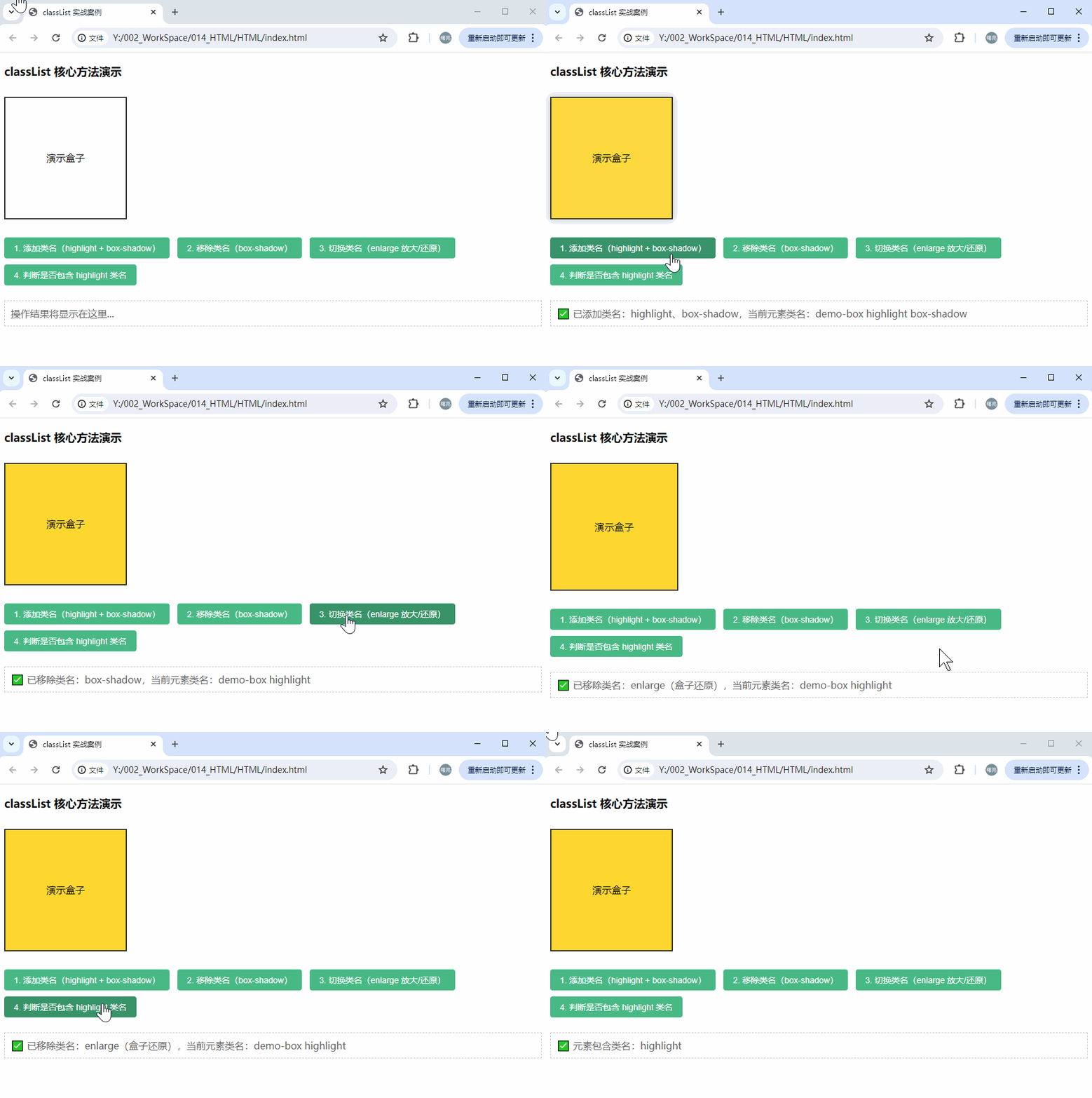
2、执行结果

有“AI”的1024 = 2048,欢迎大家加入2048 AI社区
更多推荐
 7
7 0
0- 0


 已为社区贡献357条内容

所有评论(0)